



はじめに
Python でテキストデータを扱う際、文字の大文字小文字に関係なく、文字列が同じ情報を含んでいるかどうかを判断するために、文字列の比較が必要になることがよくあります。これを大文字小文字を区別しない文字列比較と呼びます。
この実験では、大文字小文字の違いを無視して 2 つの Python 文字列が等しいかどうかを比較するさまざまな方法を学びます。基本的な文字列比較、大文字小文字を区別しない比較のさまざまな手法を探索し、これらのスキルを実際のシナリオでどのように適用するかを見ていきます。
この実験の終わりまでに、Python プログラムで大文字小文字を区別しない文字列比較を自信を持って実装できるようになり、テキストデータを効果的に処理する能力が向上します。
Python での文字列比較の理解
まずは、Python での文字列比較がどのように機能するか、および大文字小文字の区別が重要な理由を探ってみましょう。
デフォルトの文字列比較
Python で等価演算子 (==) を使って 2 つの文字列を比較する場合、デフォルトでは大文字小文字が区別されます。つまり、"Hello" と "hello" は異なる文字列とみなされます。
これをテストするために新しい Python ファイルを作成しましょう。
- WebIDE で、左側のサイドバーにある「Explorer」アイコンをクリックします。
- 「New File」ボタンをクリックし、
string_comparison.pyという名前を付けます。 - 以下のコードをファイルに追加します。
## Basic string comparison
string1 = "Python"
string2 = "python"

## Compare the strings
result = string1 == string2

## Print the result
print(f"Is '{string1}' equal to '{string2}'? {result}")
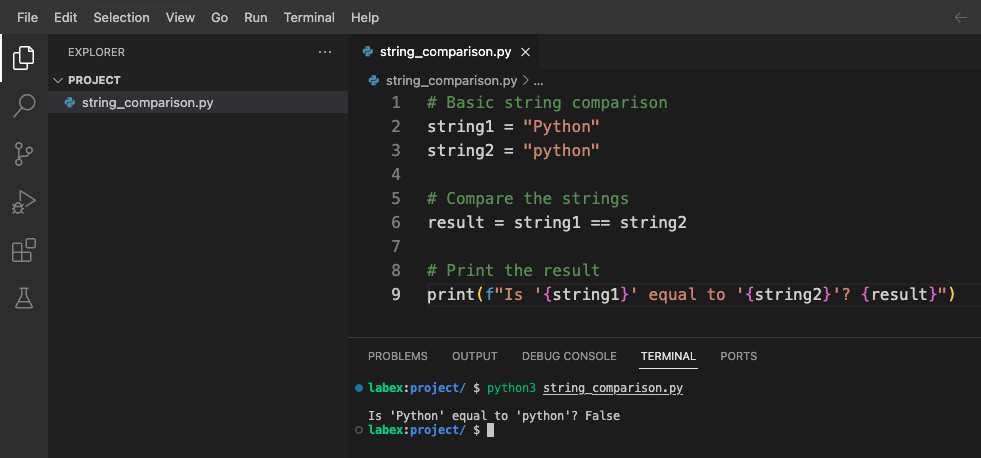
Ctrl + Sを押すか、メニューから「File」>「Save」を選択してファイルを保存します。- ターミナルを開き(Terminal > New Terminal)、以下を入力してスクリプトを実行します。
python3 string_comparison.py
以下の出力が表示されるはずです。
Is 'Python' equal to 'python'? False
この出力は False を示しています。なぜなら、比較は大文字小文字を区別するため、大文字の 'P' を持つ "Python" は小文字の 'p' を持つ "python" と同じではないからです。
大文字小文字を区別しない比較が有用な理由
大文字小文字を区別しない比較は、多くのシナリオで有用です。
- ユーザー入力の検証(ユーザーは任意の大文字小文字で入力する可能性があります)
- テキスト検索(大文字小文字に関係なく単語を検索する)
- 自然言語の処理(大文字小文字の使用が異なる場合があります)
- URL、メールアドレス、またはユーザー名の処理(大文字小文字を区別しない場合があります)
大文字小文字を区別しない比較が役立つ例を追加するために、スクリプトを修正しましょう。
## Add these examples to string_comparison.py

## Example: User searching for content
user_search = "Python"
article_title = "Getting Started with python Programming"

## Case-sensitive comparison (might miss relevant content)
found_sensitive = user_search in article_title
print(f"Case-sensitive search found match: {found_sensitive}")

## What if we want to find matches regardless of case?
## We'll explore solutions in the next steps
このコードを string_comparison.py ファイルに追加し、再度実行します。
python3 string_comparison.py
出力には以下が含まれるようになります。
Case-sensitive search found match: False
これは実際の問題を示しています。ユーザーが "Python" を検索しても、デフォルトの大文字小文字を区別する比較では、"python Programming" というタイトルのコンテンツは見つからないのです。
次のステップでは、この問題を解決するために、大文字小文字を区別しない比較を行う方法を学びます。
大文字小文字を区別しない文字列比較の方法
大文字小文字を区別しない比較が重要な理由を理解したところで、Python でこれを行うさまざまな方法を学んでみましょう。
方法 1: lower() または upper() を使用する
最も一般的なアプローチは、比較する前に両方の文字列を同じ大文字小文字に変換することです。この目的のために lower() または upper() メソッドを使用できます。
これらのメソッドをテストするために新しいファイルを作成しましょう。
- WebIDE で新しいファイルを作成し、
case_insensitive.pyと名付けます。 - 以下のコードを追加します。
## Case-insensitive comparison using lower()
string1 = "Python"
string2 = "python"

## Convert both strings to lowercase, then compare
result_lower = string1.lower() == string2.lower()
print(f"Using lower(): '{string1}' equals '{string2}'? {result_lower}")

## Convert both strings to uppercase, then compare
result_upper = string1.upper() == string2.upper()
print(f"Using upper(): '{string1}' equals '{string2}'? {result_upper}")
- ファイルを保存し、以下のコマンドで実行します。
python3 case_insensitive.py
以下の出力が表示されるはずです。
Using lower(): 'Python' equals 'python'? True
Using upper(): 'Python' equals 'python'? True
両方の方法で同じ結果が得られます。つまり、大文字小文字を無視すると、文字列が等しいことが確認されます。
方法 2: casefold() を使用する
casefold() メソッドは lower() に似ていますが、特殊な大文字小文字のマッピングルールを持つ特定の言語でより適切に動作する、より積極的な大文字小文字の折り畳みを提供します。
case_insensitive.py ファイルに以下のコードを追加します。
## Case-insensitive comparison using casefold()
german_string1 = "Straße"  ## German word for "street"
german_string2 = "STRASSE" ## Uppercase version (note: ß becomes SS when uppercased)

## Using lower()
result_german_lower = german_string1.lower() == german_string2.lower()
print(f"Using lower() with '{german_string1}' and '{german_string2}': {result_german_lower}")

## Using casefold()
result_german_casefold = german_string1.casefold() == german_string2.casefold()
print(f"Using casefold() with '{german_string1}' and '{german_string2}': {result_german_casefold}")
スクリプトを再度実行します。
python3 case_insensitive.py
以下の出力が表示されます。
Using lower() with 'Straße' and 'STRASSE': False
Using casefold() with 'Straße' and 'STRASSE': True
これは、casefold() が特定の言語で lower() よりも特殊文字のマッピングをうまく処理することを示しています。
方法 3: 正規表現を使用する
より高度なシナリオでは、re モジュールと IGNORECASE フラグを使用した正規表現を利用できます。
case_insensitive.py ファイルに以下のコードを追加します。
## Case-insensitive comparison using regular expressions
import re

text = "Python is a great programming language."
pattern1 = "python"

## Check if 'python' exists in the text (case-insensitive)
match = re.search(pattern1, text, re.IGNORECASE)
print(f"Found '{pattern1}' in text? {match is not None}")

## Case-insensitive equality check with regex
def regex_equal_ignore_case(str1, str2):
    return bool(re.match(f"^{re.escape(str1)}$", str2, re.IGNORECASE))

## Test the function
result_regex = regex_equal_ignore_case("Python", "python")
print(f"Using regex: 'Python' equals 'python'? {result_regex}")
スクリプトを再度実行します。
python3 case_insensitive.py
以下の出力が表示されるはずです。
Found 'python' in text? True
Using regex: 'Python' equals 'python'? True
方法の比較
学んだ方法をまとめてみましょう。
lower()/upper(): シンプルで一般的に使用され、ほとんどの英語のテキストに適しています。casefold(): 特殊な大文字小文字のマッピングルールを持つ国際的なテキストに適しています。re.IGNORECASEを使用した正規表現:パターンマッチングや複雑なケースに強力です。
このまとめを参考として case_insensitive.py ファイルにコメントとして追加しましょう。
## Summary of case-insensitive comparison methods:
## 1. string1.lower() == string2.lower() - Simple, works for basic cases
## 2. string1.casefold() == string2.casefold() - Better for international text
## 3. re.match(pattern, string, re.IGNORECASE) - For pattern matching
さまざまな方法を理解したところで、次のステップでこれらの技術を実際のシナリオに適用してみましょう。
大文字小文字を区別しない検索関数の作成
大文字小文字を区別しない比較のさまざまな方法を学んだところで、大文字小文字に関係なくテキスト内の単語を見つける実用的な検索関数を作成しましょう。
検索関数の作成
- WebIDE で新しいファイルを作成し、
search_function.pyと名付けます。 - 以下のコードを追加して、シンプルな大文字小文字を区別しない検索関数を実装します。
def search_text(query, text):
    """
    Search for a query in text, ignoring case.
    Returns a list of all matching positions.
    """
    ## Convert both to lowercase for case-insensitive comparison
    query_lower = query.lower()
    text_lower = text.lower()

    found_positions = []
    position = 0

    ## Find all occurrences
    while position < len(text_lower):
        position = text_lower.find(query_lower, position)
        if position == -1:  ## No more matches
            break
        found_positions.append(position)
        position += 1  ## Move to the next character

    return found_positions

## Example text
sample_text = """
Python is a programming language that lets you work quickly and integrate systems effectively.
python is easy to learn, powerful, and versatile.
Many developers love PYTHON for its simplicity and readability.
"""

## Test search
search_query = "python"
results = search_text(search_query, sample_text)

## Display results
if results:
    print(f"Found '{search_query}' at {len(results)} positions: {results}")

    ## Show each match in context
    print("\nMatches in context:")
    for pos in results:
        ## Get some context around the match (10 characters before and after)
        start = max(0, pos - 10)
        end = min(len(sample_text), pos + len(search_query) + 10)
        context = sample_text[start:end]

        ## Highlight the match by showing the original case from the text
        match_original_case = sample_text[pos:pos+len(search_query)]
        print(f"...{context.replace(match_original_case, f'[{match_original_case}]')}...")
else:
    print(f"No matches found for '{search_query}'")
- ファイルを保存し、以下のコマンドで実行します。
python3 search_function.py
以下のような出力が表示されるはずです。
Found 'python' at 3 positions: [1, 67, 132]

Matches in context:
...[Python] is a pro...
...ctively.
[python] is easy ...
...ers love [PYTHON] for its ...
これは、関数が "Python"、"python"、"PYTHON" と書かれているかに関係なく、3 箇所で "Python" を見つけたことを示しています。また、関数は各マッチを元の文脈で表示し、元の大文字小文字を保持しています。
検索関数の拡張
関数を拡張して、単語のカウントと完全一致のオプションを追加し、より便利なものにしましょう。
search_function.py ファイルに以下のコードを追加します。
def count_word_occurrences(word, text, whole_word=False):
    """
    Count occurrences of a word in text, ignoring case.
    If whole_word=True, only count complete word matches.
    """
    word_lower = word.lower()
    text_lower = text.lower()

    if whole_word:
        ## Use word boundaries to match whole words only
        import re
        pattern = r'\b' + re.escape(word_lower) + r'\b'
        matches = re.findall(pattern, text_lower)
        return len(matches)
    else:
        ## Simple substring counting
        return text_lower.count(word_lower)

## Test the enhanced function
test_text = """
Python is great. I love python programming.
This python-script demonstrates case-insensitive searching.
The word "python" appears multiple times as a whole word and as part of other words.
"""

## Count all occurrences (including within words)
count_all = count_word_occurrences("python", test_text)
print(f"Total occurrences of 'python' (including within words): {count_all}")

## Count only whole word occurrences
count_whole = count_word_occurrences("python", test_text, whole_word=True)
print(f"Whole word occurrences of 'python': {count_whole}")
スクリプトを再度実行します。
python3 search_function.py
以下の追加の出力が表示されるはずです。
Total occurrences of 'python' (including within words): 4
Whole word occurrences of 'python': 3
これは、"python" が合計 4 回出現するが、完全な単語としては 3 回しか出現しないことを示しています(1 回は "python-script" の中にあり、完全な単語とは一致しません)。
さまざまなシナリオのテスト
関数がさまざまなタイプのテキストをどのように処理するかを示すために、もう 1 つのテストを追加しましょう。
## Add more test cases
test_cases = [
    ("Python programming is fun", "python", "Simple sentence with one occurrence"),
    ("Python, python, PYTHON!", "python", "Multiple occurrences with different cases"),
    ("No matches here", "python", "No matches"),
    ("Python-script and PythonProgram contain python", "python", "Mixed word boundaries")
]

print("\nTesting different scenarios:")
for text, search_word, description in test_cases:
    whole_matches = count_word_occurrences(search_word, text, whole_word=True)
    all_matches = count_word_occurrences(search_word, text)

    print(f"\nScenario: {description}")
    print(f"Text: '{text}'")
    print(f"  - Whole word matches: {whole_matches}")
    print(f"  - All matches: {all_matches}")
このコードを追加し、スクリプトを再度実行します。
python3 search_function.py
関数がさまざまなテキストシナリオをどのように処理するかの詳細な内訳が表示されます。
Testing different scenarios:

Scenario: Simple sentence with one occurrence
Text: 'Python programming is fun'
  - Whole word matches: 1
  - All matches: 1

Scenario: Multiple occurrences with different cases
Text: 'Python, python, PYTHON!'
  - Whole word matches: 3
  - All matches: 3

Scenario: No matches
Text: 'No matches here'
  - Whole word matches: 0
  - All matches: 0

Scenario: Mixed word boundaries
Text: 'Python-script and PythonProgram contain python'
  - Whole word matches: 1
  - All matches: 3
これは、大文字小文字を区別しない比較が実世界の検索関数でどのように使用できるか、およびさまざまな検索要件を処理するオプションを持つことを示しています。
次のステップでは、これらの技術を適用して、実用的なユーザー入力検証アプリケーションを作成します。
ユーザー入力検証アプリケーションの作成
この最後のステップでは、大文字小文字を区別しない文字列比較をユーザー入力検証に使用する実用的なアプリケーションを作成します。これは多くの実世界のアプリケーションで一般的な要件です。
シンプルなコマンドバリデータ
- WebIDE で新しいファイルを作成し、
command_validator.pyと名付けます。 - 以下のコードを追加して、シンプルなコマンドバリデータを実装します。
def validate_command(user_input, valid_commands):
    """
    Validate if the user input matches any of the valid commands,
    ignoring case differences.

    Returns the standardized command if valid, None otherwise.
    """
    ## Convert user input to lowercase for comparison
    user_input_lower = user_input.strip().lower()

    for cmd in valid_commands:
        if user_input_lower == cmd.lower():
            ## Return the standard casing of the command
            return cmd

    ## No match found
    return None

## List of valid commands with standard casing
VALID_COMMANDS = [
    "Help",
    "Exit",
    "List",
    "Save",
    "Delete"
]

## Test with various inputs
test_inputs = [
    "help",      ## lowercase
    "EXIT",      ## uppercase
    "List",      ## correct case
    "  save  ",  ## with extra spaces
    "delete",    ## lowercase
    "unknown",   ## invalid command
    "hlep"       ## typo
]

print("Command Validator Test:")
print("=" * 30)
print(f"Valid commands: {VALID_COMMANDS}")
print("=" * 30)

for cmd in test_inputs:
    result = validate_command(cmd, VALID_COMMANDS)
    if result:
        print(f"'{cmd}' is valid ✓ (standardized to '{result}')")
    else:
        print(f"'{cmd}' is invalid ✗")
- ファイルを保存し、以下のコマンドで実行します。
python3 command_validator.py
以下のような出力が表示されるはずです。
Command Validator Test:
==============================
Valid commands: ['Help', 'Exit', 'List', 'Save', 'Delete']
==============================
'help' is valid ✓ (standardized to 'Help')
'EXIT' is valid ✓ (standardized to 'Exit')
'List' is valid ✓ (standardized to 'List')
'  save  ' is valid ✓ (standardized to 'Save')
'delete' is valid ✓ (standardized to 'Delete')
'unknown' is invalid ✗
'hlep' is invalid ✗
これは、大文字小文字を区別しない比較を使用してユーザーコマンドを検証し、標準化された出力形式を維持できることを示しています。
対話型コマンドプロセッサ
次に、ユーザーが直接コマンドを入力できる対話型バージョンを作成しましょう。
interactive_commands.pyという名前の新しいファイルを作成します。- 以下のコードを追加します。
## Interactive command processor using case-insensitive validation

## Valid commands with descriptions
COMMANDS = {
    "Help": "Display available commands",
    "List": "List all items",
    "Add": "Add a new item",
    "Delete": "Delete an item",
    "Exit": "Exit the program"
}

def process_command(command):
    """Process a command entered by the user."""
    ## Normalize command (remove extra spaces, convert to standard case)
    normalized = None

    ## Check if command matches any valid command (case-insensitive)
    for valid_cmd in COMMANDS:
        if command.strip().lower() == valid_cmd.lower():
            normalized = valid_cmd
            break

    ## Process the command
    if normalized == "Help":
        print("\nAvailable commands:")
        for cmd, desc in COMMANDS.items():
            print(f"  {cmd} - {desc}")

    elif normalized == "List":
        print("\nListing all items:")
        print("  (This is where your actual items would be displayed)")

    elif normalized == "Add":
        print("\nAdding a new item:")
        print("  (In a real application, you would prompt for item details here)")

    elif normalized == "Delete":
        print("\nDeleting an item:")
        print("  (In a real application, you would prompt for which item to delete)")

    elif normalized == "Exit":
        print("\nExiting program. Goodbye!")
        return False

    else:
        print(f"\nUnknown command: '{command}'")
        print("Type 'help' to see available commands")

    return True

def main():
    """Main program loop."""
    print("=== Simple Command Processor ===")
    print("Type 'help' to see available commands.")
    print("Commands are case-insensitive, so 'help', 'HELP', and 'Help' all work the same.")

    running = True
    while running:
        user_input = input("\nEnter a command: ")
        running = process_command(user_input)

if __name__ == "__main__":
    main()
- ファイルを保存して実行します。
python3 interactive_commands.py
以下のような対話型のプロンプトが表示されます。
=== Simple Command Processor ===
Type 'help' to see available commands.
Commands are case-insensitive, so 'help', 'HELP', and 'Help' all work the same.

Enter a command:
- さまざまな大文字小文字のコマンドを入力してみましょう。
help(小文字)LIST(大文字)Add(大文字小文字混在)exit(プログラムを終了する)
プログラムは、使用する大文字小文字に関係なく各コマンドを正しく処理します。
入力検証技術のまとめ
大文字小文字を区別しない入力検証について学んださまざまな技術をまとめるために、もう 1 つのファイルを作成しましょう。
validation_techniques.pyという名前のファイルを作成します。- 以下のコードを追加します。
"""
Summary of Case-Insensitive Input Validation Techniques
"""

## Example data
valid_options = ["Yes", "No", "Maybe"]
user_responses = ["yes", "NO", "mAyBe", "unknown"]

print("Case-Insensitive Input Validation Techniques\n")

## Technique 1: Simple lowercase comparison
print("Technique 1: Simple lowercase comparison")
for response in user_responses:
    is_valid = response.lower() in [opt.lower() for opt in valid_options]
    print(f"  Is '{response}' valid? {is_valid}")

## Technique 2: Using a validation function
print("\nTechnique 2: Using a validation function")
def validate_input(user_input, valid_options):
    return any(user_input.lower() == opt.lower() for opt in valid_options)

for response in user_responses:
    is_valid = validate_input(response, valid_options)
    print(f"  Is '{response}' valid? {is_valid}")

## Technique 3: Mapping to standardized values
print("\nTechnique 3: Mapping to standardized values")
def standardize_input(user_input, valid_options):
    for opt in valid_options:
        if user_input.lower() == opt.lower():
            return opt
    return None

for response in user_responses:
    standard_form = standardize_input(response, valid_options)
    if standard_form:
        print(f"  '{response}' is valid and maps to '{standard_form}'")
    else:
        print(f"  '{response}' is invalid")

## Technique 4: Using dictionaries for case-insensitive lookup
print("\nTechnique 4: Using dictionaries for case-insensitive lookup")
## Create a case-insensitive lookup dictionary
lookup_dict = {opt.lower(): opt for opt in valid_options}

for response in user_responses:
    if response.lower() in lookup_dict:
        standard_form = lookup_dict[response.lower()]
        print(f"  '{response}' is valid and maps to '{standard_form}'")
    else:
        print(f"  '{response}' is invalid")
- ファイルを保存して実行します。
python3 validation_techniques.py
さまざまな検証技術の比較が表示されます。
Case-Insensitive Input Validation Techniques

Technique 1: Simple lowercase comparison
  Is 'yes' valid? True
  Is 'NO' valid? True
  Is 'mAyBe' valid? True
  Is 'unknown' valid? False

Technique 2: Using a validation function
  Is 'yes' valid? True
  Is 'NO' valid? True
  Is 'mAyBe' valid? True
  Is 'unknown' valid? False

Technique 3: Mapping to standardized values
  'yes' is valid and maps to 'Yes'
  'NO' is valid and maps to 'No'
  'mAyBe' is valid and maps to 'Maybe'
  'unknown' is invalid

Technique 4: Using dictionaries for case-insensitive lookup
  'yes' is valid and maps to 'Yes'
  'NO' is valid and maps to 'No'
  'mAyBe' is valid and maps to 'Maybe'
  'unknown' is invalid
このまとめは、大文字小文字を区別しない検証を実装するさまざまなアプローチを示しており、特定のニーズに最適なものを選択するオプションを提供します。
このステップを完了することで、実用的なユーザー入力検証シナリオで大文字小文字を区別しない文字列比較を適用する方法を学びました。
まとめ
Python での大文字小文字を区別しない文字列比較に関するこの実験を完了したことをお祝いします。ここで学んだことは以下の通りです。
Python での文字列比較の基本と、大文字小文字の区別が重要な理由
大文字小文字を区別しない文字列比較を行う複数の方法:
lower()とupper()メソッドの使用- 国際的なテキストに対する
casefold()メソッドの使用 re.IGNORECASEを使用した正規表現の使用
大文字小文字を区別しない比較を用いた実用的なアプリケーションの構築方法:
- 大文字小文字に関係なくテキストを見つける検索関数の作成
- 任意の大文字小文字で動作するユーザー入力検証の実装
- 大文字小文字を区別しない方法でコマンドを処理する
これらのスキルは、ユーザーインターフェースの構築からテキストデータの処理まで、多くの実世界のプログラミングタスクで価値があります。大文字小文字を区別しない文字列比較は、ユーザー体験を向上させ、アプリケーションをより堅牢で使いやすくする基本的な技術です。
Python の学習を続ける際には、これらの技術を他の文字列処理方法と組み合わせることで、ますます複雑なテキスト処理要件を処理できることを忘れないでください。


