はじめに
この実験(Lab)では、GitHub Actions Secrets の使用方法を学びます。シークレットとは、Organization、リポジトリ、またはリポジトリ環境で作成する暗号化された環境変数です。作成したシークレットは、GitHub Actions のワークフロー内で使用できます。
これは、API キー、アクセストークン、パスワードなどの機密情報を安全に保つために不可欠です。GitHub Actions は、シークレットがログに公開されないように、ログから自動的にシークレットを削除(redact)します。
この実験は、以前の実験で作成したリポジトリを基盤とします。github-actions-demo リポジトリにシークレットを追加し、それを使用するワークフローを作成します。
以下の手順を実行します。
- 既存の GitHub リポジトリにリポジトリシークレットを追加します。
- リポジトリをクローンし、シークレットを参照するワークフローファイルを作成します。
- シークレットを使用するためのステップを追加します。
- ワークフローを GitHub にプッシュします。
- 実行ログでシークレットがマスクされていることを確認します。
GitHub 設定で MY_SECRET という名前のリポジトリシークレットを作成する
このステップでは、既存の github-actions-demo リポジトリにシークレットを追加し、そのリポジトリを LabEx 環境にクローンします。
リポジトリシークレットの追加
- Web ブラウザを開き、GitHub 上の
github-actions-demoリポジトリに移動します:https://github.com/your-username/github-actions-demo - Settings タブをクリックします。
- 左側のサイドバーで、Security セクションまでスクロールダウンし、Secrets and variables をクリックし、次に Actions を選択します。
- 緑色の New repository secret ボタンをクリックします。
- 以下の詳細を入力します:
- Name:
MY_SECRET - Secret:
SuperSecretValue123
- Name:
- Add secret をクリックします。
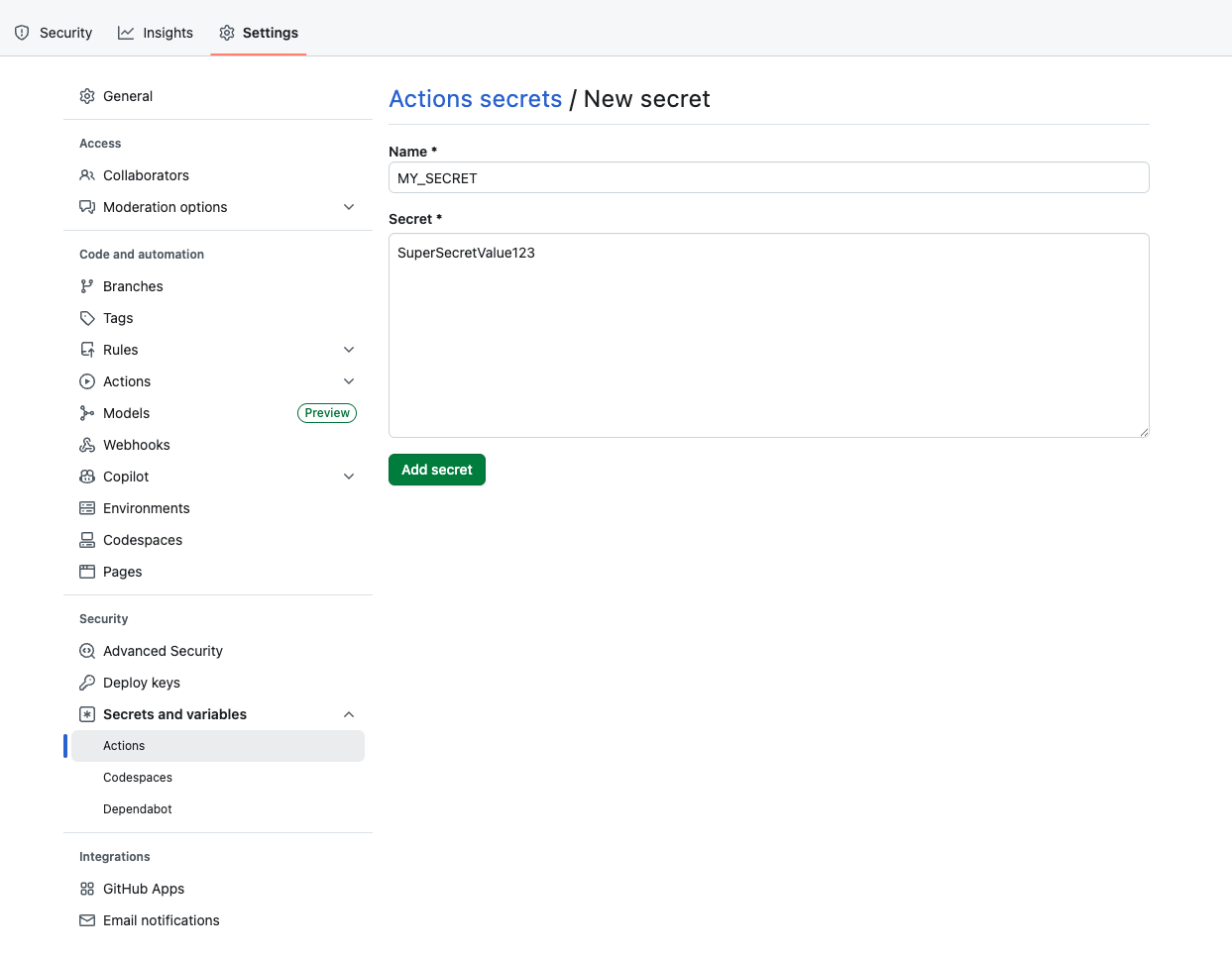
これで、「Repository secrets」の下に MY_SECRET がリストされているはずです。
リポジトリのクローン
次に、LabEx 環境に戻り、リポジトリをクローンします。
github-actions-demoの GitHub リポジトリページで、緑色の Code ボタンをクリックします。- HTTPS タブが選択されていることを確認し、URL をコピーします。URL は
https://github.com/your-username/github-actions-demo.gitのような形式になります。 - LabEx 環境でターミナルを開きます。デフォルトのパスは
~/projectです。 git cloneコマンドを使用してリポジトリをダウンロードします。your-usernameは実際の GitHub ユーザー名に置き換えてください。
cd ~/project
git clone https://github.com/your-username/github-actions-demo.git
出力例:
Cloning into 'github-actions-demo'...
remote: Enumerating objects: X, done.
remote: Counting objects: 100% (X/X), done.
remote: Total X (delta 0), reused 0 (delta 0), pack-reused 0
Receiving objects: 100% (X/X), done.
- クローンしたリポジトリ内に移動します:
cd ~/project/github-actions-demo
ワークフローで ${{ secrets.MY_SECRET }} を使用してシークレットを参照する
このステップでは、作成したシークレットを参照するワークフローファイルを作成します。
- リポジトリディレクトリにいることを確認します:
cd ~/project/github-actions-demo
.github/workflowsディレクトリ内にsecrets-demo.ymlという名前の新しいファイルを作成します:
touch .github/workflows/secrets-demo.yml
- WebIDE で
.github/workflows/secrets-demo.ymlを開き、以下の内容を追加します。これは、pushイベントでトリガーされる基本的なワークフローを定義します。
name: Secrets Demo
on: [push]

jobs:
  use-secret:
    runs-on: ubuntu-latest
    steps:
      - name: Checkout code
        uses: actions/checkout@v4
これでジョブの設定が完了しました。次のステップで、シークレットを使用するためのロジックを追加します。
安全にシークレット値を echo するステップを追加する
このステップでは、ワークフローを変更してシークレットにアクセスします。GitHub Actions では、${{ secrets.SECRET_NAME }} 構文を使用してシークレットにアクセスできます。
ワークフローの変更
.github/workflows/secrets-demo.yml を開き、steps リストに次のステップを追加します。インデントが正しいことを確認してください。
- name: Print Secret
  env:
    MY_SECRET_VAL: ${{ secrets.MY_SECRET }}
  run: |
    echo "Printing secret directly (masked): ${{ secrets.MY_SECRET }}"
    echo "Printing secret from env (masked): $MY_SECRET_VAL"
完全なファイル .github/workflows/secrets-demo.yml は次のようになります。
name: Secrets Demo
on: [push]

jobs:
  use-secret:
    runs-on: ubuntu-latest
    steps:
      - name: Checkout code
        uses: actions/checkout@v4

      - name: Print Secret
        env:
          MY_SECRET_VAL: ${{ secrets.MY_SECRET }}
        run: |
          echo "Printing secret directly (masked): ${{ secrets.MY_SECRET }}"
          echo "Printing secret from env (masked): $MY_SECRET_VAL"
キーコンセプト
ワークフローでシークレットを使用すると、GitHub はログ内で自動的にそれをマスクします。echo で出力しようとしても、実際の値の代わりにアスタリスク (***) が表示されます。
シークレット参照を含むワークフローをコミットしてプッシュする
このステップでは、変更をコミットし、GitHub にプッシュします。これにより、GitHub Action がトリガーされます。
- リポジトリディレクトリにいることを確認します。
cd ~/project/github-actions-demo
- ワークフローファイルをステージングします。
git add .github/workflows/secrets-demo.yml
- 説明的なメッセージを付けて変更をコミットします。
git commit -m "Add workflow to test secrets"
- 変更を GitHub 上のリモートリポジトリにプッシュします。
git push
認証に関する注意:
git pushを実行すると、WebIDE が自動的に認証を求めます。以下の詳細な手順に従ってください。
- "The extension 'GitHub' wants to sign in using GitHub." というメッセージが表示されたポップアップが表示されます。「Allow」をクリックします。
- 新しい通知が表示されます。「Copy&Continue to GitHub」をクリックし、次のプロンプトで「Open」をクリックします。
- 開いたブラウザウィンドウで GitHub アカウントにログインし、コピーされた認証コードを入力します。認証を確認した後、ページは自動的に閉じます。
- 数秒待つと、ターミナルでプッシュ操作が正常に完了したことが確認できます。
プライバシーに関する注意: WebIDE は認証目的で GitHub アカウントへのフルアクセスを要求します。プライバシーに関する懸念は不要です。現在の実験(Lab)が完了すると、LabEx VM は直ちに破棄され、資格情報や認証情報は保持されません。
ログを確認し、シークレットが漏洩なく使用されていることを確認する
コードをプッシュした後、ワークフローは GitHub 上で自動的にトリガーされます。ワークフローの実行ログを確認することで、シークレットが安全に使用されていることを検証できます。
- ウェブブラウザで GitHub 上のリポジトリにアクセスします:
https://github.com/your-username/github-actions-demo - リポジトリページの最上部にある Actions タブをクリックします。
- ワークフローの実行が一覧表示されているはずで、おそらく「Add workflow to test secrets」または「Secrets Demo」という名前です。
注記: コードをプッシュすると、リポジトリ内に複数のワークフローファイルがある場合、複数の Actions がトリガーされることがあります。左側のサイドバーでワークフロー名を確認するか、右側のワークフロー実行リストを使用して、正しいワークフロー実行を特定してください。
- ワークフロー実行のタイトルをクリックし、次に use-secret ジョブをクリックします。
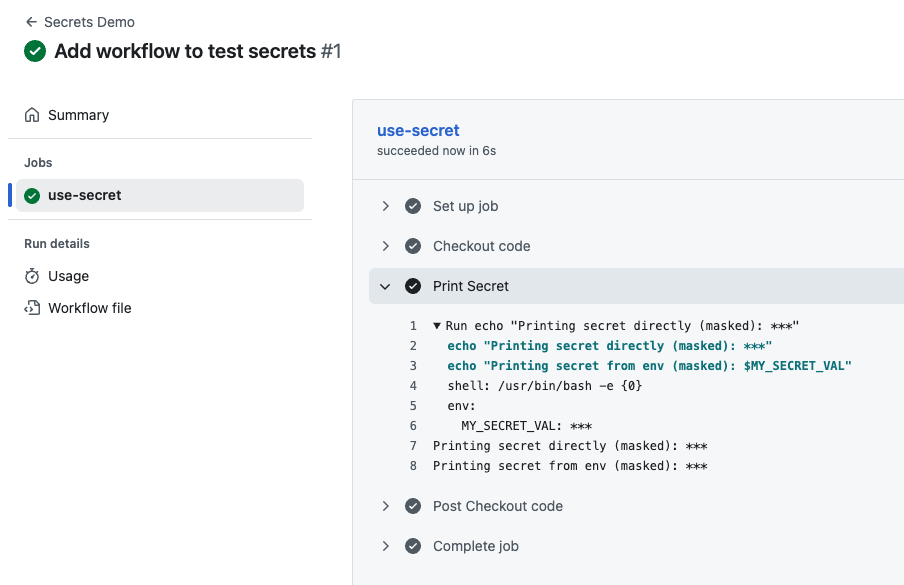
- Print Secret ステップを展開して、出力を確認します。
以下のような表示が見えるはずです。
Printing secret directly (masked): ***
Printing secret from env (masked): ***
ワークフローがシークレット値を印刷しようとしたにもかかわらず、GitHub Actions がログ内で自動的に *** でマスクしていることに注目してください。これは重要なセキュリティ機能です。意図的に印刷しようとした場合でも、機密情報がログに誤って公開されるのを防ぎます。これにより、シークレットが安全に設定され、実際の値を公開することなくワークフロー内で使用されていることが確認できます。
まとめ
この実験(Lab)では、以下の方法を習得しました。
- 機密データを保存するために、GitHub 設定内でリポジトリシークレットを作成する方法。
- GitHub Actions のワークフローファイルを作成する方法。
${{ secrets.MY_SECRET }}構文を使用してシークレットを参照する方法。- ジョブステップ内でシークレットを環境変数として渡す方法。
- ビルドログ内で GitHub がシークレット値を自動的にマスクすることを検証する方法。
この手順により、デプロイキーや API トークンなどの機密データが CI/CD プロセス全体を通じて安全に保たれることが保証されます。