
はじめに
この実験では、JavaScript を使用して文字列が英数字のみで構成されているかどうかをチェックする方法を学びます。英数字には、文字 (A - Z、a - z) と数字 (0 - 9) が含まれます。これは、フォームの検証、データ処理、およびその他多くのプログラミングシナリオで一般的なタスクです。
正規表現を使用して文字列が英数字であるかどうかを判断する JavaScript 関数を作成します。この実験の終わりまでに、このチェックの実装方法と、JavaScript で文字列パターンを検証するために正規表現をどのように使用できるかを理解するようになります。
英数字の理解
英数字は、英語のアルファベットの 26 文字(大文字 A - Z と小文字 a - z)と 10 個の数字(0 - 9)で構成されています。文字列が英数字であるかどうかをチェックするときは、その文字列がこれらの文字のみを含み、他の文字を含まないことを検証しています。
JavaScript では、正規表現を使用して英数字をチェックすることができます。正規表現(regex)は、文字列内の文字の組み合わせをマッチさせるために使用されるパターンです。
まず、コードエディタを開きましょう。WebIDE では、左側のファイルエクスプローラーに移動し、新しい JavaScript ファイルを作成します。
- ファイルエクスプローラーパネル内で右クリックします。
- 「New File」を選択します。
- ファイル名を
alphanumeric.jsとします。
ファイルを作成すると、自動的にエディタで開くはずです。開かない場合は、ファイルエクスプローラーで alphanumeric.js をクリックして開きます。
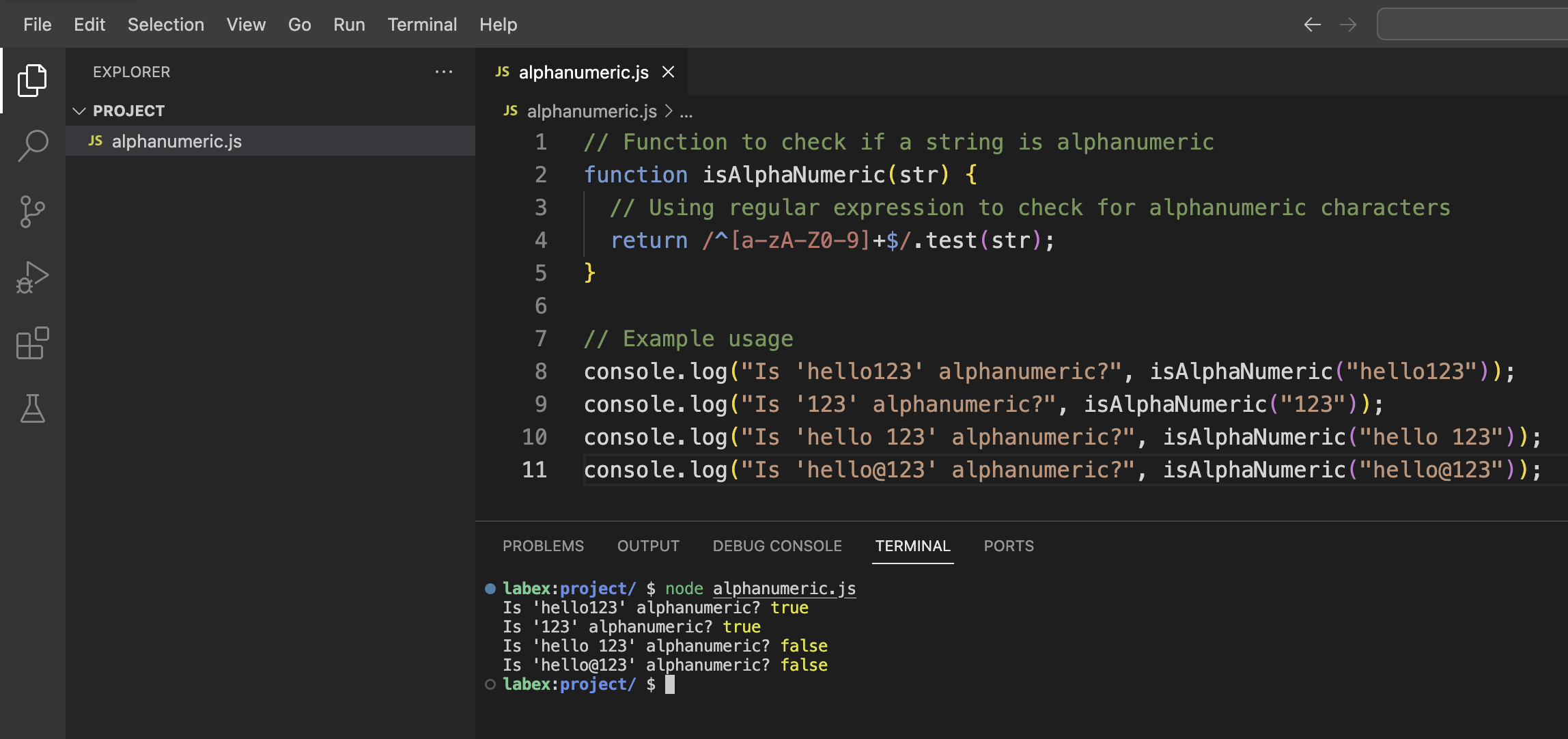
次に、以下のコードを入力しましょう。
// Function to check if a string is alphanumeric
function isAlphaNumeric(str) {
  // Using regular expression to check for alphanumeric characters
  return /^[a-zA-Z0-9]+$/.test(str);
}

// Example usage
console.log("Is 'hello123' alphanumeric?", isAlphaNumeric("hello123"));
console.log("Is '123' alphanumeric?", isAlphaNumeric("123"));
console.log("Is 'hello 123' alphanumeric?", isAlphaNumeric("hello 123"));
console.log("Is 'hello@123' alphanumeric?", isAlphaNumeric("hello@123"));
Ctrl + S を押すか、メニューから「File」>「Save」を選択してファイルを保存します。
次に、この JavaScript ファイルを実行して出力を確認しましょう。メニューから「Terminal」>「New Terminal」を選択するか、Ctrl + ` を押して WebIDE のターミナルを開きます。
ターミナルで以下のコマンドを実行します。
node alphanumeric.js
以下の出力が表示されるはずです。
Is 'hello123' alphanumeric? true
Is '123' alphanumeric? true
Is 'hello 123' alphanumeric? false
Is 'hello@123' alphanumeric? false
この出力から、hello123 と 123 が英数字の文字列として正しく識別され、hello 123(スペースを含む)と hello@123(特殊文字 @ を含む)は英数字ではないことがわかります。
正規表現の理解
では、関数で使用した正規表現を見てみましょう。
/^[a-zA-Z0-9]+$/;
このパターンは複雑に見えるかもしれませんが、いくつかの部分に分解することができます。
/- スラッシュは正規表現パターンの始まりと終わりを示します。^- この記号は「文字列の先頭」を意味します。[a-zA-Z0-9]- これは文字クラスで、以下のものにマッチします。a - z:'a' から 'z' までの任意の小文字A - Z:'A' から 'Z' までの任意の大文字0 - 9:'0' から '9' までの任意の数字
+- この数量詞は、直前の要素が「1 つ以上」であることを意味します。$- この記号は「文字列の末尾」を意味します。
したがって、この完全なパターンは、文字列が先頭から末尾まで英数字のみを含んでいるかどうかをチェックします。
関数をもっと柔軟にするために修正しましょう。再度 alphanumeric.js ファイルを開き、以下のコードで更新します。
// Function to check if a string is alphanumeric
function isAlphaNumeric(str) {
  return /^[a-zA-Z0-9]+$/.test(str);
}

// Alternative function using case-insensitive flag
function isAlphaNumericAlt(str) {
  return /^[a-z0-9]+$/i.test(str);
}

// Example usage
console.log("Using first function:");
console.log("Is 'Hello123' alphanumeric?", isAlphaNumeric("Hello123"));
console.log("Is 'HELLO123' alphanumeric?", isAlphaNumeric("HELLO123"));

console.log("\nUsing alternative function with case-insensitive flag:");
console.log("Is 'Hello123' alphanumeric?", isAlphaNumericAlt("Hello123"));
console.log("Is 'HELLO123' alphanumeric?", isAlphaNumericAlt("HELLO123"));
ファイルを保存し、再度以下のコマンドで実行します。
node alphanumeric.js
以下の出力が表示されるはずです。
Using first function:
Is 'Hello123' alphanumeric? true
Is 'HELLO123' alphanumeric? true

Using alternative function with case-insensitive flag:
Is 'Hello123' alphanumeric? true
Is 'HELLO123' alphanumeric? true
代替関数では、正規表現の末尾に i フラグを使用しています。これにより、パターンマッチングが大文字小文字を区別しなくなります。つまり、文字クラスに a - z のみを含めれば、自動的に大文字もマッチするようになります。
シンプルな検証ツールの作成
英数字のチェック関数を理解したので、シンプルな対話型の検証ツールを作成しましょう。ターミナルからユーザー入力を取得するために、Node.js の組み込み readline モジュールを使用します。
同じディレクトリに validator.js という名前の新しいファイルを作成します。
- ファイルエクスプローラーパネル内で右クリックします。
- 「New File」を選択します。
- ファイル名を
validator.jsとします。
ファイルに以下のコードを追加します。
const readline = require("readline");

// Create a readline interface for user input
const rl = readline.createInterface({
  input: process.stdin,
  output: process.stdout
});

// Function to check if a string is alphanumeric
function isAlphaNumeric(str) {
  return /^[a-zA-Z0-9]+$/.test(str);
}

// Function to check the input
function checkInput(input) {
  if (isAlphaNumeric(input)) {
    console.log(`"${input}" is alphanumeric.`);
  } else {
    console.log(`"${input}" is NOT alphanumeric.`);
    console.log(
      "Alphanumeric strings contain only letters (A-Z, a-z) and numbers (0-9)."
    );
  }

  // Ask if the user wants to check another string
  rl.question("\nDo you want to check another string? (yes/no): ", (answer) => {
    if (answer.toLowerCase() === "yes" || answer.toLowerCase() === "y") {
      askForInput();
    } else {
      console.log("Thank you for using the alphanumeric validator!");
      rl.close();
    }
  });
}

// Function to ask for input
function askForInput() {
  rl.question("Enter a string to check if it is alphanumeric: ", (input) => {
    checkInput(input);
  });
}

// Welcome message
console.log("=== Alphanumeric String Validator ===");
console.log(
  "This tool checks if a string contains only alphanumeric characters (A-Z, a-z, 0-9).\n"
);

// Start the program
askForInput();
ファイルを保存し、以下のコマンドで実行します。
node validator.js
歓迎メッセージと、文字列を入力するように求めるプロンプトが表示されます。次のような様々な文字列を入力してみてください。
hello123(英数字)Hello World(スペースがあるため英数字ではない)hello@123(@ 記号があるため英数字ではない)
各入力に対して、プログラムはそれが英数字かどうかを教えてくれ、別の文字列をチェックするかどうかを尋ねます。続けるには yes または y を入力し、それ以外の応答を入力するとプログラムが終了します。
この対話型ツールは、英数字の検証関数が実用的なアプリケーションでどのように使用できるかを示しています。
英数字文字列をチェックする他の方法を探索する
正規表現を使用する以外にも、文字列が英数字であるかどうかをチェックする方法は他にもあります。alternative-methods.js という名前の新しいファイルを作成して、それらのいくつかを探索しましょう。
- ファイルエクスプローラーパネル内で右クリックします。
- 「New File」を選択します。
- ファイル名を
alternative-methods.jsとします。
ファイルに以下のコードを追加します。
// Method 1: Using regular expression (our original method)
function isAlphaNumericRegex(str) {
  return /^[a-zA-Z0-9]+$/.test(str);
}

// Method 2: Using Array.every() and checking each character
function isAlphaNumericEvery(str) {
  // If string is empty, return false
  if (str.length === 0) return false;

  return [...str].every((char) => {
    const code = char.charCodeAt(0);
    // Check if character is a digit (0-9)
    const isDigit = code >= 48 && code <= 57;
    // Check if character is a lowercase letter (a-z)
    const isLowercase = code >= 97 && code <= 122;
    // Check if character is an uppercase letter (A-Z)
    const isUppercase = code >= 65 && code <= 90;

    return isDigit || isLowercase || isUppercase;
  });
}

// Method 3: Using a combination of match() and length
function isAlphaNumericMatch(str) {
  // If string is empty, return false
  if (str.length === 0) return false;

  // Remove all alphanumeric characters and check if anything remains
  const nonAlphaNumeric = str.match(/[^a-zA-Z0-9]/g);
  return nonAlphaNumeric === null;
}

// Test strings
const testStrings = [
  "hello123",
  "HELLO123",
  "hello 123",
  "hello@123",
  "",
  "0123456789",
  "abcdefghijklmnopqrstuvwxyz"
];

// Test each method with each string
console.log("=== Testing Different Methods ===");
console.log("String\t\t\tRegex\tEvery\tMatch");
console.log("---------------------------------------------");

testStrings.forEach((str) => {
  const displayStr = str.length > 10 ? str.substring(0, 10) + "..." : str;
  const paddedStr = displayStr.padEnd(16, " ");

  const regexResult = isAlphaNumericRegex(str);
  const everyResult = isAlphaNumericEvery(str);
  const matchResult = isAlphaNumericMatch(str);

  console.log(`"${paddedStr}"\t${regexResult}\t${everyResult}\t${matchResult}`);
});

console.log("\nPerformance Comparison:");
const iterations = 1000000;
const testString = "hello123ABCxyz45";

console.time("Regex Method");
for (let i = 0; i < iterations; i++) {
  isAlphaNumericRegex(testString);
}
console.timeEnd("Regex Method");

console.time("Every Method");
for (let i = 0; i < iterations; i++) {
  isAlphaNumericEvery(testString);
}
console.timeEnd("Every Method");

console.time("Match Method");
for (let i = 0; i < iterations; i++) {
  isAlphaNumericMatch(testString);
}
console.timeEnd("Match Method");
ファイルを保存し、以下のコマンドで実行します。
node alternative-methods.js
出力結果には、各メソッドが異なるテスト文字列に対してどのように動作するか、およびメソッド間のパフォーマンス比較が表示されます。正規表現を使用するメソッドは通常、最も簡潔で、多くの場合最速ですが、代替アプローチを理解することも有用です。
各メソッドを見てみましょう。
isAlphaNumericRegex:正規表現を使用して、英数字のみにマッチさせます。isAlphaNumericEvery:各文字の ASCII コードをチェックして、それが英数字であるかどうかを判断します。isAlphaNumericMatch:すべての英数字を削除し、残ったものがあるかどうかをチェックします。
異なるアプローチを理解することで、プログラミングの問題を解決する際に柔軟性が高まります。正規表現は強力ですが、読みにくいことがあります。他のメソッドは、特に正規表現パターンに慣れていないプログラマーにとって、より直感的である可能性があります。
まとめ
この実験では、JavaScript で文字列が英数字のみを含むかどうかをチェックする方法を探索しました。いくつかの重要な概念を学びました。
- 英数字とは何か(大文字 A - Z、小文字 a - z、および数字 0 - 9)
- 正規表現を使用して文字列パターンを検証する方法
/^[a-zA-Z0-9]+$/のような正規表現パターンを分解して理解する方法- Node.js を使用して対話型の検証ツールを作成する方法
- 英数字文字列をチェックする代替方法を探索する方法
文字列の内容を検証する能力は、プログラミングにおける基本的なスキルであり、以下の用途に役立ちます。
- Web アプリケーションにおけるフォーム検証
- データのクリーニングと処理
- インジェクション攻撃を防止するためのセキュリティチェック
- ファイル名またはユーザー入力の検証
学んだことを拡張するには、以下のことができます。
- より多くの検証ルールを追加する(例:最小文字数、特殊文字の要件)
- より包括的な検証ライブラリを作成する
- これらの検証関数を Web アプリケーションに統合する
私たちが使用した正規表現のアプローチは簡潔で効率的ですが、代替方法を理解することで、プログラミングのツールボックスにより多くのツールが用意できることを忘れないでください。