Introduction
La gestion des entrées utilisateur invalides est un aspect crucial de la programmation Java qui garantit que vos applications restent robustes et fiables. Lorsque les utilisateurs interagissent avec vos programmes, ils peuvent fournir des données inattendues ou incorrectes qui pourraient faire planter votre application si elles ne sont pas correctement gérées.
Dans ce lab (atelier), vous apprendrez à gérer efficacement les entrées utilisateur invalides dans les applications Java. Vous explorerez différentes techniques, allant des vérifications d'erreurs de base aux méthodes de validation plus avancées. À la fin de ce lab, vous serez en mesure d'écrire des programmes Java qui gèrent gracieusement les erreurs des utilisateurs et fournissent des commentaires appropriés.
Création d'un programme Java de base avec saisie utilisateur
Dans cette première étape, nous allons créer un simple programme Java qui collecte les entrées de l'utilisateur. Cela servira de base pour apprendre les techniques de validation des entrées.
Comprendre les entrées utilisateur en Java
Java propose plusieurs façons de collecter les entrées des utilisateurs. Pour les applications en console, la classe Scanner du package java.util est couramment utilisée. Cette classe offre des méthodes pour lire différents types d'entrées, telles que des entiers, des nombres à virgule flottante et des chaînes de caractères.
Création du programme de saisie
Commençons par créer un programme Java de base qui demande l'âge d'un utilisateur et l'affiche.
Tout d'abord, ouvrez le WebIDE et accédez au répertoire du projet :
Créez un nouveau fichier en cliquant sur l'icône "Nouveau fichier" dans l'explorateur de fichiers du WebIDE. Nommez le fichier
UserInputDemo.javaAjoutez le code suivant au fichier :
import java.util.Scanner;

public class UserInputDemo {
    public static void main(String[] args) {
        // Create a Scanner object to read input
        Scanner scanner = new Scanner(System.in);

        // Prompt the user for their age
        System.out.print("Please enter your age: ");

        // Read the input
        int age = scanner.nextInt();

        // Display the entered age
        System.out.println("You entered: " + age);

        // Close the scanner
        scanner.close();
    }
}
Enregistrez le fichier en appuyant sur
Ctrl+Sou en sélectionnant "Fichier" > "Enregistrer" dans le menu.Ouvrez un terminal dans le WebIDE en cliquant sur "Terminal" > "Nouveau terminal" dans le menu supérieur.
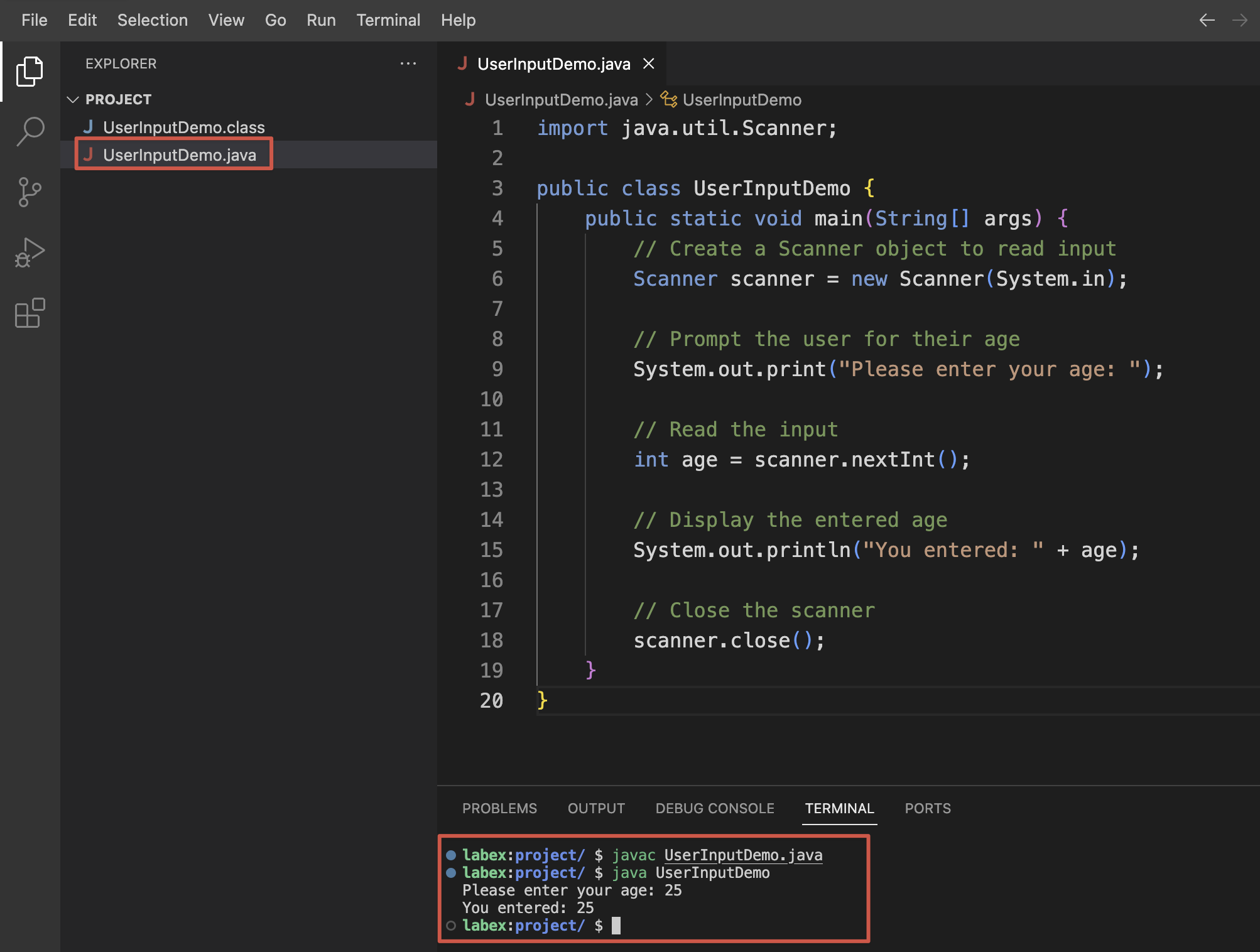
- Compilez le programme Java en exécutant la commande suivante :
javac UserInputDemo.java
- Exécutez le programme avec :
java UserInputDemo
- Entrez un nombre lorsque vous y êtes invité, par exemple,
25. Vous devriez voir la sortie suivante :
Please enter your age: 25
You entered: 25
Que se passe-t-il avec des entrées invalides ?
Maintenant, voyons ce qui se passe lorsque nous fournissons des entrées invalides. Exécutez le programme à nouveau :
java UserInputDemo
Cette fois, entrez une valeur non numérique, comme twenty-five. Vous verrez un message d'erreur similaire à :
Please enter your age: twenty-five
Exception in thread "main" java.util.InputMismatchException
 at java.base/java.util.Scanner.throwFor(Scanner.java:943)
 at java.base/java.util.Scanner.next(Scanner.java:1598)
 at java.base/java.util.Scanner.nextInt(Scanner.java:2263)
 at java.base/java.util.Scanner.nextInt(Scanner.java:2217)
 at UserInputDemo.main(UserInputDemo.java:12)
Cette InputMismatchException se produit car le programme attendait une entrée numérique (un entier), mais a reçu du texte à la place. Le programme plante au lieu de gérer cela de manière élégante. Dans les étapes suivantes, nous apprendrons à gérer correctement de telles entrées invalides.
Gestion des exceptions pour les entrées invalides
Dans cette étape, nous allons modifier notre programme pour gérer les entrées invalides en utilisant le mécanisme de gestion des exceptions de Java.
Comprendre les exceptions Java
Les exceptions en Java sont des événements qui perturbent le flux normal d'exécution d'un programme. Lorsqu'un utilisateur fournit une entrée invalide, le système d'exécution Java lance une exception pour signaler qu'il y a eu un problème. Le programme peut capturer ces exceptions et les gérer de manière appropriée, au lieu de planter.
La structure de base pour la gestion des exceptions en Java est le bloc try-catch :
try {
    // Code that might throw an exception
} catch (ExceptionType e) {
    // Code to handle the exception
}
Modification de notre programme pour gérer les exceptions
Mettons à jour notre programme pour gérer l'InputMismatchException qui se produit lorsque l'utilisateur entre une entrée non numérique :
Ouvrez le fichier
UserInputDemo.javadans le WebIDE.Modifiez le code pour inclure la gestion des exceptions :
import java.util.Scanner;
import java.util.InputMismatchException;

public class UserInputDemo {
    public static void main(String[] args) {
        // Create a Scanner object to read input
        Scanner scanner = new Scanner(System.in);

        try {
            // Prompt the user for their age
            System.out.print("Please enter your age: ");

            // Read the input
            int age = scanner.nextInt();

            // Display the entered age
            System.out.println("You entered: " + age);
        } catch (InputMismatchException e) {
            // Handle the exception if non-numeric input is provided
            System.out.println("Error: Please enter a valid numeric age.");
        } finally {
            // Close the scanner in the finally block to ensure it always gets closed
            scanner.close();
        }
    }
}
Enregistrez le fichier en appuyant sur
Ctrl+S.Compilez le programme mis à jour :
javac UserInputDemo.java
- Exécutez le programme :
java UserInputDemo
- Essayez d'entrer une valeur non numérique, comme
twenty-five. Au lieu de planter, le programme affiche maintenant :
Please enter your age: twenty-five
Error: Please enter a valid numeric age.
Amélioration de notre gestion des exceptions
Notre implémentation actuelle gère l'exception mais quitte immédiatement. Améliorons-la en donnant à l'utilisateur plusieurs tentatives pour entrer un âge valide :
Ouvrez le fichier
UserInputDemo.javadans le WebIDE.Modifiez le code pour permettre plusieurs tentatives :
import java.util.Scanner;
import java.util.InputMismatchException;

public class UserInputDemo {
    public static void main(String[] args) {
        // Create a Scanner object to read input
        Scanner scanner = new Scanner(System.in);

        boolean validInput = false;
        int age = 0;

        // Keep trying until valid input is received
        while (!validInput) {
            try {
                // Prompt the user for their age
                System.out.print("Please enter your age: ");

                // Read the input
                age = scanner.nextInt();

                // If we get here, the input was valid
                validInput = true;
            } catch (InputMismatchException e) {
                // Handle the exception if non-numeric input is provided
                System.out.println("Error: Please enter a valid numeric age.");

                // Clear the invalid input from the scanner
                scanner.nextLine();
            }
        }

        // Display the entered age
        System.out.println("You entered: " + age);

        // Close the scanner
        scanner.close();
    }
}
Enregistrez le fichier.
Compilez et exécutez le programme à nouveau :
javac UserInputDemo.java
java UserInputDemo
- Essayez d'entrer d'abord une entrée invalide, puis une valide :
Please enter your age: twenty-five
Error: Please enter a valid numeric age.
Please enter your age: 25
You entered: 25
Maintenant, notre programme donne à l'utilisateur plusieurs chances de fournir une entrée valide. C'est une amélioration significative dans la gestion gracieuse des entrées invalides.
Mise en œuvre de la validation des entrées avec des instructions conditionnelles
En plus de la gestion des exceptions, nous pouvons utiliser des instructions conditionnelles pour valider les entrées de l'utilisateur. Cette approche nous permet de mettre en œuvre des règles de validation personnalisées avant de traiter les entrées.
Comprendre la validation des entrées
La validation des entrées est le processus consistant à vérifier les entrées de l'utilisateur pour s'assurer qu'elles répondent à des critères spécifiques avant de les traiter. Par exemple, nous pourrions vouloir nous assurer qu'une valeur d'âge est non seulement un nombre, mais également dans une plage raisonnable.
Ajout d'une validation de plage à notre programme
Améliorons notre programme pour valider que l'utilisateur entre un âge compris entre 0 et 120 :
Ouvrez le fichier
UserInputDemo.javadans le WebIDE.Modifiez le code pour inclure la validation de plage :
import java.util.Scanner;
import java.util.InputMismatchException;

public class UserInputDemo {
    public static void main(String[] args) {
        // Create a Scanner object to read input
        Scanner scanner = new Scanner(System.in);

        boolean validInput = false;
        int age = 0;

        // Keep trying until valid input is received
        while (!validInput) {
            try {
                // Prompt the user for their age
                System.out.print("Please enter your age (0-120): ");

                // Read the input
                age = scanner.nextInt();

                // Check if the age is within a valid range
                if (age < 0 || age > 120) {
                    System.out.println("Error: Age must be between 0 and 120.");
                } else {
                    // If we get here, the input was valid
                    validInput = true;
                }
            } catch (InputMismatchException e) {
                // Handle the exception if non-numeric input is provided
                System.out.println("Error: Please enter a valid numeric age.");

                // Clear the invalid input from the scanner
                scanner.nextLine();
            }
        }

        // Display the entered age
        System.out.println("You entered: " + age);

        // Close the scanner
        scanner.close();
    }
}
Enregistrez le fichier en appuyant sur
Ctrl+S.Compilez le programme :
javac UserInputDemo.java
- Exécutez le programme :
java UserInputDemo
Testez le programme avec différentes entrées :
- Entrez un âge valide (par exemple,
25) :
Please enter your age (0-120): 25 You entered: 25- Entrez un âge négatif :
Please enter your age (0-120): -5 Error: Age must be between 0 and 120. Please enter your age (0-120):- Entrez un âge supérieur à 120 :
Please enter your age (0-120): 150 Error: Age must be between 0 and 120. Please enter your age (0-120):- Entrez une valeur non numérique :
Please enter your age (0-120): twenty-five Error: Please enter a valid numeric age. Please enter your age (0-120):- Entrez un âge valide (par exemple,
Création d'un exemple plus complexe : formulaire d'inscription d'utilisateur
Créons un exemple plus complet qui valide plusieurs champs pour un formulaire d'inscription d'utilisateur :
Créez un nouveau fichier nommé
UserRegistration.javadans le WebIDE.Ajoutez le code suivant au fichier :
import java.util.Scanner;

public class UserRegistration {
    public static void main(String[] args) {
        Scanner scanner = new Scanner(System.in);

        // Get and validate username
        String username = getValidUsername(scanner);

        // Get and validate age
        int age = getValidAge(scanner);

        // Get and validate email
        String email = getValidEmail(scanner);

        // Display the registration information
        System.out.println("\nRegistration Successful!");
        System.out.println("Username: " + username);
        System.out.println("Age: " + age);
        System.out.println("Email: " + email);

        scanner.close();
    }

    private static String getValidUsername(Scanner scanner) {
        String username;
        boolean validUsername = false;

        do {
            System.out.print("Enter username (3-15 characters): ");
            username = scanner.nextLine().trim();

            if (username.length() < 3 || username.length() > 15) {
                System.out.println("Error: Username must be between 3 and 15 characters.");
            } else {
                validUsername = true;
            }
        } while (!validUsername);

        return username;
    }

    private static int getValidAge(Scanner scanner) {
        int age = 0;
        boolean validAge = false;

        while (!validAge) {
            try {
                System.out.print("Enter your age (0-120): ");
                age = Integer.parseInt(scanner.nextLine());

                if (age < 0 || age > 120) {
                    System.out.println("Error: Age must be between 0 and 120.");
                } else {
                    validAge = true;
                }
            } catch (NumberFormatException e) {
                System.out.println("Error: Please enter a valid numeric age.");
            }
        }

        return age;
    }

    private static String getValidEmail(Scanner scanner) {
        String email;
        boolean validEmail = false;

        do {
            System.out.print("Enter your email: ");
            email = scanner.nextLine().trim();

            // Simple email validation: must contain @ and a period after @
            if (!email.contains("@") || email.indexOf('.', email.indexOf('@')) == -1) {
                System.out.println("Error: Please enter a valid email address.");
            } else {
                validEmail = true;
            }
        } while (!validEmail);

        return email;
    }
}
Enregistrez le fichier en appuyant sur
Ctrl+S.Compilez le programme :
javac UserRegistration.java
- Exécutez le programme :
java UserRegistration
- Suivez les invitations pour entrer un nom d'utilisateur, un âge et une adresse e-mail. Le programme validera chaque entrée et ne passera à l'étape suivante que lorsque des données valides auront été entrées.
Séquence d'entrées valides exemple :
Enter username (3-15 characters): johnsmith
Enter your age (0-120): 30
Enter your email: john.smith@example.com

Registration Successful!
Username: johnsmith
Age: 30
Email: john.smith@example.com
Cet exemple plus complet montre comment valider différents types d'entrées utilisateur en utilisant à la fois la gestion des exceptions et la validation conditionnelle.
Utilisation des expressions régulières pour la validation des entrées
Les expressions régulières (regex) offrent un moyen puissant de valider des modèles d'entrée complexes tels que les adresses e-mail, les numéros de téléphone et les mots de passe. Dans cette étape, nous allons apprendre à utiliser les expressions régulières en Java pour effectuer une validation avancée des entrées.
Comprendre les expressions régulières
Une expression régulière est une séquence de caractères qui définit un modèle de recherche. Ces modèles peuvent être utilisés pour valider si une chaîne de caractères correspond à un format spécifique. Java fournit le package java.util.regex, qui inclut les classes Pattern et Matcher pour travailler avec les expressions régulières.
Ajout de la validation regex à notre programme UserRegistration
Améliorons notre programme UserRegistration pour utiliser des expressions régulières afin d'obtenir une validation des entrées plus robuste :
Ouvrez le fichier
UserRegistration.javadans le WebIDE.Modifiez le fichier pour inclure la validation regex :
import java.util.Scanner;
import java.util.regex.Pattern;
import java.util.regex.Matcher;

public class UserRegistration {
    // Regular expression patterns
    private static final String USERNAME_PATTERN = "^[a-zA-Z0-9_]{3,15}$";
    private static final String EMAIL_PATTERN = "^[a-zA-Z0-9_+&*-]+(?:\\.[a-zA-Z0-9_+&*-]+)*@(?:[a-zA-Z0-9-]+\\.)+[a-zA-Z]{2,7}$";
    private static final String PHONE_PATTERN = "^\\d{3}-\\d{3}-\\d{4}$";

    public static void main(String[] args) {
        Scanner scanner = new Scanner(System.in);

        // Get and validate username
        String username = getValidUsername(scanner);

        // Get and validate age
        int age = getValidAge(scanner);

        // Get and validate email
        String email = getValidEmail(scanner);

        // Get and validate phone number
        String phone = getValidPhone(scanner);

        // Display the registration information
        System.out.println("\nRegistration Successful!");
        System.out.println("Username: " + username);
        System.out.println("Age: " + age);
        System.out.println("Email: " + email);
        System.out.println("Phone: " + phone);

        scanner.close();
    }

    private static String getValidUsername(Scanner scanner) {
        String username;
        boolean validUsername = false;
        Pattern pattern = Pattern.compile(USERNAME_PATTERN);

        do {
            System.out.print("Enter username (3-15 alphanumeric characters or underscore): ");
            username = scanner.nextLine().trim();

            Matcher matcher = pattern.matcher(username);
            if (!matcher.matches()) {
                System.out.println("Error: Username must be 3-15 characters long and contain only letters, numbers, or underscores.");
            } else {
                validUsername = true;
            }
        } while (!validUsername);

        return username;
    }

    private static int getValidAge(Scanner scanner) {
        int age = 0;
        boolean validAge = false;

        while (!validAge) {
            try {
                System.out.print("Enter your age (0-120): ");
                age = Integer.parseInt(scanner.nextLine());

                if (age < 0 || age > 120) {
                    System.out.println("Error: Age must be between 0 and 120.");
                } else {
                    validAge = true;
                }
            } catch (NumberFormatException e) {
                System.out.println("Error: Please enter a valid numeric age.");
            }
        }

        return age;
    }

    private static String getValidEmail(Scanner scanner) {
        String email;
        boolean validEmail = false;
        Pattern pattern = Pattern.compile(EMAIL_PATTERN);

        do {
            System.out.print("Enter your email: ");
            email = scanner.nextLine().trim();

            Matcher matcher = pattern.matcher(email);
            if (!matcher.matches()) {
                System.out.println("Error: Please enter a valid email address.");
            } else {
                validEmail = true;
            }
        } while (!validEmail);

        return email;
    }

    private static String getValidPhone(Scanner scanner) {
        String phone;
        boolean validPhone = false;
        Pattern pattern = Pattern.compile(PHONE_PATTERN);

        do {
            System.out.print("Enter your phone number (format: 123-456-7890): ");
            phone = scanner.nextLine().trim();

            Matcher matcher = pattern.matcher(phone);
            if (!matcher.matches()) {
                System.out.println("Error: Please enter a valid phone number in the format 123-456-7890.");
            } else {
                validPhone = true;
            }
        } while (!validPhone);

        return phone;
    }
}
Enregistrez le fichier en appuyant sur
Ctrl+S.Compilez le programme :
javac UserRegistration.java
- Exécutez le programme :
java UserRegistration
Testez le programme avec différentes entrées :
- Essayez d'entrer un nom d'utilisateur invalide (trop court, contenant des caractères spéciaux) :
Enter username (3-15 alphanumeric characters or underscore): a$ Error: Username must be 3-15 characters long and contain only letters, numbers, or underscores. Enter username (3-15 alphanumeric characters or underscore):- Essayez d'entrer une adresse e-mail invalide (manquant le symbole @ ou le domaine) :
Enter username (3-15 alphanumeric characters or underscore): johndoe Enter your age (0-120): 25 Enter your email: johndoe.com Error: Please enter a valid email address. Enter your email:- Essayez d'entrer un numéro de téléphone invalide (format incorrect) :
Enter username (3-15 alphanumeric characters or underscore): johndoe Enter your age (0-120): 25 Enter your email: john.doe@example.com Enter your phone number (format: 123-456-7890): 1234567890 Error: Please enter a valid phone number in the format 123-456-7890. Enter your phone number (format: 123-456-7890):- Entrez toutes les entrées valides :
Enter username (3-15 alphanumeric characters or underscore): johndoe
Enter your age (0-120): 25
Enter your email: john.doe@example.com
Enter your phone number (format: 123-456-7890): 123-456-7890

Registration Successful!
Username: johndoe
Age: 25
Email: john.doe@example.com
Phone: 123-456-7890
Comprendre les modèles d'expressions régulières
Examinons les modèles d'expressions régulières utilisés dans notre programme :
USERNAME_PATTERN:^[a-zA-Z0-9_]{3,15}$^et$garantissent que le modèle correspond à toute la chaîne de caractères[a-zA-Z0-9_]correspond à n'importe quelle lettre (majuscule ou minuscule), chiffre ou underscore{3,15}spécifie que la longueur doit être comprise entre 3 et 15 caractères
EMAIL_PATTERN:^[a-zA-Z0-9_+&*-]+(?:\\.[a-zA-Z0-9_+&*-]+)*@(?:[a-zA-Z0-9-]+\\.)+[a-zA-Z]{2,7}$- Ce modèle valide les adresses e-mail selon les règles courantes
- Il garantit que l'e-mail a une partie nom d'utilisateur, un symbole @ et un domaine
PHONE_PATTERN:^\\d{3}-\\d{3}-\\d{4}$\\dcorrespond à n'importe quel chiffre (0 - 9){3}et{4}spécifient le nombre de chiffres-correspond au caractère tiret littéral
Les expressions régulières sont un outil puissant pour la validation des entrées, mais elles peuvent être complexes. Au fur et à mesure que vous vous familiariserez avec elles, vous pourrez créer des modèles de validation plus sophistiqués pour vos applications.
Création d'un système complet de validation de formulaire
Dans cette étape finale, nous allons construire un système complet de validation de formulaire qui intègre toutes les techniques que nous avons apprises. Nous allons créer un système de validation plus modulaire et réutilisable qui peut être facilement étendu pour différentes applications.
Création d'une classe utilitaire de validation
Commençons par créer une classe utilitaire qui encapsule nos méthodes de validation :
Créez un nouveau fichier nommé
InputValidator.javadans le WebIDE.Ajoutez le code suivant au fichier :
import java.util.regex.Pattern;
import java.util.regex.Matcher;

/**
 * Utility class for validating user input
 */
public class InputValidator {
    // Regular expression patterns
    private static final String USERNAME_PATTERN = "^[a-zA-Z0-9_]{3,15}$";
    private static final String EMAIL_PATTERN = "^[a-zA-Z0-9_+&*-]+(?:\\.[a-zA-Z0-9_+&*-]+)*@(?:[a-zA-Z0-9-]+\\.)+[a-zA-Z]{2,7}$";
    private static final String PHONE_PATTERN = "^\\d{3}-\\d{3}-\\d{4}$";
    private static final String PASSWORD_PATTERN = "^(?=.*[0-9])(?=.*[a-z])(?=.*[A-Z])(?=.*[@#$%^&+=])(?=\\S+$).{8,}$";

    /**
     * Validates a username
     * @param username The username to validate
     * @return true if the username is valid, false otherwise
     */
    public static boolean isValidUsername(String username) {
        if (username == null) {
            return false;
        }
        Pattern pattern = Pattern.compile(USERNAME_PATTERN);
        Matcher matcher = pattern.matcher(username);
        return matcher.matches();
    }

    /**
     * Validates an email address
     * @param email The email to validate
     * @return true if the email is valid, false otherwise
     */
    public static boolean isValidEmail(String email) {
        if (email == null) {
            return false;
        }
        Pattern pattern = Pattern.compile(EMAIL_PATTERN);
        Matcher matcher = pattern.matcher(email);
        return matcher.matches();
    }

    /**
     * Validates a phone number
     * @param phone The phone number to validate
     * @return true if the phone number is valid, false otherwise
     */
    public static boolean isValidPhone(String phone) {
        if (phone == null) {
            return false;
        }
        Pattern pattern = Pattern.compile(PHONE_PATTERN);
        Matcher matcher = pattern.matcher(phone);
        return matcher.matches();
    }

    /**
     * Validates an age
     * @param age The age to validate
     * @return true if the age is valid, false otherwise
     */
    public static boolean isValidAge(int age) {
        return age >= 0 && age <= 120;
    }

    /**
     * Validates a password
     * @param password The password to validate
     * @return true if the password is valid, false otherwise
     */
    public static boolean isValidPassword(String password) {
        if (password == null) {
            return false;
        }
        Pattern pattern = Pattern.compile(PASSWORD_PATTERN);
        Matcher matcher = pattern.matcher(password);
        return matcher.matches();
    }

    /**
     * Gets the error message for an invalid username
     * @return The error message
     */
    public static String getUsernameErrorMessage() {
        return "Username must be 3-15 characters long and contain only letters, numbers, or underscores.";
    }

    /**
     * Gets the error message for an invalid email
     * @return The error message
     */
    public static String getEmailErrorMessage() {
        return "Please enter a valid email address.";
    }

    /**
     * Gets the error message for an invalid phone number
     * @return The error message
     */
    public static String getPhoneErrorMessage() {
        return "Please enter a valid phone number in the format 123-456-7890.";
    }

    /**
     * Gets the error message for an invalid age
     * @return The error message
     */
    public static String getAgeErrorMessage() {
        return "Age must be between 0 and 120.";
    }

    /**
     * Gets the error message for an invalid password
     * @return The error message
     */
    public static String getPasswordErrorMessage() {
        return "Password must be at least 8 characters long and contain at least one digit, one lowercase letter, one uppercase letter, one special character, and no whitespace.";
    }
}
- Enregistrez le fichier en appuyant sur
Ctrl+S.
Création d'un formulaire d'inscription complet
Maintenant, créons une nouvelle version de notre formulaire d'inscription qui utilise la classe InputValidator :
Créez un nouveau fichier nommé
CompleteRegistrationForm.javadans le WebIDE.Ajoutez le code suivant au fichier :
import java.util.Scanner;

public class CompleteRegistrationForm {
    public static void main(String[] args) {
        Scanner scanner = new Scanner(System.in);

        // Collect and validate user information
        String username = getValidInput(scanner, "Username", InputValidator::isValidUsername, InputValidator.getUsernameErrorMessage());
        int age = getValidAge(scanner);
        String email = getValidInput(scanner, "Email", InputValidator::isValidEmail, InputValidator.getEmailErrorMessage());
        String phone = getValidInput(scanner, "Phone number (format: 123-456-7890)", InputValidator::isValidPhone, InputValidator.getPhoneErrorMessage());
        String password = getValidInput(scanner, "Password", InputValidator::isValidPassword, InputValidator.getPasswordErrorMessage());

        // Display the registration information
        System.out.println("\nRegistration Successful!");
        System.out.println("Username: " + username);
        System.out.println("Age: " + age);
        System.out.println("Email: " + email);
        System.out.println("Phone: " + phone);
        System.out.println("Password: " + maskPassword(password));

        scanner.close();
    }

    /**
     * Generic method to get valid input from the user
     * @param scanner The scanner to read input
     * @param fieldName The name of the field being validated
     * @param validator The validation function
     * @param errorMessage The error message to display
     * @return The validated input
     */
    private static String getValidInput(Scanner scanner, String fieldName, java.util.function.Predicate<String> validator, String errorMessage) {
        String input;
        boolean validInput = false;

        do {
            System.out.print("Enter your " + fieldName + ": ");
            input = scanner.nextLine().trim();

            if (!validator.test(input)) {
                System.out.println("Error: " + errorMessage);
            } else {
                validInput = true;
            }
        } while (!validInput);

        return input;
    }

    /**
     * Gets a valid age from the user
     * @param scanner The scanner to read input
     * @return The validated age
     */
    private static int getValidAge(Scanner scanner) {
        int age = 0;
        boolean validAge = false;

        while (!validAge) {
            try {
                System.out.print("Enter your age (0-120): ");
                age = Integer.parseInt(scanner.nextLine());

                if (!InputValidator.isValidAge(age)) {
                    System.out.println("Error: " + InputValidator.getAgeErrorMessage());
                } else {
                    validAge = true;
                }
            } catch (NumberFormatException e) {
                System.out.println("Error: Please enter a valid numeric age.");
            }
        }

        return age;
    }

    /**
     * Masks a password for display
     * @param password The password to mask
     * @return The masked password
     */
    private static String maskPassword(String password) {
        if (password == null || password.isEmpty()) {
            return "";
        }
        return "*".repeat(password.length());
    }
}
Enregistrez le fichier en appuyant sur
Ctrl+S.Compilez les deux fichiers Java :
javac InputValidator.java
javac CompleteRegistrationForm.java
- Exécutez le programme du formulaire d'inscription :
java CompleteRegistrationForm
- Suivez les invitations pour entrer des informations valides pour chaque champ. Le programme validera chaque entrée selon les règles définies dans la classe
InputValidator.
Exemple d'interaction :
Enter your Username: john_doe
Enter your age (0-120): 35
Enter your Email: john.doe@example.com
Enter your Phone number (format: 123-456-7890): 123-456-7890
Enter your Password: weakpw
Error: Password must be at least 8 characters long and contain at least one digit, one lowercase letter, one uppercase letter, one special character, and no whitespace.
Enter your Password: P@ssw0rd123

Registration Successful!
Username: john_doe
Age: 35
Email: john.doe@example.com
Phone: 123-456-7890
Password: ***********
Avantages de cette approche
L'approche que nous avons adoptée dans cet exemple final offre plusieurs avantages :
- Modularité : La logique de validation est séparée dans une classe utilitaire réutilisable.
- Extensibilité : De nouvelles règles de validation peuvent être facilement ajoutées à la classe
InputValidator. - Maintenabilité : Les messages d'erreur sont centralisés et peuvent être facilement mis à jour.
- Réutilisation du code : La méthode
getValidInputest générique et peut être utilisée pour différents types d'entrées. - Sécurité : Le mot de passe est masqué lorsqu'il est affiché à l'utilisateur.
Cette conception suit les bonnes pratiques d'ingénierie logicielle et facilite l'adaptation du système de validation pour différentes applications.
Résumé
Dans ce laboratoire, vous avez appris à gérer efficacement les entrées utilisateur invalides dans les programmes Java. Vous êtes passé d'une compréhension de base de la gestion des entrées à la mise en œuvre d'un système de validation complet. Voici un résumé de ce que vous avez accompli :
- Créé un programme Java de base qui collecte les entrées utilisateur à l'aide de la classe
Scanner - Mis en œuvre la gestion des exceptions pour gérer gracieusement les entrées invalides
- Ajouté une validation conditionnelle pour garantir que les entrées répondent à des critères spécifiques
- Utilisé des expressions régulières pour une validation avancée basée sur des modèles
- Construité un système de validation modulaire et réutilisable avec une classe utilitaire
Ces techniques sont essentielles pour développer des applications Java robustes capables de gérer la nature imprévisible des entrées utilisateur. En validant et en gérant correctement les entrées invalides, vous pouvez éviter les plantages de programme, maintenir l'intégrité des données et offrir une meilleure expérience utilisateur.
Alors que vous poursuivez votre parcours de programmation Java, rappelez-vous que la validation des entrées ne consiste pas seulement à prévenir les erreurs, mais aussi à améliorer la sécurité et l'usabilité. Les principes que vous avez appris dans ce laboratoire peuvent être appliqués à différents types d'applications, des programmes en console simples aux applications web complexes.