

Linux Course for Beginners in 2026: From Commands to System Administration
A technical guide to Linux for Noobs: 19 guided labs and 18 challenges covering commands, files, permissions, processes, networking, Shell scripting, and recovery.

Running ps aux is not the same as diagnosing a process. Running systemctl status is not the same as recovering a service. Running ip route is not the same as finding where a connection fails.
A Linux beginner course has to teach the commands, but it also needs to connect them. Files have owners and permissions. Processes run programs. Services manage long-lived processes. Listening sockets expose those services to a network. Shell scripts and scheduled jobs automate the same operations a learner first performs manually.
The 2026 revision of Linux for Noobs is organized around that progression. The course now contains 37 terminal-based activities: 19 Guided Labs and 18 Challenges. Its earlier sequence had 25 activities and stopped after core command-line, text-processing, storage, and package-management topics. The revised sequence continues through processes, services, logs, networking, SSH, Shell scripting, and scheduled backup and recovery.
The change is not simply twelve more entries in a syllabus. It establishes a path from running individual commands to inspecting and changing a small Linux system.
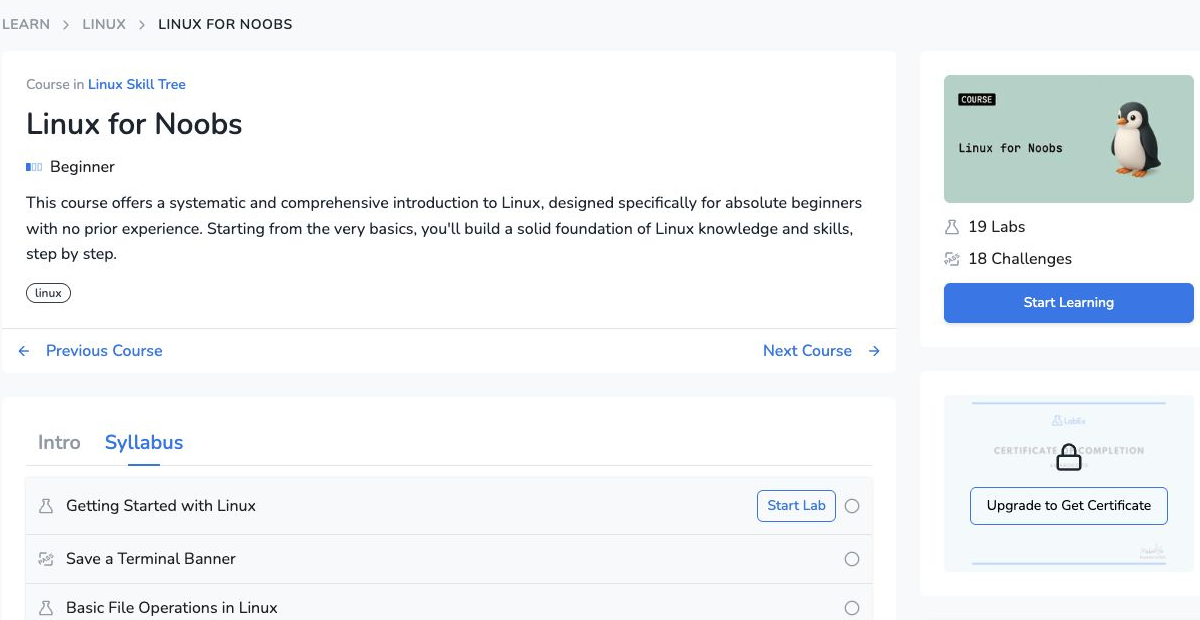
The revised public course page lists 37 activities: 19 Guided Labs and 18 Challenges. Captured August 25, 2026.
How the 37 activities form one course
Linux for Noobs is not organized as a command reference. Its 37 activities are arranged in seven connected blocks, with each block reusing operations introduced earlier in the course.
| Course block | Guided Labs establish | Challenges ask the learner to produce |
|---|---|---|
| Terminal and files | Basic commands, navigation, file operations, wildcards, shortcuts, and command help | A saved terminal banner and a correctly moved draft file |
| Users, permissions, and Shell | Users, groups, ownership, modes, links, metadata, search, environment variables, and startup files | A configured user, a protected configuration file, and a persistent variable |
| Archives, disks, and storage | Tar and compression formats, disk usage, block devices, filesystems, mounting, and /etc/fstab |
A compressed log backup and a directory-usage ranking |
| Pipelines and text processing | Exit status, pipelines, grep, cut, sort, uniq, tr, join, regular expressions, sed, awk, and streams |
Filtered alerts, normalized lists, extracted addresses, and selected history fields |
| Processes, packages, and logs | System load, process state, signals, jobs, package installation, systemd services, and journals | A stopped process, an installed local package, and a recovered service |
| Networking and remote access | Interfaces, routes, DNS, listening sockets, HTTP checks, UFW, SSH, keys, and scp |
A corrected bind address and a remotely uploaded configuration |
| Scripting, backup, and Cron | Script execution, variables, quoting, conditions, loops, archive inspection, selective restore, and scheduling | A log-summary script and one recovered configuration file |
The course’s command-line, file, identity, storage, and text-processing activities provide the base for its system-operation work. A learner starts by running commands and moving through the filesystem, then works with permissions, environment, archives, storage, pipelines, regular expressions, and redirection. By the time process management appears, concepts such as paths, ownership, exit status, text filters, and file descriptors are already available to use together.
This base is practical rather than encyclopedic. The command-help lab appears near the beginning so that --help, man, and apropos become working tools for later activities. The file lessons connect paths to metadata, links, search, and permissions. The text-processing sequence moves from pipes and individual filters to regular expressions and separate stdout and stderr streams. These are the operations used later to read a journal, inspect a listening service, write a Shell script, and record a scheduled backup.
Guided Labs and Challenges run through the whole sequence rather than being reserved for the new material. A Guided Lab introduces the model and gives the learner commands to run, output to inspect, and a state to verify. A Challenge then removes most procedural instructions and asks for one bounded result. In addition to the Guided Lab and Challenge pairs, the course includes a standalone command-help lab near the beginning, producing a total of 19 Guided Labs and 18 Challenges.
Every activity opens in a browser terminal. Twenty-eight use the standard Ubuntu 22.04 terminal environment. Nine use a full Ubuntu 22.04 instance when the task needs systemd, mounting, SSH, or other host-level behavior. The learner therefore practices the same terminal workflow throughout the course, while the underlying environment changes when the Linux subsystem being studied requires it.
What belongs in a beginner Linux curriculum?
There is no single universal boundary for “Linux basics.” The current Linux Professional Institute Linux Essentials objectives include command-line work, files, users and groups, permissions, archives, backups, and simple Shell scripts. The Linux Foundation’s Introduction to Linux covers processes, file operations, text manipulation, network operations, Bash, and local security principles.
These are useful reference points, not a specification that every course must copy. They do show why an introduction limited to navigation and file commands leaves a gap. A learner who can create a file may still be unable to explain which user owns it, why a service cannot read it, which process has the file open, or how to verify the result of a permission change.
Linux for Noobs keeps the scope below an intermediate administration course, but it now covers the system relationships needed to investigate those questions. Its sequence is:
terminal and files
  -> users, permissions, and environment
  -> archives, disks, and filesystems
  -> pipelines, regular expressions, and data streams
  -> processes and job control
  -> packages, services, and logs
  -> networking, firewalls, and SSH
  -> Shell scripts
  -> scheduled backup and recovery
The order carries technical dependencies. Redirection and file descriptors appear before a learner runs a background command such as nohup command > file 2>&1 &. Process inspection comes before service and port diagnosis. Addressing, routing, DNS, and listening sockets come before remote access with SSH. Variables, quoting, exit status, file tests, and loops appear before the course asks the learner to automate a task.
The 2026 revision extends the second half of the course
The earlier 25 activities already cover the command line, files, identity, permissions, archives, storage, pipelines, and text processing. The 2026 revision preserves that foundation and adds six Guided Lab and Challenge pairs. These pairs extend the same practice model into system operation: each introduces a system area with instructions, then asks the learner to reach one defined result with less guidance.
| System area | Guided work | Challenge result |
|---|---|---|
| Processes | Inspect system information, load, PIDs, signals, and jobs | Find and stop a runaway process identified by a PID file |
| Services and logs | Use systemctl, journalctl, and traditional log files |
Diagnose a failed service, correct its configuration, and return it to an active state |
| Networking and firewalls | Follow the path from addresses and routes through DNS, sockets, HTTP, and UFW | Correct a service bind address while preserving its HTTP response |
| SSH and file transfer | Open remote shells, handle host keys, use scp, and create an SSH key |
Upload a configuration file with an existing SSH identity |
| Shell scripting | Use a shebang, variables, quoting, tests, exit status, and loops | Write a short script that counts error lines across log files |
| Backup and recovery | Build and inspect archives, restore selected files, and schedule commands with Cron | Restore one missing configuration file from an existing archive |
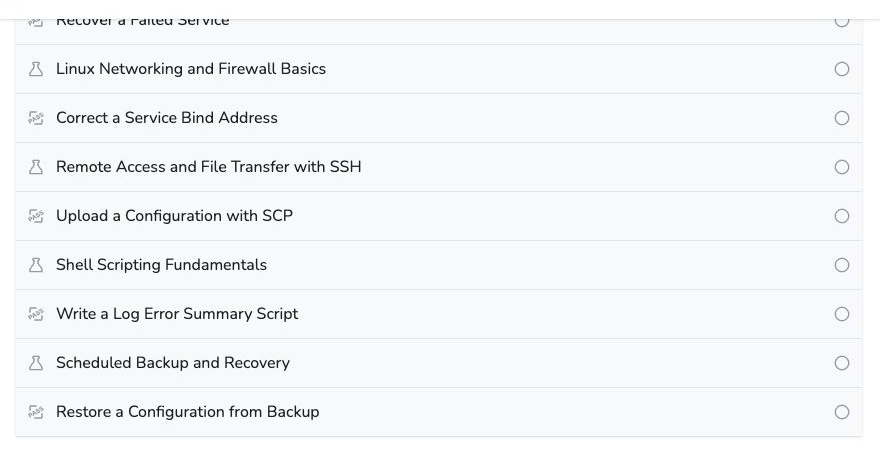
The new system-operation units appear as Guided Lab and Challenge pairs at the end of the syllabus. Captured August 25, 2026.
The Challenge results are deliberately narrower than the Guided Labs. The networking lab, for example, introduces a diagnostic chain from hostname to application response. Its Challenge does not require the learner to redesign routing, write packet-filter rules, and produce a report at the same time. It asks for one corrected bind address and a working response.
That distinction matters for beginners. A broad Guided Lab can establish vocabulary and show how several layers relate. The following Challenge needs a small enough target that failure can be traced to a particular decision rather than to five unrelated requirements.
The existing foundation was revised as well
Four existing Guided Labs received additional foundational material.
The permissions lab now goes beyond chmod and chown. It covers account locking, umask, the sticky bit, setgid directories, group inheritance, and the permission-string forms that display s, S, t, or T. Setuid remains conceptual; the course does not ask a beginner to modify privileged system programs.
The file and directory lab adds file, stat, inode basics, hard links, symbolic links, and diff. These concepts make later troubleshooting more precise. A path can disappear while an inode remains reachable through another hard link; a symbolic link can remain while its target no longer exists. Those are system states to inspect, not extra flags to memorize.
The storage lab now connects devices, partitions, filesystems, and mount points with lsblk and blkid. It introduces the purpose and fields of /etc/fstab and explains why persistent mounts commonly use a UUID, while avoiding risky boot-configuration exercises.
The data-stream lab adds tee and tee -a, including the difference between replacing a file with > and displaying output while saving it through a pipeline. That becomes relevant when the course later observes logs, backgrounds a process, and records script output.
Guided Labs and Challenges have different jobs
A Guided Lab is responsible for first teaching. When a command or Shell construct appears for the first time, the lab explains what it does, why it is needed, how its important arguments fit together, what its output means, and how to determine whether the operation succeeded.
A Challenge is responsible for reducing that support. It provides the object to change, relevant paths and constraints, and an observable final condition. The complete command sequence remains in the solution rather than in the visible task.
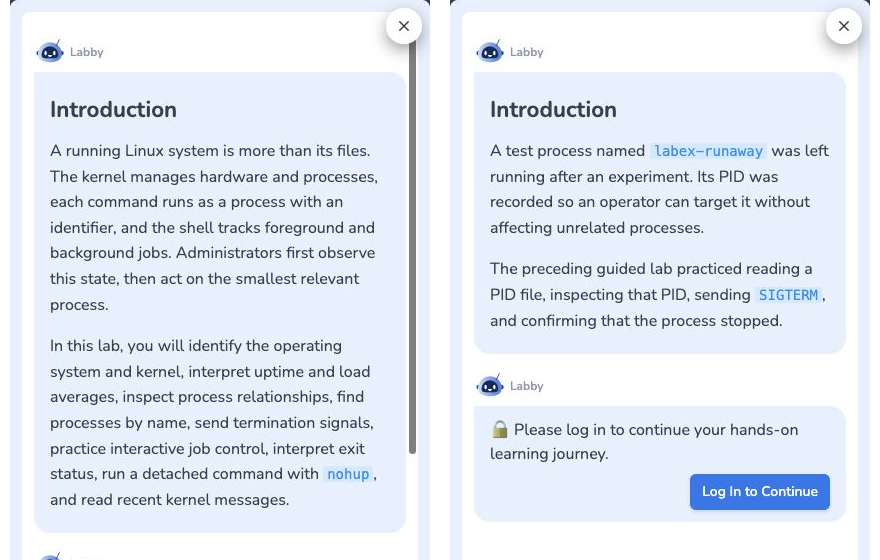
Left: the Guided Lab introduces process inspection and control. Right: the related Challenge specifies a process, a PID file, and the required final state without prescribing each command. Captured August 25, 2026.
A process-management example
The process-management Guided Lab turns an abstract term such as “PID” into a small, observable experiment. It starts a harmless named background process, captures its PID, and then inspects the process through two different interfaces:
bash -c 'exec -a labex-worker sleep 300' &
worker_pid=$!
echo "$worker_pid" > worker.pid

ps -o pid,ppid,user,stat,etime,args -p "$worker_pid"
pgrep -af labex-worker
$! provides the PID of the most recently started background job. Saving it in worker.pid makes the relationship between a running process and a PID file concrete. The ps command exposes selected fields for that exact PID, while pgrep -af locates the process by name and prints its full command line.
The lab then completes the inspect–change–verify loop:
kill "$worker_pid"
sleep 1
ps -p "$worker_pid" || echo "labex-worker stopped after SIGTERM"
The final ps is not decorative. It checks the state after sending the default SIGTERM signal. In the following Challenge, the learner receives a prepared process and PID file, but not this procedure. The task is to apply the same model—identify the exact process, send the requested signal, and verify that it has stopped.
The 18 Challenges were reviewed together with their solutions and verification scripts. Every command, Shell construct, and system concept required by a solution was traced to an earlier Guided Lab. This prevents a common failure in practical courses: presenting one set of commands in the lesson, then measuring an unintroduced technique in the exercise.
Three pairs show how the responsibility shifts:
- System Information and Process Management explains PID and PPID, process state,
pgrep, signals, andkill. Stop a Runaway Process supplies a PID file and asks the learner to inspect and terminate that process. - Managing Services and System Logs explains service state and journal queries. Recover a Failed Service asks the learner to use that evidence, correct a port value, and restore the service.
- Scheduled Backup and Recovery explains archive manifests, inspection, selected-file restoration, and Cron. Restore a Configuration from Backup narrows the task to recovering one missing file from an existing archive.
The learner is not asked to rediscover Linux from an empty prompt. The course first supplies a model and examples, then removes procedural detail while keeping the technical objective bounded.
Verification checks the resulting state
A terminal command returning without an error does not prove that the requested result exists. chmod may succeed on the wrong file. A service restart may succeed even though the service is listening on the wrong address. A tar command may create a valid archive that omits the required configuration.
The revision reviewed all 134 active verification scripts across the 37 activities. Twenty-two verifiers in twelve activities were adjusted so that they check the intended result without requiring the learner to reproduce the reference answer’s exact text, whitespace, path prefix, or source-code layout.
For example:
- an environment-variable check loads the shell configuration and inspects the resulting value instead of matching one literal
.zshrcline; - an archive check accepts harmless
./or outer-directory prefixes while still requiring the correct members and contents; - a Shell-script check can evaluate execution results instead of demanding a particular source-code fragment;
- Cron,
/etc/fstab, and UFW checks allow inconsequential whitespace differences while retaining their semantic checks.
The tolerance is limited to equivalent solutions. Tests still reject an incorrect Cron interval, missing DNS evidence, the wrong directory order, or an archive without the required member. Permissions, ownership, service state, file contents, and security boundaries remain strict where they define the task.
The course stops before intermediate administration
Adding services, networking, and automation creates a risk: an introductory course can turn into a compressed certification syllabus. This curriculum sets an explicit boundary.
It does not teach LVM, RAID, LUKS, NFS, Samba, advanced SELinux or AppArmor configuration, packet capture, custom iptables or nftables rules, systemd unit authoring, kernel compilation, cgroups, namespaces, containers, centralized identity, or advanced Bash libraries and argument parsing.
Those topics are not unimportant. They depend on the system model the course is trying to establish. A learner should understand a normal mount before managing logical volumes, basic address and port diagnosis before writing firewall rules, and a short conditional script before building reusable Shell tooling.
This makes Linux for Noobs a fit for someone who is new to Linux, or who knows isolated commands but cannot yet diagnose a process, read a service journal, distinguish a DNS failure from a listening-socket problem, or recover one file from a backup. It is not a substitute for production experience or a complete RHCSA, LFCS, or Linux+ preparation path.
The course begins with Getting Started with Linux and ends with Restore a Configuration from Backup. That change in task is the useful measure of the curriculum: the learner moves from issuing a first terminal command to inspecting a system, making a bounded change, and verifying the resulting state.
References
- Linux for Noobs — current public course sequence and activity links.
- Linux Essentials exam objectives — the Linux Professional Institute’s current boundary for foundational command-line, security, backup, and scripting knowledge.
- Introduction to Linux — the Linux Foundation’s current introductory topic sequence across command-line and graphical Linux use.