



介绍
在本实验中,你将探索 Python 的基础数据结构:列表(Lists)、元组(Tuples)、集合(Sets)和字典(Dictionaries)。在之前实验所学知识的基础上,你将学习如何创建、操作和利用这些功能多样的工具。通过这些动手实践,你将加深对 Python 核心概念的理解,并为在程序中处理更复杂的数据做好准备。
使用列表
在这一步中,你将学习列表。列表在 Python 中是按顺序排列且可修改(Mutable)的项集合。
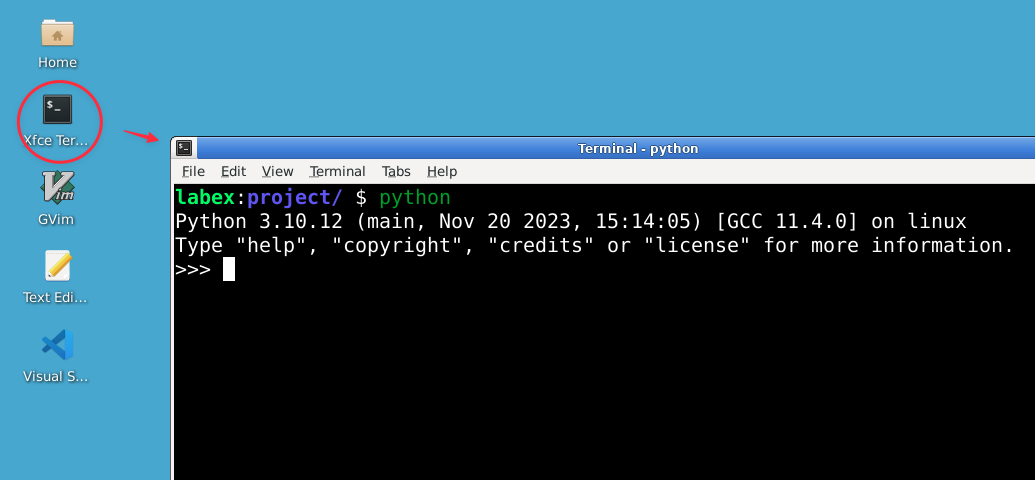
在终端中输入以下命令打开 Python 解释器:
python
你应该会看到 Python 提示符(>>>),这表示你现在已进入 Python 交互式外壳。
让我们从创建一个列表开始。在 Python 解释器中输入以下内容:
fruits = ["apple", "banana", "cherry"]
print(fruits)
输出:
['apple', 'banana', 'cherry']
Python 中的列表使用方括号 [] 创建,各项之间用逗号分隔。
你可以通过索引访问列表元素。请记住,Python 使用从零开始的索引:
print(fruits[0]) ## 第一个项
输出:
apple
print(fruits[-1]) ## 最后一个项
输出:
cherry
列表是可变的,这意味着你可以更改其内容:
fruits[1] = "blueberry"
print(fruits)
输出:
['apple', 'blueberry', 'cherry']
你可以使用 append() 方法向列表末尾添加项,或者使用 insert() 方法在特定位置插入项:
fruits.append("date")
print(fruits)
输出:
['apple', 'blueberry', 'cherry', 'date']
fruits.insert(1, "banana")
print(fruits)
输出:
['apple', 'banana', 'blueberry', 'cherry', 'date']
要删除项,可以使用 remove() 方法或 del 语句:
fruits.remove("cherry")
print(fruits)
输出:
['apple', 'banana', 'blueberry', 'date']
del fruits[0]
print(fruits)
输出:
['banana', 'blueberry', 'date']
列表可以包含不同类型的项,甚至包括其他列表:
mixed_list = [1, "hello", 3.14, [1, 2, 3]]
print(mixed_list)
输出:
[1, 'hello', 3.14, [1, 2, 3]]
列表非常灵活,在 Python 中被广泛用于存储各种项的集合。
理解元组
在这一步中,你将学习元组。元组在 Python 中是按顺序排列且不可修改(Immutable)的序列。
在 Python 解释器中,让我们创建一个元组:
coordinates = (3, 4)
print(coordinates)
输出:
(3, 4)
元组使用圆括号 () 创建。
与列表类似,你可以通过索引访问元组元素:
print(coordinates[0])
输出:
3
print(coordinates[1])
输出:
4
然而,与列表不同的是,元组是不可变的。这意味着创建后不能更改其内容:
coordinates[0] = 5 ## 这将引发错误
输出:
Traceback (most recent call last):
   File "<stdin>", line 1, in <module>
TypeError: 'tuple' object does not support item assignment
元组可以包含不同类型的项:
person = ("Alice", 25, "Engineer")
name, age, occupation = person  ## 元组解包
print(f"{name} is {age} years old and works as an {occupation}.")
输出:
Alice is 25 years old and works as an Engineer.
元组解包(Unpacking)是一种同时为多个变量赋值的便捷方式。
你可以创建一个只包含单个元素的元组,但记得要加上逗号:
single_item_tuple = (42,)
print(type(single_item_tuple))
输出:
<class 'tuple'>
如果不加逗号,Python 会将其解释为括号中的普通数值。
元组经常用于从函数返回多个值:
def get_dimensions():
    return (1920, 1080)

width, height = get_dimensions()
print(f"Width: {width}, Height: {height}")
输出:
Width: 1920, Height: 1080
当你希望创建一个不应被修改的项集合时,元组非常有用。
探索集合
在这一步中,你将学习集合。集合在 Python 中是无序且元素唯一的集合。
让我们在 Python 解释器中创建一个集合:
fruits = {"apple", "banana", "cherry"}
print(fruits)
输出:
{'cherry', 'banana', 'apple'}
集合使用花括号 {} 或 set() 函数创建。请注意,打印集合时元素的顺序可能会有所不同。
集合会自动移除重复元素:
numbers = {1, 2, 2, 3, 3, 4}
print(numbers)
输出:
{1, 2, 3, 4}
你可以使用 add() 方法向集合添加元素:
fruits.add("date")
print(fruits)
输出:
{'cherry', 'banana', 'apple', 'date'}
要删除元素,请使用 remove() 方法:
fruits.remove("banana")
print(fruits)
输出:
{'cherry', 'apple', 'date'}
集合支持数学上的集合运算,如并集、交集和差集:
set1 = {1, 2, 3}
set2 = {3, 4, 5}
print(set1.union(set2))  ## 并集
输出:
{1, 2, 3, 4, 5}
print(set1.intersection(set2)) ## 交集
输出:
{3}
print(set1.difference(set2)) ## 差集
输出:
{1, 2}
你可以使用 in 关键字检查某个元素是否在集合中:
print("apple" in fruits)
输出:
True
print("banana" in fruits)
输出:
False
当你需要存储唯一元素或执行集合运算时,集合非常有用。
使用字典
在这一步中,你将学习字典。字典在 Python 中是无序的键值对(Key-Value Pairs)集合。
让我们在 Python 解释器中创建一个字典:
person = {"name": "Alice", "age": 25, "occupation": "Engineer"}
print(person)
输出:
{'name': 'Alice', 'age': 25, 'occupation': 'Engineer'}
字典使用花括号 {} 创建,键和值之间用冒号 : 分隔。
你可以通过键来访问字典中的值:
print(person["name"])
输出:
Alice
print(person["age"])
输出:
25
字典是可变的,因此你可以添加或修改键值对:
person["city"] = "New York"
person["age"] = 26
print(person)
输出:
{'name': 'Alice', 'age': 26, 'occupation': 'Engineer', 'city': 'New York'}
要删除键值对,请使用 del 语句:
del person["city"]
print(person)
输出:
{'name': 'Alice', 'age': 26, 'occupation': 'Engineer'}
你可以使用 in 关键字检查字典中是否存在某个键:
print("name" in person)
输出:
True
print("city" in person)
输出:
False
字典拥有非常有用的方法,如 keys()、values() 和 items():
print(person.keys())
输出:
dict_keys(['name', 'age', 'occupation'])
print(person.values())
输出:
dict_values(['Alice', 26, 'Engineer'])
print(person.items())
输出:
dict_items([('name', 'Alice'), ('age', 26), ('occupation', 'Engineer')])
你可以使用字典推导式(Dictionary Comprehension)简洁地创建字典:
squares = {x: x**2 for x in range(5)}
print(squares)
输出:
{0: 0, 1: 1, 2: 4, 3: 9, 4: 16}
字典在通过唯一键存储和检索数据时极其有用。
综合应用
在最后一步中,你将编写一个程序,综合运用在本实验中学到的所有数据结构。
输入 exit() 或按 Ctrl+D 退出 Python 解释器。
打开 LabEx 虚拟机环境中的 WebIDE。
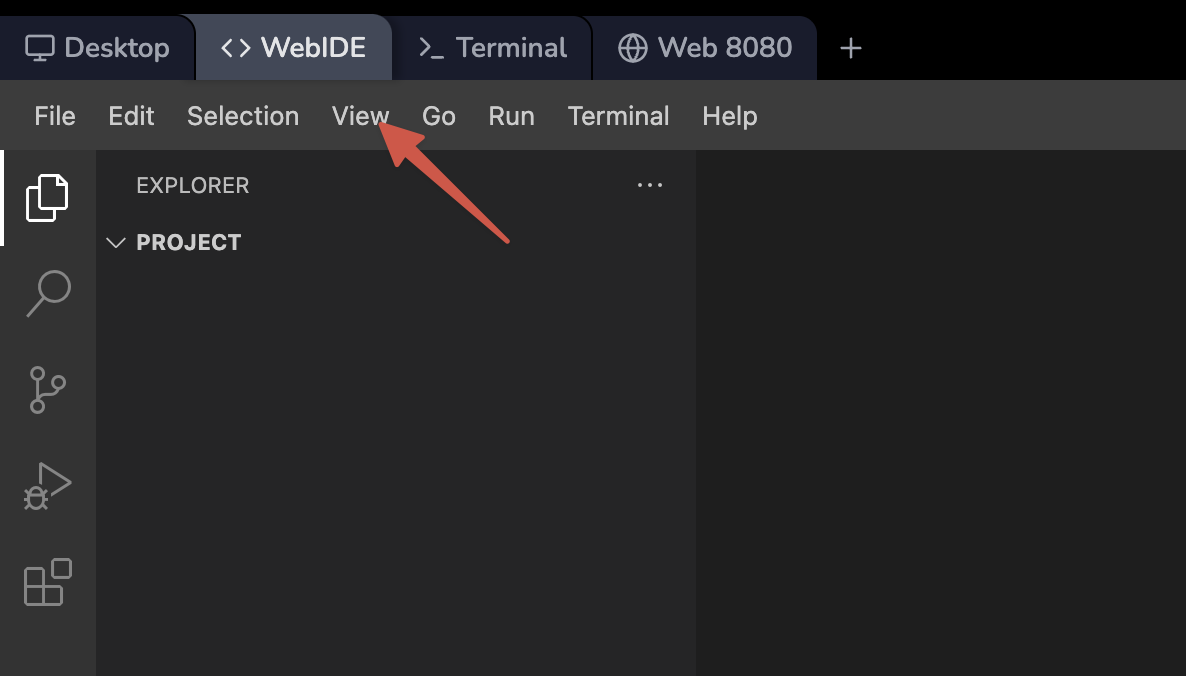
在 ~/project 目录下创建一个名为 contact_manager.py 的新文件:
touch ~/project/contact_manager.py
在 WebIDE 编辑器中打开这个新创建的文件,并添加以下内容:
def add_contact(contacts, name, phone, email):
    contacts[name] = {"phone": phone, "email": email}
    print(f"Contact {name} added successfully.")

def remove_contact(contacts, name):
    if name in contacts:
        del contacts[name]
        print(f"Contact {name} removed successfully.")
    else:
        print(f"Contact {name} not found.")

def display_contacts(contacts):
    if contacts:
        print("\nContact List:")
        for name, info in contacts.items():
            print(f"Name: {name}, Phone: {info['phone']}, Email: {info['email']}")
    else:
        print("Contact list is empty.")

def main():
    contacts = {}
    favorite_contacts = set()

    while True:
        print("\nContact Manager")
        print("1. Add Contact")
        print("2. Remove Contact")
        print("3. Display Contacts")
        print("4. Add to Favorites")
        print("5. Display Favorites")
        print("6. Exit")

        choice = input("Enter your choice (1-6): ")

        if choice == "1":
            name = input("Enter name: ")
            phone = input("Enter phone number: ")
            email = input("Enter email: ")
            add_contact(contacts, name, phone, email)
        elif choice == "2":
            name = input("Enter name to remove: ")
            remove_contact(contacts, name)
        elif choice == "3":
            display_contacts(contacts)
        elif choice == "4":
            name = input("Enter name to add to favorites: ")
            if name in contacts:
                favorite_contacts.add(name)
                print(f"{name} added to favorites.")
            else:
                print(f"Contact {name} not found.")
        elif choice == "5":
            print("\nFavorite Contacts:")
            for name in favorite_contacts:
                print(name)
        elif choice == "6":
            print("Thank you for using Contact Manager. Goodbye!")
            break
        else:
            print("Invalid choice. Please try again.")

if __name__ == "__main__":
    main()
该程序演示了如何使用字典、集合和列表来创建一个简单的联系人管理系统。
保存文件(WebIDE 已启用自动保存),然后在终端中使用以下命令运行它:
python ~/project/contact_manager.py
通过添加联系人、删除联系人、显示联系人列表、将联系人添加到收藏夹以及显示收藏联系人来与程序进行交互。以下是一个交互示例:
Contact Manager
1. Add Contact
2. Remove Contact
3. Display Contacts
4. Add to Favorites
5. Display Favorites
6. Exit
Enter your choice (1-6): 1
Enter name: Alice
Enter phone number: 123-456-7890
Enter email: alice@example.com
Contact Alice added successfully.

Contact Manager
1. Add Contact
2. Remove Contact
3. Display Contacts
4. Add to Favorites
5. Display Favorites
6. Exit
Enter your choice (1-6): 1
Enter name: Bob
Enter phone number: 987-654-3210
Enter email: bob@example.com
Contact Bob added successfully.

Contact Manager
1. Add Contact
2. Remove Contact
3. Display Contacts
4. Add to Favorites
5. Display Favorites
6. Exit
Enter your choice (1-6): 3

Contact List:
Name: Alice, Phone: 123-456-7890, Email: alice@example.com
Name: Bob, Phone: 987-654-3210, Email: bob@example.com

Contact Manager
1. Add Contact
2. Remove Contact
3. Display Contacts
4. Add to Favorites
5. Display Favorites
6. Exit
Enter your choice (1-6): 4
Enter name to add to favorites: Alice
Alice added to favorites.

Contact Manager
1. Add Contact
2. Remove Contact
3. Display Contacts
4. Add to Favorites
5. Display Favorites
6. Exit
Enter your choice (1-6): 5

Favorite Contacts:
Alice

Contact Manager
1. Add Contact
2. Remove Contact
3. Display Contacts
4. Add to Favorites
5. Display Favorites
6. Exit
Enter your choice (1-6): 6
Thank you for using Contact Manager. Goodbye!
这个程序展示了字典(用于存储联系人信息)、集合(用于存储收藏联系人)以及列表(在菜单系统中隐式使用)的实际用途。
总结
在本实验中,你探索了 Python 的基础数据结构:列表、元组、集合和字典。你学习了如何创建、操作和利用这些多功能的数据结构,它们对于在 Python 编程中实现高效的数据管理至关重要。
你首先从列表开始,学习了如何创建、访问和修改有序的项集合。接着你探索了元组,理解了它们的不可变性以及在表示固定元素集合时的应用场景。随后,你深入研究了集合,发现了它们存储唯一元素和执行数学集合运算的能力。最后,你学习了字典,掌握了如何管理键值对以实现高效的数据查找和存储。
为了巩固这些概念,你编写了一个实用的联系人管理程序,该程序综合运用了多种数据结构。这个程序展示了不同的数据结构如何在实际应用中协同工作,体现了 Python 数据结构的强大与灵活性。
这些数据结构构成了许多 Python 程序的骨架,让你能够高效地组织和处理数据。随着你 Python 学习之旅的继续,你会发现这些结构在解决各种编程问题时都具有不可替代的价值。记得在不同的场景中多加练习使用这些数据结构,以加深理解并提高 Python 编程水平。


