



介绍
在这个项目中,我们将学习如何使用 Python 和 Flask 创建一个 URL 短链接生成器。URL 短链接生成器是一种工具,它可以将长 URL 转换为更短、更易于管理的 URL。这对于在社交媒体或电子邮件中分享链接非常有用,同时也能让长 URL 对用户更加友好。
👀 预览
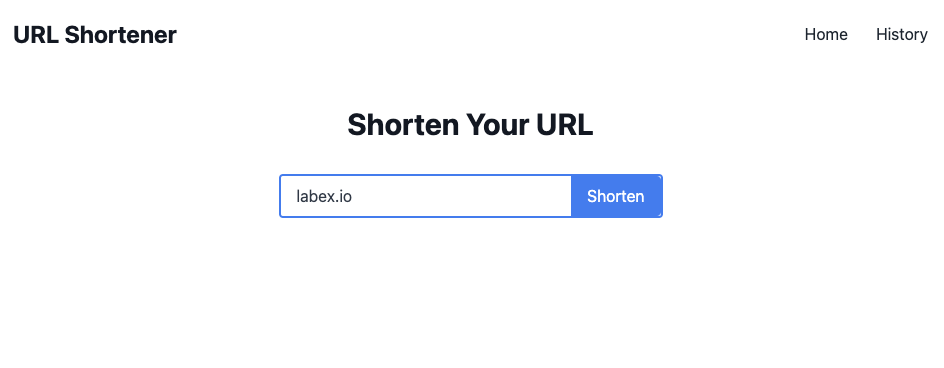
🎯 任务
在这个项目中,你将学习:
- 如何设置项目文件夹并为 URL 短链接生成器创建必要的文件。
- 如何设置 SQLite 数据库来存储原始 URL 及其对应的短链接。
- 如何使用随机字符生成短链接。
- 如何创建一个索引页面,用户可以在该页面提交要缩短的 URL 并显示缩短后的 URL。
- 当用户输入短链接时,如何将其重定向到原始 URL。
- 如何创建一个历史记录页面,以显示所有已缩短的 URL。
- 如何运行项目并在网页浏览器中进行测试。
🏆 成果
完成这个项目后,你将能够:
- 了解如何设置 Flask 项目并创建必要的文件。
- 利用 SQLite 创建数据库并执行查询。
- 为短链接生成随机字符。
- 开发 HTML 模板并扩展基础模板。
- 使用 Flask 处理表单提交并显示动态内容。
- 根据用户输入实现 URL 重定向。
创建项目文件
首先,我们需要创建一个项目文件夹,并在其中添加以下文件:
app.py:此文件将包含我们的 URL 短链接生成器的所有代码。templates/index.html:此文件将包含我们网站索引页面的 HTML 代码。templates/history.html:此文件将包含我们网站历史记录页面的 HTML 代码。templates/base.html:此文件将包含在index.html和history.html中都要使用的基础 HTML 代码。
cd ~/project
touch app.py
mkdir templates
touch templates/index.html templates/history.html templates/base.html
设置数据库
我们的 URL 短链接生成器需要一个数据库来存储原始 URL 及其对应的短链接。我们将使用 SQLite 作为数据库,它是一个轻量级且易于使用的数据库管理系统。
要设置数据库,我们首先需要在 app.py 中导入必要的模块:
## app.py
from flask import Flask, render_template, request, redirect
import string
import random
import sqlite3
接下来,我们需要连接到 SQLite 数据库并创建一个游标对象:
## 连接到 SQLite 数据库
conn = sqlite3.connect("urls.db", check_same_thread=False)
db = conn.cursor()
然后,我们可以在数据库中创建一个表来存储 URL:
## 如果不存在,则创建 urls 表
db.execute(
    """CREATE TABLE IF NOT EXISTS urls
              (id INTEGER PRIMARY KEY AUTOINCREMENT,
               original_url TEXT NOT NULL,
               short_url TEXT NOT NULL,
               created_at TIMESTAMP DEFAULT CURRENT_TIMESTAMP)"""
)
conn.commit()
生成短链接
为了生成短链接,我们将结合使用随机字母和数字。这可以通过 Python 中的 string 和 random 模块来实现。我们将创建一个名为 generate_short_url() 的函数,该函数将返回一个由 6 个字符组成的随机字符串:
def generate_short_url():
    characters = string.ascii_letters + string.digits
    short_url = "".join(random.choice(characters) for _ in range(6))
    return short_url
创建索引页面
我们网站的索引页面将允许用户提交要缩短的 URL。生成缩短后的 URL 后,它也会显示该 URL。此页面的 HTML 代码可在 templates/index.html 中找到。
首先,我们需要扩展 base.html 模板并创建一个表单,供用户提交他们的 URL:
{% extends "base.html" %} {% block content %}
<div class="text-center">
  <h1 class="text-3xl font-bold text-gray-900 mb-8">Shorten Your URL</h1>
  <form action="/" method="POST" class="w-full max-w-sm mx-auto">
    <div
      class="flex items-center border-2 border-blue-500 rounded overflow-hidden"
    >
      <input
        type="text"
        name="original_url"
        placeholder="Enter URL"
        class="appearance-none bg-transparent border-none w-full text-gray-700 py-2 px-4 leading-tight focus:outline-none"
      />
      <button
        type="submit"
        class="bg-blue-500 hover:bg-blue-700 text-white py-2 px-4 rounded-r focus:outline-none"
      >
        Shorten
      </button>
    </div>
  </form>
  {% if short_url %}
  <div class="mt-4">
    <p class="text-lg text-gray-700">
      Short URL:
      <a href="{{ request.host_url }}{{ short_url }}" class="text-blue-500"
        >{{ request.host_url }}{{ short_url }}</a
      >
    </p>
  </div>
  {% endif %}
</div>
{% endblock %}
在 index.html 中,我们有一个表单,其中有一个输入字段供用户输入他们的 URL。表单将提交到同一页面,因此我们将 action 属性设置为 /。我们还将 method 属性设置为 POST,以便表单数据将在请求体中发送。
现在,我们需要添加 templates/base.html:
<!doctype html>
<html>
  <head>
    <title>URL Shortener</title>
    <link
      href="https://cdn.jsdelivr.net/npm/tailwindcss@2.2.19/dist/tailwind.min.css"
      rel="stylesheet"
    />
  </head>
  <body>
    <nav class="p-6 bg-white flex justify-between items-center">
      <a href="/" class="text-2xl font-bold text-gray-900">URL Shortener</a>
      <div>
        <a href="/" class="text-gray-800 mr-6">Home</a>
        <a href="/history" class="text-gray-800">History</a>
      </div>
    </nav>
    <main class="container mx-auto max-w-xl pt-8 min-h-screen">
      {% block content %} {% endblock %}
    </main>
  </body>
</html>
在 base.html 中,我们在页面顶部有一个导航栏,其中包含指向主页和历史记录页面的链接。我们还有一个 main 元素,它将包含每个页面的内容。content 块是每个页面的内容将被插入的地方。
我们还需要在 app.py 中添加必要的代码来处理表单提交并生成缩短后的 URL:
@app.route("/", methods=["GET", "POST"])
def index():
    if request.method == "POST":
        original_url = request.form["original_url"]
        short_url = generate_short_url()

        ## Insert the original and short URLs into the database
        db.execute(
            "INSERT INTO urls (original_url, short_url) VALUES (?,?)",
            (original_url, short_url),
        )
        conn.commit()

        return render_template("index.html", short_url=short_url)

    return render_template("index.html")
在 index() 中,我们检查请求方法是否为 POST。如果是,我们从表单数据中获取原始 URL 并生成一个短 URL。然后,我们将原始 URL 和短 URL 插入数据库,并使用短 URL 渲染 index.html 模板。
重定向到原始 URL
当用户输入一个缩短的 URL 时,我们希望将他们重定向到相应的原始 URL。要实现这一点,我们需要创建一个函数,该函数将根据缩短的 URL 从数据库中检索原始 URL:
@app.route("/<short_url>")
def redirect_to_url(short_url):
    ## 根据短 URL 从数据库中检索原始 URL
    db.execute("SELECT original_url FROM urls WHERE short_url=?", (short_url,))
    result = db.fetchone()

    if result:
        original_url = result[0]
        return redirect(original_url)

    return render_template("index.html")
创建历史记录页面
历史记录页面将显示所有已缩短的 URL,以及它们的原始 URL 和添加日期。此页面的 HTML 代码可在 templates/history.html 中找到。
首先,我们需要扩展 base.html 模板并添加一个表格来显示 URL:
{% extends "base.html" %} {% block content %}
<div class="w-full overflow-x-auto">
  <table class="w-full bg-white rounded shadow overflow-hidden">
    <thead class="bg-gray-200">
      <tr>
        <th
          class="text-left py-3 px-4 uppercase font-semibold text-sm text-gray-700"
        >
          原始 URL
        </th>
        <th
          class="text-left py-3 px-4 uppercase font-semibold text-sm text-gray-700"
        >
          短 URL
        </th>
        <th
          class="text-left py-3 px-4 uppercase font-semibold text-sm text-gray-700"
        >
          日期
        </th>
      </tr>
    </thead>
    <tbody>
      {% for result in results %}
      <tr class="hover:bg-gray-100">
        <td class="border-t">
          <p class="py-3 px-4">{{ result[0] }}</p>
        </td>
        <td class="border-t">
          <a
            href="{{ request.host_url }}{{ result[1] }}"
            class="py-3 px-4 text-blue-500 hover:text-blue-700"
            >{{ request.host_url }}{{ result[1] }}</a
          >
        </td>
        <td class="border-t">
          <p class="py-3 px-4">{{ result[2] }}</p>
        </td>
      </tr>
      {% endfor %}
    </tbody>
  </table>
</div>
{% endblock %}
我们还需要在 app.py 中添加必要的代码,以从数据库中检索 URL 并将它们传递给模板:
@app.route("/history")
def history():
    ## 从数据库中检索所有 URL,并按最新的顺序排列
    db.execute(
        "SELECT original_url, short_url, created_at FROM urls ORDER BY created_at DESC"
    )
    results = db.fetchall()
    return render_template("history.html", results=results)
运行项目
将以下代码添加到 app.py 的底部:
if __name__ == "__main__":
    app.run(debug=True, host="0.0.0.0", port=8080)
一旦安装好模块,我们就可以在终端中执行 python app.py 来运行我们的项目。这将启动 Flask 开发服务器,我们的网站将可以在 http://localhost:8080 访问。
切换到 8080 标签页并刷新页面。你应该会看到以下内容:
总结
在这个项目中,我们学习了如何使用 Python 和 Flask 创建一个 URL 缩短器。我们首先设置了必要的项目文件和数据库,然后创建了生成短 URL 和处理表单提交的函数。我们还学习了如何从数据库中检索和显示 URL。通过这个项目,你现在可以创建自己的 URL 缩短器并根据自己的喜好进行定制。


