



介绍
在这个项目中,我们将指导你使用 Pygame 库创建一个名为「外星人」的简单游戏的过程。这个游戏需要通过击落外星入侵者来进行防御。我们将把开发过程分解为多个步骤,从设置项目文件到运行完成的游戏。
Pygame 是一个用于在 Python 中创建 2D 游戏的流行库。它提供了处理图形、声音和用户输入的功能,对于对游戏开发感兴趣的初学者来说是一个绝佳的选择。
👀 预览
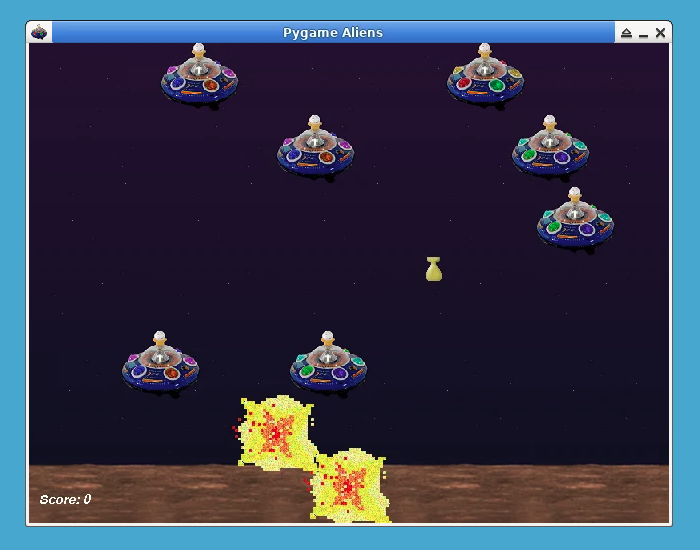
此游戏是根据 Pygame 示例 修改而来。
🎯 任务
在这个项目中,你将学习:
- 如何设置初始项目结构并加载图像和声音等必要资源。
- 如何定义玩家角色和外星入侵者的类。
- 如何创建用于处理爆炸、玩家射击、外星炸弹和游戏得分的其他类。
- 如何初始化游戏、加载资源并设置游戏窗口。
- 如何实现主游戏循环、处理玩家输入、更新游戏实体、处理碰撞并绘制游戏场景。
🏆 成果
完成这个项目后,你将能够:
- 使用 Pygame 库开发 2D 游戏。
- 在 Pygame 中加载和显示图像。
- 处理用户输入并控制玩家移动。
- 使用精灵类创建和更新游戏实体。
- 处理游戏实体之间的碰撞。
- 绘制游戏场景并更新屏幕。
- 在游戏中播放音效和音乐。
- 实现主游戏循环来管理游戏逻辑。
创建项目文件
在这一步中,我们将设置初始项目结构并加载图像和声音等必要资源。
创建一个名为 aliens.py 的新文件,并添加以下代码:
cd ~/project
touch aliens.py
sudo pip install pygame
然后,在你喜欢的文本编辑器中打开该文件,并添加以下代码:
import os
import random
from typing import List

## 导入基本的 pygame 模块
import pygame as pg

## 查看是否可以加载比标准 BMP 更多的格式
if not pg.image.get_extended():
    raise SystemExit("抱歉,需要扩展图像模块")


## 游戏常量
MAX_SHOTS = 2  ## 屏幕上最多的玩家子弹数
ALIEN_ODDS = 22  ## 出现新外星人的几率
BOMB_ODDS = 60  ## 掉落新炸弹的几率
ALIEN_RELOAD = 12  ## 生成新外星人之间的帧数
SCREENRECT = pg.Rect(0, 0, 640, 480)
SCORE = 0

main_dir = os.path.split(os.path.abspath(__file__))[0]


def load_image(file):
    """加载图像,为游戏做好准备"""
    file = os.path.join(main_dir, "data", file)
    try:
        surface = pg.image.load(file)
    except pg.error:
        raise SystemExit(f'无法加载图像 "{file}" {pg.get_error()}')
    return surface.convert()


def load_sound(file):
    """因为 pygame 可以在没有混音器的情况下编译。"""
    if not pg.mixer:
        return None
    file = os.path.join(main_dir, "data", file)
    try:
        sound = pg.mixer.Sound(file)
        return sound
    except pg.error:
        print(f"警告,无法加载 {file}")
    return None
在这一步中,我们导入必要的模块,定义游戏常量,并创建加载图像和音效的函数。我们还设置了主项目目录。
在 def load_image 和 def load_sound 中,我们使用 os.path.join 函数将主项目目录与 data 目录连接起来,我们将在下一步中创建这个目录来存储游戏资源。
定义玩家和外星人的类
现在,我们将为游戏中的角色定义类:Player(玩家)和Alien(外星人)。Player类代表玩家角色,而Alien类代表外星入侵者。
#... (步骤 1 中的代码)

## 定义 Player 类
class Player(pg.sprite.Sprite):
    """将玩家表示为月球越野车类型的车辆。"""

    speed = 10
    bounce = 24
    gun_offset = -11
    images: List[pg.Surface] = []

    def __init__(self, *groups):
        pg.sprite.Sprite.__init__(self, *groups)
        self.image = self.images[0]
        self.rect = self.image.get_rect(midbottom=SCREENRECT.midbottom)
        self.reloading = 0
        self.origtop = self.rect.top
        self.facing = -1

    def move(self, direction):
        if direction:
            self.facing = direction
        self.rect.move_ip(direction * self.speed, 0)
        self.rect = self.rect.clamp(SCREENRECT)
        if direction < 0:
            self.image = self.images[0]
        elif direction > 0:
            self.image = self.images[1]
        self.rect.top = self.origtop - (self.rect.left // self.bounce % 2)

    def gunpos(self):
        pos = self.facing * self.gun_offset + self.rect.centerx
        return pos, self.rect.top
在这里,我们定义了Player类。它包括速度、反弹和枪支偏移等属性。move方法处理玩家的移动。gunpos方法返回玩家枪支的位置。Player类继承自pg.sprite.Sprite类,这是可见游戏对象的基类。
## 定义 Alien 类
class Alien(pg.sprite.Sprite):
    """一艘外星飞船。它会慢慢地在屏幕上向下移动。"""

    speed = 13
    animcycle = 12
    images: List[pg.Surface] = []

    def __init__(self, *groups):
        pg.sprite.Sprite.__init__(self, *groups)
        self.image = self.images[0]
        self.rect = self.image.get_rect()
        self.facing = random.choice((-1, 1)) * Alien.speed
        self.frame = 0
        if self.facing < 0:
            self.rect.right = SCREENRECT.right

    def update(self):
        self.rect.move_ip(self.facing, 0)
        if not SCREENRECT.contains(self.rect):
            self.facing = -self.facing
            self.rect.top = self.rect.bottom + 1
            self.rect = self.rect.clamp(SCREENRECT)
        self.frame = self.frame + 1
        self.image = self.images[self.frame // self.animcycle % 3]
Alien类代表外星入侵者。它有速度和动画相关的属性。外星人左右移动,它们的图像循环播放。update方法处理外星人的移动和动画。Alien类继承自pg.sprite.Sprite类,这是可见游戏对象的基类。
定义其他游戏类
在这一步中,我们将定义与游戏相关的其他类:Explosion(爆炸)、Shot(射击)、Bomb(炸弹)和Score(分数)。这些类负责处理爆炸、玩家射击、外星炸弹以及游戏分数。
#... (步骤 2 中的代码)

## 定义 Explosion 类
class Explosion(pg.sprite.Sprite):
    """一次爆炸。希望是外星人被炸,而不是玩家!"""

    defaultlife = 12
    animcycle = 3
    images: List[pg.Surface] = []

    def __init__(self, actor, *groups):
        pg.sprite.Sprite.__init__(self, *groups)
        self.image = self.images[0]
        self.rect = self.image.get_rect(center=actor.rect.center)
        self.life = self.defaultlife

    def update(self):
        """每次游戏循环都会调用。

        在'defaultlife'时间内显示爆炸画面。
        每进行一次游戏更新(tick),我们就减少'life'的值。

        同时我们为爆炸添加动画效果。
        """
        self.life = self.life - 1
        self.image = self.images[self.life // self.animcycle % 2]
        if self.life <= 0:
            self.kill()

## 定义 Shot 类
class Shot(pg.sprite.Sprite):
    """玩家精灵发射的子弹。"""

    speed = -11
    images: List[pg.Surface] = []

    def __init__(self, pos, *groups):
        pg.sprite.Sprite.__init__(self, *groups)
        self.image = self.images[0]
        self.rect = self.image.get_rect(midbottom=pos)

    def update(self):
        """每次游戏循环都会调用。

        每更新一次,我们就将子弹向上移动。
        """
        self.rect.move_ip(0, self.speed)
        if self.rect.top <= 0:
            self.kill()

## 定义 Bomb 类
class Bomb(pg.sprite.Sprite):
    """外星人掉落的炸弹。"""

    speed = 9
    images: List[pg.Surface] = []

    def __init__(self, alien, explosion_group, *groups):
        pg.sprite.Sprite.__init__(self, *groups)
        self.image = self.images[0]
        self.rect = self.image.get_rect(midbottom=alien.rect.move(0, 5).midbottom)
        self.explosion_group = explosion_group

    def update(self):
        """每次游戏循环都会调用。

        每一帧我们都将精灵的'rect'向下移动。
        当它到达底部时我们:

        - 制造一次爆炸。
        - 移除炸弹。
        """
        self.rect.move_ip(0, self.speed)
        if self.rect.bottom >= 470:
            Explosion(self, self.explosion_group)
            self.kill()

## 定义 Score 类
class Score(pg.sprite.Sprite):
    """用于记录分数。"""

    def __init__(self, *groups):
        pg.sprite.Sprite.__init__(self, *groups)
        self.font = pg.font.Font(None, 20)
        self.font.set_italic(1)
        self.color = "白色"
        self.lastscore = -1
        self.update()
        self.rect = self.image.get_rect().move(10, 450)

    def update(self):
        """只有当分数发生变化时,我们才在 update() 中更新分数。"""
        if SCORE!= self.lastscore:
            self.lastscore = SCORE
            msg = f"分数:{SCORE}"
            self.image = self.font.render(msg, 0, self.color)
这些类处理游戏的不同方面,例如爆炸、射击、炸弹以及显示玩家的分数。
初始化游戏并加载资源
现在,我们将继续初始化游戏并加载图像和声音等所需资源。
#... (步骤 3 中的代码)

def main(winstyle=0):
    ## 初始化 Pygame
    if pg.get_sdl_version()[0] == 2:
        pg.mixer.pre_init(44100, 32, 2, 1024)
    pg.init()
    if pg.mixer and not pg.mixer.get_init():
        print("警告,没有声音")
        pg.mixer = None

    fullscreen = False
    ## 设置显示模式
    winstyle = 0  ## |FULLSCREEN
    bestdepth = pg.display.mode_ok(SCREENRECT.size, winstyle, 32)
    screen = pg.display.set_mode(SCREENRECT.size, winstyle, bestdepth)

    ## 加载图像,分配给精灵类
    ## (在使用类之前,屏幕设置之后进行此操作)
    img = load_image("player1.gif")
    Player.images = [img, pg.transform.flip(img, 1, 0)]
    img = load_image("explosion1.gif")
    Explosion.images = [img, pg.transform.flip(img, 1, 1)]
    Alien.images = [load_image(im) for im in ("alien1.gif", "alien2.gif", "alien3.gif")]
    Bomb.images = [load_image("bomb.gif")]
    Shot.images = [load_image("shot.gif")]
在这里,我们初始化 Pygame,设置游戏窗口,并加载玩家、外星人、爆炸、炸弹和射击的图像。
完成游戏设置与主循环
现在,我们将完成游戏设置并创建主游戏循环,所有游戏逻辑和交互都将在此循环中进行。
#... (步骤 4 中的代码)

def main(winstyle=0):
    #... (之前的代码)

    ## 装饰游戏窗口
    icon = pg.transform.scale(Alien.images[0], (32, 32))
    pg.display.set_icon(icon)
    pg.display.set_caption("Pygame 外星人")
    pg.mouse.set_visible(0)

    ## 创建背景,平铺背景图像
    bgdtile = load_image("background.gif")
    background = pg.Surface(SCREENRECT.size)
    for x in range(0, SCREENRECT.width, bgdtile.get_width()):
        background.blit(bgdtile, (x, 0))
    screen.blit(background, (0, 0))
    pg.display.flip()

    ## 加载音效
    boom_sound = load_sound("boom.wav")
    shoot_sound = load_sound("car_door.wav")
    if pg.mixer:
        music = os.path.join(main_dir, "data", "house_lo.wav")
        pg.mixer.music.load(music)
        pg.mixer.music.play(-1)

    ## 初始化游戏组
    aliens = pg.sprite.Group()
    shots = pg.sprite.Group()
    bombs = pg.sprite.Group()
    all = pg.sprite.RenderUpdates()
    lastalien = pg.sprite.GroupSingle()

    ## 创建一些初始值
    alienreload = ALIEN_RELOAD
    clock = pg.time.Clock()

    ## 初始化我们的起始精灵
    global SCORE
    player = Player(all)
    Alien(
        aliens, all, lastalien
    )  ## 注意,这个(外星人)能“存活”是因为它被添加到了一个精灵组中
    if pg.font:
        all.add(Score(all))

    ## 在玩家存活时运行主循环
    while player.alive():
        ## 获取输入
        for event in pg.event.get():
            if event.type == pg.QUIT:
                return
            if event.type == pg.KEYDOWN and event.key == pg.K_ESCAPE:
                return
            if event.type == pg.KEYDOWN:
                if event.key == pg.K_f:
                    if not fullscreen:
                        print("切换到全屏")
                        screen_backup = screen.copy()
                        screen = pg.display.set_mode(
                            SCREENRECT.size, winstyle | pg.FULLSCREEN, bestdepth
                        )
                        screen.blit(screen_backup, (0, 0))
                    else:
                        print("切换到窗口模式")
                        screen_backup = screen.copy()
                        screen = pg.display.set_mode(
                            SCREENRECT.size, winstyle, bestdepth
                        )
                        screen.blit(screen_backup, (0, 0))
                    pg.display.flip()
                    fullscreen = not fullscreen

        keystate = pg.key.get_pressed()

        ## 清除/擦除上一次绘制的精灵
        all.clear(screen, background)

        ## 更新所有精灵
        all.update()

        ## 处理玩家输入
        direction = keystate[pg.K_RIGHT] - keystate[pg.K_LEFT]
        player.move(direction)
        firing = keystate[pg.K_SPACE]
        if not player.reloading and firing and len(shots) < MAX_SHOTS:
            Shot(player.gunpos(), shots, all)
            if pg.mixer and shoot_sound is not None:
                shoot_sound.play()
        player.reloading = firing

        ## 创建新的外星人
        if alienreload:
            alienreload = alienreload - 1
        elif not int(random.random() * ALIEN_ODDS):
            Alien(aliens, all, lastalien)
            alienreload = ALIEN_RELOAD

        ## 投放炸弹
        if lastalien and not int(random.random() * BOMB_ODDS):
            Bomb(lastalien.sprite, all, bombs, all)

        ## 检测外星人与玩家之间的碰撞
        for alien in pg.sprite.spritecollide(player, aliens, 1):
            if pg.mixer and boom_sound is not None:
                boom_sound.play()
            Explosion(alien, all)
            Explosion(player, all)
            SCORE = SCORE + 1
            player.kill()

        ## 查看射击是否击中了外星人
        for alien in pg.sprite.groupcollide(aliens, shots, 1, 1).keys():
            if pg.mixer and boom_sound is not None:
                boom_sound.play()
            Explosion(alien, all)
            SCORE = SCORE + 1

        ## 查看外星炸弹是否击中了玩家
        for bomb in pg.sprite.spritecollide(player, bombs, 1):
            if pg.mixer and boom_sound is not None:
                boom_sound.play()
            Explosion(player, all)
            Explosion(bomb, all)
            player.kill()

        ## 绘制场景
        dirty = all.draw(screen)
        pg.display.update(dirty)

        ## 将帧率限制在 40fps。也称为 40HZ 或每秒 40 次。
        clock.tick(40)

    if pg.mixer:
        pg.mixer.music.fadeout(1000)
    pg.time.wait(1000)


## 如果运行此脚本,则调用“main”函数
if __name__ == "__main__":
    main()
    pg.quit()
在主函数中,我们为各种实体初始化游戏组,创建初始值,并实现主游戏循环。游戏逻辑、玩家输入处理、碰撞检测以及游戏场景的绘制都在这个循环中执行。
运行游戏
现在,我们可以通过执行以下命令来运行游戏:
cd ~/project
python aliens.py
运行游戏
现在,你可以通过执行以下命令来运行游戏:
cd ~/project
python aliens.py
总结
在这个项目中,我们将使用 Pygame 构建一个简单的“外星人”游戏的过程分为多个步骤。我们设置了项目文件,定义了玩家和外星人的类,创建了与游戏相关的其他类,并使用资源初始化了游戏。最后,我们实现了主游戏循环来处理游戏逻辑和交互。
在接下来的步骤中,我们将继续为玩家和外星人的类添加功能,处理移动和射击,并更新游戏的视觉元素。


