
简介
欢迎来到本次关于将 Jenkins 与 Git 集成的实验。版本控制管理(SCM)是现代软件开发的基石。将 Jenkins 等持续集成(CI)服务器与 Git 等 SCM 系统集成,是实现构建和测试流程自动化的基础步骤。
在本次实验中,你将学习如何:
- 验证 Jenkins Git 插件是否可用。
- 创建一个链接到本地 Git 仓库的自由风格项目。
- 添加一个构建步骤,以执行来自仓库的脚本。
- 手动运行构建以测试配置。
- 配置 SCM 轮询,以便在新提交时自动触发构建。
本次实验已经准备好了一个 Jenkins 实例和一个小型本地 Git 仓库。你可以通过打开桌面上的 Firefox 浏览器来访问 Jenkins Web 界面。浏览器会自动打开 http://localhost:8080,因此无需手动输入 URL。无需登录。
验证 Git 插件
Jenkins 使用插件来添加集成功能。Git 插件提供了你在作业配置中将要使用的 Git 选项。
- 从桌面界面打开 Firefox 浏览器。浏览器会自动打开
http://localhost:8080,无需手动输入 URL,也无需登录。 - 在 Jenkins 仪表板上,点击右上角的齿轮图标以打开 Manage Jenkins(管理 Jenkins)。
- 点击 Plugins(插件)。
- 选择 Installed plugins(已安装插件)选项卡。
- 在过滤框中输入
git。 - 确认 Git 出现在已安装插件列表中。
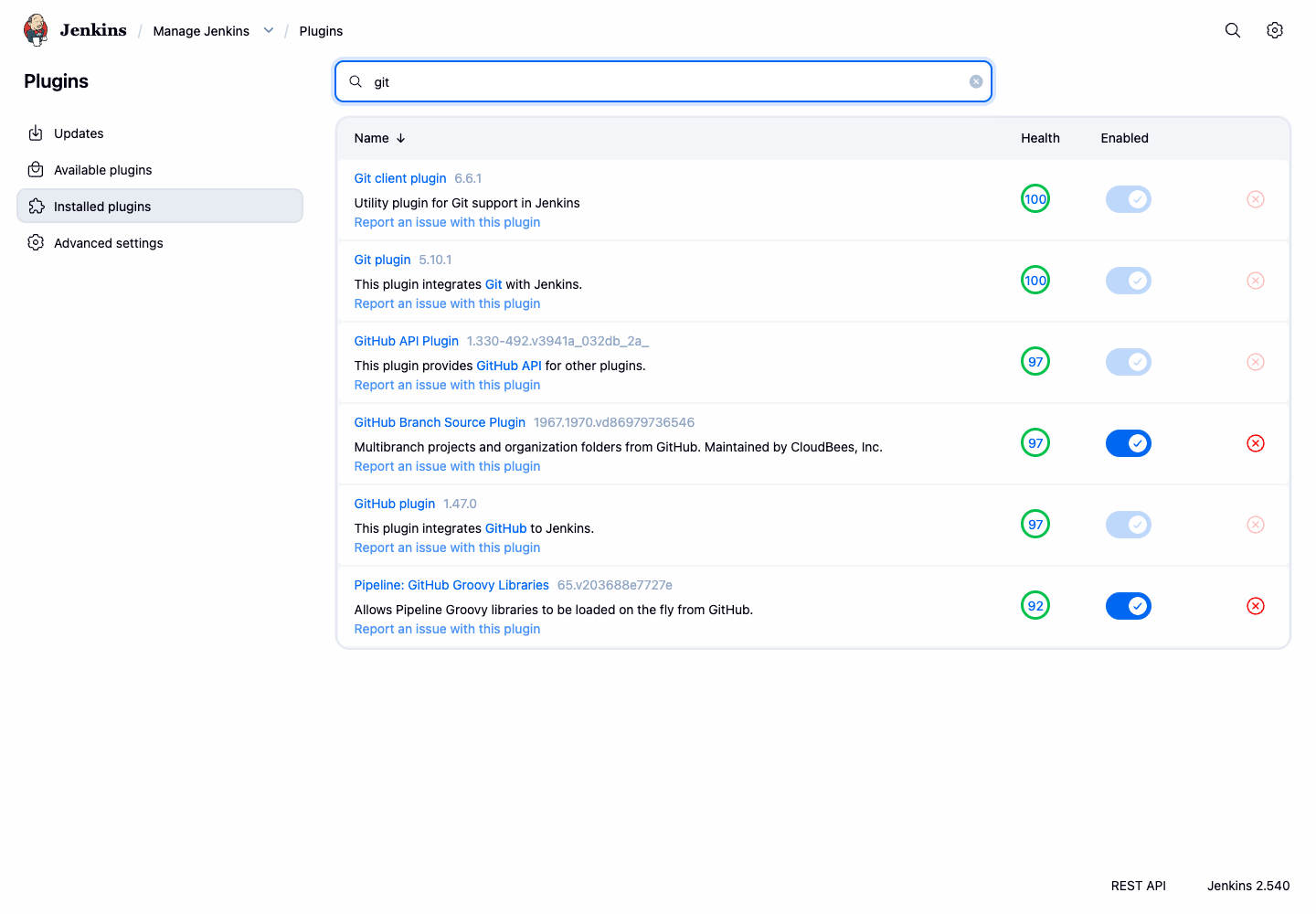
确认 Git 插件后,你就可以创建一个从仓库拉取源代码的项目了。
创建项目并配置 Git SCM
安装 Git 插件后,你现在可以创建一个 Jenkins 项目,并将其配置为从 Jenkins 容器中准备好的本地仓库拉取源代码。
- 点击左上角面包屑导航中的 Dashboard(仪表板)链接,返回 Jenkins 主仪表板。
- 点击左侧边栏中的 New Item(新建任务)。
- 输入
git-integration-project作为项目名称。 - 选择 Freestyle project(自由风格项目)。
- 点击 OK。
这将带你进入项目的配置页面。
- 向下滚动到 Source Code Management(源码管理)部分。
- 选择 Git 选项。如果你没有看到此选项,请确认 Git 插件是否在之前的步骤中正确安装。
- 在 Repository URL(仓库 URL)字段中,输入为本次实验准备的本地仓库 URL:
git://localhost/git-playground.git
- 将 Branch Specifier(分支指定)保留为默认值
*/master。这告诉 Jenkins 使用master分支。 - 点击页面底部的 Save(保存)按钮。
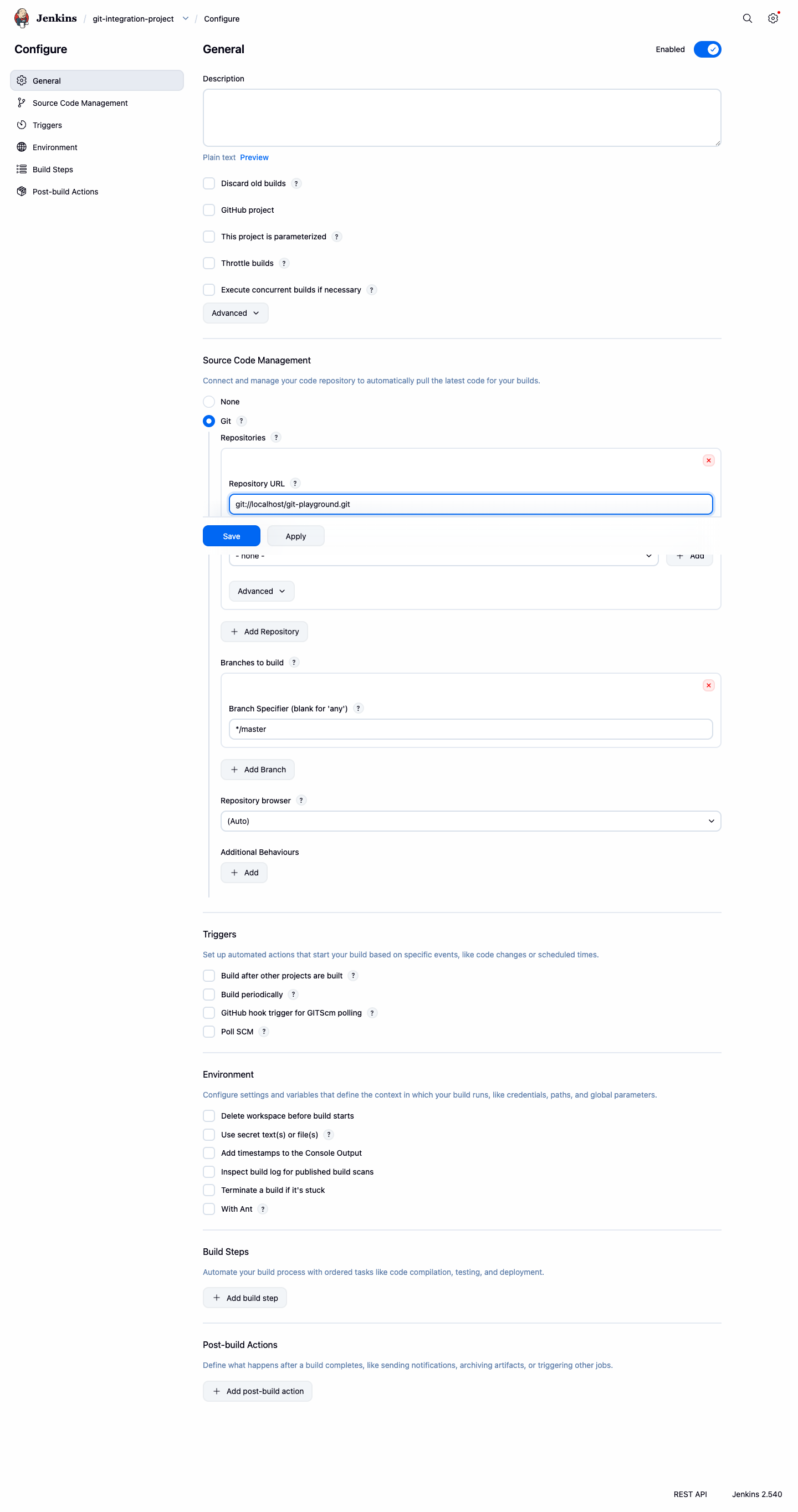
你已经成功创建了一个链接到本地 Git 仓库的 Jenkins 作业。在下一步中,你将定义作业应如何处理检出的代码。
添加构建步骤并运行手动构建
既然 Jenkins 已经知道从哪里获取代码,你需要告诉它如何处理这些代码。你将添加一个包含 shell 命令的构建步骤,然后手动运行构建来测试它。
- 在
git-integration-project的项目页面上,点击左侧边栏中的 Configure(配置)。 - 向下滚动到 Build Steps(构建步骤)部分。
- 点击 Add build step(增加构建步骤)下拉菜单,选择 Execute shell(执行 shell)。
- 在 Command(命令)文本区域中,输入以下构建命令:
echo "Building from the Git repository"
./build.sh
当作业运行时,Jenkins 会首先将 Git 仓库克隆到其工作区,然后从该工作区内执行这些命令。build.sh 脚本来自仓库,因此运行成功证明 Jenkins 在执行 shell 步骤之前已经检出了代码。
- 点击 Save(保存)。
- 你现在回到了项目页面。点击左侧边栏中的 Build Now(立即构建)以启动构建。
一个新的构建将出现在 Build History(构建历史)面板中。等待其完成(状态图标将变为蓝色,表示成功)。
- 点击构建编号(例如
#1)。 - 从构建菜单中点击 Console Output(控制台输出)。
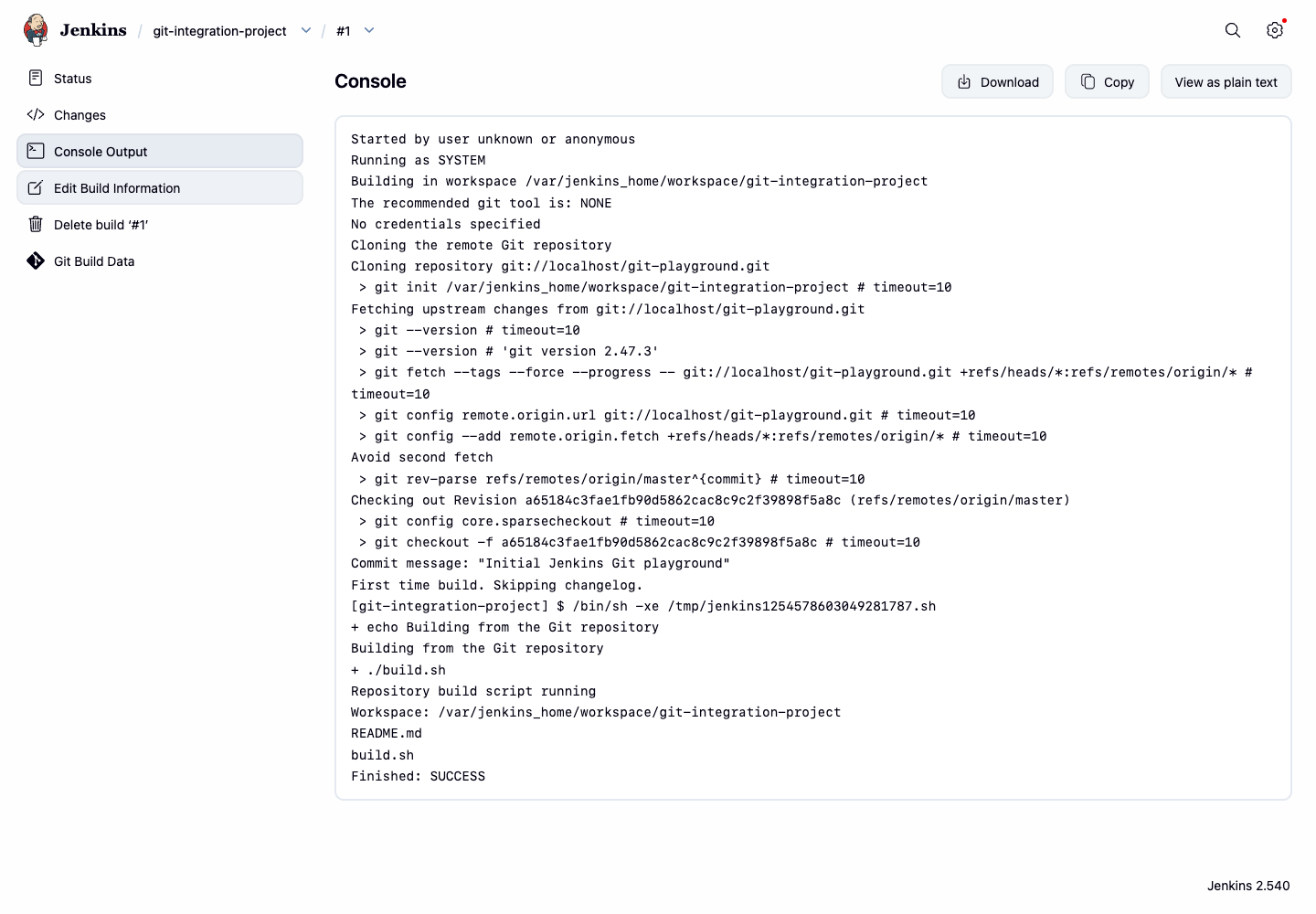
你应该能看到输出,确认 Jenkins 克隆了仓库并成功执行了你的命令。
Started by user admin
Running as SYSTEM
Building in workspace /var/jenkins_home/workspace/git-integration-project
...
[git-integration-project] $ /bin/sh -xe /tmp/jenkins123.sh
+ echo Building from the Git repository
Building from the Git repository
+ ./build.sh
Repository build script running
Workspace: /var/jenkins_home/workspace/git-integration-project
README.md
build.sh
Finished: SUCCESS
通过 SCM 轮询启用自动构建
手动运行构建对于测试很有用,但 CI 的真正威力在于自动化。在这一步中,你将配置 Jenkins 轮询 Git 仓库以检查更改。
- 导航回
git-integration-project的配置页面(项目页面 > Configure)。 - 向下滚动到 Build Triggers(构建触发器)部分。
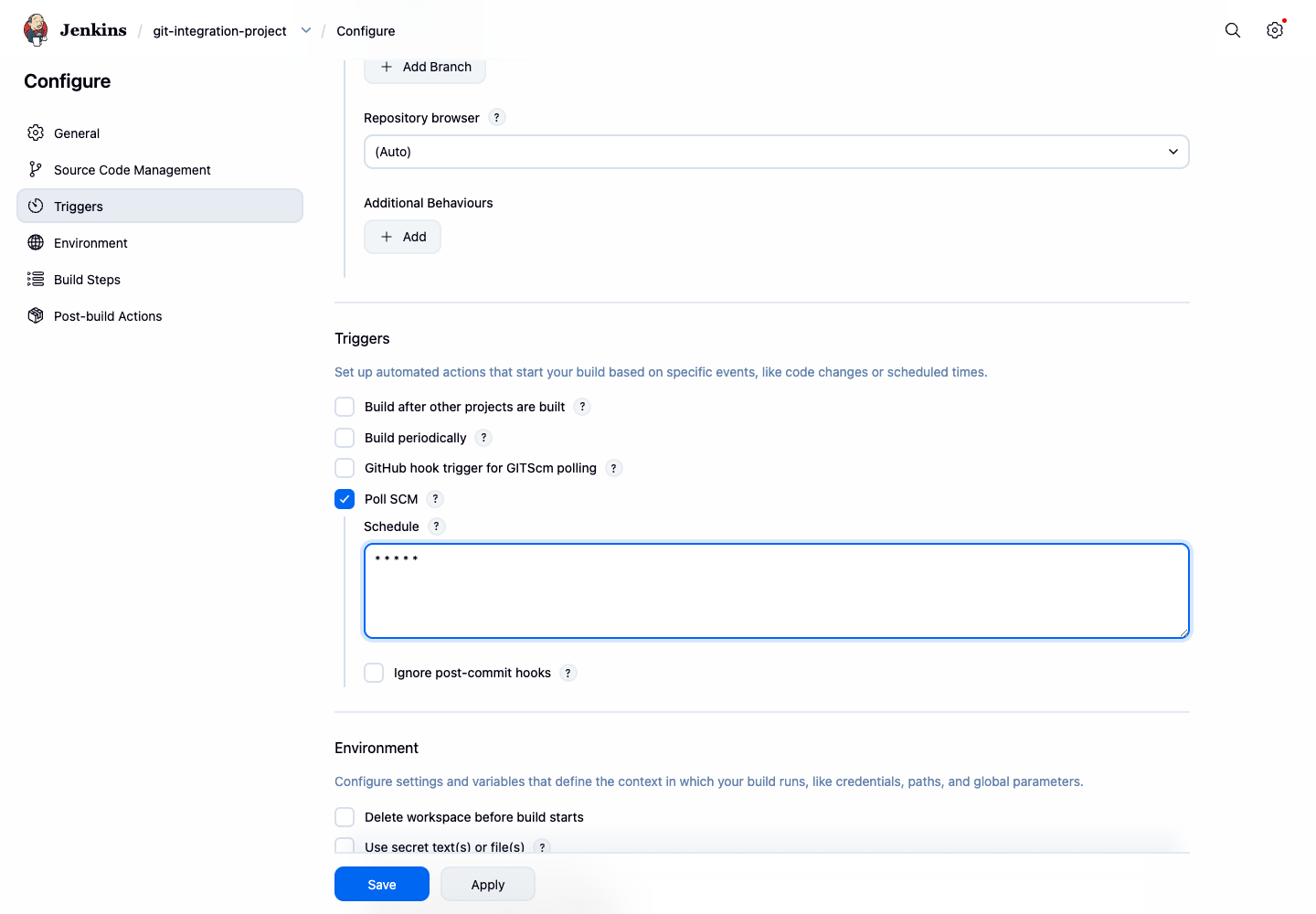
- 勾选 Poll SCM(轮询 SCM)旁边的复选框。
- 将出现一个 Schedule(日程表)文本框。它使用 cron 语法来定义 Jenkins 检查仓库更改的频率。要每分钟轮询一次,请输入以下内容:
* * * * *
- 点击 Save(保存)。
该计划将随作业配置一起保存。Jenkins 现在将每分钟检查一次配置的仓库,并在检测到新提交时启动新的构建。
- 返回 Jenkins UI 并进入
git-integration-project页面。 - 在左侧边栏中,你会看到一个名为 Git Polling Log(Git 轮询日志)的新选项。点击它。
- 此页面显示 Jenkins 至少运行一个轮询周期后的轮询活动。第一个条目出现可能需要一分钟。你应该会看到类似以下的条目:
Started on ...
Using strategy: Default
[poll] Last Built Revision: Revision ...
The recommended git tool is: NONE
No credentials specified
 > git --version ## timeout=10
 > git ls-remote -h -- git://localhost/git-playground.git ## timeout=10
...
No changes
这表明 Jenkins 已配置为自动轮询仓库。在实际项目中,仓库通常托管在 Git 服务器上,当出现新提交时,Jenkins 就会进行构建。
总结
在本次实验中,你获得了 CI 流水线中最关键的集成之一的实践经验:将 Jenkins 连接到 Git 版本控制仓库。
你已经成功完成了以下操作:
- 验证了必要的 Git 插件 是否可用,从而启用了 Jenkins 的 Git 集成功能。
- 创建了一个 自由风格项目,并将其配置为从 Git 仓库检出代码。
- 定义了一个 构建步骤,以执行来自检出代码的 shell 脚本。
- 通过运行 手动构建 验证了设置。
- 使用 Poll SCM 设置了自动构建触发器,使 Jenkins 能够自动检测并构建新的提交。
这些技能是实现开发工作流自动化的基础,也是使用 Jenkins 构建稳健高效的 CI/CD 流水线的第一步。