介绍
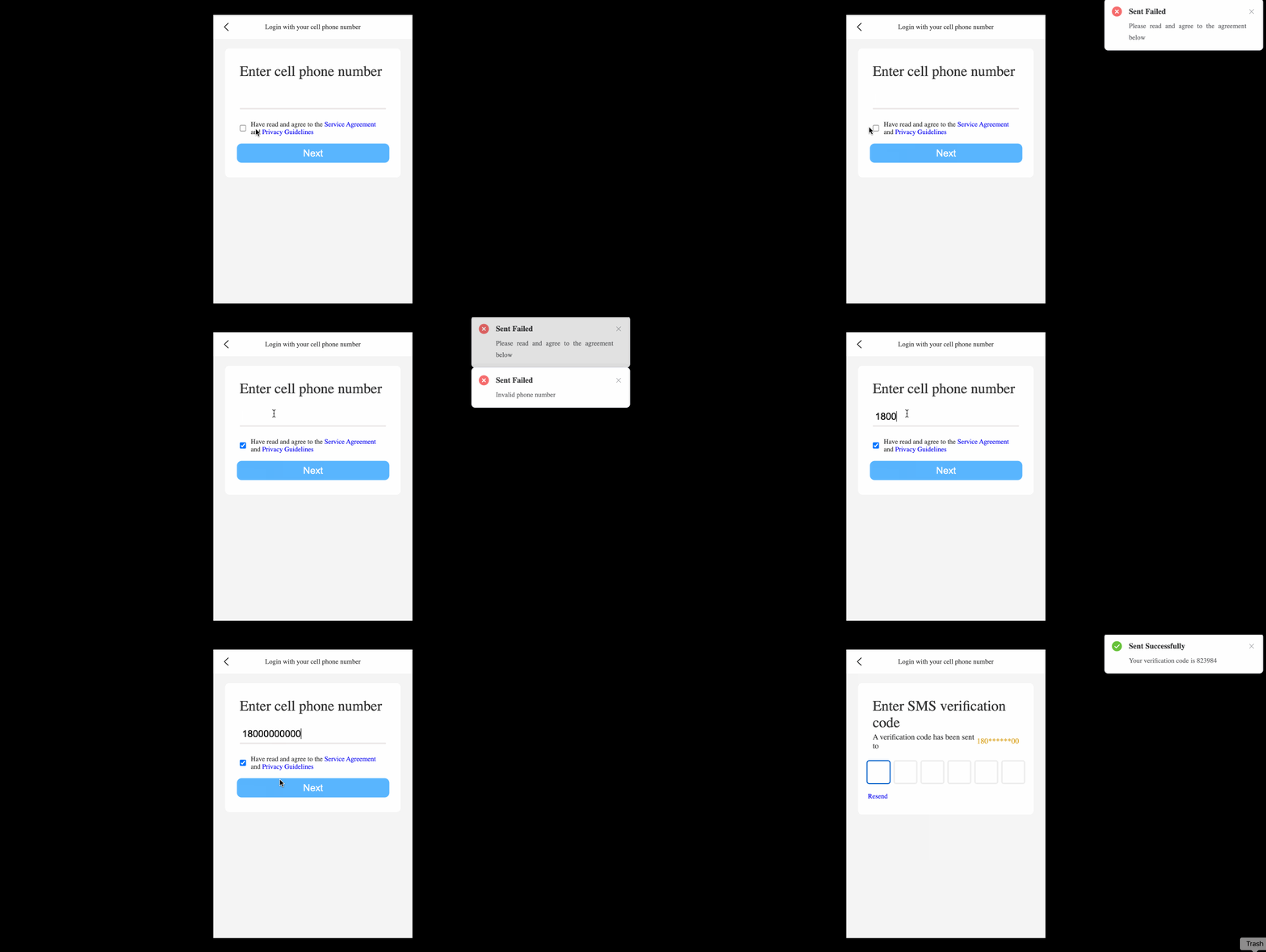
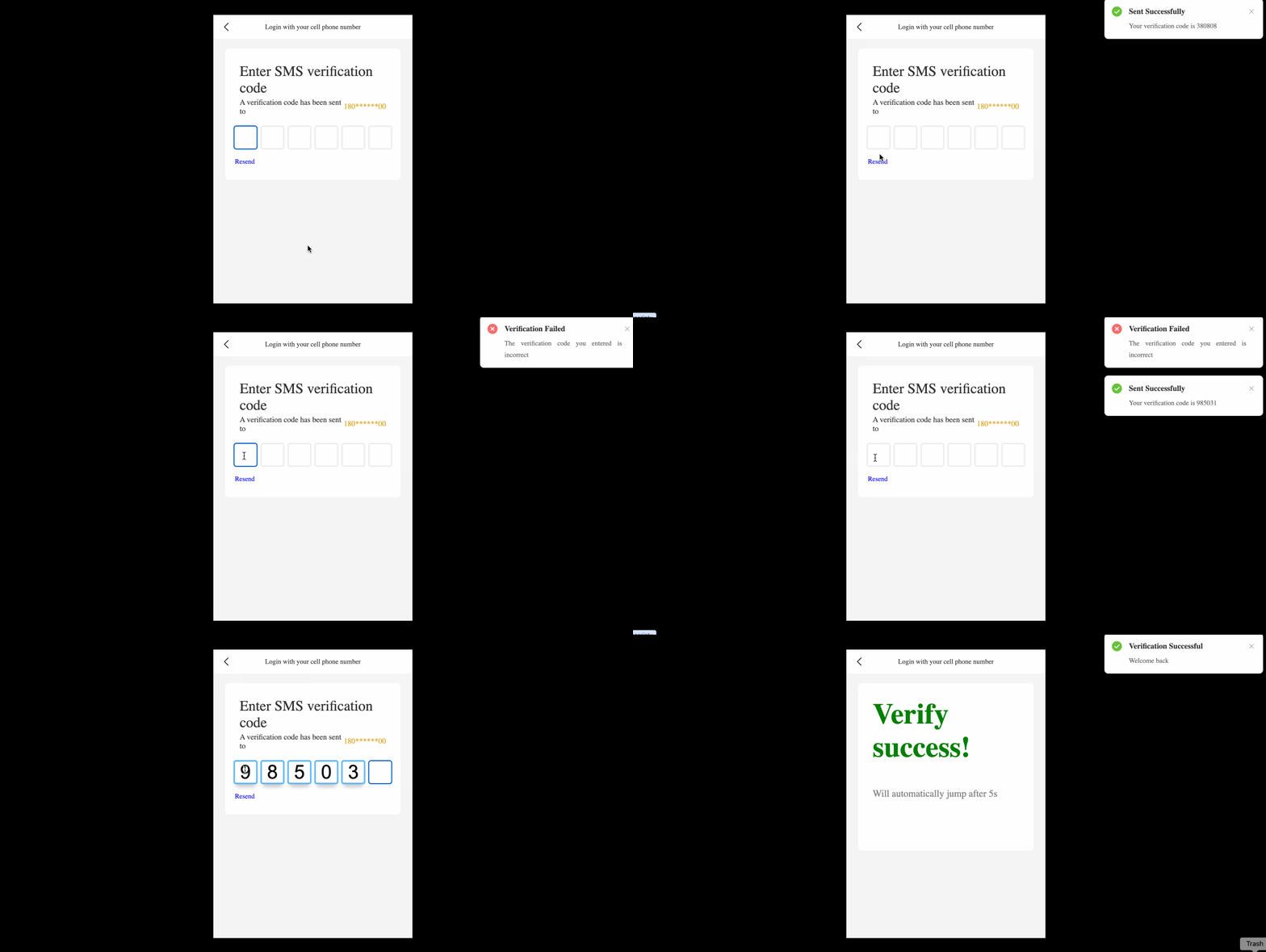
在这个项目中,你将学习如何使用手机号码验证码来实现账户验证功能。如今,这个功能在许多平台上都很常用,以便在用户登录时为其提供额外的安全保障和便利。
👀 预览
🎯 任务
在这个项目中,你将学习:
- 如何实现发送验证码的功能
- 如何实现验证输入验证码的功能
- 如何理解 Element Plus 中
Notification组件的用法
🏆 成果
完成这个项目后,你将能够:
- 处理用户输入和验证
- 生成和管理动态验证码
- 使用
Notification组件显示成功和错误消息 - 使用 Vue.js 和 Pinia 实现组件切换和状态管理
设置项目结构
在这一步中,你将学习如何设置项目结构。请按照以下步骤完成此操作:
打开此项目的项目文件夹。目录结构如下:
├── css
│   ├── element-plus@2.3.7
│   │   ├── index.css
│   │   └── index.full.js
│   └── index.css
├── images
│   └── arrow.png
├── index.html
└── js
    ├── index.mjs
    ├── pinia.esm-browser.js
    ├── vue3.global.js
    └── vue.esm-browser.prod.js
其中:
css是用于存储页面引用样式的文件夹。images是用于存储页面引用图像的文件夹。js是用于存储页面引用 JavaScript 文件的文件夹。index.html是需要完成的文件。
点击 WebIDE 右下角的 Go Live 按钮来运行项目。
接下来,在 VM 顶部打开“Web 8080”并手动刷新,你将看到页面。
提供变量和函数
在这一步中,我们获取后续步骤所需的变量和函数。
- 打开提供的项目中的
index.html文件。 - 找到
const { createApp, reactive, toRefs } = Vue;并将其添加为以下代码以供后续使用。
const { createApp, reactive, toRefs, provide, inject, ref, watch } = Vue;
- 找到第一个
// TODO并添加以下代码:
const app = createApp({
  setup() {
    let data = reactive({
      showName: "phone"
    });
    // TODO
    const code = ref([]);
    const phoneVal = ref("");
    const createCode = function () {
      let res = "";
      function* _create() {
        let count = 0;
        while (++count <= 6) {
          yield Math.floor(Math.random() * 10);
        }
      }
      for (const iterator of _create()) {
        res += iterator;
      }
      return res;
    };
    const handlePhone = (num) => {
      let res = "";
      for (let idx in num) {
        if (idx > 2 && idx < num.length - 2) {
          res += "*";
        } else {
          res += num[idx];
        }
      }
      return res;
    };
    provide("code", code);
    provide("phoneVal", phoneVal);
    provide("createCode", createCode);
    provide("data", data);
    provide("handlePhone", handlePhone);
    return {
      ...toRefs(data)
    };
  }
});
在上述代码中,createCode() 函数用于创建六位验证码,handlePhone() 函数用于简单地对电话号码进行加密。
实现发送验证码功能
在这一步中,你将学习如何实现发送验证码的功能。请按照以下步骤完成此操作:
- 打开提供的项目中的
index.html文件。 - 为
<template id="phone">部分添加绑定事件:
<!-- phone -->
<template id="phone">
  <div>
    <ul class="phone">
      <span>输入手机号码</span>
      <li>
        <input type="text" v-model="phoneVal" autofocus id="numberInput" />
      </li>
      <li>
        <input type="checkbox" v-model="isSure" name="" id="checkbox" />
        <span
          >已阅读并同意
          <a href="javascript:;">服务协议</a>
          和
          <a href="javascript:;">隐私政策</a>
        </span>
      </li>
      <button id="btn" @click="nextStep">下一步</button>
    </ul>
  </div>
</template>
<!-- phone -->
- 在
phone组件的setup()函数中,注入必要的变量和函数:
app.component("phone", {
  template: "#phone",
  setup() {
    // TODO
    let isSure = ref("");
    let phoneVal = inject("phoneVal");
    let code = inject("code");
    let createCode = inject("createCode");
    let data = inject("data");
    return {};
  }
});
- 实现
verifyPhone()函数以检查手机号码的有效性:
function verifyPhone(num) {
  if (num.length != 11) return false;
  return num[0] == 1 && num[1] == 8;
}
- 实现
nextStep()函数以处理“下一步”按钮的点击事件,phone组件的所有代码如下:
app.component("phone", {
  template: "#phone",
  setup() {
    // TODO
    let isSure = ref("");
    let phoneVal = inject("phoneVal");
    let code = inject("code");
    let createCode = inject("createCode");
    let data = inject("data");

    function verifyPhone(num) {
      if (num.length != 11) return false;
      return num[0] == 1 && num[1] == 8;
    }

    return {
      isSure,
      phoneVal,
      nextStep() {
        if (!isSure.value)
          return ElNotification({
            title: "发送失败",
            message: "请阅读并同意以下协议",
            type: "error"
          });
        if (!verifyPhone(phoneVal.value))
          return ElNotification({
            title: "发送失败",
            message: "手机号码无效",
            type: "error"
          });
        code.value = createCode();
        ElNotification({
          title: "发送成功",
          message: "你的验证码是 " + code.value,
          type: "success"
        });
        data.showName = "check";
      }
    };
  }
});
在这个函数中,我们首先检查用户是否同意条款和条件。如果不同意,我们显示一个错误通知。然后,我们使用 verifyPhone() 函数检查手机号码的有效性。如果手机号码无效,我们显示一个错误通知。如果两个条件都满足,我们使用 createCode() 函数生成一个随机的 6 位验证码,显示一个成功通知,并将组件切换到 check 组件。
实现验证输入验证码的功能
在这一步中,你将学习如何实现验证输入验证码的功能。请按照以下步骤完成此操作:
- 打开提供的项目中的
index.html文件。 - 为
<template id="check">部分添加绑定事件:
<!-- check -->
<template id="check">
  <ul class="number">
    <span>输入短信验证码</span>
    <li class="hassend">已向 <i>{{handlePhoneVal}}</i> 发送验证码</li>
    <li class="code-container">
      <input type="number" class="code" min="0" max="9" required />
      <input type="number" class="code" min="0" max="9" required />
      <input type="number" class="code" min="0" max="9" required />
      <input type="number" class="code" min="0" max="9" required />
      <input type="number" class="code" min="0" max="9" required />
      <input type="number" class="code" min="0" max="9" required />
    </li>
    <a href="javascript:;" id="resend" @click="resentCode">重新发送</a>
  </ul>
</template>
<!-- check -->
- 在
check组件中,添加必要的变量和函数:
app.component("check", {
  template: "#check",
  setup() {
    // TODO
    let phoneVal = inject("phoneVal"),
      handlePhoneVal = inject("handlePhone")(phoneVal.value),
      data = inject("data"),
      code = inject("code"),
      createCode = inject("createCode"),
      rVal = "";

    return {};
  }
});
- 实现处理验证码输入的逻辑:
setTimeout(() => {
  let oCodeIptList = [...document.getElementsByClassName("code")];

  oCodeIptList[0].focus();

  oCodeIptList.map((item) => {
    item.oninput = function () {
      if (item.value) {
        item?.nextElementSibling && item?.nextElementSibling.focus();
      } else {
        item?.previousElementSibling && item?.previousElementSibling.focus();
      }
      rVal = (oCodeIptList.map((item) => item.value) + "").replaceAll(",", "");
      trackVal(rVal);
    };
  });
  function trackVal(val) {
    if (val.length >= 6) {
      if (val == code.value) {
        ElNotification({
          title: "验证成功",
          message: "欢迎回来",
          type: "success"
        });
        data.showName = "success";
      } else {
        ElNotification({
          title: "验证失败",
          message: "你输入的验证码不正确",
          type: "error"
        });
        [...document.getElementsByClassName("code")].map(
          (item) => (item.value = "")
        );
        [...document.getElementsByClassName("code")][0].focus();
      }
    }
  }
});
在这段代码中,我们首先将焦点设置到第一个验证码输入框。然后,为每个输入框添加一个 oninput 事件处理程序。当用户输入值时,光标会自动跳转到下一个输入框。当用户删除值时,光标会自动跳转到上一个输入框。
我们还实现了 trackVal() 函数来验证输入的验证码。如果输入为 6 位且与生成的验证码匹配,我们会显示一个成功通知并将组件切换到 success 组件。如果输入不正确,我们会清空输入框并显示一个错误通知。
- 实现
resentCode()函数以重新发送验证码,check组件的所有代码如下:
app.component("check", {
  template: "#check",
  setup() {
    // TODO
    let phoneVal = inject("phoneVal"),
      handlePhoneVal = inject("handlePhone")(phoneVal.value),
      data = inject("data"),
      code = inject("code"),
      createCode = inject("createCode"),
      rVal = "";
    setTimeout(() => {
      let oCodeIptList = [...document.getElementsByClassName("code")];

      oCodeIptList[0].focus();

      oCodeIptList.map((item) => {
        item.oninput = function () {
          if (item.value) {
            item?.nextElementSibling && item?.nextElementSibling.focus();
          } else {
            item?.previousElementSibling &&
              item?.previousElementSibling.focus();
          }
          rVal = (oCodeIptList.map((item) => item.value) + "").replaceAll(
            ",",
            ""
          );
          trackVal(rVal);
        };
      });
      function trackVal(val) {
        if (val.length >= 6) {
          if (val == code.value) {
            ElNotification({
              title: "验证成功",
              message: "欢迎回来",
              type: "success"
            });
            data.showName = "success";
          } else {
            ElNotification({
              title: "验证失败",
              message: "你输入的验证码不正确",
              type: "error"
            });
            [...document.getElementsByClassName("code")].map(
              (item) => (item.value = "")
            );
            [...document.getElementsByClassName("code")][0].focus();
          }
        }
      }
    });

    return {
      handlePhoneVal,
      resentCode() {
        code.value = createCode();
        ElNotification({
          title: "发送成功",
          message: "你的验证码是 " + code.value,
          type: "success"
        });
      }
    };
  }
});
此函数会生成一个新的验证码并显示一个成功通知。
大功告成!你现在已经完成了使用手机号码验证码实现账户验证功能的操作。
最终效果如下:
总结
恭喜!你已完成此项目。你可以在 LabEx 中练习更多实验以提升技能。