



介绍
在本实验中,重点关注你网站的主要内容区域。本节展示了“宠物之家”的服务。
这是一个实验(Guided Lab),提供逐步指导来帮助你学习和实践。请仔细按照说明完成每个步骤,获得实际操作经验。根据历史数据,这是一个 初级 级别的实验,完成率为 93%。获得了学习者 98% 的好评率。
关于我们布局
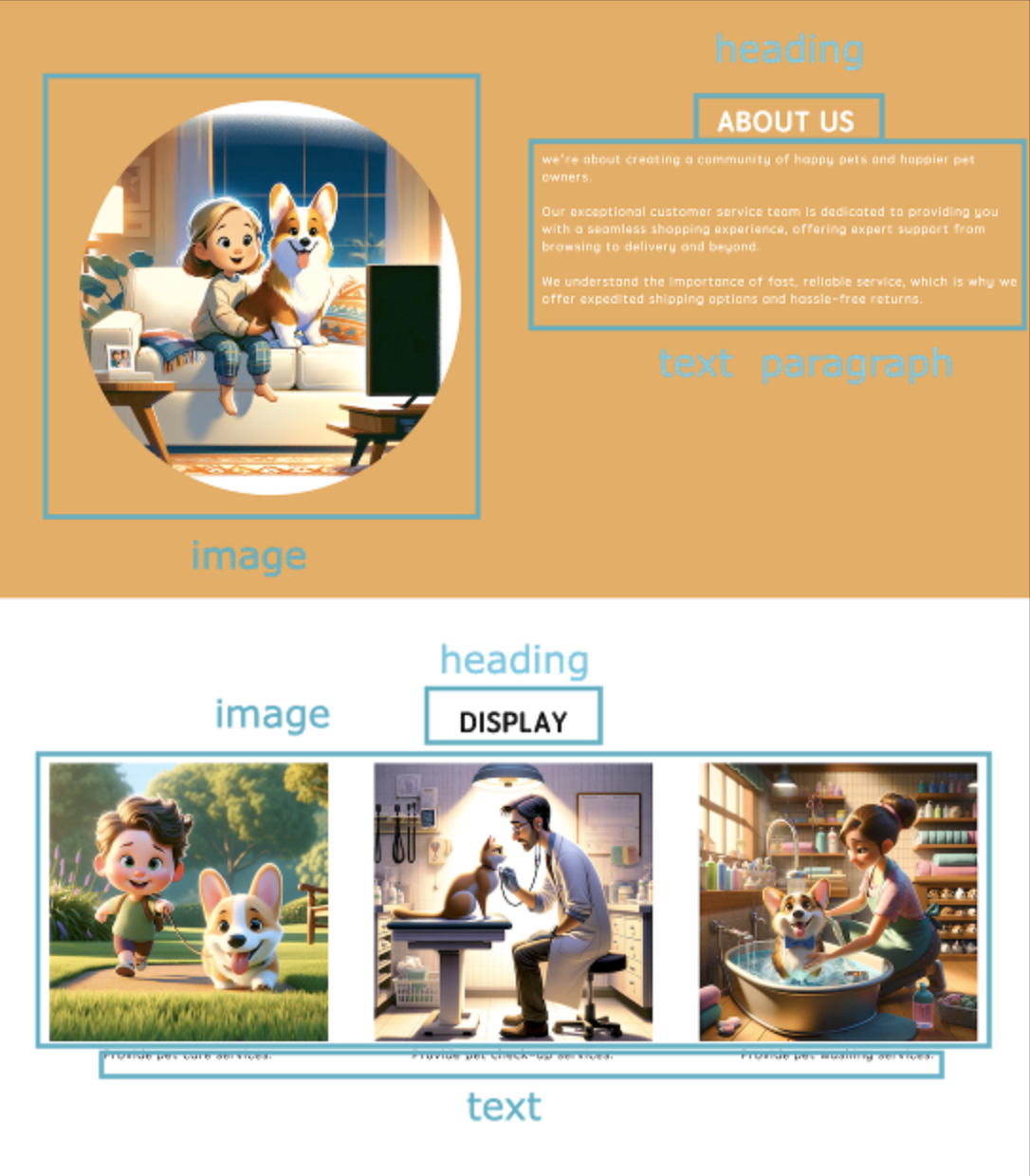
“关于我们”部分可以分为两部分:图片部分和文本内容部分。使用 <img> 标签添加图片,使用 <h2> 标签添加标题,使用 <p> 标签添加文本段落。
<!doctype html>
<html lang="en">
  <head>
    <meta charset="UTF-8" />
    <title>Pet's House</title>
  </head>
  <body>
    <!--Header Content-->
    <header>
      <div class="logo-section">
        <img class="logo" src="images/logo.svg" alt="logo" />
      </div>
      <nav class="navigation-section">
        <ul class="navigation">
          <li>Home</li>
          <li>About Us</li>
          <li>Display</li>
          <li>Contact</li>
        </ul>
      </nav>
    </header>
    <!--Main Content-->
    <main>
      <div class="container">
        <section id="home" class="cover-sect">
          <div class="title-text">
            <h1>Welcome</h1>
            <p>~ This website offers personalised services for pets. ~</p>
          </div>
          <div class="box-feature">
            <img class="cover-image" src="images/cat.jpeg" alt="just a cat" />
          </div>
        </section>
        <section id="about" class="story-sect">
          <div class="section-text">
            <h2>About Us</h2>
            <p>
              we're about creating a community of happy pets and happier pet
              owners. <br /><br />
              Our exceptional customer service team is dedicated to providing
              you with a seamless shopping experience, offering expert support
              from browsing to delivery and beyond. <br /><br />We understand
              the importance of fast, reliable service, which is why we offer
              expedited shipping options and hassle-free returns.
            </p>
          </div>
          <div class="box-feature circle">
            <img src="images/intro.png" />
          </div>
        </section>
      </div>
    </main>
    <!--Footer Content-->
    <footer></footer>
  </body>
</html>
id全局属性定义了一个标识符(ID),该标识符在整个文档中必须是唯一的。它与class类似,都是为元素命名,但区别在于id是唯一的,并且id属性还具有设置书签的功能,我们将在后续实验中用到。<h1>到<h6>HTML 元素表示六个级别的标题。<br>HTML 元素在文本中产生换行(回车)。它对于写诗或地址非常有用,因为这些场景中行的划分非常重要。
展示布局
在展示页面中,主要由图片和文本组成,我们可以将此页面分为三个部分,每个部分都包含图片和文本。
<!doctype html>
<html lang="en">
  <head>
    <meta charset="UTF-8" />
    <title>Pet's House</title>
  </head>
  <body>
    <!--Header Content-->
    <header>
      <div class="logo-section">
        <img class="logo" src="images/logo.svg" alt="logo" />
      </div>
      <nav class="navigation-section">
        <ul class="navigation">
          <li>Home</li>
          <li>About Us</li>
          <li>Display</li>
          <li>Contact</li>
        </ul>
      </nav>
    </header>
    <!--Main Content-->
    <main>
      <div class="container">
        <section id="home" class="cover-sect">
          <div class="title-text">
            <h1>Welcome</h1>
            <p>~ This website offers personalised services for pets. ~</p>
          </div>
          <div class="box-feature">
            <img class="cover-image" src="images/cat.jpeg" alt="just a cat" />
          </div>
        </section>
        <section id="about" class="story-sect">
          <div class="section-text">
            <h2>About Us</h2>
            <p>
              we're about creating a community of happy pets and happier pet
              owners. <br /><br />
              Our exceptional customer service team is dedicated to providing
              you with a seamless shopping experience, offering expert support
              from browsing to delivery and beyond. <br /><br />We understand
              the importance of fast, reliable service, which is why we offer
              expedited shipping options and hassle-free returns.
            </p>
          </div>
          <div class="box-feature circle">
            <img src="images/intro.png" />
          </div>
        </section>
        <section id="display" class="samples">
          <div class="section-text">
            <h2>Display</h2>
          </div>
          <div class="services">
            <div class="service">
              <figure>
                <img src="images/service-1.png" alt="Dog walking services" />
                <figcaption>Provide pet care services.</figcaption>
              </figure>
            </div>

            <div class="service">
              <figure>
                <img src="images/service-2.png" alt="Pet check-up services" />
                <figcaption>Provide pet check-up services.</figcaption>
              </figure>
            </div>

            <div class="service">
              <figure>
                <img src="images/service-3.png" alt="Pet washing services" />
                <figcaption>Provide pet washing services.</figcaption>
              </figure>
            </div>
          </div>
        </section>
      </div>
    </main>
    <!--Footer Content-->
    <footer></footer>
  </body>
</html>
<figure>HTML 元素表示自包含的内容,可能带有可选的标题,标题使用<figcaption>元素指定。图片、标题及其内容作为一个整体被引用。
总结
本实验引导你开发了网站的主要内容部分,展示了“宠物之家”的服务。这一步对于详细说明网站提供的服务至关重要,通过结构化的内容和美学设计提升了网站对访问者的价值。


