



介绍
欢迎来到 HTML 文本格式化实验!在本实践环节中,你将学习如何使用基本的 HTML 标签来构建和格式化网页上的文本。格式正确的文本对于创建可读、可访问且组织良好的网页内容至关重要。
你将使用一个 HTML 文件 index.html,并学习使用以下标签:
<h1>: 用于主标题。<p>: 用于段落。<strong>: 用于赋予文本重要的强调,通常显示为粗体。<em>: 用于强调文本,通常显示为斜体。<br>: 用于插入换行符。
在整个实验过程中,你可以通过保存文件并在工作区中的“Web 8080”标签页中查看,来实时看到你的更改。
为主标题添加 h1 标题标签
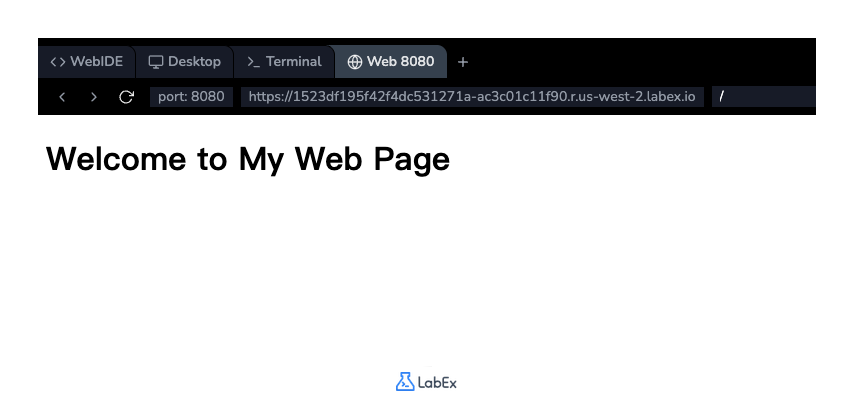
在本步骤中,你将为你的网页添加一个主标题。在 HTML 中,标题通过 <h1> 到 <h6> 标签来定义。<h1> 定义最重要的标题,通常用于页面的主标题。
首先,使用 WebIDE 左侧的文件浏览器打开位于 ~/project 目录下的 index.html 文件。
现在,在你的 index.html 文件的 <body> 部分添加一个 <h1> 标签。将注释 <!-- Content will be added here --> 替换为以下代码行:
<h1>Welcome to My Web Page</h1>
你的 <body> 部分现在应该如下所示:
<body>
  <h1>Welcome to My Web Page</h1>
</body>
添加代码后,保存文件(Ctrl+S 或 Cmd+S)。要查看结果,请点击界面顶部的“Web 8080”标签页。你应该能在页面上看到你的标题。
为段落文本插入 p 标签
在本步骤中,你将在标题下方添加一段文本。<p> 标签用于在 HTML 中定义一个段落。浏览器会自动在段落前后添加一些空白(外边距)。
在 index.html 文件中,在你的 <h1> 标签后添加一个新行,并插入以下 <p> 标签:
<p>
  This is a paragraph of text. It contains some introductory information about
  this page. HTML is great for structuring content, and this paragraph is an
  example of that. It also contains some important information.
</p>
你的 <body> 部分现在应该同时包含标题和新段落:
<body>
  <h1>Welcome to My Web Page</h1>
  <p>
    This is a paragraph of text. It contains some introductory information about
    this page. HTML is great for structuring content, and this paragraph is an
    example of that. It also contains some important information.
  </p>
</body>
保存 index.html 文件并刷新“Web 8080”标签页,即可看到新添加的段落显示在标题下方。
使用 strong 标签加粗文本
在本步骤中,你将学习如何使文本显示为粗体。<strong> 标签用于表示文本具有重要的意义、严肃性或紧急性。浏览器通常会将 <strong> 标签内的内容渲染为粗体。
让我们修改你在上一步添加的段落,以突出显示短语 "important information"。用 <strong> 和 </strong> 标签将这个短语包裹起来。
修改你 index.html 文件中的 <p> 标签,使其如下所示:
<p>
  This is a paragraph of text. It contains some introductory information about
  this page. HTML is great for structuring content, and this paragraph is an
  example of that. It also contains some <strong>important information</strong>.
</p>
你文件的完整 <body> 现在应该如下所示:
<body>
  <h1>Welcome to My Web Page</h1>
  <p>
    This is a paragraph of text. It contains some introductory information about
    this page. HTML is great for structuring content, and this paragraph is an
    example of that. It also contains some
    <strong>important information</strong>.
  </p>
</body>
保存文件并检查“Web 8080”标签页。你会注意到文本 "important information" 现在是粗体显示的。
应用 em 标签实现斜体文本
在本步骤中,你将学习如何强调文本,这通常会以斜体显示。<em> 标签("emphasis" 的缩写)就是为此目的而设计的。它表示被包含的文本应该被强调或突出。
让我们添加一个包含一些强调文本的新段落。在 index.html 中,在现有段落下方添加以下代码:
<p>
  You can also use other tags to format text. For example, the em tag is used
  for <em>emphasized</em> text.
</p>
你的 <body> 部分现在应该如下所示:
<body>
  <h1>Welcome to My Web Page</h1>
  <p>
    This is a paragraph of text. It contains some introductory information about
    this page. HTML is great for structuring content, and this paragraph is an
    example of that. It also contains some
    <strong>important information</strong>.
  </p>
  <p>
    You can also use other tags to format text. For example, the em tag is used
    for <em>emphasized</em> text.
  </p>
</body>
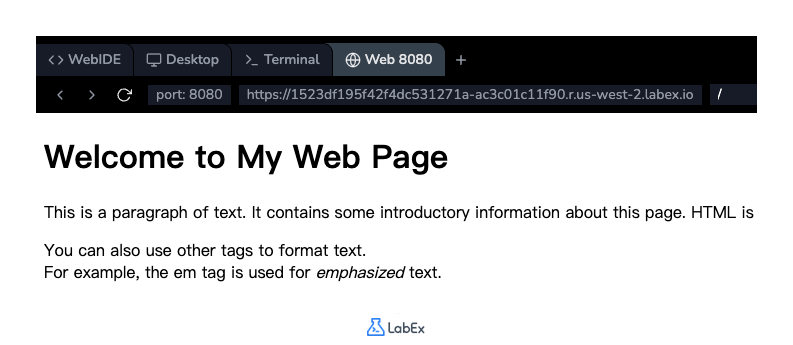
保存文件并查看“Web 8080”标签页。你将看到一个新段落,并且单词 "emphasized" 将会是斜体显示的。
插入 br 标签实现换行
在本步骤中,你将学习如何在文本块中强制换行。<br> 标签用于插入一个单独的换行符。它是一个空标签,意味着它没有闭合标签。
让我们在您创建的第二个段落中间添加一个换行符。当你希望开始新的一行而不开始新段落时,这会很有用。
修改你 index.html 文件中的第二个 <p> 标签,以包含一个 <br> 标签:
<p>
  You can also use other tags to format text. <br />For example, the em tag is
  used for <em>emphasized</em> text.
</p>
你最终的 <body> 内容应该如下所示:
<body>
  <h1>Welcome to My Web Page</h1>
  <p>
    This is a paragraph of text. It contains some introductory information about
    this page. HTML is great for structuring content, and this paragraph is an
    example of that. It also contains some
    <strong>important information</strong>.
  </p>
  <p>
    You can also use other tags to format text. <br />For example, the em tag is
    used for <em>emphasized</em> text.
  </p>
</body>
保存文件并刷新“Web 8080”标签页。你将看到第二个段落现在被分成了两行。
总结
恭喜你完成了本次实验!你已成功掌握了 HTML 文本格式化的基础知识。
在本次实验中,你练习使用了:
<h1>来创建主标题。<p>将内容组织成段落。<strong>为文本赋予重要性(粗体)。<em>来强调文本(斜体)。<br>来插入换行符。
这些标签是创建结构良好、易于阅读的网页内容的基本构建块。请继续练习并探索其他 HTML 标签,以提升你的网页开发技能。


