




介绍
在本实验中,你将学习如何使用 HTML <span> 标签来创建内联文本样式,并增强网页内容的视觉呈现。本实验的重点是理解 span 标签的用途、创建基本的 HTML 文档结构,以及为特定文本片段应用自定义的内联样式。
通过一个逐步演进的实践示例,你将探索如何使用 span 标签来定位和样式化小部分文本,而不会破坏文档的流式布局。在本实验结束时,你将能够使用 HTML span 元素应用自定义文本颜色、背景以及其他内联样式技术,从而在你的网页中提供更具动态性和视觉吸引力的文本格式。我们将在此实验中逐步构建一个 HTML 文件,逐步添加更多功能和样式。
理解 Span 标签的用途
在这一步中,你将学习 HTML 中 <span> 标签的用途和功能。<span> 标签是内联级元素(inline-level elements)。这意味着它们设计用于在文本流中工作,而不像块级元素(如 <p> 或 <div>)那样在前后创建换行。<span> 标签允许你为较大内容块中的一小部分文本应用特定的样式或添加语义。
可以将其想象为用荧光笔标记句子中的某个特定单词。<span> 标签就像那个荧光笔,允许你为那个特定单词应用样式。
它们特别适用于以下场景:
- 应用内联样式:改变特定单词或短语的外观。
- 添加自定义格式:使部分文本加粗、斜体、着色等。
- 高亮特定文本:吸引注意力到内容的重要部分。
- 针对小段文本进行 JavaScript 或 CSS 操作:让你能够精确控制单个文本片段。
让我们创建一个简单的 HTML 文件来演示 <span> 标签的使用。打开 WebIDE,在 ~/project 目录中创建一个名为 styling-example.html 的新文件。这个文件将成为本实验后续内容的画布。
<!doctype html>
<html lang="en">
  <head>
    <meta charset="UTF-8" />
    <title>Span Tag Styling</title>
  </head>
  <body>
    <p>This is a normal line of text.</p>
    <p>This line contains a <span>special</span> word.</p>
  </body>
</html>
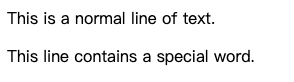
在这个示例中,<span> 标签包裹了单词 "special"。目前它并没有改变外观,但它标记了这个单词,以便我们稍后可以为其添加样式。
注意:了解更多关于如何在 WebIDE 中预览 HTML 文件的内容。花点时间在 WebIDE 中预览
styling-example.html。你会看到两个段落正常显示。<span>标签本身并不会改变文本的外观。
应用基本的内联样式
现在,让我们让单词 "special" 更加突出。在这一步中,你将学习如何使用 style 属性直接将内联样式应用到 <span> 元素。内联样式意味着在 HTML 标签内直接添加 CSS 属性。
在 WebIDE 中打开 styling-example.html 文件,并按如下方式修改 <span> 标签:
<!doctype html>
<html lang="en">
  <head>
    <meta charset="UTF-8" />
    <title>Span Tag Styling</title>
  </head>
  <body>
    <p>This is a normal line of text.</p>
    <p>
      This line contains a <span style="font-weight: bold;">special</span> word.
    </p>
  </body>
</html>
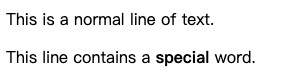
我们为 <span> 标签添加了 style 属性。在 style 属性中,我们写入了 font-weight: bold;。这是一个基本的 CSS 属性,用于使文本加粗。
以下是详细说明:
- **
style=" ... "**:这是 HTML 属性,允许你直接将 CSS 规则应用到此元素。 - **
font-weight: bold;**:这是一个 CSS 声明。font-weight:这是控制文本加粗程度的 CSS 属性。bold:这是我们为font-weight属性分配的值。;:分号很重要!它用于分隔style属性中的不同 CSS 声明。如果你稍后想添加更多样式,需要用分号将它们分隔开。
再次在 WebIDE 中预览 styling-example.html。你现在应该会看到单词 "special" 以加粗形式显示。这展示了 <span> 标签如何允许你为特定文本应用样式。
添加更多内联样式
让我们让样式更加有趣。你可以为单个 <span> 标签应用多个内联样式。在这一步中,我们将为 "special" 单词添加斜体和下划线。
在 WebIDE 中打开 styling-example.html,并修改 <span> 标签以包含更多样式:
<!doctype html>
<html lang="en">
  <head>
    <meta charset="UTF-8" />
    <title>Span Tag Styling</title>
  </head>
  <body>
    <p>This is a normal line of text.</p>
    <p>
      This line contains a
      <span
        style="font-weight: bold; font-style: italic; text-decoration: underline;"
        >special</span
      >
      word.
    </p>
  </body>
</html>
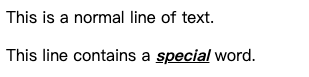
我们在 style 属性中添加了另外两个 CSS 声明,用分号分隔:
- **
font-style: italic;**:这会使文本变为斜体。 - **
text-decoration: underline;**:这为文本添加下划线。
记住每个声明后的分号!这对于浏览器理解一个样式结束和下一个样式开始的位置至关重要。
预览 styling-example.html。现在,"special" 单词应该会以加粗、斜体和带下划线的形式显示。这展示了结合多个内联样式与 <span> 标签的强大功能。
自定义文本颜色和背景
现在让我们改变文本的颜色及其背景。在这一步中,你将学习如何在 <span> 标签的 style 属性中使用 color 和 background-color CSS 属性。
打开 styling-example.html 并再次修改 <span> 标签:
<!doctype html>
<html lang="en">
  <head>
    <meta charset="UTF-8" />
    <title>Span Tag Styling</title>
  </head>
  <body>
    <p>This is a normal line of text.</p>
    <p>
      This line contains a
      <span
        style="font-weight: bold; font-style: italic; text-decoration: underline; color: blue; background-color: lightyellow;"
        >special</span
      >
      word.
    </p>
  </body>
</html>
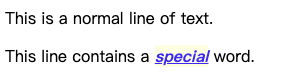
我们添加了两个新的 CSS 声明:
- **
color: blue;**:这将文本颜色设置为蓝色。你可以使用各种颜色名称(如red、green、black等)或十六进制颜色代码(如#FF0000表示红色)。 - **
background-color: lightyellow;**:这将 span 的背景颜色设置为浅黄色。与color类似,你可以使用命名颜色或十六进制代码。
预览 styling-example.html。现在,"special" 单词应该会以加粗、斜体、带下划线、蓝色文本和浅黄色背景的形式显示。这展示了如何使用 <span> 标签和内联样式显著改变特定文本的外观。
一个更实际的示例
让我们看看如何在更实际的场景中使用 <span> 标签。假设你正在创建一个产品描述,你可能希望突出显示某些功能或价格。
打开 styling-example.html 并将其内容替换为以下内容:
<!doctype html>
<html lang="en">
  <head>
    <meta charset="UTF-8" />
    <title>Span Tag Styling</title>
  </head>
  <body>
    <h1>Product Description</h1>
    <p>
      Introducing our new
      <span style="font-weight: bold;">Super Gizmo 3000</span>!
    </p>
    <p>Key Features:</p>
    <ul>
      <li><span style="color: green;">Ultra-fast processing</span></li>
      <li>
        Long-lasting <span style="font-style: italic;">battery life</span>
      </li>
      <li>Available in <span style="color: blue;">multiple colors</span></li>
    </ul>
    <p>Price: <span style="font-size: 1.2em; color: red;">$99.99</span></p>
    <p>
      Limited time offer:
      <span style="background-color: yellow; font-weight: bold; padding: 2px;"
        >Free Shipping!</span
      >
    </p>
  </body>
</html>
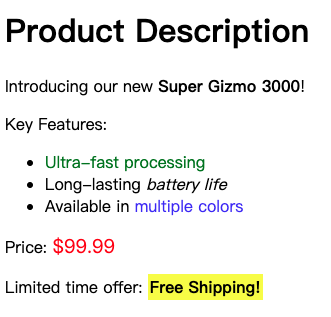
在这个示例中:
- 我们使用
<span>使产品名称加粗。 - 我们使用
<span>为关键功能添加颜色编码。 - 我们使用
<span>使价格变大并变为红色。注意这里的font-size属性,它展示了你也可以控制文本大小!em单位是一个相对单位,使文本大小相对于父元素的字体大小。 - 我们使用
<span>突出显示一个特别优惠,带有背景颜色和内边距。padding在背景颜色内为文本添加了空间。
预览 styling-example.html。你将看到如何使用 <span> 标签为内容添加视觉强调和结构,使其更具吸引力且更易于阅读。
总结
在本实验中,你学习了 HTML <span> 标签的用途和实现,重点在于它们在应用内联文本样式中的作用。你已经了解到,作为内联级元素,<span> 标签允许你定位和样式化特定部分的文本,而不会破坏文档的整体布局。
你练习了创建一个基本的 HTML 文档,并逐步使用 <span> 标签中的 style 属性添加内联样式。你探索了各种 CSS 属性,如 font-weight、font-style、text-decoration、color 和 background-color,学习了如何组合它们以实现不同的视觉效果。最后,你将所学知识应用到一个更实际的产品描述示例中,展示了 <span> 标签如何增强网页内容的呈现效果和可读性。现在,你已经掌握了如何有效地使用 <span> 标签,为你的网页添加动态且视觉吸引力强的文本格式。


