介绍
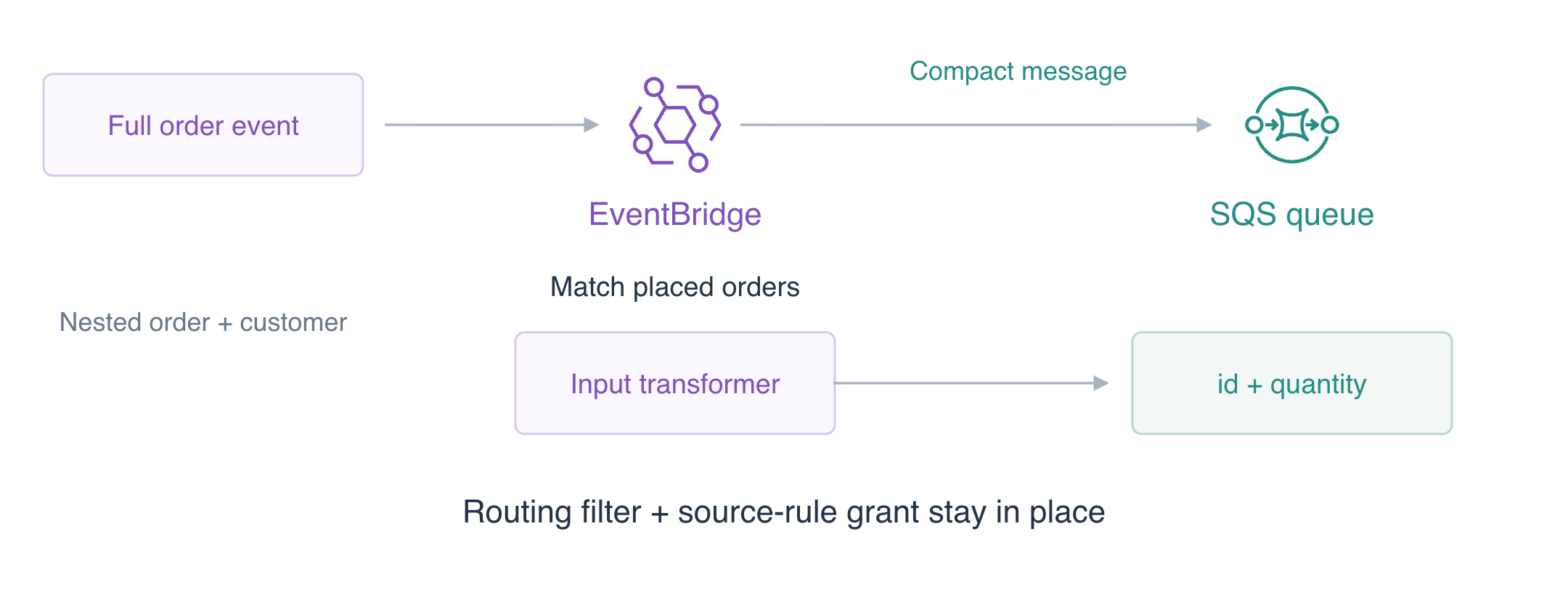
生产者发送完整的订单事件,但消费者只需要订单 ID 和数量。你将把两个事件转换为精简的队列消息,同时保留路由过滤器。
EventBridge 匹配传入事件并将其路由到 SQS,后者是保存消息的队列。CLI 访问已配置,无需个人 AWS 账号或访问密钥。
请先完成 使用 EventBridge 路由订单事件。在本实验的独立 VM 中构建管道;不会复用之前的总线、规则或队列。
认证考点
| 认证 | 考点 | 本实验练习 |
|---|---|---|
| Solutions Architect – Associate (SAA-C03) | 任务 2.1 | 面向消费者消息的 EventBridge 输入转换。 |
| Developer – Associate (DVA-C02) | 任务 1.1 | 面向消费者消息的 EventBridge 输入转换。 |
| CloudOps Engineer – Associate (SOA-C03) | 任务 1.2 | 面向消费者消息的 EventBridge 输入转换。 |
| DevOps Engineer – Professional (DOP-C02) | 任务 4.3 | 基础练习:面向消费者消息的 EventBridge 输入转换。 |
| Data Engineer – Associate (DEA-C01) | 任务 1.2 | 基础练习:面向消费者消息的 EventBridge 输入转换。 |
实验概览
准备独立的路由资源
本步骤中,为履约任务创建自定义总线和空队列。
使用上方的 AWS View,将 CLI 查询与本实验的实际资源和结果对比。保留提供的参考数据。
生产者事件包含路由元数据、客户信息和嵌套订单。队列消费者只需要订单 ID 和数量。输入转换从事件中选择字段并构建目标正文,减少消费者对生产者事件封装的依赖。
这个全新工作环境提供配置好的 CLI 访问和无关的参考数据。它不会复用 EV01 资源。从项目目录开始。shell 赋值保存返回的标识符;--query 选择响应字段,--output text 让该字段可以在下一条命令中复用。
cd /home/labex/project
BUS_NAME=labex-ev02-bus
设置后续操作要使用的 RULE_NAME:
RULE_NAME=labex-ev02-orders
创建练习事件总线:
aws events create-event-bus --name "$BUS_NAME"
将返回值保存到 QUEUE_URL:
QUEUE_URL=$(aws sqs create-queue \
  --queue-name labex-ev02-jobs \
  --query QueueUrl \
  --output text)
echo "$QUEUE_URL"
将返回值保存到 QUEUE_ARN:
QUEUE_ARN=$(aws sqs get-queue-attributes \
  --queue-url "$QUEUE_URL" \
  --attribute-names QueueArn \
  --query Attributes.QueueArn \
  --output text)
echo "$QUEUE_ARN"
总线 ARN 标识事件目的地;队列 URL 用于消息操作,而队列 ARN 标识规则目标。确认初始状态:
aws events list-rules --event-bus-name "$BUS_NAME"
查看队列 $QUEUE_URL 的属性:
aws sqs get-queue-attributes \
  --queue-url "$QUEUE_URL" \
  --attribute-names ApproximateNumberOfMessages ApproximateNumberOfMessagesNotVisible
没有规则或消息。查看上方的 AWS View,检查相同的自定义总线和空队列。运行准备检查。
连接带输入转换器的目标
本步骤中,匹配下单事件、授权规则,并定义精简的消费者载荷。
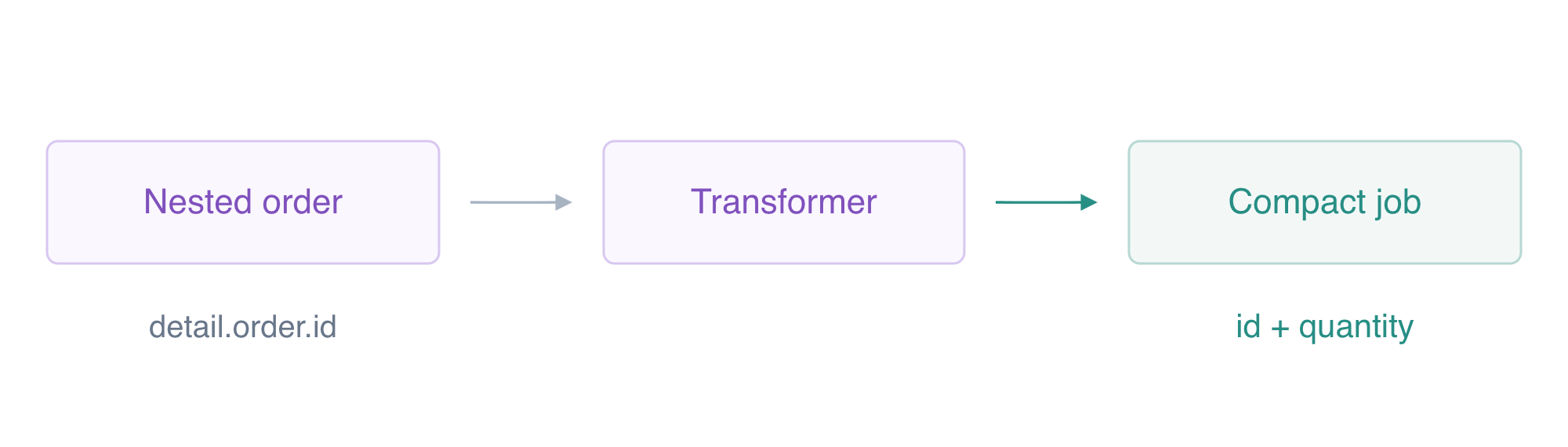
规则模式匹配生产者和事件类别。带引号的 here-document 写入字面 JSON,不进行 shell 展开;file:// 将该文件读入 CLI 请求。
复用 EV01 的路由和来源规则授权,建立这条独立管道。本步骤新增的设计是消费者契约:目标把匹配事件转换为队列消费者需要的字段。过滤器仍决定哪些事件可以到达该目标。
cat > order-pattern.json <<'JSON'
{"source":["labex.orders"],"detail-type":["OrderPlaced"]}
JSON
将返回值保存到 RULE_ARN:
RULE_ARN=$(aws events put-rule \
  --name "$RULE_NAME" \
  --event-bus-name "$BUS_NAME" \
  --event-pattern file://order-pattern.json \
  --state ENABLED \
  --query RuleArn \
  --output text)
echo "$RULE_ARN"
队列需要精确的来源规则授权。使用你的队列和规则 ARN 写入普通策略 JSON。随后,--rawfile 将其编码为字符串值形式的 SQS Policy 属性。
cat > queue-policy.json <<EOF
{
  "Version": "2012-10-17",
  "Statement": [
    {
      "Effect": "Allow",
      "Principal": {
        "Service": "events.amazonaws.com"
      },
      "Action": "sqs:SendMessage",
      "Resource": "$QUEUE_ARN",
      "Condition": {
        "ArnEquals": {
          "aws:SourceArn": "$RULE_ARN"
        }
      }
    }
  ]
}
EOF
将配置写入 queue-attributes.json:
jq -n --rawfile policy queue-policy.json '{Policy:$policy}' > queue-attributes.json
将属性应用到队列 $QUEUE_URL:
aws sqs set-queue-attributes \
  --queue-url "$QUEUE_URL" \
  --attributes file://queue-attributes.json
InputPathsMap 为 JSONPath 选出的字段命名。$ 表示事件根节点;$.detail.order.id 选择嵌套的订单 ID。InputTemplate 使用尖括号占位符构建消息。ID 占位符位于 JSON 字符串引号中;数量是 JSON 数字,没有引号。示例使用简单 ID 和正整数数量。
cat > targets.json <<EOF
[
  {
    "Id": "order-queue",
    "Arn": "$QUEUE_ARN",
    "InputTransformer": {
      "InputPathsMap": {
        "id": "\$.detail.order.id",
        "quantity": "\$.detail.order.quantity"
      },
      "InputTemplate": "{\"id\":\"<id>\",\"quantity\":<quantity>}"
    }
  }
]
EOF
应用事件规则的投递目标:
aws events put-targets \
  --rule "$RULE_NAME" \
  --event-bus-name "$BUS_NAME" \
  --targets file://targets.json
查看事件规则的投递目标:
aws events list-targets-by-rule --rule "$RULE_NAME" --event-bus-name "$BUS_NAME"
FailedEntryCount 为零。列出的目标包含你的队列 ARN,以及两个映射路径和模板。配置成功仍需要实际投递测试。AWS View 显示已启用的规则和转换器;队列仍为空。运行连接检查。
对比两个实际消费者载荷
本步骤中,发布两个不同的下单事件,并检查生成的队列消息。
将事件详情写为普通 JSON 对象。PutEvents 要求每个 Detail 是 JSON 编码字符串;下面简短的 jq 命令只转换这个字段。每个事件还包含履约消费者不需要的模拟客户信息。第三个取消事件用于测试路由过滤器仍然生效。
cat > event-inputs.json <<EOF
[
  {
    "EventBusName": "$BUS_NAME",
    "Source": "labex.orders",
    "DetailType": "OrderPlaced",
    "Detail": {
      "order": {
        "id": "transform-order-a",
        "quantity": 2
      },
      "customer": {
        "email": "synthetic-a@example.test"
      }
    }
  },
  {
    "EventBusName": "$BUS_NAME",
    "Source": "labex.orders",
    "DetailType": "OrderPlaced",
    "Detail": {
      "order": {
        "id": "transform-order-b",
        "quantity": 4
      },
      "customer": {
        "email": "synthetic-b@example.test"
      }
    }
  },
  {
    "EventBusName": "$BUS_NAME",
    "Source": "labex.orders",
    "DetailType": "OrderCancelled",
    "Detail": {
      "order": {
        "id": "cancelled-order",
        "quantity": 9
      }
    }
  }
]
EOF
将配置写入 events.json:
jq 'map(.Detail |= tojson)' event-inputs.json > events.json
发布给出的事件批次:
aws events put-events --entries file://events.json
查看队列 $QUEUE_URL 的属性:
aws sqs get-queue-attributes \
  --queue-url "$QUEUE_URL" \
  --attribute-names ApproximateNumberOfMessages ApproximateNumberOfMessagesNotVisible
三个事件都被接受,但只有两个下单事件匹配。队列有两条可用消息。以零可见性超时领取后,消息在检查结束时立即可用。查询只显示消息 ID 和正文,保持接收句柄私有。
fromjson 让每个 JSON 正文易于阅读,同时保留其 SQS 消息 ID。它只改变显示的输出。
aws sqs receive-message \
  --queue-url "$QUEUE_URL" \
  --max-number-of-messages 10 \
  --visibility-timeout 0 \
  --output json | jq '[.Messages[] | {MessageId, Body: (.Body | fromjson)}]'
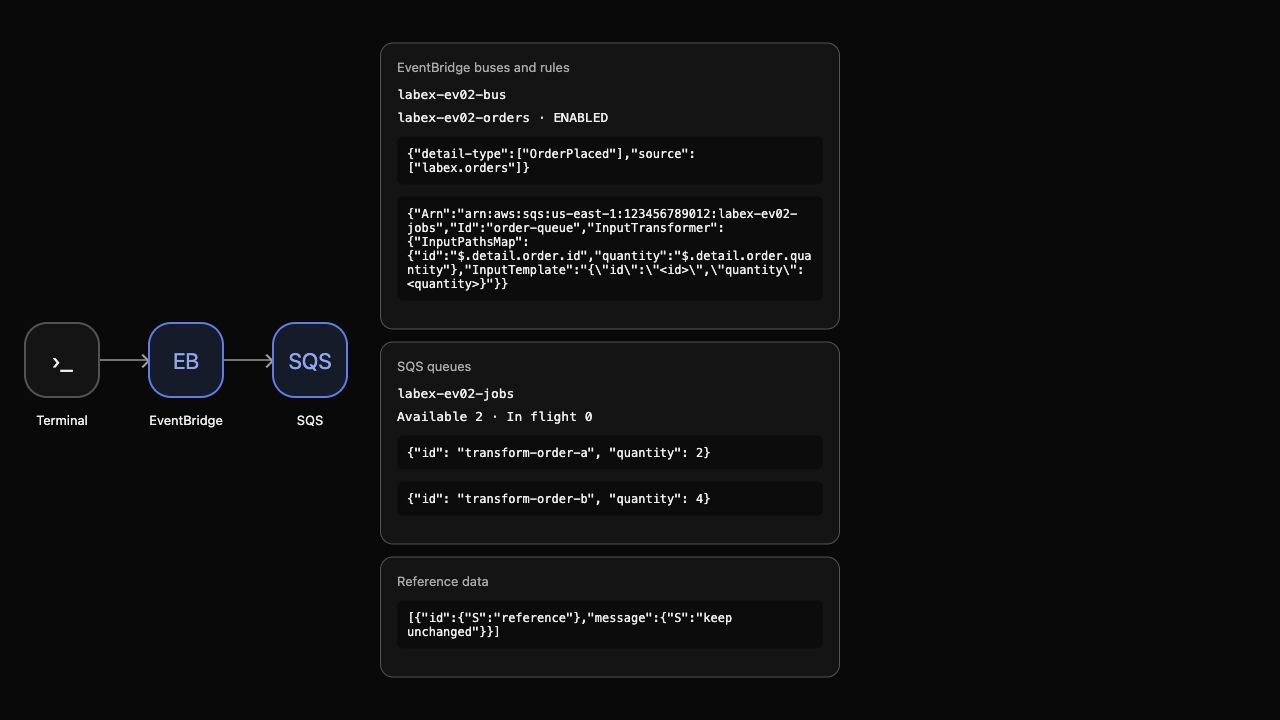
正文为 {"id":"transform-order-a","quantity":2} 和 {"id":"transform-order-b","quantity":4};不考核它们的顺序。它们具有不同的消息 ID,以及从对应事件派生的值。两者都不包含客户邮箱、路由元数据或嵌套的 order 对象。取消的订单不存在。这证明转换与投递成功,不代表履约已完成或消息已确认。
AWS View 在实际精简队列正文旁显示目标映射。
运行载荷检查。
移除临时管道
本步骤中,移除你的路由资源,并保留无关状态。
先移除目标,再删除其规则,然后删除自定义总线和队列。队列只包含用于检查的模拟消息;删除会丢弃它们,并不表示已完成业务处理。
aws events remove-targets \
  --rule "$RULE_NAME" \
  --event-bus-name "$BUS_NAME" \
  --ids order-queue
仅删除练习事件规则:
aws events delete-rule --name "$RULE_NAME" --event-bus-name "$BUS_NAME"
仅删除练习事件总线:
aws events delete-event-bus --name "$BUS_NAME"
删除练习队列 $QUEUE_URL:
aws sqs delete-queue --queue-url "$QUEUE_URL"
成功的原生资源清单查询证明删除结果:
aws events list-event-buses
查看剩余事件规则:
aws events list-rules --event-bus-name default
查看剩余 SQS 队列:
aws sqs list-queues
查看无关的参照记录:
aws dynamodb scan --table-name labex-ev02-reference --query Items
只保留默认总线,没有规则;队列 URL 已不存在。参考项目仍包含 keep unchanged。网络或身份验证错误不能证明删除成功。AWS View 显示空的自定义资源和保留的参考资源。
移除本实验创建的普通文件:
rm -f event-inputs.json order-pattern.json queue-policy.json queue-attributes.json targets.json events.json
结束 VM 之前,运行清理检查。
总结
你将嵌套订单字段映射为精简的 SQS 消费者数据格式,验证了两个实际事件中的不同值,并保留事件过滤与来源规则权限。你移除了临时管道,同时保留参考数据。
接下来是独立的工作流分支,需要先具备其 Lambda–DynamoDB 前置能力;它不依赖这条事件路由管道。
进一步阅读 AWS 官方资料:输入路径与目标载荷模板。