介绍
两名分析员需要相同的报表访问权限。你将管理一份共享策略,将报表职责从 Alice 转交给 Bob,并检查原成员是否失去该访问权限。
请先完成 为报表读取者授予最小权限,掌握身份策略及允许和拒绝的请求。这个全新 VM 提供用于管理的 default,以及用于测试的 alice、bob 和 outsider。使用 /home/labex/project 和 AWS View,比较成员关系与实际读取结果。
认证考点
| 认证 | 考点 | 本实验练习 |
|---|---|---|
| Cloud Practitioner (CLF-C02) | 任务 2.3 | IAM 组成员关系与继承的访问权限。 |
| Solutions Architect – Associate (SAA-C03) | 任务 1.1 | IAM 组成员关系与继承的访问权限。 |
| Developer – Associate (DVA-C02) | 任务 2.1 | IAM 组成员关系与继承的访问权限。 |
| CloudOps Engineer – Associate (SOA-C03) | 任务 4.1 | IAM 组成员关系与继承的访问权限。 |
| Security – Specialty (SCS-C03) | 任务 4.2 | 基础练习:IAM 组成员关系与继承的访问权限。 |
| Data Engineer – Associate (DEA-C01) | 任务 4.1 | 基础练习:IAM 组成员关系与继承的访问权限。 |
| DevOps Engineer – Professional (DOP-C02) | 任务 6.1 | 基础练习:IAM 组成员关系与继承的访问权限。 |
| Solutions Architect – Professional (SAP-C02) | 任务 2.3 | 基础练习:IAM 组成员关系与继承的访问权限。 |
实验概览
创建团队和一份共享策略
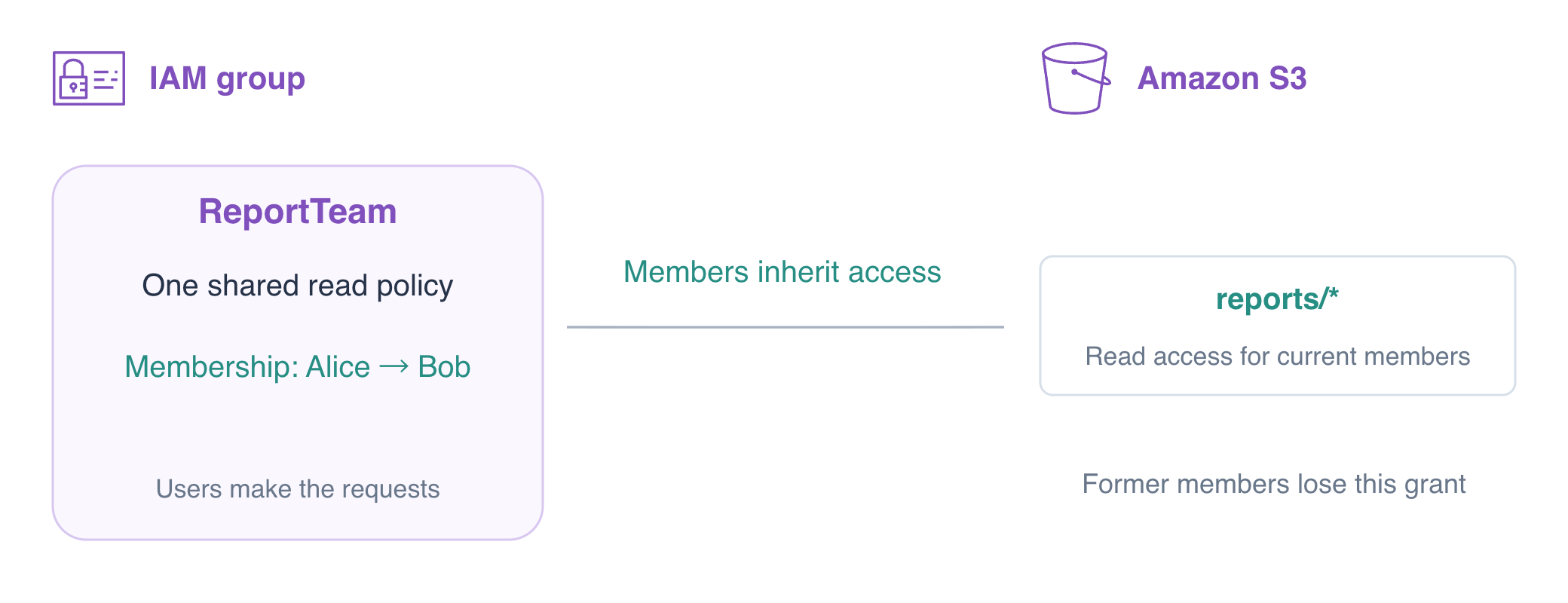
在本步骤中,你将创建空组并附加内联策略。组是权限管理对象,不是用于请求的新身份。先使用 STS 确认操作员和 Alice;ARN 应分别以 user/iam02-operator 和 user/alice 结尾。
报表团队需要你为单个用户配置过的读取权限。将它一次附加到组上,再随着分析员职责交接调整成员。交接时,报表和策略保持不变,变化的是继承授权的用户。
IAM 组(group)将用户组织在一起,让他们继承组权限。组没有凭据,不能自行登录或代入角色。本练习用于实践已有的 IAM 用户管理方式;生产环境中的人员访问通常使用联合身份和临时角色。
cd /home/labex/project
aws sts get-caller-identity --query Arn --output text
aws sts get-caller-identity --profile alice --query Arn --output text
Alice 最初无权读取已有报表。准备工作由操作员负责。授予访问前先测试:
aws s3api get-object --profile alice --bucket labex-iam02-reports --key reports/today.txt before.txt || true
预期为 AccessDenied。|| true 让有意失败的命令在粘贴序列中完成;它不会将连接失败变成权限证据。
创建 ReportTeam。这还不会添加成员或授予权限。
aws iam create-group --group-name ReportTeam
编写策略,只允许对本桶 reports 前缀执行 GetObject。对象 ARN 包含对象键;reports/ 后的通配符不匹配工资数据或另一个桶。匹配的 Allow 授予请求权限,除非有适用的显式 Deny 覆盖它。
cat > team-policy.json <<'JSON'
{"Version":"2012-10-17","Statement":[{"Effect":"Allow","Action":"s3:GetObject","Resource":"arn:aws:s3:::labex-iam02-reports/reports/*"}]}
JSON
put-group-policy 将这份内联策略直接存储在组上。它作用于组成员;仅编辑本地文件没有效果。
aws iam put-group-policy \
  --group-name ReportTeam \
  --policy-name ReportRead \
  --policy-document file://team-policy.json
aws iam get-group --group-name ReportTeam --query 'Users[].UserName'
aws iam get-group-policy \
  --group-name ReportTeam \
  --policy-name ReportRead \
  --query PolicyDocument
成员列表为空。Alice 仍被拒绝,因为没有成员关系将她与策略连接起来。
aws s3api get-object --profile alice --bucket labex-iam02-reports --key reports/today.txt still-denied.txt || true
添加 Alice 并测试权限边界
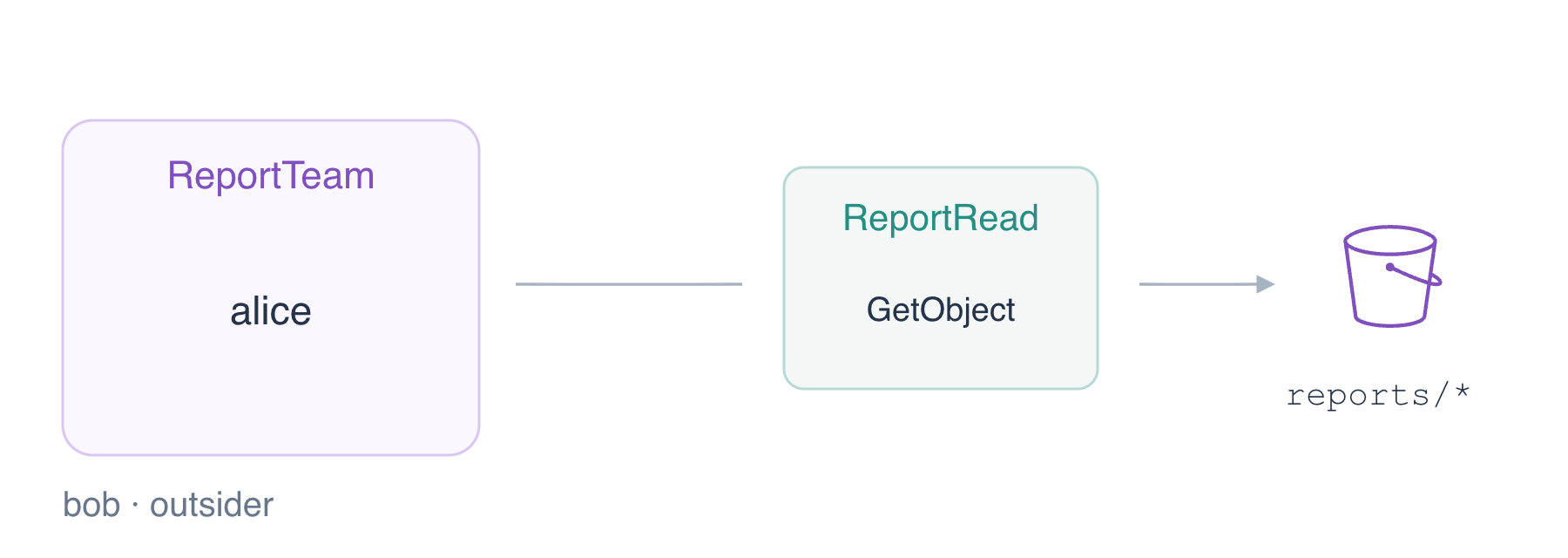
在本步骤中,你将使 Alice 获得组授权,并将她的实际请求与 Bob 和非成员比较。add-user-to-group 改变成员关系,不创建或打印凭据。
aws iam add-user-to-group --group-name ReportTeam --user-name alice
aws iam get-group --group-name ReportTeam --query 'Users[].UserName'
aws iam list-groups-for-user --user-name alice --query 'Groups[].GroupName'
预期 ReportTeam 中有 Alice,Alice 的组列表中有 ReportTeam。现在使用 Alice 的凭据请求报表字节。
aws s3api get-object \
  --profile alice \
  --bucket labex-iam02-reports \
  --key reports/today.txt alice-report.txt
cat alice-report.txt
预期为 Daily orders: 145。Bob 和 outsider 发起的相同报表请求必须失败,因为他们不是组成员。
aws s3api get-object --profile bob --bucket labex-iam02-reports --key reports/today.txt bob-denied.txt || true
aws s3api get-object --profile outsider --bucket labex-iam02-reports --key reports/today.txt outsider-denied.txt || true
Alice 在组的资源范围之外也仍被拒绝。这些已有对象用于诊断授权,而不是对象键缺失。
aws s3api get-object --profile alice --bucket labex-iam02-reports --key private/payroll.txt private-denied.txt || true
aws s3api get-object --profile alice --bucket labex-iam02-reference --key reference.txt reference-denied.txt || true
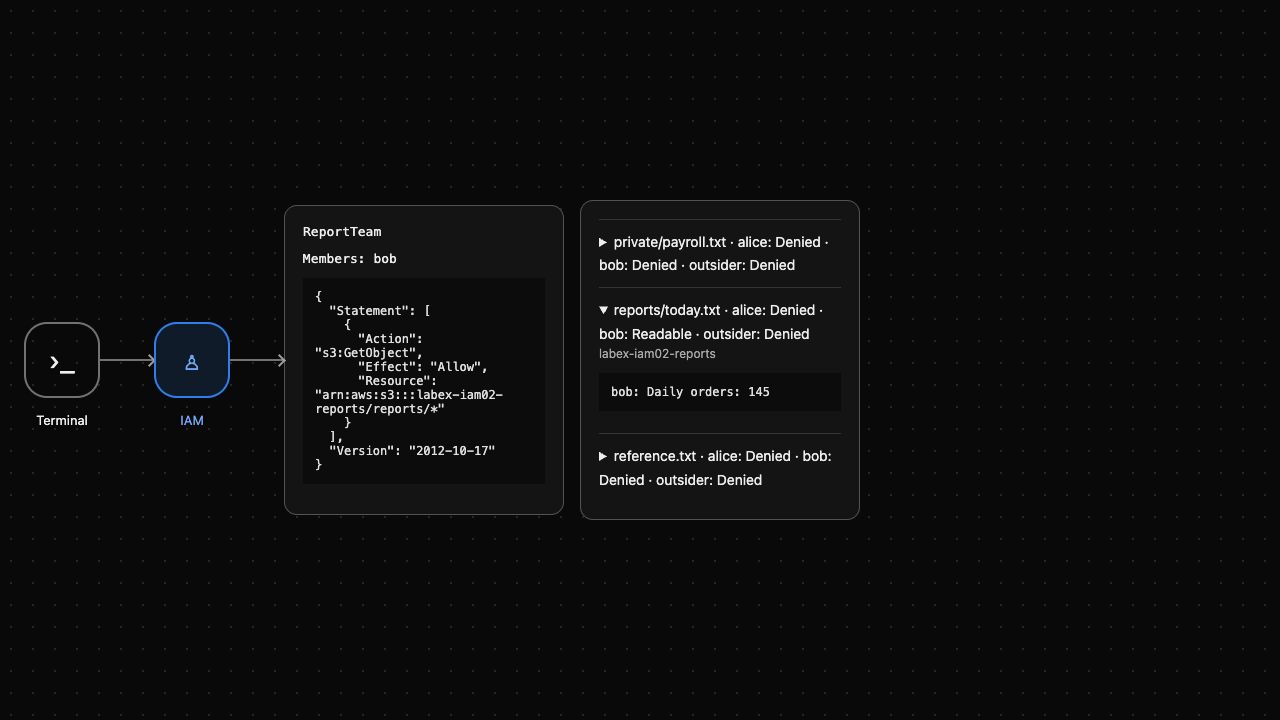
四个反例请求都预期为 AccessDenied。AWS View 显示成员关系,并为每个用户发起实际 GetObject 请求;展开今天的报表,查看 Alice 获得的字节。
转移成员关系并重新检查原有访问
在本步骤中,你将报表职责转交给 Bob,并验证 Alice 失去继承的授权。移除组成员关系会移除从该组继承的权限,但不会撤销用户可能拥有的其他授权;这里已准备好的用户没有其他授权。
先添加 Bob,再移除 Alice。两者都为成员时,共享相同组策略;移除 Alice 后,只有 Bob 应继承它。
aws iam add-user-to-group --group-name ReportTeam --user-name bob
aws iam remove-user-from-group --group-name ReportTeam --user-name alice
aws iam get-group --group-name ReportTeam --query 'Users[].UserName'
预期只有 Bob。以 Bob 身份读取报表,再以 Alice 身份重复相同请求。
aws s3api get-object \
  --profile bob \
  --bucket labex-iam02-reports \
  --key reports/today.txt bob-report.txt
cat bob-report.txt
aws s3api get-object --profile alice --bucket labex-iam02-reports --key reports/today.txt former-member.txt || true
aws s3api get-object --profile outsider --bucket labex-iam02-reports --key reports/today.txt outsider-denied.txt || true
Bob 获得 145;Alice 和 outsider 获得 AccessDenied。凭据选择调用者,而当前有效权限决定请求是否成功。
组授予读取,不授予写入。以 Bob 身份尝试上传提供的替换文件,并确认原始报表仍存在。
aws s3api put-object --profile bob --bucket labex-iam02-reports --key reports/today.txt --body upload.txt || true
aws s3api get-object \
  --profile bob \
  --bucket labex-iam02-reports \
  --key reports/today.txt bob-report.txt
cat bob-report.txt
预期 PutObject 返回 AccessDenied,随后读取到未变的 Daily orders: 145。AWS View 现在显示 Bob 为成员,Alice 被拒绝;组策略本身未变。
删除团队并清理其数据
在本步骤中,你将在删除组和练习报表数据前,撤销 Bob 继承的访问权限。IAM 要求删除组前,组内没有成员或附加策略。保持独立的 ReferenceTeam 及其 outsider 成员关系不变。
aws iam remove-user-from-group --group-name ReportTeam --user-name bob
aws s3api get-object --profile bob --bucket labex-iam02-reports --key reports/today.txt revoked.txt || true
报表仍存在时,预期为 AccessDenied。移除内联策略,再删除空组。
aws iam delete-group-policy --group-name ReportTeam --policy-name ReportRead
aws iam delete-group --group-name ReportTeam
aws iam list-groups --query 'Groups[].GroupName'
aws iam get-group --group-name ReferenceTeam --query 'Users[].UserName'
只剩下 ReferenceTeam,仍包含 outsider。按准确对象键删除两个练习对象,并在删除桶前检查报表桶为空。
aws s3api delete-object --bucket labex-iam02-reports --key reports/today.txt
aws s3api delete-object --bucket labex-iam02-reports --key private/payroll.txt
aws s3api list-objects-v2 --bucket labex-iam02-reports
检查 KeyCount 为 0,且 Contents 中没有剩余对象条目。
aws s3api delete-bucket --bucket labex-iam02-reports
aws s3api list-buckets --query 'Buckets[].Name'
aws s3api get-object --bucket labex-iam02-reference --key reference.txt reference.txt
cat reference.txt
只剩下参考桶,内容为 Platform reference: keep。成功的 API 查询证明清理;网络错误不能证明。AWS View 显示 Group removed 和 Reports bucket removed。一次性环境结束时,已准备好的用户和素材会被回收;学习者创建的组和权限已删除。
总结
你为组分配了一份策略,证明成员关系授予报表访问权限,转移了该访问,并确认原成员和非成员持续被拒绝。组成员关系是权限来源之一;身份意外保持授权时,应检查全部适用策略。你在限定范围的清理前撤销了访问,并保留无关组和数据。
进一步阅读 AWS 官方资料:IAM 用户组与继承权限.