简介
你的应用通过应用负载均衡器连接两台服务器。即使 EC2 实例仍在运行,服务器上的应用也可能发生故障。本实验将配置健康检查,让一个应用报告真实故障,并验证健康服务器继续处理请求。之后恢复故障应用,并删除负载均衡资源。
你应已了解 ALB 监听器、目标组和 EC2 SSH 连接。本次全新环境提供网络、两台运行中的应用服务器、目标注册和 ALB 监听器。它不依赖上一个实验的资源,AWS CLI 已配置,连接文件也已提供。
认证考点关联
本实验为以下认证考点提供入门实践。
- Solutions Architect – Associate (SAA-C03) · 任务 2.2:理解应用健康状态和负载均衡如何在后端故障时支持可用性。
- CloudOps Engineer – Associate (SOA-C03) · 任务 2.2:配置 ELB 健康检查并诊断不健康目标。
配置目标健康检查
本步骤查看已提供的服务,并配置 ALB 检查应用就绪状态的方式。
进入已准备好的工作目录,加载提供的网络变量:
cd /home/labex/project
source launch.env
按名称查找已提供的负载均衡器和目标组。保存它们的 ARN 供后续命令使用,同时保存用于 HTTP 请求的 DNS 名称:
LB_ARN=$(aws elbv2 \
  describe-load-balancers \
  --names application-alb \
  --query 'LoadBalancers[0].LoadBalancerArn' \
  --output text)

TG_ARN=$(aws elbv2 \
  describe-target-groups \
  --names application-targets \
  --query 'TargetGroups[0].TargetGroupArn' \
  --output text)

LB_DNS=$(aws elbv2 \
  describe-load-balancers \
  --load-balancer-arns "$LB_ARN" \
  --query 'LoadBalancers[0].DNSName' \
  --output text)
健康检查独立于客户端请求,对每个已注册目标进行探测。检查路径必须指向可报告应用是否能提供服务的接口。查看当前设置:
aws elbv2 \
  describe-target-groups \
  --target-group-arns "$TG_ARN" \
  --query 'TargetGroups[].{Path:HealthCheckPath,Interval:HealthCheckIntervalSeconds,Timeout:HealthCheckTimeoutSeconds,Healthy:HealthyThresholdCount,Unhealthy:UnhealthyThresholdCount,Matcher:Matcher}'
已提供的目标组每 30 秒检查一次 /health。本次小型练习将间隔设为五秒,超时设为两秒。连续两次检查失败后排除目标,连续两次检查成功后重新接纳不健康目标。匹配器将 HTTP 200 视为成功:
aws elbv2 \
  modify-target-group \
  --target-group-arn "$TG_ARN" \
  --health-check-protocol HTTP \
  --health-check-path /health \
  --health-check-interval-seconds 5 \
  --health-check-timeout-seconds 2 \
  --healthy-threshold-count 2 \
  --unhealthy-threshold-count 2 \
  --matcher HttpCode=200 \
  --query 'TargetGroups[].{Path:HealthCheckPath,Interval:HealthCheckIntervalSeconds,Healthy:HealthyThresholdCount,Unhealthy:UnhealthyThresholdCount}'
间隔决定检查频率,超时限制每次探测的等待时间。阈值可以避免对一次短暂故障立即作出反应。生产环境的值应结合应用启动和故障行为选择;这里使用较短设置便于观察。
等待两个目标健康,再查看实际状态:
aws elbv2 \
  wait target-in-service \
  --target-group-arn "$TG_ARN"

aws elbv2 \
  describe-target-health \
  --target-group-arn "$TG_ARN" \
  --query 'TargetHealthDescriptions[].{Instance:Target.Id,Port:Target.Port,Health:TargetHealth.State}' \
  --output table
打开 AWS View。确认两个目标均为 healthy,再点击 Send request 查看真实 HTTP 200 响应。健康状态和响应共同确认初始条件。
观察真实应用故障
本步骤让 app-a 的健康接口返回失败,同时保持其 EC2 实例运行。
按已提供的名称标签获取实例 ID,并获取 SSH 连接需要的地址:
APP_A=$(aws ec2 \
  describe-instances \
  --filters Name=tag:Name,Values=app-a \
  --query 'Reservations[0].Instances[0].InstanceId' \
  --output text)

APP_B=$(aws ec2 \
  describe-instances \
  --filters Name=tag:Name,Values=app-b \
  --query 'Reservations[0].Instances[0].InstanceId' \
  --output text)

APP_A_IP=$(aws ec2 \
  describe-instances \
  --instance-ids "$APP_A" \
  --query 'Reservations[0].Instances[0].PublicIpAddress' \
  --output text)
已提供的应用每次请求都会读取 /etc/report-app/config.json。其中 healthy 决定 /health 返回 200 还是 503。使用已提供的密钥和连接设置进行 SSH 连接。jq 只修改此 JSON 字段;临时文件避免读取时覆盖原文件,install 用可读权限替换配置:
ssh -F ssh_config "ubuntu@$APP_A_IP" \
  'sudo jq ".healthy = false" /etc/report-app/config.json > /tmp/report-config.json && sudo install -m 644 /tmp/report-config.json /etc/report-app/config.json'
从服务器内部直接检查应用。-o /dev/null 丢弃响应正文,-w 输出 HTTP 状态码:
ssh -F ssh_config "ubuntu@$APP_A_IP" \
  'curl -s -o /dev/null -w "%{http_code}\n" http://127.0.0.1:8081/health'
预期为 503。这是应用故障,不是 EC2 停止。留出两次检查的时间,再查看原因:
sleep 12

aws elbv2 \
  describe-target-health \
  --target-group-arn "$TG_ARN" \
  --query 'TargetHealthDescriptions[].{Instance:Target.Id,Health:TargetHealth.State,Reason:TargetHealth.Reason}' \
  --output table
由于 503 不匹配 200,APP_A 应为 unhealthy,原因为 Target.ResponseCodeMismatch。APP_B 应保持 healthy。健康检查异步执行;如果状态仍在转换中,稍等并重复查询。
确认 EC2 实例仍在运行:
aws ec2 \
  describe-instances \
  --instance-ids "$APP_A" "$APP_B" \
  --query 'Reservations[].Instances[].{Instance:InstanceId,State:State.Name}' \
  --output table
通过 ALB 发送六个独立请求:
for request in 1 2 3 4 5 6; do
  curl --config client.conf -sS "http://$LB_DNS/health"
  echo
done
每个响应都应标识 APP_B。在 AWS View 中确认一个不健康目标和一个健康目标。多次点击 Send request,成功响应应标识健康服务器。当存在健康目标时,ALB 会排除故障目标。
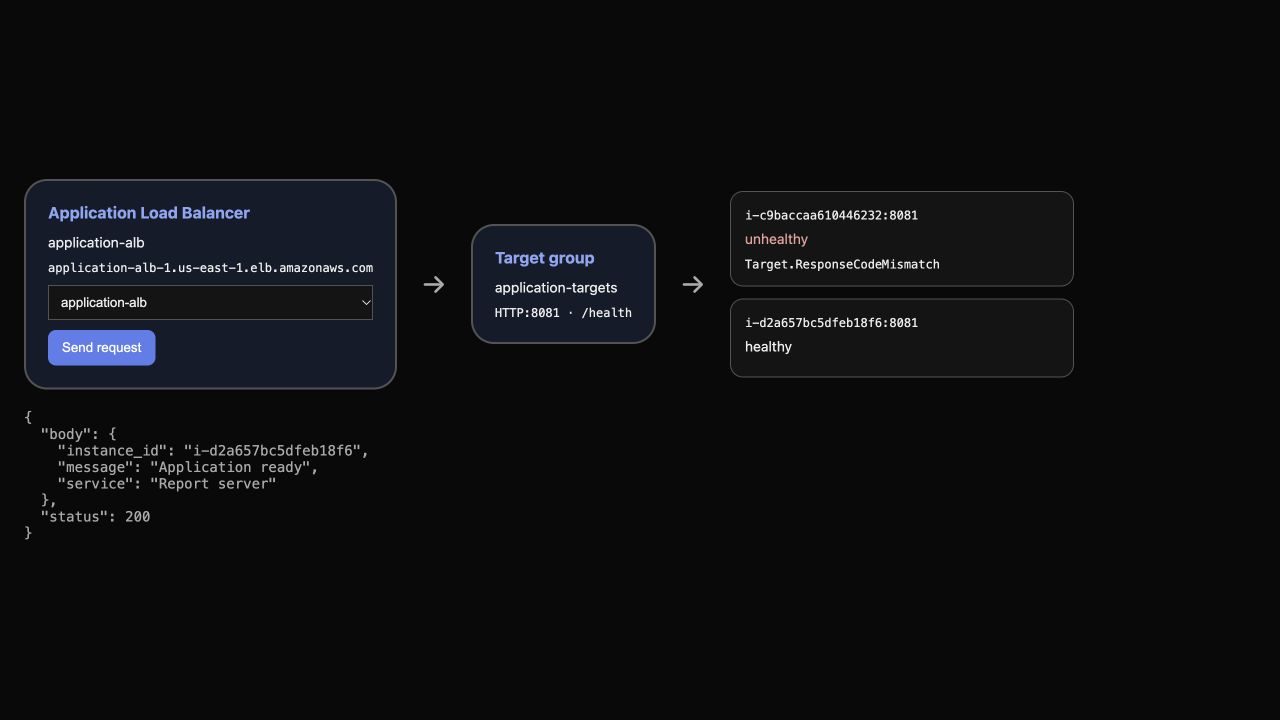
此示例中,一个目标报告 Target.ResponseCodeMismatch,另一个健康目标返回真实 HTTP 200 响应。你的实例 ID 会不同,应将响应与自己的健康目标对照。
如果所有目标都不健康,ALB 可能采用 fail open 行为,将请求转发给不健康目标。本练习必须保持 app-b 健康;不能把全部不健康的目标组理解为 ALB 一定停止转发所有请求。
恢复目标并重新加入流量
本步骤恢复 app-a,观察它通过健康检查后重新处理请求。
使用相同的安全文件替换方式,只恢复应用的 healthy 字段:
ssh -F ssh_config "ubuntu@$APP_A_IP" \
  'sudo jq ".healthy = true" /etc/report-app/config.json > /tmp/report-config.json && sudo install -m 644 /tmp/report-config.json /etc/report-app/config.json'
确认直接访问健康接口已返回 200:
ssh -F ssh_config "ubuntu@$APP_A_IP" \
  'curl -s -o /dev/null -w "%{http_code}\n" http://127.0.0.1:8081/health'
应用已经恢复,但 ALB 仍需观察到配置要求的连续成功检查。等待健康状态更新,再查看两个目标:
aws elbv2 \
  wait target-in-service \
  --target-group-arn "$TG_ARN"

aws elbv2 \
  describe-target-health \
  --target-group-arn "$TG_ARN" \
  --query 'TargetHealthDescriptions[].{Instance:Target.Id,Health:TargetHealth.State}' \
  --output table
两个目标都应为 healthy。再次发送六个请求:
for request in 1 2 3 4 5 6; do
  curl --config client.conf -sS "http://$LB_DNS/health"
  echo
done
在响应中查找两个实例 ID。在 AWS View 中确认两张健康卡片,并通过 Send request 观察两个后端都提供服务。你修复了应用,让健康检查成功,没有替换或取消注册实例。
删除负载均衡资源
本步骤删除已提供的负载均衡配置,保留恢复后的应用服务器和网络。
获取监听器 ARN,先删除监听器,再删除 ALB 和目标组:
LISTENER_ARN=$(aws elbv2 \
  describe-listeners \
  --load-balancer-arn "$LB_ARN" \
  --query 'Listeners[0].ListenerArn' \
  --output text)

aws elbv2 \
  delete-listener \
  --listener-arn "$LISTENER_ARN"

aws elbv2 \
  delete-load-balancer \
  --load-balancer-arn "$LB_ARN"

aws elbv2 \
  delete-target-group \
  --target-group-arn "$TG_ARN"
确认两个资源列表为空:
aws elbv2 \
  describe-load-balancers \
  --query 'LoadBalancers[].LoadBalancerName'

aws elbv2 \
  describe-target-groups \
  --query 'TargetGroups[].TargetGroupName'
两个查询都应返回 [],AWS View 的负载均衡区域也应为空。保留已提供的 EC2 服务器和网络。
总结
你配置了 ALB 健康检查,制造了真实应用故障,并将其与 EC2 实例停止区分开。你观察到健康服务器继续服务,恢复故障应用,并确认两个后端再次处理流量。最后,你删除负载均衡资源,保留了已提供的服务器和网络。
下一个实验将使用 Auto Scaling 组替换故障实例,而不是手动修复现有服务器。