
소개
HTML 텍스트 서식 랩에 오신 것을 환영합니다! 이 실습 세션에서는 기본적인 HTML 태그를 사용하여 웹 페이지의 텍스트를 구조화하고 서식을 지정하는 방법을 배우게 됩니다. 제대로 서식이 지정된 텍스트는 읽기 쉽고 접근 가능하며 잘 구성된 웹 콘텐츠를 만드는 데 중요합니다.
index.html이라는 단일 HTML 파일을 사용하게 되며 다음 태그를 사용하는 방법을 배우게 됩니다.
<h1>: 주요 제목에 사용됩니다.<p>: 단락에 사용됩니다.<strong>: 텍스트에 강한 중요성을 부여하며, 일반적으로 볼드체로 표시됩니다.<em>: 텍스트를 강조하며, 일반적으로 이탤릭체로 표시됩니다.<br>: 줄 바꿈을 삽입합니다.
랩을 진행하는 동안 파일을 저장하고 작업 공간의 "Web 8080" 탭에서 확인하여 변경 사항을 실시간으로 볼 수 있습니다.
메인 제목을 위한 h1 제목 태그 추가
이 단계에서는 웹 페이지에 메인 제목을 추가합니다. HTML 에서 제목은 <h1>부터 <h6> 태그로 정의됩니다. <h1>은 가장 중요한 제목을 정의하며 일반적으로 페이지의 메인 제목에 사용됩니다.
먼저 WebIDE 왼쪽의 파일 탐색기를 사용하여 ~/project 디렉토리에 있는 index.html 파일을 엽니다.
이제 index.html 파일의 <body> 섹션 안에 <h1> 태그를 추가합니다. <!-- Content will be added here --> 주석을 다음 코드 줄로 바꾸세요.
<h1>Welcome to My Web Page</h1>
이제 <body> 섹션은 다음과 같이 보여야 합니다.
<body>
  <h1>Welcome to My Web Page</h1>
</body>
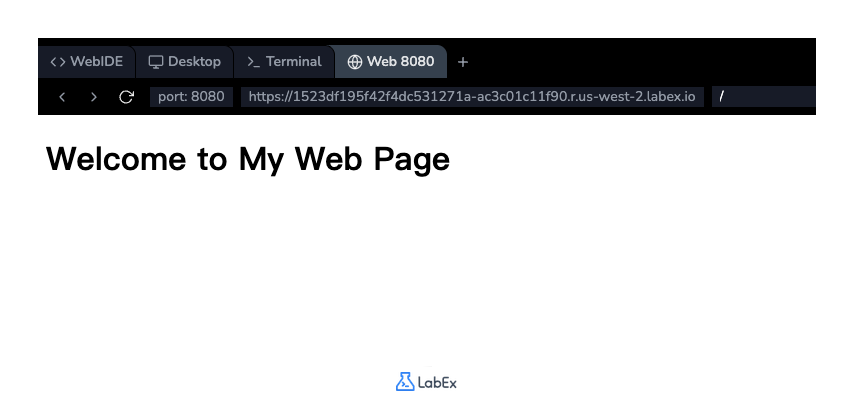
코드를 추가한 후 파일을 저장합니다 (Ctrl+S 또는 Cmd+S). 결과를 보려면 인터페이스 상단의 "Web 8080" 탭을 클릭하세요. 페이지에 제목이 표시되는 것을 볼 수 있습니다.
단락 텍스트를 위한 p 태그 삽입
이 단계에서는 제목 아래에 텍스트 단락을 추가합니다. <p> 태그는 HTML 에서 단락을 정의하는 데 사용됩니다. 브라우저는 단락 앞뒤에 자동으로 공백 (여백) 을 추가합니다.
index.html 파일에서 <h1> 태그 뒤에 새 줄을 추가하고 다음 <p> 태그를 삽입하세요.
<p>
  This is a paragraph of text. It contains some introductory information about
  this page. HTML is great for structuring content, and this paragraph is an
  example of that. It also contains some important information.
</p>
이제 <body> 섹션에는 제목과 새 단락이 모두 포함되어야 합니다.
<body>
  <h1>Welcome to My Web Page</h1>
  <p>
    This is a paragraph of text. It contains some introductory information about
    this page. HTML is great for structuring content, and this paragraph is an
    example of that. It also contains some important information.
  </p>
</body>
index.html 파일을 저장하고 "Web 8080" 탭을 새로고침하여 제목 아래에 새로 추가된 단락이 표시되는 것을 확인하세요.
굵은 텍스트를 위한 strong 태그 사용
이 단계에서는 텍스트를 굵게 표시하는 방법을 배웁니다. <strong> 태그는 텍스트가 강한 중요성, 심각성 또는 긴급성을 나타내도록 하는 데 사용됩니다. 브라우저는 일반적으로 <strong> 태그 안의 내용을 굵게 렌더링합니다.
이전 단계에서 추가한 단락을 수정하여 "important information" 구문을 강조 표시해 보겠습니다. 이 구문을 <strong> 및 </strong> 태그로 감싸세요.
index.html 파일의 <p> 태그를 다음과 같이 수정하세요.
<p>
  This is a paragraph of text. It contains some introductory information about
  this page. HTML is great for structuring content, and this paragraph is an
  example of that. It also contains some <strong>important information</strong>.
</p>
이제 파일의 전체 <body>는 다음과 같아야 합니다.
<body>
  <h1>Welcome to My Web Page</h1>
  <p>
    This is a paragraph of text. It contains some introductory information about
    this page. HTML is great for structuring content, and this paragraph is an
    example of that. It also contains some
    <strong>important information</strong>.
  </p>
</body>
파일을 저장하고 "Web 8080" 탭을 확인하세요. 이제 "important information" 텍스트가 굵게 표시되는 것을 알 수 있습니다.
이탤릭체 텍스트를 위한 em 태그 적용
이 단계에서는 일반적으로 기울임꼴로 표시되는 텍스트를 강조하는 방법을 배웁니다. <em> 태그 ( "emphasis"의 약자) 가 이 목적으로 사용됩니다. 이는 포함된 텍스트에 강조 또는 중요성을 부여해야 함을 나타냅니다.
강조된 텍스트가 포함된 새 단락을 추가해 보겠습니다. index.html의 기존 단락 아래에 다음 코드를 추가하세요.
<p>
  You can also use other tags to format text. For example, the em tag is used
  for <em>emphasized</em> text.
</p>
이제 <body> 섹션은 다음과 같아야 합니다.
<body>
  <h1>Welcome to My Web Page</h1>
  <p>
    This is a paragraph of text. It contains some introductory information about
    this page. HTML is great for structuring content, and this paragraph is an
    example of that. It also contains some
    <strong>important information</strong>.
  </p>
  <p>
    You can also use other tags to format text. For example, the em tag is used
    for <em>emphasized</em> text.
  </p>
</body>
파일을 저장하고 "Web 8080" 탭을 확인하세요. 새 단락이 보이고 "emphasized"라는 단어가 기울임꼴로 표시될 것입니다.
줄 바꿈을 위한 br 태그 삽입
이 단계에서는 텍스트 블록 내에서 줄 바꿈을 강제로 적용하는 방법을 배웁니다. <br> 태그는 단일 줄 바꿈을 삽입합니다. 이는 닫는 태그가 없는 빈 태그입니다.
두 번째로 만든 단락 중간에 줄 바꿈을 추가해 보겠습니다. 이는 새 단락을 시작하지 않고 새 줄을 시작하고 싶을 때 유용합니다.
index.html 파일의 두 번째 <p> 태그를 수정하여 <br> 태그를 포함시키세요.
<p>
  You can also use other tags to format text. <br />For example, the em tag is
  used for <em>emphasized</em> text.
</p>
최종 <body> 내용은 다음과 같아야 합니다.
<body>
  <h1>Welcome to My Web Page</h1>
  <p>
    This is a paragraph of text. It contains some introductory information about
    this page. HTML is great for structuring content, and this paragraph is an
    example of that. It also contains some
    <strong>important information</strong>.
  </p>
  <p>
    You can also use other tags to format text. <br />For example, the em tag is
    used for <em>emphasized</em> text.
  </p>
</body>
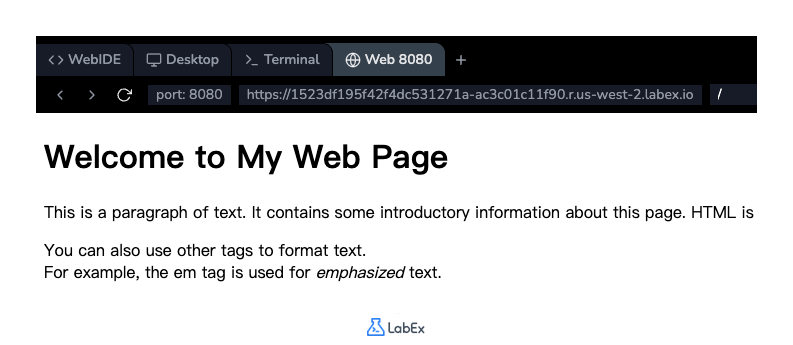
파일을 저장하고 "Web 8080" 탭을 새로고침하세요. 두 번째 단락이 이제 두 줄로 나뉘어 표시되는 것을 볼 수 있습니다.
요약
실습을 완료하신 것을 축하드립니다! HTML 텍스트 서식의 기본 사항을 성공적으로 학습하셨습니다.
이번 실습에서는 다음을 연습했습니다.
<h1>: 메인 제목 생성<p>: 콘텐츠를 단락으로 구조화<strong>: 텍스트에 강한 중요성 부여 (굵게)<em>: 텍스트 강조 (기울임꼴)<br>: 줄 바꿈 삽입
이 태그들은 모든 웹 페이지에서 잘 구조화되고 읽기 쉬운 콘텐츠를 만드는 데 필수적인 구성 요소입니다. 계속 연습하고 다른 HTML 태그를 탐색하여 웹 개발 기술을 향상시키세요.