소개
이 랩에서는 상호 작용에 필수적이며 추가 정보를 제공하는 연락처 양식과 푸터 섹션을 만드는 과정을 안내합니다.
연락처 레이아웃
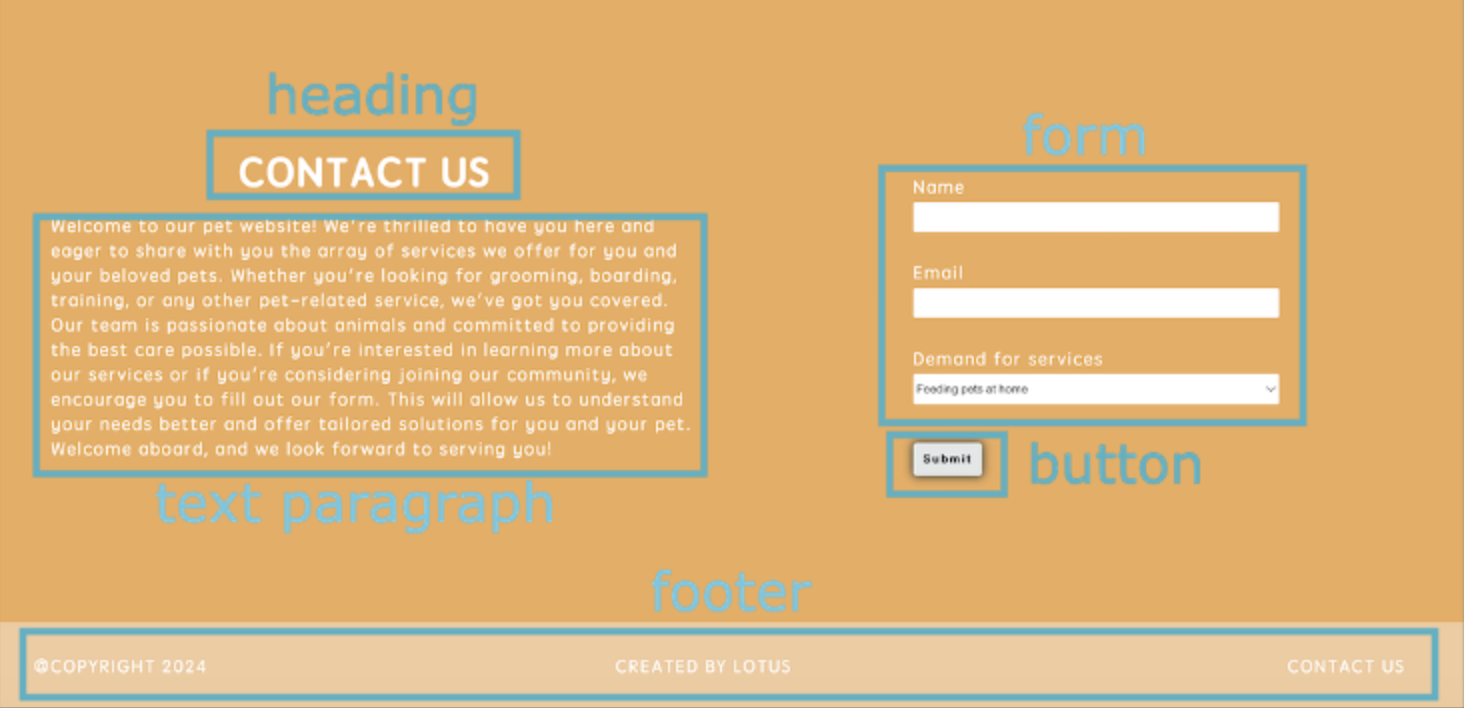
연락처 섹션은 텍스트 단락과 양식 내용의 두 부분으로 구성됩니다. HTML 에는 텍스트 상자 양식, 객관식 양식, 제출 버튼 양식 등과 같이 여러 유형의 양식 요소가 있습니다.
<!doctype html>
<html lang="en">
  <head>
    <meta charset="UTF-8" />
    <title>Pet's House</title>
  </head>
  <body>
    <!--Header Content-->
    <header>
      <div class="logo-section">
        <img class="logo" src="images/logo.svg" alt="logo" />
      </div>
      <nav class="navigation-section">
        <ul class="navigation">
          <li>Home</li>
          <li>About Us</li>
          <li>Display</li>
          <li>Contact</li>
        </ul>
      </nav>
    </header>
    <!--Main Content-->
    <main>
      <div class="container">
        <section id="home" class="cover-sect">
          <div class="title-text">
            <h1>Welcome</h1>
            <p>~ This website offers personalised services for pets. ~</p>
          </div>
          <div class="box-feature">
            <img class="cover-image" src="images/cat.jpeg" alt="just a cat" />
          </div>
        </section>
        <section id="about" class="story-sect">
          <div class="section-text">
            <h2>About Us</h2>
            <p>
              we're about creating a community of happy pets and happier pet
              owners. <br /><br />
              Our exceptional customer service team is dedicated to providing
              you with a seamless shopping experience, offering expert support
              from browsing to delivery and beyond. <br /><br />We understand
              the importance of fast, reliable service, which is why we offer
              expedited shipping options and hassle-free returns.
            </p>
          </div>
          <div class="box-feature circle">
            <img src="images/intro.png" />
          </div>
        </section>
        <section id="display" class="samples">
          <div class="section-text">
            <h2>Display</h2>
          </div>
          <div class="services">
            <div class="service">
              <figure>
                <img src="images/service-1.png" alt="Dog walking services" />
                <figcaption>Provide pet care services.</figcaption>
              </figure>
            </div>

            <div class="service">
              <figure>
                <img src="images/service-2.png" alt="Pet check-up services" />
                <figcaption>Provide pet check-up services.</figcaption>
              </figure>
            </div>

            <div class="service">
              <figure>
                <img src="images/service-3.png" alt="Pet washing services" />
                <figcaption>Provide pet washing services.</figcaption>
              </figure>
            </div>
          </div>
        </section>
        <section id="contact" class="contact-section">
          <div class="section-text">
            <h2>Contact Us</h2>
            <p>
              Welcome to our pet website! We're thrilled to have you here and
              eager to share with you the array of services we offer for you and
              your beloved pets. Whether you're looking for grooming, boarding,
              training, or any other pet-related service, we've got you covered.
              Our team is passionate about animals and committed to providing
              the best care possible. If you're interested in learning more
              about our services or if you're considering joining our community,
              we encourage you to fill out our form. This will allow us to
              understand your needs better and offer tailored solutions for you
              and your pet. Welcome aboard, and we look forward to serving you!
            </p>
          </div>
          <div class="contact-info">
            <div class="form-box">
              <form id="form" class="contact-form">
                <label for="name" class="form-content"
                  >Name <br />
                  <input
                    name="name"
                    id="name"
                    type="text"
                    class="txt-box"
                    required
                  /><br />
                </label>
                <label for="email" class="form-content"
                  >Email <br />
                  <input
                    name="email"
                    id="email"
                    type="email"
                    class="txt-box"
                    required
                  /><br />
                </label>
                <label for="message" class="form-content"
                  >Demand for services<br />
                  <select name="message" id="message" class="txt-box">
                    <option value="">Feeding pets at home</option>
                    <option value="">Pet play service</option>
                    <option value="">Pet bathing service</option>
                    <option value="">Join us</option>
                  </select>
                  <br /> </label
                ><br />
                <input class="btn" id="submit" type="submit" value="Submit" />
              </form>
            </div>
          </div>
        </section>
      </div>
    </main>
    <!--Footer Content-->
    <footer></footer>
  </body>
</html>
<form>HTML 요소는 정보를 제출하기 위한 대화형 컨트롤을 포함하는 문서 섹션을 나타냅니다.<label>HTML 요소는 사용자 인터페이스의 항목에 대한 캡션을 나타냅니다.<label>요소를<input>요소와 명시적으로 연결하려면 먼저id속성을<input>요소에 추가해야 합니다. 다음으로for속성을<label>요소에 추가합니다. 여기서 for 의 값은<input>요소의 id 와 동일합니다.<input>HTML 요소는 사용자가 데이터를 입력할 수 있도록 웹 기반 양식에 대한 대화형 컨트롤을 만드는 데 사용됩니다. 장치 및 사용자 에이전트에 따라 다양한 유형의 입력 데이터 및 컨트롤 위젯을 사용할 수 있습니다.<select>HTML 요소는 옵션 메뉴를 제공하는 컨트롤을 나타냅니다.- 각
<option>요소에는 해당 옵션을 선택했을 때 서버에 제출할 데이터 값을 포함하는value속성이 있어야 합니다. value 속성이 포함되지 않은 경우 값은 요소 내부에 포함된 텍스트로 기본 설정됩니다. type속성을 사용하면 다양한 유형의 입력 요소를 지정할 수 있습니다.type="text"는 텍스트 입력 필드임을 의미합니다.type="email"은 이메일 입력 필드임을 의미합니다.type="submit"은 제출 버튼이 있는 양식 요소임을 의미합니다.
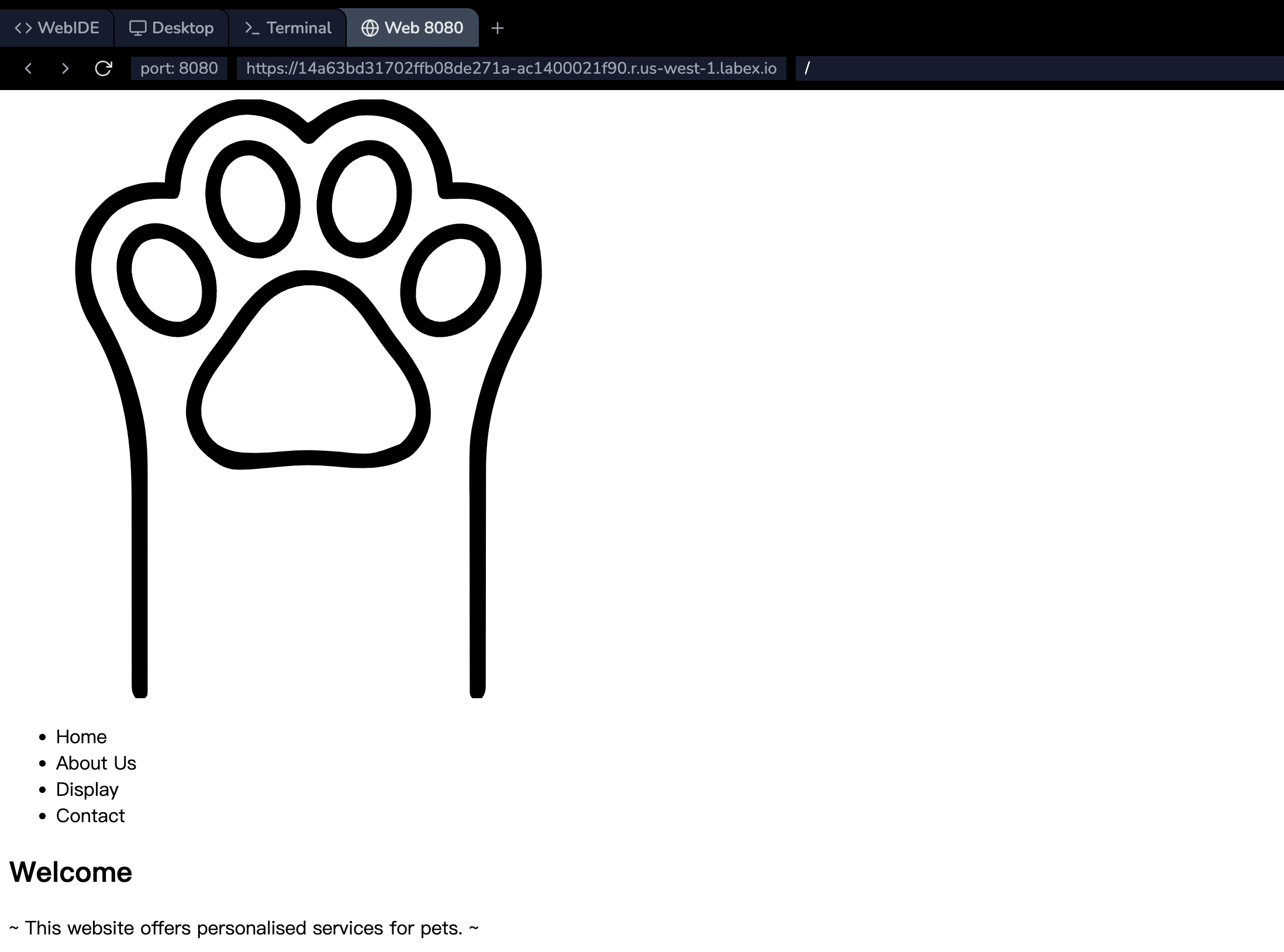
Environment 의 오른쪽 하단 모서리에 있는 Go Live를 클릭하여 포트 8080 을 열고, Environment 의 왼쪽 상단 모서리에 있는 Web 8080을 클릭하여 페이지 결과를 미리 봅니다.
앵커 요소
다음으로, 헤더의 탐색 모음에서 Home, About Us, Display 및 Contact을 클릭하면 해당 콘텐츠 영역으로 이동할 수 있도록 하려고 합니다.
탐색 모음의 ul 목록 항목에 a 태그 추가:
<nav class="navigation-section">
  <ul class="navigation">
    <li><a class="nav-link" href="#home">Home</a></li>
    <li><a class="nav-link" href="#about">About Us</a></li>
    <li><a class="nav-link" href="#display">Display</a></li>
    <li><a class="nav-link" href="#contact">Contact</a></li>
  </ul>
</nav>
<a>HTML 요소 (또는 앵커 요소) 는 href 속성을 사용하여 웹 페이지, 파일, 이메일 주소, 동일 페이지의 위치 또는 URL 이 주소를 지정할 수 있는 다른 모든 항목에 대한 하이퍼링크를 생성합니다.각
<a>내의 콘텐츠는 링크의 대상을 나타내야 합니다. href 속성이 있는 경우,<a>요소에 초점을 맞춘 상태에서 Enter 키를 누르면 해당 요소가 활성화됩니다. 여기서는href속성 내부에 해당 레이아웃의id속성 이름을 추가합니다.
푸터 레이아웃
마지막으로, 푸터 섹션의 내용이 구현됩니다.
<!doctype html>
<html lang="en">
  <head>
    <meta charset="UTF-8" />
    <title>Pet's House</title>
  </head>
  <body>
    <!--header-section-->
    <header>
      <div class="logo-section">
        <img class="logo" src="images/logo.svg" alt="logo" />
      </div>
      <nav class="navigation-section">
        <ul class="navigation">
          <li><a class="nav-link" href="#home">Home</a></li>
          <li><a class="nav-link" href="#about">About Us</a></li>
          <li><a class="nav-link" href="#display">Display</a></li>
          <li><a class="nav-link" href="#contact">Contact</a></li>
        </ul>
      </nav>
    </header>
    <!--main section-->
    <main>
      <div class="container">
        <section id="home" class="cover-sect">
          <div class="title-text">
            <h1>Welcome</h1>
            <p>~ This website offers personalised services for pets. ~</p>
          </div>
          <div class="box-feature">
            <img class="cover-image" src="images/cat.jpeg" alt="just a cat" />
          </div>
        </section>

        <section id="about" class="story-sect">
          <div class="section-text">
            <h2>About Us</h2>
            <p>
              we're about creating a community of happy pets and happier pet
              owners. <br /><br />
              Our exceptional customer service team is dedicated to providing
              you with a seamless shopping experience, offering expert support
              from browsing to delivery and beyond. <br /><br />We understand
              the importance of fast, reliable service, which is why we offer
              expedited shipping options and hassle-free returns.
            </p>
          </div>
          <div class="box-feature circle">
            <img src="images/intro.png" />
          </div>
        </section>

        <!-- display section -->
        <section id="display" class="samples">
          <div class="section-text">
            <h2>Display</h2>
          </div>
          <div class="services">
            <div class="service">
              <figure>
                <img src="images/service-1.png" alt="Dog walking services" />
                <figcaption>Provide pet care services.</figcaption>
              </figure>
            </div>

            <div class="service">
              <figure>
                <img src="images/service-2.png" alt="Pet check-up services" />
                <figcaption>Provide pet check-up services.</figcaption>
              </figure>
            </div>

            <div class="service">
              <figure>
                <img src="images/service-3.png" alt="Pet washing services" />
                <figcaption>Provide pet washing services.</figcaption>
              </figure>
            </div>
          </div>
        </section>
        <!-- contact section -->
        <section id="contact" class="contact-section">
          <div class="section-text">
            <h2>Contact Us</h2>
            <p>
              Welcome to our pet website! We're thrilled to have you here and
              eager to share with you the array of services we offer for you and
              your beloved pets. Whether you're looking for grooming, boarding,
              training, or any other pet-related service, we've got you covered.
              Our team is passionate about animals and committed to providing
              the best care possible. If you're interested in learning more
              about our services or if you're considering joining our community,
              we encourage you to fill out our form. This will allow us to
              understand your needs better and offer tailored solutions for you
              and your pet. Welcome aboard, and we look forward to serving you!
            </p>
          </div>
          <div class="contact-info">
            <div class="form-box">
              <form id="form" class="contact-form">
                <label for="name" class="form-content"
                  >Name <br />
                  <input
                    name="name"
                    id="name"
                    type="text"
                    class="txt-box"
                    required
                  /><br />
                </label>
                <label for="email" class="form-content"
                  >Email <br />
                  <input
                    name="email"
                    id="email"
                    type="email"
                    class="txt-box"
                    required
                  /><br />
                </label>
                <label for="message" class="form-content"
                  >Demand for services<br />
                  <select name="message" id="message" class="txt-box">
                    <option value="">Feeding pets at home</option>
                    <option value="">Pet play service</option>
                    <option value="">Pet bathing service</option>
                    <option value="">Join us</option>
                  </select>
                  <br /> </label
                ><br />
                <input class="btn" id="submit" type="submit" value="Submit" />
              </form>
            </div>
          </div>
        </section>
      </div>
    </main>
    <footer>
      <span class="contact-us">Contact Us</span>
      <span class="company-info">Created by Lotus</span>
      <span>@Copyright 2024</span>
    </footer>
  </body>
</html>
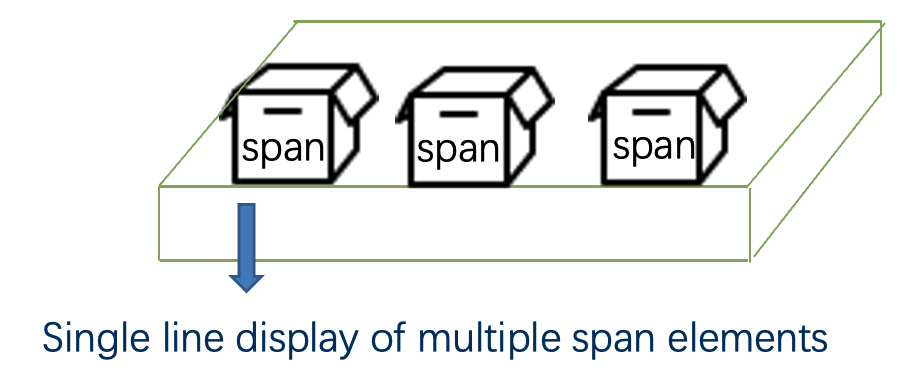
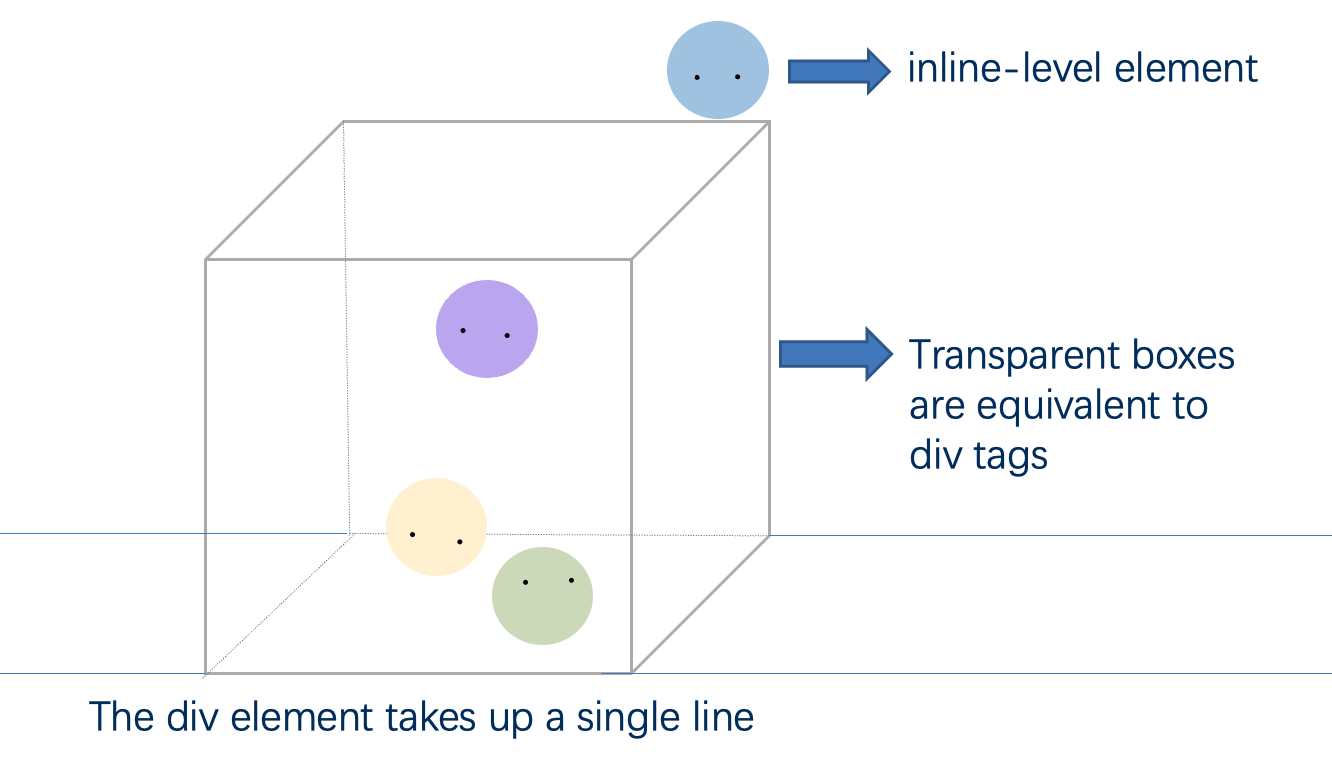
<span>HTML 요소는 구문 콘텐츠에 대한 일반적인 인라인 컨테이너이며, 본질적으로 아무것도 나타내지 않습니다. 스타일 지정을 위해 (class 또는 id 속성을 사용하여) 요소를 그룹화하거나, lang 과 같이 속성 값을 공유하기 위해 사용할 수 있습니다. 다른 의미론적 요소가 적절하지 않은 경우에만 사용해야 합니다.<span>은<div>요소와 매우 유사하지만,<div>는 블록 레벨 요소인 반면<span>은 인라인 레벨 요소입니다.
인라인 레벨 요소:
블록 레벨 요소:
외부 리소스 링크 요소
<link> HTML 요소는 현재 문서와 외부 리소스 간의 관계를 지정합니다. 이 요소는 주로 스타일시트에 연결하는 데 사용되지만, 사이트 아이콘 ( "favicon" 스타일 아이콘과 모바일 장치의 홈 화면 및 앱용 아이콘 모두) 을 설정하는 데에도 사용됩니다.
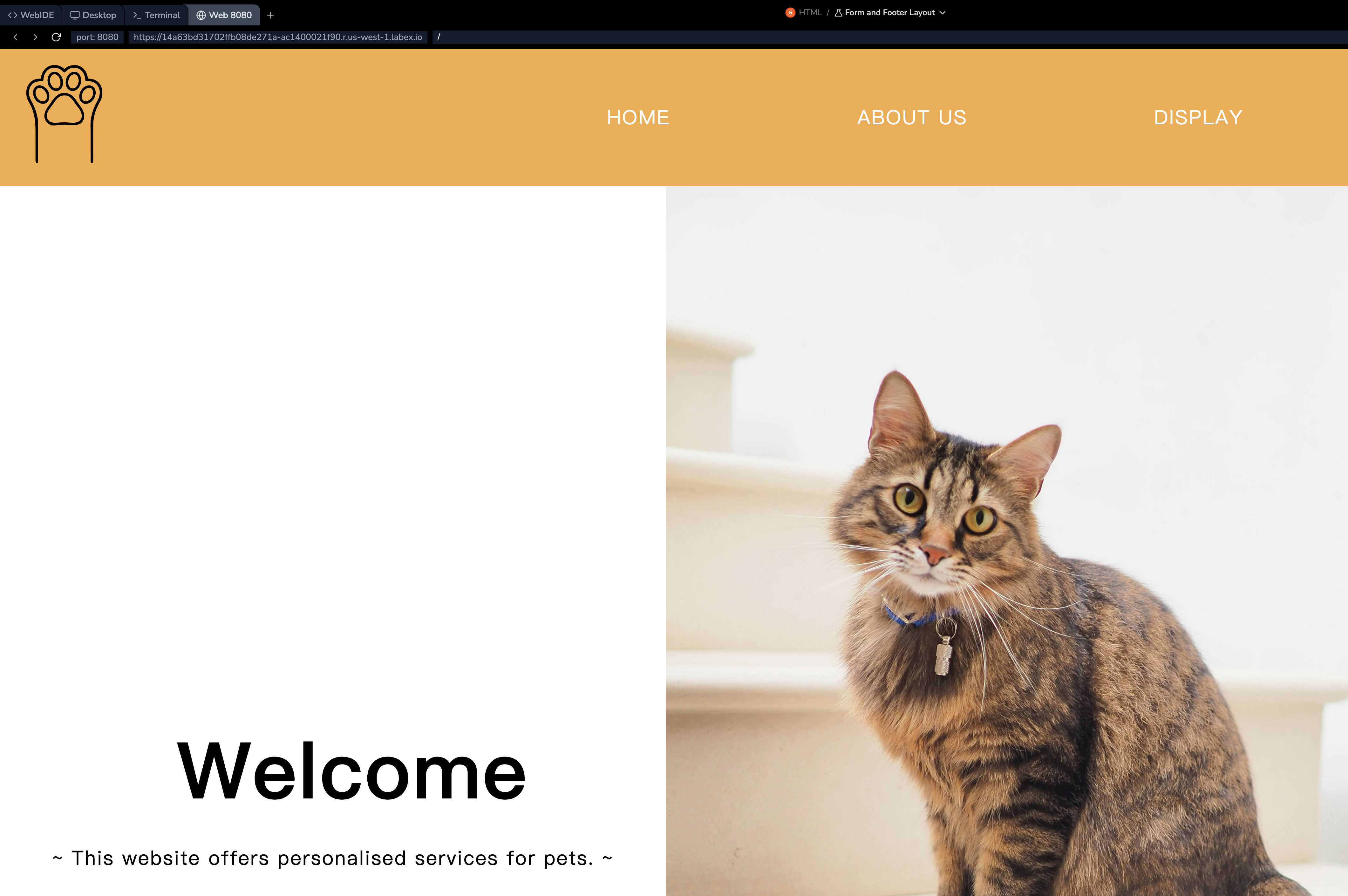
페이지의 콘텐츠를 완성하기 위해 다양한 HTML 요소를 사용했습니다. 이미지 효과를 얻으려면 CSS 를 사용해야 합니다. 여기서는 완전한 CSS 파일 (style.css) 을 준비하고, link 요소를 사용하여 이를 포함합니다.
<head>
  <meta charset="UTF-8" />
  <title>Pet's House</title>
  <link rel="stylesheet" href="./style.css" />
</head>
Environment 의 오른쪽 하단 모서리에 있는 Go Live를 클릭하여 포트 8080 을 열고, Environment 의 왼쪽 상단 모서리에 있는 Web 8080을 클릭하여 페이지 결과를 확인합니다.
요약
이 랩에서는 연락처 양식과 푸터를 추가하여 웹사이트를 완성하고, 사용자 상호 작용 및 정보 접근성에 대해 배웠습니다. 이 랩은 웹 개발에서 커뮤니케이션 채널과 일관된 디자인의 중요성을 강조하며, 사이트의 구조를 마무리했습니다.
HTML 소개를 축하합니다. 페이지 스타일을 지정하는 방법을 알고 싶다면, CSS 랩을 학습하세요!