소개
활성 WebSocket 연결은 메모리에 존재하는 하나의 JavaScript 객체보다 훨씬 오래 유지될 수 있습니다. Cloudflare는 유휴 상태의 Durable Object를 절전 모드로 전환할 수 있습니다. 클라이언트는 네트워크 엣지에서 연결된 상태로 남지만 객체의 메모리 필드는 사라집니다. 이후 메시지가 도착하면 새로운 클래스 인스턴스가 깨어납니다. 이를 통해 유휴 시간 요금을 줄일 수 있지만, 일반적인 메모리 내 맵은 클라이언트의 이름이나 역할을 저장하기에 신뢰할 수 있는 위치가 아닙니다.
Hibernation WebSocket API는 이 수명 주기 문제를 두 부분으로 해결합니다. ctx.acceptWebSocket(server)는 객체를 메모리에 고정하지 않고 연결을 등록합니다. serializeAttachment()는 작은 structured clone 값을 연결에 저장하고, 객체가 재구성된 후 deserializeAttachment()가 이를 복원합니다. ctx.getWebSockets()를 사용하면 새 생성자가 연결을 유지하고 있는 소켓을 열거할 수 있습니다.
이 실습에서는 모든 소켓에 검증된 클라이언트 ID, 표시 이름, 방 이름을 연결하는 방 상태 서비스를 구축합니다. 제어된 재구성 테스트에서는 기존 가짜 소켓을 중심으로 새 클래스 인스턴스를 만들고, 첨부 데이터로 세션 맵이 재구성되는지 확인합니다. 또한 실제 로컬 및 배포된 WebSocket을 사용하고, 브라우저 클라이언트 하나를 연결 해제한 뒤 다시 연결하여 방 동작이 계속 올바른지 확인합니다. 프로덕션에서 절전 모드로 전환되는 시점은 Cloudflare가 결정하므로, 이 실습과 채점에서는 필요할 때 제거를 강제로 실행한다고 가정하지 않습니다.
이 과정을 바로 시작하기 전에 Connect LabEx to Your Cloudflare Account를 완료합니다. 새 VM마다 자체 Wrangler 인증이 필요합니다. 또한 O01–O05에서 이름이 지정된 Durable Objects, SQLite 기반 상태, 방 범위의 WebSocket 브로드캐스트를 이미 이해하고 있어야 합니다.
설정 과정에서 /home/labex/project/connection-context에 Node.js 22.22.0, 프로젝트 로컬 Wrangler 4.132.0, 버전이 고정된 WebSocket 클라이언트를 설치합니다. 브라우저 및 테스트 픽스처도 제공하지만, Cloudflare 인증, Durable Object 구현, 소켓 수락 또는 Worker 배포는 수행하지 않습니다.
VM 인증 및 Presence 네임스페이스 선언
이 단계에서는 새 VM을 인증하고, 전용 학습 계정을 선택한 다음, presence 방용 SQLite 기반 Durable Object 클래스 하나를 선언합니다.
cd /home/labex/project/connection-context
npx wrangler --version
npx wrangler login --device --browser=false
Wrangler 버전으로 4.132.0이 표시되어야 합니다. 브라우저에서 표시된 Cloudflare URL을 열고, 짧은 코드를 입력한 뒤, 사용할 학습 계정을 확인하고 인증합니다. 브라우저가 Wrangler에 액세스 권한을 부여하며, 비밀번호가 VM으로 전송되지는 않습니다.
안전한 ID 필드만 읽고, 충돌하지 않는 일회용 Worker 이름을 생성합니다.
WHOAMI="$(npx wrangler whoami --json)"
printf '%s\n' "$WHOAMI" | jq '{loggedIn, authType, accounts: [.accounts[] | {name}]}'
ACCOUNT_ID="$(printf '%s\n' "$WHOAMI" | jq -r '.accounts[] | select(.name == "LabEx Learning") | .id')"
test -n "$ACCOUNT_ID"
RUN="labex-c10-o06-$(openssl rand -hex 6)"
printf '%s\n' "$RUN" | tee .labex/run-name
cat > wrangler.jsonc <<JSON
{
  "\$schema": "./node_modules/wrangler/config-schema.json",
  "name": "$RUN",
  "account_id": "$ACCOUNT_ID",
  "main": "src/index.js",
  "compatibility_date": "2026-09-18",
  "workers_dev": true,
  "preview_urls": false,
  "observability": { "enabled": true, "head_sampling_rate": 1 },
  "durable_objects": { "bindings": [
    { "name": "PRESENCE", "class_name": "PresenceRoom" }
  ] },
  "exports": {
    "PresenceRoom": { "type": "durable-object", "storage": "sqlite" }
  }
}
JSON
PRESENCE는 Worker에서 방 객체로 연결되는 경로입니다. 방 이름을 안정적으로 지정하면 한 방의 연결과 기록이 다른 방과 분리됩니다. 클래스 내보내기는 각 방에 전용 SQLite 저장소를 제공합니다. 배포하기 전에는 클라우드 리소스가 생성되지 않습니다.
절전 모드에 안전한 연결 컨텍스트 구현
이 단계에서는 안전한 연결 메타데이터를 활성 소켓 객체와 분리한 다음, Cloudflare가 새 객체 인스턴스를 생성할 때마다 해당 메타데이터를 복원하도록 Hibernation WebSocket API를 사용합니다.
**첨부 데이터(attachment)**는 하나의 WebSocket과 함께 저장되는 작은 structured clone 값입니다. 연결이 정상적으로 유지되는 동안에는 절전 모드 이후에도 유지되지만, 영구적인 방 기록은 계속 SQLite에 저장해야 합니다. 검증 및 재구성 도우미를 생성합니다.
cat > src/context.js <<'JS'
const TOKEN = /^[a-z0-9](?:[a-z0-9-]{0,30}[a-z0-9])?$/;

export function connectionContext(url) {
  const room = url.pathname.match(/^\/rooms\/([^/]+)\/connect$/)?.[1] ?? "";
  const clientId = url.searchParams.get("clientId") ?? "";
  const displayName = (url.searchParams.get("name") ?? "").trim();
  if (!TOKEN.test(room) || !TOKEN.test(clientId)) return null;
  if (displayName.length < 1 || displayName.length > 32) return null;
  return { room, clientId, displayName };
}

export function validAttachment(value) {
  return Boolean(value && typeof value === "object" && TOKEN.test(value.room) &&
    TOKEN.test(value.clientId) && typeof value.displayName === "string" &&
    value.displayName.length >= 1 && value.displayName.length <= 32);
}

export function restoreSessions(sockets) {
  const sessions = new Map();
  for (const socket of sockets) {
    const attachment = socket.deserializeAttachment();
    if (validAttachment(attachment)) sessions.set(socket, attachment);
  }
  return sessions;
}
JS
Durable Object와 진입점 Worker를 생성합니다.
cat > src/index.js <<'JS'
import { DurableObject } from "cloudflare:workers";
import { connectionContext, restoreSessions } from "./context.js";

const json = (body, status = 200) => Response.json(body, { status });

export class PresenceRoom extends DurableObject {
  constructor(ctx, env) {
    super(ctx, env);
    this.sessions = restoreSessions(ctx.getWebSockets());
    this.ctx.blockConcurrencyWhile(async () => {
      this.ctx.storage.sql.exec(`
        CREATE TABLE IF NOT EXISTS announcements (
          sequence INTEGER PRIMARY KEY AUTOINCREMENT,
          client_id TEXT NOT NULL,
          display_name TEXT NOT NULL,
          text TEXT NOT NULL
        )
      `);
    });
  }

  async fetch(request) {
    const context = connectionContext(new URL(request.url));
    if (!context) return json({ error: "invalid_connection_context" }, 400);
    if ((request.headers.get("Upgrade") || "").toLowerCase() !== "websocket") {
      return json({ error: "websocket_upgrade_required" }, 426);
    }
    const pair = new WebSocketPair();
    const [client, server] = Object.values(pair);
    this.ctx.acceptWebSocket(server, [`room:${context.room}`]);
    server.serializeAttachment(context);
    this.sessions.set(server, context);
    server.send(JSON.stringify({ type: "ready", context, connected: this.sessions.size }));
    return new Response(null, { status: 101, webSocket: client });
  }

  webSocketMessage(socket, raw) {
    const context = socket.deserializeAttachment();
    if (!context || !this.sessions.has(socket)) {
      socket.send(JSON.stringify({ type: "error", code: "missing_context" }));
      return;
    }
    let message;
    try { message = JSON.parse(raw); } catch { message = null; }
    const text = typeof message?.text === "string" ? message.text.trim() : "";
    if (message?.type !== "announce" || text.length < 1 || text.length > 80 || Object.keys(message).length !== 2) {
      socket.send(JSON.stringify({ type: "error", code: "invalid_message" }));
      return;
    }
    const row = this.ctx.storage.sql.exec(`
      INSERT INTO announcements (client_id, display_name, text)
      VALUES (?, ?, ?) RETURNING sequence
    `, context.clientId, context.displayName, text).one();
    const update = JSON.stringify({ type: "announcement", sequence: row.sequence,
      clientId: context.clientId, displayName: context.displayName, text });
    for (const peer of this.ctx.getWebSockets(`room:${context.room}`)) peer.send(update);
    console.log(JSON.stringify({ event: "presence_announcement", sequence: row.sequence,
      clientId: context.clientId, connected: this.ctx.getWebSockets().length }));
  }

  webSocketClose(socket) {
    this.sessions.delete(socket);
  }

  async getState() {
    const announcements = this.ctx.storage.sql.exec(`
      SELECT sequence, client_id AS clientId, display_name AS displayName, text
      FROM announcements ORDER BY sequence
    `).toArray();
    return { messageCount: announcements.length, announcements };
  }
}

export default {
  async fetch(request, env) {
    const url = new URL(request.url);
    const match = url.pathname.match(/^\/rooms\/([^/]+)\/(connect|state)$/);
    if (!match) return json({ error: "not_found" }, 404);
    const room = match[1];
    if (match[2] === "connect") return env.PRESENCE.getByName(room).fetch(request);
    if (request.method !== "GET") return json({ error: "method_not_allowed" }, 405);
    return json({ room, ...await env.PRESENCE.getByName(room).getState() });
  }
};
JS
ctx.acceptWebSocket()은 server.accept()와 이벤트 리스너를 대신합니다. 이제 메시지는 클래스 수준의 webSocketMessage() 핸들러를 통해 전달됩니다. 생성자는 런타임이 관리하는 소켓과 첨부 데이터에서 sessions를 다시 구성하며, 이전 JavaScript Map이 남아 있다고 가정하지 않습니다.
강제 제거를 가정하지 않고 컨텍스트 재구성 검증
이 단계에서는 재구성 경계를 직접 테스트합니다. 유휴 프로덕션 객체가 절전 모드로 전환되는 시점은 Cloudflare가 결정하므로, 결정적인 실습에서는 강제 제거를 기다리거나 이를 실행했다고 주장하지 않아야 합니다. 대신 이전 인스턴스가 첨부 데이터를 기록한 가짜 런타임 관리 소켓을 새 PresenceRoom 인스턴스에 전달합니다.
cat > test/context.test.mjs <<'JS'
import test from "node:test";
import assert from "node:assert/strict";
import { connectionContext, restoreSessions, validAttachment } from "../src/context.js";
import { PresenceRoom } from "../src/index.js";

const attachment = (room, clientId, displayName) => ({ room, clientId, displayName });
const socket = value => ({ deserializeAttachment: () => value });

test("connection input becomes a bounded attachment", () => {
  const url = new URL("https://example.test/rooms/planning/connect?clientId=alice-1&name=Alice");
  assert.deepEqual(connectionContext(url), attachment("planning", "alice-1", "Alice"));
  assert.equal(connectionContext(new URL("https://example.test/rooms/Bad!/connect?clientId=a&name=A")), null);
});

test("attachment validation rejects incomplete context", () => {
  assert.equal(validAttachment(attachment("planning", "alice-1", "Alice")), true);
  assert.equal(validAttachment({ room: "planning", clientId: "alice-1" }), false);
});

test("controlled reconstruction restores only valid socket context", () => {
  const alice = socket(attachment("planning", "alice-1", "Alice"));
  const bob = socket(attachment("planning", "bob-1", "Bob"));
  const broken = socket(null);
  const restored = restoreSessions([alice, bob, broken]);
  assert.equal(restored.size, 2);
  assert.equal(restored.get(alice).displayName, "Alice");
  assert.equal(restored.get(bob).clientId, "bob-1");
});

test("a new Durable Object constructor rebuilds its session map", () => {
  const sockets = [socket(attachment("planning", "alice-1", "Alice")), socket(attachment("planning", "bob-1", "Bob"))];
  const ctx = {
    getWebSockets: () => sockets,
    blockConcurrencyWhile: fn => fn(),
    storage: { sql: { exec: () => ({}) } }
  };
  const room = new PresenceRoom(ctx, {});
  assert.equal(room.sessions.size, 2);
  assert.deepEqual([...room.sessions.values()].map(value => value.displayName), ["Alice", "Bob"]);
});
JS
npm test
네 개의 테스트가 모두 통과해야 합니다. 이 테스트는 첨부 데이터에서 컨텍스트를 재구성할 수 있음을 확인합니다. 이후의 실시간 검사는 실제 소켓 동작을 검증하지만, 특정 프로덕션 객체가 요청에 따라 제거되었다는 증거로 잘못 표현하지는 않습니다.
클라이언트 재연결 및 방 동작 유지
이 단계에서는 실제 로컬 소켓을 사용합니다. 재연결하면 새 소켓과 새 첨부 데이터가 생성되지만, 영구적인 announcement는 SQLite에 계속 남습니다.
cat > tools/reconnect.mjs <<'JS'
import WebSocket from "ws";
const [base, prefix] = process.argv.slice(2);
const wsBase = base.replace(/^http/, "ws");
const room = `${prefix}-planning`, other = `${prefix}-support`;
const open = (roomName, id, name) => new Promise((resolve, reject) => {
  const ws = new WebSocket(`${wsBase}/rooms/${roomName}/connect?clientId=${id}&name=${encodeURIComponent(name)}`);
  const inbox = [];
  ws.on("message", raw => { const value = JSON.parse(raw); inbox.push(value); if (value.type === "ready") resolve({ ws, inbox, ready: value }); });
  ws.on("error", reject);
});
const waitFor = (client, predicate) => new Promise((resolve, reject) => {
  const timer = setTimeout(() => reject(new Error("message timeout")), 5000);
  const check = value => { if (predicate(value)) { clearTimeout(timer); client.ws.off("message", listener); resolve(value); } };
  const listener = raw => check(JSON.parse(raw)); client.ws.on("message", listener); client.inbox.forEach(check);
});
const close = client => new Promise(resolve => { client.ws.once("close", resolve); client.ws.close(1000, "reconnect"); });
const alice = await open(room, `${prefix}-alice`, "Alice");
const bob = await open(room, `${prefix}-bob`, "Bob");
const carol = await open(other, `${prefix}-carol`, "Carol");
alice.ws.send(JSON.stringify({ type: "announce", text: "First update" }));
await Promise.all([waitFor(alice, x => x.sequence === 1), waitFor(bob, x => x.sequence === 1)]);
await close(alice);
const reconnected = await open(room, `${prefix}-alice`, "Alice");
reconnected.ws.send(JSON.stringify({ type: "announce", text: "Back online" }));
const [again, peer] = await Promise.all([waitFor(reconnected, x => x.sequence === 2), waitFor(bob, x => x.sequence === 2)]);
await new Promise(resolve => setTimeout(resolve, 300));
const state = await fetch(`${base}/rooms/${room}/state`).then(r => r.json());
const otherState = await fetch(`${base}/rooms/${other}/state`).then(r => r.json());
console.log(JSON.stringify({ restoredName: again.displayName, peerName: peer.displayName,
  otherAnnouncements: carol.inbox.filter(x => x.type === "announcement").length, state, otherState }, null, 2));
await Promise.all([reconnected, bob, carol].map(close));
JS
rm -f .labex/local.json .labex/dev.log .labex/dev.pid
mkdir -p .labex/local-state
npx wrangler dev --local --ip 127.0.0.1 --port 8787 --persist-to .labex/local-state > .labex/dev.log 2>&1 &
echo $! > .labex/dev.pid
for attempt in $(seq 1 30); do
  LOCAL_READY="$(curl --silent http://127.0.0.1:8787/rooms/probe/state || true)"
  test "$(jq -r '.messageCount // -1' <<<"$LOCAL_READY" 2>/dev/null)" = 0 && break
  sleep 1
done
test "$(jq -r .messageCount <<<"$LOCAL_READY")" = 0
sleep 2
node tools/reconnect.mjs http://127.0.0.1:8787 local | tee .labex/local.json
Alice는 새 소켓으로 재연결하지만 두 번째 메시지에도 displayName: Alice가 유지됩니다. Bob은 이 메시지를 받고 Carol은 분리된 상태로 남습니다. 방에 저장된 두 개의 영구 announcement를 통해 소켓의 수명과 방 기록의 수명이 서로 다르다는 것을 확인할 수 있습니다.
배포 후 재연결 계약 반복
이 단계에서는 정확한 로컬 작업을 중지하고, 배포한 상태 저장 경로가 준비될 때까지 기다린 다음, 고유한 클라우드 방에서 실시간 클라이언트 계약을 반복합니다.
kill "$(cat .labex/dev.pid)"
wait "$(cat .labex/dev.pid)" 2>/dev/null || true
rm -f .labex/cloud.json .labex/deploy.log .labex/app-url
npx wrangler deploy | tee .labex/deploy.log
APP_URL="$(grep -Eo 'https://[^ ]+\.workers\.dev' .labex/deploy.log | tail -1)"
test -n "$APP_URL"
printf '%s\n' "$APP_URL" | tee .labex/app-url
for attempt in $(seq 1 30); do READY="$(curl --silent "$APP_URL/rooms/cloud-probe/state" || true)"; test "$(jq -r '.messageCount // -1' <<<"$READY" 2>/dev/null)" = 0 && break; sleep 2; done
test "$(jq -r .messageCount <<<"$READY")" = 0
sleep 5
node tools/reconnect.mjs "$APP_URL" cloud | tee .labex/cloud.json
Cloudflare에서도 같은 결과가 나오면, 배포된 서비스가 각 연결을 수락한 후와 Alice가 재연결한 후에 직렬화된 첨부 데이터를 사용한다는 것을 확인할 수 있습니다. 다만 이 제한된 실행 중 플랫폼이 실제로 절전 모드로 전환되었다고 주장하는 것은 아닙니다.
절전 모드 호환 배포 검사
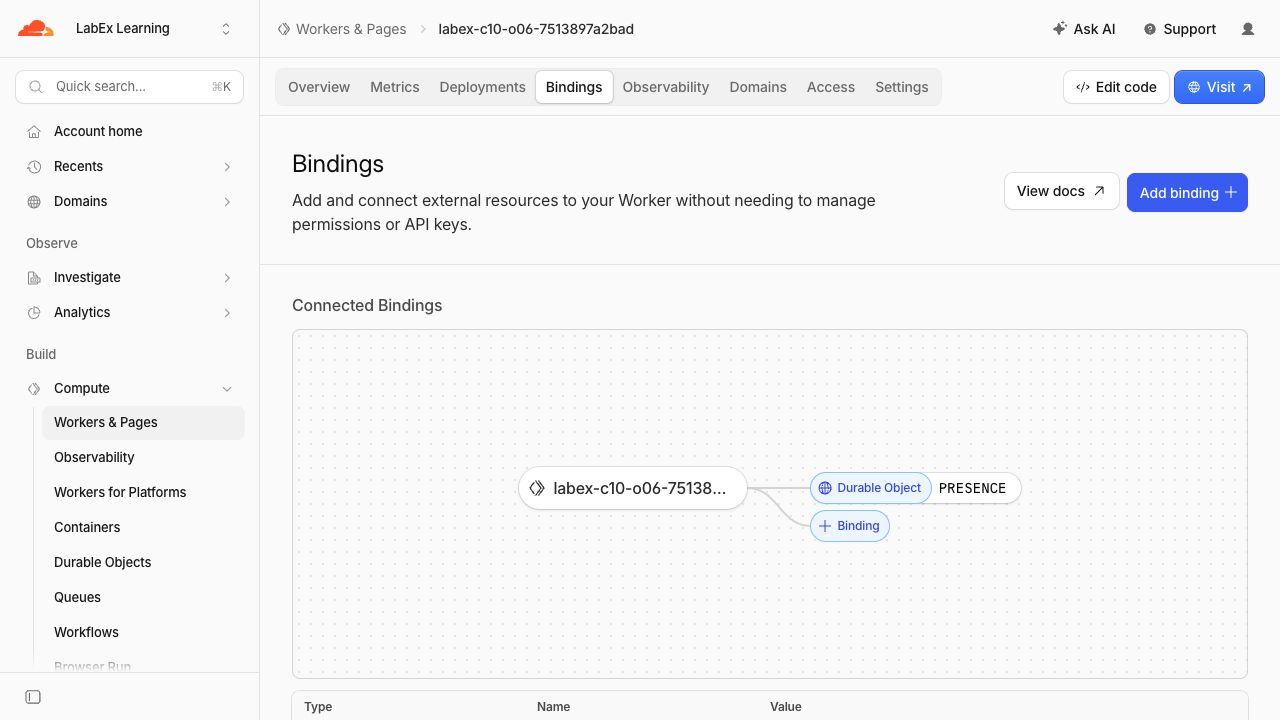
이 단계에서는 런타임 결과를 Cloudflare Dashboard 및 변경하지 않은 재배포 결과와 연결합니다. Workers & Pages를 열고 .labex/run-name에 저장된 정확한 이름을 선택한 다음 Bindings를 엽니다. PRESENCE가 PresenceRoom을 가리켜야 합니다.
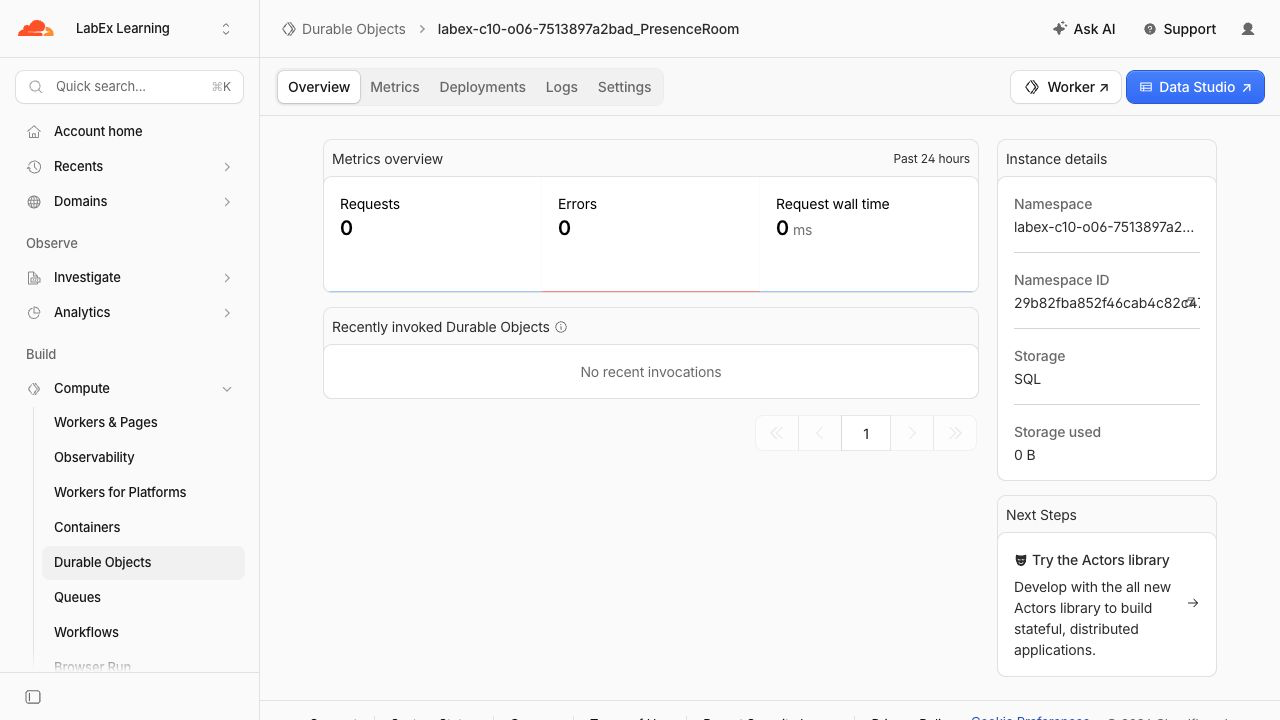
Durable Objects를 열고 <your-worker>_PresenceRoom을 선택한 다음 Storage: SQL을 확인합니다. 이 페이지에는 클래스 네임스페이스가 표시되지만 첨부 데이터 값은 표시되지 않습니다.
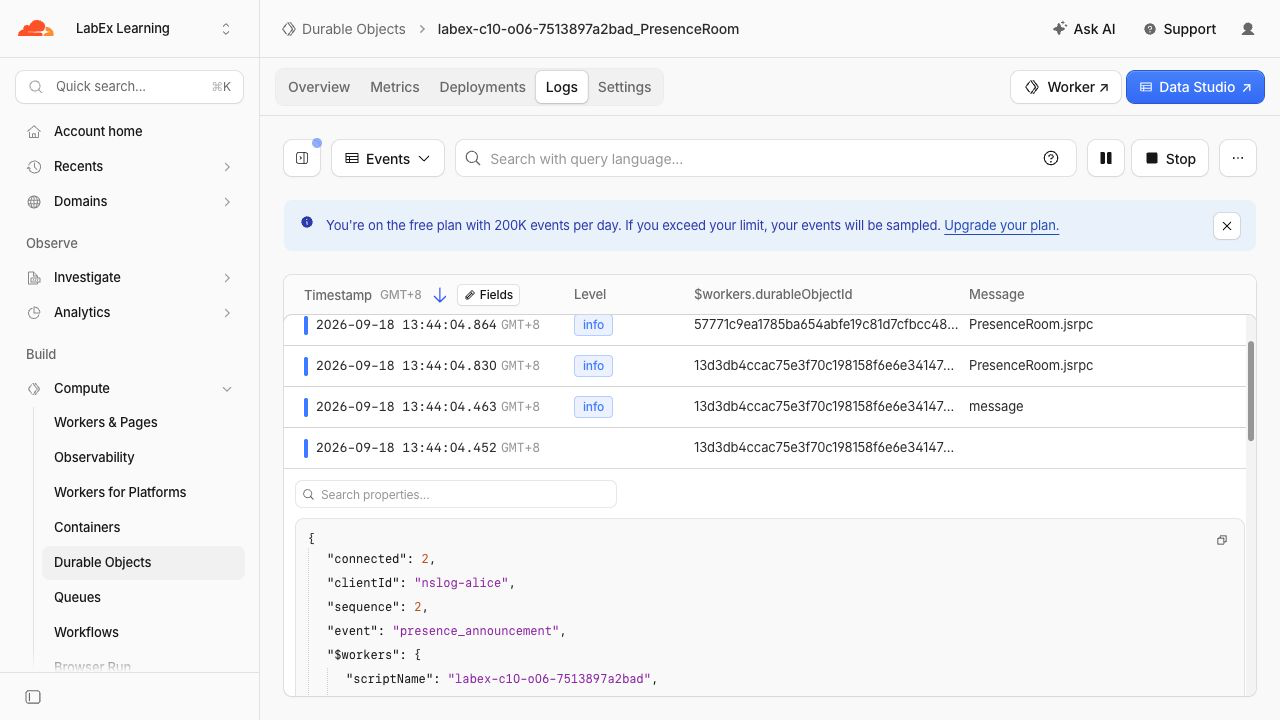
Logs를 열고 성공한 presence_announcement 행을 검사합니다. 이 행에는 테스트용 클라이언트 ID와 시퀀스가 포함되지만 announcement 텍스트는 포함되지 않습니다. Dashboard 트래픽은 응답보다 늦게 도착할 수 있으므로, 실시간 클라이언트와 백엔드 검사를 계속해서 신뢰할 수 있는 기준으로 사용합니다.
코드를 변경하지 않고 다시 배포한 뒤 동일한 클라우드 방을 읽습니다.
npx wrangler deploy
APP_URL="$(cat .labex/app-url)"
curl --silent --fail "$APP_URL/rooms/cloud-planning/state" | jq
curl --silent --fail "$APP_URL/rooms/cloud-support/state" | jq
planning 방에는 여전히 두 개의 announcement가 있고 support 방은 비어 있어야 합니다. 재배포를 통해 새 Worker 버전이 배포되어도 영구 기록이 유지됨을 확인할 수 있습니다. 한편 제어된 생성자 테스트는 첨부 데이터 재구성을 별도로 검증합니다.
Presence 네임스페이스 삭제
이 단계에서는 VM이 아직 인증된 상태에서 이 실습이 생성한 Worker와 네임스페이스만 삭제합니다.
RUN="$(cat .labex/run-name)"
case "$RUN" in labex-c10-o06-*) ;; *) echo "Unexpected Worker name" >&2; exit 1;; esac
cat > src/cleanup.js <<'JS'
export default { fetch() { return Response.json({ status: "cleanup" }, { status: 410 }); } };
JS
ACCOUNT_ID="$(node -e 'console.log(JSON.parse(require("fs").readFileSync("wrangler.jsonc", "utf8")).account_id)')"
cat > wrangler.cleanup.jsonc <<JSON
{
  "\$schema": "./node_modules/wrangler/config-schema.json",
  "name": "$RUN",
  "account_id": "$ACCOUNT_ID",
  "main": "src/cleanup.js",
  "compatibility_date": "2026-09-18",
  "workers_dev": true,
  "preview_urls": false,
  "exports": { "PresenceRoom": { "type": "durable-object", "state": "deleted" } }
}
JSON
npx wrangler deploy --config wrangler.cleanup.jsonc
npx wrangler delete --config wrangler.cleanup.jsonc
확인 프롬프트에 정확한 $RUN이 표시되는지 확인하고 y를 입력합니다. Successfully deleted가 표시되어야 합니다. 아래 검사를 수행할 때까지 VM 인증을 유지합니다.
npx wrangler whoami --json | jq '{loggedIn, authType}'
JSON에 "loggedIn": true가 포함되어야 합니다. 인증 또는 네트워크 오류는 삭제가 완료되었다는 증거가 아닙니다.
이 VM의 Wrangler 인증 취소
이 단계에서는 삭제가 독립적으로 확인된 후 이 VM의 OAuth 인증만 제거합니다.
npx wrangler logout
npx wrangler whoami --json
최종 JSON에는 "loggedIn": false가 포함되어야 합니다. 학습 계정은 브라우저에서 로그인된 상태로 유지됩니다.
요약
일반적인 수락 소켓을 Hibernation WebSocket API로 교체하고, 제한된 클라이언트 컨텍스트를 직렬화된 첨부 데이터에 저장했으며, 런타임이 관리하는 소켓에서 메모리 내 세션 맵을 재구성했습니다. 제어된 새 인스턴스 테스트에서는 프로덕션 제거를 강제로 실행한다고 가정하지 않고 재구성을 검증했습니다. 이어서 실제 로컬 및 클라우드 클라이언트를 연결 해제하고 다시 연결하여, SQLite가 영구 announcement를 유지하는 동안에도 방 동작이 유지되는지 확인했습니다. 마지막으로 배포 상태를 검사하고, 정확히 지정된 일회용 리소스를 삭제한 뒤 로그아웃했습니다.