
はじめに
HTML リンクの実験へようこそ!ハイパーリンクは World Wide Web の基盤であり、ユーザーがページやリソース間を移動することを可能にします。HTML では、リンクは<a>(アンカー)タグを使用して作成されます。
この実験では、リンクの作成と管理に関する必須スキルを習得します。まず基本的な外部リンクを作成し、次にそれを新しいブラウザタブで開く方法を学びます。その後、同じページ内の別のセクションにジャンプする内部リンクを作成します。最後に、ユーザーエクスペリエンス向上のためにリンクにツールチップを追加します。
WebIDE のindex.htmlファイルを使用します。LabEx インターフェースの「Web 8080」タブに切り替えることで、変更をリアルタイムで確認できます。
始めましょう!
外部リンク用の href 属性を持つタグを追加する
このステップでは、最初のハイパーリンクを作成します。「アンカー」を意味する<a>タグは、ハイパーリンクを定義するために使用されます。<a>要素の最も重要な属性はhrefであり、リンクの宛先 URL を指定します。
LabEx のウェブサイトへのリンクを追加しましょう。
まず、WebIDE の左側にあるファイルエクスプローラーからindex.htmlファイルを開きます。
次に、<h2>Section 1</h2>要素を見つけ、その直後の<p>タグ内に以下の<a>タグを追加します。
<a href="https://labex.io">Visit LabEx</a>
これで、index.htmlファイルの body は以下のようになります。最初のセクション内に新しいリンクがあることに注意してください。
<body>
  <h1>Welcome to the HTML Links Lab</h1>
  <p>
    This page will be used to practice creating different kinds of HTML links.
  </p>

  <nav>
    <!-- Navigation links will be added here -->
  </nav>

  <div class="section">
    <h2>Section 1</h2>
    <p>
      <a href="https://labex.io">Visit LabEx</a>
    </p>
  </div>

  <div class="section">
    <h2>Section 2</h2>
    <p>
      This is the section we will link to from the top of the page. It is placed
      far down to demonstrate the page jump effect.
    </p>
  </div>
</body>
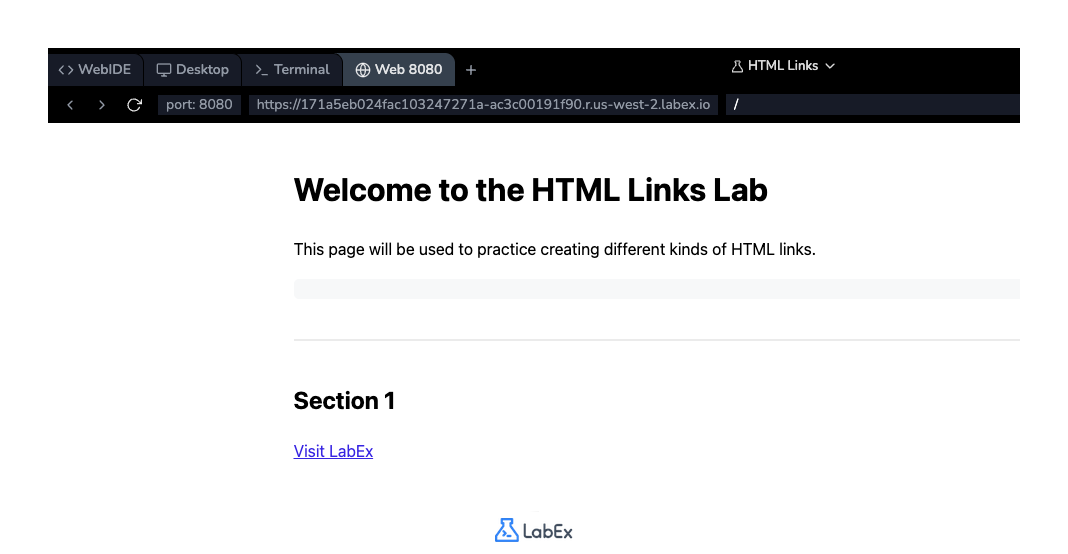
コードを追加した後、ファイルを保存します(Ctrl+S または Cmd+S)。次に、「Web 8080」タブに切り替えて新しいリンクを確認します。それをクリックすると、LabEx のホームページに移動します。
新規タブ用に target 属性を_blank に設定する
このステップでは、リンクを新しいブラウザタブで開く方法を学びます。デフォルトでは、リンクは同じタブで開きます。この動作を変更するには、target属性を使用します。
target="_blank"を設定すると、ブラウザはリンクされたドキュメントを新しいタブまたはウィンドウで開くように指示されます。これは外部リンクでよく行われる方法です。これにより、ユーザーはあなたのウェブサイトに留まりながら、外部リンクリソースを訪問することができます。
前のステップで作成したリンクを変更しましょう。<a>タグにtarget="_blank"属性を追加します。
<a href="https://labex.io" target="_blank">Visit LabEx</a>
更新されたindex.htmlファイルの最初のセクションには、この変更されたリンクが含まれているはずです。
<div class="section">
  <h2>Section 1</h2>
  <p>
    <a href="https://labex.io" target="_blank">Visit LabEx</a>
  </p>
</div>
ファイルを保存し、「Web 8080」タブに切り替えます。これで、「Visit LabEx」リンクをクリックすると、新しいブラウザタブで開かれ、ラボ環境のタブは開いたままになります。
ID アンカーへの href を持つ内部リンクを作成する
このステップでは、内部リンク、または「ページアンカー」や「ジャンプリンク」とも呼ばれるものを作成します。これらのリンクは、ユーザーが同じページの特定の場所にジャンプできるようにするもので、長いドキュメントに非常に役立ちます。
内部リンクを作成するには、href属性をハッシュ記号(#)に設定し、その後にリンクしたい要素のidを設定します。例えば、href="#section-name"のようにします。
ページ上部の<nav>要素内に、「Section 2」にジャンプするリンクを追加しましょう。
<nav>タグ内に以下の行を追加します。
<a href="#section2">Jump to Section 2</a>
これで、index.htmlファイルのナビゲーションエリアは以下のようになります。
<nav>
  <!-- Navigation links will be added here -->
  <a href="#section2">Jump to Section 2</a>
</nav>
ファイルを保存し、「Web 8080」タブを確認します。ページ上部に新しいリンクが表示されます。今クリックしても何も起こりません。なぜなら、まだ宛先のアンカーを定義していないからです。これは次のステップで行います。
アンカーのために要素に id 属性を追加する
前のステップでは、#section2を指すリンクを作成しました。次に、そのリンクの宛先を作成する必要があります。これはid属性を使用して行います。
id属性は、ページ上の HTML 要素に一意の識別子を提供します。idの値は、HTML ドキュメント内で一意でなければなりません。私たちの内部リンクhref="#section2"は、id="section2"を持つ要素を探します。
Section 2 の<h2>タグにこのidを追加しましょう。以下の行を見つけます。
<h2>Section 2</h2>
そして、id属性を含めるように変更します。
<h2 id="section2">Section 2</h2>
更新されたindex.htmlファイルの 2 番目のセクションは、以下のようになります。
<div class="section">
  <h2 id="section2">Section 2</h2>
  <p>
    This is the section we will link to from the top of the page. It is placed
    far down to demonstrate the page jump effect.
  </p>
</div>
ファイルを保存し、「Web 8080」タブに戻ります。ページ上部にある「Jump to Section 2」リンクをクリックします。ブラウザは「Section 2」の見出しまでスムーズにスクロールするはずです。
リンクのツールチップに title 属性を使用する
この最後のステップでは、リンクにツールチップを追加する方法を学びます。ツールチップは、追加の、必須ではない情報を提供し、通常、ユーザーが要素の上にマウスカーソルを置いたときに表示されます。これにより、アクセシビリティとユーザーエクスペリエンスが向上します。
グローバルなtitle属性を使用して、リンクを含む任意の要素にツールチップを追加できます。
LabEx への外部リンクに説明的なタイトルを追加しましょう。最初の 2 つのステップで作成したリンクを見つけ、それにtitle属性を追加します。
<a href="https://labex.io" target="_blank" title="Go to the LabEx homepage"
  >Visit LabEx</a
>
最終的なindex.htmlファイルには、この実験全体で追加したすべての要素が含まれているはずです。最初のセクションは以下のようになります。
<div class="section">
  <h2>Section 1</h2>
  <p>
    <a href="https://labex.io" target="_blank" title="Go to the LabEx homepage"
      >Visit LabEx</a
    >
  </p>
</div>
ファイルを最後に保存します。「Web 8080」タブに移動し、「Visit LabEx」リンクの上にマウスカーソルを置きます。「Go to the LabEx homepage」というテキストが表示された小さなボックスが現れるはずです。
まとめ
実験完了おめでとうございます!HTML でのリンクの作成とカスタマイズの基本を学びました。
この実験では、以下の方法を実践しました。
- 外部リンクを作成するために
href属性を持つ<a>タグを使用する。 - リンクを新しいタブで開くために
target="_blank"属性を使用する。 - 単一ページ内でのナビゲーションのために
href="#id"を使用して内部ページアンカーを作成する。 - 内部リンクの宛先を定義するために
id属性を使用する。 - より良いユーザーエクスペリエンスのために、
title属性でリンクに情報量の多いツールチップを追加する。
これらのスキルは、ナビゲーション可能でユーザーフレンドリーなウェブサイトを構築するために不可欠です。HTML の習熟度を高めるために、練習を続けてください!