Introducción
Al trabajar con datos de texto en Python, a menudo es necesario comparar cadenas de texto para determinar si contienen la misma información, independientemente de si las letras están en mayúsculas o minúsculas. Esto se llama comparación de cadenas sin distinción entre mayúsculas y minúsculas (case-insensitive string comparison).
En este laboratorio (lab), aprenderá diferentes métodos para comparar dos cadenas de Python para ver si son iguales, ignorando las diferencias entre mayúsculas y minúsculas. Explorará la comparación básica de cadenas, diversas técnicas para la comparación sin distinción entre mayúsculas y minúsculas y verá cómo aplicar estas habilidades en escenarios del mundo real.
Al final de este laboratorio, podrá implementar con confianza comparaciones de cadenas sin distinción entre mayúsculas y minúsculas en sus programas de Python, lo que mejorará su capacidad para manejar datos de texto de manera efectiva.
Comprender la comparación de cadenas en Python
Comencemos explorando cómo funcionan las comparaciones de cadenas en Python y por qué la distinción entre mayúsculas y minúsculas (case sensitivity) es importante.
Comparación de cadenas por defecto
En Python, cuando se comparan dos cadenas utilizando el operador de igualdad (==), la comparación distingue entre mayúsculas y minúsculas por defecto. Esto significa que "Hello" y "hello" se consideran cadenas diferentes.
Vamos a crear un nuevo archivo de Python para probar esto:
- En el WebIDE, haga clic en el icono de "Explorer" en la barra lateral izquierda.
- Haga clic en el botón "New File" y asígnele el nombre
string_comparison.py. - Agregue el siguiente código al archivo:
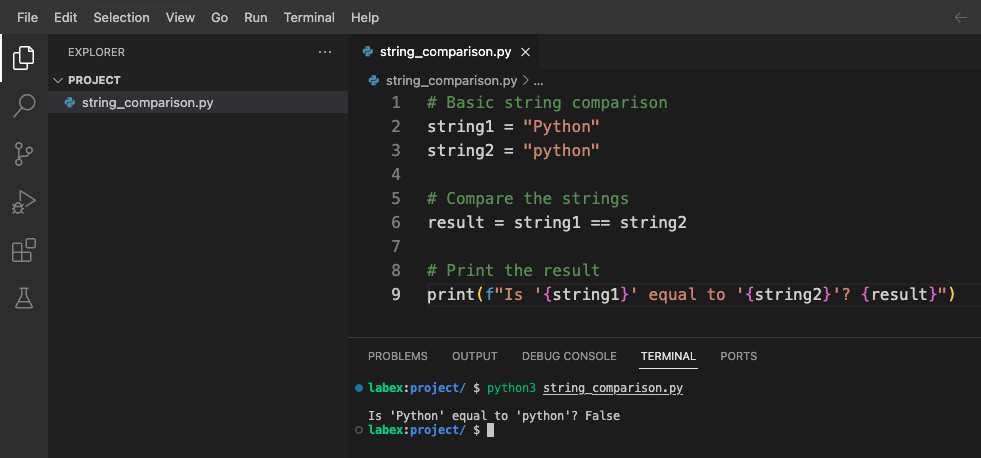
## Basic string comparison
string1 = "Python"
string2 = "python"

## Compare the strings
result = string1 == string2

## Print the result
print(f"Is '{string1}' equal to '{string2}'? {result}")
- Guarde el archivo presionando
Ctrl+So seleccionando "File" > "Save" desde el menú. - Ejecute el script abriendo una terminal (Terminal > New Terminal) y escribiendo:
python3 string_comparison.py
Debería ver la siguiente salida:
Is 'Python' equal to 'python'? False
La salida muestra False porque la comparación distingue entre mayúsculas y minúsculas, y "Python" con una 'P' mayúscula no es lo mismo que "python" con una 'p' minúscula.
Por qué la comparación sin distinción entre mayúsculas y minúsculas es útil
La comparación sin distinción entre mayúsculas y minúsculas (case-insensitive comparison) es útil en muchos escenarios:
- Validación de entrada del usuario (los usuarios pueden escribir en cualquier formato de mayúsculas y minúsculas)
- Búsqueda de texto (buscar palabras sin importar el formato de mayúsculas y minúsculas)
- Procesamiento de lenguaje natural (donde la capitalización puede variar)
- Trabajar con URLs, direcciones de correo electrónico o nombres de usuario (que pueden no distinguir entre mayúsculas y minúsculas)
Modifiquemos nuestro script para agregar algunos ejemplos que demuestren cuándo es útil la comparación sin distinción entre mayúsculas y minúsculas:
## Add these examples to string_comparison.py

## Example: User searching for content
user_search = "Python"
article_title = "Getting Started with python Programming"

## Case-sensitive comparison (might miss relevant content)
found_sensitive = user_search in article_title
print(f"Case-sensitive search found match: {found_sensitive}")

## What if we want to find matches regardless of case?
## We'll explore solutions in the next steps
Agregue este código a su archivo string_comparison.py y ejecútelo nuevamente:
python3 string_comparison.py
La salida ahora incluye:
Case-sensitive search found match: False
Esto muestra un problema práctico: un usuario que busca "Python" no encontraría contenido titulado "python Programming" con la comparación por defecto que distingue entre mayúsculas y minúsculas.
En el siguiente paso, aprenderemos cómo realizar comparaciones sin distinción entre mayúsculas y minúsculas para resolver este problema.
Métodos de comparación de cadenas sin distinción entre mayúsculas y minúsculas
Ahora que entiendes por qué es importante la comparación sin distinción entre mayúsculas y minúsculas (case-insensitive comparison), aprendamos diferentes métodos para realizarla en Python.
Método 1: Usando lower() o upper()
El enfoque más común es convertir ambas cadenas al mismo formato de mayúsculas y minúsculas antes de compararlas. Puedes usar los métodos lower() o upper() para este propósito.
Vamos a crear un nuevo archivo para probar estos métodos:
- En el WebIDE, crea un nuevo archivo y llámalo
case_insensitive.py. - Agrega el siguiente código:
## Case-insensitive comparison using lower()
string1 = "Python"
string2 = "python"

## Convert both strings to lowercase, then compare
result_lower = string1.lower() == string2.lower()
print(f"Using lower(): '{string1}' equals '{string2}'? {result_lower}")

## Convert both strings to uppercase, then compare
result_upper = string1.upper() == string2.upper()
print(f"Using upper(): '{string1}' equals '{string2}'? {result_upper}")
- Guarda el archivo y ejecútalo con:
python3 case_insensitive.py
Deberías ver:
Using lower(): 'Python' equals 'python'? True
Using upper(): 'Python' equals 'python'? True
Ambos métodos producen el mismo resultado: confirman que las cadenas son iguales cuando se ignora el formato de mayúsculas y minúsculas.
Método 2: Usando casefold()
El método casefold() es similar a lower(), pero proporciona una conversión más agresiva del formato de mayúsculas y minúsculas que funciona mejor para ciertos idiomas con reglas especiales de mapeo de mayúsculas y minúsculas.
Agrega el siguiente código a tu archivo case_insensitive.py:
## Case-insensitive comparison using casefold()
german_string1 = "Straße"  ## German word for "street"
german_string2 = "STRASSE" ## Uppercase version (note: ß becomes SS when uppercased)

## Using lower()
result_german_lower = german_string1.lower() == german_string2.lower()
print(f"Using lower() with '{german_string1}' and '{german_string2}': {result_german_lower}")

## Using casefold()
result_german_casefold = german_string1.casefold() == german_string2.casefold()
print(f"Using casefold() with '{german_string1}' and '{german_string2}': {result_german_casefold}")
Ejecuta el script nuevamente:
python3 case_insensitive.py
Verás:
Using lower() with 'Straße' and 'STRASSE': False
Using casefold() with 'Straße' and 'STRASSE': True
Esto demuestra que casefold() maneja mejor los mapeos de caracteres especiales que lower() en ciertos idiomas.
Método 3: Usando expresiones regulares
Para escenarios más avanzados, puedes usar expresiones regulares con el módulo re y la bandera IGNORECASE:
Agrega el siguiente código a tu archivo case_insensitive.py:
## Case-insensitive comparison using regular expressions
import re

text = "Python is a great programming language."
pattern1 = "python"

## Check if 'python' exists in the text (case-insensitive)
match = re.search(pattern1, text, re.IGNORECASE)
print(f"Found '{pattern1}' in text? {match is not None}")

## Case-insensitive equality check with regex
def regex_equal_ignore_case(str1, str2):
    return bool(re.match(f"^{re.escape(str1)}$", str2, re.IGNORECASE))

## Test the function
result_regex = regex_equal_ignore_case("Python", "python")
print(f"Using regex: 'Python' equals 'python'? {result_regex}")
Ejecuta el script nuevamente:
python3 case_insensitive.py
Deberías ver:
Found 'python' in text? True
Using regex: 'Python' equals 'python'? True
Comparación de los métodos
Resumamos los métodos que hemos aprendido:
lower()/upper(): Simple y de uso común, funciona para la mayoría del texto en inglés.casefold(): Mejor para texto internacional con reglas especiales de mapeo de mayúsculas y minúsculas.- Expresiones regulares con
re.IGNORECASE: Poderoso para la coincidencia de patrones y casos complejos.
Agrega este resumen a tu archivo case_insensitive.py como un comentario para referencia:
## Summary of case-insensitive comparison methods:
## 1. string1.lower() == string2.lower() - Simple, works for basic cases
## 2. string1.casefold() == string2.casefold() - Better for international text
## 3. re.match(pattern, string, re.IGNORECASE) - For pattern matching
Ahora que entiendes diferentes métodos, apliquemos estas técnicas a escenarios prácticos en el siguiente paso.
Construyendo una función de búsqueda sin distinción entre mayúsculas y minúsculas
Ahora que has aprendido diferentes métodos para la comparación sin distinción entre mayúsculas y minúsculas (case-insensitive comparison), construyamos una función de búsqueda práctica que pueda encontrar palabras en un texto sin importar el formato de mayúsculas y minúsculas.
Creando una función de búsqueda
- En el WebIDE, crea un nuevo archivo y llámalo
search_function.py. - Agrega el siguiente código para implementar una simple función de búsqueda sin distinción entre mayúsculas y minúsculas:
def search_text(query, text):
    """
    Search for a query in text, ignoring case.
    Returns a list of all matching positions.
    """
    ## Convert both to lowercase for case-insensitive comparison
    query_lower = query.lower()
    text_lower = text.lower()

    found_positions = []
    position = 0

    ## Find all occurrences
    while position < len(text_lower):
        position = text_lower.find(query_lower, position)
        if position == -1:  ## No more matches
            break
        found_positions.append(position)
        position += 1  ## Move to the next character

    return found_positions

## Example text
sample_text = """
Python is a programming language that lets you work quickly and integrate systems effectively.
python is easy to learn, powerful, and versatile.
Many developers love PYTHON for its simplicity and readability.
"""

## Test search
search_query = "python"
results = search_text(search_query, sample_text)

## Display results
if results:
    print(f"Found '{search_query}' at {len(results)} positions: {results}")

    ## Show each match in context
    print("\nMatches in context:")
    for pos in results:
        ## Get some context around the match (10 characters before and after)
        start = max(0, pos - 10)
        end = min(len(sample_text), pos + len(search_query) + 10)
        context = sample_text[start:end]

        ## Highlight the match by showing the original case from the text
        match_original_case = sample_text[pos:pos+len(search_query)]
        print(f"...{context.replace(match_original_case, f'[{match_original_case}]')}...")
else:
    print(f"No matches found for '{search_query}'")
- Guarda el archivo y ejecútalo con:
python3 search_function.py
Deberías ver una salida como esta:
Found 'python' at 3 positions: [1, 67, 132]

Matches in context:
...[Python] is a pro...
...ctively.
[python] is easy ...
...ers love [PYTHON] for its ...
Esto muestra que nuestra función encontró "Python" en tres lugares, sin importar si estaba escrito como "Python", "python" o "PYTHON". La función también muestra cada coincidencia en su contexto original, preservando la capitalización original.
Mejorando la función de búsqueda
Mejoremos nuestra función para hacerla más útil agregando la opción de contar palabras y manejar la coincidencia de palabras completas:
Agrega el siguiente código a tu archivo search_function.py:
def count_word_occurrences(word, text, whole_word=False):
    """
    Count occurrences of a word in text, ignoring case.
    If whole_word=True, only count complete word matches.
    """
    word_lower = word.lower()
    text_lower = text.lower()

    if whole_word:
        ## Use word boundaries to match whole words only
        import re
        pattern = r'\b' + re.escape(word_lower) + r'\b'
        matches = re.findall(pattern, text_lower)
        return len(matches)
    else:
        ## Simple substring counting
        return text_lower.count(word_lower)

## Test the enhanced function
test_text = """
Python is great. I love python programming.
This python-script demonstrates case-insensitive searching.
The word "python" appears multiple times as a whole word and as part of other words.
"""

## Count all occurrences (including within words)
count_all = count_word_occurrences("python", test_text)
print(f"Total occurrences of 'python' (including within words): {count_all}")

## Count only whole word occurrences
count_whole = count_word_occurrences("python", test_text, whole_word=True)
print(f"Whole word occurrences of 'python': {count_whole}")
Ejecuta el script nuevamente:
python3 search_function.py
Ahora deberías ver una salida adicional:
Total occurrences of 'python' (including within words): 4
Whole word occurrences of 'python': 3
Esto muestra que "python" aparece 4 veces en total, pero solo 3 veces como palabra completa (una aparición está en "python-script", que no es una coincidencia de palabra completa).
Probando diferentes escenarios
Agreguemos una prueba más para mostrar cómo nuestras funciones manejan diferentes tipos de texto:
## Add more test cases
test_cases = [
    ("Python programming is fun", "python", "Simple sentence with one occurrence"),
    ("Python, python, PYTHON!", "python", "Multiple occurrences with different cases"),
    ("No matches here", "python", "No matches"),
    ("Python-script and PythonProgram contain python", "python", "Mixed word boundaries")
]

print("\nTesting different scenarios:")
for text, search_word, description in test_cases:
    whole_matches = count_word_occurrences(search_word, text, whole_word=True)
    all_matches = count_word_occurrences(search_word, text)

    print(f"\nScenario: {description}")
    print(f"Text: '{text}'")
    print(f"  - Whole word matches: {whole_matches}")
    print(f"  - All matches: {all_matches}")
Agrega este código y ejecuta el script nuevamente:
python3 search_function.py
Verás un desglose detallado de cómo la función maneja diferentes escenarios de texto:
Testing different scenarios:

Scenario: Simple sentence with one occurrence
Text: 'Python programming is fun'
  - Whole word matches: 1
  - All matches: 1

Scenario: Multiple occurrences with different cases
Text: 'Python, python, PYTHON!'
  - Whole word matches: 3
  - All matches: 3

Scenario: No matches
Text: 'No matches here'
  - Whole word matches: 0
  - All matches: 0

Scenario: Mixed word boundaries
Text: 'Python-script and PythonProgram contain python'
  - Whole word matches: 1
  - All matches: 3
Esto demuestra cómo se puede usar la comparación sin distinción entre mayúsculas y minúsculas en una función de búsqueda del mundo real, con opciones para manejar diferentes requisitos de búsqueda.
En el siguiente paso, aplicaremos estas técnicas para crear una aplicación práctica de validación de entrada de usuario.
Creando una aplicación de validación de entrada de usuario
En este último paso, crearemos una aplicación práctica que utiliza la comparación de cadenas sin distinción entre mayúsculas y minúsculas (case-insensitive string comparison) para la validación de la entrada de usuario. Esta es una necesidad común en muchas aplicaciones del mundo real.
Validador de comandos sencillo
- En el WebIDE, crea un nuevo archivo y llámalo
command_validator.py. - Agrega el siguiente código para implementar un validador de comandos sencillo:
def validate_command(user_input, valid_commands):
    """
    Validate if the user input matches any of the valid commands,
    ignoring case differences.

    Returns the standardized command if valid, None otherwise.
    """
    ## Convert user input to lowercase for comparison
    user_input_lower = user_input.strip().lower()

    for cmd in valid_commands:
        if user_input_lower == cmd.lower():
            ## Return the standard casing of the command
            return cmd

    ## No match found
    return None

## List of valid commands with standard casing
VALID_COMMANDS = [
    "Help",
    "Exit",
    "List",
    "Save",
    "Delete"
]

## Test with various inputs
test_inputs = [
    "help",      ## lowercase
    "EXIT",      ## uppercase
    "List",      ## correct case
    "  save  ",  ## with extra spaces
    "delete",    ## lowercase
    "unknown",   ## invalid command
    "hlep"       ## typo
]

print("Command Validator Test:")
print("=" * 30)
print(f"Valid commands: {VALID_COMMANDS}")
print("=" * 30)

for cmd in test_inputs:
    result = validate_command(cmd, VALID_COMMANDS)
    if result:
        print(f"'{cmd}' is valid ✓ (standardized to '{result}')")
    else:
        print(f"'{cmd}' is invalid ✗")
- Guarda el archivo y ejecútalo con:
python3 command_validator.py
Deberías ver una salida como esta:
Command Validator Test:
==============================
Valid commands: ['Help', 'Exit', 'List', 'Save', 'Delete']
==============================
'help' is valid ✓ (standardized to 'Help')
'EXIT' is valid ✓ (standardized to 'Exit')
'List' is valid ✓ (standardized to 'List')
'  save  ' is valid ✓ (standardized to 'Save')
'delete' is valid ✓ (standardized to 'Delete')
'unknown' is invalid ✗
'hlep' is invalid ✗
Esto muestra cómo se puede usar la comparación sin distinción entre mayúsculas y minúsculas para validar comandos de usuario mientras se mantiene un formato de salida estandarizado.
Procesador de comandos interactivo
Ahora, creemos una versión interactiva donde los usuarios puedan ingresar comandos directamente:
- Crea un nuevo archivo llamado
interactive_commands.py. - Agrega el siguiente código:
## Interactive command processor using case-insensitive validation

## Valid commands with descriptions
COMMANDS = {
    "Help": "Display available commands",
    "List": "List all items",
    "Add": "Add a new item",
    "Delete": "Delete an item",
    "Exit": "Exit the program"
}

def process_command(command):
    """Process a command entered by the user."""
    ## Normalize command (remove extra spaces, convert to standard case)
    normalized = None

    ## Check if command matches any valid command (case-insensitive)
    for valid_cmd in COMMANDS:
        if command.strip().lower() == valid_cmd.lower():
            normalized = valid_cmd
            break

    ## Process the command
    if normalized == "Help":
        print("\nAvailable commands:")
        for cmd, desc in COMMANDS.items():
            print(f"  {cmd} - {desc}")

    elif normalized == "List":
        print("\nListing all items:")
        print("  (This is where your actual items would be displayed)")

    elif normalized == "Add":
        print("\nAdding a new item:")
        print("  (In a real application, you would prompt for item details here)")

    elif normalized == "Delete":
        print("\nDeleting an item:")
        print("  (In a real application, you would prompt for which item to delete)")

    elif normalized == "Exit":
        print("\nExiting program. Goodbye!")
        return False

    else:
        print(f"\nUnknown command: '{command}'")
        print("Type 'help' to see available commands")

    return True

def main():
    """Main program loop."""
    print("=== Simple Command Processor ===")
    print("Type 'help' to see available commands.")
    print("Commands are case-insensitive, so 'help', 'HELP', and 'Help' all work the same.")

    running = True
    while running:
        user_input = input("\nEnter a command: ")
        running = process_command(user_input)

if __name__ == "__main__":
    main()
- Guarda el archivo y ejecútalo:
python3 interactive_commands.py
Verás un aviso interactivo:
=== Simple Command Processor ===
Type 'help' to see available commands.
Commands are case-insensitive, so 'help', 'HELP', and 'Help' all work the same.

Enter a command:
- Intenta ingresar varios comandos con diferentes formatos de mayúsculas y minúsculas:
help(en minúsculas)LIST(en mayúsculas)Add(con mayúsculas y minúsculas mezcladas)exit(para salir del programa)
El programa procesará cada comando correctamente, independientemente del formato de mayúsculas y minúsculas que uses.
Resumen de técnicas de validación de entrada
Creemos un archivo más para resumir las diferentes técnicas que hemos aprendido para la validación de entrada sin distinción entre mayúsculas y minúsculas:
- Crea un archivo llamado
validation_techniques.py. - Agrega el siguiente código:
"""
Summary of Case-Insensitive Input Validation Techniques
"""

## Example data
valid_options = ["Yes", "No", "Maybe"]
user_responses = ["yes", "NO", "mAyBe", "unknown"]

print("Case-Insensitive Input Validation Techniques\n")

## Technique 1: Simple lowercase comparison
print("Technique 1: Simple lowercase comparison")
for response in user_responses:
    is_valid = response.lower() in [opt.lower() for opt in valid_options]
    print(f"  Is '{response}' valid? {is_valid}")

## Technique 2: Using a validation function
print("\nTechnique 2: Using a validation function")
def validate_input(user_input, valid_options):
    return any(user_input.lower() == opt.lower() for opt in valid_options)

for response in user_responses:
    is_valid = validate_input(response, valid_options)
    print(f"  Is '{response}' valid? {is_valid}")

## Technique 3: Mapping to standardized values
print("\nTechnique 3: Mapping to standardized values")
def standardize_input(user_input, valid_options):
    for opt in valid_options:
        if user_input.lower() == opt.lower():
            return opt
    return None

for response in user_responses:
    standard_form = standardize_input(response, valid_options)
    if standard_form:
        print(f"  '{response}' is valid and maps to '{standard_form}'")
    else:
        print(f"  '{response}' is invalid")

## Technique 4: Using dictionaries for case-insensitive lookup
print("\nTechnique 4: Using dictionaries for case-insensitive lookup")
## Create a case-insensitive lookup dictionary
lookup_dict = {opt.lower(): opt for opt in valid_options}

for response in user_responses:
    if response.lower() in lookup_dict:
        standard_form = lookup_dict[response.lower()]
        print(f"  '{response}' is valid and maps to '{standard_form}'")
    else:
        print(f"  '{response}' is invalid")
- Guarda el archivo y ejecútalo:
python3 validation_techniques.py
Verás una comparación de diferentes técnicas de validación:
Case-Insensitive Input Validation Techniques

Technique 1: Simple lowercase comparison
  Is 'yes' valid? True
  Is 'NO' valid? True
  Is 'mAyBe' valid? True
  Is 'unknown' valid? False

Technique 2: Using a validation function
  Is 'yes' valid? True
  Is 'NO' valid? True
  Is 'mAyBe' valid? True
  Is 'unknown' valid? False

Technique 3: Mapping to standardized values
  'yes' is valid and maps to 'Yes'
  'NO' is valid and maps to 'No'
  'mAyBe' is valid and maps to 'Maybe'
  'unknown' is invalid

Technique 4: Using dictionaries for case-insensitive lookup
  'yes' is valid and maps to 'Yes'
  'NO' is valid and maps to 'No'
  'mAyBe' is valid and maps to 'Maybe'
  'unknown' is invalid
Este resumen muestra diferentes enfoques para implementar la validación sin distinción entre mayúsculas y minúsculas, lo que te da opciones para elegir la que mejor se adapte a tus necesidades específicas.
Al completar este paso, has aprendido cómo aplicar la comparación de cadenas sin distinción entre mayúsculas y minúsculas en un escenario práctico de validación de entrada de usuario.
Resumen
Felicidades por completar este laboratorio sobre la comparación de cadenas sin distinción entre mayúsculas y minúsculas en Python. Esto es lo que has aprendido:
Los conceptos básicos de la comparación de cadenas en Python y por qué la distinción entre mayúsculas y minúsculas es importante.
Varios métodos para realizar la comparación de cadenas sin distinción entre mayúsculas y minúsculas:
- Usando los métodos
lower()yupper(). - Usando el método
casefold()para texto internacional. - Usando expresiones regulares con
re.IGNORECASE.
- Usando los métodos
Cómo construir aplicaciones prácticas con comparación sin distinción entre mayúsculas y minúsculas:
- Crear una función de búsqueda que encuentre texto sin importar el formato de mayúsculas y minúsculas.
- Implementar la validación de entrada de usuario que funcione con cualquier formato de mayúsculas y minúsculas.
- Procesar comandos de manera insensible a mayúsculas y minúsculas.
Estas habilidades son valiosas en muchas tareas de programación del mundo real, desde la construcción de interfaces de usuario hasta el procesamiento de datos de texto. La comparación de cadenas sin distinción entre mayúsculas y minúsculas es una técnica fundamental que mejora la experiencia del usuario y hace que tus aplicaciones sean más robustas y amigables.
A medida que continúes tu viaje en Python, recuerda que estas técnicas se pueden combinar con otros métodos de procesamiento de cadenas para manejar requisitos de procesamiento de texto cada vez más complejos.