

Build Your First LabEx Study Plan Around One Linux Service
Choose LabEx Linux labs by a concrete service task, from paths and permissions to listeners, service logs, and restoration, with checkpoints for independent practice.

Opening a Linux syllabus gives you many reasonable next clicks: permissions, processes, networking, services, backups. Choosing one becomes easier when your study plan has a single outcome: make a small service answer, explain why it can access its files, and recover it after a controlled failure.
Use each course to resolve the next behavior you cannot yet demonstrate. Keep a short record that connects the individual labs back to the service. A completed sequence of instructions and an independently reconstructed result are different learning checkpoints.
This is a LabEx-authored study plan across several courses. We checked their public activity lists on September 14, 2026. The session order and checkpoints below are editorial suggestions, not an official combined course or a claim that separate labs share one persistent machine.
Choose your starting gap
You do not have to restart from terminal basics if you already know them. Try the question in the first column, then use the linked activity when you cannot yet produce the evidence in the last column.
| Your current gap | Public LabEx activity | Check to attempt afterward |
|---|---|---|
| A command works only from one directory | Absolute and Relative Paths | Locate the same file from two working directories |
| You cannot explain who can read a file | Reading Permission Bits | State the owner, group, mode, and relevant parent-directory access |
| You do not know which process you started | Viewing Running Processes | Identify your test process and its user |
| The service answers from one place only | Listening Ports and Services | Record the listener and the client’s location |
| A managed service fails without an obvious explanation | Viewing Service Logs with journalctl | Find the relevant service records for one start attempt |
| You have a backup but no evidence of recovery | Archiving with tar | Restore a practice file into a separate directory and compare it |
The activity names are from the current catalog. The last column is our suggested extension; it does not claim that a lab’s built-in checks assess that exact task.
For a new terminal user, Linux Terminal Basics is the entry point. Its public syllabus includes working directories, paths, help, and a First Server Exploration challenge. Read that sequence as preparation for locating and inspecting your own files.
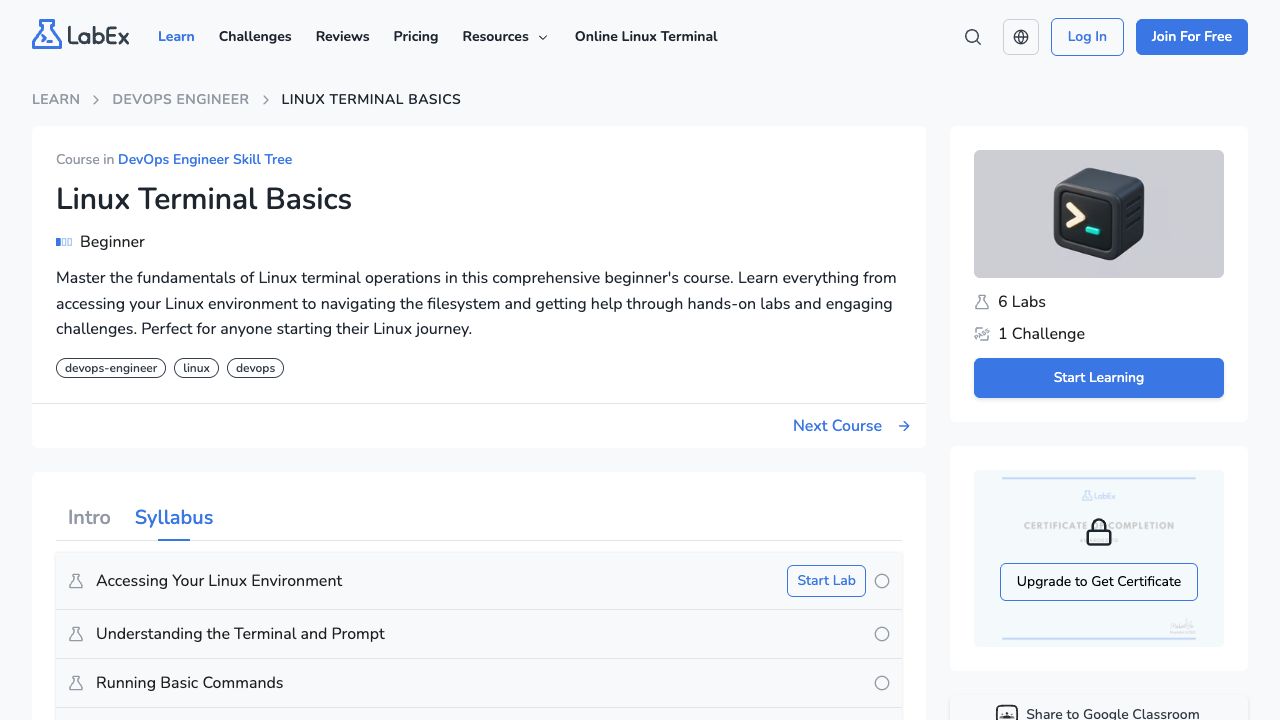
The public course page captured on September 14, 2026. The visible syllabus establishes the available activity names, not completion of those activities.
Session one: connect a file to a response
Choose a small text page as your application artifact. Write its location and expected contents before starting any server. Then identify the command that serves it and the URL used to request it.
The small-service walkthrough supplies an original practice example using Python and curl. It runs in an environment where those tools are installed; it is separate from the linked LabEx lab instructions. Its loopback request should run inside the same environment as the server.
Your stopping point is an explanation such as: “This process reads site/index.html; this request from the same machine returns the marker stored there.” Replace each generic phrase with the actual path, process command, and response you observed.
If you get a different page, inspect the directory and port before repeating the setup. A wrong response often gives more information than a second clean run that hides how the first one differed.
Session two: explain the access and the listener
Follow the permissions activity if reading modes is still uncertain. Then inspect your own practice file. Identify the acting user and the parent directories as well as the file mode. Our Permission Denied walkthrough demonstrates a file that is readable but inaccessible because its parent directory lacks search permission.
For networking, draw the caller and listener in your notes. A request inside a remote lab to 127.0.0.1 is local to that lab. A browser on your laptop needs the environment’s documented preview or access route; its own localhost is not the remote machine.
A successful local request is a useful checkpoint. It does not prove that another machine can reach the service. Record that limit explicitly rather than widening the bind address without a reason.
The Linux Networking Fundamentals course contains listener, connectivity, and DNS activities. Choose the one that corresponds to your unanswered question. DNS practice will not explain a wrong file returned by a known numeric loopback address.
Session three: distinguish a process from a managed service
A command running in your foreground terminal is enough for the first exercise. It is not yet a system service with a configured startup policy.
When you need that next behavior, move to Service Management with systemd. Its syllabus includes status checks, start/stop/restart, boot enablement, and journal inspection. Use its supplied instructions and environment instead of assuming every shell you open has systemd running as the system manager.
Keep the distinction between starting now and enabling at boot in your notes. Also distinguish a command that requests a start from evidence that the application answers correctly afterward. Service status and an application request answer related but separate questions.
For a reconstruction pass, use the lab’s stated task and your notes to explain the lifecycle before consulting its full command sequence. Documentation remains allowed; the point is to choose the operation yourself.
Session four: make restoration observable
Use only your own practice files for a controlled failure. Save an identifiable copy, alter the served marker, verify that the result is wrong, restore the known content, and request it again.
The Archiving and Backup course offers follow-up activities for archives and directory backups. First prove restoration into a separate location. A file named backup.tar is not evidence that its contents can be recovered as intended.
This exercise does not establish a production backup strategy. A live database, changing application state, and loss of the entire host add requirements beyond copying a static file. Keep the first claim narrow: you restored this practice artifact and verified its contents.
Plan for a session to end
Check the live lab entry for current account and access requirements before reserving study time. A public syllabus is readable without proving that every environment session is free, unlimited, or persistent.
Keep reusable source files and a short notebook somewhere you control. Do not make your study record depend on the same runtime remaining available when you open a different activity. Record enough environment context to explain a later mismatch: distribution, relevant tool versions, paths, and whether the service ran in the foreground or under a manager.
A useful note is short:
Task:
Prediction:
Command or configuration:
Observed response or error:
What this proves:
What remains untested:
Next change to try:
Leave credentials and personal account details out of notes you intend to share. Keep the actual error while you investigate; “networking did not work” loses the distinction between connection failure, HTTP failure, and the wrong response body.
Pick the next lab from the missing explanation
If you cannot locate the served file, start with paths. If you can locate it but cannot explain access, choose permissions. If the response fails only from another location, investigate the listener and request path. If the service stops unexpectedly, inspect process state and relevant logs before choosing a recovery command.
Open the activity that addresses the first missing explanation, complete its guided work, and then repeat one small behavior with a changed filename, marker, or port. Save the prediction and observed result. That gives the following session a specific starting point.
References
- Linux Terminal Basics — navigation and help activities.
- Users, Groups, and Permissions — ownership and mode practice.
- Processes and Job Control — process inspection and lifecycle basics.
- Linux Networking Fundamentals — listeners, connectivity, and DNS.
- Service Management with systemd — managed-service operations and logs.
- Archiving and Backup — archive and restoration-related practice.