

Practice Git on LabEx Before Touching a Shared Repository
Choose LabEx Git activities by the repository state you need to understand, then transfer staging, history, and recovery checks to a disposable local project.

Before undoing a change in a shared repository, practice explaining what will happen to the branch, the index, and the files on disk. A disposable repository gives you room to compare those states without using a team’s work as the experiment.
LabEx’s Git for Beginners is one place to build that foundation. Its public curriculum focuses on local repositories: staging, branches, commits, stashes, tags, comparisons, and recovery. Remote collaboration is a separate next step.
This is LabEx’s own blog. The course selection below uses its public syllabus and course description, checked October 13, 2026. The transfer exercise is independently authored and tested locally; it is not a reproduction of private lab instructions or a claim that we ran every course activity.
Pick an activity by the state you cannot yet explain
The course page currently describes ten guided labs paired with ten challenges, using provided Ubuntu 22.04 desktop environments. It lists basic file navigation and terminal use as prerequisites and says the listed local activities do not require a GitHub account.
Start with the question that stopped you, then choose the relevant activity:
| Your question | Public curriculum entry | Check to attempt afterward |
|---|---|---|
| Why did my last edit miss the commit? | Working with Files and Staging Area | Predict HEAD, index, and disk contents |
| Which branch contains this change? | Git Branch Basic Operations | Explain the current branch and inspect its commits |
| What changed between these states? | Git Diff Deep Dive | Choose the two states before running diff |
| Where did an earlier commit go? | Git Reset and Reflog | Locate a prior branch position and name what can be recovered |
These checks are suggested learning goals, not the platform’s grading specification. The public directory establishes the activity names; the course description supplies the broader learning scope.
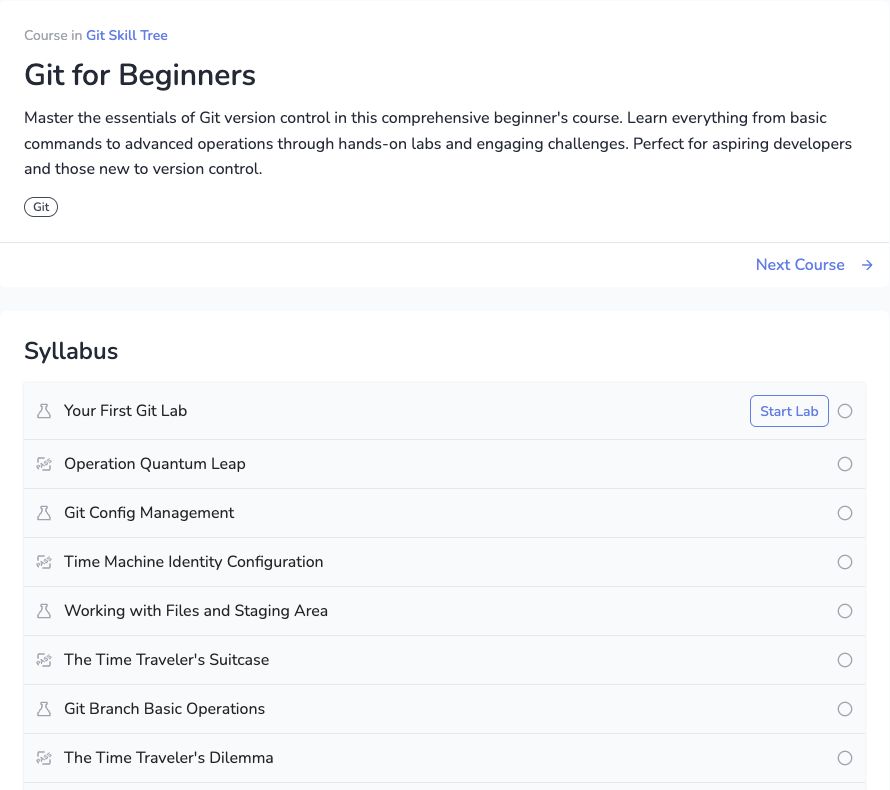
Public course syllabus captured October 13, 2026, while logged out. The screenshot shows the directory, not an active lab or a completed result.
If you are new to Git entirely, begin with Your First Git Lab. If you already use add and commit, identify the first state you cannot predict instead of assuming that recognizing command names means you can safely combine them.
Transfer one concept to a fresh local project
After a staging activity, use Bash and a local Git installation to create this independent experiment. It does not connect to GitHub, GitLab, or a work repository:
practice_dir=$(mktemp -d)
cd "$practice_dir"
git init -b main
git config user.name 'Practice Learner'
git config user.email 'learner@example.invalid'
printf 'port=8000\n' > service.conf
git add service.conf
git commit -m 'Baseline'
printf 'port=8001\n' > service.conf
git add service.conf
printf 'port=8002\n' > service.conf
Before running the next commands, write down which port each will show:
git show HEAD:service.conf
git show :service.conf
cat service.conf
The answers are 8000, 8001, and 8002. Now predict the next ordinary commit, verify it with git diff --cached, and commit. Check the recorded file with git show HEAD:service.conf and compare it with the file still on disk.
The staging walkthrough explains the result. Repeat the experiment with different values until you can predict it without copying the explanation. There is no need to push the disposable repository just to test the index.
Make recovery a prediction exercise
For an undo activity, name what must survive first. Is it an unstaged edit, a staged snapshot, or an existing commit? Then choose one operation and inspect the state afterward.
For example, git restore --staged -- service.conf changes the index while preserving the current file. Plain git restore -- service.conf overwrites the file from the index. The difference is visible in the restore/reset/revert experiment.
Do not transfer a successful disposable reset --hard or history rewrite directly into a shared project. A local recovery exercise does not establish whether another person has based work on a commit. Team policy, remotes, and coordination change the decision.
Check access and environment before starting
Open the selected activity and check its current sign-in, free-access, or subscription requirements. A public course directory does not establish that every activity is available without an account or payment. This article does not compare plans or promise a fixed session lifetime.
The provided environment and your computer are also different places. A file created in a course session does not automatically appear in your local directory. Keep a short note of the command, its intended state change, and the verification you used; do not assume that a practice session is your permanent project backup.
The next gap after this local curriculum is remote collaboration: authentication, push/fetch, review requests, and the team’s branch rules. Use GitHub versus GitLab for a first project to choose that environment. Start the shared exercise with a small branch and a reviewed diff after you can already explain what your local commit contains.