

Kubernetes for Beginners Updated: From Cluster State to Rollbacks
The updated LabEx course uses a ready-to-use Kubernetes v1.35.5 cluster to teach inspection, deployment, debugging, services, scaling, updates, and rollbacks.
Installing a cluster should not be the first obstacle in a beginner Kubernetes course. Before a learner has seen how Pods, Deployments, and Services fit together, installation choices, runtimes, and networking can introduce a separate set of problems.
We redesigned Kubernetes for Beginners around that constraint. Every lab now opens with a preconfigured Kubernetes v1.35.5 cluster. Learners can begin by reading cluster state, then move through deployment, troubleshooting, service exposure, scaling, updates, and rollbacks.
Inspect the cluster before creating resources
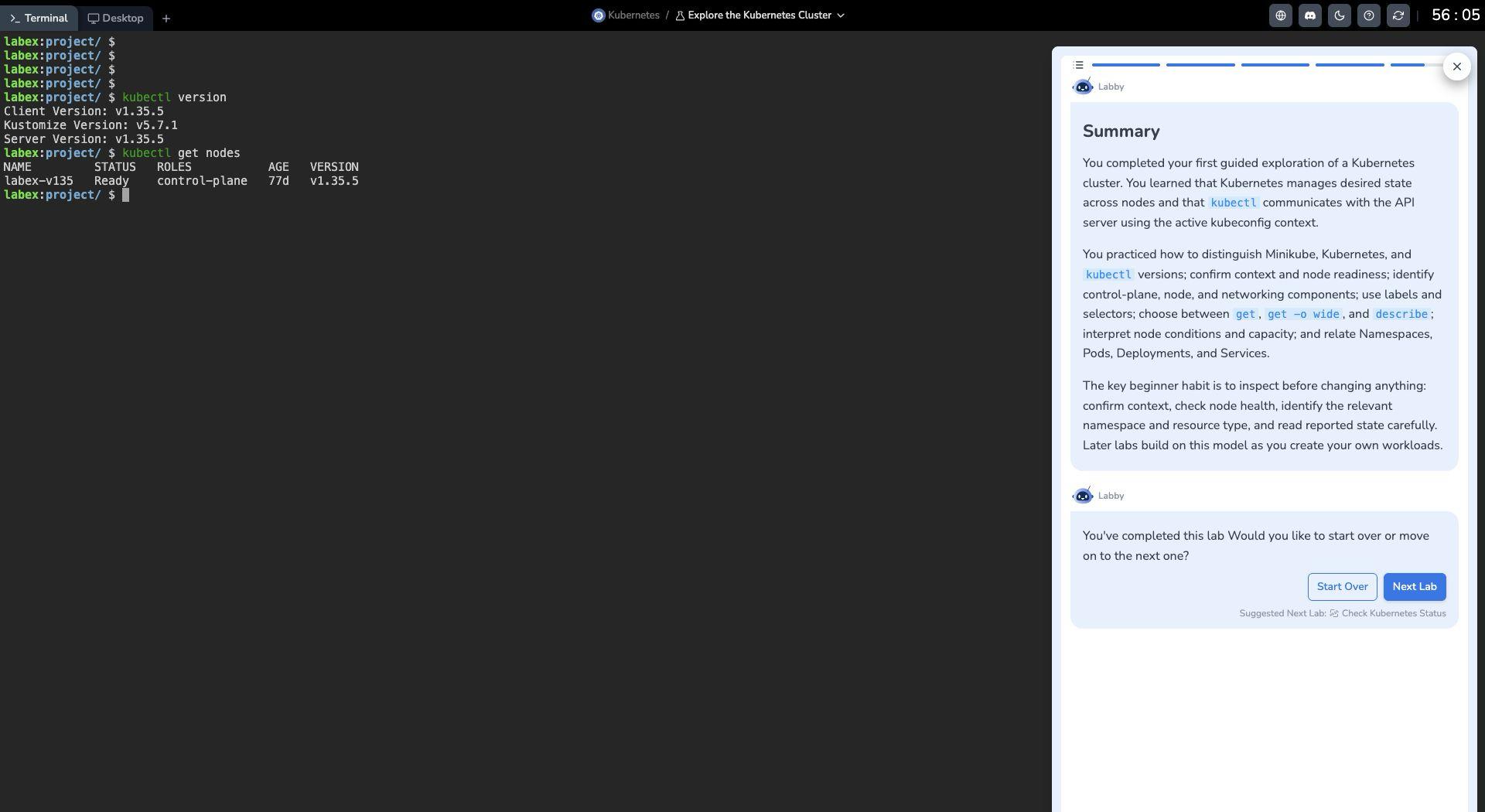
The first Guided Lab is Explore the Kubernetes Cluster. Instead of creating a Pod immediately, learners first confirm the active context, node readiness, and core components already running in the cluster.
That order matters. A kubectl command may be easy to copy, but a learner still needs to know which cluster it queries, what the reported state means, and how Kubernetes objects relate to one another. Establishing that inspection habit gives later deployment and debugging work a clear baseline.
Both the Kubernetes client and server in the lab use v1.35.5. Once the preconfigured environment is ready, read-only commands can confirm the version and node state without installing or starting a cluster.
Six lab pairs follow an application lifecycle
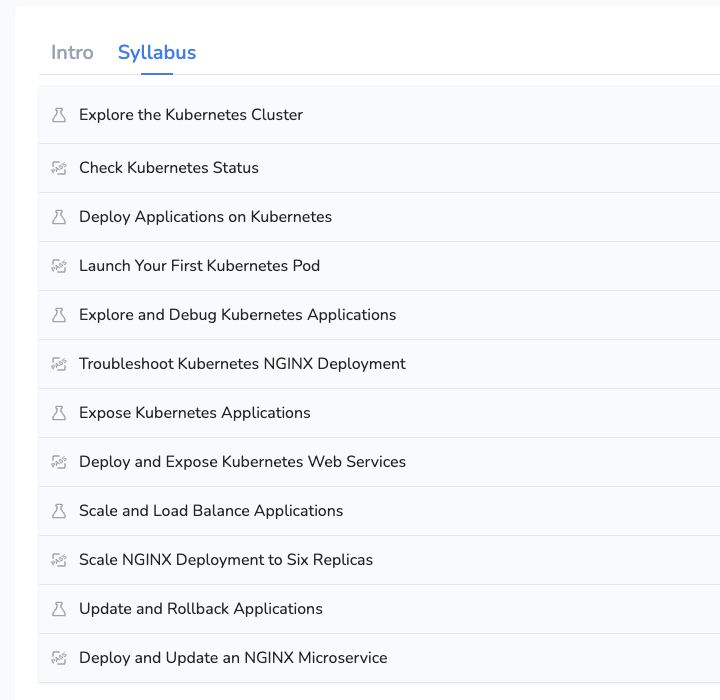
The course contains six Guided Labs and six corresponding Challenges. The sequence treats commands as parts of an application lifecycle rather than isolated facts:
- Explore the cluster and check Kubernetes status
- Deploy an application and launch a first Pod
- Inspect application state and troubleshoot an NGINX Deployment
- Expose an application with a Service and verify access
- Scale the application and observe load balancing
- Update the application and roll it back when needed
Each lab reuses earlier knowledge. Node and Pod status first establish whether the cluster is healthy, then support Deployment troubleshooting. Labels and selectors introduced early return when learners inspect Service backends and the Pod set created by scaling.
Every operation answers three questions
The update adds more foundational context and expands the first explanation of each command, option, and YAML field. Every operation now addresses three questions: why it is being run, what a normal result looks like, and how to read the output.
Creating a Service, for example, does not prove that an application is reachable. A learner also needs to check whether the selector matches the intended labels, whether the Service has the expected Pod backends, whether cluster DNS resolves the name, and whether a request reaches the application.
The same approach applies to Pod state, deployments, scaling, updates, and rollbacks. Success is determined from the resulting system state, not only from a command returning without an error.
Kubernetes convergence is part of the exercise
Kubernetes continually reconciles actual state with declared desired state, and that process is not instantaneous. A newly created Pod may still be pulling its image, Deployment replicas may still be starting, or Service backends may not yet be ready.
The revised labs improve waiting and retry behavior around resource startup and network checks. Validation allows a reasonable convergence period, then still checks the final state. This reduces failures caused by brief transitional states without treating a real configuration error as ordinary waiting.
Commands, output, and examples have also been updated for the v1.35.5 environment. Every lab was revalidated, and the main learning path was tested in fresh environments.
Challenges test only practiced skills
Each Guided Lab is followed by a related Challenge. Challenges remove the step-by-step instructions, but they test only commands, objects, and diagnostic methods already introduced and practiced.
After working with Pod state, labels, and Service backends in a Guided Lab, for example, a learner may need to perform those checks independently in the next Challenge. The task does not suddenly depend on an unfamiliar command or concept. It asks whether the learner can reach and verify the required state without the full procedure in front of them.
If you have not operated a Kubernetes cluster before, start with the updated Kubernetes for Beginners. The first task is not to deploy an application. It is to understand what the cluster in front of you is already running.