

KodeKloud vs LabEx: Which Hands-On Learning Model Fits You?
Compare KodeKloud and LabEx by teaching format, browser labs, AI feedback, certification paths, skill evidence, and subscription value.

Open a beginner Linux course on KodeKloud and you may meet an instructor, a fictional workplace, a quiz, and then a terminal lab.
Open the comparable course on LabEx and the lesson begins beside the environment where you will run the commands.
Both platforms lead to hands-on work. They differ in what they put before it, what happens when a check fails, how they remove guidance, and how completed practice becomes evidence of a skill.
That makes “Does it have labs?” a poor way to compare KodeKloud and LabEx. Both do. A more useful question is which learning loop helps you move from following an explanation to solving a system problem without one.
The useful comparison is not whether either platform has labs. It is what the platform can understand about your work when the expected result does not appear.
The Short Version
| If you want to… | Start by looking at… | Why |
|---|---|---|
| Learn from instructor-led videos before practicing | KodeKloud | Its courses commonly combine narrated lessons, quizzes, stories, and browser labs. |
| Prepare for CKA, CKAD, CKS, or another named certification | Either, with different formats | KodeKloud emphasizes video-led courses and mock exams; LabEx organizes hands-on prep and practice exams inside certification Skill Trees. |
| Learn mainly by reading and operating the environment | LabEx | Its default format is no-video, with instructions, a VM, and verification in the same workflow. |
| Get feedback based on the current lab and your recent actions | LabEx | Labby works with the active lab context, while Deep Inspection can review operation logs after a failed verification. |
| Move from guided practice to minimally guided problems | Either, with different structures | KodeKloud offers Engineer tasks and challenge programs; LabEx places Guided Labs and Challenge Labs inside its course and Skill Tree model. |
| Track progress as evidence against individual technical skills | LabEx | Labs, challenges, projects, and assessments can contribute evidence to concept-level skills rather than only course completion. |
| Keep labs, AI help, solutions, and projects in one lower-cost plan | LabEx | LabEx Pro lists these together at $99.90 per year; KodeKloud distributes advanced practice and AI across higher subscription tiers. |
This is not a ranking. A learner preparing for a certification may prefer KodeKloud’s instructor-led sequence or LabEx’s no-video, lab-first route. Someone who routinely skips course videos may reach the terminal faster with LabEx even when both catalogs cover the same command.
Before the Terminal: Two Ways to Introduce a Topic
KodeKloud: Explain, Then Practise
KodeKloud’s Linux Basics course shows its teaching pattern clearly. It mixes videos, a continuing story about a fictional company, multiple-choice questions, articles, and labs.
A section on the shell includes video lessons before the corresponding terminal exercises. Later sections repeat the pattern for package management, the Linux kernel, networking, storage, and service management.
The browser lab is not an optional appendix. KodeKloud says each lecture is followed by a hands-on lab where it validates the learner’s work and provides feedback or hints.
Typical rhythm: watch → answer → practise → receive feedback.
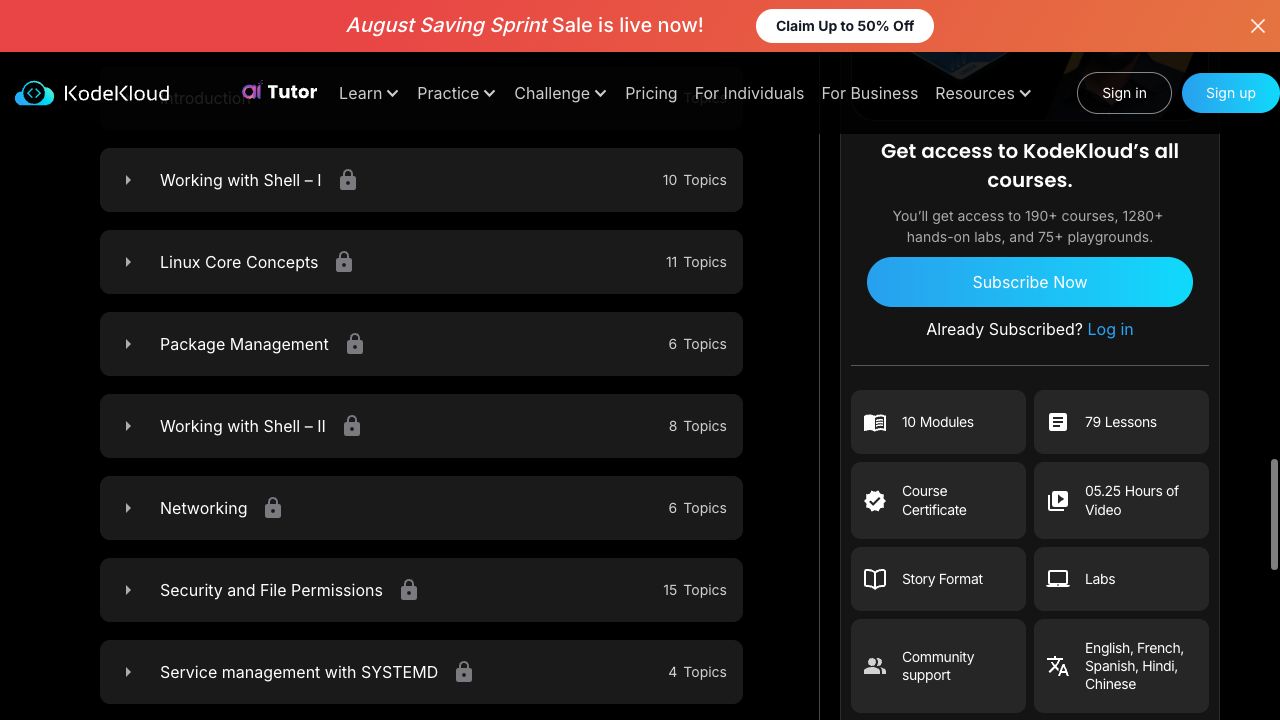
KodeKloud’s public Linux course page presents modules beside video length, story format, and lab access.
LabEx: Explain Inside the Practice
LabEx starts from a different constraint. Its support documentation describes the platform as no-video and organizes instruction around browser environments with automated checks. In Quick Start with Linux, the course sequence contains five Guided Labs and five Challenges. The learner reads the explanation while working in the environment rather than watching a lecture before opening it.
Typical rhythm: read → operate → check → retry.
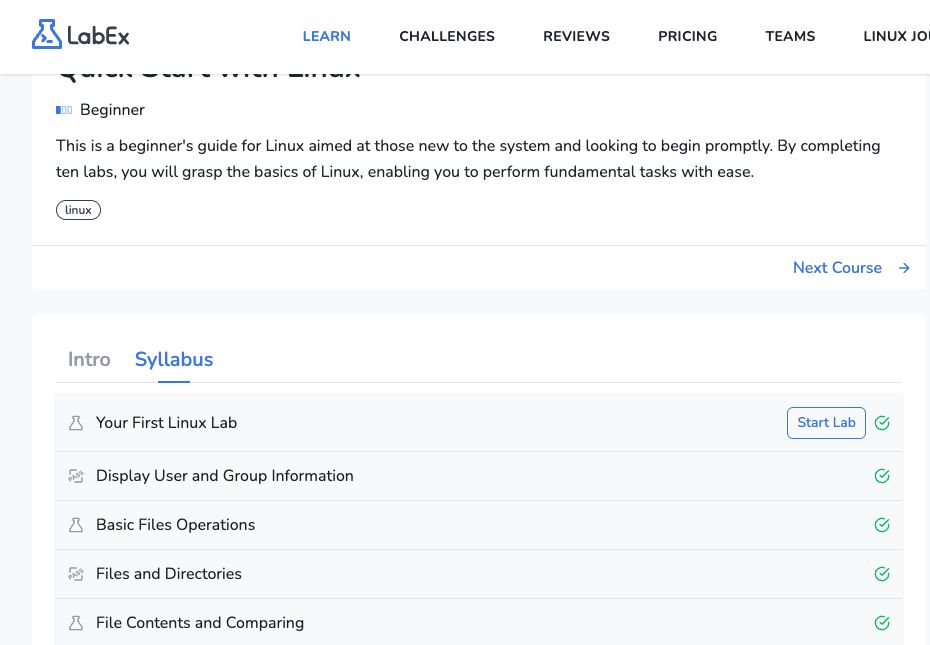
LabEx’s course syllabus places guided labs and challenge activities in one sequence; the two activity types use different icons.
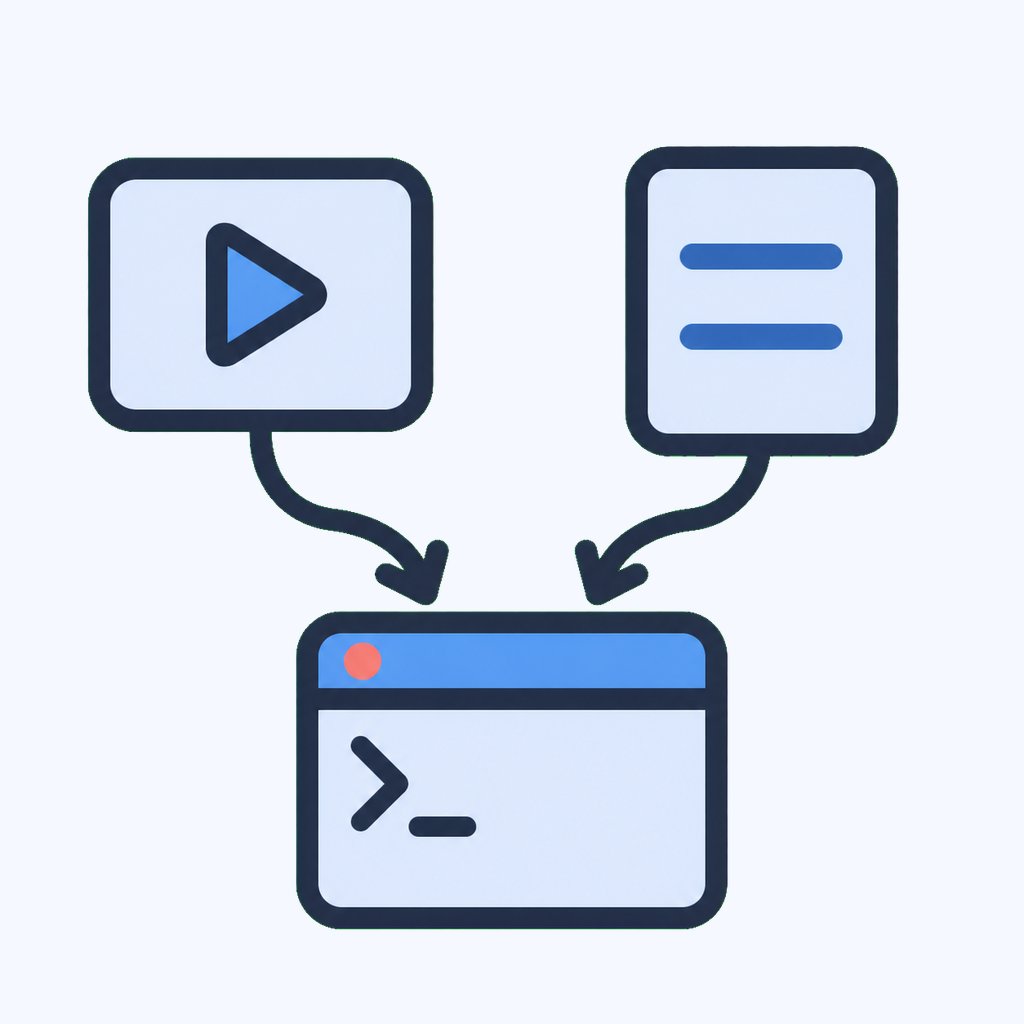
Different routes, same destination: the meaningful work still happens in a running environment.
Neither sequence is inherently more rigorous:
- Video before the lab can make architecture, process, and visual relationships easier to introduce.
- Text beside the terminal makes it easier to pause on a command, inspect the current state, and retry without moving between a player and a lab.
The useful distinction is the amount and form of explanation you want before touching the system.
A Passing Check Is Only the Beginning
Both platforms remove much of the setup work that can consume a beginner’s study session. In either one, a learner can:
- open a prepared environment in the browser;
- run commands and change configuration;
- submit the resulting state to automated checks;
- retry without first rebuilding a disposable Linux or Kubernetes machine locally.
Both also check work rather than treating terminal activity as proof by itself. KodeKloud’s Linux course describes labs that validate answers and return feedback. In LabEx, a Guided Lab runs a verification script against the VM after a step.
Running
chmoddoes not establish that the resulting permissions are correct. A useful lab checks the state that the command produced.
This shared mechanism matters more than catalog slogans. The learner has to connect a command, its effect, and the requirement the checker is enforcing. But a deterministic script usually answers only one question: does the current state satisfy the rule it was written to test?
LabEx Adds Context to a Failed Check
Labby is connected to the active lab workflow rather than operating as a detached chatbot. LabEx’s documentation says that step verification runs inside the VM. The current Your First Linux Lab goes further: its Ask feature understands the current lab context and recent actions, so a learner can ask where a mistake occurred, request a learning report based on the session, or ask how to improve.
The same lab contains a deliberately failed verification after the learner runs id -un. Clicking Re-Inspect triggers Deep Inspection, which uses AI to review the operation logs. It can then give feedback tied to what the learner actually did instead of repeating a generic hint for everyone who failed the same step.
- Verification script — state inside the VM: produces a deterministic pass or failure.
- Deep Inspection — failed check and operation logs: provides a contextual diagnosis and a more relevant next action.
- Ask Labby — question, current lab, and recent actions: provides targeted explanation, debugging help, or session feedback.
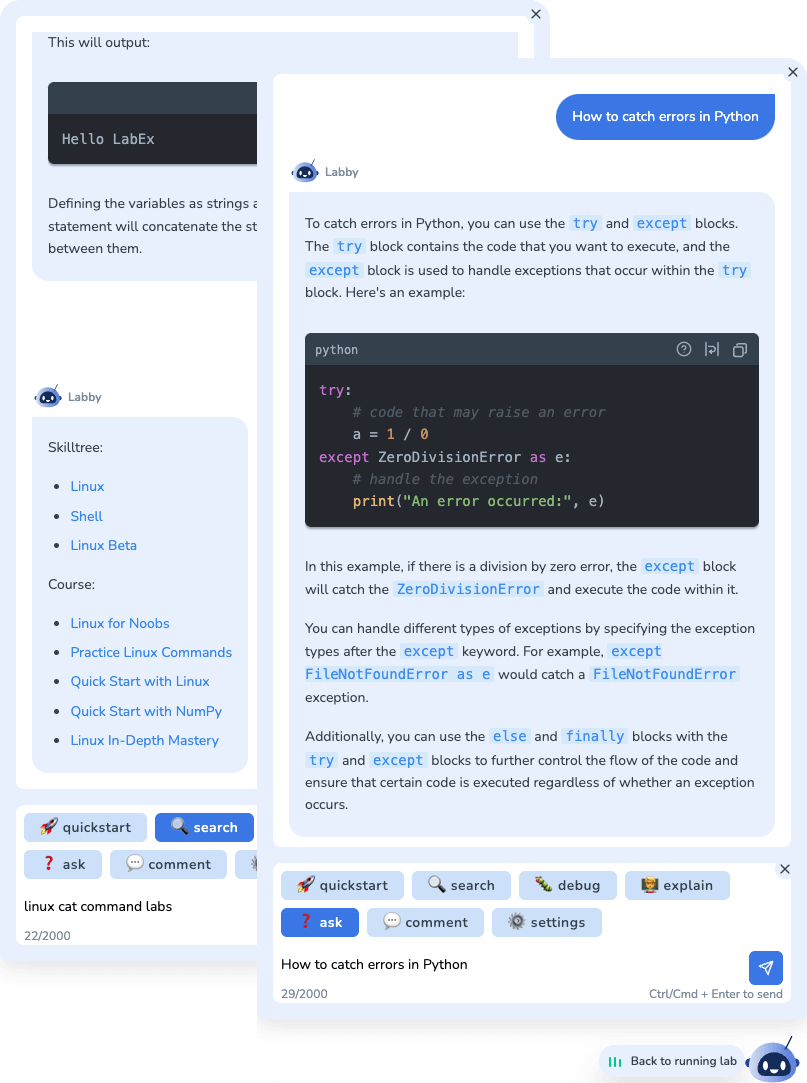
Labby remains inside the learning workflow, with actions for asking questions, debugging, explaining code, and returning to the running lab. Image from the LabEx AI Assistant documentation.
This does not make every diagnosis infallible. A verification script can be too narrow, and an AI inspection can misread an unusual sequence of actions. The advantage is the additional evidence available when a plain pass/fail result is not enough.
The distinction appears again in how the environment is presented. KodeKloud offers course labs as well as open DevOps and cloud Playgrounds for experiments without predefined instructions. A LabEx VM can expose a Linux desktop, WebIDE, or terminal depending on the task. These are different interfaces around the same important idea: the learner should change a running environment, not only recall an answer.
What Happens When the Instructions Stop?
A guided lab can confirm that you followed a procedure. It cannot, by itself, show whether you would recognize when to use that procedure.
KodeKloud Engineer: The Task as a Work Ticket
KodeKloud addresses that gap most visibly through KodeKloud Engineer. The program places the learner in a fictional organization, provides project documentation and systems, and assigns operational tasks.
The surrounding fiction gives each task the shape of a work ticket rather than another chapter in a course. KodeKloud’s Engineer 2.0 overview lists tasks in Linux, Git, Docker, Kubernetes, Jenkins, and Ansible.
LabEx Challenge: The Task as a Skill Check
LabEx uses Challenge Labs for the same transition from instruction to application. A Challenge usually keeps the objectives and requirements but removes most explanatory steps. The learner must inspect the supplied state, decide which commands or files matter, make the change, and satisfy the checks.
| Independent-practice model | KodeKloud Engineer | LabEx Challenge |
|---|---|---|
| Context | Fictional organization and operational task | A stated objective in a prepared technical environment |
| Connection to learning | A distinct job-simulation experience | Linked to courses and concept-level Skill Trees |
| Likely appeal | Learners who value workplace narrative | Learners who want a direct concept-to-check loop |
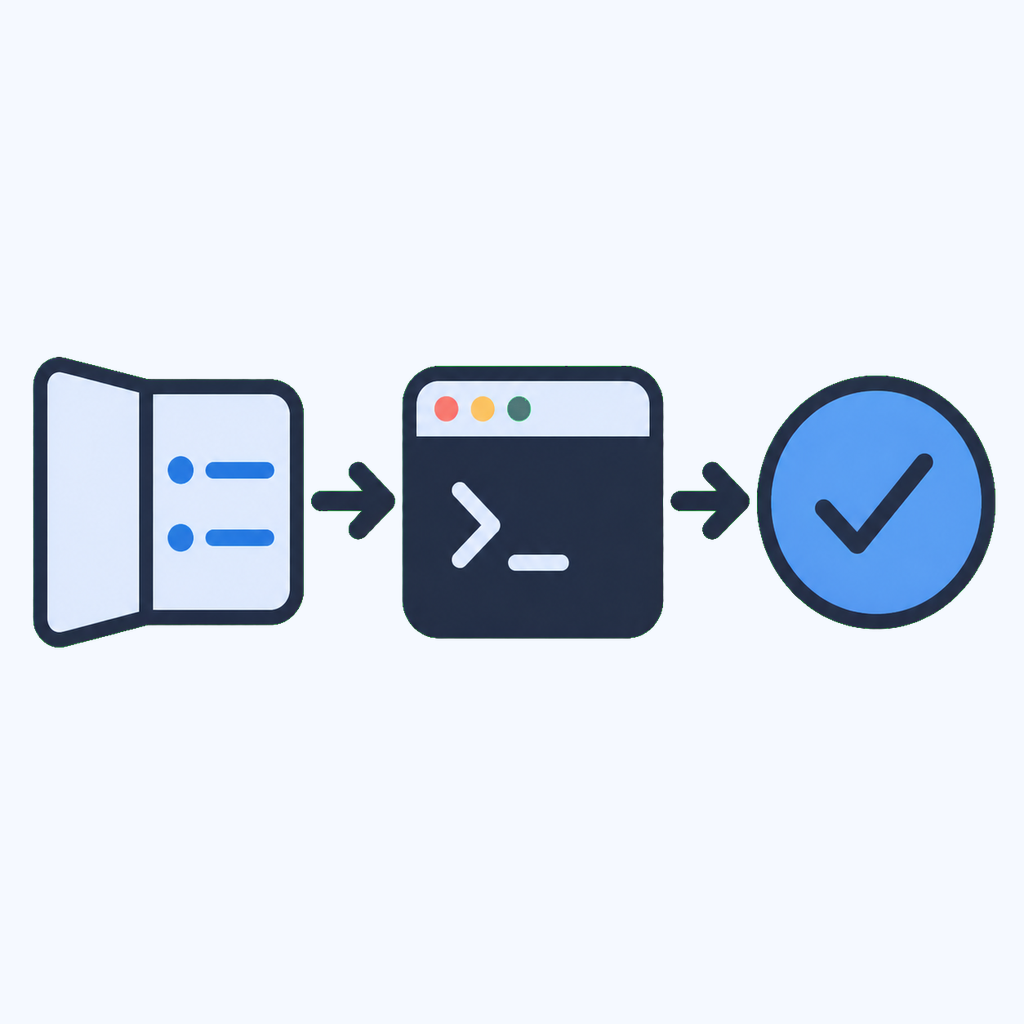
The transition that matters: follow less, decide more, then verify the resulting state.
Neither should be described as employment or production experience. The systems are controlled learning environments. Their value is that they can expose a gap hidden by step-by-step completion: knowing a command is different from diagnosing when and how to use it.
Certification Preparation Is No Longer a One-Sided Comparison
Certification preparation is a traditional KodeKloud strength. Its CKA Learning Path, for example, moves through Linux, containers, Kubernetes, a dedicated CKA course, and mock exams. The same catalog has named paths for CKAD and CKS. This is a clear fit for learners who want an instructor-led course sequence ending in exam-shaped practice.
LabEx now covers much of the same certification decision. Its public Skill Trees catalog lists CKA, CKAD, and CKS training alongside RHCSA, RHCE, LFCS, and CompTIA Linux+, A+, Network+, and Security+ preparation. For each of CKA, CKAD, and CKS, the catalog groups three courses: a preparation course and two practice-exam courses.
The distinction is therefore less about whether certification content exists and more about how it is delivered:
| Certification-prep question | KodeKloud | LabEx |
|---|---|---|
| How is the syllabus introduced? | Instructor-led video courses followed by labs | No-video explanations beside live environments |
| How does exam practice appear? | Dedicated certification courses, readiness tests, and mock exams | Hands-on prep courses and practice exams inside certification Skill Trees |
| What does progress connect to? | A course and certification learning path | A certification path plus reusable Kubernetes, Linux, and security skills |
Neither platform awards the CKA, CKAD, or CKS credential itself. Those credentials still come from the certification body after the learner passes its exam. The platforms provide preparation, labs, and practice exams; their course-completion certificates are a separate record.
Course Progress and Skill Evidence Are Not the Same Thing
KodeKloud’s Learning Paths answer a planning question: which courses should someone take for a domain, certification, or role? The current catalog includes domain paths for Linux, Kubernetes, cloud platforms, infrastructure as code, and AI, as well as role paths for system administrators, DevOps engineers, platform engineers, and other infrastructure roles. Course certificates, readiness tests, and KodeKloud Engineer progression provide several ways to represent work completed inside those paths.
LabEx also has courses and certificates, but its Skill Trees add a separate layer. A Skill Tree is a map of the capabilities inside a technical domain, not merely another order in which to consume lessons.
The relationship is many-to-many: one lab can teach or assess several skills, while one skill can receive evidence from several Guided Labs, Challenge Labs, projects, or assessments. This matters for learners who do not follow one linear course from the beginning. Existing ability in file operations can remain distinct from gaps in Linux services, networking, or process management.
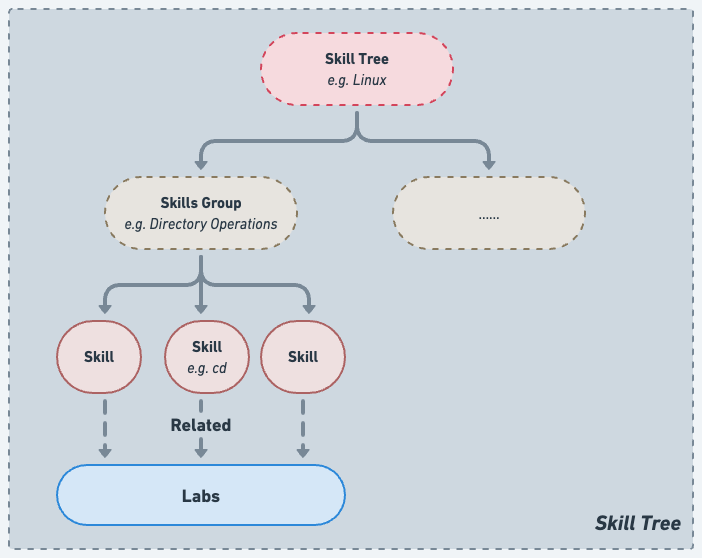
The Skill Tree structure connects a domain to reusable skills and then to the labs that practise them. Image from the LabEx Skill Trees documentation.
The public Skill Trees V2 catalog makes the structure inspectable outside the product UI. It defines domain boundaries, stable skill identifiers, names, descriptions, and canonical ordering. Each skill is intended to represent a reusable concept-level capability rather than one command option or one step in one lab.
That distinction changes what a progress page can answer:
- Course completion: Did the learner reach the end of this sequence?
- Skill evidence: Which concepts did the completed work exercise across courses, challenges, projects, or assessments?
The second view can reveal that finishing one course did not exercise every skill in the tree. It can also combine evidence from different courses when they exercise the same underlying capability.
The careful word here is evidence, not proof of job readiness. A completed LabEx challenge records performance inside that challenge’s environment and checks. It does not establish how someone will perform in every unfamiliar system. The Skill Tree makes the platform’s interpretation visible; it does not remove the limits of platform-based assessment.
Price Changes the Practical Comparison
Price is volatile, but omitting it would hide one of LabEx’s clearest advantages. As of August 12, 2026, LabEx Pro is listed at $99.90 per year. That plan includes 6,000+ hands-on labs, unlimited virtual machines, 2,000+ challenge solutions, 400+ projects, completion certificates, and full access to Labby.
KodeKloud’s pricing is regional and promotion-dependent, so its checkout price should be checked directly. Its feature split is still useful to compare: Standard includes the main course library and 1,280 hands-on labs; Pro adds playgrounds, cloud labs, projects, and unlimited KodeKloud Engineer work; the AI tier adds the personalized tutor and AI-assisted labs.
| What you need | LabEx | KodeKloud |
|---|---|---|
| Free hands-on access | 3 VMs per day | Limited free courses and features |
| Unlimited core labs | Included in Pro | Included in Standard and above |
| AI assistance in the learning workflow | Full Labby access in Pro | Personalized tutor and AI-assisted labs in the AI tier |
| Challenges, solutions, and projects | Included in Pro | Access and task limits vary across Standard, Pro, and AI |
The value advantage is not just a lower headline price. A learner who wants labs, project and challenge practice, solutions, and contextual AI help can obtain that bundle in one LabEx Pro subscription. The products are not feature-for-feature identical—KodeKloud also funds a large instructor-led video catalog—so the fair conclusion is narrower: for learners primarily buying hands-on practice and AI-assisted feedback, LabEx offers the stronger all-in price.
Which Platform Fits Your Learning Loop?
Start With KodeKloud If…
- You want an instructor-led DevOps or cloud curriculum.
- You want instructor-led certification preparation with a long-established video and mock-exam sequence.
- A role-based sequence helps you decide what to learn next.
- Workplace narrative makes independent tasks more engaging.
Its videos and labs are designed to support each other, and KodeKloud Engineer provides a distinct place to practise ticket-shaped tasks after learning the foundations.
Start With LabEx If…
- Video is the part of online learning you usually skip.
- You prefer reading instructions beside a live environment.
- You want AI help that can use the current lab, recent actions, and failed verification context.
- You want a direct progression from Guided Labs to Challenges.
- You want progress represented as concept-level skill evidence across courses.
- You want hands-on certification paths and AI-assisted practice in one lower-cost annual plan.
The default interaction is reading, operating a VM, checking the result, and moving from guidance to a less-prescriptive problem.
Topic coverage can change the answer. KodeKloud’s public catalog is strongly developed around DevOps, Kubernetes, cloud, platform engineering, certification preparation, and newer AI topics. LabEx exposes learning directions beyond infrastructure, including programming languages, databases, data science, web development, and cybersecurity. A larger category list does not establish depth, so compare the actual course and challenge sequence for the subject you intend to study.
Compare the actual course and challenge sequence, then compare the plan that unlocks the features you will use. A low entry price is less informative than the total cost of labs, AI help, solutions, and independent practice.
A 30-Minute Test Before You Choose
Use the same small Linux topic on both platforms. File permissions, process inspection, or package management works better than comparing two unrelated flagship courses.
- Measure time to terminal. Start a free beginner lab and note how long it takes before you run the first meaningful command.
- Make a reversible mistake. Check whether the feedback merely states the expected answer or can explain the failure using what you actually did. In LabEx, compare the initial check with Re-Inspect and an Ask Labby question.
- Remove the procedure. Complete one guided task, then find a Challenge or Engineer task covering related skills.
- Inspect the evidence. Can you tell what capability was exercised and what remains, or only that the activity is finished?
- Choose for your real habits. Prefer the balance of explanation, terminal time, feedback, and independent work that matches how you actually study.
The better platform is the one that gets you from a correct walkthrough to an unfamiliar system state with enough support to recover, but not so much that the decisions have already been made for you.