简介
V03 将问题转换为嵌入向量,并检索相近的帮助文章。V04 将这些结果限制在由服务器控制的客户和类别范围内。检索本身很有用,但许多支持类应用还需要再完成一步:将经过批准的段落转换为简短的自然语言回答。
这种模式称为检索增强生成,通常简称为 RAG。应用先检索证据,只使用这些记录构建一个小型上下文,然后要求语言模型根据该上下文回答。检索并不会自动让模型变得真实可靠。应用仍然必须控制哪些来源符合条件,限制进入提示词的文本量,保留来源标识,并在没有经过批准的证据时停止生成。
你将构建一个包含两个 Cloudflare 绑定的一次性 Worker。DOCUMENTS 用于搜索 Vectorize 索引,AI 同时运行 BGE Small 嵌入模型和由 Cloudflare 托管的 Llama 文本生成模型。Worker 会通过代码中提供的语料库解析返回的向量 ID;向量元数据可用于搜索,但不会被当作规范的文章正文。
该端点会在生成的回答旁边返回由应用控制的 sources 数组。如果在选定的命名空间和类别中没有检索到任何内容,端点会返回固定的 no_evidence 响应,而不会调用文本生成模型。在没有经过批准的证据时,使用这个明确的分支比要求模型自行编造答案更安全。
如果你是直接进入本课程的,请先完成将 LabEx 连接到你的 Cloudflare 账户。V01–V04 是前置课程,介绍兼容的索引、异步变更、语义检索和由服务器控制的范围。
本实验使用 Cloudflare 托管的 @cf/meta/llama-3.3-70b-instruct-fp8-fast 模型,因为它已经在前一个 Workers AI 课程中通过 Workers Free 进行了测试。DeepSeek V4 Flash 虽然由 Cloudflare 托管,但当前需要付费访问,因此不是学习者必须具备的依赖项。本实验只发送有界的嵌入和生成请求;只要账户的共享 Workers AI 免费额度仍然可用,就不需要 Workers Paid。
安装过程会在 /home/labex/project/grounded-answer 中安装 Node.js 22.22.0 和项目本地的 Wrangler 4.132.0。它提供确定性测试和独立的只读检查,但不会授权 Wrangler、创建索引、部署 Worker、运行推理或写入云端数据。
授权并命名 RAG 资源
在此步骤中,你将授权这台全新的虚拟机,确认学习账户,并在创建任何资源之前定义一组配对的 Worker 和 Vectorize 索引。
进入已准备好的项目目录,并检查固定版本的工具:
cd /home/labex/project/grounded-answer
node --version
npx wrangler --version
预期 Node.js 版本为 v22.22.0,Wrangler 版本为 4.132.0。浏览器中的 Dashboard 登录状态不会自动授权这台虚拟机,因此需要使用 Wrangler 的设备授权流程,并授予读取账户身份、操作一次性 Worker、Vectorize 和 Workers AI 所需的权限:
npx wrangler login --device --browser=false --scopes account:read user:read workers:write workers_scripts:write workers_kv:write ai:write
npx wrangler whoami --json
打开输出的授权链接,确认代码匹配,并批准目标 LabEx Learning 账户。不要将代码、密码或令牌发送给任何人。在 JSON 结果中确认 loggedIn: true,然后记下账户名称和 ID。
生成一个随机后缀。两个资源名称会共用这个后缀,便于后续清理时识别准确的资源配对:
RUN="labex-c08-v05-$(openssl rand -hex 6)"
INDEX="$RUN-docs"
printf 'Worker: %s\nIndex: %s\n' "$RUN" "$INDEX"
创建 wrangler.jsonc。Here 文档会将 JSON 标记之间的内容写入文件;$RUN 和 $INDEX 会展开为这台虚拟机的唯一名称。将 YOUR_ACCOUNT_ID 替换为 whoami 输出的 ID:
cat > wrangler.jsonc <<JSON
{
  "\$schema": "./node_modules/wrangler/config-schema.json",
  "name": "$RUN",
  "main": "src/index.js",
  "compatibility_date": "2026-09-16",
  "compatibility_flags": ["nodejs_compat"],
  "account_id": "YOUR_ACCOUNT_ID",
  "workers_dev": true,
  "preview_urls": false,
  "observability": { "enabled": true },
  "ai": { "binding": "AI" },
  "vectorize": [
    { "binding": "DOCUMENTS", "index_name": "$INDEX", "remote": true }
  ]
}
JSON
虽然代码会通过 AI 绑定调用两个模型,但 AI 仍然只是一个绑定。DOCUMENTS 指向配对的索引。这个文件只声明了目标资源的名称,目前还不会创建任何资源。
构建先检索后生成的 Worker
在此步骤中,你将实现完整的 RAG 流程,并在使用云端配额之前,通过确定性的内存绑定验证每个决策。
提供的 CORPUS 是规范的 ID 到文本映射。Vectorize 存储嵌入向量和可搜索的元数据;查询完成后,Worker 只接受能够通过该映射解析的 ID。随后,它最多将两个段落加入提示词。这样可以防止某条意外的索引记录仅仅因为得分较高,就成为模型上下文。
创建 Worker 源文件:
cat > src/index.js <<'JS'
export const EMBEDDING_MODEL = "@cf/baai/bge-small-en-v1.5";
export const ANSWER_MODEL = "@cf/meta/llama-3.3-70b-instruct-fp8-fast";
const DIMENSIONS = 384;
const POOLING = "cls";
const ALLOWED_CATEGORIES = new Set(["account", "billing", "files"]);

export const CORPUS = [
  {
    id: "password-reset",
    namespace: "customer-blue",
    category: "account",
    title: "Reset a password",
    url: "https://support.example.test/articles/password-reset",
    text: "If a password expires, open the sign-in page, choose Forgot password, and use the one-time reset link sent to the verified email address."
  },
  {
    id: "mfa-recovery",
    namespace: "customer-blue",
    category: "account",
    title: "Recover multi-factor access",
    url: "https://support.example.test/articles/mfa-recovery",
    text: "If the authenticator device is unavailable, enter a saved recovery code. Contact an administrator only after all recovery codes are exhausted."
  },
  {
    id: "billing-receipt",
    namespace: "customer-blue",
    category: "billing",
    title: "Download a billing receipt",
    url: "https://support.example.test/articles/billing-receipt",
    text: "Open Billing, select a completed payment, and choose Download receipt to save a PDF copy."
  }
];

const CORPUS_BY_ID = new Map(CORPUS.map((item) => [item.id, item]));

function json(value, status = 200) {
  return Response.json(value, { status });
}

export function resolveSession(value) {
  if (value === "blue-session") return { customer: "blue", namespace: "customer-blue" };
  throw new Error("session_invalid");
}

export function parseAnswerInput(value) {
  if (!value || typeof value !== "object" || Array.isArray(value)) throw new Error("invalid_json");
  for (const key of ["customer", "customerId", "namespace", "sources", "context"]) {
    if (Object.prototype.hasOwnProperty.call(value, key)) throw new Error("scope_override_not_allowed");
  }
  const question = typeof value.question === "string" ? value.question.trim() : "";
  const category = typeof value.category === "string" ? value.category.trim() : "";
  if (!question || question.length > 240) throw new Error("question_required");
  if (!ALLOWED_CATEGORIES.has(category)) throw new Error("category_invalid");
  return { question, category };
}

export function validateEmbeddingBatch(result, expectedCount) {
  const vectors = result?.data;
  if (!Array.isArray(vectors) || vectors.length !== expectedCount || result?.shape?.[1] !== DIMENSIONS) {
    throw new Error("incompatible embedding batch");
  }
  for (const vector of vectors) {
    if (!Array.isArray(vector) || vector.length !== DIMENSIONS || !vector.every(Number.isFinite)) {
      throw new Error("invalid embedding vector");
    }
  }
  return vectors;
}

async function embed(env, texts) {
  const result = await env.AI.run(EMBEDDING_MODEL, { text: texts, pooling: POOLING });
  return validateEmbeddingBatch(result, texts.length);
}

async function seed(env) {
  const vectors = await embed(env, CORPUS.map((item) => item.text));
  const records = CORPUS.map((item, index) => ({
    id: item.id,
    namespace: item.namespace,
    values: vectors[index],
    metadata: {
      category: item.category,
      title: item.title,
      model: EMBEDDING_MODEL,
      pooling: POOLING
    }
  }));
  const mutation = await env.DOCUMENTS.upsert(records);
  console.log(JSON.stringify({ event: "grounding_sources_seeded", count: records.length, mutationId: mutation.mutationId }));
  return json({ mutationId: mutation.mutationId, count: records.length, model: EMBEDDING_MODEL, dimensions: DIMENSIONS, pooling: POOLING }, 202);
}

function noEvidence(category, candidateCount) {
  console.log(JSON.stringify({ event: "grounded_no_evidence", category, candidateCount }));
  return json({
    mode: "no_evidence",
    generated: false,
    answer: "I don't have enough approved evidence to answer that question.",
    sources: []
  });
}

async function answer(request, env) {
  let scope;
  try {
    scope = resolveSession(request.headers.get("x-lab-session") ?? "");
  } catch {
    return json({ error: "session_invalid" }, 401);
  }

  let input;
  try {
    input = parseAnswerInput(await request.json());
  } catch (error) {
    return json({ error: error instanceof Error ? error.message : "invalid_json" }, 400);
  }

  const [queryVector] = await embed(env, [input.question]);
  const result = await env.DOCUMENTS.query(queryVector, {
    topK: 2,
    namespace: scope.namespace,
    filter: { category: input.category },
    returnMetadata: "all"
  });

  const sources = result.matches.flatMap((match) => {
    const article = CORPUS_BY_ID.get(match.id);
    if (!article || article.namespace !== scope.namespace || article.category !== input.category) return [];
    return [{
      id: article.id,
      title: article.title,
      url: article.url,
      text: article.text,
      score: match.score
    }];
  });

  if (sources.length === 0) return noEvidence(input.category, result.matches.length);

  const context = sources.map((source) =>
    "[source:" + source.id + "] " + source.title + "\n" + source.text
  ).join("\n\n");
  const generation = await env.AI.run(ANSWER_MODEL, {
    messages: [
      {
        role: "system",
        content: "Answer only from the supplied support context. Keep the answer under 80 words. Cite supporting source IDs in square brackets. If the context is insufficient, say you do not have enough approved evidence."
      },
      {
        role: "user",
        content: "Question: " + input.question + "\n\nApproved context:\n" + context
      }
    ],
    max_tokens: 160,
    temperature: 0
  });
  const generatedAnswer = typeof generation?.response === "string" ? generation.response.trim() : "";
  if (!generatedAnswer) return json({ error: "generation_failed" }, 502);

  const references = sources.map(({ id, title, url, score }) => ({ id, title, url, score }));
  console.log(JSON.stringify({
    event: "grounded_answer",
    customer: scope.customer,
    namespace: scope.namespace,
    category: input.category,
    sourceIds: references.map((source) => source.id),
    sourceCount: references.length
  }));
  return json({
    mode: "grounded",
    generated: true,
    model: ANSWER_MODEL,
    answer: generatedAnswer,
    sources: references
  });
}

export default {
  async fetch(request, env) {
    const url = new URL(request.url);
    if (request.method === "POST" && url.pathname === "/seed") return seed(env);
    if (request.method === "POST" && url.pathname === "/answer") return answer(request, env);
    return json({ error: "not_found" }, 404);
  }
};
JS
注意 answer() 中的执行顺序:先验证由服务器控制的范围,再嵌入问题,检索最多两个符合条件的匹配项,通过 CORPUS 解析每个 ID,构建有界上下文,最后生成回答。公开响应不会包含完整的上下文文本和向量值,但会保留可解析的来源引用。
运行确定性测试套件:
node --test test/worker.test.mjs
预期七个测试全部通过。伪造绑定会证明:未知 ID 和空检索结果都不会进入文本生成流程。在不部署的情况下生成绑定类型并打包项目:
npx wrangler types
npx wrangler deploy --dry-run --outdir /tmp/v05-dry-run
生成的类型应包含 AI: Ai 和 DOCUMENTS: VectorizeIndex。试运行可以证明文件能够成功打包,但不会创建云端资源,也不会运行任一模型。
创建准备好的索引并部署
在此步骤中,你将创建兼容的 Vectorize 索引,为 category 准备过滤功能,并在这些准备工作稳定后部署 Worker。
创建 BGE Small 使用的 384 维余弦索引。--update-config=false 会阻止 Wrangler 改写你已经检查过的显式绑定:
npx wrangler vectorize create "$INDEX" --dimensions=384 --metric=cosine --update-config=false
创建 category 的字符串元数据索引,并保存返回的变更 ID。set -o pipefail 可确保即使 tee 同时写入输出副本,Wrangler 失败时整个管道也会失败:
set -o pipefail
npx wrangler vectorize create-metadata-index "$INDEX" \
  --propertyName=category \
  --type=string 2>&1 | tee .labex/category-index-output.txt
META_MUTATION=$(grep -Eo '[0-9a-fA-F]{8}-[0-9a-fA-F-]{27}' .labex/category-index-output.txt | tail -n 1)
if [ -z "$META_MUTATION" ]; then
  printf '%s\n' 'No metadata mutation ID was returned; fix the command before continuing.' >&2
else
  printf '%s\n' "$META_MUTATION" | tee .labex/category-mutation.txt
fi
已接受的变更会进入排队处理。创建一个有界的只读等待脚本,要求连续三次读取都得到准确的变更 ID 和向量数量:
cat > scripts/wait-for-vectorize.mjs <<'JS'
import { execFileSync } from "node:child_process";
import { readFileSync } from "node:fs";

const [indexName, mutationFile, expectedText] = process.argv.slice(2);
const mutationId = readFileSync(mutationFile, "utf8").trim();
const expectedCount = Number(expectedText);
if (!/^[0-9a-f-]{36}$/i.test(mutationId)) throw new Error("mutation file has no UUID");
if (!Number.isInteger(expectedCount) || expectedCount < 0) throw new Error("expected count is invalid");
const wrangler = "./node_modules/wrangler/bin/wrangler.js";
let consecutiveMatches = 0;

for (let attempt = 1; attempt <= 120; attempt += 1) {
  const output = execFileSync(process.execPath, [wrangler, "vectorize", "info", indexName, "--json"], { encoding: "utf8" });
  const info = JSON.parse(output);
  if (String(info.processedUpToMutation) === mutationId && info.vectorCount === expectedCount) consecutiveMatches += 1;
  else consecutiveMatches = 0;
  if (consecutiveMatches === 3) {
    console.log("mutation " + mutationId + " is consistently readable with " + expectedCount + " vectors");
    console.log(JSON.stringify(info, null, 2));
    process.exit(0);
  }
  await new Promise((resolve) => setTimeout(resolve, 2000));
}
throw new Error("mutation " + mutationId + " was not stable within four minutes");
JS
node scripts/wait-for-vectorize.mjs "$INDEX" .labex/category-mutation.txt 0
单独的列表视图可能会落后于已处理的变更状态,因此需要短暂等待,直到该视图中也显示对应的记录:
for attempt in {1..15}; do
  METADATA_INDEXES=$(npx wrangler vectorize list-metadata-index "$INDEX" 2>&1)
  if grep -Eq 'category.*String' <<<"$METADATA_INDEXES"; then
    break
  fi
  sleep 2
done
printf '%s\n' "$METADATA_INDEXES"
grep -Eq 'category.*String' <<<"$METADATA_INDEXES" || {
  printf '%s\n' 'The category metadata index is processed but not yet visible; rerun this read-only check.' >&2
  exit 1
}
最后部署 Worker,并保存公开的 Worker URL:
set -o pipefail
npx wrangler deploy 2>&1 | tee .labex/deploy-output.txt
DEPLOY_URL=$(sed -nE 's#.*(https://[^[:space:]]+\.workers\.dev).*#\1#p' .labex/deploy-output.txt | tail -n 1)
if [ -z "$DEPLOY_URL" ]; then
  printf '%s\n' 'No workers.dev URL was returned; fix deployment before continuing.' >&2
else
  printf '%s\n' "$DEPLOY_URL" | tee .labex/deploy-url.txt
fi
此时索引仍然为空。部署只会连接这些绑定,不会自动创建嵌入向量或来源记录。
写入经过批准的来源语料库
在此步骤中,你将为提供的三篇文章创建实时嵌入向量,并等待每个来源 ID 都可以读取。
来源文本保留在 CORPUS 中;向量记录包含兼容的嵌入向量和少量搜索元数据。这样,应用可以将 ID 解析为经过批准的文章正文,而不是信任从向量元数据中复制的任意文本。
调用固定的 seed 端点一次:
DEPLOY_URL=$(cat .labex/deploy-url.txt)
curl --fail-with-body --silent --show-error \
  -X POST "$DEPLOY_URL/seed" \
  -H 'content-type: application/json' \
  --data '{}' | tee .labex/seed-response.json
node -e '
  const value = JSON.parse(require("fs").readFileSync(".labex/seed-response.json", "utf8"));
  if (!/^[0-9a-f-]{36}$/i.test(value.mutationId)) throw new Error("seed mutation is missing");
  require("fs").writeFileSync(".labex/seed-mutation.txt", value.mutationId + "\n");
  console.log("accepted " + value.count + " source vectors in mutation " + value.mutationId);
'
预期得到三条记录、384 个维度、cls pooling 和一个变更 UUID。等待准确的状态,然后短暂等待单独的清单视图中显示全部三个 ID:
node scripts/wait-for-vectorize.mjs "$INDEX" .labex/seed-mutation.txt 3
for attempt in {1..15}; do
  VECTOR_LIST=$(npx wrangler vectorize list-vectors "$INDEX" --count=10 2>&1)
  if grep -q 'password-reset' <<<"$VECTOR_LIST" &&
     grep -q 'mfa-recovery' <<<"$VECTOR_LIST" &&
     grep -q 'billing-receipt' <<<"$VECTOR_LIST"; then
    break
  fi
  sleep 2
done
printf '%s\n' "$VECTOR_LIST"
for id in password-reset mfa-recovery billing-receipt; do
  grep -q "$id" <<<"$VECTOR_LIST" || {
    printf 'The processed source %s is not visible in the list yet; rerun this read-only check.\n' "$id" >&2
    exit 1
  }
done
现在,每个 ID 都可以将搜索结果连接到语料库中的一条确切记录。索引中没有 files 类别的文章,因此无需依赖相似度阈值,就能观察到无证据分支。
对比有依据的回答和无证据回答
在此步骤中,你将发送一个有支持来源的问题,以及一个授权类别中没有来源的问题。通过对比,可以清楚看到 RAG 的控制流程。
在蓝色账户范围内询问如何重置已过期的密码:
curl --fail-with-body --silent --show-error \
  -X POST "$DEPLOY_URL/answer" \
  -H 'content-type: application/json' \
  -H 'x-lab-session: blue-session' \
  --data '{"question":"How do I reset my expired password?","category":"account"}' \
  | tee .labex/grounded-answer.json
预期得到 mode: grounded、generated: true、非空回答,以及一个以 password-reset 为首的 sources 数组。模型生成的措辞可能不同。稳定不变的证据是:返回的每个 ID、标题和 URL 都能通过提供的语料库解析,并且只有经过批准的 account 类别段落被放入提示词。
现在询问文件上传,同时保持相同的、由服务器控制的客户范围。files 是允许的类别,但该语料库中没有符合条件的文件记录:
curl --fail-with-body --silent --show-error \
  -X POST "$DEPLOY_URL/answer" \
  -H 'content-type: application/json' \
  -H 'x-lab-session: blue-session' \
  --data '{"question":"How do I upload a PDF?","category":"files"}' \
  | tee .labex/no-evidence-answer.json
预期得到 mode: no_evidence、generated: false、固定消息 I don't have enough approved evidence to answer that question.,以及 sources: []。Worker 仍然会嵌入该问题并进行搜索,但由于没有经过批准的上下文,它会跳过文本生成。
尝试发送一个包含自定义命名空间的不安全请求:
curl --silent --show-error \
  -o .labex/override-response.json \
  -w 'HTTP %{http_code}\n' \
  -X POST "$DEPLOY_URL/answer" \
  -H 'content-type: application/json' \
  -H 'x-lab-session: blue-session' \
  --data '{"question":"Help","category":"account","namespace":"customer-green"}'
cat .labex/override-response.json
预期 HTTP 状态码为 400,并得到 scope_override_not_allowed。RAG 不会取代 V04 中学习的授权边界;检索必须先安全,检索到的文本才能成为模型上下文。
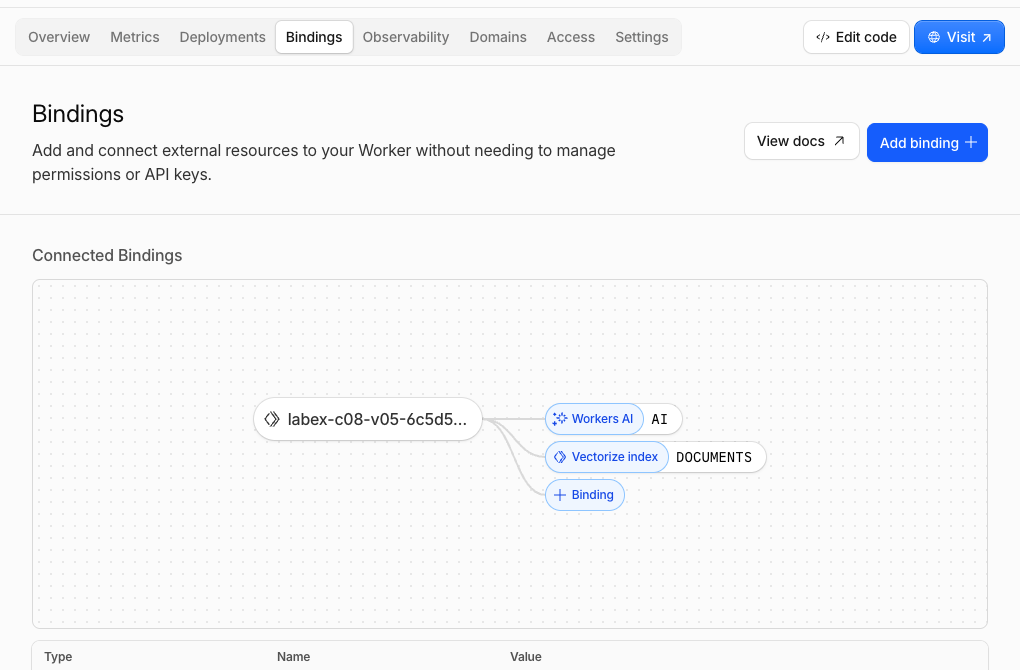
打开 Workers & Pages → 你的 labex-c08-v05-... Worker → Bindings。确认 AI 指向 Workers AI,DOCUMENTS 指向配对的 Vectorize 索引。此页面将代码中的两个服务名称与实际托管资源对应起来。
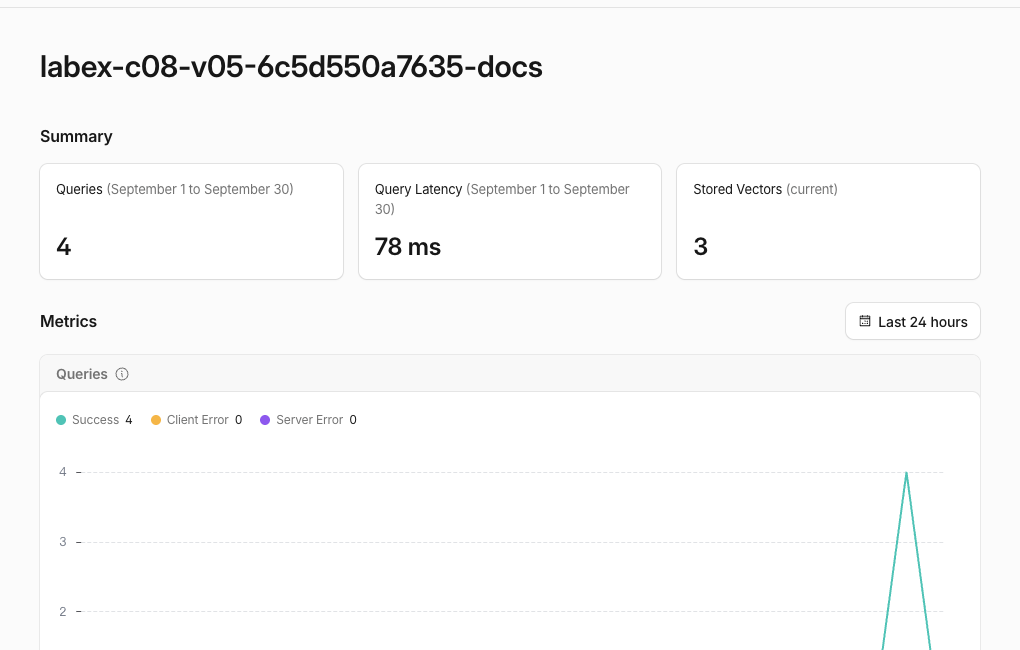
然后打开 AI → Vectorize → 对应的 -docs 索引。当前数量最终应显示三个向量,查询活动应反映有依据的搜索和无证据搜索。Dashboard 指标可能会延迟,因此经过身份验证的 ID 读取结果和端点响应仍然是权威依据。
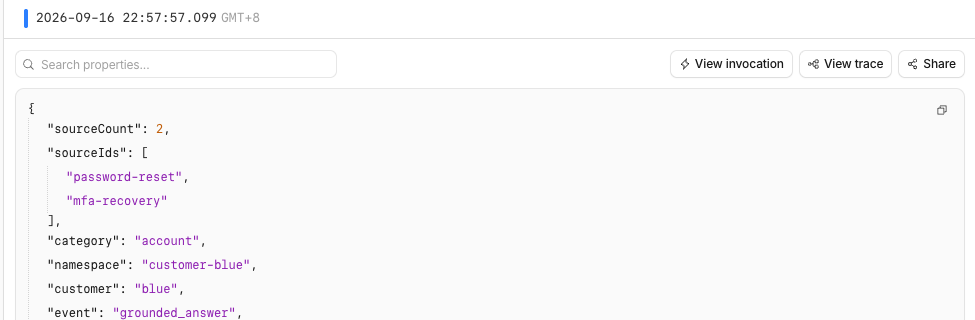
如果 Workers Logs 可用,请打开 Observability → Logs,检查 grounded_answer 和 grounded_no_evidence 条目。日志包含类别、来源 ID 和数量,但不会记录问题、回答、段落文本、会话标签或向量值。这样既能为操作人员提供有用的控制流证据,又不会将提示词复制到日志中。
删除有依据回答资源
在此步骤中,你将删除一次性 Worker 和 Vectorize 索引,并在 Wrangler 仍处于授权状态时证明它们已经不存在。
从 wrangler.jsonc 中恢复两个准确的名称,确保清理操作不依赖之前终端会话中的变量:
RUN=$(node -p 'JSON.parse(require("fs").readFileSync("wrangler.jsonc", "utf8")).name')
INDEX=$(node -p 'JSON.parse(require("fs").readFileSync("wrangler.jsonc", "utf8")).vectorize.find((item) => item.binding === "DOCUMENTS").index_name')
printf 'Worker: %s\nIndex: %s\n' "$RUN" "$INDEX"
确认两个值都使用你唯一的 labex-c08-v05-... 前缀。先删除 Worker,避免已部署的代码继续保留该绑定;然后只删除与它配对的索引:
npx wrangler delete --name "$RUN" --force
npx wrangler vectorize delete "$INDEX" --force
保存一次成功的、经过身份验证的索引清单,并检查准确名称已经不存在:
npx wrangler vectorize list --json > .labex/indexes-after-cleanup.json
node -e '
  const rows = JSON.parse(require("fs").readFileSync(process.argv[1], "utf8"));
  if (rows.some((row) => row.name === process.argv[2])) throw new Error("lab index still exists");
  console.log("lab index is absent");
' .labex/indexes-after-cleanup.json "$INDEX"
在退出登录前完成这项检查。网络错误或授权错误无法证明资源已经删除;评估会独立要求成功读取账户信息,并确认准确名称不存在。
退出学习虚拟机中的登录状态
在此步骤中,你将删除这台虚拟机上的临时 Wrangler 授权。云端资源已经不存在,并且经过身份验证的清理检查已经通过:
npx wrangler logout
npx wrangler whoami --json
预期得到 loggedIn: false。Cloudflare Dashboard 的浏览器会话是独立的,仍然可以使用你的学习账户。
总结
你构建了一个小型检索增强生成端点:由服务器控制的范围缩小了 Vectorize 搜索范围,返回的 ID 通过经过批准的语料库进行解析,最多两个段落会成为模型上下文,并且应用会在可变的生成文本旁边返回稳定的来源引用。
你还证明了:符合条件但结果为空的搜索会进入固定的无证据分支,而不会进行文本生成;客户端提供的范围覆盖会在检索前被拒绝;你检查了 Worker、Vectorize 以及受隐私边界限制的可观测性之间的关系;在仍有授权时删除了两个一次性资源,随后退出登录。课程挑战将要求你修复一个违反相同范围边界的损坏端点。