
소개
이 랩에서는 JavaScript 를 사용하여 문자열이 영숫자 문자만 포함하는지 확인하는 방법을 배우겠습니다. 영숫자 문자에는 문자 (A-Z, a-z) 와 숫자 (0-9) 가 포함됩니다. 이는 폼 유효성 검사, 데이터 처리 및 기타 많은 프로그래밍 시나리오에서 흔히 사용되는 작업입니다.
정규 표현식 (regular expression) 을 사용하여 문자열이 영숫자인지 확인하는 JavaScript 함수를 만들 것입니다. 이 랩이 끝나면 이 검사를 구현하는 방법과 JavaScript 에서 정규 표현식을 사용하여 문자열 패턴의 유효성을 검사하는 방법을 이해하게 될 것입니다.
영숫자 문자 이해
영숫자 문자는 영어 알파벳의 26 개 문자 (대문자 A-Z 및 소문자 a-z 모두) 와 10 개의 숫자 (0-9) 로 구성됩니다. 문자열이 영숫자인지 확인할 때, 우리는 해당 문자열이 이러한 문자만 포함하고 다른 것은 포함하지 않는지 확인하는 것입니다.
JavaScript 에서는 정규 표현식 (regular expression) 을 사용하여 영숫자 문자를 확인할 수 있습니다. 정규 표현식 (regex) 은 문자열에서 문자 조합을 일치시키는 데 사용되는 패턴입니다.
코드 편집기를 열어 시작해 보겠습니다. WebIDE 에서 왼쪽의 파일 탐색기로 이동하여 새 JavaScript 파일을 만듭니다.
- 파일 탐색기 패널에서 마우스 오른쪽 버튼을 클릭합니다.
- "New File"을 선택합니다.
- 파일 이름을
alphanumeric.js로 지정합니다.
파일을 만들면 편집기에서 자동으로 열립니다. 그렇지 않은 경우 파일 탐색기에서 alphanumeric.js를 클릭하여 엽니다.
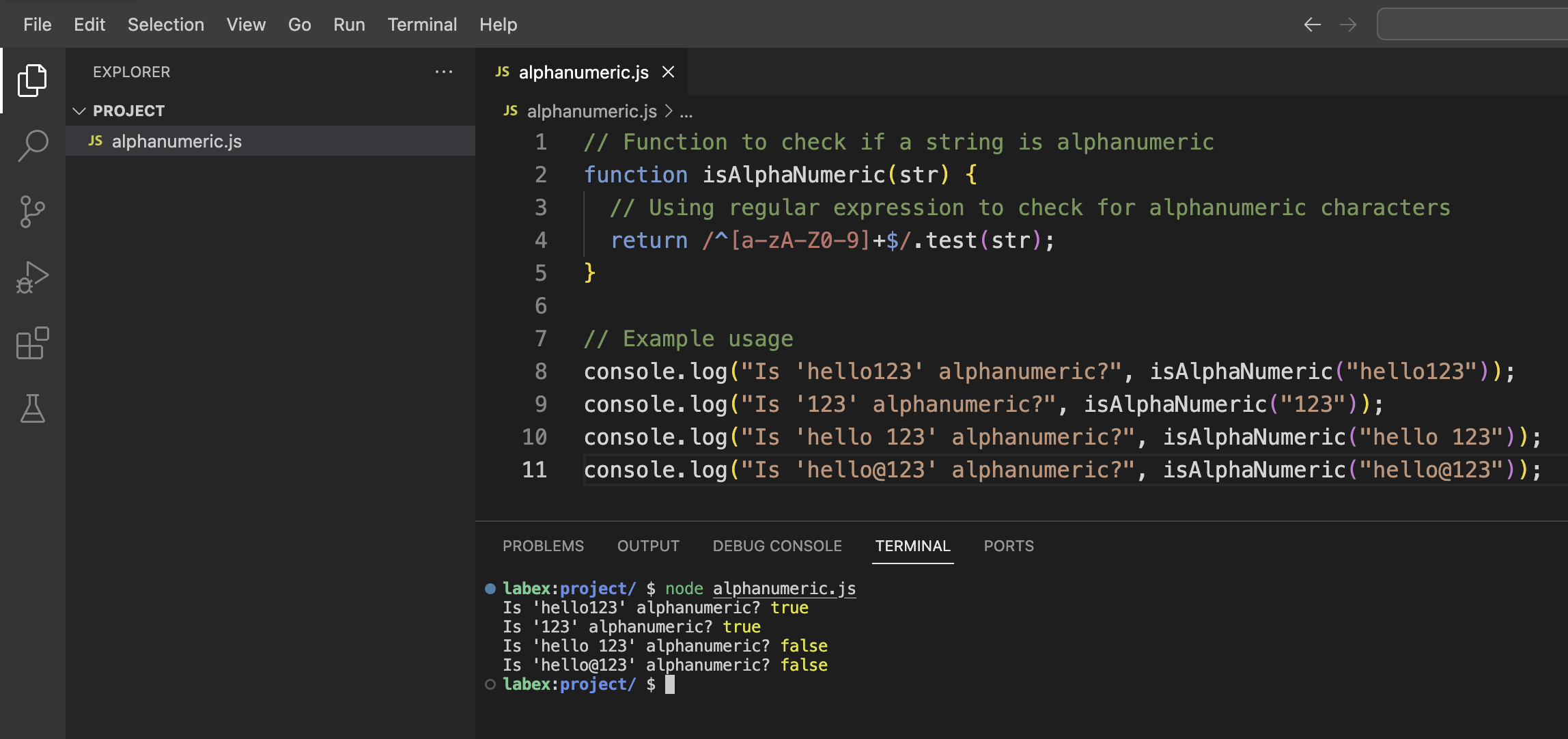
이제 다음 코드를 입력해 보겠습니다.
// Function to check if a string is alphanumeric
function isAlphaNumeric(str) {
  // Using regular expression to check for alphanumeric characters
  return /^[a-zA-Z0-9]+$/.test(str);
}

// Example usage
console.log("Is 'hello123' alphanumeric?", isAlphaNumeric("hello123"));
console.log("Is '123' alphanumeric?", isAlphaNumeric("123"));
console.log("Is 'hello 123' alphanumeric?", isAlphaNumeric("hello 123"));
console.log("Is 'hello@123' alphanumeric?", isAlphaNumeric("hello@123"));
Ctrl+S를 누르거나 메뉴에서 "File" > "Save"를 선택하여 파일을 저장합니다.
이제 이 JavaScript 파일을 실행하여 출력을 확인해 보겠습니다. 메뉴에서 "Terminal" > "New Terminal"을 선택하거나 Ctrl+`를 눌러 WebIDE 에서 터미널을 엽니다.
터미널에서 다음 명령을 실행합니다.
node alphanumeric.js
다음 출력을 볼 수 있습니다.
Is 'hello123' alphanumeric? true
Is '123' alphanumeric? true
Is 'hello 123' alphanumeric? false
Is 'hello@123' alphanumeric? false
이 출력은 함수가 hello123과 123을 영숫자 문자열로 올바르게 식별하는 반면, hello 123(공백 포함) 과 hello@123(특수 문자 @ 포함) 은 영숫자가 아님을 보여줍니다.
정규 표현식 (Regular Expression) 이해
이제 함수에서 사용한 정규 표현식을 살펴보겠습니다.
/^[a-zA-Z0-9]+$/;
이 패턴은 복잡해 보일 수 있지만, 다음과 같이 부분으로 나눌 수 있습니다.
/- 슬래시는 정규 표현식 패턴의 시작과 끝을 나타냅니다.^- 이 기호는 "문자열의 시작"을 의미합니다.[a-zA-Z0-9]- 다음을 일치시키는 문자 클래스입니다.a-z: 'a'에서 'z'까지의 모든 소문자A-Z: 'A'에서 'Z'까지의 모든 대문자0-9: '0'에서 '9'까지의 모든 숫자
+- 이 수량자는 앞선 요소가 "하나 이상"임을 의미합니다.$- 이 기호는 "문자열의 끝"을 의미합니다.
따라서 전체 패턴은 문자열이 처음부터 끝까지 영숫자 문자만 포함하는지 확인합니다.
이제 함수를 수정하여 더 유연하게 만들어 보겠습니다. alphanumeric.js 파일을 다시 열고 다음 코드로 업데이트합니다.
// Function to check if a string is alphanumeric
function isAlphaNumeric(str) {
  return /^[a-zA-Z0-9]+$/.test(str);
}

// Alternative function using case-insensitive flag
function isAlphaNumericAlt(str) {
  return /^[a-z0-9]+$/i.test(str);
}

// Example usage
console.log("Using first function:");
console.log("Is 'Hello123' alphanumeric?", isAlphaNumeric("Hello123"));
console.log("Is 'HELLO123' alphanumeric?", isAlphaNumeric("HELLO123"));

console.log("\nUsing alternative function with case-insensitive flag:");
console.log("Is 'Hello123' alphanumeric?", isAlphaNumericAlt("Hello123"));
console.log("Is 'HELLO123' alphanumeric?", isAlphaNumericAlt("HELLO123"));
파일을 저장하고 다음 명령으로 다시 실행합니다.
node alphanumeric.js
다음 출력을 볼 수 있습니다.
Using first function:
Is 'Hello123' alphanumeric? true
Is 'HELLO123' alphanumeric? true

Using alternative function with case-insensitive flag:
Is 'Hello123' alphanumeric? true
Is 'HELLO123' alphanumeric? true
대체 함수는 정규 표현식의 끝에 i 플래그를 사용하여 패턴 일치를 대소문자를 구분하지 않도록 합니다. 즉, 문자 클래스에 a-z만 포함하면 대문자도 자동으로 일치합니다.
간단한 유효성 검사 도구 만들기
이제 영숫자 검사 함수를 이해했으므로 간단한 대화형 유효성 검사 도구를 만들어 보겠습니다. Node.js 의 내장 readline 모듈을 사용하여 터미널에서 사용자 입력을 받습니다.
동일한 디렉토리에 validator.js라는 새 파일을 만듭니다.
- 파일 탐색기 패널에서 마우스 오른쪽 버튼을 클릭합니다.
- "New File"을 선택합니다.
- 파일 이름을
validator.js로 지정합니다.
다음 코드를 파일에 추가합니다.
const readline = require("readline");

// Create a readline interface for user input
const rl = readline.createInterface({
  input: process.stdin,
  output: process.stdout
});

// Function to check if a string is alphanumeric
function isAlphaNumeric(str) {
  return /^[a-zA-Z0-9]+$/.test(str);
}

// Function to check the input
function checkInput(input) {
  if (isAlphaNumeric(input)) {
    console.log(`"${input}" is alphanumeric.`);
  } else {
    console.log(`"${input}" is NOT alphanumeric.`);
    console.log(
      "Alphanumeric strings contain only letters (A-Z, a-z) and numbers (0-9)."
    );
  }

  // Ask if the user wants to check another string
  rl.question("\nDo you want to check another string? (yes/no): ", (answer) => {
    if (answer.toLowerCase() === "yes" || answer.toLowerCase() === "y") {
      askForInput();
    } else {
      console.log("Thank you for using the alphanumeric validator!");
      rl.close();
    }
  });
}

// Function to ask for input
function askForInput() {
  rl.question("Enter a string to check if it is alphanumeric: ", (input) => {
    checkInput(input);
  });
}

// Welcome message
console.log("=== Alphanumeric String Validator ===");
console.log(
  "This tool checks if a string contains only alphanumeric characters (A-Z, a-z, 0-9).\n"
);

// Start the program
askForInput();
파일을 저장하고 다음 명령으로 실행합니다.
node validator.js
환영 메시지와 문자열을 입력하라는 메시지가 표시됩니다. 다음과 같은 다양한 문자열을 입력해 보세요.
hello123(영숫자)Hello World(공백 때문에 영숫자가 아님)hello@123(@ 기호 때문에 영숫자가 아님)
각 입력에 대해 프로그램은 영숫자인지 여부를 알려주고 다른 문자열을 확인할지 묻습니다. 계속하려면 yes 또는 y를 입력하고, 프로그램을 종료하려면 다른 응답을 입력합니다.
이 대화형 도구는 영숫자 유효성 검사 함수가 실제 응용 프로그램에서 어떻게 사용될 수 있는지 보여줍니다.
영숫자 문자열을 확인하는 다른 방법 탐색
정규 표현식을 사용하는 것 외에도 문자열이 영숫자인지 확인하는 다른 방법이 있습니다. alternative-methods.js라는 새 파일을 만들어 몇 가지 방법을 살펴보겠습니다.
- 파일 탐색기 패널에서 마우스 오른쪽 버튼을 클릭합니다.
- "New File"을 선택합니다.
- 파일 이름을
alternative-methods.js로 지정합니다.
다음 코드를 파일에 추가합니다.
// Method 1: Using regular expression (our original method)
function isAlphaNumericRegex(str) {
  return /^[a-zA-Z0-9]+$/.test(str);
}

// Method 2: Using Array.every() and checking each character
function isAlphaNumericEvery(str) {
  // If string is empty, return false
  if (str.length === 0) return false;

  return [...str].every((char) => {
    const code = char.charCodeAt(0);
    // Check if character is a digit (0-9)
    const isDigit = code >= 48 && code <= 57;
    // Check if character is a lowercase letter (a-z)
    const isLowercase = code >= 97 && code <= 122;
    // Check if character is an uppercase letter (A-Z)
    const isUppercase = code >= 65 && code <= 90;

    return isDigit || isLowercase || isUppercase;
  });
}

// Method 3: Using a combination of match() and length
function isAlphaNumericMatch(str) {
  // If string is empty, return false
  if (str.length === 0) return false;

  // Remove all alphanumeric characters and check if anything remains
  const nonAlphaNumeric = str.match(/[^a-zA-Z0-9]/g);
  return nonAlphaNumeric === null;
}

// Test strings
const testStrings = [
  "hello123",
  "HELLO123",
  "hello 123",
  "hello@123",
  "",
  "0123456789",
  "abcdefghijklmnopqrstuvwxyz"
];

// Test each method with each string
console.log("=== Testing Different Methods ===");
console.log("String\t\t\tRegex\tEvery\tMatch");
console.log("---------------------------------------------");

testStrings.forEach((str) => {
  const displayStr = str.length > 10 ? str.substring(0, 10) + "..." : str;
  const paddedStr = displayStr.padEnd(16, " ");

  const regexResult = isAlphaNumericRegex(str);
  const everyResult = isAlphaNumericEvery(str);
  const matchResult = isAlphaNumericMatch(str);

  console.log(`"${paddedStr}"\t${regexResult}\t${everyResult}\t${matchResult}`);
});

console.log("\nPerformance Comparison:");
const iterations = 1000000;
const testString = "hello123ABCxyz45";

console.time("Regex Method");
for (let i = 0; i < iterations; i++) {
  isAlphaNumericRegex(testString);
}
console.timeEnd("Regex Method");

console.time("Every Method");
for (let i = 0; i < iterations; i++) {
  isAlphaNumericEvery(testString);
}
console.timeEnd("Every Method");

console.time("Match Method");
for (let i = 0; i < iterations; i++) {
  isAlphaNumericMatch(testString);
}
console.timeEnd("Match Method");
파일을 저장하고 다음 명령으로 실행합니다.
node alternative-methods.js
출력은 각 방법이 서로 다른 테스트 문자열에서 어떻게 작동하는지 보여주고, 방법 간의 성능 비교를 보여줍니다. 정규 표현식 방법이 일반적으로 가장 간결하고 종종 가장 빠르지만, 다른 접근 방식을 이해하는 것이 유용합니다.
각 방법을 살펴보겠습니다.
isAlphaNumericRegex: 영숫자 문자만 일치시키기 위해 정규 표현식을 사용합니다.isAlphaNumericEvery: 각 문자의 ASCII 코드를 확인하여 영숫자인지 확인합니다.isAlphaNumericMatch: 모든 영숫자 문자를 제거하고 아무것도 남지 않는지 확인합니다.
다양한 접근 방식을 이해하면 프로그래밍 문제를 해결할 때 유연성을 얻을 수 있습니다. 정규 표현식은 강력하지만 때로는 읽기 어려울 수 있습니다. 다른 방법은 일부 프로그래머, 특히 정규식 패턴에 익숙하지 않은 프로그래머에게 더 직관적일 수 있습니다.
요약
이 랩에서는 JavaScript 에서 문자열이 영숫자 문자로만 구성되어 있는지 확인하는 방법을 살펴보았습니다. 몇 가지 주요 개념을 배웠습니다.
- 영숫자 문자가 무엇인지 (A-Z, a-z 및 숫자 0-9)
- 문자열 패턴을 검증하기 위해 정규 표현식 (regular expression) 을 사용하는 방법
/^[a-zA-Z0-9]+$/와 같은 정규식 패턴을 분석하고 이해하는 방법- Node.js 를 사용하여 대화형 유효성 검사 도구를 만드는 방법
- 영숫자 문자열을 확인하는 대체 방법 탐색
문자열 내용을 검증하는 능력은 프로그래밍의 기본 기술이며, 다음과 같은 경우에 유용합니다.
- 웹 애플리케이션의 양식 유효성 검사
- 데이터 정리 및 처리
- 주입 공격을 방지하기 위한 보안 검사
- 파일 이름 또는 사용자 입력 유효성 검사
다음과 같은 방법으로 학습한 내용을 확장할 수 있습니다.
- 더 많은 유효성 검사 규칙 추가 (예: 최소 길이, 특수 문자 요구 사항)
- 보다 포괄적인 유효성 검사 라이브러리 만들기
- 이러한 유효성 검사 기능을 웹 애플리케이션에 통합
우리가 사용한 정규 표현식 접근 방식은 간결하고 효율적이지만, 대안을 이해하면 프로그래밍 도구 상자에 더 많은 도구를 갖게 된다는 것을 기억하십시오.