



소개
Python 의 itertools 모듈은 효율적인 루핑을 위한 이터레이터를 생성하는 빠르고 메모리 효율적인 도구들을 제공합니다. 이 모듈에서 특히 유용한 함수 중 하나는 combinations()로, 컬렉션의 항목에서 지정된 길이의 모든 가능한 조합을 생성할 수 있습니다.
이 Lab 에서는 itertools.combinations() 함수를 사용하여 요소의 조합을 생성하는 방법, 매개변수를 이해하고 실용적인 응용 프로그램을 탐구하는 방법을 배우게 됩니다. 이 지식은 Python 프로그래밍 도구를 향상시키고 조합 연산과 관련된 복잡한 문제를 해결하는 데 도움이 될 것입니다.
itertools.combinations 시작하기
조합이 무엇인지, 그리고 Python 에서 itertools.combinations() 함수를 사용하는 방법을 이해하는 것부터 시작해 보겠습니다.
조합이란 무엇인가요?
수학에서 조합 (combination) 은 순서가 중요하지 않은 컬렉션에서 항목을 선택하는 것입니다. 예를 들어, 집합 {1, 2, 3}에서 2 개의 항목을 선택할 때 가능한 조합은 {1, 2}, {1, 3}, {2, 3}입니다.
필요한 모듈 설치
Python 의 itertools 모듈은 표준 라이브러리의 일부이므로 추가로 설치할 필요가 없습니다. combinations 함수를 실험하기 위해 새로운 Python 파일을 만들어 보겠습니다.
WebIDE 에서 탐색기 패널의 "New File" 아이콘을 클릭하거나 키보드 단축키 Ctrl+N 을 사용하여 새 파일을 만듭니다.
파일을
/home/labex/project디렉토리에combinations_intro.py로 저장합니다.이제
itertools.combinations의 기본 사용법을 보여주는 간단한 Python 스크립트를 작성해 보겠습니다.
## Import the combinations function from itertools module
import itertools

## Create a simple list of elements
fruits = ['apple', 'banana', 'orange']

## Generate all combinations of 2 fruits from the list
fruit_combinations = itertools.combinations(fruits, 2)

## Convert the iterator to a list to display all combinations
combinations_list = list(fruit_combinations)

## Print the result
print("All possible combinations of 2 fruits:")
print(combinations_list)

## Count the total number of combinations
print(f"Total number of combinations: {len(combinations_list)}")
- 터미널을 열고 (아직 열려 있지 않은 경우) 다음을 실행하여 스크립트를 실행합니다.
python3 combinations_intro.py
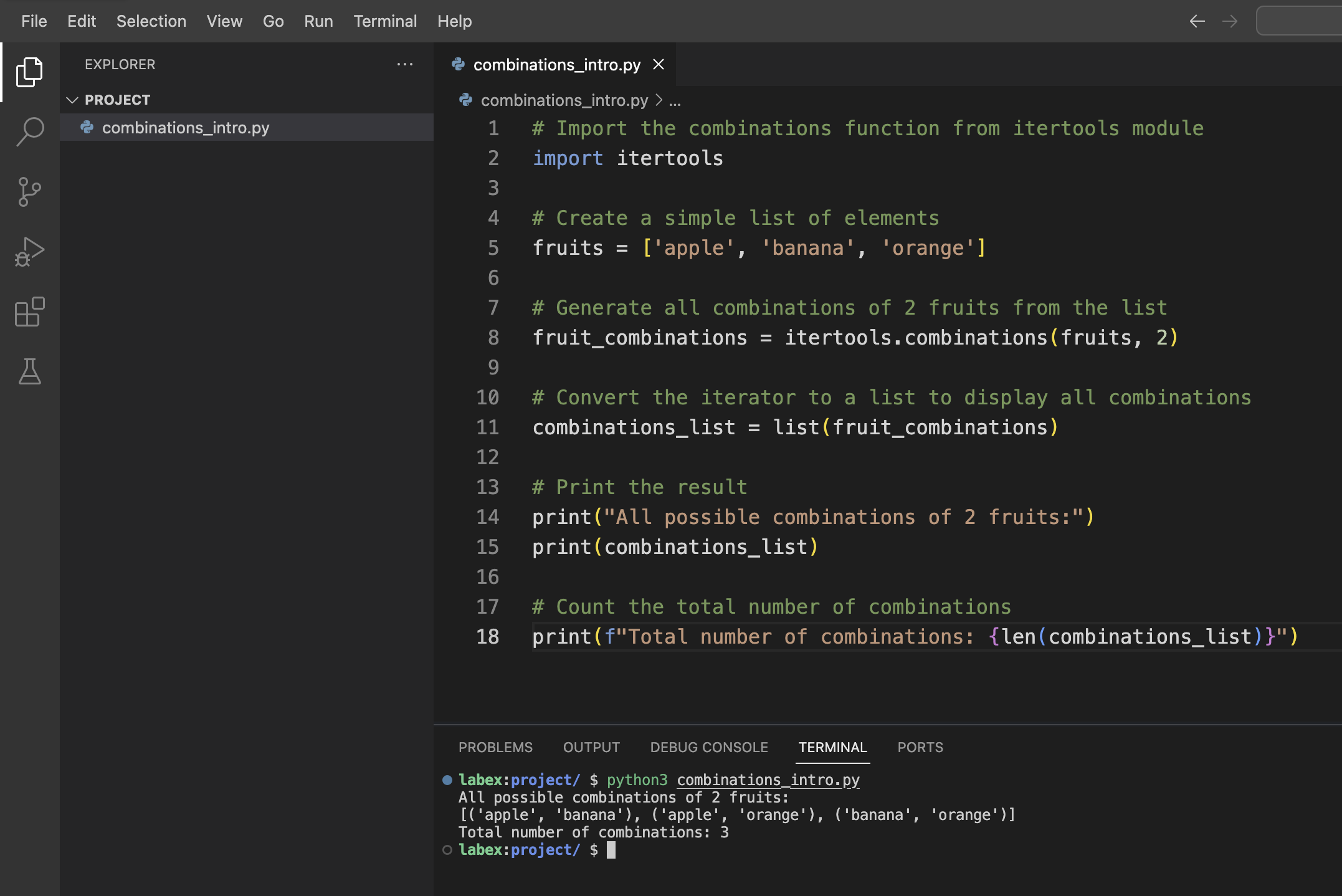
다음과 유사한 출력을 볼 수 있습니다.
All possible combinations of 2 fruits:
[('apple', 'banana'), ('apple', 'orange'), ('banana', 'orange')]
Total number of combinations: 3
출력 이해하기
출력은 과일 목록에서 선택한 2 개의 요소의 모든 가능한 조합을 보여줍니다. 각 조합은 튜플로 표시됩니다.
- ('apple', 'banana')
- ('apple', 'orange')
- ('banana', 'orange')
('banana', 'apple') 과 같은 조합이 포함되지 않은 것을 알 수 있습니다. 조합에서는 순서가 중요하지 않기 때문입니다. 따라서 ('apple', 'banana') 와 ('banana', 'apple') 은 동일한 조합으로 간주됩니다.
매개변수 및 구문 이해하기
이제 itertools.combinations() 함수를 자세히 살펴보고 매개변수와 구문을 자세히 살펴보겠습니다.
함수 시그니처 (Function Signature)
itertools.combinations() 함수는 다음과 같은 구문을 갖습니다.
itertools.combinations(iterable, r)
여기서:
iterable: 반복을 지원하는 시퀀스, 이터레이터 또는 기타 객체 (예: 리스트, 튜플 또는 문자열)r: 생성할 각 조합의 길이
다양한 예제를 탐구하기 위해 다른 Python 파일을 만들어 보겠습니다.
/home/labex/project디렉토리에combinations_parameters.py라는 새 파일을 만듭니다.파일에 다음 코드를 추가합니다.
import itertools

## Example 1: Combinations from a string
letters = "ABCD"
print("Example 1: Combinations from a string 'ABCD', r=2")
letter_combinations = list(itertools.combinations(letters, 2))
print(letter_combinations)
print(f"Number of combinations: {len(letter_combinations)}\n")

## Example 2: Different values of r
numbers = [1, 2, 3, 4]

## r=1 (individual elements)
print("Example 2a: Combinations with r=1")
combinations_r1 = list(itertools.combinations(numbers, 1))
print(combinations_r1)
print(f"Number of combinations: {len(combinations_r1)}\n")

## r=2 (pairs)
print("Example 2b: Combinations with r=2")
combinations_r2 = list(itertools.combinations(numbers, 2))
print(combinations_r2)
print(f"Number of combinations: {len(combinations_r2)}\n")

## r=3 (triplets)
print("Example 2c: Combinations with r=3")
combinations_r3 = list(itertools.combinations(numbers, 3))
print(combinations_r3)
print(f"Number of combinations: {len(combinations_r3)}\n")

## r=4 (all elements)
print("Example 2d: Combinations with r=4")
combinations_r4 = list(itertools.combinations(numbers, 4))
print(combinations_r4)
print(f"Number of combinations: {len(combinations_r4)}\n")

## Example 3: Empty result when r is larger than the iterable length
print("Example 3: Empty result when r > len(iterable)")
too_large_r = list(itertools.combinations(numbers, 5))
print(too_large_r)
print(f"Number of combinations: {len(too_large_r)}")
- 스크립트를 실행합니다.
python3 combinations_parameters.py
다음과 유사한 출력을 볼 수 있습니다.
Example 1: Combinations from a string 'ABCD', r=2
[('A', 'B'), ('A', 'C'), ('A', 'D'), ('B', 'C'), ('B', 'D'), ('C', 'D')]
Number of combinations: 6

Example 2a: Combinations with r=1
[(1,), (2,), (3,), (4,)]
Number of combinations: 4

Example 2b: Combinations with r=2
[(1, 2), (1, 3), (1, 4), (2, 3), (2, 4), (3, 4)]
Number of combinations: 6

Example 2c: Combinations with r=3
[(1, 2, 3), (1, 2, 4), (1, 3, 4), (2, 3, 4)]
Number of combinations: 4

Example 2d: Combinations with r=4
[(1, 2, 3, 4)]
Number of combinations: 1

Example 3: Empty result when r > len(iterable)
[]
Number of combinations: 0
주요 통찰력
이러한 예제에서 itertools.combinations() 함수의 몇 가지 중요한 속성을 관찰할 수 있습니다.
- 다양한 유형의 이터러블 (문자열, 리스트 등) 에서 작동합니다.
r의 값은 각 조합의 크기를 결정합니다.- 조합의 수는 수학 공식: n! / (r! * (n-r)!) 을 따릅니다. 여기서 n 은 이터러블의 길이입니다.
r이 이터러블의 길이와 같으면 조합이 하나만 있습니다 (전체 이터러블).r이 이터러블의 길이보다 크면 빈 리스트가 반환됩니다.
이러한 매개변수에 대한 이해는 Python 프로그램에서 itertools.combinations() 함수를 효과적으로 적용하는 데 도움이 됩니다.
조합의 실용적인 응용
이제 itertools.combinations() 함수의 몇 가지 실용적인 응용을 살펴보겠습니다. 이 함수를 사용하여 일반적인 문제를 해결하는 방법을 보여주기 위해 몇 가지 실제 예제를 구현해 보겠습니다.
예제 1: 팀 구성
특정 크기의 팀을 그룹에서 구성해야 한다고 가정해 보겠습니다. 가능한 모든 팀을 구성하는 데 도움이 되는 프로그램을 만들어 보겠습니다.
/home/labex/project디렉토리에team_formation.py라는 새 파일을 만듭니다.다음 코드를 추가합니다.
import itertools

def form_teams(members, team_size):
    """Generate all possible teams of the specified size from the list of members."""
    teams = list(itertools.combinations(members, team_size))
    return teams

## List of team members
team_members = ["Alice", "Bob", "Charlie", "David", "Eva", "Frank"]

## Form teams of different sizes
pairs = form_teams(team_members, 2)
trios = form_teams(team_members, 3)

## Display the results
print(f"Total members: {len(team_members)}")
print(f"Members: {team_members}\n")

print(f"Possible pairs (teams of 2): {len(pairs)}")
for i, pair in enumerate(pairs, 1):
    print(f"Team {i}: {' and '.join(pair)}")

print(f"\nPossible trios (teams of 3): {len(trios)}")
for i, trio in enumerate(trios, 1):
    print(f"Team {i}: {', '.join(trio)}")
- 스크립트를 실행합니다.
python3 team_formation.py
6 명의 팀 구성원으로부터 구성할 수 있는 모든 가능한 쌍과 삼중항을 나열하는 출력을 볼 수 있습니다.
예제 2: 모든 부분 집합 찾기
또 다른 일반적인 응용 분야는 주어진 집합의 모든 가능한 부분 집합 (멱집합 (power set) 이라고도 함) 을 생성하는 것입니다. 이를 구현해 보겠습니다.
/home/labex/project디렉토리에generate_subsets.py라는 새 파일을 만듭니다.다음 코드를 추가합니다.
import itertools

def generate_all_subsets(items):
    """Generate all possible subsets of the given items."""
    all_subsets = []

    ## Empty set is always a subset
    all_subsets.append(())

    ## Generate subsets of all possible lengths
    for r in range(1, len(items) + 1):
        subsets_of_length_r = list(itertools.combinations(items, r))
        all_subsets.extend(subsets_of_length_r)

    return all_subsets

## Sample set of items
items = ['A', 'B', 'C']

## Generate all subsets
subsets = generate_all_subsets(items)

## Display the results
print(f"Original set: {items}")
print(f"Total number of subsets: {len(subsets)}")
print("All subsets (including the empty set):")

for i, subset in enumerate(subsets):
    if len(subset) == 0:
        print(f"{i+1}. Empty set {{}}")
    else:
        print(f"{i+1}. {set(subset)}")
- 스크립트를 실행합니다.
python3 generate_subsets.py
출력은 빈 집합을 포함하여 집합 {A, B, C}의 모든 가능한 부분 집합을 표시합니다.
예제 3: 메뉴 조합 생성기
레스토랑이 메뉴 항목에서 가능한 모든 식사 조합을 생성하는 데 도움이 되는 실용적인 응용 프로그램을 만들어 보겠습니다.
/home/labex/project디렉토리에menu_combinations.py라는 새 파일을 만듭니다.다음 코드를 추가합니다.
import itertools

def generate_meal_combinations(appetizers, main_courses, desserts):
    """Generate all possible meal combinations with one item from each category."""
    meal_combinations = []

    for app in appetizers:
        for main in main_courses:
            for dessert in desserts:
                meal_combinations.append((app, main, dessert))

    return meal_combinations

def generate_combo_deals(menu_items, combo_size):
    """Generate all possible combo deals of the specified size."""
    return list(itertools.combinations(menu_items, combo_size))

## Menu categories
appetizers = ["Salad", "Soup", "Bruschetta"]
main_courses = ["Pasta", "Steak", "Fish"]
desserts = ["Ice Cream", "Cake", "Fruit"]

## All menu items
all_items = appetizers + main_courses + desserts

## Generate all possible three-course meals
meals = generate_meal_combinations(appetizers, main_courses, desserts)

## Generate all possible 2-item combo deals from the entire menu
combos = generate_combo_deals(all_items, 2)

## Display the results
print("Restaurant Menu Planner\n")

print("Menu Items:")
print(f"Appetizers: {appetizers}")
print(f"Main Courses: {main_courses}")
print(f"Desserts: {desserts}\n")

print(f"Total possible three-course meals: {len(meals)}")
print("Sample meals:")
for i in range(min(5, len(meals))):
    app, main, dessert = meals[i]
    print(f"Meal option {i+1}: {app} + {main} + {dessert}")

print(f"\nTotal possible 2-item combo deals: {len(combos)}")
print("Sample combo deals:")
for i in range(min(5, len(combos))):
    print(f"Combo {i+1}: {' + '.join(combos[i])}")
- 스크립트를 실행합니다.
python3 menu_combinations.py
출력은 메뉴 항목에서 만들 수 있는 다양한 식사 조합 및 콤보 상품을 보여줍니다.
이러한 예제는 itertools.combinations() 함수를 항목의 조합과 관련된 실제 문제를 해결하는 데 어떻게 적용할 수 있는지 보여줍니다. 이 함수를 효과적으로 사용하는 방법을 이해하면 더 큰 집합에서 항목 그룹을 선택하는 문제를 해결하기 위한 보다 효율적인 솔루션을 개발할 수 있습니다.
조합을 사용하여 문제 해결하기
이 단계에서는 itertools.combinations()에 대한 지식을 적용하여 일반적인 프로그래밍 문제를 해결합니다. "부분 집합 합" 문제라고도 하는, 주어진 총 가치를 가진 항목을 선택하는 모든 가능한 방법을 찾는 솔루션을 구현합니다.
문제: 목표 합계가 있는 부분 집합 찾기
숫자 집합이 있고 특정 목표 합계가 되는 모든 부분 집합을 찾고 싶다고 가정해 보겠습니다. 이것은 조합을 사용하여 해결할 수 있는 고전적인 문제입니다.
솔루션을 구현해 보겠습니다.
/home/labex/project디렉토리에subset_sum.py라는 새 파일을 만듭니다.다음 코드를 추가합니다.
import itertools

def find_subsets_with_sum(numbers, target_sum):
    """Find all subsets of numbers that add up to the target sum."""
    results = []

    ## Try combinations of different lengths
    for r in range(1, len(numbers) + 1):
        ## Generate all combinations of length r
        combinations = itertools.combinations(numbers, r)

        ## Check each combination
        for combo in combinations:
            if sum(combo) == target_sum:
                results.append(combo)

    return results

## Example usage
numbers = [3, 5, 2, 7, 4, 9, 1, 8]
target_sum = 10

## Find subsets with sum equal to target_sum
matching_subsets = find_subsets_with_sum(numbers, target_sum)

## Display results
print(f"Numbers: {numbers}")
print(f"Target sum: {target_sum}")
print(f"Number of matching subsets: {len(matching_subsets)}")

if matching_subsets:
    print("Subsets that add up to the target sum:")
    for i, subset in enumerate(matching_subsets, 1):
        print(f"Subset {i}: {subset} (Sum: {sum(subset)})")
else:
    print("No subsets found that add up to the target sum.")

## Let's find subsets for another target sum
second_target = 15
matching_subsets_2 = find_subsets_with_sum(numbers, second_target)

print(f"\nTarget sum: {second_target}")
print(f"Number of matching subsets: {len(matching_subsets_2)}")

if matching_subsets_2:
    print("Subsets that add up to the target sum:")
    for i, subset in enumerate(matching_subsets_2, 1):
        print(f"Subset {i}: {subset} (Sum: {sum(subset)})")
else:
    print("No subsets found that add up to the target sum.")
- 스크립트를 실행합니다.
python3 subset_sum.py
출력은 목표 합계 10 이 되는 목록의 숫자 조합과 15 가 되는 숫자 조합을 모두 표시합니다.
확장: 대화형 버전
사용자가 자체 숫자 목록과 목표 합계를 입력할 수 있도록 하여 솔루션을 향상시켜 보겠습니다.
/home/labex/project디렉토리에interactive_subset_sum.py라는 새 파일을 만듭니다.다음 코드를 추가합니다.
import itertools

def find_subsets_with_sum(numbers, target_sum):
    """Find all subsets of numbers that add up to the target sum."""
    results = []

    ## Try combinations of different lengths
    for r in range(1, len(numbers) + 1):
        ## Generate all combinations of length r
        combinations = itertools.combinations(numbers, r)

        ## Check each combination
        for combo in combinations:
            if sum(combo) == target_sum:
                results.append(combo)

    return results

def main():
    ## Get user input
    try:
        input_str = input("Enter a list of numbers separated by spaces: ")
        numbers = [int(num) for num in input_str.split()]

        target_sum = int(input("Enter the target sum: "))

        ## Find matching subsets
        matching_subsets = find_subsets_with_sum(numbers, target_sum)

        ## Display results
        print(f"\nNumbers: {numbers}")
        print(f"Target sum: {target_sum}")
        print(f"Number of matching subsets: {len(matching_subsets)}")

        if matching_subsets:
            print("Subsets that add up to the target sum:")
            for i, subset in enumerate(matching_subsets, 1):
                print(f"Subset {i}: {subset} (Sum: {sum(subset)})")
        else:
            print("No subsets found that add up to the target sum.")

    except ValueError:
        print("Invalid input. Please enter integers only.")

if __name__ == "__main__":
    main()
- 대화형 스크립트를 실행합니다.
python3 interactive_subset_sum.py
- 메시지가 표시되면 숫자 목록 (예:
3 5 2 7 4 9 1 8) 과 목표 합계 (예:10) 를 입력합니다.
스크립트는 입력 숫자의 조합을 찾아 지정된 목표 합계가 되는 모든 조합을 표시합니다.
솔루션 이해
솔루션은 itertools.combinations()를 사용하여 입력 숫자 목록에서 서로 다른 크기의 부분 집합을 생성합니다. 각 부분 집합에 대해 합계가 목표 값과 같은지 확인하고, 그렇다면 결과를 추가합니다.
이 접근 방식은 일반적인 알고리즘 문제를 해결하는 데 조합의 강력한 응용 프로그램을 보여줍니다. itertools.combinations()의 효율성은 작거나 중간 크기의 입력에 대해 부분 집합 합 문제를 효율적으로 해결할 수 있게 해줍니다.
실제로 매우 큰 목록의 경우 더 최적화된 알고리즘이 필요할 수 있지만, 많은 실제 시나리오에서 이 조합 기반 접근 방식은 깨끗하고 이해하기 쉬운 솔루션을 제공합니다.
요약
이 랩에서는 Python 의 itertools.combinations() 함수를 사용하여 항목 모음에서 조합을 생성하는 방법을 배웠습니다. 주요 내용은 다음과 같습니다.
기본 사용법:
itertools.combinations(iterable, r)함수는 입력iterable에서 길이r의 모든 가능한 조합을 생성합니다.함수 매개변수: 이 함수는 두 개의 매개변수를 사용합니다.
iterable: 반복을 지원하는 시퀀스, 반복자 또는 기타 객체r: 생성할 각 조합의 길이
주요 속성:
- 조합에서 순서는 중요하지 않습니다.
- 조합에 요소가 두 번 이상 나타날 수 없습니다.
- 이 함수는 한 번에 하나씩 조합을 생성하는 반복자를 반환합니다.
실용적인 응용:
combinations()함수를 사용하여 다양한 문제를 해결하는 방법을 배웠습니다.- 그룹에서 팀 구성
- 주어진 집합의 모든 부분 집합 생성
- 식사 조합 및 콤보 상품 만들기
- 목표 합계가 되는 부분 집합 찾기
itertools.combinations() 함수는 더 큰 모음에서 항목 그룹을 선택하는 문제를 해결하는 강력한 도구입니다. 이 함수를 활용하면 Python 에서 조합 연산을 처리하기 위한 더 깔끔하고 효율적인 코드를 작성할 수 있습니다.
향후 Python 프로젝트에서 itertools 모듈은 반복자를 사용하여 작업하는 데 유용한 다른 많은 함수를 제공하며, 이를 통해 더 우아하고 효율적인 코드를 작성하는 데 도움이 될 수 있다는 점을 기억하십시오.


