



소개
Python 에서 텍스트 데이터를 다룰 때, 대소문자를 구분하지 않고 두 문자열이 동일한 정보를 포함하는지 비교해야 하는 경우가 많습니다. 이를 대소문자를 구분하지 않는 문자열 비교라고 합니다.
이 Lab 에서는 대소문자 차이를 무시하고 두 Python 문자열의 동일성을 비교하는 다양한 방법을 배우게 됩니다. 기본적인 문자열 비교, 대소문자를 구분하지 않는 비교를 위한 다양한 기술을 살펴보고, 이러한 기술을 실제 시나리오에서 어떻게 적용하는지 살펴보겠습니다.
이 Lab 을 마치면 Python 프로그램에서 대소문자를 구분하지 않는 문자열 비교를 자신 있게 구현하여 텍스트 데이터를 효과적으로 처리하는 능력을 향상시킬 수 있습니다.
Python 에서의 문자열 비교 이해
Python 에서 문자열 비교가 어떻게 작동하는지, 그리고 대소문자 구분이 왜 중요한지 살펴보겠습니다.
기본 문자열 비교
Python 에서 등가 연산자 (==) 를 사용하여 두 문자열을 비교할 때, 기본적으로 대소문자를 구분합니다. 즉, "Hello"와 "hello"는 서로 다른 문자열로 간주됩니다.
이를 테스트하기 위해 새로운 Python 파일을 만들어 보겠습니다.
- WebIDE 에서 왼쪽 사이드바의 "Explorer" 아이콘을 클릭합니다.
- "New File" 버튼을 클릭하고 이름을
string_comparison.py로 지정합니다. - 파일에 다음 코드를 추가합니다.
## Basic string comparison
string1 = "Python"
string2 = "python"

## Compare the strings
result = string1 == string2

## Print the result
print(f"Is '{string1}' equal to '{string2}'? {result}")
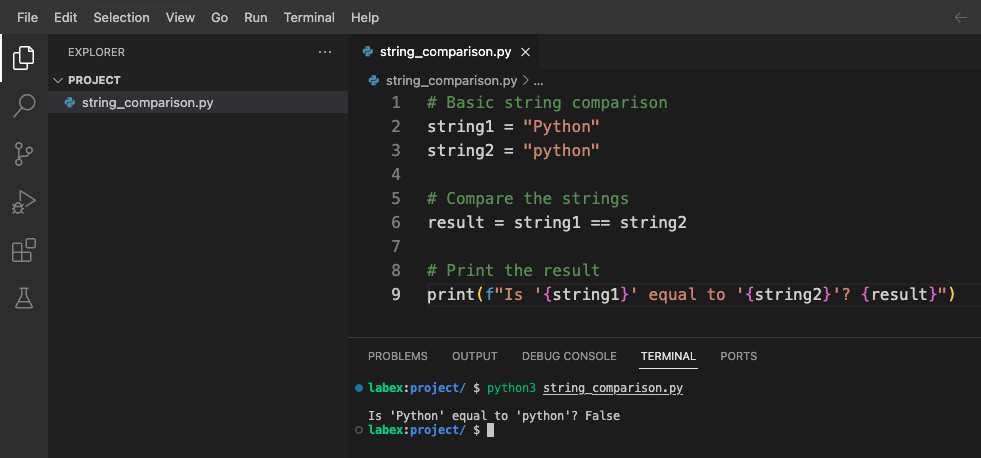
Ctrl+S를 누르거나 메뉴에서 "File" > "Save"를 선택하여 파일을 저장합니다.- 터미널을 열고 (Terminal > New Terminal) 다음을 입력하여 스크립트를 실행합니다.
python3 string_comparison.py
다음과 같은 출력을 볼 수 있습니다.
Is 'Python' equal to 'python'? False
출력 결과가 False인 이유는 비교가 대소문자를 구분하며, 대문자 'P'로 시작하는 "Python"은 소문자 'p'로 시작하는 "python"과 같지 않기 때문입니다.
대소문자를 구분하지 않는 비교가 유용한 이유
대소문자를 구분하지 않는 비교는 다음과 같은 많은 시나리오에서 유용합니다.
- 사용자 입력 유효성 검사 (사용자는 어떤 대소문자로든 입력할 수 있습니다)
- 텍스트 검색 (대소문자와 관계없이 단어 검색)
- 자연어 처리 (대문자 사용이 다를 수 있음)
- URL, 이메일 주소 또는 사용자 이름 작업 (대소문자를 구분하지 않을 수 있음)
대소문자를 구분하지 않는 비교가 유용한 경우를 보여주는 몇 가지 예제를 추가하기 위해 스크립트를 수정해 보겠습니다.
## Add these examples to string_comparison.py

## Example: User searching for content
user_search = "Python"
article_title = "Getting Started with python Programming"

## Case-sensitive comparison (might miss relevant content)
found_sensitive = user_search in article_title
print(f"Case-sensitive search found match: {found_sensitive}")

## What if we want to find matches regardless of case?
## We'll explore solutions in the next steps
이 코드를 string_comparison.py 파일에 추가하고 다시 실행합니다.
python3 string_comparison.py
이제 출력 결과에 다음이 포함됩니다.
Case-sensitive search found match: False
이는 실질적인 문제를 보여줍니다. "Python"을 검색하는 사용자는 기본 대소문자 구분 비교를 사용하면 "python Programming"이라는 제목의 콘텐츠를 찾을 수 없습니다.
다음 단계에서는 이 문제를 해결하기 위해 대소문자를 구분하지 않는 비교를 수행하는 방법을 배우겠습니다.
대소문자를 구분하지 않는 문자열 비교 방법
대소문자를 구분하지 않는 비교가 중요한 이유를 이해했으므로, Python 에서 이를 수행하는 다양한 방법을 알아보겠습니다.
방법 1: lower() 또는 upper() 사용
가장 일반적인 접근 방식은 비교하기 전에 두 문자열을 동일한 대소문자로 변환하는 것입니다. 이를 위해 lower() 또는 upper() 메서드를 사용할 수 있습니다.
이러한 메서드를 테스트하기 위해 새 파일을 만들어 보겠습니다.
- WebIDE 에서 새 파일을 만들고 이름을
case_insensitive.py로 지정합니다. - 다음 코드를 추가합니다.
## Case-insensitive comparison using lower()
string1 = "Python"
string2 = "python"

## Convert both strings to lowercase, then compare
result_lower = string1.lower() == string2.lower()
print(f"Using lower(): '{string1}' equals '{string2}'? {result_lower}")

## Convert both strings to uppercase, then compare
result_upper = string1.upper() == string2.upper()
print(f"Using upper(): '{string1}' equals '{string2}'? {result_upper}")
- 파일을 저장하고 다음 명령으로 실행합니다.
python3 case_insensitive.py
다음과 같은 출력을 볼 수 있습니다.
Using lower(): 'Python' equals 'python'? True
Using upper(): 'Python' equals 'python'? True
두 메서드 모두 동일한 결과를 생성합니다. 즉, 대소문자를 무시하면 문자열이 같다는 것을 확인합니다.
방법 2: casefold() 사용
casefold() 메서드는 lower()와 유사하지만 특수한 대소문자 매핑 규칙이 있는 특정 언어에 더 적합한 보다 적극적인 대소문자 접기를 제공합니다.
case_insensitive.py 파일에 다음 코드를 추가합니다.
## Case-insensitive comparison using casefold()
german_string1 = "Straße"  ## German word for "street"
german_string2 = "STRASSE" ## Uppercase version (note: ß becomes SS when uppercased)

## Using lower()
result_german_lower = german_string1.lower() == german_string2.lower()
print(f"Using lower() with '{german_string1}' and '{german_string2}': {result_german_lower}")

## Using casefold()
result_german_casefold = german_string1.casefold() == german_string2.casefold()
print(f"Using casefold() with '{german_string1}' and '{german_string2}': {result_german_casefold}")
스크립트를 다시 실행합니다.
python3 case_insensitive.py
다음과 같은 결과를 볼 수 있습니다.
Using lower() with 'Straße' and 'STRASSE': False
Using casefold() with 'Straße' and 'STRASSE': True
이는 casefold()가 특정 언어에서 lower()보다 특수 문자 매핑을 더 잘 처리함을 보여줍니다.
방법 3: 정규 표현식 사용
더 복잡한 시나리오의 경우 re 모듈과 IGNORECASE 플래그를 사용하여 정규 표현식 (정규식) 을 사용할 수 있습니다.
case_insensitive.py 파일에 다음 코드를 추가합니다.
## Case-insensitive comparison using regular expressions
import re

text = "Python is a great programming language."
pattern1 = "python"

## Check if 'python' exists in the text (case-insensitive)
match = re.search(pattern1, text, re.IGNORECASE)
print(f"Found '{pattern1}' in text? {match is not None}")

## Case-insensitive equality check with regex
def regex_equal_ignore_case(str1, str2):
    return bool(re.match(f"^{re.escape(str1)}$", str2, re.IGNORECASE))

## Test the function
result_regex = regex_equal_ignore_case("Python", "python")
print(f"Using regex: 'Python' equals 'python'? {result_regex}")
스크립트를 다시 실행합니다.
python3 case_insensitive.py
다음과 같은 출력을 볼 수 있습니다.
Found 'python' in text? True
Using regex: 'Python' equals 'python'? True
방법 비교
지금까지 배운 방법을 요약해 보겠습니다.
lower()/upper(): 간단하고 일반적으로 사용되며, 대부분의 영어 텍스트에 적합합니다.casefold(): 특수한 대소문자 매핑 규칙이 있는 국제 텍스트에 더 적합합니다.re.IGNORECASE를 사용한 정규 표현식: 패턴 매칭 및 복잡한 경우에 강력합니다.
참조용으로 이 요약을 case_insensitive.py 파일에 주석으로 추가합니다.
## Summary of case-insensitive comparison methods:
## 1. string1.lower() == string2.lower() - Simple, works for basic cases
## 2. string1.casefold() == string2.casefold() - Better for international text
## 3. re.match(pattern, string, re.IGNORECASE) - For pattern matching
이제 다양한 방법을 이해했으므로 다음 단계에서 이러한 기술을 실제 시나리오에 적용해 보겠습니다.
대소문자를 구분하지 않는 검색 함수 구축
대소문자를 구분하지 않는 비교를 위한 다양한 방법을 배웠으므로, 이제 대소문자와 관계없이 텍스트에서 단어를 찾을 수 있는 실용적인 검색 함수를 구축해 보겠습니다.
검색 함수 생성
- WebIDE 에서 새 파일을 만들고 이름을
search_function.py로 지정합니다. - 다음 코드를 추가하여 간단한 대소문자를 구분하지 않는 검색 함수를 구현합니다.
def search_text(query, text):
    """
    Search for a query in text, ignoring case.
    Returns a list of all matching positions.
    """
    ## Convert both to lowercase for case-insensitive comparison
    query_lower = query.lower()
    text_lower = text.lower()

    found_positions = []
    position = 0

    ## Find all occurrences
    while position < len(text_lower):
        position = text_lower.find(query_lower, position)
        if position == -1:  ## No more matches
            break
        found_positions.append(position)
        position += 1  ## Move to the next character

    return found_positions

## Example text
sample_text = """
Python is a programming language that lets you work quickly and integrate systems effectively.
python is easy to learn, powerful, and versatile.
Many developers love PYTHON for its simplicity and readability.
"""

## Test search
search_query = "python"
results = search_text(search_query, sample_text)

## Display results
if results:
    print(f"Found '{search_query}' at {len(results)} positions: {results}")

    ## Show each match in context
    print("\nMatches in context:")
    for pos in results:
        ## Get some context around the match (10 characters before and after)
        start = max(0, pos - 10)
        end = min(len(sample_text), pos + len(search_query) + 10)
        context = sample_text[start:end]

        ## Highlight the match by showing the original case from the text
        match_original_case = sample_text[pos:pos+len(search_query)]
        print(f"...{context.replace(match_original_case, f'[{match_original_case}]')}...")
else:
    print(f"No matches found for '{search_query}'")
- 파일을 저장하고 다음 명령으로 실행합니다.
python3 search_function.py
다음과 같은 출력을 볼 수 있습니다.
Found 'python' at 3 positions: [1, 67, 132]

Matches in context:
...[Python] is a pro...
...ctively.
[python] is easy ...
...ers love [PYTHON] for its ...
이는 함수가 "Python"을 "Python", "python" 또는 "PYTHON"으로 작성되었는지 여부에 관계없이 세 곳에서 찾았음을 보여줍니다. 또한 함수는 각 일치를 원래 컨텍스트에 표시하여 원래 대문자를 유지합니다.
검색 함수 향상
단어 수를 세고 전체 단어 일치를 처리하는 옵션을 추가하여 함수를 더욱 유용하게 만들어 보겠습니다.
search_function.py 파일에 다음 코드를 추가합니다.
def count_word_occurrences(word, text, whole_word=False):
    """
    Count occurrences of a word in text, ignoring case.
    If whole_word=True, only count complete word matches.
    """
    word_lower = word.lower()
    text_lower = text.lower()

    if whole_word:
        ## Use word boundaries to match whole words only
        import re
        pattern = r'\b' + re.escape(word_lower) + r'\b'
        matches = re.findall(pattern, text_lower)
        return len(matches)
    else:
        ## Simple substring counting
        return text_lower.count(word_lower)

## Test the enhanced function
test_text = """
Python is great. I love python programming.
This python-script demonstrates case-insensitive searching.
The word "python" appears multiple times as a whole word and as part of other words.
"""

## Count all occurrences (including within words)
count_all = count_word_occurrences("python", test_text)
print(f"Total occurrences of 'python' (including within words): {count_all}")

## Count only whole word occurrences
count_whole = count_word_occurrences("python", test_text, whole_word=True)
print(f"Whole word occurrences of 'python': {count_whole}")
스크립트를 다시 실행합니다.
python3 search_function.py
이제 추가 출력을 볼 수 있습니다.
Total occurrences of 'python' (including within words): 4
Whole word occurrences of 'python': 3
이는 "python"이 총 4 번 나타나지만, 전체 단어로는 3 번만 나타남을 보여줍니다 (한 번은 "python-script"에 나타나며 전체 단어 일치가 아님).
다양한 시나리오 테스트
함수가 다양한 유형의 텍스트를 처리하는 방식을 보여주기 위해 테스트를 하나 더 추가해 보겠습니다.
## Add more test cases
test_cases = [
    ("Python programming is fun", "python", "Simple sentence with one occurrence"),
    ("Python, python, PYTHON!", "python", "Multiple occurrences with different cases"),
    ("No matches here", "python", "No matches"),
    ("Python-script and PythonProgram contain python", "python", "Mixed word boundaries")
]

print("\nTesting different scenarios:")
for text, search_word, description in test_cases:
    whole_matches = count_word_occurrences(search_word, text, whole_word=True)
    all_matches = count_word_occurrences(search_word, text)

    print(f"\nScenario: {description}")
    print(f"Text: '{text}'")
    print(f"  - Whole word matches: {whole_matches}")
    print(f"  - All matches: {all_matches}")
이 코드를 추가하고 스크립트를 다시 실행합니다.
python3 search_function.py
함수가 다양한 텍스트 시나리오를 처리하는 방법에 대한 자세한 분석을 볼 수 있습니다.
Testing different scenarios:

Scenario: Simple sentence with one occurrence
Text: 'Python programming is fun'
  - Whole word matches: 1
  - All matches: 1

Scenario: Multiple occurrences with different cases
Text: 'Python, python, PYTHON!'
  - Whole word matches: 3
  - All matches: 3

Scenario: No matches
Text: 'No matches here'
  - Whole word matches: 0
  - All matches: 0

Scenario: Mixed word boundaries
Text: 'Python-script and PythonProgram contain python'
  - Whole word matches: 1
  - All matches: 3
이는 대소문자를 구분하지 않는 비교를 실제 검색 함수에서 사용하여 다양한 검색 요구 사항을 처리하는 옵션을 보여줍니다.
다음 단계에서는 이러한 기술을 적용하여 실용적인 사용자 입력 유효성 검사 애플리케이션을 만들 것입니다.
사용자 입력 유효성 검사 애플리케이션 생성
이 마지막 단계에서는 사용자 입력 유효성 검사를 위해 대소문자를 구분하지 않는 문자열 비교를 사용하는 실용적인 애플리케이션을 만들 것입니다. 이는 많은 실제 애플리케이션에서 흔히 요구되는 사항입니다.
간단한 명령 유효성 검사기
- WebIDE 에서 새 파일을 만들고 이름을
command_validator.py로 지정합니다. - 다음 코드를 추가하여 간단한 명령 유효성 검사기를 구현합니다.
def validate_command(user_input, valid_commands):
    """
    Validate if the user input matches any of the valid commands,
    ignoring case differences.

    Returns the standardized command if valid, None otherwise.
    """
    ## Convert user input to lowercase for comparison
    user_input_lower = user_input.strip().lower()

    for cmd in valid_commands:
        if user_input_lower == cmd.lower():
            ## Return the standard casing of the command
            return cmd

    ## No match found
    return None

## List of valid commands with standard casing
VALID_COMMANDS = [
    "Help",
    "Exit",
    "List",
    "Save",
    "Delete"
]

## Test with various inputs
test_inputs = [
    "help",      ## lowercase
    "EXIT",      ## uppercase
    "List",      ## correct case
    "  save  ",  ## with extra spaces
    "delete",    ## lowercase
    "unknown",   ## invalid command
    "hlep"       ## typo
]

print("Command Validator Test:")
print("=" * 30)
print(f"Valid commands: {VALID_COMMANDS}")
print("=" * 30)

for cmd in test_inputs:
    result = validate_command(cmd, VALID_COMMANDS)
    if result:
        print(f"'{cmd}' is valid ✓ (standardized to '{result}')")
    else:
        print(f"'{cmd}' is invalid ✗")
- 파일을 저장하고 다음 명령으로 실행합니다.
python3 command_validator.py
다음과 같은 출력을 볼 수 있습니다.
Command Validator Test:
==============================
Valid commands: ['Help', 'Exit', 'List', 'Save', 'Delete']
==============================
'help' is valid ✓ (standardized to 'Help')
'EXIT' is valid ✓ (standardized to 'Exit')
'List' is valid ✓ (standardized to 'List')
'  save  ' is valid ✓ (standardized to 'Save')
'delete' is valid ✓ (standardized to 'Delete')
'unknown' is invalid ✗
'hlep' is invalid ✗
이는 대소문자를 구분하지 않는 비교를 사용하여 표준화된 출력 형식을 유지하면서 사용자 명령을 유효성 검사하는 방법을 보여줍니다.
대화형 명령 프로세서
이제 사용자가 직접 명령을 입력할 수 있는 대화형 버전을 만들어 보겠습니다.
interactive_commands.py라는 새 파일을 만듭니다.- 다음 코드를 추가합니다.
## Interactive command processor using case-insensitive validation

## Valid commands with descriptions
COMMANDS = {
    "Help": "Display available commands",
    "List": "List all items",
    "Add": "Add a new item",
    "Delete": "Delete an item",
    "Exit": "Exit the program"
}

def process_command(command):
    """Process a command entered by the user."""
    ## Normalize command (remove extra spaces, convert to standard case)
    normalized = None

    ## Check if command matches any valid command (case-insensitive)
    for valid_cmd in COMMANDS:
        if command.strip().lower() == valid_cmd.lower():
            normalized = valid_cmd
            break

    ## Process the command
    if normalized == "Help":
        print("\nAvailable commands:")
        for cmd, desc in COMMANDS.items():
            print(f"  {cmd} - {desc}")

    elif normalized == "List":
        print("\nListing all items:")
        print("  (This is where your actual items would be displayed)")

    elif normalized == "Add":
        print("\nAdding a new item:")
        print("  (In a real application, you would prompt for item details here)")

    elif normalized == "Delete":
        print("\nDeleting an item:")
        print("  (In a real application, you would prompt for which item to delete)")

    elif normalized == "Exit":
        print("\nExiting program. Goodbye!")
        return False

    else:
        print(f"\nUnknown command: '{command}'")
        print("Type 'help' to see available commands")

    return True

def main():
    """Main program loop."""
    print("=== Simple Command Processor ===")
    print("Type 'help' to see available commands.")
    print("Commands are case-insensitive, so 'help', 'HELP', and 'Help' all work the same.")

    running = True
    while running:
        user_input = input("\nEnter a command: ")
        running = process_command(user_input)

if __name__ == "__main__":
    main()
- 파일을 저장하고 실행합니다.
python3 interactive_commands.py
다음과 같은 대화형 프롬프트를 볼 수 있습니다.
=== Simple Command Processor ===
Type 'help' to see available commands.
Commands are case-insensitive, so 'help', 'HELP', and 'Help' all work the same.

Enter a command:
- 다양한 대문자를 사용하여 다양한 명령을 입력해 봅니다.
help(소문자)LIST(대문자)Add(혼합 대소문자)exit(프로그램 종료)
프로그램은 사용한 대소문자와 관계없이 각 명령을 올바르게 처리합니다.
입력 유효성 검사 기술 요약
대소문자를 구분하지 않는 입력 유효성 검사에 대해 배운 다양한 기술을 요약하기 위해 파일을 하나 더 만들어 보겠습니다.
validation_techniques.py라는 파일을 만듭니다.- 다음 코드를 추가합니다.
"""
Summary of Case-Insensitive Input Validation Techniques
"""

## Example data
valid_options = ["Yes", "No", "Maybe"]
user_responses = ["yes", "NO", "mAyBe", "unknown"]

print("Case-Insensitive Input Validation Techniques\n")

## Technique 1: Simple lowercase comparison
print("Technique 1: Simple lowercase comparison")
for response in user_responses:
    is_valid = response.lower() in [opt.lower() for opt in valid_options]
    print(f"  Is '{response}' valid? {is_valid}")

## Technique 2: Using a validation function
print("\nTechnique 2: Using a validation function")
def validate_input(user_input, valid_options):
    return any(user_input.lower() == opt.lower() for opt in valid_options)

for response in user_responses:
    is_valid = validate_input(response, valid_options)
    print(f"  Is '{response}' valid? {is_valid}")

## Technique 3: Mapping to standardized values
print("\nTechnique 3: Mapping to standardized values")
def standardize_input(user_input, valid_options):
    for opt in valid_options:
        if user_input.lower() == opt.lower():
            return opt
    return None

for response in user_responses:
    standard_form = standardize_input(response, valid_options)
    if standard_form:
        print(f"  '{response}' is valid and maps to '{standard_form}'")
    else:
        print(f"  '{response}' is invalid")

## Technique 4: Using dictionaries for case-insensitive lookup
print("\nTechnique 4: Using dictionaries for case-insensitive lookup")
## Create a case-insensitive lookup dictionary
lookup_dict = {opt.lower(): opt for opt in valid_options}

for response in user_responses:
    if response.lower() in lookup_dict:
        standard_form = lookup_dict[response.lower()]
        print(f"  '{response}' is valid and maps to '{standard_form}'")
    else:
        print(f"  '{response}' is invalid")
- 파일을 저장하고 실행합니다.
python3 validation_techniques.py
다양한 유효성 검사 기술의 비교를 볼 수 있습니다.
Case-Insensitive Input Validation Techniques

Technique 1: Simple lowercase comparison
  Is 'yes' valid? True
  Is 'NO' valid? True
  Is 'mAyBe' valid? True
  Is 'unknown' valid? False

Technique 2: Using a validation function
  Is 'yes' valid? True
  Is 'NO' valid? True
  Is 'mAyBe' valid? True
  Is 'unknown' valid? False

Technique 3: Mapping to standardized values
  'yes' is valid and maps to 'Yes'
  'NO' is valid and maps to 'No'
  'mAyBe' is valid and maps to 'Maybe'
  'unknown' is invalid

Technique 4: Using dictionaries for case-insensitive lookup
  'yes' is valid and maps to 'Yes'
  'NO' is valid and maps to 'No'
  'mAyBe' is valid and maps to 'Maybe'
  'unknown' is invalid
이 요약은 대소문자를 구분하지 않는 유효성 검사를 구현하는 다양한 접근 방식을 보여주므로 특정 요구 사항에 가장 적합한 것을 선택할 수 있습니다.
이 단계를 완료함으로써 실용적인 사용자 입력 유효성 검사 시나리오에서 대소문자를 구분하지 않는 문자열 비교를 적용하는 방법을 배웠습니다.
요약
Python 에서 대소문자를 구분하지 않는 문자열 비교에 대한 이 랩을 완료하신 것을 축하드립니다. 다음은 학습 내용입니다.
Python 에서 문자열 비교의 기본 사항과 대소문자 구분이 중요한 이유
대소문자를 구분하지 않는 문자열 비교를 수행하는 여러 가지 방법:
lower()및upper()메서드 사용- 국제 텍스트에 대한
casefold()메서드 사용 re.IGNORECASE를 사용한 정규 표현식 사용
대소문자를 구분하지 않는 비교를 사용하여 실용적인 애플리케이션을 구축하는 방법:
- 대소문자와 관계없이 텍스트를 찾는 검색 함수 생성
- 모든 대문자로 작동하는 사용자 입력 유효성 검사 구현
- 대소문자를 구분하지 않는 방식으로 명령 처리
이러한 기술은 사용자 인터페이스 구축에서 텍스트 데이터 처리에 이르기까지 많은 실제 프로그래밍 작업에서 유용합니다. 대소문자를 구분하지 않는 문자열 비교는 사용자 경험을 개선하고 애플리케이션을 더욱 강력하고 사용자 친화적으로 만드는 기본적인 기술입니다.
Python 여정을 계속 진행하면서 이러한 기술을 다른 문자열 처리 방법과 결합하여 점점 더 복잡한 텍스트 처리 요구 사항을 처리할 수 있다는 점을 기억하십시오.


