



소개
이 프로젝트는 플레이어가 AI 와 경쟁할 수 있는 고전적인 Connect Four 게임의 Python 구현입니다. 게임 인터페이스 및 제어를 위해 Pygame 라이브러리를 사용합니다. AI 의 의사 결정은 몬테카를로 트리 탐색 알고리즘을 기반으로 하며, 난이도를 조절할 수 있어 플레이어가 더 똑똑한 AI 상대와 경쟁할 수 있습니다.
핵심 개념:
- 게임 개발에 Pygame 활용.
- AI 의사 결정을 위한 몬테카를로 트리 탐색 알고리즘 구현.
👀 미리보기
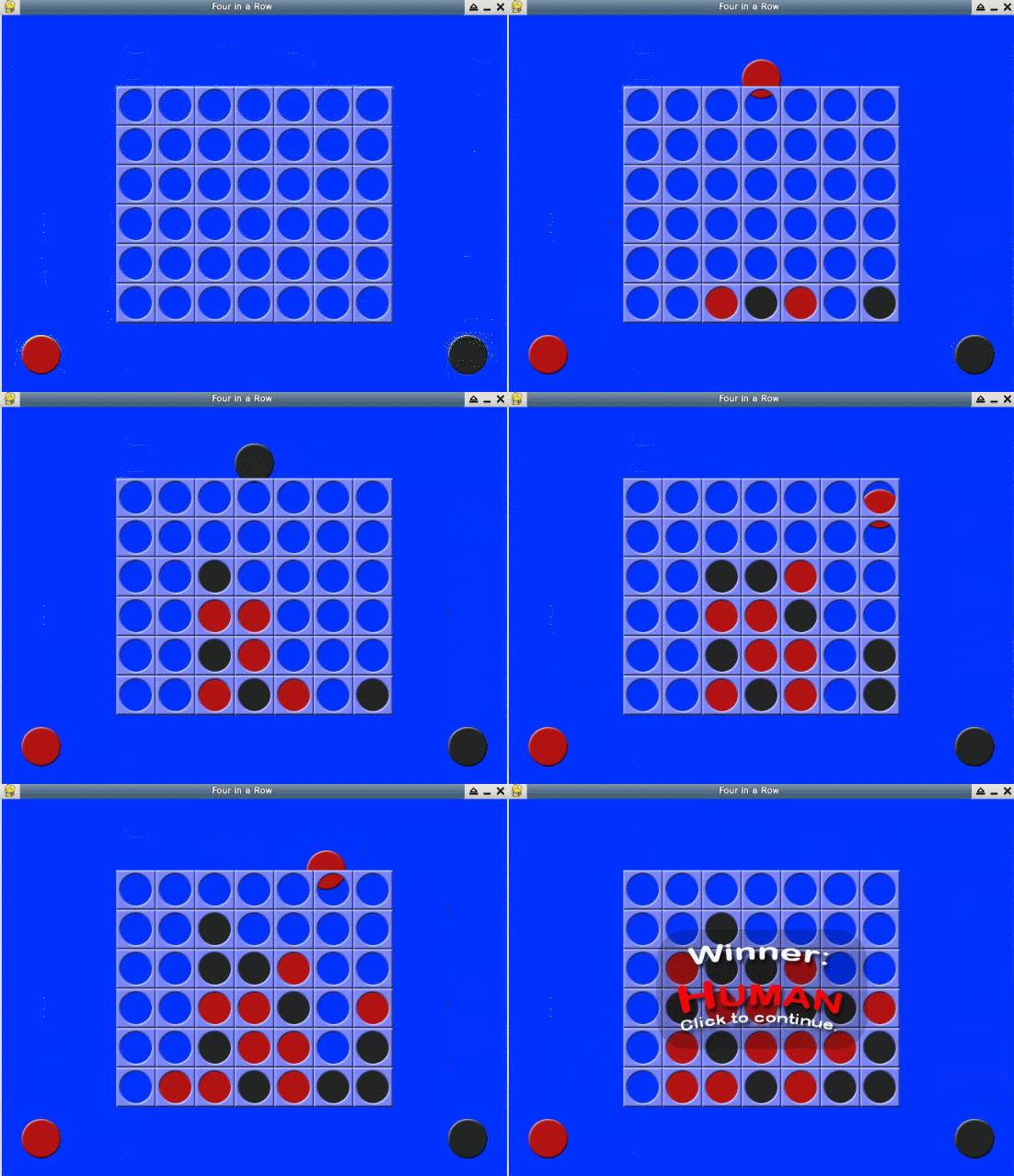
🎯 과제
이 프로젝트를 통해 다음을 배우게 됩니다:
- Pygame 을 사용하여 게임을 구축하는 방법
- AI 의사 결정을 위해 몬테카를로 트리 탐색 알고리즘을 구현하는 방법
- AI 의 난이도를 사용자 정의하고 향상시키는 방법
- 인간 대 AI 대결을 위한 재미있고 상호 작용적인 Connect Four 게임을 만드는 방법
🏆 성과
이 프로젝트를 완료하면 다음을 수행할 수 있습니다:
- Python 및 Pygame 을 사용하여 게임 개발
- 몬테카를로 트리 탐색 알고리즘의 원리 이해
- 도전적인 게임 경험을 만들기 위해 AI 상대의 난이도 조정
- 게임 경험을 더욱 매력적으로 만들기 위해 사용자 인터페이스 향상
개발 준비
Four-In-A-Row 게임은 7*6 크기의 그리드에서 진행됩니다. 플레이어는 차례대로 열의 상단에서 자신의 조각을 떨어뜨립니다. 조각은 해당 열의 가장 아래 빈 공간으로 떨어집니다. 가로, 세로 또는 대각선으로 4 개의 조각을 연결하는 플레이어가 게임에서 승리합니다.
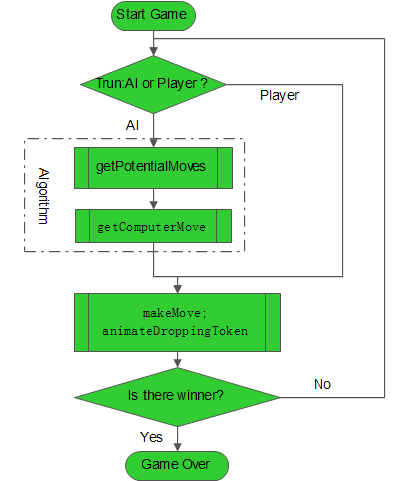
이 프로젝트의 코드를 저장하기 위해 ~/project 디렉토리에 fourinrow.py라는 파일을 생성합니다. 또한, 게임 인터페이스를 구현하고 작업을 지원하기 위해 Pygame 라이브러리를 설치해야 합니다.
cd ~/project
touch fourinrow.py
sudo pip install pygame
이 프로젝트에 필요한 이미지 리소스는 ~/project/images 디렉토리에서 찾을 수 있습니다.
이 프로젝트의 코드를 더 잘 이해하려면, 전체 솔루션의 코드와 함께 학습하는 것이 좋습니다.
변수 초기화
사용되는 변수에는 체스판의 너비와 높이 (다양한 크기의 체스판을 디자인하기 위해 수정 가능), 난이도, 체스 조각의 크기, 일부 좌표 변수의 설정이 포함됩니다.
fourinrow.py 파일에 다음 코드를 입력합니다:
import random, copy, sys, pygame
from pygame.locals import *

BOARDWIDTH = 7  ## 게임 보드의 열 수
BOARDHEIGHT = 6 ## 게임 보드의 행 수
assert BOARDWIDTH >= 4 and BOARDHEIGHT >= 4, 'Board must be at least 4x4.'

## The python assert statement is used to declare that its given boolean expression must be true.
## If the expression is false, it raises an exception.

DIFFICULTY = 2 ## 난이도, 컴퓨터가 고려할 수 있는 이동 횟수
               ## 여기에서 2 는 상대방의 7 가지 가능한 이동과 해당 7 가지 이동에 대한 응답을 고려함을 의미합니다.

SPACESIZE = 50 ## 체스 조각의 크기

FPS = 30 ## 화면 새로 고침 빈도, 30/s
WINDOWWIDTH = 640  ## 픽셀 단위의 게임 화면 너비
WINDOWHEIGHT = 480 ## 픽셀 단위의 게임 화면 높이

XMARGIN = int((WINDOWWIDTH - BOARDWIDTH * SPACESIZE) / 2)  ## 그리드의 왼쪽 가장자리의 X 좌표
YMARGIN = int((WINDOWHEIGHT - BOARDHEIGHT * SPACESIZE) / 2) ## 그리드의 상단 가장자리의 Y 좌표
BRIGHTBLUE = (0, 50, 255) ## 파란색
WHITE = (255, 255, 255) ## 흰색

BGCOLOR = BRIGHTBLUE
TEXTCOLOR = WHITE

RED = 'red'
BLACK = 'black'
EMPTY = None
HUMAN = 'human'
COMPUTER = 'computer'
또한, pygame 의 일부 전역 변수를 정의해야 합니다. 이러한 전역 변수는 나중에 다양한 모듈에서 여러 번 호출됩니다. 그 중 많은 부분이 로드된 이미지를 저장하는 변수이므로 준비 작업이 약간 길 수 있습니다. 인내심을 가지십시오.
## Initialize pygame modules
pygame.init()

## Create a Clock object
FPSCLOCK = pygame.time.Clock()

## Create the game window
DISPLAYSURF = pygame.display.set_mode((WINDOWWIDTH, WINDOWHEIGHT))

## Set the game window title
pygame.display.set_caption(u'four in row')

## Rect(left, top, width, height) is used to define position and size
REDPILERECT = pygame.Rect(int(SPACESIZE / 2), WINDOWHEIGHT - int(3 * SPACESIZE / 2), SPACESIZE, SPACESIZE)

## Create the bottom left and bottom right chess pieces in the window
BLACKPILERECT = pygame.Rect(WINDOWWIDTH - int(3 * SPACESIZE / 2), WINDOWHEIGHT - int(3 * SPACESIZE / 2), SPACESIZE, SPACESIZE)

## Load the red chess piece image
REDTOKENIMG = pygame.image.load('images/4rowred.png')

## Scale the red chess piece image to SPACESIZE
REDTOKENIMG = pygame.transform.smoothscale(REDTOKENIMG, (SPACESIZE, SPACESIZE))

## Load the black chess piece image
BLACKTOKENIMG = pygame.image.load('images/4rowblack.png')

## Scale the black chess piece image to SPACESIZE
BLACKTOKENIMG = pygame.transform.smoothscale(BLACKTOKENIMG, (SPACESIZE, SPACESIZE))

## Load the chessboard image
BOARDIMG = pygame.image.load('images/4rowboard.png')

## Scale the chessboard image to SPACESIZE
BOARDIMG = pygame.transform.smoothscale(BOARDIMG, (SPACESIZE, SPACESIZE))

## Load the human winner image
HUMANWINNERIMG = pygame.image.load('images/4rowhumanwinner.png')

## Load the AI winner image
COMPUTERWINNERIMG = pygame.image.load('images/4rowcomputerwinner.png')

## Load the tie image
TIEWINNERIMG = pygame.image.load('images/4rowtie.png')

## Return a Rect object
WINNERRECT = HUMANWINNERIMG.get_rect()

## Center the winner image on the game window
WINNERRECT.center = (int(WINDOWWIDTH / 2), int(WINDOWHEIGHT / 2))

## Load the arrow image for user instructions
ARROWIMG = pygame.image.load('images/4rowarrow.png')

## Return a Rect object
ARROWRECT = ARROWIMG.get_rect()

## Set the left position of the arrow image
ARROWRECT.left = REDPILERECT.right + 10

## Align the arrow image vertically with the red chess piece below it
ARROWRECT.centery = REDPILERECT.centery
이 프로젝트의 코드를 더 잘 이해하려면, 전체 솔루션의 코드와 함께 학습하는 것이 좋습니다.
보드 디자인
처음에는 보드를 나타내는 2 차원 리스트를 초기화하고, 플레이어와 AI 의 움직임에 따라 보드의 해당 위치에 색상을 설정합니다.
def drawBoard(board, extraToken=None):
    ## DISPLAYSURF is our interface, defined in the variable initialization module.
    DISPLAYSURF.fill(BGCOLOR) ## Fill the game window background color with blue.
    spaceRect = pygame.Rect(0, 0, SPACESIZE, SPACESIZE) ## Create a Rect instance.
    for x in range(BOARDWIDTH):
        ## Determine the top-left position coordinates of each cell in each row of each column.
        for y in range(BOARDHEIGHT):
            spaceRect.topleft = (XMARGIN + (x * SPACESIZE), YMARGIN + (y * SPACESIZE))

            ## When x = 0 and y = 0, it is the first cell in the first row of the first column.
            if board[x][y] == RED: ## If the cell value is red,
                ## draw a red token in the game window within spaceRect.
                DISPLAYSURF.blit(REDTOKENIMG, spaceRect)
            elif board[x][y] == BLACK: ## Otherwise, draw a black token.
                DISPLAYSURF.blit(BLACKTOKENIMG, spaceRect)

    ## extraToken is a variable that contains position information and color information.
    ## It is used to display a specified token.
    if extraToken != None:
        if extraToken['color'] == RED:
            DISPLAYSURF.blit(REDTOKENIMG, (extraToken['x'], extraToken['y'], SPACESIZE, SPACESIZE))
        elif extraToken['color'] == BLACK:
            DISPLAYSURF.blit(BLACKTOKENIMG, (extraToken['x'], extraToken['y'], SPACESIZE, SPACESIZE))

    ## Draw the token panels.
    for x in range(BOARDWIDTH):
        for y in range(BOARDHEIGHT):
            spaceRect.topleft = (XMARGIN + (x * SPACESIZE), YMARGIN + (y * SPACESIZE))
            DISPLAYSURF.blit(BOARDIMG, spaceRect)

    ## Draw the tokens at the bottom left and bottom right of the game window.
    DISPLAYSURF.blit(REDTOKENIMG, REDPILERECT) ## Left red token.
    DISPLAYSURF.blit(BLACKTOKENIMG, BLACKPILERECT) ## Right black token.


def getNewBoard():
    board = []
    for x in range(BOARDWIDTH):
        board.append([EMPTY] * BOARDHEIGHT)
    return board ## Return the board list with BOARDHEIGHT number of None values.
위 코드에서 drawBoard() 함수는 보드와 보드 위의 토큰을 그립니다. getNewBoard() 함수는 새로운 보드 데이터 구조를 반환합니다.
최적 이동을 위한 AI 알고리즘
몬테카를로 트리 탐색 (Monte Carlo tree search) 의 아이디어를 간략하게 설명합니다:
바둑판을 평가하기 위해 1 차원 몬테카를로 방법 (Monte Carlo method) 을 사용합니다. 구체적으로, 특정 체스판 상황이 주어지면 프로그램은 현재 상황에서 사용 가능한 모든 지점 중에서 무작위로 한 지점을 선택하고 그 위에 체스 조각을 놓습니다. 이 사용 가능한 지점 (roll point) 을 무작위로 선택하는 프로세스를 양쪽 모두 사용 가능한 지점이 없을 때까지 (게임 종료) 반복한 다음, 이 최종 상태의 승리 또는 패배 결과를 현재 상황을 평가하는 기준으로 피드백합니다.
이 프로젝트에서 AI 는 지속적으로 다른 열을 선택하고 양쪽의 승리 결과를 평가합니다. AI 는 궁극적으로 더 높은 평가를 받는 전략을 선택합니다.
아래 그림과 텍스트를 보기 전에, 먼저 마지막에 있는 코드를 살펴본 다음 해당 설명을 참조하십시오.
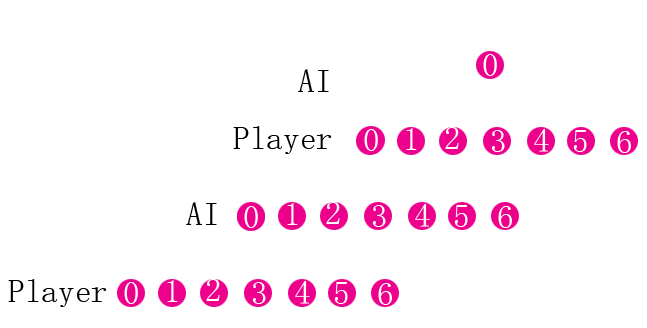
아래 그림에서 AI 와 플레이어의 대결을 관찰합니다:
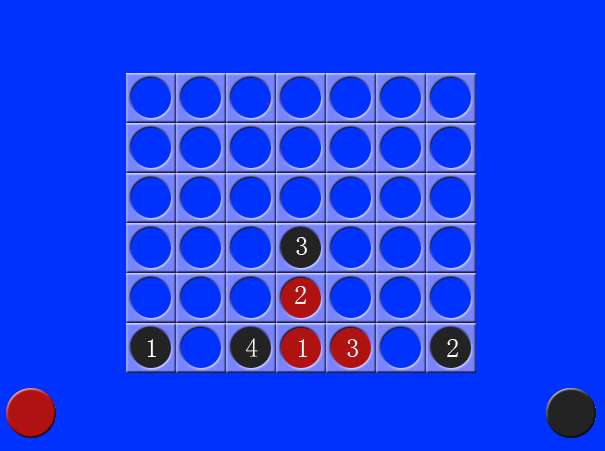
프로젝트의 일부 변수는 AI 의 체스 조작 과정을 직관적으로 반영할 수 있습니다:
PotentialMoves: 체스 조각을 리스트의 모든 열로 이동할 때 AI 가 이길 가능성을 나타내는 리스트를 반환합니다. 값은 -1 에서 1 사이의 난수입니다. 값이 음수이면 플레이어가 다음 두 번의 움직임에서 이길 수 있음을 의미하며, 값이 작을수록 플레이어가 이길 가능성이 커집니다. 값이 0 이면 플레이어가 이기지 못하고 AI 도 이기지 못함을 의미합니다. 값이 1 이면 AI 가 이길 수 있음을 의미합니다.
bestMoveFitness: Fitness 는 PotentialMoves 에서 선택된 최대값입니다.
bestMoves: PotentialMoves 에 여러 개의 최대값이 있는 경우, AI 가 체스 조각을 이러한 값이 있는 열로 이동할 때 플레이어의 승리 가능성이 가장 작다는 것을 의미합니다. 따라서 이러한 열은 bestMoves 리스트에 추가됩니다.
column: bestMoves 에 여러 값이 있는 경우, bestMoves 에서 하나의 열을 무작위로 선택하여 AI 의 움직임으로 사용합니다. 값이 하나만 있는 경우, column 은 이 고유한 값입니다.
프로젝트에서 이러한 bestMoveFitness, bestMoves, column 및 potentialMoves 를 출력함으로써 위의 그림에서 AI 의 각 단계의 매개변수를 추론할 수 있습니다.
AI 움직임
| 단계 | potentialMoves | bestMoveFitness | bestMoves | column |
|---|---|---|---|---|
| 1 | [0, 0, 0, 0, 0, 0, 0] | 0 | [0, 1, 2, 3, 4, 5, 6] | 0 |
| 2 | [0, 0, 0, 0, 0, 0, 0] | 0 | [0, 1, 2, 3, 4, 5, 6] | 6 |
| 3 | [-0.12, -0.12, -0.12, 0, -0.12, -0.12, -0.12] | 0 | [3] | 3 |
| 4 | [-0.34, -0.22, 0, -0.34, -0.34, -0.22, -0.34] | 0 | [2] | 2 |
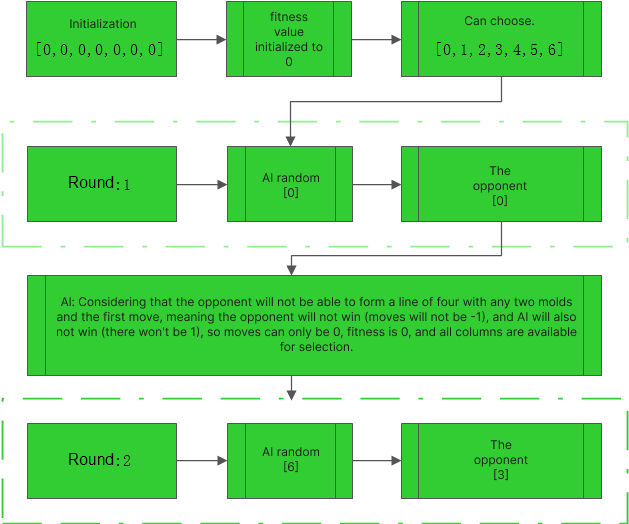
세 번째 단계에서 AI 의 선택을 검토하여 알고리즘을 더 잘 이해할 수 있습니다:
아래 그림은 AI 의 일부 움직임을 보여주며, AI 가 첫 번째 열에 조각을 놓을 경우 플레이어가 선택할 수 있는 가능한 선택과 AI 의 다음 움직임이 플레이어의 승리 가능성에 미치는 영향을 보여줍니다. 이 검색 및 반복 프로세스를 통해 AI 는 다음 두 단계에서 상대방과 자신 모두의 승리 상황을 결정하고 그에 따라 결정을 내릴 수 있습니다.
아래 그림은 AI 의 fitness value 를 계산하는 순서도입니다. 이 프로젝트에서 난이도 계수는 2 이며, 7^4=2041 개의 경우를 고려해야 합니다:
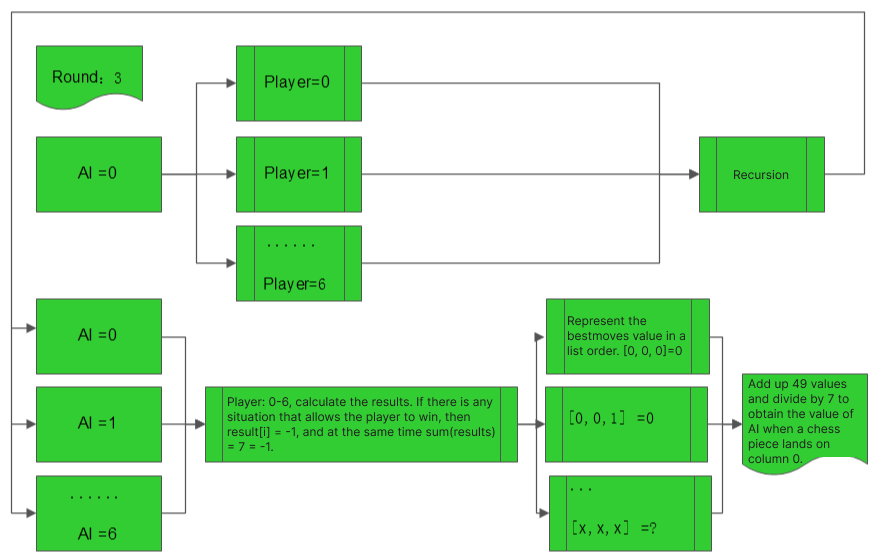
위의 순서도에서 AI 가 첫 번째 조각을 열 0, 1, 2, 4, 5 또는 6 에 놓으면 플레이어가 항상 나머지 두 조각을 열 3 에 놓고 이길 수 있다는 것을 쉽게 알 수 있습니다. 표현의 편의를 위해 다양한 조합을 나타내기 위해 시퀀스를 사용합니다. 여기서 첫 번째 요소는 AI 의 첫 번째 움직임을 나타내고, 두 번째 숫자는 플레이어의 응답을 나타내며, 세 번째 숫자는 AI 의 응답을 나타냅니다. "X"는 유효한 모든 움직임을 나타냅니다. 따라서 [0,0,x]=0 이며, 시퀀스가 [0,x<>3,x]일 때 플레이어는 이길 수 없다는 것을 추론할 수 있습니다. 플레이어의 두 번째 조각이 열 3 에 있고 AI 의 두 번째 움직임이 열 3 에 있지 않을 때만 AI 가 이길 수 있습니다. 따라서 [0,x=3,x<>3] = -1 이며, 이러한 경우가 6 개 있습니다. 최종 결과는 (0+0+...(43 times)-1*6)/7/7 = -0.12입니다.
같은 추론으로, 다른 네 가지 경우의 결과는 모두 -0.12 입니다. AI 의 첫 번째 움직임이 열 3 에 있으면 플레이어는 이길 수 없고 AI 도 이길 수 없으므로 값은 0 입니다. AI 는 가장 높은 fitness value 를 가진 움직임을 선택하며, 이는 조각을 열 3 에 놓을 것임을 의미합니다.
AI 의 후속 움직임에도 동일한 분석을 적용할 수 있습니다. 요약하면, AI 의 움직임 이후 플레이어가 이길 가능성이 높을수록 AI 의 fitness value 는 낮아지며, AI 는 플레이어가 이기는 것을 방지하기 위해 더 높은 fitness value 를 가진 움직임을 선택합니다. 물론, AI 가 스스로 이길 수 있다면 자신의 승리로 이어지는 움직임을 우선시할 것입니다.
def getPotentialMoves(board, tile, lookAhead):
    if lookAhead == 0 or isBoardFull(board):
        '''
        If the difficulty coefficient is 0 or the board is full,
        return a list with all values set to 0. This means that
        the fitness value is equal to the potential moves for each column.
        In this case, AI will drop the piece randomly and lose its intelligence.
        '''
        return [0] * BOARDWIDTH

    ## Determine the color of the opponent's piece
    if tile == RED:
        enemyTile = BLACK
    else:
        enemyTile = RED
    potentialMoves = [0] * BOARDWIDTH
    ## Initialize a list of potential moves, with all values set to 0
    for firstMove in range(BOARDWIDTH):
        ## Iterate over each column and consider any move by either side as the firstMove
        ## The move by the other side is then considered as the counterMove
        ## Here, our firstMove refers to AI's move and the opponent's move is considered as counterMove
        ## Take a deep copy of the board to prevent mutual influence between board and dupeBoard
        dupeBoard = copy.deepcopy(board)
        if not isValidMove(dupeBoard, firstMove):
        ## If the move of placing a black piece in the column specified by firstMove is invalid in dupeBoard
            continue
            ## Continue to the next firstMove
        makeMove(dupeBoard, tile, firstMove)
        ## If it is a valid move, set the corresponding grid color
        if isWinner(dupeBoard, tile):
        ## If AI wins
            potentialMoves[firstMove] = 1
            ## The winning piece automatically gets a high value to indicate its chances of winning
            ## The larger the value, the higher the chances of winning, and the lower the chances of the opponent winning
            break
            ## Do not interfere with the calculation of other moves
        else:
            if isBoardFull(dupeBoard):
            ## If there are no empty grids in dupeBoard
                potentialMoves[firstMove] = 0
                ## It is not possible to move
            else:
                for counterMove in range(BOARDWIDTH):
                ## Consider the opponent's move
                    dupeBoard2 = copy.deepcopy(dupeBoard)
                    if not isValidMove(dupeBoard2, counterMove):
                        continue
                    makeMove(dupeBoard2, enemyTile, counterMove)
                    if isWinner(dupeBoard2, enemyTile):
                        potentialMoves[firstMove] = -1
                        ## If the player wins, the fitness value for AI in this column is the lowest
                        break
                    else:
                        ## Recursively call getPotentialMoves
                        results = getPotentialMoves(dupeBoard2, tile, lookAhead - 1)
                        ## Use floating-point representation here for more accurate results
                        ## This ensures that the values in potentialMoves are within the range [-1, 1]
                        potentialMoves[firstMove] += (sum(results)*1.0 / BOARDWIDTH) / BOARDWIDTH
    return potentialMoves
플레이어 조작
체스 조각을 드래그하고, 체스 조각이 위치한 사각형을 결정하고, 체스 조각을 검증하고, 체스 조각 드롭 함수를 호출하고, 조작을 완료합니다.
def getHumanMove(board, isFirstMove):
    draggingToken = False
    tokenx, tokeny = None, None
    while True:
        ## Use pygame.event.get() to handle all events
        for event in pygame.event.get():
            if event.type == QUIT: ## Stop and exit
                pygame.quit()
                sys.exit()

            elif event.type == MOUSEBUTTONDOWN and not draggingToken and REDPILERECT.collidepoint(event.pos):
                ## If the event type is mouse button down, draggingToken is True, and the mouse click position is inside REDPILERECT
                draggingToken = True
                tokenx, tokeny = event.pos

            elif event.type == MOUSEMOTION and draggingToken: ## If the red piece is dragged
                tokenx, tokeny = event.pos ## Update the position of the dragged piece

            elif event.type == MOUSEBUTTONUP and draggingToken:
                ## If the mouse is released, and the chess piece is dragged
                ## If the chess piece is dragged directly above the board
                if tokeny < YMARGIN and tokenx > XMARGIN and tokenx < WINDOWWIDTH - XMARGIN:
                    column = int((tokenx - XMARGIN) / SPACESIZE) ## Determine the column where the chess piece will drop based on the x coordinate of the chess piece (0,1...6)
                    if isValidMove(board, column): ## If the chess piece move is valid
                        """
                        Drop into the corresponding empty square,
                        This function only shows the dropping effect
                        The chess piece filling the square can also be achieved without this function by the following code
                        """
                        animateDroppingToken(board, column, RED)

                        ## Set the bottom most square in the empty column to red
                        board[column][getLowestEmptySpace(board, column)] = RED
                        drawBoard(board) ## Draw the red chess piece in the dropped square
                        pygame.display.update() ## Window update
                        return
                tokenx, tokeny = None, None
                draggingToken = False

        if tokenx != None and tokeny != None: ## If a chess piece is dragged, display the dragged chess piece
            drawBoard(board, {'x':tokenx - int(SPACESIZE / 2), 'y':tokeny - int(SPACESIZE / 2), 'color':RED})
            ## Adjust the x, y coordinates so that the mouse is always at the center position of the chess piece during dragging

        else:
            drawBoard(board) ## When it is an invalid move, after the mouse is released, because all the values in the board are none
            ## When calling drawBoard, the operations performed are to display the two chess pieces below, which is equivalent to returning the chess piece to the location where it started dragging

        if isFirstMove:
            DISPLAYSURF.blit(ARROWIMG, ARROWRECT) ## AI moves first, display the hint operation image

        pygame.display.update()
        FPSCLOCK.tick()
위 코드에서 getHumanMove() 함수는 플레이어의 움직임을 처리합니다. animateDroppingToken() 함수는 토큰의 드롭을 애니메이션합니다. getLowestEmptySpace() 함수는 열에서 가장 낮은 빈 공간을 반환합니다.
AI 운영
컴퓨터의 움직임과 AI 조각이 해당 위치에 착지하는 것을 애니메이션하는 함수를 구현합니다.
def animateComputerMoving(board, column):
    x = BLACKPILERECT.left ## The left coordinate of the black piece at the bottom
    y = BLACKPILERECT.top ## The top coordinate of the black piece at the bottom
    speed = 1.0
    while y > (YMARGIN - SPACESIZE): ## When y has a larger value, indicating that the piece is below the window
        y -= int(speed) ## Decrease y continuously, which means the piece moves up
        speed += 0.5 ## Increase the speed at which y decreases
        drawBoard(board, {'x':x, 'y':y, 'color':BLACK})
        ## y keeps changing, continuously drawing the black piece, creating an effect of continuous ascent
        pygame.display.update()
        FPSCLOCK.tick()
    ## When the piece ascends to the top of the board
    y = YMARGIN - SPACESIZE ## Reset y, so that the bottom of the piece is aligned with the top of the board
    speed = 1.0
    while x > (XMARGIN + column * SPACESIZE): ## When x is greater than the x coordinate of the desired column
        x -= int(speed) ## Decrease x continuously, which means the piece moves to the left
        speed += 0.5
        drawBoard(board, {'x':x, 'y':y, 'color':BLACK})
        ## At this point, the y coordinate remains unchanged, which means the piece moves horizontally to the column
        pygame.display.update()
        FPSCLOCK.tick()
    ## The black piece lands on the calculated empty space
    animateDroppingToken(board, column, BLACK)
반환된 potentialMoves 목록에서 가장 높은 숫자를 fitness value 로 선택하고, 높은 fitness value 를 가진 열에서 무작위로 최종 움직임 목표를 선택합니다.
def getComputerMove(board):
    potentialMoves = getPotentialMoves(board, BLACK, DIFFICULTY) ## Potential moves, a list with BOARDWIDTH values
               ## The values in the list are related to the difficulty level set
    bestMoves = [] ## Create an empty bestMoves list
    bestMoveFitness = -1 ## Since the minimum value in potentialMoves is -1, it serves as the lower limit
    print(bestMoveFitness)
    for i in range(len(potentialMoves)):
        if potentialMoves[i] > bestMoveFitness and isValidMove(board, i):
            bestMoveFitness = potentialMoves[i] ## Continuously update bestMoves, so that each value in bestMoves is the largest
            ## while ensuring that the move is valid.

    for i in range(len(potentialMoves)):
        if potentialMoves[i] == bestMoveFitness and isValidMove(board, i):
            bestMoves.append(i) ## List all the columns where the piece can be moved to. This list may be empty, contain
            ## only one value, or multiple values.
    print(bestMoves)
    return random.choice(bestMoves) ## Randomly choose one of the columns where the piece can be moved to as the target move.
말 이동 조작
조각의 해당 좌표를 지속적으로 변경하여 낙하 애니메이션 효과를 얻습니다.
def getLowestEmptySpace(board, column):
    ## Return the lowest empty space in a column
    for y in range(BOARDHEIGHT-1, -1, -1):
        if board[column][y] == EMPTY:
            return y
    return -1

def makeMove(board, player, column):
    lowest = getLowestEmptySpace(board, column)
    if lowest != -1:
        board[column][lowest] = player
        '''
        Assign the player (red/black) to the lowest empty space in the column.
        Because the piece is dropped in the lowest empty space in a column,
        it is considered as the color of that space.
        '''

def animateDroppingToken(board, column, color):
    x = XMARGIN + column * SPACESIZE
    y = YMARGIN - SPACESIZE
    dropSpeed = 1.0
    lowestEmptySpace = getLowestEmptySpace(board, column)

    while True:
        y += int(dropSpeed)
        dropSpeed += 0.5
        if int((y - YMARGIN) / SPACESIZE) >= lowestEmptySpace:
            return
        drawBoard(board, {'x':x, 'y':y, 'color':color})
        pygame.display.update()
        FPSCLOCK.tick()
위 코드에서 makeMove() 함수는 보드에서 움직임을 만듭니다. animateDroppingToken() 함수는 토큰의 드롭을 애니메이션합니다. getLowestEmptySpace() 함수는 열에서 가장 낮은 빈 공간을 반환합니다.
일부 판단 기능
조각의 움직임의 유효성을 판단하고, 체스판에 아직 빈 공간이 있는지 판단합니다.
def isValidMove(board, column):
    ## Judge the validity of a piece's move
    if column < 0 or column >= (BOARDWIDTH) or board[column][0] != EMPTY:
    ## If the column is less than 0 or greater than BOARDWIDTH, or there is no empty space in the column
        return False
        ## Then it is an invalid move, otherwise it is valid
    return True


def isBoardFull(board):
    ## If there are no empty spaces in the grid, return True
    for x in range(BOARDWIDTH):
        for y in range(BOARDHEIGHT):
            if board[x][y] == EMPTY:
                return False
    return True
위 코드에서 isValidMove() 함수는 움직임이 유효하면 True 를 반환합니다. isBoardFull() 함수는 보드가 가득 차면 True 를 반환합니다.
승리 조건 판단
네 가지 승리 조건을 쉽게 이해할 수 있도록 몇 가지 다이어그램을 제공합니다. 다이어그램에 표시된 위치는 x 및 y 의 극값에 해당합니다.
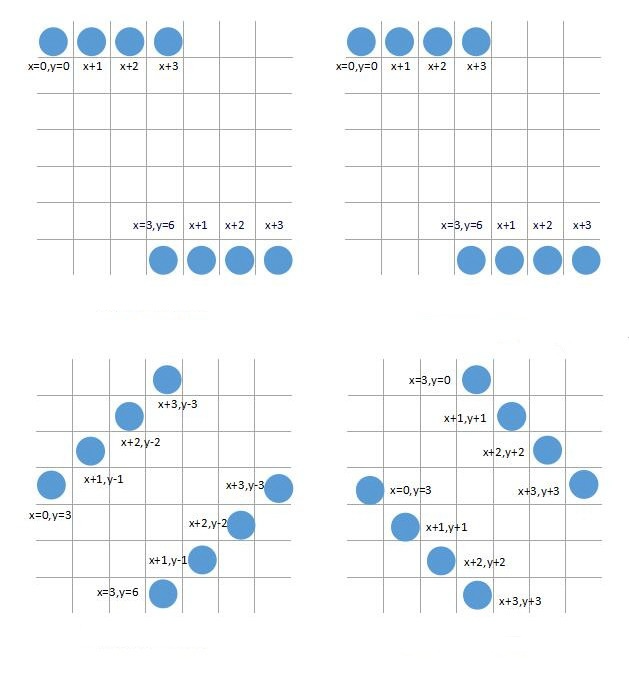
def isWinner(board, tile):
    ## Check for horizontal situation of pieces
    for x in range(BOARDWIDTH - 3): ## x takes on the values 0, 1, 2, 3
        for y in range(BOARDHEIGHT): ## iterate through all rows
            ## If x = 0, check if the first four pieces in the yth row are all the same tile. This can be used to traverse all horizontal situations of pieces connecting four in a row. If any x, y is true, it can be determined as a win
            if board[x][y] == tile and board[x+1][y] == tile and board[x+2][y] == tile and board[x+3][y] == tile:
                return True

    ## Check for vertical situation of pieces, similar to the horizontal situation
    for x in range(BOARDWIDTH):
        for y in range(BOARDHEIGHT - 3):
            if board[x][y] == tile and board[x][y+1] == tile and board[x][y+2] == tile and board[x][y+3] == tile:
                return True

    ## Check for left-leaning diagonal situation of pieces
    for x in range(BOARDWIDTH - 3): ## x takes on the values 0, 1, 2, 3
        for y in range(3, BOARDHEIGHT): ## because when forming a left-leaning diagonal four in a row, the bottom-most piece must be at least four squares away from the top, i.e. y >= 3
            if board[x][y] == tile and board[x+1][y-1] == tile and board[x+2][y-2] == tile and board[x+3][y-3] == tile: ## determine if the left-leaning diagonal four pieces are the same color
                return True

    ## Check for right-leaning diagonal situation of pieces, similar to the left-leaning diagonal situation
    for x in range(BOARDWIDTH - 3):
        for y in range(BOARDHEIGHT - 3):
            if board[x][y] == tile and board[x+1][y+1] == tile and board[x+2][y+2] == tile and board[x+3][y+3] == tile:
                return True
    return False
게임 메인 루프 생성
마지막으로, 게임을 계속 실행하기 위해 게임 메인 루프를 생성합니다.
def main():

    ## Exsiting code omitted

    isFirstGame = True ## Initialize isFirstGame

    while True: ## Keep the game running continuously
        runGame(isFirstGame)
        isFirstGame = False


def runGame(isFirstGame):
    if isFirstGame:
        ## At the start of the first game
        ## Let the AI make the first move so that players can watch how the game is played
        turn = COMPUTER
        showHelp = True
    else:
        ## For the second game and onwards, assign turns randomly
        if random.randint(0, 1) == 0:
            turn = COMPUTER
        else:
            turn = HUMAN
        showHelp = False
    mainBoard = getNewBoard() ## Set up the initial empty board structure
    while True: ## Game main loop
        if turn == HUMAN: ## If it's the player's turn

            getHumanMove(mainBoard, showHelp) ## Call the method for player's move, see getHumanMove method for details
            if showHelp:
                ## If there's a hint image, turn off the hint after AI makes the first move
                showHelp = False
            if isWinner(mainBoard, RED): ## If red chip (player) wins
                winnerImg = HUMANWINNERIMG ## Load the player winning image
                break ## Exit the loop
            turn = COMPUTER ## Hand over the first move to the AI
        else:
            ## If it's the AI's turn
            column = getComputerMove(mainBoard) ## Call the method for AI's move, see getComputerMove method for details
            print(column)
            animateComputerMoving(mainBoard, column) ## Move the black chip
            makeMove(mainBoard, BLACK, column) ## Set the bottom-most empty slot in the column as black
            if isWinner(mainBoard, BLACK):
                winnerImg = COMPUTERWINNERIMG
                break
            turn = HUMAN ## Switch to the player's turn

        if isBoardFull(mainBoard):
            ## If the board is full, it's a tie
            winnerImg = TIEWINNERIMG
            break
실행 및 테스트
다음으로, 프로그램을 실행하고 성능을 확인합니다.
cd ~/project
python fourinrow.py
요약
몬테카를로 알고리즘 (Monte Carlo algorithm) 을 기반으로, 이 프로젝트는 Pygame 모듈을 사용하여 Python 으로 인간 대 AI 체스 게임을 구현했습니다. 이 프로젝트를 통해 Pygame 에서 인스턴스 생성 및 객체 이동의 기본 사항을 익힐 수 있었으며, 몬테카를로 알고리즘의 구체적인 적용에 대한 예비적인 이해를 얻을 수 있었습니다.


