



소개
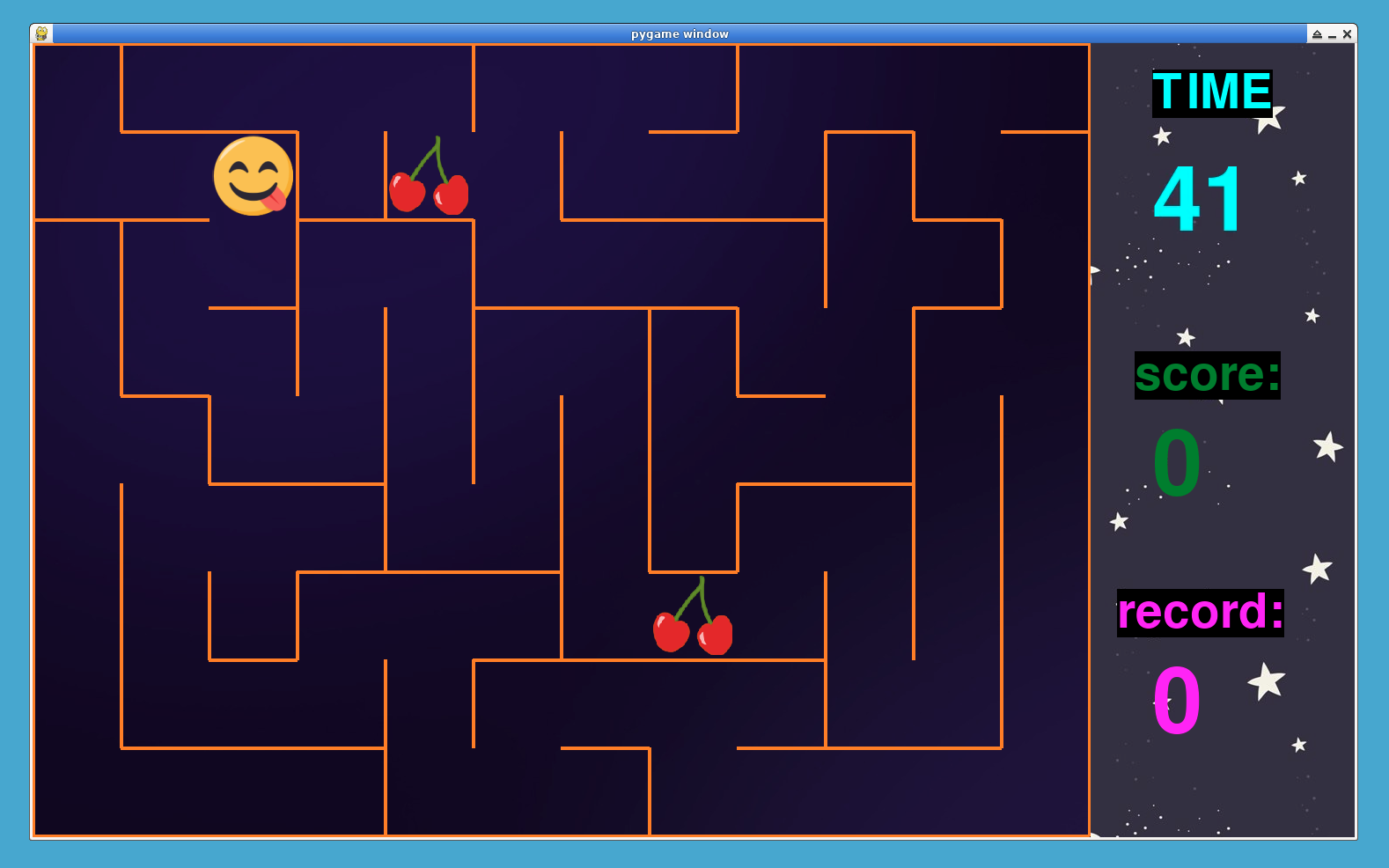
이 프로젝트에서는 Python 의 Pygame 라이브러리를 사용하여 미로 게임을 만들 것입니다. 이 게임은 플레이어가 벽을 피하면서 미로를 통과하여 음식 아이템을 수집하는 것을 포함합니다. 개발 과정을 여러 단계로 나누어 이해하고 따라하기 쉽게 만들 것입니다.
👀 미리보기
🎯 과제
이 프로젝트에서 다음을 배우게 됩니다:
- Pygame 을 사용하여 게임 환경을 설정하는 방법
- 셀과 벽을 사용하여 미로를 만드는 방법
- 플레이어가 수집할 음식 아이템을 추가하는 방법
- 플레이어 이동 및 충돌 감지를 구현하는 방법
- 점수 계산 및 게임 오버 조건을 포함한 게임 로직을 처리하는 방법
- 플레이어의 기록을 추적하는 방법
- 시간, 점수, 기록과 같은 게임 통계를 화면에 표시하는 방법
🏆 성과
이 프로젝트를 완료하면 다음을 수행할 수 있습니다:
- 게임 개발을 위해 Pygame 라이브러리를 사용합니다.
- 객체 지향 프로그래밍 (Object-oriented programming) 개념을 적용하여 게임 요소를 만듭니다.
- 미로 생성을 위한 알고리즘적 사고와 문제 해결 능력을 보여줍니다.
- 이벤트 처리 및 플레이어 입력을 처리합니다.
- 게임 환경에서 충돌 감지 및 이동 메커니즘을 구현합니다.
- 게임 기록을 저장하고 검색하기 위한 파일 처리를 관리합니다.
- 화면에 게임 통계 및 정보를 표시합니다.
환경 설정
먼저, 미로 게임을 위한 프로젝트 파일을 만들 것입니다.
cd ~/project
touch maze.py
sudo pip install pygame
이 단계에서는 Pygame 환경을 설정하고 상수를 정의합니다.
import pygame
from random import choice, randrange

## Constants for screen dimensions and tile size
RES = WIDTH, HEIGHT = 1202, 902
TILE = 100
cols, rows = WIDTH // TILE, HEIGHT // TILE

## The rest of your code will go here...
이 단계에서:
- 필요한 라이브러리 (Pygame 및 random) 를 가져옵니다.
- 화면 치수 및 타일 크기에 대한 상수를 정의합니다.
- Pygame 이 초기화되고 게임 창이 설정됩니다.
- 게임의 배경 이미지를 로드합니다.
Cell 클래스 생성
이 단계에서는 미로 셀을 나타내는 Cell 클래스를 정의합니다.
## Define a class to represent cells in the maze
class Cell:
    def __init__(self, x, y):
        self.x, self.y = x, y
        ## Walls represent the boundaries of the cell
        self.walls = {"top": True, "right": True, "bottom": True, "left": True}
        self.visited = False
        self.thickness = 4

    ## Draw the cell's walls
    def draw(self, sc):
        x, y = self.x * TILE, self.y * TILE
        if self.walls["top"]:
            pygame.draw.line(
                sc, pygame.Color("darkorange"), (x, y), (x + TILE, y), self.thickness
            )
        if self.walls["right"]:
            pygame.draw.line(
                sc,
                pygame.Color("darkorange"),
                (x + TILE, y),
                (x + TILE, y + TILE),
                self.thickness,
            )
        if self.walls["bottom"]:
            pygame.draw.line(
                sc,
                pygame.Color("darkorange"),
                (x + TILE, y + TILE),
                (x, y + TILE),
                self.thickness,
            )
        if self.walls["left"]:
            pygame.draw.line(
                sc, pygame.Color("darkorange"), (x, y + TILE), (x, y), self.thickness
            )

    ## Get the rectangles representing each wall of the cell
    def get_rects(self):
        rects = []
        x, y = self.x * TILE, self.y * TILE
        if self.walls["top"]:
            rects.append(pygame.Rect((x, y), (TILE, self.thickness)))
        if self.walls["right"]:
            rects.append(pygame.Rect((x + TILE, y), (self.thickness, TILE)))
        if self.walls["bottom"]:
            rects.append(pygame.Rect((x, y + TILE), (TILE, self.thickness)))
        if self.walls["left"]:
            rects.append(pygame.Rect((x, y), (self.thickness, TILE)))
        return rects

    ## Check if a neighboring cell exists
    def check_cell(self, x, y):
        find_index = lambda x, y: x + y * cols
        if x < 0 or x > cols - 1 or y < 0 or y > rows - 1:
            return False
        return self.grid_cells[find_index(x, y)]

    ## Get neighboring cells that have not been visited
    def check_neighbors(self, grid_cells):
        self.grid_cells = grid_cells
        neighbors = []
        top = self.check_cell(self.x, self.y - 1)
        right = self.check_cell(self.x + 1, self.y)
        bottom = self.check_cell(self.x, self.y + 1)
        left = self.check_cell(self.x - 1, self.y)
        if top and not top.visited:
            neighbors.append(top)
        if right and not right.visited:
            neighbors.append(right)
        if bottom and not bottom.visited:
            neighbors.append(bottom)
        if left and not left.visited:
            neighbors.append(left)
        return choice(neighbors) if neighbors else False

## The rest of your code will go here...
이 단계에서:
- 벽을 그리고 이웃을 확인하기 위한 속성과 메서드를 갖는
Cell클래스를 정의합니다.
벽 제거 및 미로 생성
이 단계에서는 벽을 제거하고 미로를 생성하는 함수를 만들 것입니다.
## Function to remove walls between two adjacent cells
def remove_walls(current, next):
    dx = current.x - next.x
    if dx == 1:
        current.walls["left"] = False
        next.walls["right"] = False
    elif dx == -1:
        current.walls["right"] = False
        next.walls["left"] = False
    dy = current.y - next.y
    if dy == 1:
        current.walls["top"] = False
        next.walls["bottom"] = False
    elif dy == -1:
        current.walls["bottom"] = False
        next.walls["top"] = False


## Function to generate the maze
def generate_maze():
    grid_cells = [Cell(col, row) for row in range(rows) for col in range(cols)]
    current_cell = grid_cells[0]
    array = []
    break_count = 1

    while break_count != len(grid_cells):
        current_cell.visited = True
        next_cell = current_cell.check_neighbors(grid_cells)
        if next_cell:
            next_cell.visited = True
            break_count += 1
            array.append(current_cell)
            remove_walls(current_cell, next_cell)
            current_cell = next_cell
        elif array:
            current_cell = array.pop()
    return grid_cells

## The rest of your code will go here...
이 단계에서:
- 인접한 셀 사이의 벽을 제거하는
remove_walls함수를 정의합니다. - 깊이 우선 탐색 (depth-first search) 알고리즘을 사용하여 미로를 생성하는
generate_maze함수를 만듭니다.
게임에 음식 추가
이 단계에서는 게임에 음식 아이템을 추가하기 위해 Food 클래스를 만들 것입니다.
## Class to represent food in the game
class Food:
    def __init__(self):
        ## Load the food image
        self.img = pygame.image.load("img/food.png").convert_alpha()
        self.img = pygame.transform.scale(self.img, (TILE - 10, TILE - 10))
        self.rect = self.img.get_rect()
        self.set_pos()

    ## Set the position of the food randomly
    def set_pos(self):
        self.rect.topleft = randrange(cols) * TILE + 5, randrange(rows) * TILE + 5

    ## Draw the food on the screen
    def draw(self):
        game_surface.blit(self.img, self.rect)

## The rest of your code will go here...
이 단계에서:
- 위치를 설정하고 음식 아이템을 그리는 메서드를 갖는
Food클래스를 정의합니다.
플레이어 이동 및 충돌 감지
이 단계에서는 플레이어 컨트롤, 이동 및 충돌 감지를 설정합니다.
## Check if the player collides with walls
def is_collide(x, y):
    tmp_rect = player_rect.move(x, y)
    if tmp_rect.collidelist(walls_collide_list) == -1:
        return False
    return True

## The rest of your code will go here...
이 단계에서:
- 플레이어가 벽과 충돌하는지 확인하는
is_collide함수를 정의합니다.
게임 플레이 및 점수 시스템
이 단계에서는 음식 먹기 및 점수를 포함한 게임 플레이 로직을 구현합니다.
## Check if the player has eaten any food
def eat_food():
    for food in food_list:
        if player_rect.collidepoint(food.rect.center):
            food.set_pos()
            return True
    return False


## Check if the game is over (time runs out)
def is_game_over():
    global time, score, record, FPS
    if time < 0:
        pygame.time.wait(700)
        player_rect.center = TILE // 2, TILE // 2
        [food.set_pos() for food in food_list]
        set_record(record, score)
        record = get_record()
        time, score, FPS = 60, 0, 60

## The rest of your code will go here...
이 단계에서:
- 플레이어가 음식을 먹었는지 확인하는
eat_food함수를 정의합니다. - 시간이 다 되었을 때 게임이 종료되었는지 확인하는
is_game_over함수를 생성합니다.
기록 관리
이 단계에서는 게임의 기록 관리를 구현합니다.
## Function to get the current record from a file
def get_record():
    try:
        with open("record") as f:
            return f.readline()
    except FileNotFoundError:
        with open("record", "w") as f:
            f.write("0")
            return "0"

## Function to set and update the record in a file
def set_record(record, score):
    rec = max(int(record), score)
    with open("record", "w") as f:
        f.write(str(rec))

## The rest of your code will go here...
이 단계에서:
- 파일에서 현재 기록을 가져오고 업데이트하는 함수를 정의합니다.
게임 초기화
이 단계에서는 게임 초기화 작업을 수행합니다.
## Initialize Pygame and set up the game window
FPS = 60
pygame.init()
game_surface = pygame.Surface(RES)
surface = pygame.display.set_mode((WIDTH + 300, HEIGHT))
clock = pygame.time.Clock()

## Load background images
bg_game = pygame.image.load("img/bg_1.jpg").convert()
bg = pygame.image.load("img/bg_main.jpg").convert()

## Generate the maze
maze = generate_maze()

## Player settings
player_speed = 5
player_img = pygame.image.load("img/0.png").convert_alpha()
player_img = pygame.transform.scale(
    player_img, (TILE - 2 * maze[0].thickness, TILE - 2 * maze[0].thickness)
)
player_rect = player_img.get_rect()
player_rect.center = TILE // 2, TILE // 2
directions = {
    "a": (-player_speed, 0),
    "d": (player_speed, 0),
    "w": (0, -player_speed),
    "s": (0, player_speed),
}
keys = {"a": pygame.K_LEFT, "d": pygame.K_RIGHT, "w": pygame.K_UP, "s": pygame.K_DOWN}
direction = (0, 0)

## Food settings
food_list = [Food() for i in range(3)]

## Create a list of rectangles representing walls for collision detection
walls_collide_list = sum([cell.get_rects() for cell in maze], [])

## Timer, score, and record
pygame.time.set_timer(pygame.USEREVENT, 1000)
time = 60
score = 0
record = get_record()

## Fonts
font = pygame.font.SysFont("Impact", 150)
text_font = pygame.font.SysFont("Impact", 80)

## The rest of your code will go here...
이 단계에서:
- Pygame 설정, 이미지 로드, 미로 생성, 플레이어 및 음식 관련 변수 초기화를 포함한 다양한 초기화 작업을 수행합니다.
메인 게임 루프
이 단계에서는 메인 게임 루프를 설정하고 게임 요소를 표시합니다.
## Main game loop
while True:
    ## Blit background images
    surface.blit(bg, (WIDTH, 0))
    surface.blit(game_surface, (0, 0))
    game_surface.blit(bg_game, (0, 0))

    for event in pygame.event.get():
        if event.type == pygame.QUIT:
            exit()
        if event.type == pygame.USEREVENT:
            time -= 1

    ## Handle player controls and movement
    pressed_key = pygame.key.get_pressed()
    for key, key_value in keys.items():
        if pressed_key[key_value] and not is_collide(*directions[key]):
            direction = directions[key]
            break
    if not is_collide(*direction):
        player_rect.move_ip(direction)

    ## Draw the maze
    [cell.draw(game_surface) for cell in maze]

    ## Gameplay: Check if the player has eaten food and if the game is over
    if eat_food():
        FPS += 10
        score += 1
    is_game_over()

    ## Draw the player
    game_surface.blit(player_img, player_rect)

    ## Draw food items
    [food.draw() for food in food_list]

    ## The rest of your code will go here...
이 단계에서:
- 이벤트 처리, 플레이어 이동 및 게임 렌더링을 처리하는 메인 게임 루프를 설정합니다.
게임 통계 표시
이 단계에서는 화면에 게임 통계를 표시합니다.
    ## Draw game statistics
    surface.blit(
        text_font.render("TIME", True, pygame.Color("cyan"), True), (WIDTH + 70, 30)
    )
    surface.blit(font.render(f"{time}", True, pygame.Color("cyan")), (WIDTH + 70, 130))
    surface.blit(
        text_font.render("score:", True, pygame.Color("forestgreen"), True),
        (WIDTH + 50, 350),
    )
    surface.blit(
        font.render(f"{score}", True, pygame.Color("forestgreen")), (WIDTH + 70, 430)
    )
    surface.blit(
        text_font.render("record:", True, pygame.Color("magenta"), True),
        (WIDTH + 30, 620),
    )
    surface.blit(
        font.render(f"{record}", True, pygame.Color("magenta")), (WIDTH + 70, 700)
    )

    pygame.display.flip()
    clock.tick(FPS)
이 단계에서:
- 글꼴을 사용하여 시간, 점수 및 기록과 같은 게임 관련 정보를 표시합니다.
blit()메서드를 사용하여 화면에 텍스트를 그립니다.flip()메서드를 사용하여 디스플레이를 업데이트합니다.
게임 실행
이제 모든 단계를 완료했으므로 다음 명령을 사용하여 Maze 게임을 실행할 수 있습니다.
cd ~/project
python maze.py
요약
이 프로젝트에서는 Pygame 을 사용하여 미로 게임을 구축하는 과정을 10 개의 명확하고 관리 가능한 단계로 나누었습니다. 게임 환경 설정, 미로 셀 생성, 미로 생성, 플레이어 이동 및 충돌 감지 처리, 게임 플레이 및 점수 구현, 기록 관리 등에 대해 배우게 됩니다. 이러한 단계를 따르면 Python 으로 완벽하게 작동하는 미로 게임을 만들 수 있습니다.


