



소개
이 프로젝트에서는 Pygame 라이브러리를 사용하여 "Aliens"라는 간단한 게임을 만드는 과정을 안내합니다. 이 게임은 외계 침략자들을 쏘아 격퇴하는 내용을 담고 있습니다. 프로젝트 파일 설정부터 완성된 게임 실행까지, 개발 과정을 여러 단계로 나누어 설명합니다.
Pygame 은 Python 에서 2D 게임을 제작하기 위한 인기 있는 라이브러리입니다. 그래픽, 사운드, 사용자 입력을 처리하는 기능을 제공하여 게임 개발에 관심 있는 초보자에게 훌륭한 선택입니다.
👀 미리보기
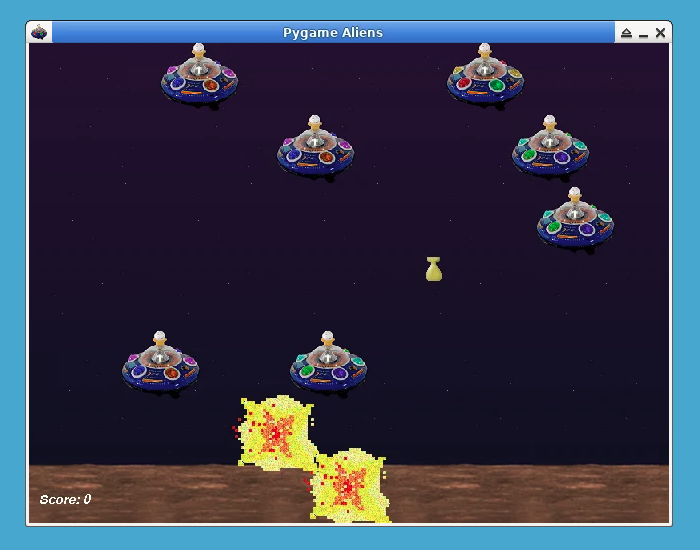
이 게임은 Pygame 예제를 기반으로 수정되었습니다.
🎯 과제
이 프로젝트를 통해 다음을 배우게 됩니다:
- 초기 프로젝트 구조를 설정하고 이미지 및 사운드와 같은 필요한 리소스를 로드하는 방법.
- 플레이어 캐릭터와 외계 침략자를 위한 클래스를 정의하는 방법.
- 폭발, 플레이어 샷, 외계인 폭탄 및 게임 점수를 처리하기 위한 추가 클래스를 만드는 방법.
- 게임을 초기화하고, 리소스를 로드하고, 게임 창을 설정하는 방법.
- 메인 게임 루프를 구현하고, 플레이어 입력을 처리하고, 게임 엔티티를 업데이트하고, 충돌을 처리하고, 게임 장면을 그리는 방법.
🏆 성과
이 프로젝트를 완료하면 다음을 수행할 수 있습니다:
- Pygame 라이브러리를 사용하여 2D 게임을 개발할 수 있습니다.
- Pygame 에서 이미지를 로드하고 표시할 수 있습니다.
- 사용자 입력을 처리하고 플레이어의 움직임을 제어할 수 있습니다.
- 스프라이트 클래스를 사용하여 게임 엔티티를 생성하고 업데이트할 수 있습니다.
- 게임 엔티티 간의 충돌을 처리할 수 있습니다.
- 게임 장면을 그리고 화면을 업데이트할 수 있습니다.
- 게임에서 사운드 효과와 음악을 재생할 수 있습니다.
- 게임 로직을 관리하기 위해 메인 게임 루프를 구현할 수 있습니다.
프로젝트 파일 생성
이 단계에서는 초기 프로젝트 구조를 설정하고 이미지 및 사운드와 같은 필요한 리소스를 로드합니다.
aliens.py라는 새 파일을 만들고 다음 코드를 추가합니다:
cd ~/project
touch aliens.py
sudo pip install pygame
그런 다음, 즐겨 사용하는 텍스트 편집기에서 파일을 열고 다음 코드를 추가합니다:
import os
import random
from typing import List

## import basic pygame modules
import pygame as pg

## see if we can load more than standard BMP
if not pg.image.get_extended():
    raise SystemExit("Sorry, extended image module required")


## game constants
MAX_SHOTS = 2  ## most player bullets onscreen
ALIEN_ODDS = 22  ## chances a new alien appears
BOMB_ODDS = 60  ## chances a new bomb will drop
ALIEN_RELOAD = 12  ## frames between new aliens
SCREENRECT = pg.Rect(0, 0, 640, 480)
SCORE = 0

main_dir = os.path.split(os.path.abspath(__file__))[0]


def load_image(file):
    """loads an image, prepares it for play"""
    file = os.path.join(main_dir, "data", file)
    try:
        surface = pg.image.load(file)
    except pg.error:
        raise SystemExit(f'Could not load image "{file}" {pg.get_error()}')
    return surface.convert()


def load_sound(file):
    """because pygame can be compiled without mixer."""
    if not pg.mixer:
        return None
    file = os.path.join(main_dir, "data", file)
    try:
        sound = pg.mixer.Sound(file)
        return sound
    except pg.error:
        print(f"Warning, unable to load, {file}")
    return None
이 단계에서는 필요한 모듈을 가져오고, 게임 상수를 정의하며, 이미지와 사운드 효과를 로드하는 함수를 만듭니다. 또한 메인 프로젝트 디렉토리를 설정합니다.
def load_image 및 def load_sound에서 os.path.join 함수를 사용하여 메인 프로젝트 디렉토리와 게임 리소스를 저장할 data 디렉토리를 결합합니다. 이 디렉토리는 다음 단계에서 생성합니다.
플레이어 및 외계인 클래스 정의
이제 게임의 캐릭터인 Player와 Alien 클래스를 정의합니다. Player 클래스는 플레이어의 캐릭터를 나타내고, Alien 클래스는 외계 침략자를 나타냅니다.
## ... (code from step 1)

## Define the Player class
class Player(pg.sprite.Sprite):
    """Representing the player as a moon buggy type car."""

    speed = 10
    bounce = 24
    gun_offset = -11
    images: List[pg.Surface] = []

    def __init__(self, *groups):
        pg.sprite.Sprite.__init__(self, *groups)
        self.image = self.images[0]
        self.rect = self.image.get_rect(midbottom=SCREENRECT.midbottom)
        self.reloading = 0
        self.origtop = self.rect.top
        self.facing = -1

    def move(self, direction):
        if direction:
            self.facing = direction
        self.rect.move_ip(direction * self.speed, 0)
        self.rect = self.rect.clamp(SCREENRECT)
        if direction < 0:
            self.image = self.images[0]
        elif direction > 0:
            self.image = self.images[1]
        self.rect.top = self.origtop - (self.rect.left // self.bounce % 2)

    def gunpos(self):
        pos = self.facing * self.gun_offset + self.rect.centerx
        return pos, self.rect.top
여기서는 Player 클래스를 정의했습니다. 속도, 바운스, 총 오프셋과 같은 속성을 포함합니다. move 메서드는 플레이어의 움직임을 처리합니다. gunpos 메서드는 플레이어의 총 위치를 반환합니다. Player 클래스는 가시적인 게임 객체의 기본 클래스인 pg.sprite.Sprite 클래스를 상속합니다.
## Define the Alien class
class Alien(pg.sprite.Sprite):
    """An alien space ship. That slowly moves down the screen."""

    speed = 13
    animcycle = 12
    images: List[pg.Surface] = []

    def __init__(self, *groups):
        pg.sprite.Sprite.__init__(self, *groups)
        self.image = self.images[0]
        self.rect = self.image.get_rect()
        self.facing = random.choice((-1, 1)) * Alien.speed
        self.frame = 0
        if self.facing < 0:
            self.rect.right = SCREENRECT.right

    def update(self):
        self.rect.move_ip(self.facing, 0)
        if not SCREENRECT.contains(self.rect):
            self.facing = -self.facing
            self.rect.top = self.rect.bottom + 1
            self.rect = self.rect.clamp(SCREENRECT)
        self.frame = self.frame + 1
        self.image = self.images[self.frame // self.animcycle % 3]
Alien 클래스는 외계 침략자를 나타냅니다. 속도 및 애니메이션 속성을 가지고 있습니다. 외계인은 좌우로 움직이며, 이미지 순환을 합니다. update 메서드는 외계인의 움직임과 애니메이션을 처리합니다. Alien 클래스는 가시적인 게임 객체의 기본 클래스인 pg.sprite.Sprite 클래스를 상속합니다.
추가 게임 클래스 정의
이 단계에서는 Explosion, Shot, Bomb, 그리고 Score와 같은 추가 게임 관련 클래스를 정의합니다. 이러한 클래스는 폭발, 플레이어의 발사체, 외계인의 폭탄, 그리고 게임 점수를 처리합니다.
## ... (code from step 2)

## Define the Explosion class
class Explosion(pg.sprite.Sprite):
    """An explosion. Hopefully the Alien and not the player!"""

    defaultlife = 12
    animcycle = 3
    images: List[pg.Surface] = []

    def __init__(self, actor, *groups):
        pg.sprite.Sprite.__init__(self, *groups)
        self.image = self.images[0]
        self.rect = self.image.get_rect(center=actor.rect.center)
        self.life = self.defaultlife

    def update(self):
        """called every time around the game loop.

        Show the explosion surface for 'defaultlife'.
        Every game tick(update), we decrease the 'life'.

        Also we animate the explosion.
        """
        self.life = self.life - 1
        self.image = self.images[self.life // self.animcycle % 2]
        if self.life <= 0:
            self.kill()

## Define the Shot class
class Shot(pg.sprite.Sprite):
    """a bullet the Player sprite fires."""

    speed = -11
    images: List[pg.Surface] = []

    def __init__(self, pos, *groups):
        pg.sprite.Sprite.__init__(self, *groups)
        self.image = self.images[0]
        self.rect = self.image.get_rect(midbottom=pos)

    def update(self):
        """called every time around the game loop.

        Every tick we move the shot upwards.
        """
        self.rect.move_ip(0, self.speed)
        if self.rect.top <= 0:
            self.kill()

## Define the Bomb class
class Bomb(pg.sprite.Sprite):
    """A bomb the aliens drop."""

    speed = 9
    images: List[pg.Surface] = []

    def __init__(self, alien, explosion_group, *groups):
        pg.sprite.Sprite.__init__(self, *groups)
        self.image = self.images[0]
        self.rect = self.image.get_rect(midbottom=alien.rect.move(0, 5).midbottom)
        self.explosion_group = explosion_group

    def update(self):
        """called every time around the game loop.

        Every frame we move the sprite 'rect' down.
        When it reaches the bottom we:

        - make an explosion.
        - remove the Bomb.
        """
        self.rect.move_ip(0, self.speed)
        if self.rect.bottom >= 470:
            Explosion(self, self.explosion_group)
            self.kill()

## Define the Score class
class Score(pg.sprite.Sprite):
    """to keep track of the score."""

    def __init__(self, *groups):
        pg.sprite.Sprite.__init__(self, *groups)
        self.font = pg.font.Font(None, 20)
        self.font.set_italic(1)
        self.color = "white"
        self.lastscore = -1
        self.update()
        self.rect = self.image.get_rect().move(10, 450)

    def update(self):
        """We only update the score in update() when it has changed."""
        if SCORE != self.lastscore:
            self.lastscore = SCORE
            msg = f"Score: {SCORE}"
            self.image = self.font.render(msg, 0, self.color)
이러한 클래스는 폭발, 발사체, 폭탄, 그리고 플레이어의 점수 표시와 같은 게임의 다양한 측면을 처리합니다.
게임 초기화 및 리소스 로드
이제 게임을 초기화하고 이미지 및 사운드와 같은 필요한 리소스를 로드하는 작업을 계속 진행합니다.
## ... (code from step 3)

def main(winstyle=0):
    ## Initialize pygame
    if pg.get_sdl_version()[0] == 2:
        pg.mixer.pre_init(44100, 32, 2, 1024)
    pg.init()
    if pg.mixer and not pg.mixer.get_init():
        print("Warning, no sound")
        pg.mixer = None

    fullscreen = False
    ## Set the display mode
    winstyle = 0  ## |FULLSCREEN
    bestdepth = pg.display.mode_ok(SCREENRECT.size, winstyle, 32)
    screen = pg.display.set_mode(SCREENRECT.size, winstyle, bestdepth)

    ## Load images, assign to sprite classes
    ## (do this before the classes are used, after screen setup)
    img = load_image("player1.gif")
    Player.images = [img, pg.transform.flip(img, 1, 0)]
    img = load_image("explosion1.gif")
    Explosion.images = [img, pg.transform.flip(img, 1, 1)]
    Alien.images = [load_image(im) for im in ("alien1.gif", "alien2.gif", "alien3.gif")]
    Bomb.images = [load_image("bomb.gif")]
    Shot.images = [load_image("shot.gif")]
여기서는 Pygame 을 초기화하고, 게임 창을 설정하며, 플레이어, 외계인, 폭발, 폭탄 및 발사체에 대한 이미지를 로드합니다.
게임 설정 완료 및 메인 루프 실행
이제 게임 설정을 완료하고 모든 게임 로직과 상호 작용이 일어나는 메인 게임 루프를 생성합니다.
## ... (code from step 4)

def main(winstyle=0):
    ## ... (previous code)

    ## decorate the game window
    icon = pg.transform.scale(Alien.images[0], (32, 32))
    pg.display.set_icon(icon)
    pg.display.set_caption("Pygame Aliens")
    pg.mouse.set_visible(0)

    ## create the background, tile the bgd image
    bgdtile = load_image("background.gif")
    background = pg.Surface(SCREENRECT.size)
    for x in range(0, SCREENRECT.width, bgdtile.get_width()):
        background.blit(bgdtile, (x, 0))
    screen.blit(background, (0, 0))
    pg.display.flip()

    ## load the sound effects
    boom_sound = load_sound("boom.wav")
    shoot_sound = load_sound("car_door.wav")
    if pg.mixer:
        music = os.path.join(main_dir, "data", "house_lo.wav")
        pg.mixer.music.load(music)
        pg.mixer.music.play(-1)

    ## Initialize Game Groups
    aliens = pg.sprite.Group()
    shots = pg.sprite.Group()
    bombs = pg.sprite.Group()
    all = pg.sprite.RenderUpdates()
    lastalien = pg.sprite.GroupSingle()

    ## Create Some Starting Values
    alienreload = ALIEN_RELOAD
    clock = pg.time.Clock()

    ## initialize our starting sprites
    global SCORE
    player = Player(all)
    Alien(
        aliens, all, lastalien
    )  ## note, this 'lives' because it goes into a sprite group
    if pg.font:
        all.add(Score(all))

    ## Run our main loop whilst the player is alive.
    while player.alive():
        ## get input
        for event in pg.event.get():
            if event.type == pg.QUIT:
                return
            if event.type == pg.KEYDOWN and event.key == pg.K_ESCAPE:
                return
            if event.type == pg.KEYDOWN:
                if event.key == pg.K_f:
                    if not fullscreen:
                        print("Changing to FULLSCREEN")
                        screen_backup = screen.copy()
                        screen = pg.display.set_mode(
                            SCREENRECT.size, winstyle | pg.FULLSCREEN, bestdepth
                        )
                        screen.blit(screen_backup, (0, 0))
                    else:
                        print("Changing to windowed mode")
                        screen_backup = screen.copy()
                        screen = pg.display.set_mode(
                            SCREENRECT.size, winstyle, bestdepth
                        )
                        screen.blit(screen_backup, (0, 0))
                    pg.display.flip()
                    fullscreen = not fullscreen

        keystate = pg.key.get_pressed()

        ## clear/erase the last drawn sprites
        all.clear(screen, background)

        ## update all the sprites
        all.update()

        ## handle player input
        direction = keystate[pg.K_RIGHT] - keystate[pg.K_LEFT]
        player.move(direction)
        firing = keystate[pg.K_SPACE]
        if not player.reloading and firing and len(shots) < MAX_SHOTS:
            Shot(player.gunpos(), shots, all)
            if pg.mixer and shoot_sound is not None:
                shoot_sound.play()
        player.reloading = firing

        ## Create new alien
        if alienreload:
            alienreload = alienreload - 1
        elif not int(random.random() * ALIEN_ODDS):
            Alien(aliens, all, lastalien)
            alienreload = ALIEN_RELOAD

        ## Drop bombs
        if lastalien and not int(random.random() * BOMB_ODDS):
            Bomb(lastalien.sprite, all, bombs, all)

        ## Detect collisions between aliens and players.
        for alien in pg.sprite.spritecollide(player, aliens, 1):
            if pg.mixer and boom_sound is not None:
                boom_sound.play()
            Explosion(alien, all)
            Explosion(player, all)
            SCORE = SCORE + 1
            player.kill()

        ## See if shots hit the aliens.
        for alien in pg.sprite.groupcollide(aliens, shots, 1, 1).keys():
            if pg.mixer and boom_sound is not None:
                boom_sound.play()
            Explosion(alien, all)
            SCORE = SCORE + 1

        ## See if alien bombs hit the player.
        for bomb in pg.sprite.spritecollide(player, bombs, 1):
            if pg.mixer and boom_sound is not None:
                boom_sound.play()
            Explosion(player, all)
            Explosion(bomb, all)
            player.kill()

        ## draw the scene
        dirty = all.draw(screen)
        pg.display.update(dirty)

        ## cap the framerate at 40fps. Also called 40HZ or 40 times per second.
        clock.tick(40)

    if pg.mixer:
        pg.mixer.music.fadeout(1000)
    pg.time.wait(1000)


## call the "main" function if running this script
if __name__ == "__main__":
    main()
    pg.quit()
메인 함수에서는 다양한 엔티티에 대한 게임 그룹을 초기화하고, 시작 값을 생성하며, 메인 게임 루프를 구현합니다. 게임 로직, 플레이어 입력 처리, 충돌 및 게임 장면 그리기는 이 루프 내에서 수행됩니다.
게임 실행
이제 다음 명령을 실행하여 게임을 실행할 수 있습니다.
cd ~/project
python aliens.py
게임 실행
이제 다음 명령을 실행하여 게임을 실행할 수 있습니다.
cd ~/project
python aliens.py
요약
이 프로젝트에서는 Pygame 을 사용하여 간단한 "Aliens" 게임을 구축하는 과정을 여러 단계로 나누었습니다. 프로젝트 파일을 설정하고, 플레이어 및 외계인 클래스를 정의했으며, 추가적인 게임 관련 클래스를 생성하고 리소스로 게임을 초기화했습니다. 마지막으로, 게임 로직과 상호 작용을 처리하기 위해 메인 게임 루프를 구현했습니다.
향후 단계에서는 플레이어 및 외계인 클래스에 기능을 계속 추가하고, 이동 및 사격을 처리하며, 게임의 시각적 요소를 업데이트할 것입니다.


