소개
이 프로젝트에서는 쉘 스크립트를 사용하여 간단한 타이핑 게임을 만드는 방법을 배웁니다. 게임은 화면에 무작위 문자를 표시하며, 목표는 문자가 사라지기 전에 입력하는 것입니다. 이 게임은 다양한 난이도를 가진 여러 모드를 제공합니다. 숫자, 문자, 또는 둘 다를 연습하거나, 사용자 정의 단어를 연습하도록 선택할 수 있습니다.
👀 미리보기

🎯 과제
이 프로젝트에서 다음을 배우게 됩니다:
- 프로젝트 파일을 생성하고 코드 편집기에서 여는 방법
- 특수 문자와 색상을 사용하여 환영 인터페이스를 표시하는 방법
- 난이도 레벨을 선택하기 위한 모드 선택 메뉴를 구현하는 방법
- 연습할 문자 유형을 선택하기 위한 타이핑 카테고리 선택 메뉴를 구현하는 방법
- 타이핑 인터페이스의 테두리를 그리고 배경색을 채우는 함수를 만드는 방법
- 타이핑 게임을 위한 무작위 문자 및 숫자를 생성하는 방법
- 사용자 입력을 처리하고 정확도를 계산하는 등 타이핑 기능을 구현하는 방법
- 특수 신호를 처리하기 위한 우아한 종료 함수를 만드는 방법
🏆 성과
이 프로젝트를 완료하면 다음을 수행할 수 있습니다:
- 쉘 스크립팅 기본 사항 시연
- 터미널 출력에서 특수 문자와 색상 사용
- 쉘 스크립트에서 사용자 입력 읽기
- 쉘 스크립트에서 메뉴 및 사용자 인터페이스 구현
- 쉘 스크립트에서 특수 신호 처리
프로젝트 파일 생성
시작하려면, shell_typing_game.sh라는 새 파일을 생성하고 선호하는 코드 편집기에서 엽니다.
cd ~/project
touch shell_typing_game.sh
시작 화면 표시
#!/bin/bash
function dis_welcome() {
  declare -r str='
0000000000000000000000000000000000000000000000000000000000000000
0000000000000000000000000000000000000000000000000000000000000000
1000000010000000101111101000000111100111000000100000001000001111
0100000101000001001000001000001000001000100001010000010100001000
0010001000100010001111101000001000001000100010001000100010001111
0001010000010100001000001000001000001000100100000101000001001000
0000100000001000001111101111100111100111001000000010000000101111
0000000000000000000000000000000000000000000000000000000000000000
0000000000000000000000000000000000000000000000000000000000000000
0000000000001111000000100000000001000000010000001111100000000000
0000000000010000000001010000000010100000101000001000000000000000
0000000000010011000011111000000100010001000100001111100000000000
0000000000010001000100000100001000001010000010001000000000000000
0000000000001111001000000010010000000100000001001111100000000000
0000000000000000000000000000000000000000000000000000000000000000
0000000000000000000000000000000000000000000000000000000000000000'
  declare -i j=0
  declare -i row=3   ## Print start line.
  line_char_count=65 ## Define the newline position, 64 characters per line plus newlines, for a total of 65 characters.

  echo -ne "\033[37;40m\033[5;3H" ## Set the color and cursor start position.

  for ((i = 0; i < ${#str}; i++)); do
    ## Line feed.
    if [ "$((i % line_char_count))" == "0" ] && [ "$i" != "0" ]; then
      row=$row+1
      echo -ne "\033["$row";3H"
    fi
    ## Determine foreground and background characters.
    if [ "${str:$i:1}" == "0" ]; then
      echo -ne "\033[37;40m "
    elif [ "${str:$i:1}" == "1" ]; then
      echo -ne "\033[31;40m$"
    fi
  done
}

dis_welcome
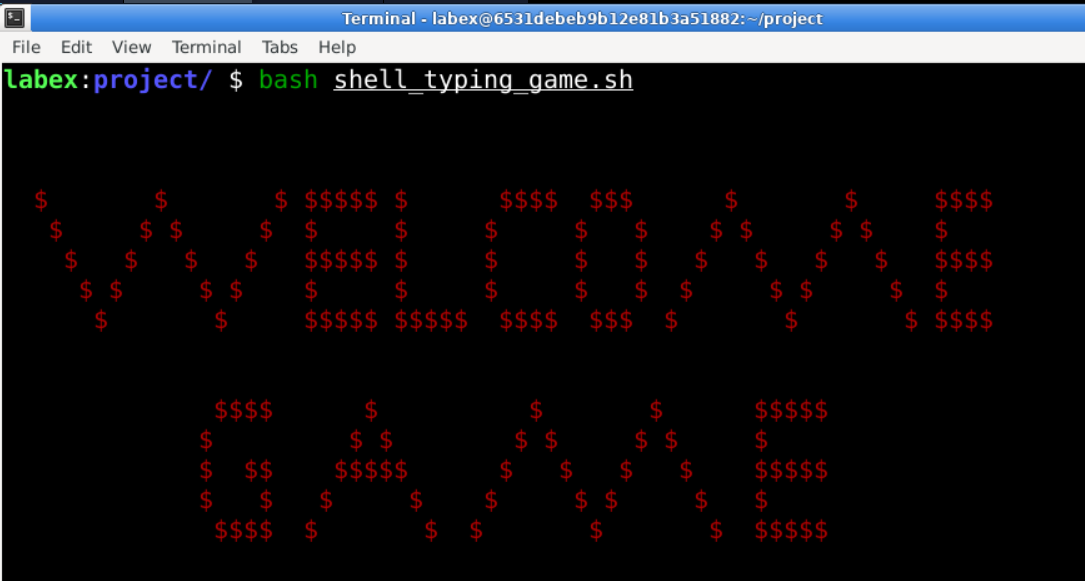
처음에 있는 긴 문자열 010101...은 표시될 환영 게임 인터페이스입니다. 직접 보면 무엇인지 이해하지 못할 수 있습니다. 따라서 이 문자열을 gedit 편집기에 복사한 다음 단축키 Ctrl+F를 눌러 찾을 수 있습니다. 1을 입력하면 즉시 이해할 수 있습니다. echo 명령에 집중해 봅시다. 화면에 표시하려면 (여기서는 Xfce 터미널을 의미합니다. Linux 에서 표준 입력, 출력 및 표준 오류 출력은 모두 기본적으로 터미널에 연결되어 있습니다) echo 명령을 사용해야 합니다. 지정된 위치에 인쇄하고 표시 문자 색상을 설정하고 전체 게임의 배경을 인쇄하는 등 몇 가지 특수 기능을 수행하려면 다음 코드와 같이 해당 명령의 몇 가지 특수 매개변수를 사용해야 합니다.
## Set the color and cursor start position.
echo -ne "\033[37;40m\033[5;3H"
주석을 바탕으로 그 기능을 대략적으로 이해할 수 있습니다. 하지만 정확히 무슨 뜻일까요? 먼저, -n 매개변수는 출력 후 줄 바꿈 없이 현재 줄에 인쇄하는 것을 의미합니다. 그런 다음 출력 문자 색상과 커서 위치를 설정합니다. 그 중 \033[foreground color;background color m이고, 그 다음은 \033[row;column H입니다. 그러나 echo가 이러한 특수 이스케이프 시퀀스를 인식하게 하려면 -e 매개변수가 필요합니다. 그렇지 않으면 echo는 이러한 문자를 있는 그대로 출력합니다.
전경색: 30-39, 배경색: 40-49.
| 값 | 전경색 | 값 | 배경색 범위: 40 - 49 |
|---|---|---|---|
| 30 | 검정색 전경 설정 | 40 | 검정색 배경 설정 |
| 31 | 빨간색 전경 설정 | 41 | 빨간색 배경 설정 |
| 32 | 녹색 전경 설정 | 42 | 녹색 배경 설정 |
| 33 | 갈색 전경 설정 | 43 | 갈색 배경 설정 |
| 34 | 파란색 전경 설정 | 44 | 파란색 배경 설정 |
| 35 | 보라색 전경 설정 | 45 | 보라색 배경 설정 |
| 36 | 시안색 전경 설정 | 46 | 시안색 배경 설정 |
| 37 | 흰색 전경 설정 | 47 | 흰색 배경 설정 |
| 38 | 기본 전경색에 밑줄 설정 | 49 | 기본 검정색 배경 설정 |
| 39 | 기본 전경색에 밑줄 해제 |
echo가 이렇게 사용될 줄은 몰랐죠! 다시 알게 된 기분이 드나요? 좋습니다. 이제 터미널에서 이 코드 조각을 테스트해 보겠습니다.
cd ~/project
bash shell_typing_game.sh
모드 선택 메뉴 표시
## Declare the variable 'time' to represent the typing timeout, where different difficulty levels correspond to different timeout values
declare -i time
function modechoose() {
  ## Select from three different modes
  echo -e "\033[8;30H1) easy mode"
  echo -e "\033[9;30H2) normal mode"
  echo -e "\033[10;30H3) difficult mode"
  echo -ne "\033[22;2HPlease input your choice: "
  read mode
  case $mode in
    "1")
      time=10
      dismenu ## Call the menu selection function
      ;;
    "2")
      time=5
      dismenu
      ;;
    "3")
      time=3
      dismenu
      ;;
    *)
      echo -e "\033[22;2HYour choice is incorrect, please try again"
      sleep 1
      ;;
  esac
}
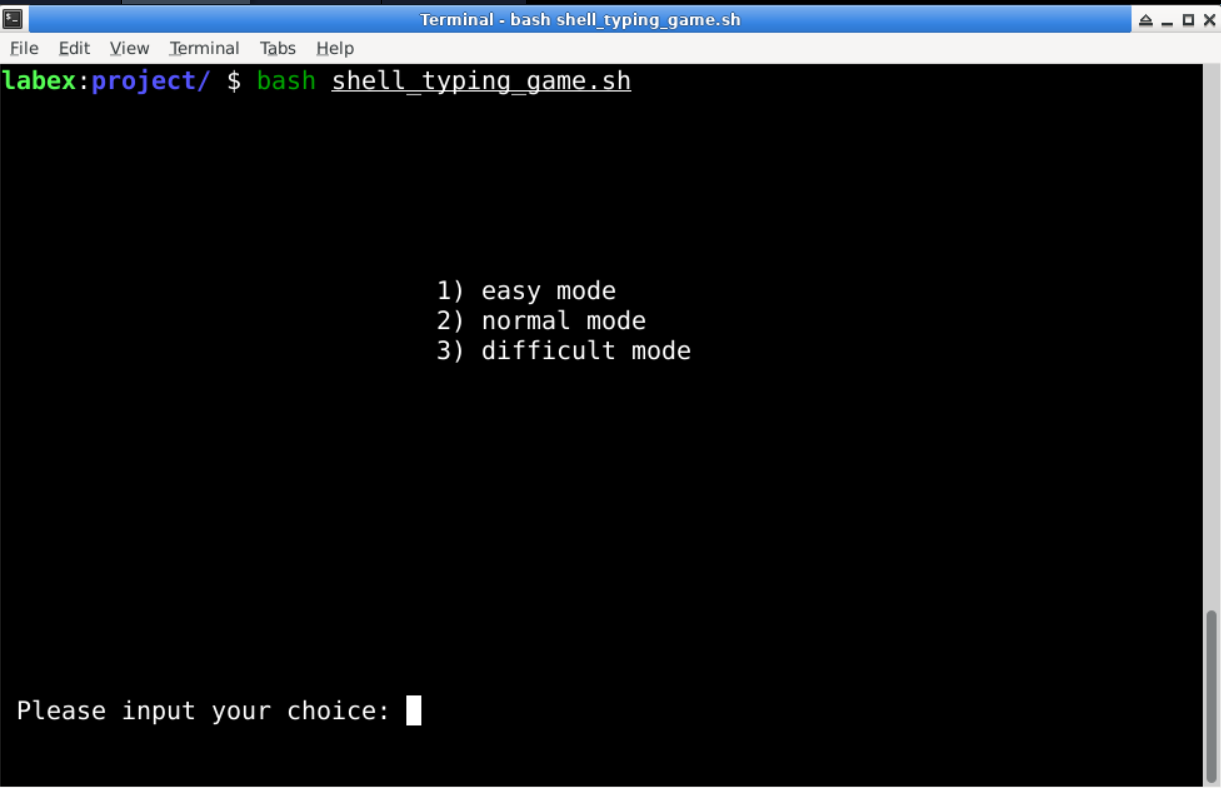
이 함수를 정의하기 전에 먼저 declare -i 명령을 사용하여 정수 변수 'time'을 선언했습니다. 그런 다음, 다음 case 문에서 사용자의 난이도 선택에 따라 'time' 변수에 서로 다른 값을 설정했습니다. 난이도가 높을수록 값이 작아집니다. 이 변수는 실제로 후속 타이핑 처리 함수에서 사용됩니다. 쉘 스크립트에서 함수 내부 또는 외부에서 선언되거나 정의된 변수는 함수 내에서 'local' 키워드를 사용하여 변수를 선언하지 않는 한 스크립트 파일 전체에서 범위를 갖는 전역 변수로 처리된다는 것을 기억할 수 있습니다. 메뉴의 표시 효과에 관해서는, 여전히 echo 명령을 사용한 다음 read 명령을 사용하여 사용자의 입력을 변수 'mode'로 읽습니다.
타이핑 카테고리 선택 메뉴 표시
function display_menu() {
  while [ 1 ]; do
    draw_border
    echo -e "\033[8;30H1) Practice typing numbers"
    echo -e "\033[9;30H2) Practice typing letters"
    echo -e "\033[10;30H3) Practice typing alphanumeric characters"
    echo -e "\033[11;30H4) Practice typing words"
    echo -e "\033[12;30H5) Quit"
    echo -ne "\033[22;2HPlease input your choice: "
    read choice
    case $choice in
      "1")
        draw_border
        ## The next two are function parameters, the first parameter indicates the typing type, and the second is the function for moving characters
        main digit
        echo -e "\033[39;49m"
        ;;
      "2")
        draw_border
        main char
        echo -e "\033[39;49m"
        ;;
      "3")
        draw_border
        main mix
        echo -e "\033[39;49m"
        ;;
      "4")
        draw_border
        echo -ne "\033[22;2H"
        read -p "Which file would you like to use for typing practice: " file
        if [ ! -f "$file" ]; then
          display_menu
        else
          exec 4< $file ## Create a file pipeline
          main word
          echo -e "\033[39;49m"
        fi
        ;;
      "5" | "q" | "Q")
        draw_border
        echo -e "\033[10;25HYou will exit this game now"
        echo -e "\033[39;49m"
        sleep 1
        clear
        exit 1
        ;;
      *)
        draw_border
        echo -e "\033[22;2HYour choice is wrong, please try again"
        sleep 1
        ;;
    esac
  done
}
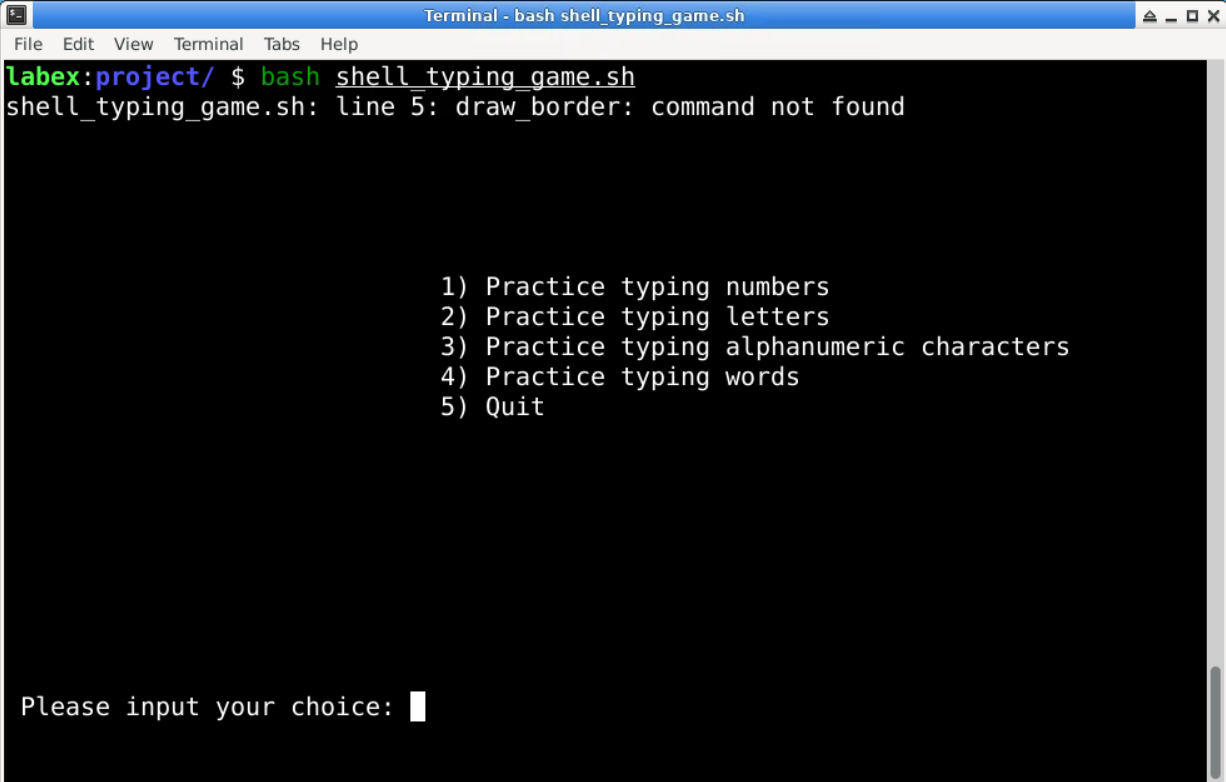
이 함수에서 먼저 case 분기에서 호출되는 두 함수를 설명하겠습니다. 먼저, draw_border 함수는 타이핑 인터페이스의 테두리를 그리는 데 사용되며, 이는 나중에 표시됩니다. 그런 다음, main 함수가 호출됩니다. 이 main 함수는 Java 및 C 와 같은 언어의 main 함수와 같은 특별한 역할을 하지 않으며, 단순히 main이라는 이름을 가지고 있어 전체 프로그램에서 주요 역할을 한다는 것을 나타냅니다. 각 main 뒤에 인수가 있다는 것을 눈치챘을 것입니다. 네, 이것은 함수에 전달되는 매개변수입니다. 쉘에서는 다른 많은 언어와 달리 함수 이름 바로 뒤 괄호 안에 매개변수를 쓰지 않습니다. 또한 case 문의 네 번째 분기, 즉 다음 줄에 유의해야 합니다.
read -p "Which file would you like to use for typing practice: " file
if [ ! -f "$file" ]; then
  display_menu
else
  exec 4< $file ## Create a file pipeline
  main word
  echo -e "\033[39;49m"
fi
메뉴 프롬프트에 따르면 이 분기는 단어 타이핑 연습을 위한 것임을 알 수 있습니다. 이 프로그램은 사용자가 사용자 지정 단어 파일 (줄당 하나의 단어가 있는 특정 형식 요구 사항이 있는 텍스트 파일, 온라인에서 단어 목록 파일을 다운로드하고 awk 명령을 사용하여 추출할 수 있음) 을 연습에 사용할 수 있도록 합니다. 따라서 먼저 사용자 입력 파일 이름을 읽어 단어 파일을 선택해야 합니다. 그런 다음 exec 명령을 사용하여 파일에 연결되는 파이프라인을 생성합니다. 즉, 파일의 출력을 파일 디스크립터 4(fd) 로 리디렉션합니다. exec는 bash 의 내장 명령이므로 man 명령을 사용하여 exec의 문서를 볼 수 없습니다. exec 를 사용한 I/O 리디렉션은 일반적으로 fd 와 관련이 있으며, 쉘은 일반적으로 0 에서 9 까지 10 개의 fd 를 갖습니다. 일반적으로 사용되는 fd 는 0(stdin, 표준 입력), 1(stdout, 표준 출력) 및 2(stderr, 표준 오류 출력) 입니다. 지금은 그 의미만 이해하십시오.
타이핑 인터페이스 테두리 그리기
function draw_border() {
  declare -i width
  declare -i high
  width=79 ## terminal default width - 1
  high=23  ## terminal default height - 1

  clear

  ## Set display color to white on black background
  echo -e "\033[37;40m"
  ## Set background color
  for ((i = 1; i <= $width; i = i + 1)); do
    for ((j = 1; j <= $high; j = j + 1)); do
      ## Set display position
      echo -e "\033["$j";"$i"H "
    done
  done
  ## Draw background border
  echo -e "\033[1;1H+\033["$high";1H+\033[1;"$width"H+\033["$high";"$width"H+"
  for ((i = 2; i <= $width - 1; i = i + 1)); do
    echo -e "\033[1;"$i"H-"
    echo -e "\033["$high";"$i"H-"
  done
  for ((i = 2; i <= $high - 1; i = i + 1)); do
    echo -e "\033["$i";1H|"
    echo -e "\033["$i";"$width"H|\n"
  done
}
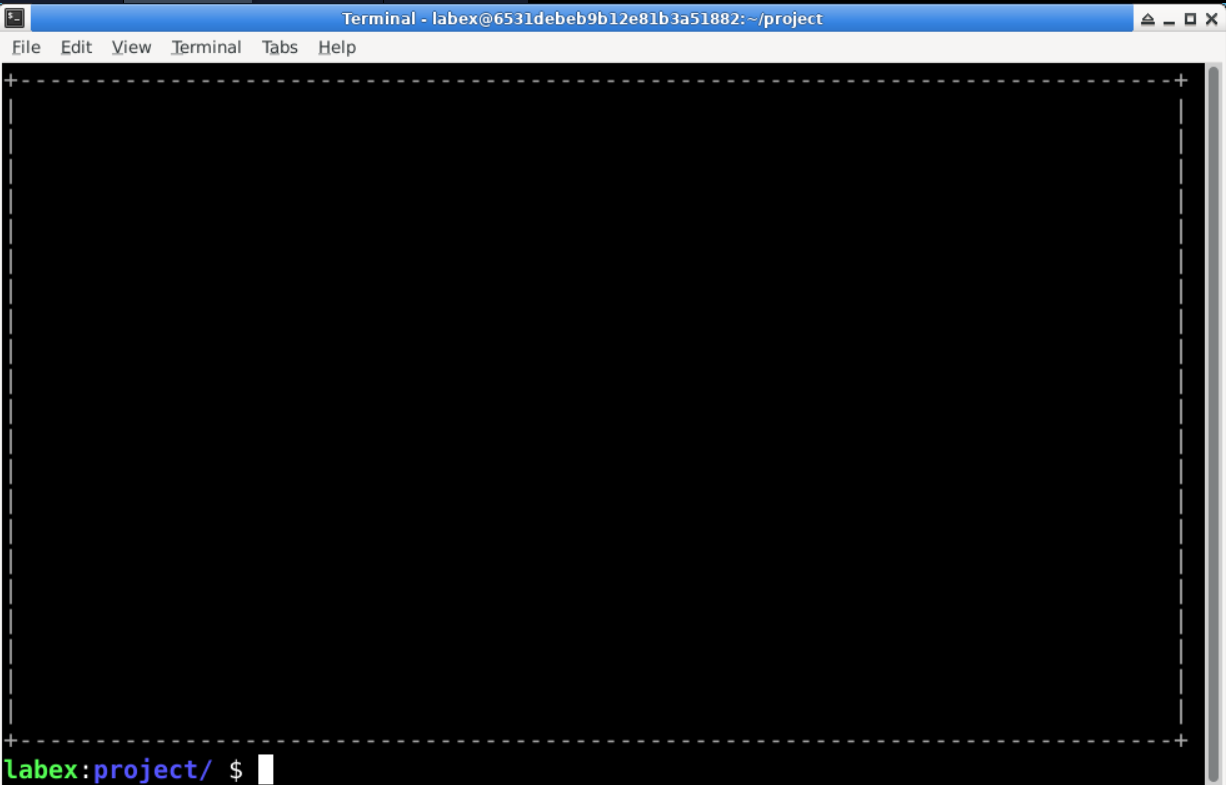
draw_border()함수에서, 터미널 창의 너비와 높이를 나타내는 두 개의 정수 변수width와high가 선언됩니다.echo -e "\033[37;40m"명령은 표시 색상을 설정하는 데 사용됩니다. 중첩된for루프는 터미널의 각 행과 열을 반복하여 배경을 채웁니다.- 내부 루프 내에서 ANSI 이스케이프 코드는 터미널 내에서 원하는 좌표에 커서를 배치하는 데 사용됩니다. 예를 들어,
echo -e "\033["$j";"$i"H"는 커서 위치를 행 j, 열 i 로 설정합니다. - 터미널 배경을 채운 후, 특정 문자를 사용하여 장식적인 테두리가 그려집니다. 사용된 문자는
+,-,|를 포함하며, 이는 테두리를 그리는 데 일반적으로 사용됩니다. 이러한 문자의 위치는 행 및 열 값에 의해 결정되며, ANSI 이스케이프 코드를 사용하여 인쇄됩니다. 예를 들어,echo -e "\033[1;1H+"는+문자를 터미널의 왼쪽 상단 모서리에 배치합니다.
요약하면, draw_border() 함수는 터미널을 지우고, 배경색을 검정색으로 설정하고, 배경을 만들기 위해 공백으로 터미널을 채웁니다. 마지막으로, 특정 위치에 문자 (예: 모서리에 +, 선에 - 및 |) 를 배치하여 시각적으로 매력적인 테두리를 그립니다.
타이핑 인터페이스 배경색 채우기
## Clear the entire character landing area
function clear_all_area() {
  local i j
  ## Fill the typing area
  for ((i = 5; i <= 21; i++)); do
    for ((j = 3; j <= 77; j = j + 1)); do
      ## Set the display position
      echo -e "\033[44m\033["$i";"$j"H "
    done
  done
  echo -e "\033[37;40m"
}

## Function: Clear a specific column of characters
## Input: The column number to be cleared
## Return: None
function clear_line() {
  local i
  ## Fill the typing area
  for ((i = 5; i <= 21; i++)); do
    for ((j = $1; j <= $1 + 9; j = j + 1)); do
      echo -e "\033[44m\033["$i";"$j"H "
    done
  done
  echo -e "\033[37;40m"
}
clear_all_area()함수:
- 전체 문자 착지 영역을 지우는 데 사용됩니다. 이 함수의 기능은 문자 착지 영역의 문자를 배경색 (검정색) 으로 채워 터미널 창의 문자를 지우는 것입니다.
- 중첩 루프를 사용하여
i와j의 모든 조합을 반복합니다. 여기서i는 행을 나타내고j는 열을 나타냅니다. - 내부 루프 내에서 ANSI 이스케이프 코드를 사용하여 커서 위치를 지정된 행과 열로 설정한 다음,
echo -e "\033[44m\033["$i";"$j"H "를 사용하여 해당 위치에 공백 문자를 인쇄하지만 배경색은 검정색 (코드 44) 으로 설정합니다. - 루프가 완료된 후, 함수는
echo -e "\033[37;40m"를 사용하여 텍스트 색상과 배경색을 기본값 (흰색 텍스트, 검정색 배경) 으로 복원합니다.
clear_line()함수:
- 이 함수는 문자 착지 영역의 특정 열을 지우는 데 사용됩니다. 일반적으로 사용자가 올바른 문자를 입력한 후 해당 열의 문자 경로를 지우는 데 사용됩니다.
- 이 함수는 지울 열 번호를 나타내는 하나의 인수
$1을 받습니다. - 문자 착지 영역의 행과 열을 반복하는 루프를 사용하여 해당 열의 문자 경로를 배경색 (검정색) 으로 채웁니다.
clear_all_area()와 유사하게, 함수는 ANSI 이스케이프 코드를 사용하여 커서 위치를 지정된 행과 열로 설정한 다음,echo -e "\033[44m\033["$i";"$j"H "를 사용하여 해당 위치에 공백 문자를 인쇄하지만 배경색은 검정색으로 설정합니다.- 마지막으로, 함수는
echo -e "\033[37;40m"를 사용하여 텍스트 색상과 배경색을 기본값으로 복원합니다.
무작위 문자 및 숫자 생성
## Function:  Move the character along the falling path.
## Input:     Parameter 1: The current row of the character (related to the time length away from the character).
##            Parameter 2: The current column of the character.
##            Parameter 3: (Unused parameter).
## Return:    None
function move() {

  local locate_row lastloca
  locate_row=$(($1 + 5))
  ## Display the character to be input.
  echo -e "\033[30;44m\033["$locate_row";"$2"H$3\033[37;40m"
  if [ "$1" -gt "0" ]; then
    lastloca=$(($locate_row - 1))
    ## Clear the previous position.
    echo -e "\033[30;44m\033["$lastloca";"$2"H \033[37;40m"
  fi
}

function putarray() {
  local chars
  case $1 in
    digit)
      chars='0123456789'
      for ((i = 0; i < 10; i++)); do
        array[$i]=${chars:$i:1}
      done
      ;;
    char)
      chars='ABCDEFGHIJKLMNOPQRSTUVWXYZabcdefghijklmnopqrstuvwxyz'
      for ((i = 0; i < 52; i++)); do
        array[$i]=${chars:$i:1}
      done
      ;;
    mix)
      chars='0123456789ABCDEFGHIJKLMNOPQRSTUVWXYZabcdefghijklmnopqrstuvwxyz'
      for ((i = 0; i < 62; i++)); do
        array[$i]=${chars:$i:1}
      done
      ;;
    *) ;;

  esac
}

## Function:  Generate a random character of the corresponding type to be converted into a random character.
## Input:     The type of character to be generated.
## Global Var: random_char, array[]
## Return:    None
function get_random_char() {
  local typenum
  declare -i typenum=0
  case $1 in
    digit)
      typenum=$(($RANDOM % 10))
      ;;
    char)
      typenum=$(($RANDOM % 52))
      ;;
    mix)
      typenum=$(($RANDOM % 62))
      ;;
    *) ;;

  esac
  random_char=${array[$typenum]}
}
쉘의 문자열 변수는 직접적인 인덱싱을 지원하지 않기 때문에, 모든 문자와 숫자를 인덱싱된 배열에 넣어야 합니다. 이것이 putarray 함수의 목적입니다. 아래의 get_random_char 함수는 무작위 문자 및 숫자를 생성하는 데 사용됩니다. 시스템의 무작위 숫자 환경 변수 RANDOM을 사용하여 무작위 인덱스를 얻은 다음, 배열에서 해당 문자를 읽습니다.
타이핑 기능 구현
모든 준비가 완료되었으므로, 이제 타이핑 기능을 구현할 수 있습니다. 다음 코드를 살펴보겠습니다.
function main() {
  declare -i gamestarttime=0
  declare -i gamedonetime=0

  declare -i starttime
  declare -i deadtime
  declare -i curtime
  declare -i donetime

  declare -i numright=0
  declare -i numtotal=0
  declare -i accuracy=0

  ## Store the corresponding characters into an array, $1 represents the user-selected character type
  putarray $1

  ## Initialize the game start time
  gamestarttime=$(date +%s)

  while [ 1 ]; do
    echo -e "\033[2;2H  Please enter the letter on the screen before it disappears!"

    echo -e "\033[3;2H Game time:     "
    curtime=$(date +%s)
    gamedonetime=$curtime-$gamestarttime
    echo -e "\033[31;40m\033[3;15H$gamedonetime s\033[37;40m"
    echo -e "\033[3;60H Total: \033[31;26m$numtotal\033[37;40m"
    echo -e "\033[3;30H Accuracy: \033[31;40m$accuracy %\033[37;40m"
    echo -ne "\033[22;2H Your input:                         "
    clear_all_area
    ## Loop 10 times to check if a column of characters times out or is hit
    for ((line = 20; line <= 60; line = line + 10)); do
      ## Check if the column of characters has been hit
      if [ "${ifchar[$line]}" == "" ] || [ "${donetime[$line]}" -gt "$time" ]; then
        ## Clear the display in that column
        clear_line $line
        ## Generate a random character
        if [ "$1" == "word" ]; then
          read -u 4 word
          if [ "$word" == "" ]; then ## End of file reading
            exec 4< $file
          fi
          putchar[$line]=$word
        else
          get_random_char $1
          putchar[$line]=$random_char
        fi
        numtotal=$numtotal+1
        ## Set the flag to 1
        ifchar[$line]=1
        ## Reset the timer
        starttime[$line]=$(date +%s)
        curtime[$line]=${starttime[$line]}
        donetime[$line]=$time
        ## Reset the column position to 0
        column[$line]=0
        if [ "$1" == "word" ]; then
          move 0 $line ${putchar[$line]}
        fi
      else
        ## If it has not timed out or been hit, update the timer and current position
        curtime[$line]=$(date +%s)
        donetime[$line]=${curtime[$line]}-${starttime[$line]}
        move ${donetime[$line]} $line ${putchar[$line]}
      fi
    done

    if [ "$1" != "word" ]; then
      echo -ne "\033[22;14H" ## Clear the input line characters
      ## Check user input characters and act as a one-second timer
      if read -n 1 -t 0.5 tmp; then
        ## Successful input, loop checks if the input matches a column
        for ((line = 20; line <= 60; line = line + 10)); do
          if [ "$tmp" == "${putchar[$line]}" ]; then
            ## Clear the display in that column
            clear_line $line
            ## If matched, clear the flag
            ifchar[$line]=""
            echo -e "\007\033[32;40m\033[4;62H         right !\033[37;40m"
            numright=$numright+1
            ## Exit the loop
            break
          else
            ## Otherwise, always display an error until timeout
            echo -e "\033[31;40m\033[4;62Hwrong,try again!\033[37;40m"
          fi
        done
      fi
    else
      echo -ne "\033[22;14H" ## Clear the input line characters
      ## Check user input characters and act as a timer
      if read tmp; then
        ## Successful input, loop checks if the input matches a column
        for ((line = 20; line <= 60; line = line + 10)); do
          if [ "$tmp" == "${putchar[$line]}" ]; then
            ## Clear the display in that column
            clear_line $line
            ## If matched, clear the flag
            ifchar[$line]=""
            echo -e "\007\033[32;40m\033[4;62H         right !\033[37;40m"
            numright=$numright+1
            ## Exit the loop
            break
          else
            ## Otherwise, always display an error until timeout
            echo -e "\033[31;40m\033[4;62Hwrong,try again!\033[37;40m"
          fi
        done
      fi
    fi
    trap " doexit " 2 ## Capture special signals
    ## Calculate accuracy
    accuracy=$numright*100/$numtotal
  done
}
이제 단일 문자 및 단어 타이핑 방식을 별도로 설명하겠습니다. 약간의 차이가 있기 때문입니다.
단일 문자 타이핑의 경우, 다섯 개의 문자가 동시에 나타나고, 설정된 시간 간격으로 계속 떨어지다가 특정 높이에 도달하면 사라지도록 (처음에 선택한 타임아웃 기간에 의해 결정됨) 합니다. 사라지기 전에 맞히지 못하면 (사용자가 해당 올바른 문자를 입력하지 않음), 해당 열에 새 문자가 나타납니다. 따라서 먼저, 문자 시퀀스를 초기화하고 배열에 저장하기 위해 루프를 실행합니다. 배열의 인덱스는 터미널의 열 번호를 나타내며, 이는 각 열의 문자를 독립적으로 관리하는 이점이 있습니다. 타임아웃되었는지, 맞았는지, 어디에 배치해야 하는지 등입니다. 단점은 비교적 큰 배열을 생성한다는 것이지만, 처리할 수 없을 정도로 크지는 않습니다. 쉘에서는 배열 인덱스의 크기에 따라 메모리를 할당하지 않으므로 이는 중요하지 않습니다. 첫 번째 for 루프가 이를 담당하며, 각 주요 루프의 끝에서 열이 비어 있는지 확인한 다음 해당 열에 새 문자가 나타납니다.
다음은 긴 if...else 문입니다. main 함수를 호출할 때 전달된 매개변수를 기억하십니까? 가장 바깥쪽 부분은 단일 문자를 타이핑할지, 단어를 타이핑할지를 구분하는 데 사용됩니다. 먼저 단일 문자 타이핑을 살펴보겠습니다. 여기에는 중요한 줄이 포함되어 있습니다.
if read -n 1 -t 0.5 tmp
read 명령의 -n 매개변수는 읽을 문자의 길이를 지정합니다. 여기서는 1의 길이가 지정되어 사용자가 한 문자를 입력하면 Enter 키를 누를 필요 없이 입력을 즉시 종료합니다. -t 매개변수는 입력 타임아웃 시간을 지정합니다. 사용자가 입력하지 않거나 입력이 타임아웃 기간 내에 완료되지 않으면 읽기가 즉시 종료됩니다. read 명령은 사용자 입력을 읽을 때 동일한 쉘에 대한 동기식 작업이므로, 문자 낙하는 이 타임아웃에 의존합니다 (간접적으로 낙하 지연을 구현). 여기서는 대부분의 사용자가 0.5s 내에 한 문자의 입력을 완료할 수 있으므로 0.5s로 설정됩니다. 사용자 입력을 읽은 후, 각 열에 해당하는 각 문자 배열을 비교하기 위해 for 루프를 사용하고, 일치하는 항목이 있으면 clear_line 함수를 호출하여 현재 열의 문자를 지우고, 플래그 변수 ifchar[$line]을 0으로 설정하여 지워졌음을 나타냅니다.
단어 타이핑의 흐름은 기본적으로 문자 타이핑과 동일합니다. 단, 무한한 길이의 단어를 입력하는 데 걸리는 시간을 추정할 수 없으므로, read 명령에 대한 입력 타임아웃 시간을 설정할 수 없습니다. 이 타임아웃이 없으면, 단어 타이핑의 최종 구현은 문자 타이핑과 같이 자동으로 떨어지지 않을 수 있으며, 대신 단어를 입력하고 Enter 키를 누르면 단어가 한 줄 아래로 떨어집니다. 물론, 문자 타이핑과 동일하거나 더 나은 효과를 얻기 위해 다른 방법을 고려할 수 있습니다.
또한, 각 열에 대한 새 단어를 얻는 처리가 약간 다릅니다. 무작위 단어를 생성하는 대신 파일에서 읽기 때문입니다. 이전에 생성한 파일 디스크립터 4를 기억하십니까? 이는 단어 파일을 가리킵니다. 여기에서 이 파일 디스크립터를 사용했습니다.
read -u 4 word
if [ "$word" == "" ]; then ## End of file reading
  exec 4< $file
fi
putchar[$line]=$word
여기서도 read 명령을 사용하며, -u 매개변수를 사용하면 파일에서 줄 단위로 변수로 읽을 파일 디스크립터를 지정할 수 있습니다. 후속 빈 확인 문은 파일이 끝에 도달했을 때 파일을 가리키는 파일 디스크립터를 다시 생성하여 read가 파일의 처음부터 다시 읽을 수 있도록 합니다.
약간 복잡하다고 느끼십니까? 걱정하지 마세요. 아직 끝나지 않았습니다. 다음으로, main 함수의 마지막 줄에서 두 번째 줄에 주의하십시오.
trap " doexit " 2 ## Capture special signals
trap 명령은 쉘에서 Ctrl+C, Ctrl+D, Ctrl+Z, ESC 등과 같은 특수 신호를 캡처하는 데 사용됩니다. 원래 이러한 특수 신호는 쉘 자체에서 처리됩니다. 게임이 종료될 때 더 깔끔하게 종료되기를 원하므로, 2번째 특수 신호인 Ctrl+C를 가로채서 일부 사용자 정의 처리를 구현할 수 있습니다. 예를 들어, 여기서는 2번째 신호를 캡처한 후 아래의 doexit 함수를 호출하여 프로그램을 깔끔하게 종료합니다.
function doexit() {
  draw_border
  echo -e "\033[10;30Hthis game will exit....."
  echo -e "\033[0m"
  sleep 2
  clear
  exit 1
}
메인 코드 흐름
각 함수 모듈에 대한 코드가 이미 준비되었으므로, 프로그램을 실행하려면 이러한 함수를 호출하는 메인 코드 흐름이 필요합니다.
draw_border
dis_welcome
echo -ne "\033[3;30Hstart the game. Y/N : "
read yourchoice
if [ "$yourchoice" == "Y" ] || [ "$yourchoice" == "y" ]; then
  draw_border
  modechoose
else
  clear
  exit 1
fi

exit 1
이 코드 조각은 문자 낙하 게임의 진입점을 생성합니다. 먼저 환영 화면과 게임 시작 여부를 묻는 메시지를 표시한 다음, 게임 시작 여부에 대한 사용자 입력을 기다립니다. 사용자가 게임을 시작하기로 선택하면 게임의 난이도 모드를 선택하라는 메시지가 표시됩니다. 사용자가 종료를 선택하거나 유효하지 않은 입력을 입력하면 게임이 시작되지 않습니다.
실행 및 테스트
다음으로, 쉘 타이핑 게임을 실행할 수 있습니다.
cd ~/project
bash shell_typing_game.sh
요약
방금 쉘에서 간단한 타이핑 게임을 구축하는 프로젝트를 만들었습니다. 이러한 단계를 따라 자신만의 타이핑 게임 프로젝트를 만들고 다양한 게임 모드와 난이도를 선택할 수 있습니다. 이 프로젝트는 쉘 스크립팅 및 터미널 기반 게임 개발에 대한 실질적인 경험을 제공합니다. echo의 다양한 출력, exec의 I/O 리디렉션, 특수 신호를 캡처하기 위한 trap 과 같이 과정에서 사용된 일부 명령에 익숙하지 않은 경우, 사용법에 익숙해지도록 더 연습할 수 있습니다.