소개
저는 누구나 한 번쯤은 고전 게임인 지뢰 찾기를 해보셨을 거라고 생각합니다. 규칙은 간단하지만 중독성이 강하죠. 직접 개발해볼 생각을 해보신 적이 있나요? 오늘 우리는 웹 기반의 지뢰 찾기 버전을 만들어 볼 것입니다. 먼저, 인터페이스의 스크린샷을 살펴보겠습니다.
👀 미리 보기

🎯 과제
이 프로젝트에서 여러분은 다음을 배우게 됩니다:
- 지뢰 찾기 게임의 게임 알고리즘을 설계하는 방법
- 프로젝트의 파일 구조를 만드는 방법
- HTML 과 CSS 를 사용하여 페이지 레이아웃을 구현하는 방법
- JavaScript 를 사용하여 그리드를 그리는 방법
- 게임 플레이를 처리하기 위해 셀에 클릭 이벤트를 추가하는 방법
- 게임 시작 및 종료와 같은 게임 제어 기능을 구현하는 방법
🏆 성과
이 프로젝트를 완료하면 다음을 수행할 수 있습니다:
- 게임 알고리즘을 설계하고 구현할 수 있습니다.
- 웹 프로젝트의 파일 구조를 만들 수 있습니다.
- HTML 과 CSS 를 사용하여 페이지 레이아웃을 만들 수 있습니다.
- JavaScript 를 사용하여 그리드를 그리고 이벤트를 처리할 수 있습니다.
- 게임 제어 기능을 구현할 수 있습니다.
개발 준비
개발을 시작하기 전에 먼저 게임 알고리즘을 설계해 보겠습니다.
지뢰 찾기 게임의 규칙은 간단합니다:
- 게임 보드에는 여러 개의 사각형이 있으며, 각 사각형에는 숫자 (빈칸은 숫자 0 을 나타냄) 또는 폭탄이 들어 있습니다. 사각형의 숫자는 주변 사각형에 있는 폭탄의 수를 나타냅니다. 플레이어의 임무는 가능한 한 적은 시간 안에 숫자 사각형을 찾는 것입니다.
- 가장자리에 있는 사각형을 제외하고, 각 사각형은 위, 아래, 왼쪽, 오른쪽 및 4 개의 대각선 사각형 등 8 개의 인접한 사각형을 갖습니다. 따라서 숫자의 범위는 0 에서 8 까지입니다.
따라서, 우리의 알고리즘은 다음과 같습니다:
- 사용자가 선택한 난이도 (초급, 중급, 고급의 세 가지 레벨이 있으며, 레벨이 높아질수록 폭탄과 사각형이 더 많아짐) 에 따라, 무작위로 특정 수의 폭탄을 생성하고 사각형에 무작위로 배치합니다. 그런 다음, 사각형을 순회하면서 각 사각형의 숫자를 계산하고 사각형에 표시합니다. 플레이어가 사각형을 왼쪽 클릭하면 사각형의 내용이 표시됩니다 (사각형에 폭탄이 포함되어 있으면 챌린지가 실패하고 게임이 종료됨). 플레이어가 사각형을 오른쪽 클릭하면 해당 사각형이 폭탄으로 표시됩니다. 모든 폭탄이 올바르게 표시되고 모든 비폭탄 사각형이 열리면 챌린지가 성공하고 게임이 종료됩니다.
유용한 팁: 사각형의 숫자 범위가 0 에서 8 까지이므로, 계산을 용이하게 하기 위해 폭탄이 있는 사각형의 숫자를 9 로 표시하는 것을 고려할 수 있습니다.
프로젝트 파일 구조
먼저, ~/project 경로 아래에 다음 파일 구조를 생성해야 합니다:
~/project
 |__ index.html
 |__ index.css
 |__ index.js
 |__ jms.js
 |__ mine.png
 |__ flag.png
프로젝트 디렉토리의 mine.png와 flag.png는 각각 지뢰와 깃발을 위한 이미지입니다.
페이지 레이아웃
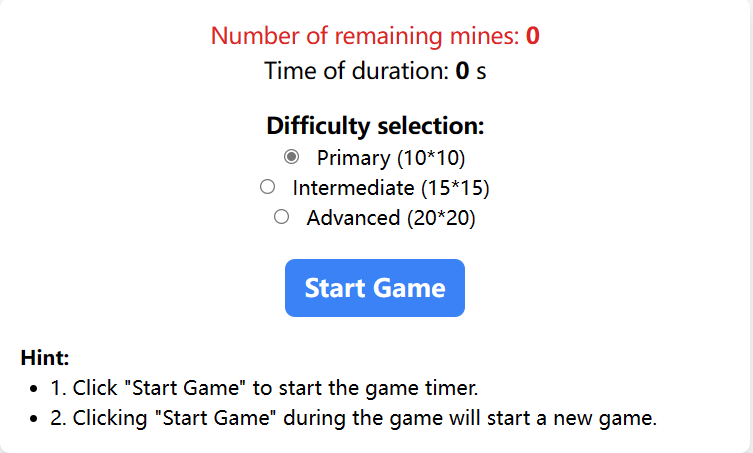
먼저, 남은 지뢰 수, 경과 시간, 난이도 등 게임 정보를 표시할 패널이 필요합니다. 사각형의 수가 고정되어 있지 않으므로, 지금은 사각형을 그리지 않고 JS 코드에서 그릴 것입니다.
index.html 파일을 생성하고 다음 코드를 추가합니다:
<!-- index.html -->
<!doctype html>
<html>
  <head>
    <meta charset="utf-8" />
    <title>Minesweeper with JavaScript</title>
    <link
      href="https://cdn.jsdelivr.net/npm/tailwindcss@2.2.19/dist/tailwind.min.css"
      rel="stylesheet"
    />
    <link rel="stylesheet" type="text/css" href="index.css" />
  </head>
  <body class="bg-gray-100">
    <div
      id="JMS_main"
      class="container mx-auto p-4 bg-white shadow-lg rounded-lg"
    >
      <table id="landmine" class="mx-auto"></table>
      <div id="operation" class="text-center">
        <div class="text-lg text-red-600">
          Number of remaining mines:
          <span class="font-semibold" id="landMineCount">0</span>
        </div>
        <div class="text-lg text-orange-500">
          Time of duration: <span class="font-semibold" id="costTime">0</span> s
        </div>
        <fieldset class="my-4">
          <legend class="text-lg font-semibold">Difficulty selection:</legend>
          <input
            type="radio"
            name="level"
            id="llevel"
            checked="checked"
            value="10"
            class="mr-2"
          />
          <label for="llevel">Primary (10*10) </label><br />
          <input
            type="radio"
            name="level"
            id="mlevel"
            value="15"
            class="mr-2"
          />
          <label for="mlevel">Intermediate (15*15) </label><br />
          <input
            type="radio"
            name="level"
            id="hlevel"
            value="20"
            class="mr-2"
          />
          <label for="hlevel">Advanced (20*20) </label><br />
        </fieldset>
        <button
          id="begin"
          class="px-4 py-2 bg-blue-500 text-white font-semibold rounded-lg hover:bg-blue-700"
        >
          Start Game</button
        ><br />
        <div class="text-left mt-4">
          <div class="font-semibold">Hint:</div>
          <ul class="list-disc ml-6">
            <li>1. Click "Start Game" to start the game timer.</li>
            <li>
              2. Clicking "Start Game" during the game will start a new game.
            </li>
          </ul>
        </div>
      </div>
    </div>
    <script src="jms.js"></script>
    <script src="index.js"></script>
  </body>
</html>
페이지 레이아웃 스타일
다음으로, 패널에 있는 게임 정보의 위치를 조정하고 몇 가지 스타일을 추가해야 합니다. index.css에 다음 코드를 추가하고 저장합니다:
@import "tailwindcss/base";
@import "tailwindcss/components";
@import "tailwindcss/utilities";

.container {
  max-width: 600px;
}
table {
  background: #ccc;
  margin: 0 auto;
}
td {
  border: 2px outset #eee;
  font-size: 20px;
  width: 32px;
  height: 32px;
  text-align: center;
  cursor: pointer;
}
button {
  padding: 2px 10px;
  margin: 5px;
  font-size: 20px;
  cursor: pointer;
}

.clicked-cell {
  background-color: #a0aec0;
  color: #fff;
  font-weight: bold;
}

.landMine {
  background-image: url(mine.png);
  background-position: center;
  background-repeat: no-repeat;
}

.flag {
  background-image: url(flag.png);
  background-position: center;
  background-repeat: no-repeat;
}
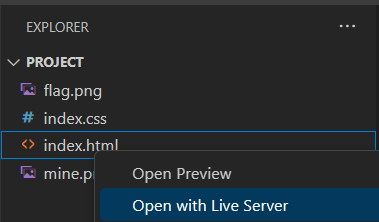
이 단계를 완료한 후, 브라우저에서 index.html을 엽니다.
그리드 그리기
이전 단계를 완료한 후, 그리드를 그려야 합니다. 코드를 더 명확하게 만들기 위해, 게임 구현 부분과 호출 부분을 분리합니다. 게임 구현 부분은 index.html과 동일한 디렉토리에 있는 jms.js에 배치하고, 게임 호출 부분은 동일한 디렉토리에 있는 index.js에 배치합니다.
그리드를 그리려면, 그리드가 배치될 테이블의 id와 셀 수 (행 및 열의 수로 표시) 와 같은 몇 가지 매개변수를 전달해야 합니다. 또한, 다른 게임 관련 데이터를 초기화해야 합니다.
jms.js 부분
jms.js에 다음 코드를 추가하고 저장합니다:
(function () {
  // Initialize the Minesweeper object and initialize the data
  var JMS = function (
    id,
    rowCount,
    colCount,
    minLandMineCount,
    maxLandMineCount
  ) {
    if (!(this instanceof JMS))
      return new JMS(
        id,
        rowCount,
        colCount,
        minLandMineCount,
        maxLandMineCount
      );
    this.doc = document;
    this.table = this.doc.getElementById(id); // Table for drawing the grid
    this.cells = this.table.getElementsByTagName("td"); // Cells
    this.rowCount = rowCount || 10; // Number of rows in the grid
    this.colCount = colCount || 10; // Number of columns in the grid
    this.landMineCount = 0; // Number of mines
    this.markLandMineCount = 0; // Number of marked mines
    this.minLandMineCount = minLandMineCount || 10; // Minimum number of mines
    this.maxLandMineCount = maxLandMineCount || 20; // Maximum number of mines
    this.arrs = []; // Array corresponding to the cells
    this.beginTime = null; // Start time of the game
    this.endTime = null; // End time of the game
    this.currentSetpCount = 0; // Number of steps taken
    this.endCallBack = null; // Callback function when the game ends
    this.landMineCallBack = null; // Callback function to update the remaining number of mines when a mine is marked
    this.doc.oncontextmenu = function () {
      // Disable right-click menu
      return false;
    };
    this.drawMap();
  };

  // Create cells in the prototype of JMS
  JMS.prototype = {
    // Draw the grid
    drawMap: function () {
      var tds = [];
      // For browser compatibility
      if (
        window.ActiveXObject &&
        parseInt(navigator.userAgent.match(/msie ([\d.]+)/i)[1]) < 8
      ) {
        // Create a new CSS style file
        var css = "#JMS_main table td{background-color:#888;}",
          // Get the head tag
          head = this.doc.getElementsByTagName("head")[0],
          // Create a style tag
          style = this.doc.createElement("style");
        style.type = "text/css";
        if (style.styleSheet) {
          // Assign the CSS style to the style tag
          style.styleSheet.cssText = css;
        } else {
          // Create a node in the style tag
          style.appendChild(this.doc.createTextNode(css));
        }
        // Append the style tag as a child tag of the head tag
        head.appendChild(style);
      }
      // Loop to create the table
      for (var i = 0; i < this.rowCount; i++) {
        tds.push("<tr>");
        for (var j = 0; j < this.colCount; j++) {
          tds.push("<td id='m_" + i + "_" + j + "'></td>");
        }
        tds.push("</tr>");
      }
      this.setTableInnerHTML(this.table, tds.join(""));
    },
    // Add HTML to the table
    setTableInnerHTML: function (table, html) {
      if (navigator && navigator.userAgent.match(/msie/i)) {
        // Create a div within the owner document of the table
        var temp = table.ownerDocument.createElement("div");
        // Create the content of the table's tbody
        temp.innerHTML = "<table><tbody>" + html + "</tbody></table>";
        if (table.tBodies.length == 0) {
          var tbody = document.createElement("tbody");
          table.appendChild(tbody);
        }
        table.replaceChild(temp.firstChild.firstChild, table.tBodies[0]);
      } else {
        table.innerHTML = html;
      }
    }
  };

  window.JMS = JMS;
})();
위 코드는 IE 브라우저와의 호환성을 위한 코드를 포함하고 있으며, 무시해도 됩니다.
index.js 부분
index.js의 호출 코드에서 난이도 선택 버튼의 이벤트를 바인딩한 다음, 위에서 정의한 JMS 를 호출하여 그리드 그리기를 시작해야 합니다.
index.js에 다음 코드를 추가하고 저장합니다:
var jms = null,
  timeHandle = null;
window.onload = function () {
  var radios = document.getElementsByName("level");
  for (var i = 0, j = radios.length; i < j; i++) {
    radios[i].onclick = function () {
      if (jms != null)
        if (jms.landMineCount > 0)
          if (!confirm("Are you sure you want to end the current game?"))
            return false;
      var value = this.value;
      init(value, value, (value * value) / 5 - value, (value * value) / 5);
      document.getElementById("JMS_main").style.width =
        value * 40 + 180 + 60 + "px";
    };
  }
  init(10, 10);
};

function init(rowCount, colCount, minLandMineCount, maxLandMineCount) {
  var doc = document,
    landMineCountElement = doc.getElementById("landMineCount"),
    timeShow = doc.getElementById("costTime"),
    beginButton = doc.getElementById("begin");
  if (jms != null) {
    clearInterval(timeHandle);
    timeShow.innerHTML = 0;
    landMineCountElement.innerHTML = 0;
  }
  jms = JMS("landmine", rowCount, colCount, minLandMineCount, maxLandMineCount);
}
그런 다음 브라우저에서 index.html을 열면 그리드가 표시되어야 합니다. 효과는 다음과 같습니다:
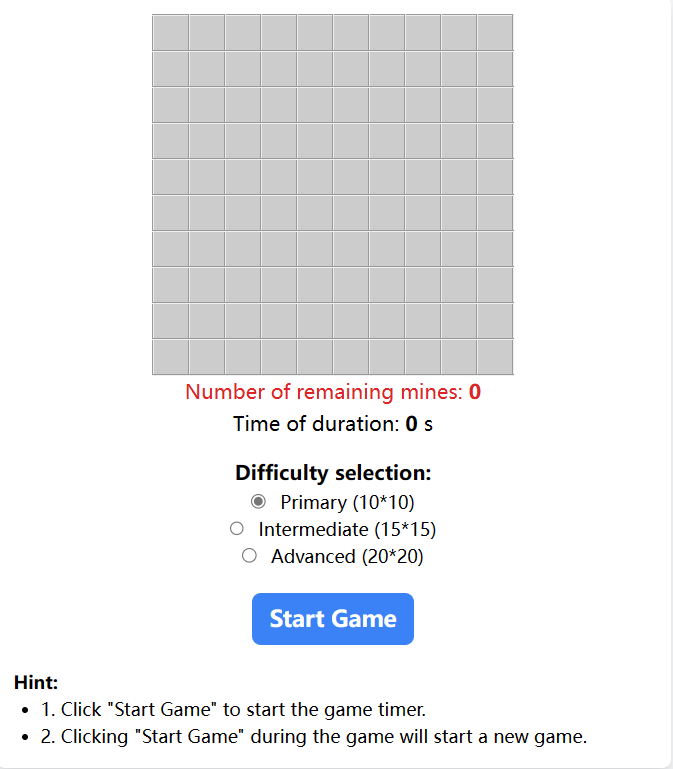
오른쪽에서 난이도 선택을 클릭하면 셀 수가 변경되는 것을 볼 수 있습니다.
게임 초기화
이제 게임을 초기화해 보겠습니다. 이는 주로 세 단계로 구성됩니다:
- 모든 셀을 0 으로 초기화합니다 (코드에서 배열로 표현).
- 무작위로 지뢰 수를 생성하고 배열에 무작위로 배치하여 배열 항목의 값을 9 로 설정합니다.
- 다른 셀의 숫자를 계산하고 배열에 값을 저장합니다.
jms.js의 JMS.prototype 내부에 다음 코드를 추가합니다:
// Initialization: set the default value of the array to 0 and determine the number of landmines
init: function () {
    for (var i = 0; i < this.rowCount; i++) {
        this.arrs[i] = [];
        for (var j = 0; j < this.colCount; j++) {
            this.arrs[i][j] = 0;
        }
    }
    this.landMineCount = this.selectFrom(this.minLandMineCount, this.maxLandMineCount);
    this.markLandMineCount = 0;
    this.beginTime = null;
    this.endTime = null;
    this.currentSetpCount = 0;
},
// Set the value of array items that contain landmines to 9
landMine: function () {
    var allCount = this.rowCount * this.colCount - 1,
        tempArr = {};
    for (var i = 0; i < this.landMineCount; i++) {
        var randomNum = this.selectFrom(0, allCount),
            rowCol = this.getRowCol(randomNum);
        if (randomNum in tempArr) {
            i--;
            continue;
        }
        this.arrs[rowCol.row][rowCol.col] = 9;
        tempArr[randomNum] = randomNum;
    }
},
// Calculate the numbers in other cells
calculateNoLandMineCount: function () {
    for (var i = 0; i < this.rowCount; i++) {
        for (var j = 0; j < this.colCount; j++) {
            if (this.arrs[i][j] == 9)
                continue;
            if (i > 0 && j > 0) {
                if (this.arrs[i - 1][j - 1] == 9)
                    this.arrs[i][j]++;
            }
            if (i > 0) {
                if (this.arrs[i - 1][j] == 9)
                    this.arrs[i][j]++;
            }
            if (i > 0 && j < this.colCount - 1) {
                if (this.arrs[i - 1][j + 1] == 9)
                    this.arrs[i][j]++;
            }
            if (j > 0) {
                if (this.arrs[i][j - 1] == 9)
                    this.arrs[i][j]++;
            }
            if (j < this.colCount - 1) {
                if (this.arrs[i][j + 1] == 9)
                    this.arrs[i][j]++;
            }
            if (i < this.rowCount - 1 && j > 0) {
                if (this.arrs[i + 1][j - 1] == 9)
                    this.arrs[i][j]++;
            }
            if (i < this.rowCount - 1) {
                if (this.arrs[i + 1][j] == 9)
                    this.arrs[i][j]++;
            }
            if (i < this.rowCount - 1 && j < this.colCount - 1) {
                if (this.arrs[i + 1][j + 1] == 9)
                    this.arrs[i][j]++;
            }
        }
    }
},
// Get a random number
selectFrom: function (iFirstValue, iLastValue) {
    var iChoices = iLastValue - iFirstValue + 1;
    return Math.floor(Math.random() * iChoices + iFirstValue);
},
// Find the row and column numbers based on the value
getRowCol: function (val) {
    return {
        row: parseInt(val / this.colCount),
        col: val % this.colCount
    };
},
셀에 클릭 이벤트 추가
이제 셀에 클릭 이벤트를 추가해야 합니다. 왼쪽 클릭 시 셀의 숫자 (지뢰인 경우 게임 종료) 를 표시합니다. 오른쪽 클릭 시 지뢰로 표시합니다.
또한, 셀을 처음 클릭했을 때 (보통 운이 작용하는 경우), 주변에 빈 영역이 있으면 직접 확장해야 합니다.
jms.js의 JMS.prototype에 다음 코드를 추가합니다:
// Get element
$: function (id) {
    return this.doc.getElementById(id);
},
// Bind click events (left and right) to each cell
bindCells: function () {
    var self = this;
    for (var i = 0; i < this.rowCount; i++) {
        for (var j = 0; j < this.colCount; j++) {
            (function (row, col) {
                self.$("m_" + i + "_" + j).onmousedown = function (e) {
                    e = e || window.event;
                    var mouseNum = e.button;
                    var className = this.className;
                    if (mouseNum == 2) {
                        if (className == "flag") {
                            this.className = "";
                            self.markLandMineCount--;
                        } else {
                            this.className = "flag";
                            self.markLandMineCount++;
                        }
                        if (self.landMineCallBack) {
                            self.landMineCallBack(self.landMineCount - self.markLandMineCount);
                        }
                    } else if (className != "flag") {
                        self.openBlock.call(self, this, row, col);
                    }
                };
            })(i,j);
        }
    }
},
// Expand the area with no mines
showNoLandMine: function (x, y) {
    for (var i = x - 1; i < x + 2; i++)
        for (var j = y - 1; j < y + 2; j++) {
            if (!(i == x && j == y)) {
                var ele = this.$("m_" + i + "_" + j);
                if (ele && ele.className == "") {
                    this.openBlock.call(this, ele, i, j);
                }
            }
        }
},
// Display
openBlock: function (obj, x, y) {
    if (this.arrs[x][y] != 9) {
        this.currentSetpCount++;
        if (this.arrs[x][y] != 0) {
            obj.innerHTML = this.arrs[x][y];
        }
        obj.className = "clicked-cell";
        if (this.currentSetpCount + this.landMineCount == this.rowCount * this.colCount) {
            this.success();
        }
        obj.onmousedown = null;
        if (this.arrs[x][y] == 0) {
            this.showNoLandMine.call(this, x, y);
        }
    } else {
        this.failed();
    }
},
// Display mines
showLandMine: function () {
    for (var i = 0; i < this.rowCount; i++) {
        for (var j = 0; j < this.colCount; j++) {
            if (this.arrs[i][j] == 9) {
                this.$("m_" + i + "_" + j).className = "landMine";
            }
        }
    }
},
// Show information of all cells
showAll: function () {
    for (var i = 0; i < this.rowCount; i++) {
        for (var j = 0; j < this.colCount; j++) {
            if (this.arrs[i][j] == 9) {
                this.$("m_" + i + "_" + j).className = "landMine";
            } else {
                var ele=this.$("m_" + i + "_" + j);
                if (this.arrs[i][j] != 0)
                    ele.innerHTML = this.arrs[i][j];
                ele.className = "normal";
            }
        }
    }
},
// Clear displayed cell information
hideAll: function () {
    for (var i = 0; i < this.rowCount; i++) {
        for (var j = 0; j < this.colCount; j++) {
            var tdCell = this.$("m_" + i + "_" + j);
            tdCell.className = "";
            tdCell.innerHTML = "";
        }
    }
},
// Remove the events bound to the cells
disableAll: function () {
    for (var i = 0; i < this.rowCount; i++) {
        for (var j = 0; j < this.colCount; j++) {
            var tdCell = this.$("m_" + i + "_" + j);
            tdCell.onmousedown = null;
        }
    }
},
게임 제어 기능 추가
지금까지 게임의 주요 부분이 완료되었습니다. 다음 단계는 게임을 원활하게 실행하기 위해 게임 제어 기능을 추가하는 것입니다. 주요 단계는 다음과 같습니다:
- 시작 버튼에 클릭 이벤트 리스너를 추가하여 게임 매개변수를 재설정합니다.
- 게임이 시작될 때 시간 측정을 시작합니다.
- 게임이 종료되면 시간 측정을 중지하고 알림을 표시합니다.
jms.js 섹션
jms.js의 JMS.prototype에 게임 시작 및 시작 함수를 추가합니다:
// Game start
begin: function() {
    this.currentSetpCount = 0; // Reset the step count to zero
    this.markLandMineCount = 0;
    this.beginTime = new Date(); // Game start time
    this.hideAll();
    this.bindCells();
},
// Game end
end: function() {
    this.endTime = new Date(); // Game end time
    if (this.endCallBack) { // Call the callback function if it exists
        this.endCallBack();
    }
},
// Game success
success: function() {
    this.end();
    this.showAll();
    this.disableAll();
    alert("Congratulation!");
},
// Game failed
failed: function() {
    this.end();
    this.showAll();
    this.disableAll();
    alert("GAME OVER!");
},
// Entry point
play: function() {
    this.init();
    this.landMine();
    this.calculateNoLandMineCount();
},
index.js 섹션
index.js에서 시작 버튼에 이벤트 리스너를 추가하여 게임을 시작하고, 게임 시간과 남은 지뢰 수를 표시합니다 ( index.js의 init 함수에서 jms = JMS("landmine", rowCount, colCount, minLandMineCount, maxLandMineCount); 뒤에):
jms.endCallBack = function () {
  clearInterval(timeHandle);
};
jms.landMineCallBack = function (count) {
  landMineCountElement.innerHTML = count;
};

// Bind event to "Start Game" button
beginButton.onclick = function () {
  jms.play(); // Initialize the game

  // Display the number of landmines
  landMineCountElement.innerHTML = jms.landMineCount;

  // Start the game
  jms.begin();

  // Update the elapsed time
  timeHandle = setInterval(function () {
    timeShow.innerHTML = parseInt((new Date() - jms.beginTime) / 1000);
  }, 1000);
};
실행 및 테스트
이제 지뢰 찾기 웹 버전이 완성되었습니다. 브라우저에서 index.html 파일을 열어 게임을 시작하세요.
WebIDE 의 오른쪽 하단 모서리에 있는 Go Live 버튼을 클릭하고 Web 8080 탭으로 전환합니다.
요약
이 실험은 주로 JavaScript 를 사용하여 클래식 게임인 지뢰 찾기의 웹 버전을 구현합니다. 이 실험을 통해 사용자는 JavaScript 에 대한 이해와 활용 능력을 향상시킬 수 있다고 생각합니다. 또한, 사용자는 JavaScript 언어를 사용하여 게임 내 객체를 추상화하고 캡슐화하는 방법을 배울 수 있습니다.