소개
이 프로젝트에서는 React 를 사용하여 드래그 앤 드롭 퍼즐 게임을 만들 것입니다. 이 프로젝트는 React 컴포넌트, 상태 관리, 사용자 상호 작용 처리에 대해 배우는 초보자에게 훌륭한 프로젝트입니다. 이 프로젝트가 끝나면 기능적인 퍼즐 게임을 갖게 될 것입니다.
👀 미리보기
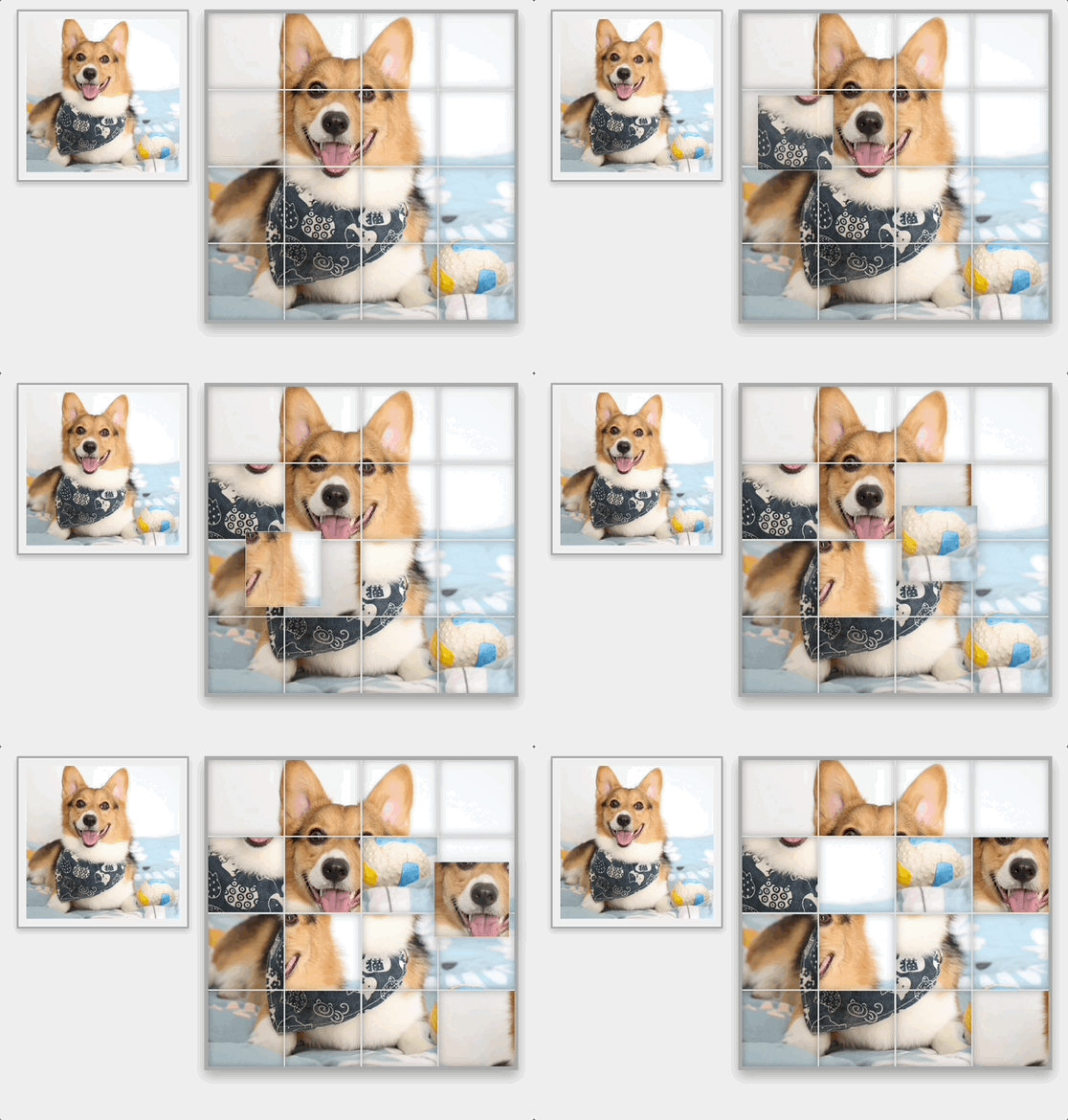
🎯 과제
이 프로젝트에서 다음을 배우게 됩니다.
- 새로운 React 애플리케이션 설정 방법
- 메인 퍼즐 게임 컴포넌트 생성 방법
- 상태 관리 및 퍼즐 이미지 설정 방법
- 화면에 퍼즐 조각 표시 방법
- 드래그 앤 드롭 기능 구현 방법
- PuzzleGame 컴포넌트를 메인 애플리케이션 파일에 통합하는 방법
- 퍼즐 스타일링을 위한 CSS 추가 방법
🏆 성과
이 프로젝트를 완료하면 다음을 수행할 수 있습니다.
- React 애플리케이션을 설정하고 컴포넌트를 생성할 수 있습니다.
- 상태를 관리하고 사용자 상호 작용을 처리할 수 있습니다.
- 드래그 앤 드롭 기능을 구현할 수 있습니다.
- 퍼즐을 시각적으로 매력적으로 만들기 위해 스타일링을 통합할 수 있습니다.
프로젝트 설정
목표: 퍼즐 게임의 기반은 새로운 React 애플리케이션입니다.
터미널을 엽니다.
프로젝트 디렉토리로 이동합니다.
cd puzzle-game프로젝트 종속성을 설치합니다.
npm install
PuzzleGame 컴포넌트 생성
목표: 메인 퍼즐 게임 컴포넌트를 설정합니다.
src디렉토리 내부에components라는 폴더를 생성합니다.components내부에PuzzleGame.js라는 새 파일을 생성합니다.PuzzleGame.js에 다음 기본 구조를 추가합니다.
// src/components/PuzzleGame.js
// 컴포넌트 상태 관리를 위해 React 와 useState 를 가져옵니다.
import React, { useState, useEffect } from "react";

// PuzzleGame 컴포넌트 정의
const PuzzleGame = () => {
  // 이 컴포넌트는 게임 로직과 UI 를 처리합니다.
  return (
    <div className="game-container">{/* 퍼즐이 렌더링될 위치입니다. */}</div>
  );
};

// 다른 파일에서 사용하기 위해 컴포넌트를 내보냅니다.
export default PuzzleGame;
상태 및 이미지 설정 구현
목표: 퍼즐 조각을 관리하고 퍼즐 이미지를 정의하기 위한 상태를 설정합니다.
PuzzleGame.js에서 React 로부터useState를 import 합니다.- 퍼즐 조각의 위치를 추적하기 위한 상태 변수를 정의합니다.
- 퍼즐 이미지의 URL 을 정의합니다 (
public폴더에corgi.png라는 이미지를 배치합니다).
// src/components/PuzzleGame.js

// ...other imports
const PuzzleGame = () => {
  // 이미지 URL 및 퍼즐 조각의 초기 위치를 정의합니다.
  const imgUrl = "corgi.png"; // 이 이미지가 public 폴더에 있는지 확인하십시오.
  const [positions, setPositions] = useState([...Array(16).keys()]);

  useEffect(() => {
    // 초기 퍼즐 설정을 위해 위치를 섞습니다.
    setPositions((prevPositions) => {
      const newPos = [...prevPositions];
      newPos.sort(() => Math.random() - 0.5);
      return newPos;
    });
  }, []);

  // 컴포넌트의 return 문
  return (
    <div className="game-container">
      {/* 퍼즐의 UI 는 이후 단계에서 여기에 추가됩니다. */}
    </div>
  );
};

// PuzzleGame 컴포넌트 내보내기
export default PuzzleGame;
퍼즐 조각 렌더링
목표: 화면에 퍼즐 조각을 표시합니다.
positions상태를 순회 (map) 하여 개별 퍼즐 조각을 렌더링합니다.- 각 조각은 이미지의 일부를 표시해야 합니다.
// src/components/PuzzleGame.js
const PuzzleGame = () => {
  // ...이전 코드

  return (
    <div className="game-container">
      <div className="reference-image">
        <img src={imgUrl} alt="Reference Image" />
      </div>
      <div className="puzzle-container">
        {positions.map((pos, index) => {
          const x = (pos % 4) * 100;
          const y = Math.floor(pos / 4) * 100;
          return (
            <div
              key={index}
              className="puzzle-piece"
              style={{
                backgroundImage: `url('${imgUrl}')`,
                backgroundPosition: `-${x}px -${y}px`
              }}
            />
          );
        })}
      </div>
    </div>
  );
};
드래그 앤 드롭 기능 추가
목표: 퍼즐 조각을 드래그 앤 드롭하는 로직을 구현합니다.
- 드래그 시작, 드래그 오버 및 드롭 이벤트에 대한 핸들러를 추가합니다.
- 드롭 시 퍼즐 조각을 교환하는 로직을 구현합니다.
// src/components/PuzzleGame.js

const PuzzleGame = () => {
  // ...이전 코드

  // 드래그 이벤트 시작 처리
  const handleDragStart = (e, position) => {
    e.dataTransfer.setData("text/plain", position);
  };

  // 드롭 이벤트 처리
  const handleDrop = (e, position) => {
    e.preventDefault();
    const originalPosition = e.dataTransfer.getData("text");
    // 여기에 퍼즐 조각의 위치를 교환하는 로직을 추가합니다.
    setPositions((prevPositions) => {
      const newPos = [...prevPositions];
      [newPos[originalPosition], newPos[position]] = [
        newPos[position],
        newPos[originalPosition]
      ];
      return newPos;
    });
  };

  // 기본 동작을 방지하여 드롭 동작 허용
  const handleDragOver = (e) => {
    e.preventDefault();
  };

  // 추가된 드래그 앤 드롭 핸들러로 퍼즐 조각 렌더링
};
// src/components/PuzzleGame.js
const PuzzleGame = () => {
  // ...이전 코드

  return (
    <div className="game-container">
      <div className="reference-image">
        <img src={imgUrl} alt="Reference Image" />
      </div>
      <div className="puzzle-container">
        {positions.map((pos, index) => {
          const x = (pos % 4) * 100;
          const y = Math.floor(pos / 4) * 100;
          return (
            <div
              key={index}
              className="puzzle-piece"
              draggable
              onDragStart={(e) => handleDragStart(e, index)}
              onDrop={(e) => handleDrop(e, index)}
              onDragOver={handleDragOver}
              style={{
                backgroundImage: `url('${imgUrl}')`,
                backgroundPosition: `-${x}px -${y}px`
              }}
            />
          );
        })}
      </div>
    </div>
  );
};
App 컴포넌트 업데이트
목표: PuzzleGame 컴포넌트를 메인 애플리케이션 파일에 통합합니다.
src/App.js를 엽니다.- PuzzleGame 컴포넌트를 렌더링합니다.
// src/App.js

import React from "react";
import "./App.css";
import PuzzleGame from "./components/PuzzleGame";

// PuzzleGame 컴포넌트를 렌더링하는 App 컴포넌트
function App() {
  return (
    <div className="App">
      <PuzzleGame />
    </div>
  );
}

export default App;
퍼즐 스타일링
목표: 퍼즐을 시각적으로 매력적으로 만들기 위해 CSS 를 추가합니다.
src/App.css를 엽니다..game-container및.puzzle-piece에 대한 스타일을 추가하여 퍼즐을 올바르게 배치합니다.
body {
  font-family: "Arial", sans-serif;
  text-align: center;
  padding: 20px;
  background: #f0f0f0;
}

.game-container {
  display: flex;
  justify-content: center;
  align-items: flex-start;
  gap: 20px;
}

.reference-image {
  display: flex;
  align-items: center;
  justify-content: center;
  border: 3px solid #aaa9a9;
  /* 일관성을 위해 테두리 추가 */
  padding: 10px;
  /* 이미지 주변에 패딩 추가 */
  box-shadow: 0 4px 8px rgba(0, 0, 0, 0.2);
  /* 깊이를 위해 그림자 추가 */
}

.reference-image img {
  display: block;
  /* 기본 인라인 간격 제거 */
  max-width: 200px;
}

.puzzle-container {
  width: 400px;
  height: 400px;
  display: grid;
  grid-template-columns: repeat(4, 1fr);
  gap: 2px;
  border: 5px solid #aaa9a9;
  box-shadow: 0 8px 16px rgba(0, 0, 0, 0.3);
  /* 3D 효과를 위해 더 큰 그림자 추가 */
  background: #ddd;
  /* 틈새를 위한 밝은 배경 */
}

.puzzle-piece {
  width: 100%;
  height: 100%;
  background-size: 400px 400px;
  cursor: grab;
  box-shadow: inset 0 0 10px rgba(0, 0, 0, 0.3);
  /* 각 조각에 내부 그림자 추가 */
}
애플리케이션 실행
목표: 완성된 퍼즐 게임을 보기 위해 애플리케이션을 실행합니다.
프로젝트 디렉토리에서 다음을 실행합니다.
npm start웹 브라우저에서 애플리케이션이 열리고 퍼즐 게임이 표시됩니다.
요약
축하합니다! React 로 드래그 앤 드롭 퍼즐 게임을 성공적으로 구축했습니다. 이 프로젝트는 React 프로젝트 설정, 컴포넌트 생성, 상태 관리, 사용자 상호 작용 처리 및 기본 스타일 적용을 다루었습니다. 이제 타이머, 점수 또는 다양한 레벨과 같은 더 많은 기능을 추가하여 게임을 향상시킬 수 있습니다.