

소개
이 실험에서는 느리거나 신뢰할 수 없는 응답 시간을 가진 서비스를 공격할 때 Hydra 의 응답 대기 시간을 미세 조정하는 방법을 배웁니다. SMTP 를 예시로 사용하여 이러한 개념을 보여줍니다.
파이썬을 사용하여 지연된 응답을 시뮬레이션하는 간단한 SMTP 서버를 설정하여 시작합니다. 이를 통해 느리거나 신뢰할 수 없는 네트워크 환경을 모방할 수 있습니다. 그런 다음 기본 대기 시간 설정으로 Hydra 를 이 서버에 실행하고, -w 옵션을 사용하여 대기 시간을 조정하여 그 영향을 관찰합니다. 마지막으로, 단일 자격 증명을 직접 지정하는 -l 및 -p 옵션을 탐색하고 단일 스레드로 테스트합니다.
지연 응답 SMTP 설정
이 단계에서는 파이썬을 사용하여 간단한 SMTP 서버를 설정합니다. 이 서버는 느리거나 신뢰할 수 없는 서비스를 시뮬레이션하기 위해 응답에 지연을 도입합니다. 이 설정은 Hydra 의 대기 시간 설정이 성능에 미치는 영향을 이해하는 데 필수적입니다.
먼저 ~/project 디렉토리에 delayed_smtp.py라는 파이썬 스크립트를 생성해야 합니다. 이 스크립트는 SMTP 서버 역할을 합니다.
nano 텍스트 편집기를 열어 이 파일을 생성합니다.
nano ~/project/delayed_smtp.py
이제 다음 파이썬 코드를 delayed_smtp.py 파일에 복사하여 붙여넣습니다.
import socket
import time
import threading

def handle_client(client_socket):
    try:
        ## 인사 메시지 전송
        client_socket.send(b"220 localhost ESMTP\r\n")

        while True:
            data = client_socket.recv(1024).decode('utf-8').strip()
            if not data:
                break

            if data.upper().startswith('EHLO') or data.upper().startswith('HELO'):
                client_socket.send(b"250-localhost\r\n250-AUTH LOGIN\r\n250 OK\r\n")

            elif data.upper().startswith('AUTH LOGIN'):
                client_socket.send(b"334 VXNlcm5hbWU6\r\n")  ## Username:
                client_socket.recv(1024)  ## 사용자 이름 수신

                ## 5 초 지연 추가
                time.sleep(5)

                client_socket.send(b"334 UGFzc3dvcmQ6\r\n")  ## Password:
                client_socket.recv(1024)  ## 비밀번호 수신
                client_socket.send(b"235 Authentication successful\r\n")

            elif data.upper().startswith('QUIT'):
                client_socket.send(b"221 Bye\r\n")
                break
            else:
                client_socket.send(b"250 OK\r\n")

    except:
        pass
    finally:
        client_socket.close()

def run_server():
    server = socket.socket(socket.AF_INET, socket.SOCK_STREAM)
    server.setsockopt(socket.SOL_SOCKET, socket.SO_REUSEADDR, 1)
    server.bind(('127.0.0.1', 1025))
    server.listen(5)
    print("SMTP 서버가 포트 1025 에서 시작되었습니다.")

    while True:
        try:
            client, addr = server.accept()
            thread = threading.Thread(target=handle_client, args=(client,))
            thread.daemon = True
            thread.start()
        except:
            break

if __name__ == '__main__':
    run_server()
이 간소화된 파이썬 스크립트는 포트 1025에서 수신 대기하는 기본 SMTP 서버를 생성합니다. 서버는 Hydra 가 예상하는 LOGIN 메서드를 사용하여 SMTP 인증을 지원합니다. 주요 특징은 인증 처리에서 time.sleep(5) 라인으로, 인증 과정에서 5 초의 지연을 도입하여 느린 네트워크 응답을 시뮬레이션하는 것입니다.
코드를 붙여넣은 후 파일을 저장하고 nano를 종료합니다 (Ctrl + X, Y, Enter).
다음으로, 이 파이썬 스크립트를 백그라운드에서 실행해야 합니다. nohup을 사용하면 터미널 세션을 종료하더라도 스크립트가 계속 실행됩니다. 모니터링을 위해 출력을 delayed_smtp.log라는 로그 파일에 리디렉션합니다.
터미널에서 다음 명령을 실행합니다.
nohup python3 ~/project/delayed_smtp.py > ~/project/delayed_smtp.log 2>&1 &
이 명령은 SMTP 서버를 시작합니다. 마지막 &는 프로세스를 백그라운드로 보내 터미널을 계속 사용할 수 있도록 합니다.
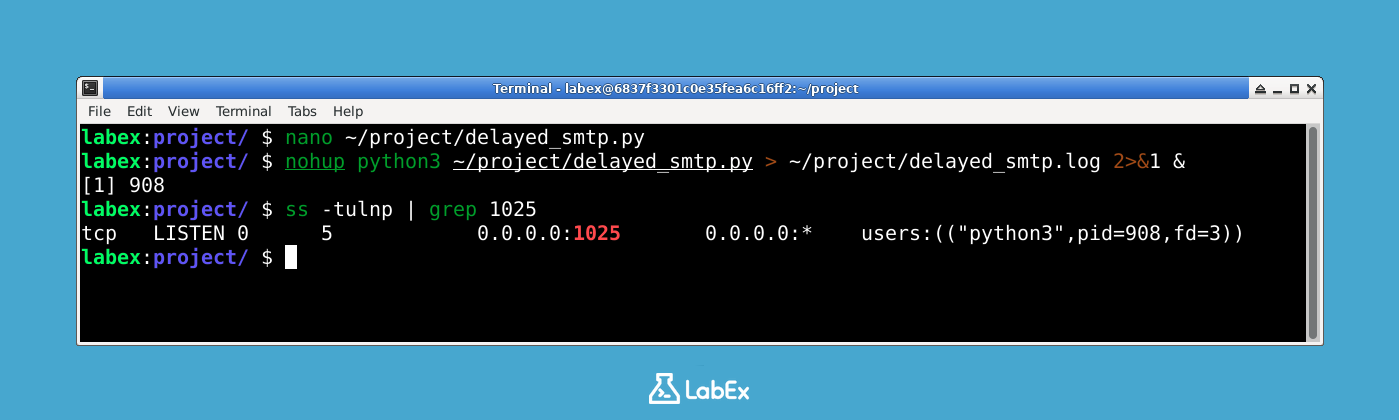
SMTP 서버가 실행 중이고 포트 1025에서 수신 대기하는지 확인하려면 ss 명령을 사용할 수 있습니다. ss 명령은 소켓을 조사하는 유틸리티입니다.
ss -tulnp | grep 1025
서버가 포트 1025에서 수신 대기하는 것을 나타내는 다음과 유사한 출력이 표시되어야 합니다.
tcp LISTEN 0 4096 0.0.0.0:1025 0.0.0.0:* users:(("python3",pid=XXXX,fd=X))
pid=XXXX는 파이썬 스크립트의 실제 프로세스 ID 를 보여줍니다. 이는 지연된 SMTP 서버가 활성화되어 테스트 준비가 되었음을 확인합니다.
이 출력은 파이썬 SMTP 서버가 포트 1025 에서 성공적으로 실행되고 수신 대기 중임을 확인합니다. LISTEN 상태는 서버가 연결을 수락할 준비가 되었음을 나타내고, python3 프로세스 이름은 스크립트가 실행 중임을 확인합니다. 이 서버에 내장된 5 초 지연은 Hydra 의 대기 시간 설정이 공격 성능에 미치는 영향을 이해하는 데 도움이 될 것입니다.
기본 대기 시간으로 Hydra 실행
이 단계에서는 설정한 지연 SMTP 서버를 대상으로 Hydra 를 실행합니다. Hydra 의 기본 대기 시간은 10 초이며, 대상 서비스의 응답 지연 시간이 Hydra 의 기본 시간 제한 내에 있는 경우 Hydra 의 동작을 보여줍니다.
먼저 Hydra 가 사용할 사용자 목록과 비밀번호 목록을 생성해야 합니다. 이 파일은 ~/project 디렉토리에 있습니다.
users.txt 파일을 생성합니다.
nano ~/project/users.txt
다음 사용자 이름을 users.txt 파일에 추가합니다.
testuser
admin
user
파일을 저장하고 nano를 종료합니다 (Ctrl + X, Y, Enter).
다음으로 passwords.txt 파일을 생성합니다.
nano ~/project/passwords.txt
다음 비밀번호를 passwords.txt 파일에 추가합니다.
password
123456
test
파일을 저장하고 nano를 종료합니다 (Ctrl + X, Y, Enter).
이제 Hydra 를 실행합니다. localhost (127.0.0.1) 의 포트 1025에서 실행 중인 SMTP 서버를 대상으로 합니다. smtp 모듈, users.txt 목록, passwords.txt 목록을 사용합니다. -t 1 옵션은 Hydra 가 단일 스레드만 사용하도록 설정하여 출력을 쉽게 추적할 수 있도록 합니다.
hydra -L ~/project/users.txt -P ~/project/passwords.txt -vV -t 1 127.0.0.1 smtp -s 1025
명령을 분석해 보겠습니다.
hydra: Hydra 도구를 호출하는 명령입니다.-L ~/project/users.txt: 사용자 이름 목록이 있는 파일의 경로를 지정합니다.-P ~/project/passwords.txt: 비밀번호 목록이 있는 파일의 경로를 지정합니다.-vV: 자세한 정보를 표시하는 상세 모드를 활성화합니다. 성공 및 실패 로그인 시도 모두 포함.-t 1: 병렬 작업 (스레드) 수를 1 로 설정합니다. 각 시도를 순차적으로 관찰하는 데 유용합니다.127.0.0.1: 대상 IP 주소, 즉 로컬 머신입니다.smtp: 공격에 사용할 Hydra 의 서비스 모듈입니다. 이 경우 SMTP 입니다.-s 1025: 대상 서비스의 포트 번호를 지정합니다. 지연 SMTP 서버의 경우1025입니다.
SMTP 서버의 지연 시간이 5 초이고 Hydra 의 기본 대기 시간이 10 초이므로 Hydra 는 시간 초과 없이 각 시도를 성공적으로 완료해야 합니다. 다음과 유사한 출력이 표시되며 Hydra 가 각 사용자 이름과 비밀번호 조합을 시도하는 것을 보여줍니다.
labex:project/ $ hydra -L ~/project/users.txt -P ~/project/passwords.txt -vV -t 1 127.0.0.1 smtp -s 1025
Hydra v9.2 (c) 2021 by van Hauser/THC & David Maciejak - Please do not use in military or secret service organizations, or for illegal purposes (this is non-binding, these *** ignore laws and ethics anyway).

Hydra (https://github.com/vanhauser-thc/thc-hydra) starting at 2025-05-29 13:47:03
[INFO] several providers have implemented cracking protection, check with a small wordlist first - and stay legal!
[DATA] max 1 task per 1 server, overall 1 task, 9 login tries (l:3/p:3), ~9 tries per task
[DATA] attacking smtp://127.0.0.1:1025/
[VERBOSE] Resolving addresses ... [VERBOSE] resolving done
[ATTEMPT] target 127.0.0.1 - login "testuser" - pass "password" - 1 of 9 [child 0] (0/0)
[VERBOSE] using SMTP LOGIN AUTH mechanism
[1025][smtp] host: 127.0.0.1   login: testuser   password: password
... (나머지 출력 생략)
이 출력은 Hydra 가 기본 10 초 대기 시간으로 5 초 지연이 있는 서버에 대해 작동하는 것을 보여줍니다. 모든 시도가 시간 초과 없이 성공적으로 완료되었으므로 기본 대기 시간이 이 시나리오에 충분함을 보여줍니다. [DATA] 줄은 총 9 회 시도 (3 명의 사용자 × 3 개의 비밀번호) 를 보여주며, 각 성공적인 로그인은 포트와 서비스 유형을 나타내는 [1025][smtp]로 표시됩니다.
-w 옵션으로 대기 시간 조정
이 단계에서는 -w 옵션을 사용하여 Hydra 의 대기 시간을 명시적으로 설정합니다. 기본 대기 시간 (10 초) 이 5 초 지연에 충분했지만, 다양한 네트워크 환경과 서버 동작에 Hydra 를 적응시키기 위해 이 매개변수를 이해하고 제어하는 것이 중요합니다.
이전 단계에서 생성한 동일한 사용자 이름 및 비밀번호 목록 (users.txt 및 passwords.txt) 을 사용합니다.
이제 -w 옵션을 명시적으로 추가하여 Hydra 를 다시 실행합니다. 이 명령은 10 초가 Hydra 의 기본 대기 시간이므로 이전 명령과 동일하게 동작하지만, 옵션 사용 방법을 보여줍니다.
hydra -L ~/project/users.txt -P ~/project/passwords.txt -vV -t 1 -w 10 127.0.0.1 smtp -s 1025
핵심적인 차이점을 강조하여 명령을 분석해 보겠습니다.
hydra: Hydra 명령입니다.-L ~/project/users.txt: 사용자 이름 목록 파일을 지정합니다.-P ~/project/passwords.txt: 비밀번호 목록 파일을 지정합니다.-vV: 상세 모드를 활성화합니다.-t 1: 스레드 수를 1 로 설정합니다.-w 10: 대기 시간 (시간 제한) 을 명시적으로 10 초로 설정합니다. 즉, Hydra 는 대상 서비스로부터 응답을 받을 때까지 최대 10 초 동안 기다린 후 시도를 실패로 간주합니다.127.0.0.1: 대상 IP 주소입니다.smtp: 서비스 모듈입니다.-s 1025: 포트 번호를 지정합니다.
10 초 대기 시간이 SMTP 서버의 5 초 지연에 충분하므로 출력은 이전 단계와 유사합니다. 이 단계는 주로 -w 옵션의 사용법을 보여주는 데 있습니다.
Hydra v9.2 (c) 2021 by van Hauser/THC & David Maciejak - Please do not use in military or secret service organizations, or for illegal purposes (this is non-binding, these *** ignore laws and ethics anyway).

Hydra (https://github.com/vanhauser-thc/thc-hydra) starting at 2025-05-29 14:02:49
[INFO] several providers have implemented cracking protection, check with a small wordlist first - and stay legal!
[DATA] max 1 task per 1 server, overall 1 task, 9 login tries (l:3/p:3), ~9 tries per task
[DATA] attacking smtp://127.0.0.1:1025/
[VERBOSE] Resolving addresses ... [VERBOSE] resolving done
[ATTEMPT] target 127.0.0.1 - login "testuser" - pass "password" - 1 of 9 [child 0] (0/0)
[VERBOSE] using SMTP LOGIN AUTH mechanism
[1025][smtp] host: 127.0.0.1   login: testuser   password: password
... (나머지 출력 생략)
이 출력은 대기 시간을 10 초로 명시적으로 설정하는 -w 10의 사용을 보여주며, 기본 설정과 동일한 결과를 생성합니다. 공격은 성공적으로 완료되었으며, 16 초 (14:02:49 ~ 14:03:05) 이내에 3 개의 유효한 비밀번호를 모두 찾았습니다. 이 단계는 기본 10 초 제한보다 응답 시간이 더 긴 서버를 다룰 때 시간 제한 설정을 명시적으로 제어하는 방법을 보여줍니다.
-l 및 -p 옵션으로 단일 자격 증명 테스트
In this step, you will learn how to use Hydra's -l and -p options to test a single username and password combination. This approach allows you to specify a single credential pair directly on the command line, rather than using separate files. This is particularly useful for quickly testing a specific credential pair without creating or modifying files.
You will continue to use the delayed SMTP server you set up in the first step.
Execute the following Hydra command, using the -l option to specify the username and -p option to specify the password:
hydra -t 1 -l testuser -p password -vV 127.0.0.1 smtp -s 1025
Let's break down this command:
hydra: The Hydra command.-t 1: Sets the number of threads to 1, ensuring a clear, sequential attempt.-l testuser: Specifies the username to test. The-l(lowercase L) option is used for a single username.-p password: Specifies the password to test. The-poption is used for a single password.-vV: Enables verbose mode.127.0.0.1: The target IP address.smtp: The service module.-s 1025: Specifies the port number.
In this scenario, Hydra will only attempt to log in with the single credential pair testuser:password. Since our SMTP server accepts any credentials for demonstration purposes, Hydra will report a successful login.
You will see output similar to this:
labex:project/ $ hydra -t 1 -l testuser -p password -vV 127.0.0.1 smtp -s 1025
Hydra v9.2 (c) 2021 by van Hauser/THC & David Maciejak - Please do not use in military or secret service organizations, or for illegal purposes (this is non-binding, these *** ignore laws and ethics anyway).

Hydra (https://github.com/vanhauser-thc/thc-hydra) starting at 2025-05-29 13:50:25
[INFO] several providers have implemented cracking protection, check with a small wordlist first - and stay legal!
[DATA] max 1 task per 1 server, overall 1 task, 1 login try (l:1/p:1), ~1 try per task
[DATA] attacking smtp://127.0.0.1:1025/
[VERBOSE] Resolving addresses ... [VERBOSE] resolving done
[ATTEMPT] target 127.0.0.1 - login "testuser" - pass "password" - 1 of 1 [child 0] (0/0)
[VERBOSE] using SMTP LOGIN AUTH mechanism
[1025][smtp] host: 127.0.0.1   login: testuser   password: password
[STATUS] attack finished for 127.0.0.1 (waiting for children to complete tests)
1 of 1 target successfully completed, 1 valid password found
Hydra (https://github.com/vanhauser-thc/thc-hydra) finished at 2025-05-29 13:50:30
This output demonstrates testing a single credential pair using -l and -p options instead of wordlist files. Notice the [DATA] line now shows 1 login try (l:1/p:1), indicating only one username and one password are being tested. This approach is efficient for targeted testing when you have specific credentials to verify, and it completes much faster since there's only one attempt instead of nine.
요약
이 실습에서는 응답이 느리거나 불안정한 서비스를 다룰 때 Hydra 의 동작을 미세 조정하는 방법을 배웠습니다.
파이썬 스크립트를 사용하여 5 초 지연이 있는 가상의 느린 SMTP 서버를 설정하여 시작했습니다. 이를 통해 Hydra 의 시간 제한 설정을 테스트하기 위한 제어된 환경을 만들 수 있었습니다. 그런 다음 이 서버에 대해 Hydra 를 실행하여 먼저 기본 동작을 관찰하고, -w 옵션을 사용하여 대기 시간을 명시적으로 조정했습니다. 마지막으로, 단일 자격 증명을 명령줄에서 직접 지정하는 -l 및 -p 옵션을 탐색하여 빠르고 타겟팅된 테스트에 유용함을 확인했습니다.
이 실습을 통해 다양한 네트워크 환경에 맞춰 Hydra 를 구성하는 실질적인 경험을 얻었으며, 효과적인 브루트포스 공격을 수행하는 능력을 향상시켰습니다.