
소개
이 Lab 에서는 기본적인 Flask 애플리케이션을 설정하는 과정을 안내합니다. Flask 는 Python 용 경량 웹 애플리케이션 프레임워크입니다. 웹 개발을 빠르고 쉽게 시작할 수 있도록 설계되었습니다.
참고: 코드 파일을 직접 생성하고 환경에서 실행해야 합니다. Web 5000 에서 Flask 서비스 상태를 미리 볼 수 있습니다.
이 Lab 에서는 기본적인 Flask 애플리케이션을 설정하는 과정을 안내합니다. Flask 는 Python 용 경량 웹 애플리케이션 프레임워크입니다. 웹 개발을 빠르고 쉽게 시작할 수 있도록 설계되었습니다.
참고: 코드 파일을 직접 생성하고 환경에서 실행해야 합니다. Web 5000 에서 Flask 서비스 상태를 미리 볼 수 있습니다.
먼저, 애플리케이션을 위한 디렉토리를 생성해야 합니다. 이 디렉토리는 애플리케이션에 필요한 모든 파일이 저장될 주 폴더 역할을 합니다.
cd ~/project
mkdir flaskr다음으로, flaskr 디렉토리에 __init__.py 파일을 생성합니다. 이 파일은 두 가지 목적을 수행합니다. 애플리케이션 팩토리 (application factory) 를 포함하고, Python 에게 flaskr 디렉토리를 패키지로 취급해야 함을 알립니다.
__init__.py 파일에서 필요한 모듈을 import 하고, 애플리케이션을 인스턴스화하고 구성하는 함수 create_app()을 정의합니다.
## flaskr/__init__.py

import os
from flask import Flask

def create_app(test_config=None):
    ## create and configure the app
    app = Flask(__name__, instance_relative_config=True)
    app.config.from_mapping(
        SECRET_KEY='dev',
        DATABASE=os.path.join(app.instance_path, 'flaskr.sqlite'),
    )

    ## More code to be added here...

return app동일한 __init__.py 파일에 애플리케이션에 필요한 구성 세부 정보를 추가합니다. 여기에는 비밀 키 설정과 데이터베이스 파일 위치 지정이 포함됩니다.
## flaskr/__init__.py

## More code above...

if test_config is None:
    ## load the instance config, if it exists, when not testing
    app.config.from_pyfile('config.py', silent=True)
else:
    ## load the test config if passed in
    app.config.from_mapping(test_config)

## ensure the instance folder exists
try:
    os.makedirs(app.instance_path)
except OSError:
    pass

## a simple page that says hello
@app.route('/')
def hello():
return 'Hello, World!'애플리케이션이 설정 및 구성되었으므로 flask 명령을 사용하여 실행할 수 있습니다. 이 명령은 flaskr 패키지가 아닌 최상위 디렉토리에서 실행해야 합니다.
flask --app flaskr run --debug --host=0.0.0.0다음과 유사한 출력을 볼 수 있습니다.
 * Serving Flask app "flaskr"
 * Debug mode: on
 * Running on all addresses (0.0.0.0)
 * Running on http://127.0.0.1:5000/ (Press CTRL+C to quit)
 * Restarting with stat
 * Debugger is active!
 * Debugger PIN: nnn-nnn-nnn
그런 다음 Web 5000 탭을 열면 다음을 볼 수 있습니다.
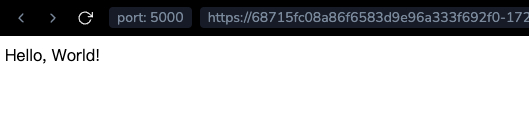
축하합니다! 첫 번째 Flask 애플리케이션을 성공적으로 생성하고 실행했습니다! 이 기본 애플리케이션은 더 복잡한 프로젝트의 시작점으로 사용할 수 있습니다. Flask 의 유연성과 단순성은 Python 웹 개발에 훌륭한 선택입니다.