



소개
이 랩에서는 C++ 에서 문자열을 배우게 됩니다. 문자열을 정의하고 초기화하는 방법과 문자열 함수를 사용하는 방법을 배우게 됩니다.
내용 미리보기
C++ 는 두 가지 유형의 문자열을 지원합니다.
- 문자열은
NULL문자'\0'(16 진수0) 로 종료되는char배열입니다. 이는 문자열 또는 C 스타일 문자열이라고도 합니다. - C++98 에서 도입된 새로운
string클래스.
사용하기가 훨씬 쉽고 이해하기 쉬우므로 "고수준" string 클래스를 권장합니다. 그러나 많은 레거시 프로그램에서 C 문자열을 사용했으며, 많은 프로그래머는 완전한 제어와 효율성을 위해 "저수준" C 문자열을 사용합니다. 또한, 명령줄 인수와 같은 일부 상황에서는 C 문자열만 지원됩니다. 따라서 두 세트의 문자열을 모두 이해해야 할 수 있습니다.
- 문자열 선언 및 초기화
- 문자열 입력/출력
- 문자열 연산
문자열 선언 및 초기화
string 클래스를 사용하려면 <string> 헤더를 포함하고 "using namespace std"를 사용하십시오.
문자열 리터럴로 문자열을 선언하고 초기화하거나, 빈 문자열로 초기화하거나, 다른 문자열 객체로 초기화할 수 있습니다. 예를 들어,
#include <string>
using namespace std;

string str1("Hello");  // 문자열 리터럴로 초기화 (암시적 초기화)
string str2 = "world"; // 문자열 리터럴로 초기화 (할당 연산자를 통한 명시적 초기화)
string str3;           // 빈 문자열로 초기화
string str4(str1);     // 기존 문자열 객체에서 복사하여 초기화
문자열 입출력
예시
/* 문자열 클래스 입력 및 출력 테스트 */
#include <iostream>
#include <string>     // string 클래스를 사용하려면 이 헤더가 필요합니다.
#include <limits>
using namespace std;  // <string>에도 필요합니다.

int main() {
   string message("Hello");
   cout << message << endl;

   // 단어 (공백으로 구분) 를 문자열로 입력합니다.
   cout << "메시지를 입력하세요 (공백 없음): ";
   cin >> message;
   cout << message << endl;

   cin.ignore(numeric_limits<streamsize>::max(), '\n');
   // 개행 문자까지 cin 을 플러시합니다 ( <limits> 헤더 필요)

   // 한 줄을 문자열로 입력합니다.
   cout << "메시지를 입력하세요 (공백 포함): ";
   getline(cin, message);  // cin 에서 message 로 입력을 읽습니다.
   cout << message << endl;
   return 0;
}
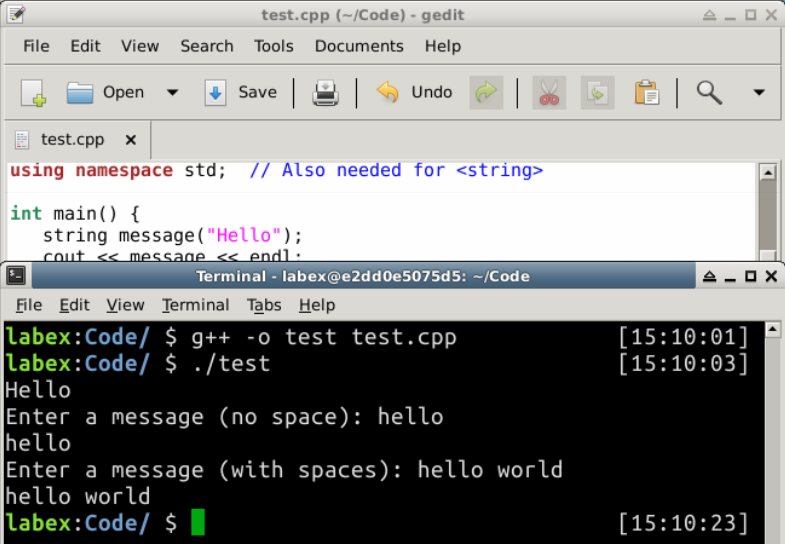
출력:
Hello
Enter a message (no space): hello
hello
Enter a message (with spaces): hello world
hello world
참고:
string클래스를 사용하려면 "#include <string>"이 필요하며,string이std네임스페이스 아래에 정의되어 있으므로 "using namespace std"도 필요합니다.- "
cin >> aStr"은cin(키보드) 에서 단어 (공백으로 구분) 를 읽어string변수aStr에 할당합니다. getline(cin, aStr)은cin에서 전체 줄 ('\n'까지) 을 읽어aStr에 할당합니다.'\n'문자는 버려집니다.cin을 플러시하려면ignore(numeric_limits<streamsize>::max(), '\n')함수를 사용하여'\n'까지의 모든 문자를 버릴 수 있습니다.numeric_limits는<limits>헤더에 있습니다.
문자열 연산
문자열 길이 확인:
string str("Hello, world");
// 둘 다 문자열의 길이를 반환합니다.
cout << str.length() << endl;  // 12
cout << str.size()   << endl;  // 12
빈 문자열 확인:
string str1("Hello, world");
string str2;                   // 빈 문자열
// 문자열이 비어 있는지 확인합니다.
cout << str1.empty() << endl;  // 0 (false)
cout << str2.empty() << endl;  // 1 (true)
다른 문자열에서 복사: 할당 연산자 "="를 사용합니다.
string str1("Hello, world"), str2;
str2 = str1;
cout << str2 << endl;   // Hello, world
다른 문자열과 연결: 더하기 "+" 연산자 또는 복합 더하기 "+="를 사용합니다.
string str1("Hello,");
string str2(" world");
cout << str1 + str2 << endl;  // "Hello, world"
cout << str1 << endl;         // "Hello,"
cout << str2 << endl;         // " world"
str1 += str2;
cout << str1 << endl;  // "Hello, world"
cout << str2 << endl;  // " world"
string str3 = str1 + str2;
cout << str3 << endl;  // "Hello, world world"
str3 += "again";
cout << str3 << endl;  // "Hello, world worldagain"
문자열의 개별 문자 읽기/쓰기:
string str("Hello, world");
// 인덱스에 있는 문자를 반환합니다. 인덱스는 0 부터 시작합니다. 인덱스 경계 검사를 수행합니다.
cout << str.at(0) << endl;  // 'H'
cout << str[1] << endl;     // 'e'
cout << str.at(str.length() - 1) << endl;  // 'd'

str.at(1) = 'a';  // 인덱스 1 에 쓰기
cout << str << endl;  // "Hallo, world"

str[0] = 'h';
cout << str << endl;  // "hallo, world"
부분 문자열 추출:
string str("Hello, world");
// beginIndex 에서 시작하여 size 만큼의 부분 문자열을 반환합니다.
cout << str.substr(2, 6) << endl;  // "llo, w"
다른 문자열과 비교:
string str1("Hello"), str2("Hallo"), str3("hello"), str4("Hello");
cout << str1.compare(str2) << endl;   // 1   'e' > 'a'
cout << str1.compare(str3) << endl;   // -1  'h' < 'H'
cout << str1.compare(str4) << endl;   // 0

// == 또는 != 연산자를 사용할 수도 있습니다.
if (str1 == str2) cout << "Same" << endl;
if (str3 != str4) cout << "Different" << endl;
cout << boolalpha;  // bool 을 true/false로 출력
cout << (str1 != str2) << endl;
cout << (str1 == str4) << endl;
문자 검색/교체:
#include <algorithm>에 있는 함수를 사용할 수 있습니다.예를 들어,
#include <algorithm>
......
string str("Hello, world");
replace(str.begin(), str.end(), 'l', '_');
cout << str << endl;    // He__o, wor_d
예시
/* C++ 문자열 함수 예시 */
#include <iostream>
#include <string>    // string 클래스 사용
using namespace std;

int main() {
   string msg = "hello, world!";
   cout << msg << endl;
   cout << msg.length() << endl;  // 문자열 길이
   cout << msg.at(1) << endl;     // 인덱스 1 의 문자
   cout << msg[1] << endl;        // 위와 동일
   cout << msg.empty() << endl;   // 빈 문자열 테스트
   cout << msg.substr(3, 3) << endl; // 부분 문자열 시작 위치
                                     // 3, 크기 3
   cout << msg.replace(3, 3, "why") << endl; // 부분 문자열 교체
   cout << msg.append("end") << endl;        // 뒤에 추가
   cout << msg + "end" << endl;              // 위와 동일
   cout << msg.insert(3, "insert") << endl;  // 위치 3 뒤에 삽입

   string msg1;
   msg1 = msg;   // 복사
   cout << msg1 << endl;

   cout << "Enter a line: ";
   getline(cin, msg);   // 한 줄의 입력을 읽습니다.
   cout << msg << endl;
}
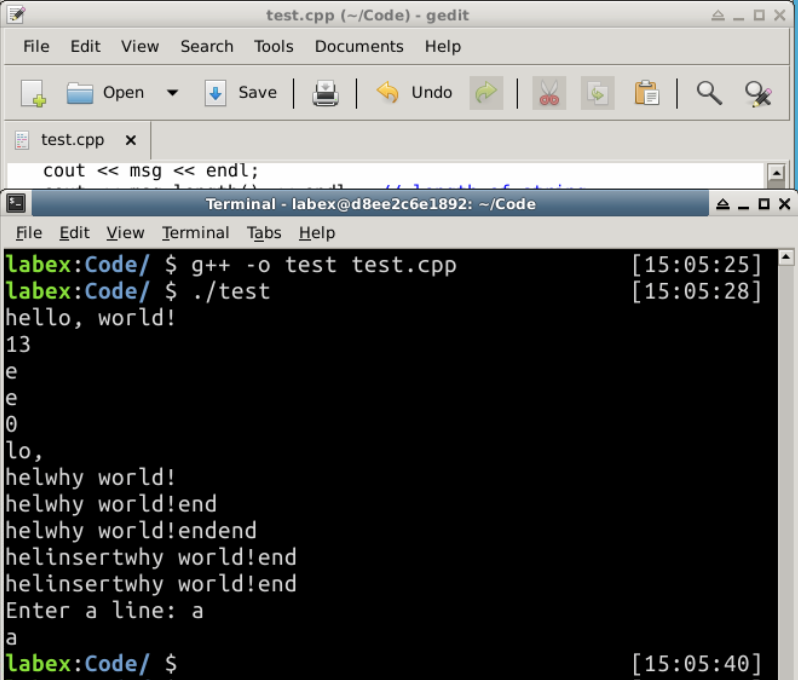
출력:
hello, world!
13
e
e
0
lo,
helwhy world!
helwhy world!end
helwhy world!endend
helinsertwhy world!end
helinsertwhy world!end
Enter a line: a
a
요약
문자열은 숫자 외에 또 다른 중요한 데이터 유형입니다. 이 섹션에서는 문자열의 사용에 대해 이야기했으며, C++ 는 문자열을 처리하기 위한 많은 유용한 메서드를 제공합니다. 이를 쉽게 사용하는 방법을 배우십시오.


