



소개
이 랩에서는 C++ 의 제어 흐름 문에 대해 배우게 됩니다. if-else 문, switch 문, while 루프, do-while 루프, for 루프를 사용하는 방법을 배우게 됩니다.
내용 미리보기
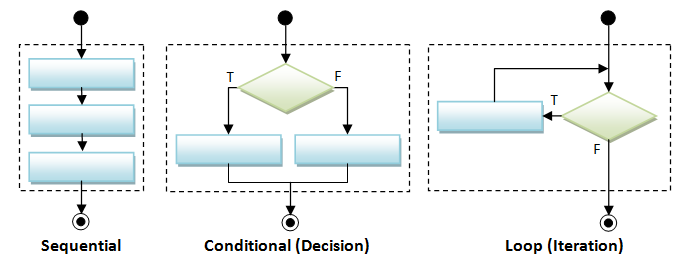
세 가지 기본적인 흐름 제어 구조가 있습니다 - 순차적, 조건적 (또는 결정), 그리고 루프 (또는 반복). 순차적 구조는 실행 과정이 위에서 아래로 한 줄씩 진행됩니다. 조건적 구조는 if-else 문을 사용하여 문장이 특정 조건을 만족하는지 확인한 다음 선택을 합니다. 루프 구조는 일부 논리 연산을 반복적으로 실행하는 데 사용됩니다.
순차적 흐름 제어
프로그램은 일련의 명령어입니다. 순차적 흐름은 가장 일반적이고 간단하며, 프로그래밍 문이 작성된 순서대로, 즉 순차적인 방식으로 위에서 아래로 실행됩니다.
조건부 흐름 제어
몇 가지 유형의 조건문이 있습니다. if-then, if-then-else, nested-if (if-elseif-elseif-...-else), switch-case, 그리고 조건식이 있습니다.
#include <iostream>
using namespace std;

int main(){

 int mark;

 cout<<"Input a number [0-100]: ";
 cin>>mark;
    // if
    if (mark >= 50) {
       cout << "Congratulation!" << endl;
       cout << "Keep it up!" << endl;
    }

    cout<<"Input a number [0-100]: ";
 cin>>mark;
    // if-else
    if (mark >= 50) {
       cout << "Congratulation!" << endl;
       cout << "Keep it up!" << endl;
    } else {
       cout << "Try Harder!" << endl;
    }

 cout<<"Input a number [0-100]: ";
 cin>>mark;
    // nested-if
    if (mark >= 80) {
       cout << "A" << endl;
    } else if (mark >= 70) {
       cout << "B" << endl;
    } else if (mark >= 60) {
       cout << "C" << endl;
    } else if (mark >= 50) {
       cout << "D" << endl;
    } else {
       cout << "F" << endl;
    }

    // switch-case
    char oper;
    int num1 = 1, num2 = 2, result = 0;
    cout<<"Input a char [+ - / *]: ";
    cin>> oper;
    switch (oper) {
       case '+':
          result = num1 + num2;
          break;
       case '-':
          result = num1 - num2;
          break;
       case '*':
          result = num1 * num2;
          break;
       case '/':
          result = num1 / num2;
          break;
       default:
          cout << "Unknown operator" << endl;
    }
    cout<<num1<<oper<<num2<<"="<<result;
    return 0;
}
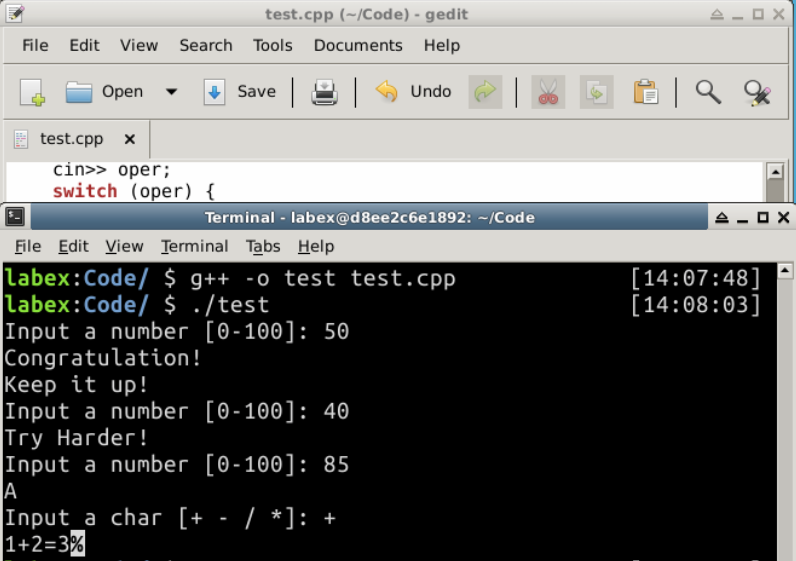
출력:
Input a number [0-100]: 50
Congratulation!
Keep it up!
Input a number [0-100]: 40
Try Harder!
Input a number [0-100]: 85
A
Input a char [+ - / *]: +
1+2=3
조건 연산자 (Conditional Operator): 조건 연산자는 booleanExpr ? trueExpr : falseExpr 형식의 삼항 (3-operand) 연산자입니다. booleanExpr에 따라 trueExpr 또는 falseExpr의 값을 평가하고 반환합니다.
// return either "PASS" or "FAIL", and put to cout
cout << (mark >= 50) ? "PASS" : "FAIL" << endl;

max = (a > b) ? a : b;   // RHS returns a or b
abs = (a > 0) ? a : -a;  // RHS returns a or -a
중괄호 (Braces): 블록 안에 문장이 하나만 있는 경우 중괄호 { }를 생략할 수 있습니다. 예를 들어,
if (mark >= 50)
   cout << "PASS" << endl;   // Only one statement, can omit { } but not recommended
else {                       // more than one statements, need { }
   cout << "FAIL" << endl;
   cout << "Try Harder!" << endl;
}
하지만 프로그램의 가독성을 높이기 위해 블록에 문장이 하나만 있더라도 중괄호를 유지하는 것이 좋습니다.
반복 흐름 제어
다시, 몇 가지 유형의 루프가 있습니다: for-loop, while-do, 그리고 do-while.
// for-loop
int sum = 0;
for (int number = 1; number <= 100; ++number) {
   sum += number;
}

// while-do
int sum = 0, number = 1;
while (number <= 100) {
   sum += number;
   ++number;
}

// do-while
int sum = 0, number = 1;
do {
   sum += number;
   ++number;
} while (number <= 100);
사용자에게 상한값을 묻습니다. 1 부터 주어진 상한값까지의 정수를 더하고 평균을 계산합니다.
/*
 * Sum from 1 to a given upperbound and compute their average.
 */
#include <iostream>
using namespace std;

int main() {
   int sum = 0;     // Store the accumulated sum
   int upperbound;
   cout << "Enter the upperbound: ";
   cin >> upperbound;

   // Sum from 1 to the upperbound
   for (int number = 1; number <= upperbound; ++number) {
      sum += number;
   }
   cout << "Sum is " << sum << endl;
   cout << "Average is " << (double)sum / upperbound << endl;

   // Sum only the odd numbers
   int count = 0;     // counts of odd numbers
   sum = 0;           // reset sum
   for (int number=1; number <= upperbound; number=number+2) {
      ++count;
      sum += number;
   }
   cout << "Sum of odd numbers is " << sum << endl;
   cout << "Average is " << (double)sum / count << endl;
}
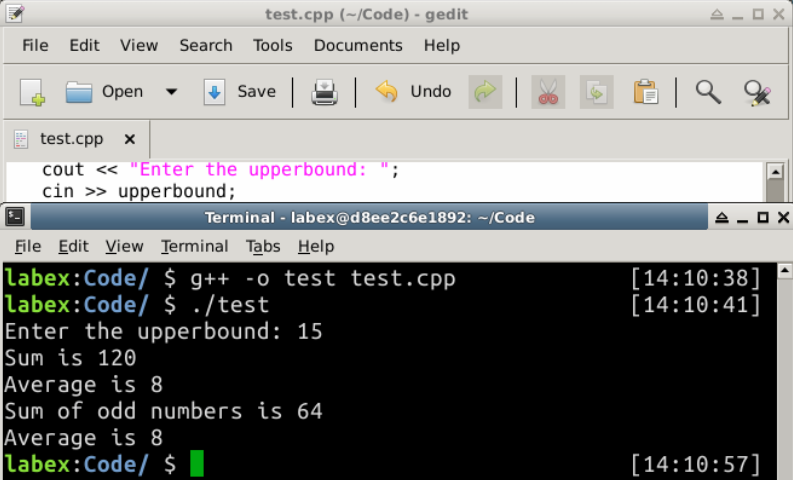
출력:
Enter the upperbound: 15
Sum is 120
Average is 8
Sum of odd numbers is 64
Average is 8
반복 흐름 중단 - 'break' 및 'continue'
break 문은 현재 (가장 안쪽의) 루프를 벗어나 종료합니다.
continue 문은 현재 반복을 중단하고 현재 (가장 안쪽의) 루프의 다음 반복을 계속합니다.
break와 continue는 읽고 따라가기 어렵기 때문에 좋지 않은 구조입니다. 절대적으로 필요한 경우에만 사용하십시오. break와 continue를 사용하지 않고도 동일한 프로그램을 항상 작성할 수 있습니다.
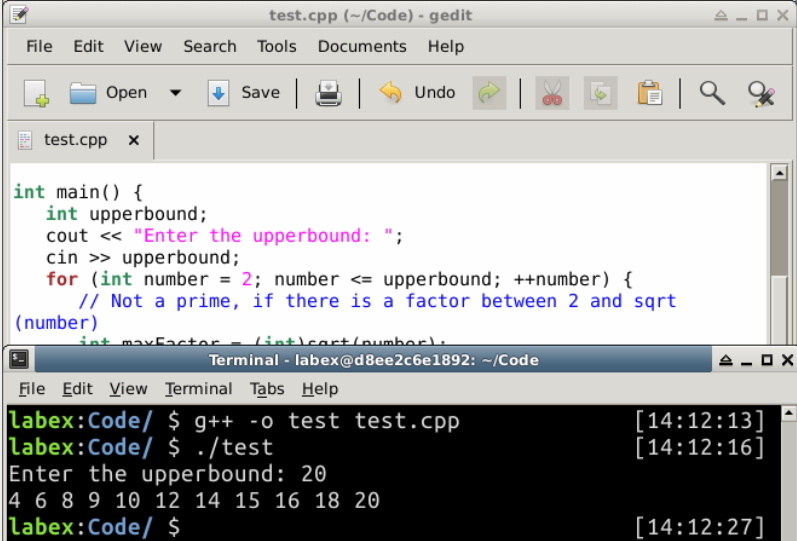
다음 프로그램은 2 와 상한값 사이의 소수가 아닌 숫자를 나열합니다.
/*
 *  List non-prime from 1 to an upperbound.
 */
#include <iostream>
#include <cmath>
using namespace std;

int main() {
   int upperbound;
   cout << "Enter the upperbound: ";
   cin >> upperbound;
   for (int number = 2; number <= upperbound; ++number) {
      // Not a prime, if there is a factor between 2 and sqrt(number)
      int maxFactor = (int)sqrt(number);
      for (int factor = 2; factor <= maxFactor; ++factor) {
         if (number % factor == 0) {   // Factor?
            cout << number << " ";
            break;   // A factor found, no need to search for more factors
         }
      }
   }
   cout << endl;
   return 0;
}
출력:
Enter the upperbound: 20
4 6 8 9 10 12 14 15 16 18 20
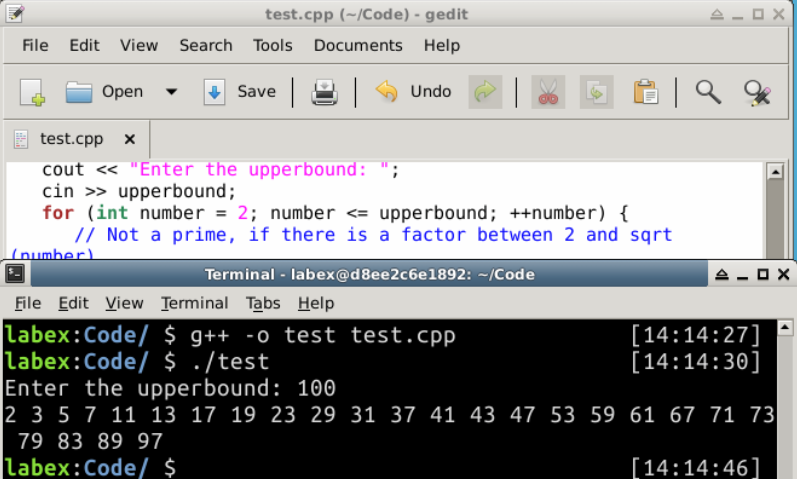
위의 프로그램을 다시 작성하여 대신 모든 소수를 나열해 보겠습니다. isPrime이라는 boolean 플래그를 사용하여 현재 number가 소수인지 여부를 나타냅니다. 그런 다음 출력을 제어하는 데 사용됩니다.
/*
 *  List primes from 1 to an upperbound.
 */
#include <iostream>
#include <cmath>
using namespace std;

int main() {
   int upperbound;
   cout << "Enter the upperbound: ";
   cin >> upperbound;
   for (int number = 2; number <= upperbound; ++number) {
      // Not a prime, if there is a factor between 2 and sqrt(number)
      int maxFactor = (int)sqrt(number);
      bool isPrime = true;  // boolean flag to indicate whether number is a prime
      for (int factor = 2; factor <= maxFactor; ++factor) {
         if (number % factor == 0) {   // Factor?
            isPrime = false;   // number is not a prime
            break;   // A factor found, no need to search for more factors
         }
      }
      if (isPrime) cout << number << " ";
   }
   cout << endl;
   return 0;
}
출력:
Enter the upperbound: 100
2 3 5 7 11 13 17 19 23 29 31 37 41 43 47 53 59 61 67 71 73 79 83 89 97
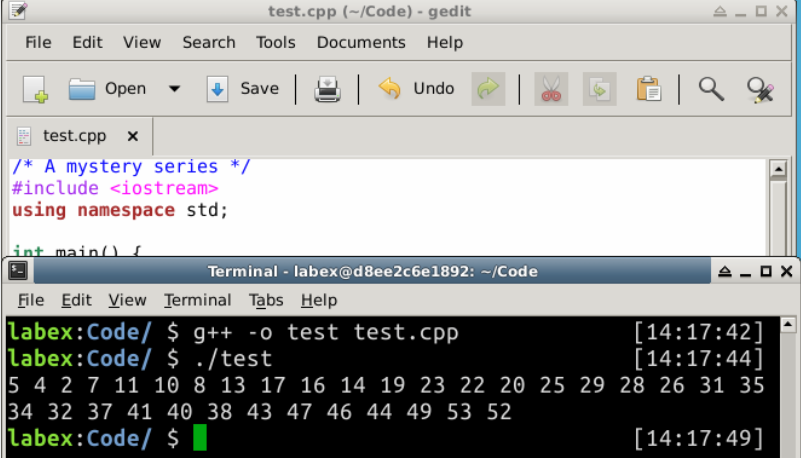
break와 continue를 사용하는 다음 프로그램을 연구하십시오.
/* A mystery series */
#include <iostream>
using namespace std;

int main() {
   int number = 1;
   while (true) {
      ++number;
      if ((number % 3) == 0) continue;
      if (number == 53) break;
      if ((number % 2) == 0) {
         number += 3;
      } else {
         number -= 3;
      }
      cout << number << " ";
   }
   cout << endl;
   return 0;
}
출력:
5 4 2 7 11 10 8 13 17 16 14 19 23 22 20 25 29 28 26 31 35 34 32 37 41 40 38 43 47 46 44 49 53 52
프로그램 종료
프로그래밍 문장의 끝에 도달하기 전에 프로그램을 종료할 수 있는 몇 가지 방법이 있습니다.
exit(): <cstdlib> (C 의 "stdlib.h"에서 포팅됨) 에서 함수 exit(int exitCode)를 호출하여 프로그램을 종료하고 운영 체제로 제어를 반환할 수 있습니다. 관례적으로, 반환 코드 0 은 정상적인 종료를 나타냅니다. 반면, 0 이 아닌 exitCode (-1) 는 비정상적인 종료를 나타냅니다. 예를 들어,
abort(): 헤더 <cstdlib>는 또한 abort()라는 함수를 제공하며, 이 함수는 프로그램을 비정상적으로 종료하는 데 사용할 수 있습니다.
if (errorCount > 10) {
   cout << "too many errors" << endl;
   exit(-1);  // Terminate the program
              // OR abort();
}
중첩 루프
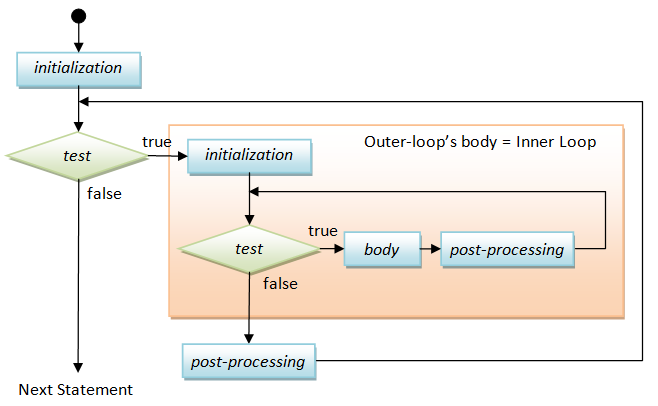
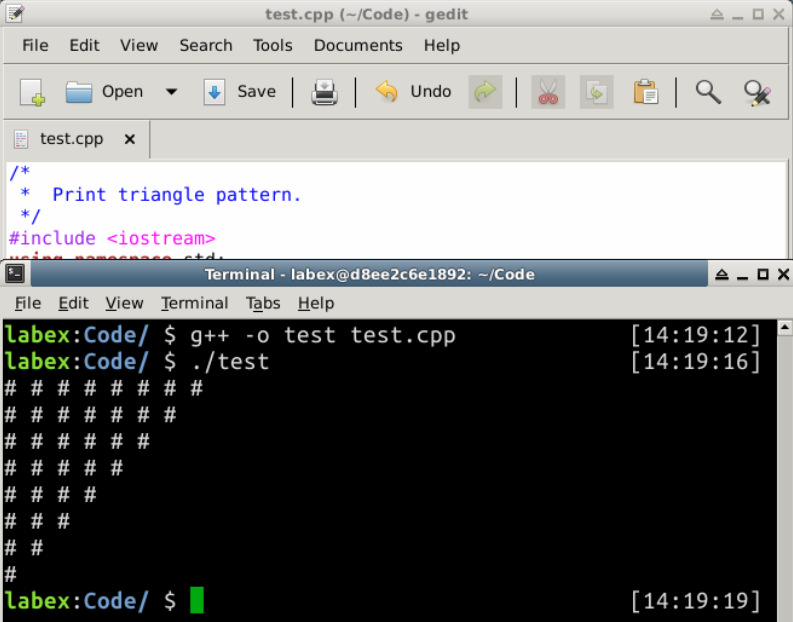
다음 다이어그램은 중첩 for-루프, 즉 외부 for-루프 내의 내부 for-루프를 보여줍니다.
/*
 *  Print triangle pattern.
 */
#include <iostream>
using namespace std;

int main() {
   int size = 8;
   for (int row = 1; row <= size; ++row) {     // Outer loop to print all the rows
      for (int col = 1; col <= size-row+1; ++col) {  // Inner loop to print all the columns of each row
         cout << "## ";
      }
      cout << endl;   // A row ended, bring the cursor to the next line
   }

   return 0;
}
출력:
## ## ## ## ## ## ## #
## ## ## ## ## ## #
## ## ## ## ## #
## ## ## ## #
## ## ## #
## ## #
## #
#
다음 구조는 일반적으로 사용됩니다.
while (true) { ...... }
무한 루프 (infinite loop) 처럼 보이지만, 일반적으로 루프 본체 내부의 break 또는 return 문을 통해 종료됩니다. 이러한 종류의 코드는 읽기 어려우므로, 조건을 다시 작성하여 가능하다면 피하십시오.
요약
이 섹션에서는 세 가지 제어 구조를 소개했습니다. 이는 매우 유용합니다. 이들을 함께 결합할 수 있습니다. 루프에 주의하고, 무한 루프가 발생하지 않도록 종료 조건을 확인하십시오.


