소개
Durable Object의 이름은 애플리케이션 데이터 모델의 일부입니다. 같은 이름을 사용하는 호출은 동일한 논리 객체와 해당 객체의 SQLite 데이터베이스에 도달하고, 서로 다른 이름은 서로 다른 조정 단위를 선택합니다. 따라서 Durable Object 클래스와 저장소 코드가 올바르더라도 라우팅 회귀가 발생하면 한 방의 상태가 다른 방의 URL을 통해 노출될 수 있습니다.
이 실습에서는 정상적인 planning 및 support 기록이 있는 작은 방 저널을 배포합니다. 그런 다음 모든 방을 planning 객체로 보내는 잘못된 릴리스를 재현하고, 경로 진단 기능으로 불일치를 찾습니다. 이름 매핑만 수정한 후 다시 배포하고, 두 원래 기록이 모두 보존되었는지 확인합니다. 제공된 WebSocket 프로브는 동시에 업데이트를 수행하고 연결을 끊었다가 다시 연결하여 새 방도 서로 격리되어 있는지 확인합니다.
이 과정을 바로 시작했다면 먼저 Connect LabEx to Your Cloudflare Account를 완료합니다. 이 실습에서 사용하는 LabEx VM 터미널, Wrangler 디바이스 인증, 계정 확인 및 명시적 account-ID 설정 방법을 설명합니다. 이 새 VM도 별도로 인증해야 합니다.
VM 인증 및 방 네임스페이스 선언
이 단계에서는 새 VM을 인증하고, 전용 학습 계정을 확인한 다음, SQLite 기반 Durable Object 네임스페이스 하나를 선언합니다.
cd /home/labex/project/room-routing
npx wrangler --version
npx wrangler login --device --browser=false
Wrangler 버전이 4.132.0으로 표시되어야 합니다. 브라우저에서 표시된 Cloudflare URL을 열고, 짧은 코드를 입력한 다음, 사용할 학습 계정을 확인하고 인증합니다. 디바이스 인증을 사용하면 비밀번호를 터미널에 입력하지 않고도 이 VM에 액세스 권한을 부여할 수 있습니다.
안전한 신원 정보만 읽고, 이름으로 확인된 계정을 선택한 다음, 임시 Worker 이름을 생성합니다.
WHOAMI="$(npx wrangler whoami --json)"
printf '%s\n' "$WHOAMI" | jq '{loggedIn, authType, accounts: [.accounts[] | {name}]}'
ACCOUNT_ID="$(printf '%s\n' "$WHOAMI" | jq -r '.accounts[] | select(.name == "LabEx Learning") | .id')"
test -n "$ACCOUNT_ID"
RUN="labex-c10-o07-$(openssl rand -hex 6)"
printf '%s\n' "$RUN" | tee .labex/run-name
cat > wrangler.jsonc <<JSON
{
  "\$schema": "./node_modules/wrangler/config-schema.json",
  "name": "$RUN",
  "account_id": "$ACCOUNT_ID",
  "main": "src/index.js",
  "compatibility_date": "2026-09-18",
  "workers_dev": true,
  "preview_urls": false,
  "observability": { "enabled": true, "head_sampling_rate": 1 },
  "durable_objects": { "bindings": [
    { "name": "ROOMS", "class_name": "RoomJournal" }
  ] },
  "exports": {
    "RoomJournal": { "type": "durable-object", "storage": "sqlite" }
  }
}
JSON
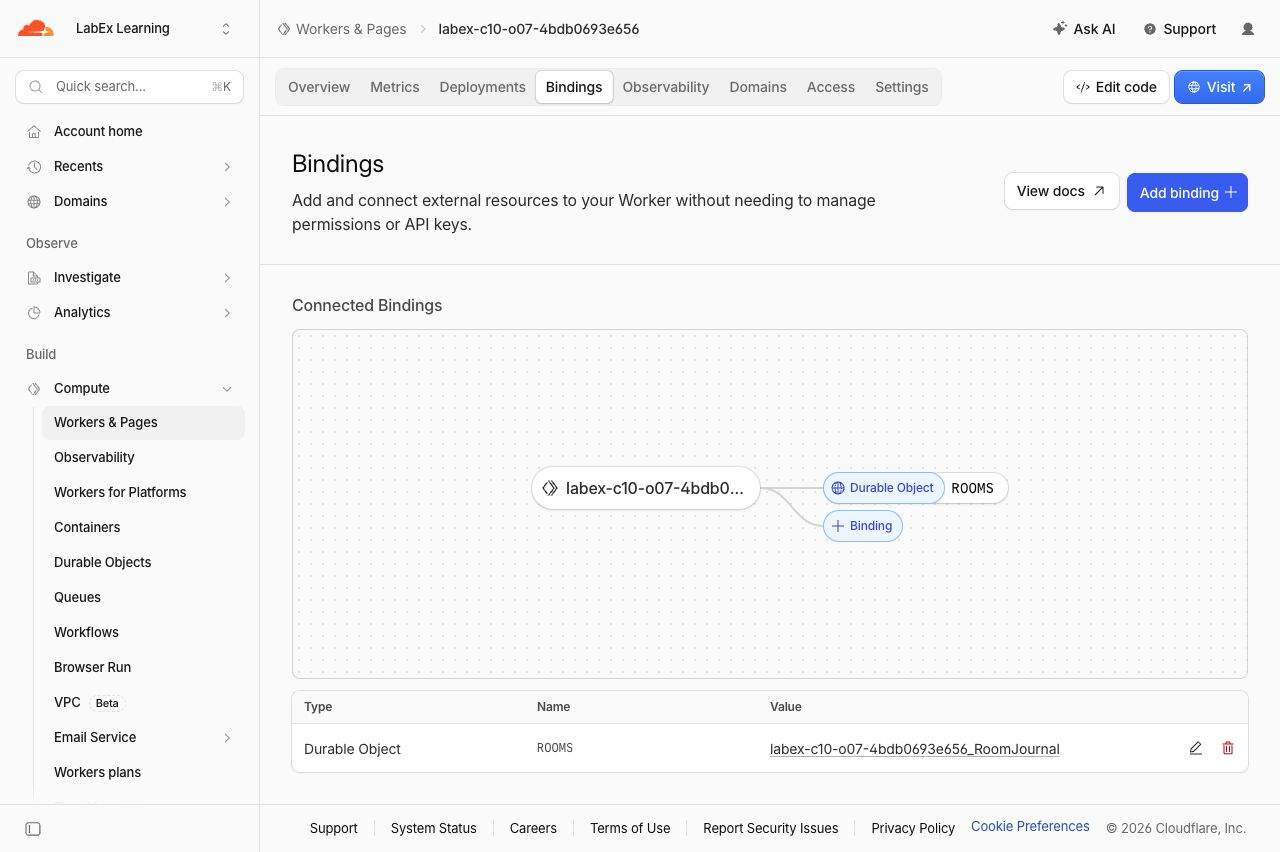
ROOMS는 네임스페이스 바인딩입니다. 이 바인딩으로 여러 RoomJournal 객체에 접근할 수 있습니다. getByName()에 전달하는 애플리케이션 지정 이름이 어떤 객체의 SQLite 데이터베이스와 실시간 연결이 호출을 받을지 결정합니다.
명시적인 객체 이름을 사용하는 저널 작성
이 단계에서는 상태를 유지하는 클래스를 구현하고, 객체 식별자 선택을 하나의 작은 라우팅 함수에 모읍니다. 진단 과정에서는 이 분리가 중요합니다. 호출자가 잘못된 객체를 선택하더라도 저장소 동작 자체는 정상일 수 있기 때문입니다.
처음에는 올바른 매퍼를 만듭니다. 검증된 방 이름은 이미 안정적이고 결정적인 객체 이름입니다.
cat > src/router.js <<'JS'
export function objectNameFor(room) {
  return room;
}
JS
cat > test/router.test.mjs <<'JS'
import test from "node:test";
import assert from "node:assert/strict";
import { objectNameFor } from "../src/router.js";

test("each validated room keeps its own object identity", () => {
  assert.equal(objectNameFor("planning"), "planning");
  assert.equal(objectNameFor("support"), "support");
  assert.notEqual(objectNameFor("planning"), objectNameFor("support"));
});
JS
Worker와 Durable Object를 만듭니다. ctx.id.name은 이 객체에 도달할 때 사용한 안정적인 이름을 보여줍니다. 페이지 로그에는 요청된 가상 방 이름과 선택된 가상 방 이름만 기록하며, 저널 내용은 의도적으로 로그에서 제외합니다.
cat > src/index.js <<'JS'
import { DurableObject } from "cloudflare:workers";
import { objectNameFor } from "./router.js";

const ROOM = /^[a-z0-9](?:[a-z0-9-]{0,30}[a-z0-9])?$/;
const EVENT = /^[a-z0-9](?:[a-z0-9-]{0,46}[a-z0-9])?$/;
const json = (value, status = 200) => Response.json(value, { status });
const safeRoom = value => ROOM.test(value || "") ? value : null;

export class RoomJournal extends DurableObject {
  constructor(ctx, env) {
    super(ctx, env);
    ctx.blockConcurrencyWhile(async () => {
      ctx.storage.sql.exec(`CREATE TABLE IF NOT EXISTS events (
        sequence INTEGER PRIMARY KEY AUTOINCREMENT,
        event_id TEXT NOT NULL UNIQUE,
        text TEXT NOT NULL
      )`);
    });
  }

  state() {
    return {
      objectName: this.ctx.id.name,
      events: this.ctx.storage.sql.exec(
        "SELECT sequence, event_id AS eventId, text FROM events ORDER BY sequence"
      ).toArray()
    };
  }

  append(eventId, text) {
    if (!EVENT.test(eventId || "") || typeof text !== "string" || text.length < 1 || text.length > 80) {
      throw new Error("invalid_event");
    }
    this.ctx.storage.sql.exec("INSERT OR IGNORE INTO events (event_id, text) VALUES (?, ?)", eventId, text);
    return this.state();
  }

  async fetch(request) {
    if (request.headers.get("Upgrade")?.toLowerCase() !== "websocket") return json({ error: "upgrade_required" }, 426);
    const pair = new WebSocketPair();
    const [client, server] = Object.values(pair);
    this.ctx.acceptWebSocket(server);
    server.send(JSON.stringify({ type: "ready", ...this.state() }));
    return new Response(null, { status: 101, webSocket: client });
  }

  async webSocketMessage(socket, raw) {
    try {
      const message = JSON.parse(raw);
      if (message.type !== "append") throw new Error("invalid_event");
      const state = this.append(message.eventId, message.text);
      const frame = JSON.stringify({ type: "event", ...state });
      for (const peer of this.ctx.getWebSockets()) peer.send(frame);
    } catch {
      socket.send(JSON.stringify({ type: "error", error: "invalid_event" }));
    }
  }
}

async function roomState(env, room) {
  return env.ROOMS.getByName(objectNameFor(room)).state();
}

function inspectPage(planning, support) {
  const rows = [planning, support].map(([requested, state]) => `<tr><td>${requested}</td><td>${state.objectName}</td><td>${state.events.map(x => x.eventId).join(", ")}</td></tr>`).join("");
  return `<!doctype html><html lang="en"><meta charset="utf-8"><title>Room routing inspector</title>
  <style>body{font:18px system-ui;max-width:900px;margin:48px auto;color:#17212b}h1{color:#5b8c00}table{border-collapse:collapse;width:100%}th,td{border:1px solid #ccd5df;padding:14px;text-align:left}th{background:#eef7dc}.ok{padding:12px;background:#eef7dc;border-left:5px solid #78aa00}</style>
  <h1>Room routing inspector</h1><p class="ok">Each requested room resolves to the matching Durable Object name.</p>
  <table><thead><tr><th>Requested room</th><th>Object name</th><th>Preserved event IDs</th></tr></thead><tbody>${rows}</tbody></table></html>`;
}

export default {
  async fetch(request, env) {
    const url = new URL(request.url);
    if (url.pathname === "/inspect") {
      const states = await Promise.all(["planning", "support"].map(async room => [room, await roomState(env, room)]));
      return new Response(inspectPage(...states), { headers: { "content-type": "text/html; charset=utf-8" } });
    }
    const debug = url.pathname.match(/^\/debug\/route\/([^/]+)$/);
    if (debug) {
      const room = safeRoom(debug[1]);
      if (!room) return json({ error: "invalid_room" }, 400);
      return json({ requestedRoom: room, objectName: objectNameFor(room) });
    }
    const match = url.pathname.match(/^\/rooms\/([^/]+)\/(events|connect)$/);
    if (!match) return json({ error: "not_found" }, 404);
    const room = safeRoom(match[1]);
    if (!room) return json({ error: "invalid_room" }, 400);
    const objectName = objectNameFor(room);
    console.log(JSON.stringify({ event: "routing_decision", requestedRoom: room, objectName, operation: match[2] }));
    const stub = env.ROOMS.getByName(objectName);
    if (match[2] === "connect") return stub.fetch(request);
    if (request.method === "GET") return json(await stub.state());
    if (request.method === "POST") {
      try {
        const body = await request.json();
        return json(await stub.append(body.eventId, body.text), 201);
      } catch (error) {
        return json({ error: error.message === "invalid_event" ? "invalid_event" : "invalid_json" }, 400);
      }
    }
    return json({ error: "method_not_allowed" }, 405);
  }
};
JS
npm test
테스트는 객체 식별 경계를 직접 확인합니다. Durable Object는 진단을 위해 런타임이 관리하는 이름을 사용하고, 저널 행을 SQLite에 저장한 뒤 반환합니다.
정상적인 두 방 기록 배포
이 단계에서는 먼저 정상 릴리스를 배포하고 각 방에 식별하기 쉬운 이벤트를 하나씩 만듭니다. 이 행들이 보존 증거입니다. 이후 수정이 성공하려면 두 행이 원래 객체에서 다시 반환되어야 합니다.
rm -f .labex/deploy.log .labex/app-url .labex/baseline.json
npx wrangler deploy | tee .labex/deploy.log
APP_URL="$(grep -Eo 'https://[^ ]+\.workers\.dev' .labex/deploy.log | tail -1)"
test -n "$APP_URL"
printf '%s\n' "$APP_URL" | tee .labex/app-url
for attempt in $(seq 1 30); do READY="$(curl --silent "$APP_URL/debug/route/planning" || true)"; test "$(jq -r '.objectName // empty' <<<"$READY" 2>/dev/null)" = planning && break; sleep 2; done
test "$(jq -r .objectName <<<"$READY")" = planning
sleep 5
curl --silent --fail -X POST "$APP_URL/rooms/planning/events" -H 'content-type: application/json' --data '{"eventId":"plan-start","text":"Planning kickoff"}' >/dev/null
curl --silent --fail -X POST "$APP_URL/rooms/support/events" -H 'content-type: application/json' --data '{"eventId":"support-start","text":"Support handoff"}' >/dev/null
jq -n --argjson planning "$(curl --silent --fail "$APP_URL/rooms/planning/events")" --argjson support "$(curl --silent --fail "$APP_URL/rooms/support/events")" '{planning:$planning,support:$support}' | tee .labex/baseline.json
두 objectName 필드는 서로 달라야 합니다. planning에는 plan-start만 포함되고, support에는 support-start만 포함되어야 합니다. Worker 이름은 임시로 사용되지만, 이 객체 기록은 릴리스 회귀와 수정 과정에서도 보존되어야 합니다.
잘못된 릴리스 재현 및 추적
이 단계에서는 실습에 포함된 릴리스 회귀를 시뮬레이션합니다. 잘못된 함수는 인수를 무시하고 항상 planning을 반환합니다. 객체 식별 테스트를 실행하면 실패해야 합니다. 이 통제된 실패를 기록하면 배포 전에 결함을 확인할 수 있습니다.
cp fixtures/router-bug.js src/router.js
rm -f .labex/bug-test.log .labex/bug.json
set -o pipefail
if npm test 2>&1 | tee .labex/bug-test.log; then TEST_STATUS=0; else TEST_STATUS=$?; fi
set +o pipefail
printf '%s\n' "$TEST_STATUS" > .labex/bug-test-status
test "$TEST_STATUS" -ne 0
npx wrangler deploy
APP_URL="$(cat .labex/app-url)"
for attempt in $(seq 1 30); do
  BUG_ROUTE="$(curl --silent "$APP_URL/debug/route/support" || true)"
  BUG_READ="$(curl --silent "$APP_URL/rooms/support/events" || true)"
  test "$(jq -r '.objectName // empty' <<<"$BUG_ROUTE" 2>/dev/null)" = planning && test "$(jq -r '.objectName // empty' <<<"$BUG_READ" 2>/dev/null)" = planning && break
  sleep 2
done
test "$(jq -r .objectName <<<"$BUG_ROUTE")" = planning
test "$(jq -r .objectName <<<"$BUG_READ")" = planning
jq -n \
  --argjson planningRoute "$(curl --silent --fail "$APP_URL/debug/route/planning")" \
  --argjson supportRoute "$BUG_ROUTE" \
  --argjson supportRead "$BUG_READ" \
  '{planningRoute:$planningRoute,supportRoute:$supportRoute,supportRead:$supportRead}' | tee .labex/bug.json
진단 결과는 요청된 방과 선택된 객체 이름을 구분해서 보여줍니다. 이제 support를 요청하면 objectName: planning이 반환되고, 해당 방의 조회 결과에는 plan-start가 노출됩니다. 원래 support 객체를 삭제하거나 덮어쓴 것이 아닙니다. 잘못된 릴리스가 해당 객체를 더 이상 가리키지 않게 되었을 뿐입니다.
매퍼 수정 및 재연결 격리 검증
이 단계에서는 객체 식별 매핑만 수정합니다. 원래 이름이 지정된 객체가 여전히 존재하므로 저장소를 초기화하거나 데이터를 다시 재생할 필요가 없습니다.
cat > src/router.js <<'JS'
export function objectNameFor(room) {
  return room;
}
JS
npm test
cat > tools/isolation.mjs <<'JS'
import WebSocket from "ws";
const [base, prefix] = process.argv.slice(2);
const wsBase = base.replace(/^http/, "ws");
const rooms = [`${prefix}-planning`, `${prefix}-support`];
const open = room => new Promise((resolve, reject) => {
  const ws = new WebSocket(`${wsBase}/rooms/${room}/connect`);
  const inbox = [];
  ws.on("message", raw => { const value = JSON.parse(raw); inbox.push(value); if (value.type === "ready") resolve({ ws, inbox, ready:value }); });
  ws.on("error", reject);
});
const waitFor = (client, eventId) => new Promise((resolve, reject) => {
  const timer = setTimeout(() => reject(new Error("event timeout")), 5000);
  const inspect = value => { if (value.type === "event" && value.events.some(x => x.eventId === eventId)) { clearTimeout(timer); client.ws.off("message", listener); resolve(value); } };
  const listener = raw => inspect(JSON.parse(raw));
  client.ws.on("message", listener); client.inbox.forEach(inspect);
});
const close = client => new Promise(resolve => { client.ws.once("close", resolve); client.ws.close(1000, "reconnect"); });
const [planning, support] = await Promise.all(rooms.map(open));
planning.ws.send(JSON.stringify({ type:"append", eventId:`${prefix}-plan`, text:"Plan update" }));
support.ws.send(JSON.stringify({ type:"append", eventId:`${prefix}-support`, text:"Support update" }));
await Promise.all([waitFor(planning, `${prefix}-plan`), waitFor(support, `${prefix}-support`)]);
await Promise.all([close(planning), close(support)]);
const [planningAgain, supportAgain] = await Promise.all(rooms.map(open));
const result = { planning:planningAgain.ready, support:supportAgain.ready };
console.log(JSON.stringify(result, null, 2));
await Promise.all([close(planningAgain), close(supportAgain)]);
JS
rm -f .labex/repaired.json .labex/reconnect.json
npx wrangler deploy
APP_URL="$(cat .labex/app-url)"
for attempt in $(seq 1 30); do REPAIRED_READY="$(curl --silent "$APP_URL/debug/route/support" || true)"; test "$(jq -r '.objectName // empty' <<<"$REPAIRED_READY" 2>/dev/null)" = support && break; sleep 2; done
test "$(jq -r .objectName <<<"$REPAIRED_READY")" = support
sleep 5
jq -n --argjson planning "$(curl --silent --fail "$APP_URL/rooms/planning/events")" --argjson support "$(curl --silent --fail "$APP_URL/rooms/support/events")" '{planning:$planning,support:$support}' | tee .labex/repaired.json
node tools/isolation.mjs "$APP_URL" cloud | tee .labex/reconnect.json
수정된 조회 결과에서는 두 원래 이벤트 ID가 각 원래 객체에 그대로 존재해야 합니다. 그런 다음 WebSocket 프로브가 새 객체 두 개를 동시에 업데이트하고, 두 연결을 닫은 뒤 다시 연결합니다. 각 ready 프레임에는 해당 방의 이벤트만 포함됩니다. 이를 통해 데이터베이스를 초기화한 것이 아니라 라우팅을 수정했기 때문에 누출이 해결되었음을 확인할 수 있습니다.
수정된 서비스 검사 및 재배포
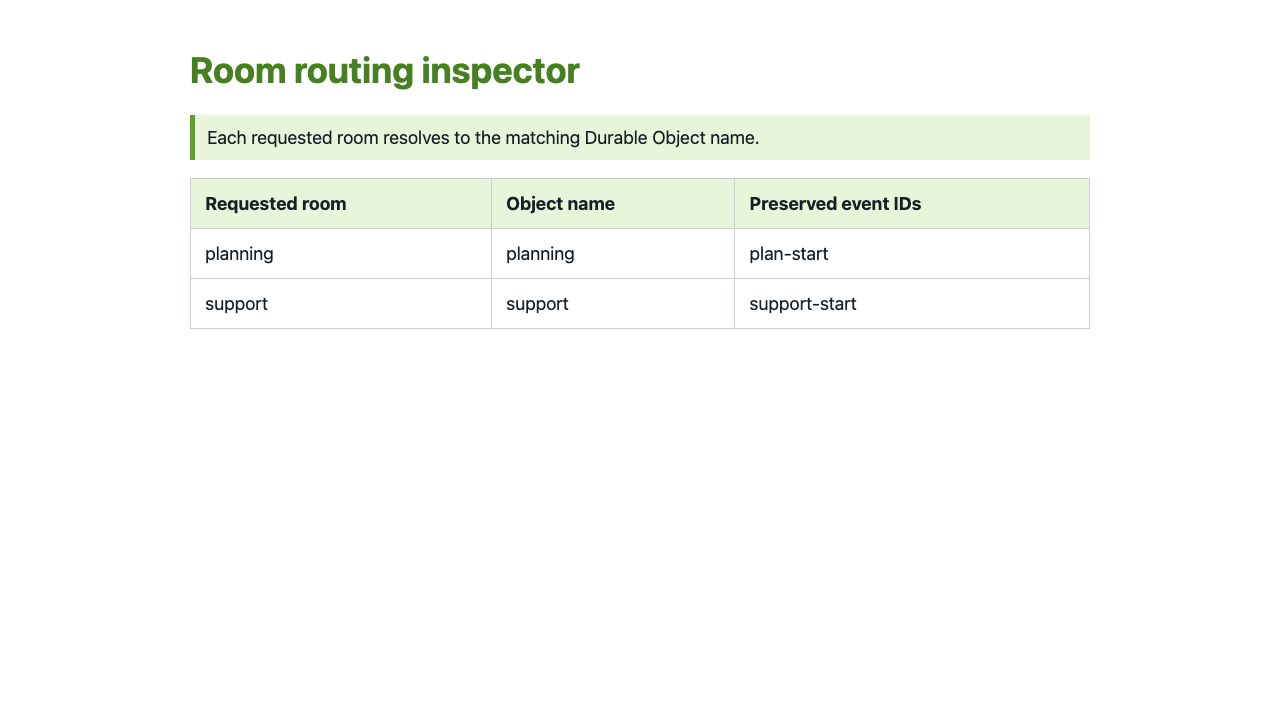
이 단계에서는 런타임 증거를 초보자도 확인하기 쉬운 브라우저와 Dashboard 화면에 연결합니다. .labex/app-url에 저장된 URL 뒤에 /inspect를 붙여 브라우저에서 엽니다. 초록색 문장과 표에 planning → planning, support → support 및 보존된 두 이벤트 ID가 표시되어야 합니다.
Workers & Pages를 열고 .labex/run-name에 저장된 정확한 Worker 이름을 선택한 다음 Bindings를 엽니다. ROOMS가 RoomJournal에 연결되어 있어야 합니다.
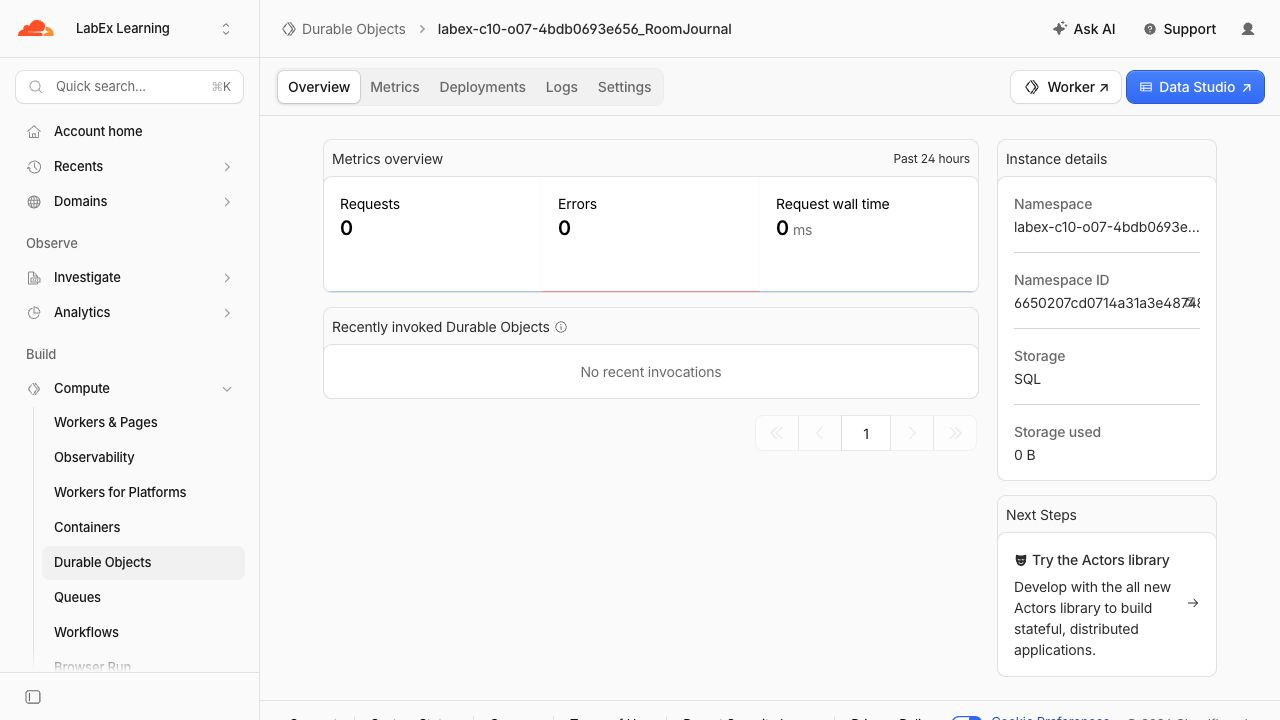
Durable Objects를 열고 <your-worker>_RoomJournal을 선택한 다음 Storage: SQL을 확인합니다. 하나의 네임스페이스에는 이름이 지정된 여러 객체가 포함될 수 있으며, 이름이 그 안에서 격리된 객체를 선택합니다.
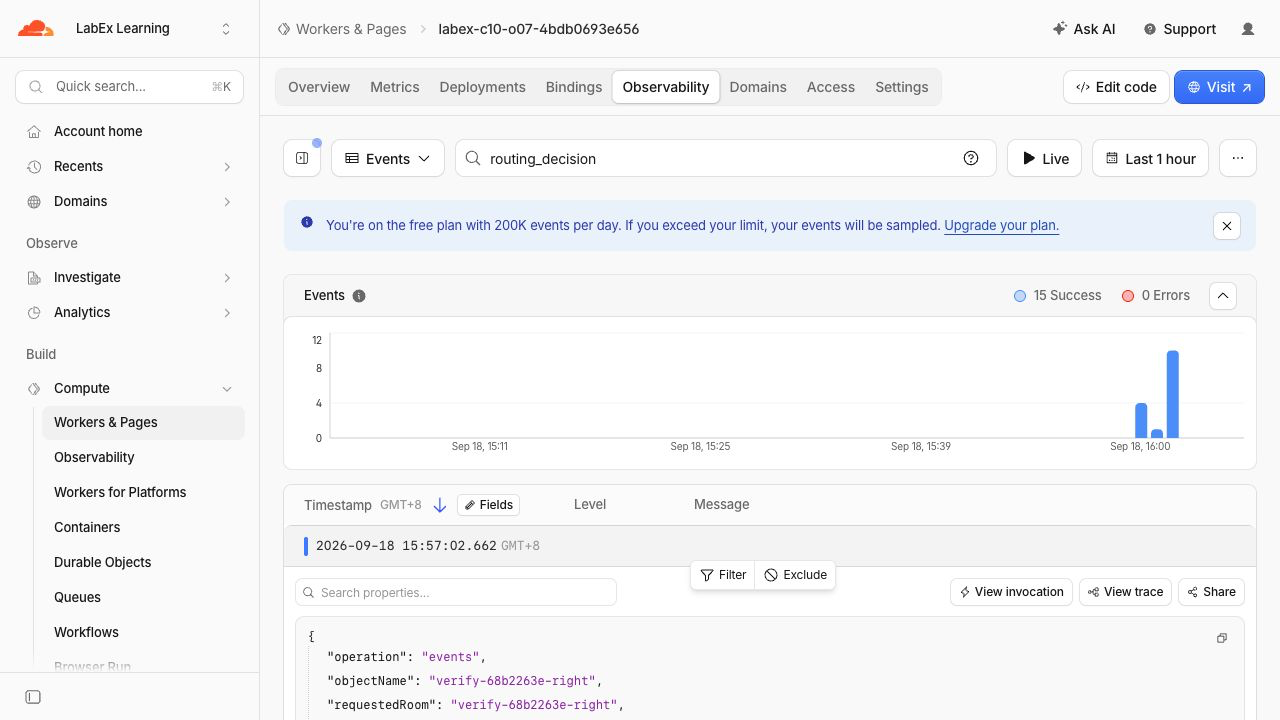
Workers & Pages에서 Worker로 돌아가 Observability를 연 다음, 저장된 이벤트에서 routing_decision을 검색합니다. 방 작업에서 발생한 이벤트 하나를 펼칩니다. 이 결정은 Worker가 Durable Object를 호출하기 전에 상태를 저장하지 않는 Worker에서 기록하므로 네임스페이스 로그가 아니라 Worker 로그에 나타납니다. 안전한 필드에는 저널 내용 없이, 요청된 가상 방 이름과 선택된 가상 방 이름이 동일하게 표시되어야 합니다.
마지막으로 코드를 변경하지 않고 다시 배포한 뒤 원래 방을 다시 조회합니다.
npx wrangler deploy
APP_URL="$(cat .labex/app-url)"
curl --silent --fail "$APP_URL/rooms/planning/events" | jq
curl --silent --fail "$APP_URL/rooms/support/events" | jq
두 원래 기록이 그대로 남아 있어야 합니다. 동일한 검증된 이름이 동일한 네임스페이스 항목을 계속 선택하므로, 변경되지 않은 배포는 새로운 객체 식별자를 만들지 않습니다.
Room Journal 네임스페이스 삭제
이 단계에서는 VM이 인증된 상태에서 이 실습의 Worker와 생성된 네임스페이스만 삭제합니다. 선언적 삭제 표시가 클래스 네임스페이스를 제거한 뒤 Wrangler가 스크립트를 삭제합니다.
RUN="$(cat .labex/run-name)"
case "$RUN" in labex-c10-o07-*) ;; *) echo "Unexpected Worker name" >&2; exit 1;; esac
cat > src/cleanup.js <<'JS'
export default { fetch() { return Response.json({ status: "cleanup" }, { status: 410 }); } };
JS
ACCOUNT_ID="$(node -e 'console.log(JSON.parse(require("fs").readFileSync("wrangler.jsonc", "utf8")).account_id)')"
cat > wrangler.cleanup.jsonc <<JSON
{
  "\$schema": "./node_modules/wrangler/config-schema.json",
  "name": "$RUN",
  "account_id": "$ACCOUNT_ID",
  "main": "src/cleanup.js",
  "compatibility_date": "2026-09-18",
  "workers_dev": true,
  "preview_urls": false,
  "exports": { "RoomJournal": { "type": "durable-object", "state": "deleted" } }
}
JSON
npx wrangler deploy --config wrangler.cleanup.jsonc
npx wrangler delete --config wrangler.cleanup.jsonc
확인 프롬프트에 정확한 $RUN이 표시되는지 확인하고 y를 입력합니다. Successfully deleted가 표시되어야 합니다. 독립적인 삭제 확인을 위해 VM 인증 상태를 유지합니다.
npx wrangler whoami --json | jq '{loggedIn, authType}'
JSON에 "loggedIn": true가 포함되어야 합니다. 네트워크 또는 인증 실패는 삭제되었다는 증거가 아닙니다.
이 VM의 Wrangler 인증 해제
이 단계에서는 삭제가 독립적으로 확인된 후 이 VM의 OAuth 인증만 제거합니다.
npx wrangler logout
npx wrangler whoami --json
최종 JSON에 "loggedIn": false가 포함되어야 합니다. 학습 계정은 브라우저에서 계속 로그인된 상태로 유지됩니다.
요약
정상적인 저장소를 초기화하는 대신 ID 라우팅 경계에서 Durable Object 결함을 진단했습니다. 통제된 잘못된 릴리스를 통해 support가 planning 객체를 선택한다는 사실을 확인했고, 경로 진단으로 요청된 이름과 선택된 이름을 표시했습니다. 직접적인 이름 매핑을 복원하자 두 원래 SQLite 기록이 즉시 복구되었습니다. 동시에 수행한 WebSocket 업데이트, 연결 종료, 재연결 및 변경되지 않은 재배포를 통해 새 방과 기존 방이 계속 격리되어 있음을 확인했습니다. 마지막으로 수정된 배포를 검사하고, 정확한 임시 리소스를 삭제한 뒤 로그아웃했습니다.