소개
이 랩에서는 원의 면적과 둘레를 계산하는 C 프로그램을 만들 것입니다. 이 간단한 프로그램은 변수 선언, 사용자 입력 처리, 수학적 계산, 그리고 형식화된 출력 표시를 포함한 몇 가지 기본적인 프로그래밍 개념을 보여줍니다.
다음 수학 공식을 사용할 것입니다:
- 원의 면적 = π × 반지름²
- 원의 둘레 = 2 × π × 반지름
이 랩을 마치면 사용자 입력을 받아 이러한 공식을 사용하여 계산을 수행하는 완전한 C 프로그램을 작성하게 됩니다.
프로그램 파일 생성 및 기본 구조
C 프로그램 파일을 생성하고 기본 구조를 설정하는 것으로 시작해 보겠습니다. ~/project/circle_program 디렉토리에 circle.c라는 파일을 생성할 것입니다.
프로젝트 디렉토리로 이동합니다:
cd ~/project/circle_programWebIDE 편집기를 사용하여
circle.c라는 새 파일을 생성합니다. WebIDE 상단의 "File" 메뉴를 클릭한 다음 "New File"을 선택합니다. 또는 파일 탐색기 패널에서 마우스 오른쪽 버튼을 클릭하고 "New File"을 선택할 수도 있습니다.파일 이름을
circle.c로 지정하고~/project/circle_program디렉토리에 저장합니다.이제 C 프로그램의 기본 구조를 파일에 추가해 보겠습니다:
#include <stdio.h>

int main() {
    // We will add our code here

    return 0;
}
위 코드에서:
#include <stdio.h>는 컴파일러에게printf()및scanf()와 같은 함수를 제공하는 표준 입출력 라이브러리를 포함하도록 지시하는 전처리기 지시문입니다.int main()은 모든 C 프로그램의 진입점인 main 함수를 정의합니다.- 중괄호
{ }는 main 함수의 본문의 시작과 끝을 표시합니다. return 0;은 프로그램이 성공적으로 실행되었음을 나타냅니다.
- Ctrl+S 를 누르거나 "File" 메뉴를 사용하여 "Save"를 선택하여 파일을 저장합니다.
변수 및 상수 선언
이제 기본 프로그램 구조가 있으므로 계산에 필요한 변수와 상수를 추가해 보겠습니다.
편집기에서
circle.c파일을 엽니다 (아직 열려 있지 않은 경우).몇 가지 변수가 필요합니다:
- 원의 반지름을 저장할 변수
- π (pi) 값을 저장할 상수
- 계산된 면적과 둘레를 저장할 변수
코드를 다음과 같이 업데이트합니다:
#include <stdio.h>

int main() {
    // Declare variables and constants
    float radius;         // to store the radius of the circle
    const float PI = 3.14159; // the mathematical constant π (pi)
    float area;           // to store the calculated area
    float circumference;  // to store the calculated circumference

    return 0;
}
변수 선언을 이해해 봅시다:
float radius;- 반지름이 소수일 수 있으므로float데이터 형식을 사용합니다.const float PI = 3.14159;- PI 의 값은 프로그램 실행 중에 변경되지 않아야 하므로 상수로 정의합니다.const키워드는 이를 보장합니다.float area;및float circumference;- 이 변수는 소수일 수 있는 계산 결과를 저장합니다.
C 프로그래밍에서는 일반적으로 모든 변수를 함수의 시작 부분에서 선언합니다. 이 관행은 프로그램을 더 체계적으로 만들고 이해하기 쉽게 합니다.
- 파일을 저장합니다 (Ctrl+S).
사용자 입력 받기
이제 사용자에게 원의 반지름을 묻고 입력을 읽는 코드를 추가해 보겠습니다.
편집기에서
circle.c파일을 엽니다 (아직 열려 있지 않은 경우).사용자에게 메시지를 표시하고 입력을 읽는 코드를 추가합니다:
#include <stdio.h>

int main() {
    // Declare variables and constants
    float radius;         // to store the radius of the circle
    const float PI = 3.14159; // the mathematical constant π (pi)
    float area;           // to store the calculated area
    float circumference;  // to store the calculated circumference

    // Prompt user for radius
    printf("Please enter the radius of the circle: ");

    // Read the radius value from user input
    scanf("%f", &radius);

    // Validate input (optional but good practice)
    if (radius <= 0) {
        printf("Error: Radius must be a positive number\n");
        return 1;  // Exit with error code
    }

    return 0;
}
추가한 내용을 이해해 봅시다:
printf("Please enter the radius of the circle: ");- 사용자에게 반지름을 입력하라는 메시지를 표시합니다.scanf("%f", &radius);- 사용자로부터 부동 소수점 값을 읽어radius변수에 저장합니다.%f는 부동 소수점 숫자에 대한 형식 지정자입니다.&radius는radius변수의 메모리 주소를 전달하여scanf()가 해당 값을 수정할 수 있도록 합니다.
- 원은 0 또는 음수 반지름을 가질 수 없으므로 반지름이 양수인지 확인하기 위해 간단한 유효성 검사를 추가했습니다.
scanf() 함수는 표준 입력 (키보드) 에서 형식이 지정된 입력을 읽는 데 사용됩니다. 올바른 형식 지정자 (float의 경우 %f) 를 사용하고 & 연산자를 사용하여 변수의 주소를 전달하는 것이 중요합니다.
- 파일을 저장합니다 (Ctrl+S).
면적 및 둘레 계산
이제 반지름을 얻었으므로 공식을 사용하여 원의 면적과 둘레를 계산할 수 있습니다.
편집기에서
circle.c파일을 엽니다 (아직 열려 있지 않은 경우).계산 코드를 추가합니다:
#include <stdio.h>

int main() {
    // Declare variables and constants
    float radius;         // to store the radius of the circle
    const float PI = 3.14159; // the mathematical constant π (pi)
    float area;           // to store the calculated area
    float circumference;  // to store the calculated circumference

    // Prompt user for radius
    printf("Please enter the radius of the circle: ");

    // Read the radius value from user input
    scanf("%f", &radius);

    // Validate input
    if (radius <= 0) {
        printf("Error: Radius must be a positive number\n");
        return 1;  // Exit with error code
    }

    // Calculate the area of the circle
    area = PI * radius * radius;

    // Calculate the circumference of the circle
    circumference = 2 * PI * radius;

    return 0;
}
계산을 이해해 봅시다:
area = PI * radius * radius;- 이 코드는 공식 π × r²를 사용하여 면적을 계산합니다. 여기서 r 은 반지름입니다.circumference = 2 * PI * radius;- 이 코드는 공식 2 × π × r 을 사용하여 둘레를 계산합니다.
C 에서 곱셈 연산자는 *입니다. r²을 계산하기 위해 단순히 반지름을 자체적으로 곱합니다 (radius * radius). 더 복잡한 수학적 연산을 위해서는 math.h 라이브러리의 함수를 사용하겠지만, 우리의 계산은 이 없이도 충분히 간단합니다.
- 파일을 저장합니다 (Ctrl+S).
결과 출력 및 프로그램 테스트
결과를 표시하는 코드를 추가하여 프로그램을 완성한 다음, 컴파일하고 실행하여 제대로 작동하는지 확인해 보겠습니다.
편집기에서
circle.c파일을 엽니다 (아직 열려 있지 않은 경우).결과를 표시하는 코드를 추가합니다:
#include <stdio.h>

int main() {
    // Declare variables and constants
    float radius;         // to store the radius of the circle
    const float PI = 3.14159; // the mathematical constant π (pi)
    float area;           // to store the calculated area
    float circumference;  // to store the calculated circumference

    // Prompt user for radius
    printf("Please enter the radius of the circle: ");

    // Read the radius value from user input
    scanf("%f", &radius);

    // Validate input
    if (radius <= 0) {
        printf("Error: Radius must be a positive number\n");
        return 1;  // Exit with error code
    }

    // Calculate the area of the circle
    area = PI * radius * radius;

    // Calculate the circumference of the circle
    circumference = 2 * PI * radius;

    // Display the results
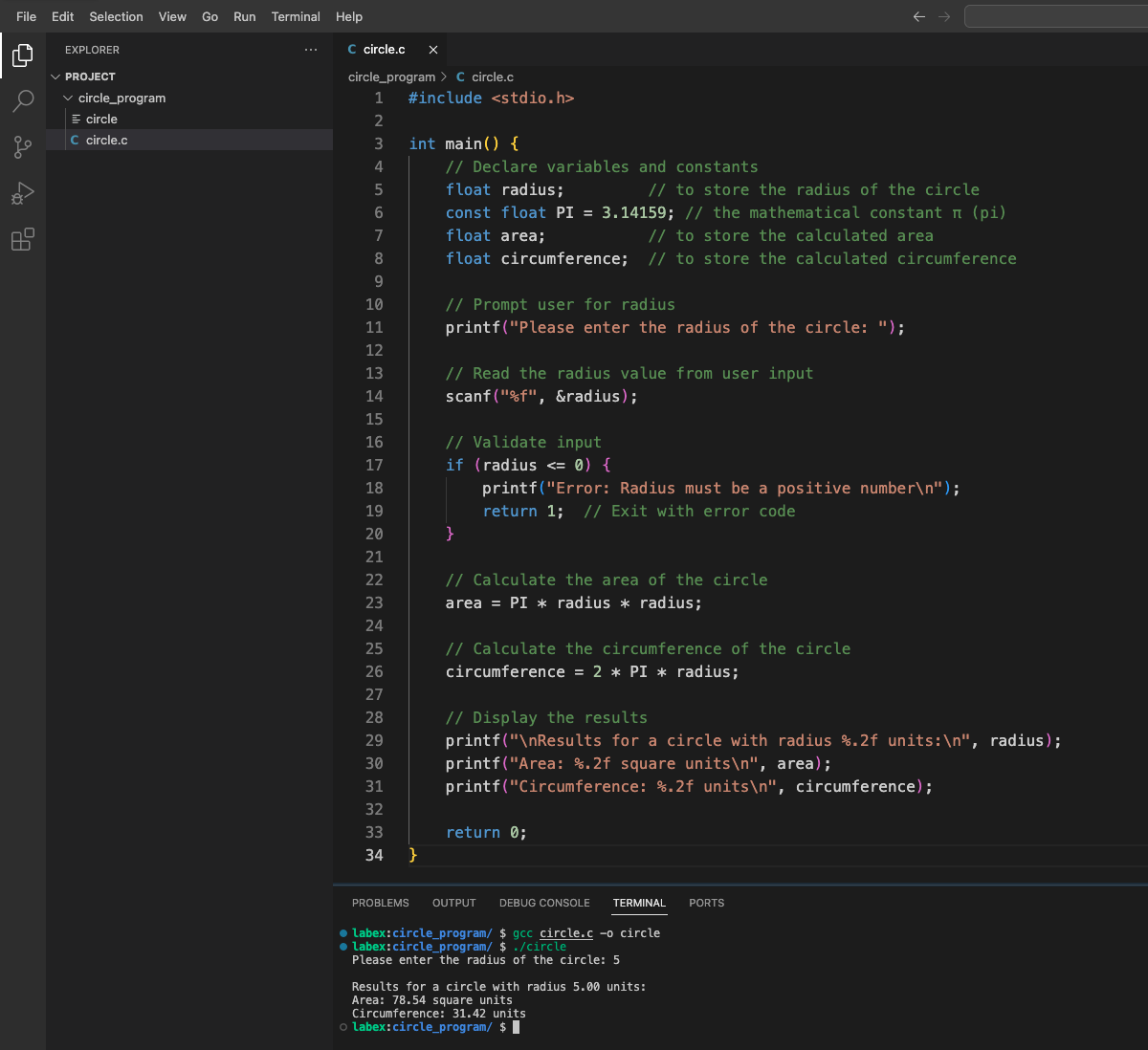
    printf("\nResults for a circle with radius %.2f units:\n", radius);
    printf("Area: %.2f square units\n", area);
    printf("Circumference: %.2f units\n", circumference);

    return 0;
}
출력 코드를 이해해 봅시다:
printf("\nResults for a circle with radius %.2f units:\n", radius);- 반지름을 소수점 2 자리까지 표시합니다.printf("Area: %.2f square units\n", area);- 계산된 면적을 소수점 2 자리까지 표시합니다.printf("Circumference: %.2f units\n", circumference);- 계산된 둘레를 소수점 2 자리까지 표시합니다.
%.2f 형식 지정자는 printf()에게 부동 소수점 숫자를 소수점 2 자리까지 표시하도록 지시하여 출력을 더 읽기 쉽게 만듭니다.
파일을 저장합니다 (Ctrl+S).
이제 프로그램을 컴파일해 보겠습니다. 터미널에서 프로젝트 디렉토리로 이동하여
gcc컴파일러를 사용합니다:cd ~/project/circle_program gcc circle.c -o circle-o circle옵션은 컴파일러에게circle이라는 실행 파일을 생성하도록 지시합니다.컴파일이 성공하면 다음 명령으로 프로그램을 실행할 수 있습니다:
./circle메시지가 표시되면 반지름 값을 입력하고 (예: 5) Enter 키를 누릅니다. 다음과 유사한 출력이 표시되어야 합니다:
Please enter the radius of the circle: 5

Results for a circle with radius 5.00 units:
Area: 78.54 square units
Circumference: 31.42 units
다른 반지름 값으로 프로그램을 다시 실행하여 제대로 작동하는지 확인하십시오.
축하합니다! 사용자 입력을 기반으로 원의 면적과 둘레를 계산하고 표시하는 C 프로그램을 성공적으로 만들었습니다.
요약
이 랩에서 다음을 수행하는 C 프로그램을 성공적으로 만들었습니다:
- 사용자에게 원의 반지름을 입력하라는 메시지를 표시합니다.
- 사용자의 입력을 읽고 유효성을 검사합니다.
- 공식 π × r²를 사용하여 원의 면적을 계산합니다.
- 공식 2 × π × r 을 사용하여 원의 둘레를 계산합니다.
- 계산된 결과를 적절한 형식으로 표시합니다.
이 과정에서 몇 가지 중요한 C 프로그래밍 개념을 배웠습니다:
#include를 사용하여 헤더 파일을 포함하는 방법- 변수 및 상수를 정의하고 사용하는 방법
scanf()를 사용하여 사용자 입력을 읽는 방법- 수학적 계산을 수행하는 방법
printf()를 사용하여 형식이 지정된 출력을 표시하는 방법- C 프로그램을 컴파일하고 실행하는 방법
이러한 기본적인 기술은 더 복잡한 C 프로그램의 구성 요소가 됩니다. 이제 이 지식을 확장하여 사용자 상호 작용 및 수학적 계산을 포함하는 더 정교한 애플리케이션을 만들 수 있습니다.