

简介
本综合教程将探讨 Bash 函数返回值,为你提供在 Bash 脚本中有效使用函数的必备知识和技巧。无论你是刚接触 shell 脚本编程,还是希望提升自己的技能,本指南都能让你扎实掌握如何定义、调用和处理函数返回值。掌握这些技能后,你就能编写更健壮、更灵活的 shell 脚本来完成各种自动化任务。
创建你的第一个 Bash 函数
Bash 函数是可复用的代码块,有助于更好地组织你的脚本。在深入了解返回值之前,我们先来了解如何创建和调用函数。
创建一个基本函数
我们来创建第一个 Bash 函数。打开一个终端窗口并输入:
cd ~/project
mkdir -p bash_functions
cd bash_functions
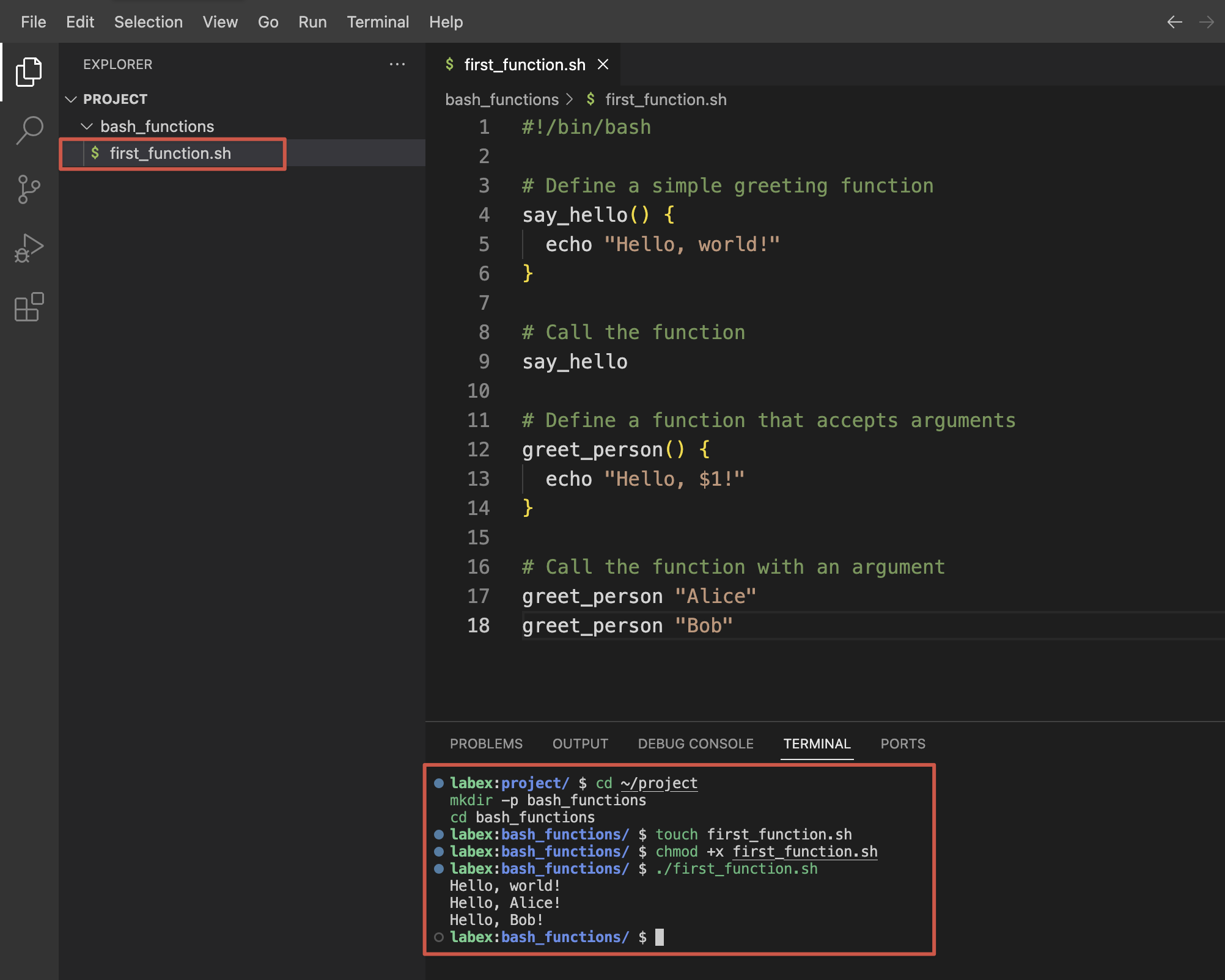
现在,我们在一个新脚本中创建一个简单的函数。使用 nano 创建一个名为 first_function.sh 的文件:
touch first_function.sh
将以下内容添加到文件中:
#!/bin/bash

## Define a simple greeting function
say_hello() {
  echo "Hello, world!"
}

## Call the function
say_hello

## Define a function that accepts arguments
greet_person() {
  echo "Hello, $1!"
}

## Call the function with an argument
greet_person "Alice"
greet_person "Bob"
使脚本可执行:
chmod +x first_function.sh
现在运行脚本:
./first_function.sh
你应该会看到以下输出:
Hello, world!
Hello, Alice!
Hello, Bob!
函数语法解释
在 Bash 中,有两种定义函数的方式:
- 使用标准语法:
function_name() {
  ## Commands
}
- 使用
function关键字:
function function_name {
  ## Commands
}
这两种风格的作用相同,但第一种更常用且符合 POSIX 标准。
访问函数参数
在函数内部,你可以使用位置参数来访问传递给函数的参数:
$1、$2、$3等分别指第一个、第二个、第三个参数,依此类推$0指函数名或脚本名$#给出参数的数量$@包含所有参数,每个参数作为单独的字符串$*包含所有参数,作为一个单独的字符串
我们创建一个新文件来练习使用函数参数:
touch function_args.sh
添加以下内容:
#!/bin/bash

show_args() {
  echo "Function name: $0"
  echo "First argument: $1"
  echo "Second argument: $2"
  echo "Number of arguments: $#"
  echo "All arguments: $@"
}

echo "Calling function with three arguments:"
show_args apple banana cherry
保存文件,使其可执行,然后运行脚本:
chmod +x function_args.sh
./function_args.sh
你应该会看到类似于以下的输出:
Calling function with three arguments:
Function name: ./function_args.sh
First argument: apple
Second argument: banana
Number of arguments: 3
All arguments: apple banana cherry
对函数定义和参数处理的这些基本理解为后续处理函数返回值奠定了基础。
理解函数返回码
Bash 中的每个命令(包括函数)都会产生一个返回码(也称为退出状态)。这个数值表示命令是成功还是失败。这个返回码是 Bash 脚本中错误处理的基础。
基本返回码
在 Bash 中:
- 返回码
0表示成功 - 任何非零值(1 - 255)表示错误或异常情况
我们创建一个脚本来演示这一点:
cd ~/project/bash_functions
touch return_codes.sh
添加以下内容:
#!/bin/bash

## Function that always succeeds
succeed() {
  echo "This function succeeds"
  return 0
}

## Function that always fails
fail() {
  echo "This function fails"
  return 1
}

## Call the functions and check their return codes
succeed
echo "Return code of succeed: $?"

fail
echo "Return code of fail: $?"
保存文件,使其可执行,然后运行脚本:
chmod +x return_codes.sh
./return_codes.sh
你应该会看到:
This function succeeds
Return code of succeed: 0
This function fails
Return code of fail: 1
捕获返回码
特殊变量 $? 包含最近执行的命令或函数的返回码。这个值对于条件执行和错误处理非常重要。
我们创建另一个脚本来练习使用返回码进行条件逻辑判断:
touch check_file.sh
添加以下内容:
#!/bin/bash

## Function to check if a file exists
file_exists() {
  local filename="$1"

  if [ -f "$filename" ]; then
    echo "File $filename exists"
    return 0
  else
    echo "File $filename does not exist"
    return 1
  fi
}

## Test the function with files that exist and don't exist
file_exists "return_codes.sh"
if [ $? -eq 0 ]; then
  echo "Great! The file was found."
else
  echo "Too bad. The file was not found."
fi

echo ""

file_exists "non_existent_file.txt"
if [ $? -eq 0 ]; then
  echo "Great! The file was found."
else
  echo "Too bad. The file was not found."
fi
保存文件,使其可执行,然后运行脚本:
chmod +x check_file.sh
./check_file.sh
你应该会看到类似于以下的输出:
File return_codes.sh exists
Great! The file was found.

File non_existent_file.txt does not exist
Too bad. The file was not found.
在条件语句中使用返回码
返回码可以使用 &&(逻辑与)和 ||(逻辑或)运算符直接用于条件表达式中:
touch conditional_return.sh
添加以下内容:
#!/bin/bash

check_number() {
  local num=$1

  if [ $num -gt 10 ]; then
    return 0 ## Success if number is greater than 10
  else
    return 1 ## Failure if number is not greater than 10
  fi
}

## Using conditional operators with return codes
check_number 15 && echo "Number is greater than 10"
check_number 5 || echo "Number is not greater than 10"

## This line runs only if check_number succeeds
check_number 20 && {
  echo "Number is greater than 10"
  echo "Performing additional operations..."
}

## This line runs only if check_number fails
check_number 3 || {
  echo "Number is not greater than 10"
  echo "Taking alternative actions..."
}
保存文件,使其可执行,然后运行脚本:
chmod +x conditional_return.sh
./conditional_return.sh
输出应该是:
Number is greater than 10
Number is not greater than 10
Number is greater than 10
Performing additional operations...
Number is not greater than 10
Taking alternative actions...
理解返回码的工作原理对于编写能够正确处理错误并根据操作的成功或失败做出决策的健壮脚本至关重要。
使用自定义返回值
虽然返回码可用于指示成功或失败,但它们仅限于 0 到 255 之间的数字。若要从函数返回实际数据,我们需要使用其他技术。
方法 1:使用 echo 返回值
从函数返回实际值最常用的方法是使用 echo 或其他输出命令,然后捕获该输出。
我们创建一个脚本来演示这种技术:
cd ~/project/bash_functions
touch return_values.sh
添加以下内容:
#!/bin/bash

## Function that returns a value using echo
get_username() {
  echo "labex"
}

## Function that returns a calculated value
add_numbers() {
  local sum=$(($1 + $2))
  echo $sum
}

## Capture the returned values
username=$(get_username)
echo "The username is: $username"

result=$(add_numbers 5 7)
echo "The sum of 5 and 7 is: $result"

## You can also use the returned value directly
echo "Calculating again: $(add_numbers 10 20)"
保存文件,使其可执行,然后运行脚本:
chmod +x return_values.sh
./return_values.sh
你应该会看到:
The username is: labex
The sum of 5 and 7 is: 12
Calculating again: 30
方法 2:使用全局变量
另一种方法是在函数内部修改全局变量:
touch global_return.sh
添加以下内容:
#!/bin/bash

## Declare global variables
FULL_NAME=""
USER_AGE=0

## Function that sets global variables
set_user_info() {
  FULL_NAME="$1 $2"
  USER_AGE=$3

  ## Return success
  return 0
}

## Call the function
set_user_info "John" "Doe" 30

## Use the global variables that were set by the function
echo "Full name: $FULL_NAME"
echo "Age: $USER_AGE"
保存文件,使其可执行,然后运行脚本:
chmod +x global_return.sh
./global_return.sh
输出:
Full name: John Doe
Age: 30
方法 3:返回多个值
我们来探讨如何从函数返回多个值:
touch multiple_returns.sh
添加以下内容:
#!/bin/bash

## Function that returns multiple values separated by a delimiter
get_system_info() {
  local hostname=$(hostname)
  local kernel=$(uname -r)
  local uptime=$(uptime -p)

  ## Return multiple values separated by semicolons
  echo "$hostname;$kernel;$uptime"
}

## Capture the output and split it
system_info=$(get_system_info)

## Split the values using IFS (Internal Field Separator)
IFS=';' read -r host kernel up <<< "$system_info"

## Display the values
echo "Hostname: $host"
echo "Kernel version: $kernel"
echo "Uptime: $up"

## Alternative method using an array
get_user_details() {
  local details=("John Doe" "john@example.com" "Developer")
  printf "%s\n" "${details[@]}"
}

## Capture the output into an array
mapfile -t user_details < <(get_user_details)

echo ""
echo "User information:"
echo "Name: ${user_details[0]}"
echo "Email: ${user_details[1]}"
echo "Role: ${user_details[2]}"
保存文件,使其可执行,然后运行脚本:
chmod +x multiple_returns.sh
./multiple_returns.sh
输出应显示你的系统信息,随后是用户详细信息:
Hostname: ubuntu
Kernel version: 5.15.0-1033-azure
Uptime: up 2 hours, 15 minutes

User information:
Name: John Doe
Email: john@example.com
Role: Developer
实际的主机名、内核版本和正常运行时间会因你的系统而异。
这些方法展示了除简单返回码之外,从函数返回值的不同方式。每种方法根据你的需求各有优势。
脚本中函数的实际应用
既然我们已经了解了如何定义函数并处理其返回值,那就来编写一个实用的脚本来演示这些概念的实际应用。我们将创建一个文件管理工具,该工具会使用不同返回方式的函数。
创建文件管理工具
我们来创建一个执行各种文件操作的综合脚本:
cd ~/project/bash_functions
touch file_manager.sh
添加以下内容:
#!/bin/bash

## Function to check if a file exists
## Returns 0 if file exists, 1 if it doesn't
file_exists() {
  if [ -f "$1" ]; then
    return 0
  else
    return 1
  fi
}

## Function to get file size in bytes
## Returns the size via echo
get_file_size() {
  if file_exists "$1"; then
    ## Use stat to get file size in bytes
    local size=$(stat -c %s "$1")
    echo "$size"
  else
    echo "0"
  fi
}

## Function to count lines in a file
## Returns line count via echo
count_lines() {
  if file_exists "$1"; then
    local lines=$(wc -l < "$1")
    echo "$lines"
  else
    echo "0"
  fi
}

## Function to get file information
## Returns multiple values using a delimiter
get_file_info() {
  local filename="$1"

  if file_exists "$filename"; then
    local size=$(get_file_size "$filename")
    local lines=$(count_lines "$filename")
    local modified=$(stat -c %y "$filename")
    local permissions=$(stat -c %A "$filename")

    ## Return all info with semicolons as delimiters
    echo "$size;$lines;$modified;$permissions"
  else
    echo "0;0;N/A;N/A"
  fi
}

## Function to create a test file
create_test_file() {
  local filename="$1"
  local lines="$2"

  ## Create or overwrite the file
  > "$filename"

  ## Add the specified number of lines
  for ((i = 1; i <= lines; i++)); do
    echo "This is line $i of the test file." >> "$filename"
  done

  ## Return success if file was created
  if file_exists "$filename"; then
    return 0
  else
    return 1
  fi
}

## Main script execution starts here
echo "File Management Utility"
echo "----------------------"

## Create a test file
TEST_FILE="sample.txt"
echo "Creating test file with 10 lines..."
if create_test_file "$TEST_FILE" 10; then
  echo "File created successfully."
else
  echo "Failed to create file."
  exit 1
fi

## Check if file exists
echo ""
echo "Checking if file exists..."
if file_exists "$TEST_FILE"; then
  echo "File '$TEST_FILE' exists."
else
  echo "File '$TEST_FILE' does not exist."
fi

## Get file size
echo ""
echo "Getting file size..."
size=$(get_file_size "$TEST_FILE")
echo "File size: $size bytes"

## Count lines
echo ""
echo "Counting lines in file..."
lines=$(count_lines "$TEST_FILE")
echo "Line count: $lines"

## Get all file information
echo ""
echo "Getting complete file information..."
file_info=$(get_file_info "$TEST_FILE")

## Split the returned values
IFS=';' read -r size lines modified permissions <<< "$file_info"

echo "File: $TEST_FILE"
echo "Size: $size bytes"
echo "Lines: $lines"
echo "Last modified: $modified"
echo "Permissions: $permissions"

echo ""
echo "File content preview:"
head -n 3 "$TEST_FILE"
echo "..."
保存文件,使其可执行,然后运行脚本:
chmod +x file_manager.sh
./file_manager.sh
你应该会看到类似于以下的输出:
File Management Utility
----------------------
Creating test file with 10 lines...
File created successfully.

Checking if file exists...
File 'sample.txt' exists.

Getting file size...
File size: 300 bytes

Counting lines in file...
Line count: 10

Getting complete file information...
File: sample.txt
Size: 300 bytes
Lines: 10
Last modified: 2023-11-04 12:34:56.789012345 +0000
Permissions: -rwxrwxr-x

File content preview:
This is line 1 of the test file.
This is line 2 of the test file.
This is line 3 of the test file.
...
文件大小、修改时间和权限的具体值会有所不同。
脚本剖析
我们的文件管理工具展示了几个关键概念:
- 返回码 -
file_exists()和create_test_file()函数成功时返回 0,失败时返回 1。 - 使用 echo 返回值 -
get_file_size()和count_lines()函数通过 echo 返回数值。 - 返回多个值 -
get_file_info()函数使用分隔符返回多个值。 - 函数组合 - 一些函数会调用其他函数,展示了如何构建复杂的功能。
- 条件执行 - 脚本使用带有返回码的 if 语句来控制程序流程。
这个实际示例展示了如何结合各种函数技术来创建一个实用的工具。该脚本展示了正确的错误处理、函数组合以及不同的返回值方法。
错误处理和函数最佳实践
在最后一部分,我们来探讨 Bash 函数的错误处理技术和最佳实践。正确的错误处理对于创建健壮、可维护的脚本至关重要。
创建带有错误处理的脚本
我们创建一个新脚本来演示健壮的错误处理:
cd ~/project/bash_functions
touch error_handling.sh
添加以下内容:
#!/bin/bash

## Enable error handling
set -e ## Exit immediately if a command exits with non-zero status

## Define a function to log messages
log_message() {
  local level="$1"
  local message="$2"
  echo "[$(date '+%Y-%m-%d %H:%M:%S')] [$level] $message"
}

## Function to validate a number is positive
validate_positive() {
  local num="$1"
  local name="$2"

  ## Check if the argument is a number
  if ! [[ "$num" =~ ^[0-9]+$ ]]; then
    log_message "ERROR" "$name must be a number"
    return 1
  fi

  ## Check if the number is positive
  if [ "$num" -le 0 ]; then
    log_message "ERROR" "$name must be positive"
    return 2
  fi

  return 0
}

## Function that divides two numbers
divide() {
  local numerator="$1"
  local denominator="$2"

  ## Validate inputs
  validate_positive "$numerator" "Numerator" || return $?
  validate_positive "$denominator" "Denominator" || return $?

  ## Check for division by zero
  if [ "$denominator" -eq 0 ]; then
    log_message "ERROR" "Division by zero is not allowed"
    return 3
  fi

  ## Perform division
  local result=$(echo "scale=2; $numerator / $denominator" | bc)
  echo "$result"
  return 0
}

## Function to safely get user input
get_number() {
  local prompt="$1"
  local input

  while true; do
    read -p "$prompt: " input

    if validate_positive "$input" "Input"; then
      echo "$input"
      return 0
    else
      log_message "WARN" "Invalid input. Please try again."
    fi
  done
}

## Disable automatic exit on error for the main script
set +e

## Main script logic
log_message "INFO" "Starting division calculator"

## Test with valid values
result=$(divide 10 2)
exit_code=$?

if [ $exit_code -eq 0 ]; then
  log_message "INFO" "10 / 2 = $result"
else
  log_message "ERROR" "Division failed with code $exit_code"
fi

## Test with invalid values
echo ""
log_message "INFO" "Testing with invalid values"
divide 0 5
log_message "INFO" "Exit code: $?"

divide 10 0
log_message "INFO" "Exit code: $?"

divide abc 5
log_message "INFO" "Exit code: $?"

## Interactive mode
echo ""
log_message "INFO" "Interactive mode"
echo "Let's perform a division. Enter positive numbers."

## Get user input safely
num1=$(get_number "Enter first number")
num2=$(get_number "Enter second number")

## Perform division
result=$(divide "$num1" "$num2")
exit_code=$?

if [ $exit_code -eq 0 ]; then
  log_message "INFO" "$num1 / $num2 = $result"
else
  log_message "ERROR" "Division failed with code $exit_code"
fi

log_message "INFO" "Calculator finished"
保存文件,使其可执行,然后运行脚本:
chmod +x error_handling.sh
./error_handling.sh
你会看到类似于以下的输出,并被提示输入数字:
[2023-11-04 13:45:23] [INFO] Starting division calculator
[2023-11-04 13:45:23] [INFO] 10 / 2 = 5.00

[2023-11-04 13:45:23] [INFO] Testing with invalid values
[2023-11-04 13:45:23] [ERROR] Numerator must be positive
[2023-11-04 13:45:23] [INFO] Exit code: 2
[2023-11-04 13:45:23] [ERROR] Division by zero is not allowed
[2023-11-04 13:45:23] [INFO] Exit code: 3
[2023-11-04 13:45:23] [ERROR] Numerator must be a number
[2023-11-04 13:45:23] [INFO] Exit code: 1

[2023-11-04 13:45:23] [INFO] Interactive mode
Let's perform a division. Enter positive numbers.
Enter first number:
输入一个数字,例如 20。然后你会被提示输入第二个数字:
Enter second number:
再输入另一个数字,例如 4,你应该会看到:
[2023-11-04 13:45:30] [INFO] 20 / 4 = 5.00
[2023-11-04 13:45:30] [INFO] Calculator finished
Bash 函数的最佳实践
根据我们的示例,以下是使用 Bash 函数的一些最佳实践:
- 添加描述性注释 - 记录每个函数的功能、参数和返回值。
- 使用有意义的函数名 - 选择能清晰表明函数用途的名称。
- 验证输入参数 - 检查输入以防止错误。
- 使用局部变量 - 使用
local关键字防止变量名冲突。 - 返回适当的退出码 - 使用常规的返回码(0 表示成功,非零表示错误)。
- 实现正确的错误处理 - 记录错误并优雅地处理它们。
- 保持函数功能单一 - 每个函数应该专注于做好一件事。
- 使用函数组合 - 通过组合简单的函数来构建复杂的功能。
- 记录返回值 - 清楚地记录值是如何返回的(通过 echo、返回码等)。
- 测试边界情况 - 确保函数能正确处理异常输入。
遵循这些实践,你可以创建更可靠、可维护和可复用的 Bash 函数。
创建函数库
在最后的练习中,我们来创建一个可复用的函数库:
touch math_functions.lib
添加以下内容:
#!/bin/bash
## math_functions.lib - A library of mathematical functions

## Add two numbers
add() {
  echo $(($1 + $2))
}

## Subtract second number from first
subtract() {
  echo $(($1 - $2))
}

## Multiply two numbers
multiply() {
  echo $(($1 * $2))
}

## Divide first number by second (with decimal precision)
divide() {
  if [ "$2" -eq 0 ]; then
    return 1
  fi
  echo "scale=2; $1 / $2" | bc
  return 0
}

## Calculate power: first number raised to second number
power() {
  echo $(($1 ** $2))
}

## Check if a number is even
is_even() {
  if (($1 % 2 == 0)); then
    return 0
  else
    return 1
  fi
}

## Check if a number is odd
is_odd() {
  if is_even "$1"; then
    return 1
  else
    return 0
  fi
}
现在创建一个使用这个库的脚本:
touch use_library.sh
添加以下内容:
#!/bin/bash

## Source the math functions library
source math_functions.lib

## Display a header
echo "Math Functions Demo"
echo "------------------"

## Test the functions
echo "Addition: 5 + 3 = $(add 5 3)"
echo "Subtraction: 10 - 4 = $(subtract 10 4)"
echo "Multiplication: 6 * 7 = $(multiply 6 7)"

## Test division with error handling
div_result=$(divide 20 5)
if [ $? -eq 0 ]; then
  echo "Division: 20 / 5 = $div_result"
else
  echo "Division error: Cannot divide by zero"
fi

## Test division by zero
div_result=$(divide 20 0)
if [ $? -eq 0 ]; then
  echo "Division: 20 / 0 = $div_result"
else
  echo "Division error: Cannot divide by zero"
fi

echo "Power: 2 ^ 8 = $(power 2 8)"

## Test the even/odd functions
echo ""
echo "Number properties:"
for num in 1 2 3 4 5; do
  echo -n "Number $num is "

  if is_even $num; then
    echo "even"
  else
    echo "odd"
  fi
done
保存文件,使其可执行,然后运行脚本:
chmod +x use_library.sh
./use_library.sh
你应该会看到:
Math Functions Demo
------------------
Addition: 5 + 3 = 8
Subtraction: 10 - 4 = 6
Multiplication: 6 * 7 = 42
Division: 20 / 5 = 4.00
Division error: Cannot divide by zero
Power: 2 ^ 8 = 256

Number properties:
Number 1 is odd
Number 2 is even
Number 3 is odd
Number 4 is even
Number 5 is odd
这种库的方法展示了如何创建可复用的函数集合,这些集合可以导入到多个脚本中,从而促进代码复用和可维护性。
总结
在本教程中,你学习了 Bash 函数返回值的重要概念。从基本的函数创建和参数处理开始,你逐步深入理解了返回码以及它们如何指示成功或失败。你探索了从函数返回实际数据的多种方法,包括使用 echo、全局变量,以及使用分隔符返回多个值。
通过实际示例,你实现了一个文件管理工具,该工具展示了正确的函数组合和错误处理。最后,你学习了创建健壮、可复用函数的最佳实践,以及如何将它们组织成库。
本教程中获得的技能为编写更复杂的 Bash 脚本奠定了坚实的基础,这些脚本具备正确的错误处理、模块化和可复用性。这些技术使你能够为各种自动化任务创建可维护的 shell 脚本,提高你作为系统管理员或开发人员的整体工作效率。