



介绍
Python 是一种强大的编程语言,广泛用于各种应用,包括文件处理。然而,处理文件未找到错误对于开发者来说可能是一个常见的挑战(Challenge)。本教程将指导你理解文件未找到错误,处理它的有效技术,以及在 Python 中进行健壮文件处理的最佳实践。
在这个实验(Lab)中,你将学习如何使用 try-except 块和 os 模块来处理 Python 中的 FileNotFoundError。你还将练习编写 Python 代码来演示这些概念。
理解文件未找到错误
在 Python 中,FileNotFoundError 是一个内置的异常,当你要访问的文件或目录不存在时,会引发此异常。这种错误可能发生在各种情况下,例如当你尝试打开文件进行读取、写入或追加时,或者当你尝试访问不存在的目录时。
FileNotFoundError 是 OSError 异常的一个子类,OSError 异常是所有与操作系统相关的错误的基本类。当操作系统找不到指定的文件或目录时,会引发 FileNotFoundError。
让我们看看这个错误是如何发生的。打开终端并导航到你的项目目录(如果尚未进入)。
cd ~/project
现在,让我们尝试使用 Python 解释器打开一个不存在的文件。在终端中键入 python 以启动 Python 交互式 shell。
python
在 Python shell 中,尝试打开一个不存在的文件:
open("non_existent_file.txt", "r")
你将看到一个 FileNotFoundError 回溯(traceback)。这表明 Python 引发了异常,因为未找到该文件。
Traceback (most recent call last):
  File "<stdin>", line 1, in <module>
FileNotFoundError: [Errno 2] No such file or directory: 'non_existent_file.txt'
键入 exit() 以离开 Python shell。
exit()
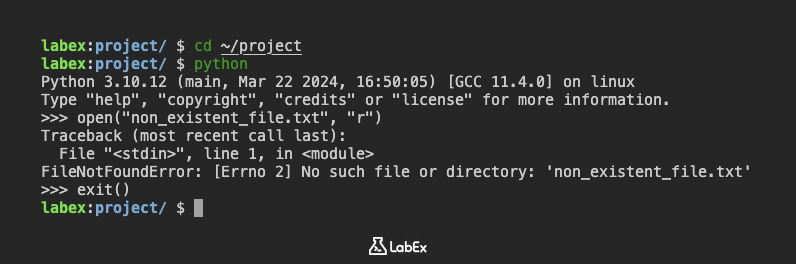
理解 FileNotFoundError 以及它是如何被引发的,是在 Python 代码中有效处理它的第一步。
使用 try-except 处理文件未找到错误
在 Python 中处理 FileNotFoundError 最常见和推荐的方法是使用 try-except 块。这允许你优雅地捕获异常,并在未找到文件时执行替代代码。
让我们创建一个 Python 脚本来演示这一点。
在 VS Code 中,在 ~/project 目录中创建一个名为 handle_error.py 的新文件。
cd ~/project
touch handle_error.py
现在,将以下代码添加到 handle_error.py:
try:
    ## 尝试打开一个可能不存在的文件
    with open("my_file.txt", "r") as file:
        content = file.read()
        print("File content:")
        print(content)
except FileNotFoundError:
    ## 处理未找到文件的情况
    print("Error: The file 'my_file.txt' was not found.")
    content = "Default content because the file was not found."
    print("Using default content:")
    print(content)

print("Program continues after handling the error.")
保存文件。此脚本尝试打开 my_file.txt。如果该文件不存在,则会捕获 FileNotFoundError,并打印一条消息,并分配默认内容。
现在,从终端运行脚本:
python handle_error.py
由于 my_file.txt 不存在,你将看到来自 except 块的输出:
Error: The file 'my_file.txt' was not found.
Using default content:
Default content because the file was not found.
Program continues after handling the error.
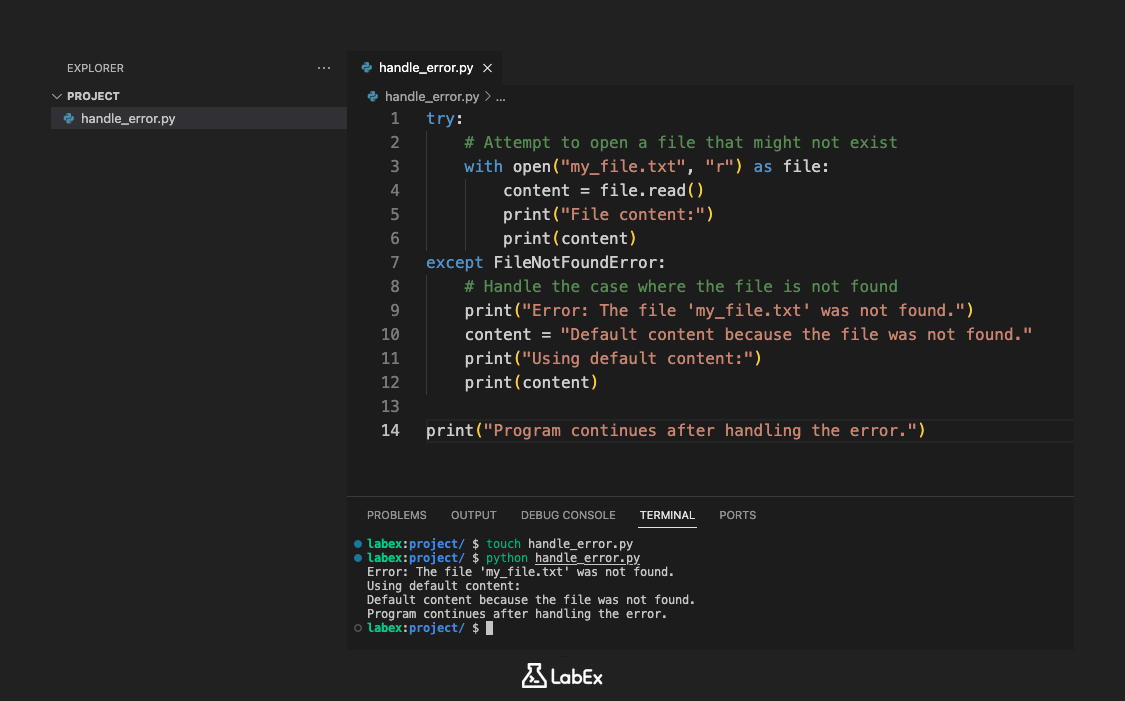
这演示了 try-except 块如何允许你的程序处理错误并继续执行,而不是崩溃。
使用 os.path.exists() 处理文件未找到错误
处理潜在 FileNotFoundError 的另一种方法是在尝试打开文件之前检查文件是否存在。 os 模块为此提供了 os.path.exists() 函数。
让我们修改我们的脚本以使用 os.path.exists()。再次在 VS Code 中打开 handle_error.py。
将现有代码替换为以下代码:
import os

file_path = "my_file.txt"

if os.path.exists(file_path):
    ## 文件存在,继续打开并读取
    try:
        with open(file_path, "r") as file:
            content = file.read()
            print("File content:")
            print(content)
    except IOError as e:
        ## 处理其他潜在的 I/O 错误
        print(f"An I/O error occurred: {e}")
else:
    ## 文件不存在
    print(f"Error: The file '{file_path}' was not found.")
    content = "Default content because the file was not found."
    print("Using default content:")
    print(content)

print("Program continues after checking file existence.")
保存文件。现在,此脚本首先使用 os.path.exists() 检查 my_file.txt 是否存在。如果不存在,它会打印一条错误消息并使用默认内容。如果它确实存在,它将继续在 try-except 块中打开并读取该文件,以捕获其他潜在的 IOError 异常。
再次从终端运行脚本:
python handle_error.py
你将获得与之前相同的输出,因为 my_file.txt 仍然不存在:
Error: The file 'my_file.txt' was not found.
Using default content:
Default content because the file was not found.
Program continues after checking file existence.
现在,让我们创建 my_file.txt 并再次运行该脚本。在终端中,使用 echo 命令创建文件:
echo "This is the content of my_file.txt" > my_file.txt
现在再次运行 Python 脚本:
python handle_error.py
这一次,由于 my_file.txt 存在,脚本将打开并读取它:
File content:
This is the content of my_file.txt
Program continues after checking file existence.
当你希望在尝试打开文件之前,根据文件是否存在来执行不同的操作时,使用 os.path.exists() 会很有用。
健壮的文件处理的最佳实践
在 Python 中处理文件操作时,遵循最佳实践以确保你的代码健壮、可维护且容错至关重要。
使用上下文管理器(with 语句)
正如你在示例中所见,在打开文件时使用 with 语句是一种最佳实践。它确保即使发生错误,文件也会自动关闭,从而防止资源泄漏。
try:
    with open(file_path, "r") as file:
        content = file.read()
except FileNotFoundError:
    print("File not found.")
实施优雅的错误处理
始终将你的文件操作包装在 try-except 块中,以处理 FileNotFoundError 和其他潜在的异常,如 IOError。这可以防止你的程序崩溃,并允许你提供信息丰富的反馈或替代操作。
提供回退选项
当找不到文件时,请考虑提供回退选项,例如使用默认数据或创建具有默认内容的新文件。这有助于你的程序继续顺利运行。
使用绝对路径(在适当的时候)
虽然相对路径对于简单的脚本来说很方便,但使用绝对路径可以使你的代码更加健壮,尤其是在处理不同目录中的文件或脚本的工作目录可能更改时。
你可以使用 os.path.abspath() 获取文件的绝对路径:
import os

relative_path = "my_file.txt"
absolute_path = os.path.abspath(relative_path)
print(f"Absolute path: {absolute_path}")
让我们在终端中尝试一下。打开 Python 解释器:
python
在解释器中,键入以下内容:
import os
print(os.path.abspath("my_file.txt"))
你将看到 my_file.txt 在你的项目目录中的绝对路径:
/home/labex/project/my_file.txt
键入 exit() 以退出 Python shell。
exit()
通过结合这些最佳实践,你可以编写更可靠的 Python 代码,从而有效且优雅地处理文件操作。
总结
在本 Python 教程中,你学习了如何有效地处理 Python 中的 FileNotFoundError(文件未找到错误)。你探索了使用 try-except 块来捕获异常,以及使用 os.path.exists() 函数在尝试打开文件之前检查文件是否存在。你还回顾了健壮的文件处理的最佳实践,包括使用上下文管理器、优雅的错误处理、提供回退选项以及考虑绝对路径。
通过应用这些技术,你可以编写更可靠和更有弹性的 Python 代码,从而有效地处理与文件相关的操作,并提供更好的用户体验。


