



简介
在 Python 中处理文本数据时,你通常需要比较字符串,以确定它们是否包含相同的信息,而不考虑字母是大写还是小写。这被称为不区分大小写的字符串比较。
在这个实验中,你将学习不同的方法来比较两个 Python 字符串是否相等,同时忽略大小写差异。你将探索基本的字符串比较、各种不区分大小写的比较技术,并了解如何在实际场景中应用这些技能。
在本实验结束时,你将能够自信地在你的 Python 程序中实现不区分大小写的字符串比较,提高你有效处理文本数据的能力。
理解 Python 中的字符串比较
让我们先探讨一下 Python 中字符串比较的工作原理,以及区分大小写为何重要。
默认字符串比较
在 Python 中,当你使用相等运算符 (==) 比较两个字符串时,默认情况下比较是区分大小写的。这意味着 "Hello" 和 "hello" 被视为不同的字符串。
让我们创建一个新的 Python 文件来测试这一点:
- 在 WebIDE 中,点击左侧侧边栏中的“Explorer”图标。
- 点击“New File”按钮,并将其命名为
string_comparison.py。 - 在文件中添加以下代码:
## Basic string comparison
string1 = "Python"
string2 = "python"

## Compare the strings
result = string1 == string2

## Print the result
print(f"Is '{string1}' equal to '{string2}'? {result}")
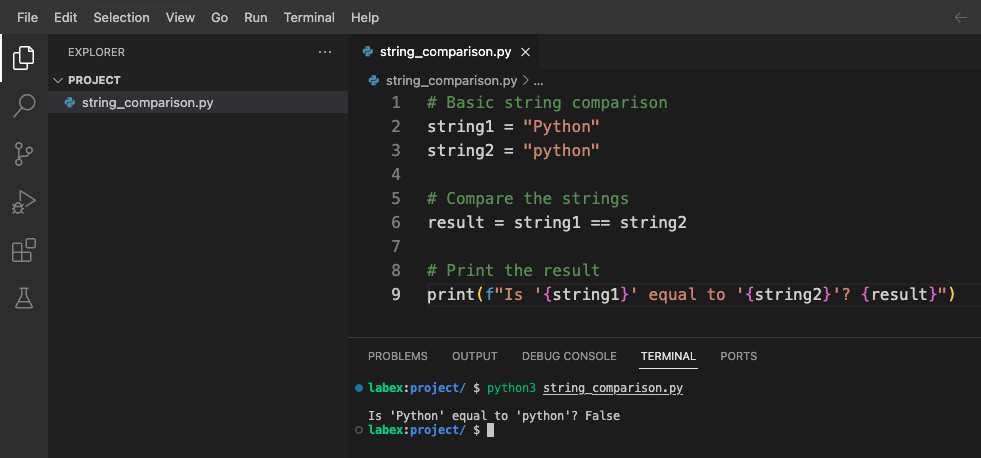
- 按
Ctrl+S或从菜单中选择“File” > “Save”来保存文件。 - 打开终端(Terminal > New Terminal)并输入以下命令来运行脚本:
python3 string_comparison.py
你应该会看到以下输出:
Is 'Python' equal to 'python'? False
输出显示为 False,因为比较是区分大小写的,大写 'P' 的 "Python" 与小写 'p' 的 "python" 不同。
不区分大小写比较的用处
不区分大小写的比较在许多场景中都很有用:
- 用户输入验证(用户可能以任何大小写形式输入)
- 文本搜索(搜索单词时不考虑大小写)
- 自然语言处理(大小写可能会有所不同)
- 处理 URL、电子邮件地址或用户名(可能不区分大小写)
让我们修改脚本,添加一些示例来展示不区分大小写比较何时有用:
## Add these examples to string_comparison.py

## Example: User searching for content
user_search = "Python"
article_title = "Getting Started with python Programming"

## Case-sensitive comparison (might miss relevant content)
found_sensitive = user_search in article_title
print(f"Case-sensitive search found match: {found_sensitive}")

## What if we want to find matches regardless of case?
## We'll explore solutions in the next steps
将此代码添加到你的 string_comparison.py 文件中,然后再次运行它:
python3 string_comparison.py
现在的输出包括:
Case-sensitive search found match: False
这显示了一个实际问题:使用默认的区分大小写比较时,搜索 "Python" 的用户将找不到标题为 "python Programming" 的内容。
在下一步中,我们将学习如何执行不区分大小写的比较来解决这个问题。
不区分大小写的字符串比较方法
既然你已经了解了不区分大小写比较的重要性,那么让我们来学习在 Python 中执行这种比较的不同方法。
方法 1:使用 lower() 或 upper()
最常见的方法是在比较两个字符串之前,将它们都转换为相同的大小写形式。你可以使用 lower() 或 upper() 方法来实现这一点。
让我们创建一个新文件来测试这些方法:
- 在 WebIDE 中,创建一个新文件并将其命名为
case_insensitive.py。 - 添加以下代码:
## Case-insensitive comparison using lower()
string1 = "Python"
string2 = "python"

## Convert both strings to lowercase, then compare
result_lower = string1.lower() == string2.lower()
print(f"Using lower(): '{string1}' equals '{string2}'? {result_lower}")

## Convert both strings to uppercase, then compare
result_upper = string1.upper() == string2.upper()
print(f"Using upper(): '{string1}' equals '{string2}'? {result_upper}")
- 保存文件并使用以下命令运行它:
python3 case_insensitive.py
你应该会看到:
Using lower(): 'Python' equals 'python'? True
Using upper(): 'Python' equals 'python'? True
这两种方法产生相同的结果——它们都确认了在忽略大小写的情况下,这两个字符串是相等的。
方法 2:使用 casefold()
casefold() 方法与 lower() 类似,但它提供了更激进的大小写折叠功能,对于某些具有特殊大小写映射规则的语言,它的效果更好。
在你的 case_insensitive.py 文件中添加以下代码:
## Case-insensitive comparison using casefold()
german_string1 = "Straße"  ## German word for "street"
german_string2 = "STRASSE" ## Uppercase version (note: ß becomes SS when uppercased)

## Using lower()
result_german_lower = german_string1.lower() == german_string2.lower()
print(f"Using lower() with '{german_string1}' and '{german_string2}': {result_german_lower}")

## Using casefold()
result_german_casefold = german_string1.casefold() == german_string2.casefold()
print(f"Using casefold() with '{german_string1}' and '{german_string2}': {result_german_casefold}")
再次运行脚本:
python3 case_insensitive.py
你会看到:
Using lower() with 'Straße' and 'STRASSE': False
Using casefold() with 'Straße' and 'STRASSE': True
这表明在某些语言中,casefold() 处理特殊字符映射的能力比 lower() 更好。
方法 3:使用正则表达式
对于更高级的场景,你可以使用 re 模块和 IGNORECASE 标志的正则表达式:
在你的 case_insensitive.py 文件中添加以下代码:
## Case-insensitive comparison using regular expressions
import re

text = "Python is a great programming language."
pattern1 = "python"

## Check if 'python' exists in the text (case-insensitive)
match = re.search(pattern1, text, re.IGNORECASE)
print(f"Found '{pattern1}' in text? {match is not None}")

## Case-insensitive equality check with regex
def regex_equal_ignore_case(str1, str2):
    return bool(re.match(f"^{re.escape(str1)}$", str2, re.IGNORECASE))

## Test the function
result_regex = regex_equal_ignore_case("Python", "python")
print(f"Using regex: 'Python' equals 'python'? {result_regex}")
再次运行脚本:
python3 case_insensitive.py
你应该会看到:
Found 'python' in text? True
Using regex: 'Python' equals 'python'? True
方法比较
让我们总结一下我们学到的方法:
lower()/upper():简单且常用,适用于大多数英文文本。casefold():对于具有特殊大小写映射规则的国际文本效果更好。- 使用
re.IGNORECASE的正则表达式:在模式匹配和复杂情况下功能强大。
将此总结作为注释添加到你的 case_insensitive.py 文件中以供参考:
## Summary of case-insensitive comparison methods:
## 1. string1.lower() == string2.lower() - Simple, works for basic cases
## 2. string1.casefold() == string2.casefold() - Better for international text
## 3. re.match(pattern, string, re.IGNORECASE) - For pattern matching
既然你已经了解了不同的方法,那么让我们在下一步中将这些技术应用到实际场景中。
构建不区分大小写的搜索函数
既然你已经学习了不同的不区分大小写的比较方法,那么让我们来构建一个实用的搜索函数,它可以在文本中查找单词,而不考虑大小写。
创建搜索函数
- 在 WebIDE 中,创建一个新文件并将其命名为
search_function.py。 - 添加以下代码以实现一个简单的不区分大小写的搜索函数:
def search_text(query, text):
    """
    Search for a query in text, ignoring case.
    Returns a list of all matching positions.
    """
    ## Convert both to lowercase for case-insensitive comparison
    query_lower = query.lower()
    text_lower = text.lower()

    found_positions = []
    position = 0

    ## Find all occurrences
    while position < len(text_lower):
        position = text_lower.find(query_lower, position)
        if position == -1:  ## No more matches
            break
        found_positions.append(position)
        position += 1  ## Move to the next character

    return found_positions

## Example text
sample_text = """
Python is a programming language that lets you work quickly and integrate systems effectively.
python is easy to learn, powerful, and versatile.
Many developers love PYTHON for its simplicity and readability.
"""

## Test search
search_query = "python"
results = search_text(search_query, sample_text)

## Display results
if results:
    print(f"Found '{search_query}' at {len(results)} positions: {results}")

    ## Show each match in context
    print("\nMatches in context:")
    for pos in results:
        ## Get some context around the match (10 characters before and after)
        start = max(0, pos - 10)
        end = min(len(sample_text), pos + len(search_query) + 10)
        context = sample_text[start:end]

        ## Highlight the match by showing the original case from the text
        match_original_case = sample_text[pos:pos+len(search_query)]
        print(f"...{context.replace(match_original_case, f'[{match_original_case}]')}...")
else:
    print(f"No matches found for '{search_query}'")
- 保存文件并使用以下命令运行它:
python3 search_function.py
你应该会看到类似以下的输出:
Found 'python' at 3 positions: [1, 67, 132]

Matches in context:
...[Python] is a pro...
...ctively.
[python] is easy ...
...ers love [PYTHON] for its ...
这表明我们的函数在三个位置找到了 "Python",无论它是写成 "Python"、"python" 还是 "PYTHON"。该函数还会在原始上下文中显示每个匹配项,并保留原始的大小写。
增强搜索函数
让我们通过添加统计单词数量和处理全词匹配的选项来增强我们的函数,使其更有用:
在你的 search_function.py 文件中添加以下代码:
def count_word_occurrences(word, text, whole_word=False):
    """
    Count occurrences of a word in text, ignoring case.
    If whole_word=True, only count complete word matches.
    """
    word_lower = word.lower()
    text_lower = text.lower()

    if whole_word:
        ## Use word boundaries to match whole words only
        import re
        pattern = r'\b' + re.escape(word_lower) + r'\b'
        matches = re.findall(pattern, text_lower)
        return len(matches)
    else:
        ## Simple substring counting
        return text_lower.count(word_lower)

## Test the enhanced function
test_text = """
Python is great. I love python programming.
This python-script demonstrates case-insensitive searching.
The word "python" appears multiple times as a whole word and as part of other words.
"""

## Count all occurrences (including within words)
count_all = count_word_occurrences("python", test_text)
print(f"Total occurrences of 'python' (including within words): {count_all}")

## Count only whole word occurrences
count_whole = count_word_occurrences("python", test_text, whole_word=True)
print(f"Whole word occurrences of 'python': {count_whole}")
再次运行脚本:
python3 search_function.py
你现在应该会看到额外的输出:
Total occurrences of 'python' (including within words): 4
Whole word occurrences of 'python': 3
这表明 "python" 总共出现了 4 次,但作为全词只出现了 3 次(有一次出现在 "python-script" 中,这不是全词匹配)。
测试不同场景
让我们再添加一个测试,以展示我们的函数如何处理不同类型的文本:
## Add more test cases
test_cases = [
    ("Python programming is fun", "python", "Simple sentence with one occurrence"),
    ("Python, python, PYTHON!", "python", "Multiple occurrences with different cases"),
    ("No matches here", "python", "No matches"),
    ("Python-script and PythonProgram contain python", "python", "Mixed word boundaries")
]

print("\nTesting different scenarios:")
for text, search_word, description in test_cases:
    whole_matches = count_word_occurrences(search_word, text, whole_word=True)
    all_matches = count_word_occurrences(search_word, text)

    print(f"\nScenario: {description}")
    print(f"Text: '{text}'")
    print(f"  - Whole word matches: {whole_matches}")
    print(f"  - All matches: {all_matches}")
添加此代码并再次运行脚本:
python3 search_function.py
你将看到函数如何处理不同文本场景的详细分解:
Testing different scenarios:

Scenario: Simple sentence with one occurrence
Text: 'Python programming is fun'
  - Whole word matches: 1
  - All matches: 1

Scenario: Multiple occurrences with different cases
Text: 'Python, python, PYTHON!'
  - Whole word matches: 3
  - All matches: 3

Scenario: No matches
Text: 'No matches here'
  - Whole word matches: 0
  - All matches: 0

Scenario: Mixed word boundaries
Text: 'Python-script and PythonProgram contain python'
  - Whole word matches: 1
  - All matches: 3
这展示了如何在实际的搜索函数中使用不区分大小写的比较,并提供了处理不同搜索需求的选项。
在下一步中,我们将应用这些技术来创建一个实用的用户输入验证应用程序。
创建用户输入验证应用程序
在这最后一步,我们将创建一个实用的应用程序,它使用不区分大小写的字符串比较来进行用户输入验证。这是许多实际应用中的常见需求。
简单命令验证器
- 在 WebIDE 中,创建一个新文件并将其命名为
command_validator.py。 - 添加以下代码以实现一个简单的命令验证器:
def validate_command(user_input, valid_commands):
    """
    Validate if the user input matches any of the valid commands,
    ignoring case differences.

    Returns the standardized command if valid, None otherwise.
    """
    ## Convert user input to lowercase for comparison
    user_input_lower = user_input.strip().lower()

    for cmd in valid_commands:
        if user_input_lower == cmd.lower():
            ## Return the standard casing of the command
            return cmd

    ## No match found
    return None

## List of valid commands with standard casing
VALID_COMMANDS = [
    "Help",
    "Exit",
    "List",
    "Save",
    "Delete"
]

## Test with various inputs
test_inputs = [
    "help",      ## lowercase
    "EXIT",      ## uppercase
    "List",      ## correct case
    "  save  ",  ## with extra spaces
    "delete",    ## lowercase
    "unknown",   ## invalid command
    "hlep"       ## typo
]

print("Command Validator Test:")
print("=" * 30)
print(f"Valid commands: {VALID_COMMANDS}")
print("=" * 30)

for cmd in test_inputs:
    result = validate_command(cmd, VALID_COMMANDS)
    if result:
        print(f"'{cmd}' is valid ✓ (standardized to '{result}')")
    else:
        print(f"'{cmd}' is invalid ✗")
- 保存文件并使用以下命令运行它:
python3 command_validator.py
你应该会看到类似以下的输出:
Command Validator Test:
==============================
Valid commands: ['Help', 'Exit', 'List', 'Save', 'Delete']
==============================
'help' is valid ✓ (standardized to 'Help')
'EXIT' is valid ✓ (standardized to 'Exit')
'List' is valid ✓ (standardized to 'List')
'  save  ' is valid ✓ (standardized to 'Save')
'delete' is valid ✓ (standardized to 'Delete')
'unknown' is invalid ✗
'hlep' is invalid ✗
这展示了如何使用不区分大小写的比较来验证用户命令,同时保持标准化的输出格式。
交互式命令处理器
现在,让我们创建一个交互式版本,让用户可以直接输入命令:
- 创建一个名为
interactive_commands.py的新文件。 - 添加以下代码:
## Interactive command processor using case-insensitive validation

## Valid commands with descriptions
COMMANDS = {
    "Help": "Display available commands",
    "List": "List all items",
    "Add": "Add a new item",
    "Delete": "Delete an item",
    "Exit": "Exit the program"
}

def process_command(command):
    """Process a command entered by the user."""
    ## Normalize command (remove extra spaces, convert to standard case)
    normalized = None

    ## Check if command matches any valid command (case-insensitive)
    for valid_cmd in COMMANDS:
        if command.strip().lower() == valid_cmd.lower():
            normalized = valid_cmd
            break

    ## Process the command
    if normalized == "Help":
        print("\nAvailable commands:")
        for cmd, desc in COMMANDS.items():
            print(f"  {cmd} - {desc}")

    elif normalized == "List":
        print("\nListing all items:")
        print("  (This is where your actual items would be displayed)")

    elif normalized == "Add":
        print("\nAdding a new item:")
        print("  (In a real application, you would prompt for item details here)")

    elif normalized == "Delete":
        print("\nDeleting an item:")
        print("  (In a real application, you would prompt for which item to delete)")

    elif normalized == "Exit":
        print("\nExiting program. Goodbye!")
        return False

    else:
        print(f"\nUnknown command: '{command}'")
        print("Type 'help' to see available commands")

    return True

def main():
    """Main program loop."""
    print("=== Simple Command Processor ===")
    print("Type 'help' to see available commands.")
    print("Commands are case-insensitive, so 'help', 'HELP', and 'Help' all work the same.")

    running = True
    while running:
        user_input = input("\nEnter a command: ")
        running = process_command(user_input)

if __name__ == "__main__":
    main()
- 保存文件并运行它:
python3 interactive_commands.py
你会看到一个交互式提示:
=== Simple Command Processor ===
Type 'help' to see available commands.
Commands are case-insensitive, so 'help', 'HELP', and 'Help' all work the same.

Enter a command:
- 尝试输入各种不同大小写的命令:
help(小写)LIST(大写)Add(混合大小写)exit(退出程序)
无论你使用何种大小写,程序都会正确处理每个命令。
输入验证技术总结
让我们再创建一个文件,总结我们学到的不同的不区分大小写的输入验证技术:
- 创建一个名为
validation_techniques.py的文件。 - 添加以下代码:
"""
Summary of Case-Insensitive Input Validation Techniques
"""

## Example data
valid_options = ["Yes", "No", "Maybe"]
user_responses = ["yes", "NO", "mAyBe", "unknown"]

print("Case-Insensitive Input Validation Techniques\n")

## Technique 1: Simple lowercase comparison
print("Technique 1: Simple lowercase comparison")
for response in user_responses:
    is_valid = response.lower() in [opt.lower() for opt in valid_options]
    print(f"  Is '{response}' valid? {is_valid}")

## Technique 2: Using a validation function
print("\nTechnique 2: Using a validation function")
def validate_input(user_input, valid_options):
    return any(user_input.lower() == opt.lower() for opt in valid_options)

for response in user_responses:
    is_valid = validate_input(response, valid_options)
    print(f"  Is '{response}' valid? {is_valid}")

## Technique 3: Mapping to standardized values
print("\nTechnique 3: Mapping to standardized values")
def standardize_input(user_input, valid_options):
    for opt in valid_options:
        if user_input.lower() == opt.lower():
            return opt
    return None

for response in user_responses:
    standard_form = standardize_input(response, valid_options)
    if standard_form:
        print(f"  '{response}' is valid and maps to '{standard_form}'")
    else:
        print(f"  '{response}' is invalid")

## Technique 4: Using dictionaries for case-insensitive lookup
print("\nTechnique 4: Using dictionaries for case-insensitive lookup")
## Create a case-insensitive lookup dictionary
lookup_dict = {opt.lower(): opt for opt in valid_options}

for response in user_responses:
    if response.lower() in lookup_dict:
        standard_form = lookup_dict[response.lower()]
        print(f"  '{response}' is valid and maps to '{standard_form}'")
    else:
        print(f"  '{response}' is invalid")
- 保存文件并运行它:
python3 validation_techniques.py
你会看到不同验证技术的比较:
Case-Insensitive Input Validation Techniques

Technique 1: Simple lowercase comparison
  Is 'yes' valid? True
  Is 'NO' valid? True
  Is 'mAyBe' valid? True
  Is 'unknown' valid? False

Technique 2: Using a validation function
  Is 'yes' valid? True
  Is 'NO' valid? True
  Is 'mAyBe' valid? True
  Is 'unknown' valid? False

Technique 3: Mapping to standardized values
  'yes' is valid and maps to 'Yes'
  'NO' is valid and maps to 'No'
  'mAyBe' is valid and maps to 'Maybe'
  'unknown' is invalid

Technique 4: Using dictionaries for case-insensitive lookup
  'yes' is valid and maps to 'Yes'
  'NO' is valid and maps to 'No'
  'mAyBe' is valid and maps to 'Maybe'
  'unknown' is invalid
这个总结展示了实现不区分大小写验证的不同方法,让你可以选择最适合你特定需求的方法。
通过完成这一步,你已经学会了如何在实际的用户输入验证场景中应用不区分大小写的字符串比较。
总结
恭喜你完成了这个关于 Python 中不区分大小写的字符串比较的实验。以下是你学到的内容:
- Python 中字符串比较的基础知识,以及大小写敏感性为何重要
- 执行不区分大小写的字符串比较的多种方法:
- 使用
lower()和upper()方法 - 使用
casefold()方法处理国际文本 - 使用带有
re.IGNORECASE的正则表达式
- 使用
- 如何使用不区分大小写的比较构建实用应用程序:
- 创建一个不考虑大小写的文本搜索函数
- 实现可处理任何大小写的用户输入验证
- 以不区分大小写的方式处理命令
这些技能在许多实际编程任务中都很有价值,从构建用户界面到处理文本数据。不区分大小写的字符串比较是一项基础技术,它可以提升用户体验,使你的应用程序更加健壮和用户友好。
在你继续 Python 学习之旅时,请记住,这些技术可以与其他字符串处理方法结合使用,以处理日益复杂的文本处理需求。


