

Introdução
Neste laboratório, você aprenderá sobre arrays em C++. Você aprenderá como definir e inicializar arrays, e como usar funções de array.
Pré-visualização do Conteúdo
Arrays são comumente usados para armazenar dados do mesmo tipo. Eles são eficientes, compactos e fáceis de acessar. Combinados com loops, as operações para elementos em um array são bastante simples.
Para criar um array, você precisa saber o comprimento (ou tamanho) do array com antecedência e alocar de acordo. Uma vez que um array é criado, seu comprimento é fixo e não pode ser alterado.
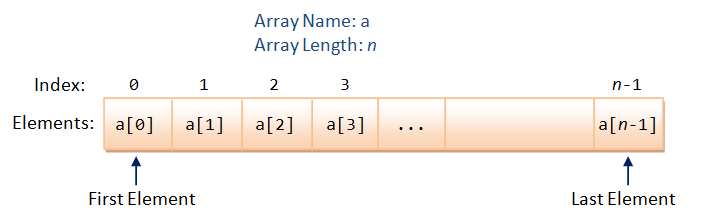
Declaração e Uso de Arrays
Suponha que você queira encontrar a média das notas de uma turma de 30 alunos, certamente você não quer criar 30 variáveis: nota1, nota2, ..., nota30. Em vez disso, você pode usar uma única variável, chamada de array, com 30 elementos.
Um array é uma lista de elementos do mesmo tipo, identificados por um par de colchetes [ ]. Para usar um array, você precisa declarar o array com 3 coisas: um nome, um tipo e uma dimensão (ou tamanho, ou comprimento). Recomendamos usar um nome plural para arrays, por exemplo, notas, linhas, números. Por exemplo,
int marks[5];        // Declare an int array called marks with 5 elements
double numbers[10];  // Declare an double array of 10 elements
const int SIZE = 9;
float temps[SIZE];   // Use const int as array length

// Some compilers support an variable as array length, e.g.,
int size;
cout << "Enter the length of the array: ";
cin >> size;
float values[size];
Observe que, em C++, o valor dos elementos é indefinido após a declaração.
Você também pode inicializar o array durante a declaração com uma lista de valores separados por vírgulas, da seguinte forma:
// Declare and initialize an int array of 3 elements
int numbers[3] = {11, 33, 44};
// If length is omitted, the compiler counts the elements
int numbers[] = {11, 33, 44};
// Number of elements in the initialization shall be equal to or less than length
int numbers[5] = {11, 33, 44};  // Remaining elements are zero. Confusing! Don't do this
int numbers[2] = {11, 33, 44};  // ERROR: too many initializers

// Use {0} or {} to initialize all elements to 0
int numbers[5] = {0};  // First element to 0, the rest also to zero
int numbers[5] = {};   // All element to 0 too
/* Test local array initialization */
#include <iostream>
using namespace std;

int main() {
   int const SIZE = 5;

   int a1[SIZE];   // Uninitialized
   for (int i = 0; i < SIZE; ++i) cout << a1[i] << " ";
   cout << endl;   // ? ? ? ? ?

   int a2[SIZE] = {21, 22, 23, 24, 25}; // All elements initialized
   for (int i = 0; i < SIZE; ++i) cout << a2[i] << " ";
   cout << endl;   // 21 22 23 24 25

   int a3[] = {31, 32, 33, 34, 35};   // Size deduced from init values
   int a3Size = sizeof(a3)/sizeof(int);
   cout << "Size is " << a3Size << endl;   // 5
   for (int i = 0; i < a3Size; ++i) cout << a3[i] << " ";
   cout << endl;   // 31 32 33 34 35

   int a4[SIZE] = {41, 42};  // Leading elements initialized, the rests to 0
   for (int i = 0; i < SIZE; ++i) cout << a4[i] << " ";
   cout << endl;   // 41 42 0 0 0

   int a5[SIZE] = {0};  // First elements to 0, the rests to 0 too
   for (int i = 0; i < SIZE; ++i) cout << a5[i] << " ";
   cout << endl;   // 0 0 0 0 0

   int a6[SIZE] = {};   // All elements to 0 too
   for (int i = 0; i < SIZE; ++i) cout << a6[i] << " ";
   cout << endl;   // 0 0 0 0 0

   for (int i=0;i<5;i++){
       // assign a value for each element of the array, like this
       a6[i] = i;
       cout << a6[i] << " ";
   }
}
Saída:
6299128 0 485160213 32595 0 ## some unexpected values
21 22 23 24 25
Size is 5
31 32 33 34 35
41 42 0 0 0
0 0 0 0 0
0 0 0 0 0
0 1 2 3 4
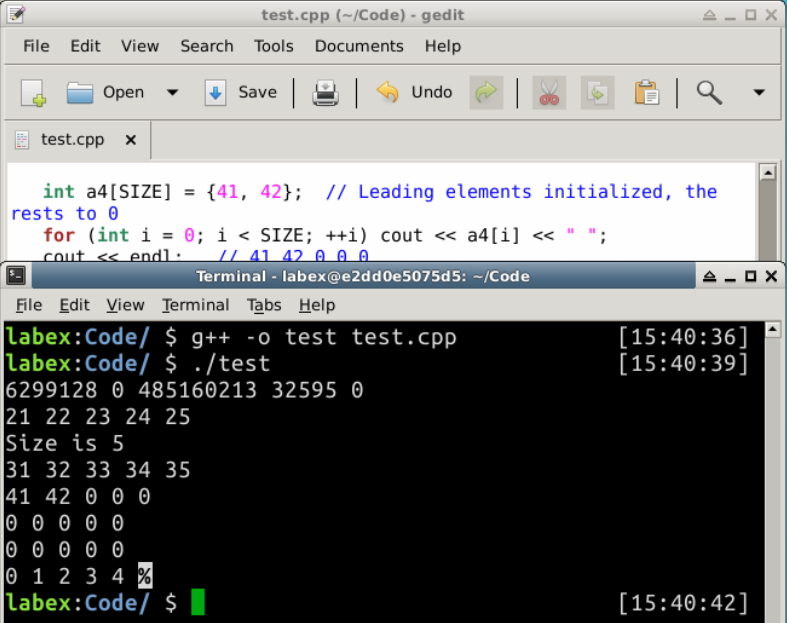
Você pode encontrar o comprimento do array usando a expressão sizeof(arrayName)/sizeof(arrayName[0]), onde sizeof(arrayName) retorna o total de bytes do array e sizeof(arrayName[0]) retorna os bytes do primeiro elemento.
Arrays e Loops
Arrays trabalham em conjunto com loops. Você pode processar todos os elementos de um array por meio de um loop. C++11 introduz um loop for baseado em intervalo (ou loop for-each) para iterar em um array, por exemplo,
/* Testing For-each loop */
#include <iostream>
using namespace std;

int main() {
   int numbers[] = {11, 22, 33, 44, 55};

   // For each member called number of array numbers - read only
   for (int number : numbers) {
      cout << number << " ";
   }

   // To modify members, need to use reference (&)
   for (int &number : numbers) {
      number = 99;
   }

   for (int number : numbers) {
      cout << number << endl;
   }
   return 0;
}
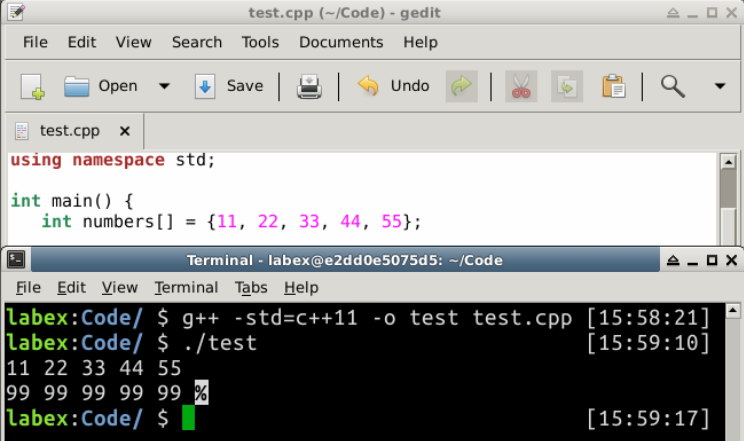
Saída:
11 22 33 44 55
99 99 99 99 99
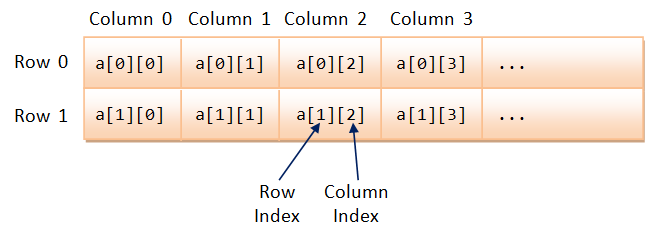
Array Multidimensional
Por exemplo,
int[2][3] = { {11, 22, 33}, {44, 55, 66} };
/* Test Multi-dimensional Array */
#include <iostream>
using namespace std;
void printArray(const int[][3], int);

int main() {
   int myArray[][3] = {{8, 2, 4}, {7, 5, 2}}; // 2x3 initialized
                 // Only the first index can be omitted and implied
   printArray(myArray, 2);
   return 0;
}

// Print the contents of rows-by-3 array (columns is fixed)
void printArray(const int array[][3], int rows) {
   for (int i = 0; i < rows; ++i) {
      for (int j = 0; j < 3; ++j) {
         cout << array[i][j] << " ";
      }
      cout << endl;
   }
}
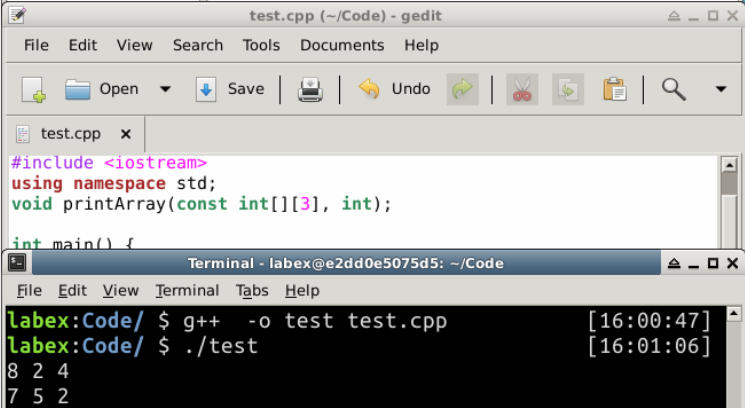
Saída:
8 2 4
7 5 2
Array de Caracteres
Em C, uma string é um array de char terminado por um caractere NULL '\0' (código ASCII de Hex 0). C++ fornece uma nova classe string sob o cabeçalho <string>. A string original em C é conhecida como C-String (ou String no estilo C ou String de Caracteres). Você pode alocar uma C-string via:
char message[256];     // Declare a char array
                       // Can hold a C-String of up to 255 characters terminated by '\0'
char str1[] = "Hello"; // Declare and initialize with a "string literal".
                       // The length of array is number of characters + 1 (for '\0').
char str1char[] = {'H', 'e', 'l', 'l', 'o', '\0'};  // Same as above
char str2[256] = "Hello";  // Length of array is 256, keeping a smaller string.
Para iniciantes, evite C-string. Use string C++ (no cabeçalho <string>) discutido anteriormente.
Você pode usar cin e cout para lidar com C-strings.
cin <<lê uma string delimitada por espaços em branco;cin.getline(*var*, *size*)lê uma string em var até a nova linha de comprimento de atésize-1, descartando a nova linha (substituída por'\0'). O*size*normalmente corresponde ao comprimento do array C-string.cin.get(*var*, *size*)lê uma string até a nova linha, mas deixa a nova linha no buffer de entrada.cin.get(), sem argumento, lê o próximo caractere.
/* Test C-string */
#include <iostream>
using namespace std;

int main() {
   char msg[256]; // Hold a string of up to 255 characters (terminated by '\0')

   cout << "Enter a message (with space)" << endl;
   cin.getline(msg, 256);  // Read up to 255 characters into msg
   cout << msg << endl;

   // Access via null-terminated character array
   for (int i = 0; msg[i] != '\0'; ++i) {
      cout << msg[i];
   }
   cout << endl;

   cout << "Enter a word (without space)" << endl;
   cin >> msg;
   cout << msg << endl;

   // Access via null-terminated character array
   for (int i = 0; msg[i] != '\0'; ++i) {
      cout << msg[i];
   }
   cout << endl;
   return 0;
}
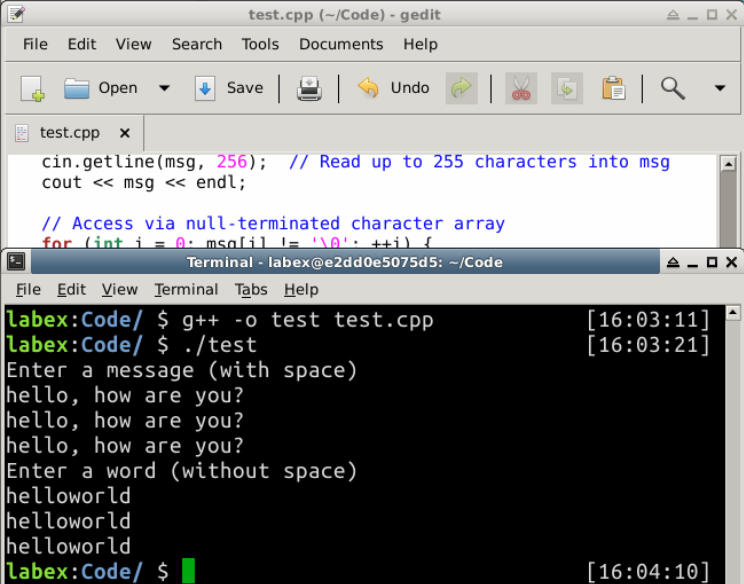
Saída:
Enter a message (with space)
hello, how are you?
hello, how are you?
hello, how are you?
Enter a word (without space)
helloworld
helloworld
helloworld
Resumo
C/C++ não realiza a verificação de limites de índice (array index-bound check). Em outras palavras, se o índice estiver além dos limites do array, ele não emitirá um aviso/erro. No entanto, você precisa estimar o comprimento e alocar um limite superior. Esta é provavelmente a principal desvantagem de usar um array. C++ possui uma classe template vector (e C++11 adicionou uma classe template array), que suporta array redimensionável dinamicamente.