介绍
在这个项目中,你将学习如何修复 vue-router-2.7.0 库中与处理 query 参数中的 null 值相关的一个漏洞。
👀 预览
🎯 任务
在这个项目中,你将学习:
- 如何在
vue-router-2.7.0/src/util/route.js文件中定位并理解isObjectEqual函数。 - 如何修复
isObjectEqual函数以正确处理null值。 - 如何使用修复后的函数重新构建并发布
vue-router-2.7.0项目。 - 如何通过检查浏览器控制台中是否没有之前的错误消息来测试修复。
🏆 成果
完成这个项目后,你将能够:
- 识别并修复第三方库中的漏洞。
- 使用
vue-router-2.7.0库并理解其内部函数。 - 在进行代码更改后重新构建并发布项目。
- 通过检查浏览器控制台中的错误消息来测试修复。
修复 isObjectEqual 函数
首先,查看左侧文件的目录结构如下:
├── vue-router-2.7.0
├── vue.min.js
└── index.html
点击 WebIDE 右下角的 Go Live 按钮来运行项目。
接下来,在虚拟机顶部打开“Web 8080”并手动刷新,点击“test”并在浏览器控制台中打开 Console 选项,你会看到两条错误消息,分别是 TypeError: Cannot convert undefined or null to object 和 Uncaught TypeError: Cannot convert undefined or null to object。
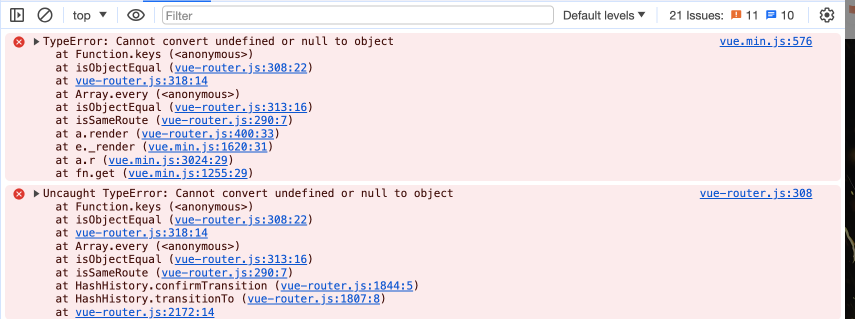
在这一步中,你将学习如何修复 vue-router-2.7.0/src/util/route.js 文件中的 isObjectEqual 函数,以正确处理 null 值。
- 打开
vue-router-2.7.0/src/util/route.js文件。 - 找到
isObjectEqual函数:
function isObjectEqual(a = {}, b = {}): boolean {
  const aKeys = Object.keys(a);
  const bKeys = Object.keys(b);
  if (aKeys.length!== bKeys.length) {
    return false;
  }
  return aKeys.every((key) => {
    const aVal = a[key];
    const bVal = b[key];
    // 检查嵌套相等性
    if (typeof aVal === "object" && typeof bVal === "object") {
      return isObjectEqual(aVal, bVal);
    }
    return String(aVal) === String(bVal);
  });
}
- 更新函数以正确处理
null值:
function isObjectEqual(a = {}, b = {}): boolean {
  if (!a ||!b) return a === b;
  const aKeys = Object.keys(a);
  const bKeys = Object.keys(b);
  if (aKeys.length!== bKeys.length) {
    return false;
  }
  return aKeys.every((key) => {
    const aVal = a[key];
    const bVal = b[key];
    // 检查嵌套相等性
    if (typeof aVal === "object" && typeof bVal === "object") {
      return isObjectEqual(aVal, bVal);
    }
    return String(aVal) === String(bVal);
  });
}
更改内容如下:
- 添加了一个条件来检查
a或b是否为null或undefined。如果其中任何一个是null或undefined,函数将返回a === b。 - 这确保了函数能够正确处理
query参数中的null值。
重新构建并测试项目
在这一步中,你将在修复 isObjectEqual 函数之后重新构建并测试 vue-router-2.7.0 项目。
- 在终端中,导航到
vue-router-2.7.0目录。 - 运行命令
npm install来安装依赖项。这个过程可能需要一些时间,请耐心等待。(如果长时间卡住,请按Ctrl+C终止进程,然后再次运行此命令。) - 安装完成后,运行命令
npm run build来重新构建并发布项目。这将生成带有修复后的isObjectEqual函数的更新后的vue-router-2.7.0库。 - 返回网页并刷新页面。
- 点击“test”并在
Console标签页中打开控制台进行检查,你将不再看到上述错误消息。
如果错误消息消失,则修复成功。你已完成该项目!
总结
恭喜你!你已经完成了这个项目。你可以在 LabEx 中练习更多实验来提升你的技能。