介绍
我相信大家以前都玩过经典的扫雷游戏。它规则简单却极易让人上瘾。你有没有想过自己开发一个呢?今天,我们就来创建一个基于网页的扫雷游戏。首先,让我们看看界面的截图。
👀 预览

🎯 任务
在这个项目中,你将学习:
- 如何设计扫雷游戏的算法
- 如何为项目创建文件结构
- 如何使用 HTML 和 CSS 实现页面布局
- 如何使用 JavaScript 绘制网格
- 如何为单元格添加点击事件以处理游戏玩法
- 如何实现游戏控制功能,如游戏开始和结束
🏆 成果
完成这个项目后,你将能够:
- 设计并实现游戏算法
- 为网页项目创建文件结构
- 使用 HTML 和 CSS 创建页面布局
- 使用 JavaScript 绘制网格并处理事件
- 实现游戏控制功能
开发准备
在开始开发之前,我们先来设计游戏算法。
扫雷游戏的规则很简单:
- 游戏棋盘上有若干个方块,每个方块包含一个数字(空白表示数字为 0)或一枚炸弹。方块中的数字代表其周围方块中炸弹的数量。玩家的任务是尽可能少的时间内找出所有数字方块。
- 除了边缘的方块,每个方块都有 8 个相邻方块:上、下、左、右以及 4 个对角方块。因此,数字范围是从 0 到 8。
所以,我们的算法如下:
- 根据用户选择的难度级别(有三个级别:初级、中级和高级,级别越高炸弹和方块越多),随机生成一定数量的炸弹,并将它们随机放置在方块上。然后遍历方块,计算每个方块中的数字,并将其标记在方块上。当玩家左键点击一个方块时,显示该方块的内容(如果该方块包含炸弹,则挑战失败,游戏结束),当玩家右键点击一个方块时,该方块被标记为炸弹。只有当所有炸弹都被正确标记且所有非炸弹方块都被打开时,挑战才成功,游戏结束。
实用提示:由于方块中的数字范围是从 0 到 8,我们可以考虑将放置炸弹的方块中的数字标记为 9,以便于计算。
项目文件结构
首先,我们需要在 ~/project 路径下创建以下文件结构:
~/project
 |__ index.html
 |__ index.css
 |__ index.js
 |__ jms.js
 |__ mine.png
 |__ flag.png
项目目录中的 mine.png 和 flag.png 分别是地雷和旗帜的图像。
页面布局
首先,我们需要一个面板来显示游戏信息,包括剩余地雷数量、已用时间、难度级别等。由于方块数量不固定,我们现在暂不绘制方块,而是在 JS 代码中绘制。
创建一个 index.html 文件,并添加以下代码:
<!-- index.html -->
<!doctype html>
<html>
  <head>
    <meta charset="utf-8" />
    <title>Minesweeper with JavaScript</title>
    <link
      href="https://cdn.jsdelivr.net/npm/tailwindcss@2.2.19/dist/tailwind.min.css"
      rel="stylesheet"
    />
    <link rel="stylesheet" type="text/css" href="index.css" />
  </head>
  <body class="bg-gray-100">
    <div
      id="JMS_main"
      class="container mx-auto p-4 bg-white shadow-lg rounded-lg"
    >
      <table id="landmine" class="mx-auto"></table>
      <div id="operation" class="text-center">
        <div class="text-lg text-red-600">
          剩余地雷数量:
          <span class="font-semibold" id="landMineCount">0</span>
        </div>
        <div class="text-lg text-orange-500">
          持续时间:<span class="font-semibold" id="costTime">0</span> 秒
        </div>
        <fieldset class="my-4">
          <legend class="text-lg font-semibold">难度选择:</legend>
          <input
            type="radio"
            name="level"
            id="llevel"
            checked="checked"
            value="10"
            class="mr-2"
          />
          <label for="llevel">初级 (10*10) </label><br />
          <input
            type="radio"
            name="level"
            id="mlevel"
            value="15"
            class="mr-2"
          />
          <label for="mlevel">中级 (15*15) </label><br />
          <input
            type="radio"
            name="level"
            id="hlevel"
            value="20"
            class="mr-2"
          />
          <label for="hlevel">高级 (20*20) </label><br />
        </fieldset>
        <button
          id="begin"
          class="px-4 py-2 bg-blue-500 text-white font-semibold rounded-lg hover:bg-blue-700"
        >
          开始游戏</button
        ><br />
        <div class="text-left mt-4">
          <div class="font-semibold">提示:</div>
          <ul class="list-disc ml-6">
            <li>1. 点击“开始游戏”以启动游戏计时器。</li>
            <li>2. 在游戏过程中点击“开始游戏”将开始新游戏。</li>
          </ul>
        </div>
      </div>
    </div>
    <script src="jms.js"></script>
    <script src="index.js"></script>
  </body>
</html>
页面布局样式
接下来,我们需要调整面板上游戏信息的位置,并添加一些样式。在 index.css 中添加以下代码并保存:
@import "tailwindcss/base";
@import "tailwindcss/components";
@import "tailwindcss/utilities";

.container {
  max-width: 600px;
}
table {
  background: #ccc;
  margin: 0 auto;
}
td {
  border: 2px outset #eee;
  font-size: 20px;
  width: 32px;
  height: 32px;
  text-align: center;
  cursor: pointer;
}
button {
  padding: 2px 10px;
  margin: 5px;
  font-size: 20px;
  cursor: pointer;
}

.clicked-cell {
  background-color: #a0aec0;
  color: #fff;
  font-weight: bold;
}

.landMine {
  background-image: url(mine.png);
  background-position: center;
  background-repeat: no-repeat;
}

.flag {
  background-image: url(flag.png);
  background-position: center;
  background-repeat: no-repeat;
}
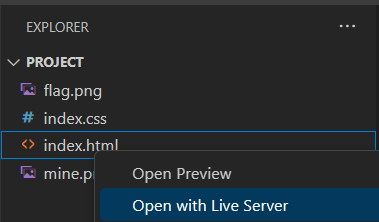
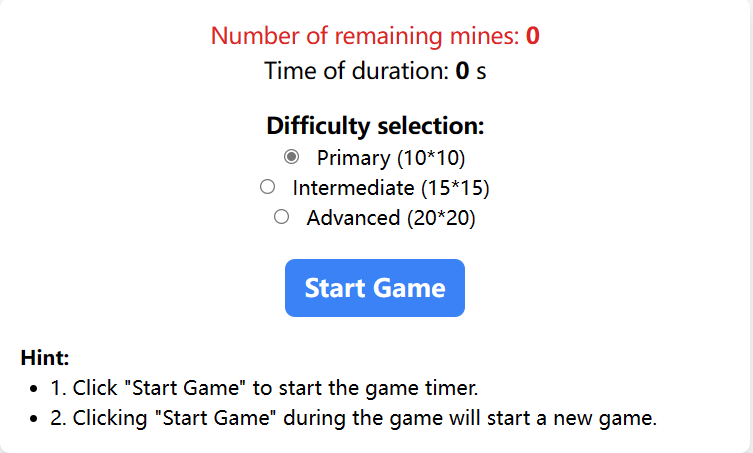
完成此步骤后,在浏览器中打开 index.html。
绘制网格
完成上述步骤后,我们需要绘制网格。为了使代码更清晰,我们将游戏实现部分和调用部分分开。游戏实现部分放在与 index.html 同一目录下的 jms.js 中,游戏调用部分放在同一目录下的 index.js 中。
要绘制网格,我们需要传入一些参数,比如要放置网格的表格的 id,以及单元格数量(用行数和列数表示)。此外,还需要初始化其他与游戏相关的数据。
jms.js 部分
在 jms.js 中添加以下代码并保存:
(function () {
  // 初始化扫雷对象并初始化数据
  var JMS = function (
    id,
    rowCount,
    colCount,
    minLandMineCount,
    maxLandMineCount
  ) {
    if (!(this instanceof JMS))
      return new JMS(
        id,
        rowCount,
        colCount,
        minLandMineCount,
        maxLandMineCount
      );
    this.doc = document;
    this.table = this.doc.getElementById(id); // 用于绘制网格的表格
    this.cells = this.table.getElementsByTagName("td"); // 单元格
    this.rowCount = rowCount || 10; // 网格的行数
    this.colCount = colCount || 10; // 网格的列数
    this.landMineCount = 0; // 地雷数量
    this.markLandMineCount = 0; // 标记的地雷数量
    this.minLandMineCount = minLandMineCount || 10; // 最小地雷数量
    this.maxLandMineCount = maxLandMineCount || 20; // 最大地雷数量
    this.arrs = []; // 与单元格对应的数组
    this.beginTime = null; // 游戏开始时间
    this.endTime = null; // 游戏结束时间
    this.currentSetpCount = 0; // 已执行的步数
    this.endCallBack = null; // 游戏结束时的回调函数
    this.landMineCallBack = null; // 标记地雷时更新剩余地雷数量的回调函数
    this.doc.oncontextmenu = function () {
      // 禁用右键菜单
      return false;
    };
    this.drawMap();
  };

  // 在 JMS 的原型上创建单元格
  JMS.prototype = {
    // 绘制网格
    drawMap: function () {
      var tds = [];
      // 为了浏览器兼容性
      if (
        window.ActiveXObject &&
        parseInt(navigator.userAgent.match(/msie ([\d.]+)/i)[1]) < 8
      ) {
        // 创建一个新的 CSS 样式文件
        var css = "#JMS_main table td{background-color:#888;}",
          // 获取 head 标签
          head = this.doc.getElementsByTagName("head")[0],
          // 创建一个样式标签
          style = this.doc.createElement("style");
        style.type = "text/css";
        if (style.styleSheet) {
          // 将 CSS 样式赋给样式标签
          style.styleSheet.cssText = css;
        } else {
          // 在样式标签中创建节点
          style.appendChild(this.doc.createTextNode(css));
        }
        // 将样式标签作为 head 标签的子标签添加
        head.appendChild(style);
      }
      // 循环创建表格
      for (var i = 0; i < this.rowCount; i++) {
        tds.push("<tr>");
        for (var j = 0; j < this.colCount; j++) {
          tds.push("<td id='m_" + i + "_" + j + "'></td>");
        }
        tds.push("</tr>");
      }
      this.setTableInnerHTML(this.table, tds.join(""));
    },
    // 向表格添加 HTML
    setTableInnerHTML: function (table, html) {
      if (navigator && navigator.userAgent.match(/msie/i)) {
        // 在表格的所有者文档中创建一个 div
        var temp = table.ownerDocument.createElement("div");
        // 创建表格 tbody 的内容
        temp.innerHTML = "<table><tbody>" + html + "</tbody></table>";
        if (table.tBodies.length == 0) {
          var tbody = document.createElement("tbody");
          table.appendChild(tbody);
        }
        table.replaceChild(temp.firstChild.firstChild, table.tBodies[0]);
      } else {
        table.innerHTML = html;
      }
    }
  };

  window.JMS = JMS;
})();
上述代码包含了一些使其与 IE 浏览器兼容的代码,可以忽略。
index.js 部分
在 index.js 的调用代码中,我们需要绑定难度选择按钮的事件,然后调用我们上面定义的 JMS 来开始绘制网格。
在 index.js 中添加以下代码并保存:
var jms = null,
  timeHandle = null;
window.onload = function () {
  var radios = document.getElementsByName("level");
  for (var i = 0, j = radios.length; i < j; i++) {
    radios[i].onclick = function () {
      if (jms != null)
        if (jms.landMineCount > 0)
          if (!confirm("你确定要结束当前游戏吗?")) return false;
      var value = this.value;
      init(value, value, (value * value) / 5 - value, (value * value) / 5);
      document.getElementById("JMS_main").style.width =
        value * 40 + 180 + 60 + "px";
    };
  }
  init(10, 10);
};

function init(rowCount, colCount, minLandMineCount, maxLandMineCount) {
  var doc = document,
    landMineCountElement = doc.getElementById("landMineCount"),
    timeShow = doc.getElementById("costTime"),
    beginButton = doc.getElementById("begin");
  if (jms != null) {
    clearInterval(timeHandle);
    timeShow.innerHTML = 0;
    landMineCountElement.innerHTML = 0;
  }
  jms = JMS("landmine", rowCount, colCount, minLandMineCount, maxLandMineCount);
}
然后在浏览器中打开 index.html,应该会显示网格。效果如下:
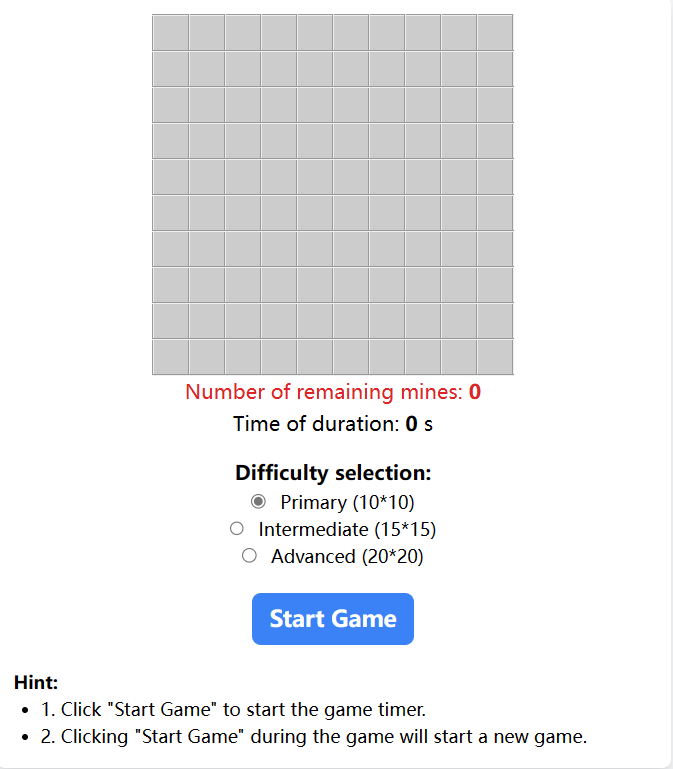
点击右侧的难度选择,查看单元格数量的变化。
游戏初始化
现在,让我们开始初始化游戏,这主要涉及三个步骤:
- 将所有单元格(在代码中用数组表示)初始化为 0。
- 生成随机数量的地雷,并将它们随机放置在数组中,将数组项的值设置为 9。
- 计算其他单元格中的数字,并将值存储在数组中。
在 jms.js 中 JMS.prototype 内部添加以下代码:
// 初始化:将数组的默认值设置为 0 并确定地雷数量
init: function () {
    for (var i = 0; i < this.rowCount; i++) {
        this.arrs[i] = [];
        for (var j = 0; j < this.colCount; j++) {
            this.arrs[i][j] = 0;
        }
    }
    this.landMineCount = this.selectFrom(this.minLandMineCount, this.maxLandMineCount);
    this.markLandMineCount = 0;
    this.beginTime = null;
    this.endTime = null;
    this.currentSetpCount = 0;
},
// 将包含地雷的数组项的值设置为 9
landMine: function () {
    var allCount = this.rowCount * this.colCount - 1,
        tempArr = {};
    for (var i = 0; i < this.landMineCount; i++) {
        var randomNum = this.selectFrom(0, allCount),
            rowCol = this.getRowCol(randomNum);
        if (randomNum in tempArr) {
            i--;
            continue;
        }
        this.arrs[rowCol.row][rowCol.col] = 9;
        tempArr[randomNum] = randomNum;
    }
},
// 计算其他单元格中的数字
calculateNoLandMineCount: function () {
    for (var i = 0; i < this.rowCount; i++) {
        for (var j = 0; j < this.colCount; j++) {
            if (this.arrs[i][j] == 9)
                continue;
            if (i > 0 && j > 0) {
                if (this.arrs[i - 1][j - 1] == 9)
                    this.arrs[i][j]++;
            }
            if (i > 0) {
                if (this.arrs[i - 1][j] == 9)
                    this.arrs[i][j]++;
            }
            if (i > 0 && j < this.colCount - 1) {
                if (this.arrs[i - 1][j + 1] == 9)
                    this.arrs[i][j]++;
            }
            if (j > 0) {
                if (this.arrs[i][j - 1] == 9)
                    this.arrs[i][j]++;
            }
            if (j < this.colCount - 1) {
                if (this.arrs[i][j + 1] == 9)
                    this.arrs[i][j]++;
            }
            if (i < this.rowCount - 1 && j > 0) {
                if (this.arrs[i + 1][j - 1] == 9)
                    this.arrs[i][j]++;
            }
            if (i < this.rowCount - 1) {
                if (this.arrs[i + 1][j] == 9)
                    this.arrs[i][j]++;
            }
            if (i < this.rowCount - 1 && j < this.colCount - 1) {
                if (this.arrs[i + 1][j + 1] == 9)
                    this.arrs[i][j]++;
            }
        }
    }
},
// 获取一个随机数
selectFrom: function (iFirstValue, iLastValue) {
    var iChoices = iLastValue - iFirstValue + 1;
    return Math.floor(Math.random() * iChoices + iFirstValue);
},
// 根据值找到行号和列号
getRowCol: function (val) {
    return {
        row: parseInt(val / this.colCount),
        col: val % this.colCount
    };
},
为单元格添加点击事件
现在,需要为单元格添加点击事件。左键点击时,显示单元格中的数字(如果是地雷,游戏结束)。右键点击时,将其标记为地雷。
此外,当单元格首次被点击时(通常涉及运气),如果其周围存在空白区域,应直接展开该区域。
在 jms.js 中的 JMS.prototype 里添加以下代码:
// 获取元素
$: function (id) {
    return this.doc.getElementById(id);
},
// 为每个单元格绑定点击事件(左键和右键)
bindCells: function () {
    var self = this;
    for (var i = 0; i < this.rowCount; i++) {
        for (var j = 0; j < this.colCount; j++) {
            (function (row, col) {
                self.$("m_" + i + "_" + j).onmousedown = function (e) {
                    e = e || window.event;
                    var mouseNum = e.button;
                    var className = this.className;
                    if (mouseNum == 2) {
                        if (className == "flag") {
                            this.className = "";
                            self.markLandMineCount--;
                        } else {
                            this.className = "flag";
                            self.markLandMineCount++;
                        }
                        if (self.landMineCallBack) {
                            self.landMineCallBack(self.landMineCount - self.markLandMineCount);
                        }
                    } else if (className!= "flag") {
                        self.openBlock.call(self, this, row, col);
                    }
                };
            })(i,j);
        }
    }
},
// 展开无地雷的区域
showNoLandMine: function (x, y) {
    for (var i = x - 1; i < x + 2; i++)
        for (var j = y - 1; j < y + 2; j++) {
            if (!(i == x && j == y)) {
                var ele = this.$("m_" + i + "_" + j);
                if (ele && ele.className == "") {
                    this.openBlock.call(this, ele, i, j);
                }
            }
        }
},
// 显示
openBlock: function (obj, x, y) {
    if (this.arrs[x][y]!= 9) {
        this.currentSetpCount++;
        if (this.arrs[x][y]!= 0) {
            obj.innerHTML = this.arrs[x][y];
        }
        obj.className = "clicked-cell";
        if (this.currentSetpCount + this.landMineCount == this.rowCount * this.colCount) {
            this.success();
        }
        obj.onmousedown = null;
        if (this.arrs[x][y] == 0) {
            this.showNoLandMine.call(this, x, y);
        }
    } else {
        this.failed();
    }
},
// 显示地雷
showLandMine: function () {
    for (var i = 0; i < this.rowCount; i++) {
        for (var j = 0; j < this.colCount; j++) {
            if (this.arrs[i][j] == 9) {
                this.$("m_" + i + "_" + j).className = "landMine";
            }
        }
    }
},
// 显示所有单元格的信息
showAll: function () {
    for (var i = 0; i < this.rowCount; i++) {
        for (var j = 0; j < this.colCount; j++) {
            if (this.arrs[i][j] == 9) {
                this.$("m_" + i + "_" + j).className = "landMine";
            } else {
                var ele=this.$("m_" + i + "_" + j);
                if (this.arrs[i][j]!= 0)
                    ele.innerHTML = this.arrs[i][j];
                ele.className = "normal";
            }
        }
    }
},
// 清除显示的单元格信息
hideAll: function () {
    for (var i = 0; i < this.rowCount; i++) {
        for (var j = 0; j < this.colCount; j++) {
            var tdCell = this.$("m_" + i + "_" + j);
            tdCell.className = "";
            tdCell.innerHTML = "";
        }
    }
},
// 移除绑定到单元格的事件
disableAll: function () {
    for (var i = 0; i < this.rowCount; i++) {
        for (var j = 0; j < this.colCount; j++) {
            var tdCell = this.$("m_" + i + "_" + j);
            tdCell.onmousedown = null;
        }
    }
},
添加游戏控制功能
到目前为止,游戏的主要部分已经完成。下一步是添加游戏控制功能,以使游戏顺利运行。主要步骤如下:
- 为开始按钮添加点击事件监听器,以重置游戏参数。
- 游戏开始时开始计时。
- 游戏结束时停止计时并给出提示。
jms.js 部分
在 jms.js 中的 JMS.prototype 里添加游戏入口和开始函数:
// 游戏开始
begin: function() {
    this.currentSetpCount = 0; // 将步数计数重置为零
    this.markLandMineCount = 0;
    this.beginTime = new Date(); // 游戏开始时间
    this.hideAll();
    this.bindCells();
},
// 游戏结束
end: function() {
    this.endTime = new Date(); // 游戏结束时间
    if (this.endCallBack) { // 如果存在回调函数,则调用它
        this.endCallBack();
    }
},
// 游戏成功
success: function() {
    this.end();
    this.showAll();
    this.disableAll();
    alert("恭喜!");
},
// 游戏失败
failed: function() {
    this.end();
    this.showAll();
    this.disableAll();
    alert("游戏结束!");
},
// 入口点
play: function() {
    this.init();
    this.landMine();
    this.calculateNoLandMineCount();
},
index.js 部分
在 index.js 中,为开始按钮添加事件监听器以启动游戏,并显示游戏时间和剩余地雷数量(在 index.js 的 init 函数中的 jms = JMS("landmine", rowCount, colCount, minLandMineCount, maxLandMineCount); 之后):
jms.endCallBack = function () {
  clearInterval(timeHandle);
};
jms.landMineCallBack = function (count) {
  landMineCountElement.innerHTML = count;
};

// 为“开始游戏”按钮绑定事件
beginButton.onclick = function () {
  jms.play(); // 初始化游戏

  // 显示地雷数量
  landMineCountElement.innerHTML = jms.landMineCount;

  // 开始游戏
  jms.begin();

  // 更新经过的时间
  timeHandle = setInterval(function () {
    timeShow.innerHTML = parseInt((new Date() - jms.beginTime) / 1000);
  }, 1000);
};
运行与测试
至此,我们的网页版扫雷游戏已完成。在浏览器中打开 index.html 文件即可开始游玩。
点击 WebIDE 右下角的 上线 按钮,然后切换到 Web 8080 标签页。
总结
本实验主要使用 JavaScript 实现了经典游戏扫雷的网页版。相信通过这个实验,用户能够提高对 JavaScript 的理解和应用能力。此外,用户还能学习如何使用 JavaScript 语言对游戏中的对象进行抽象和封装。