
介绍
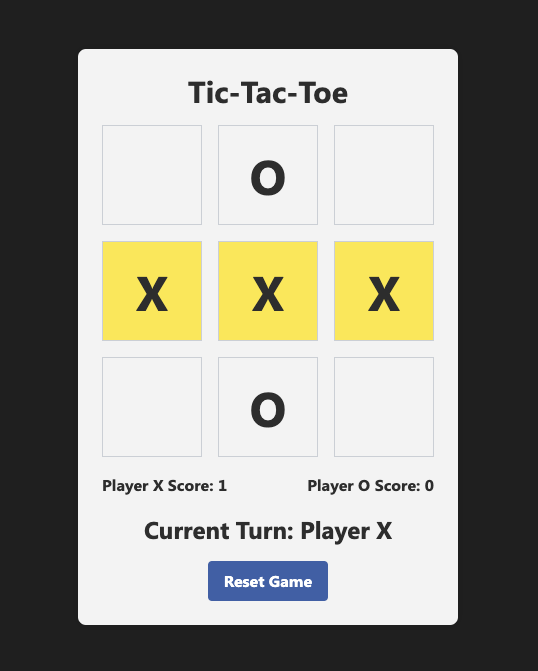
在这个项目中,你将学习如何使用 HTML、CSS 和 JavaScript 创建一个井字棋游戏。井字棋是一款双人游戏,玩家轮流在 3x3 的网格中标记 X 或 O。游戏目标是先在横向、纵向或对角线上连成一线。你将逐步创建所需的 HTML、CSS 和 JavaScript 文件,并实现游戏逻辑。
👀 预览
🎯 任务
在这个项目中,你将学习:
- 如何使用 HTML 设置井字棋游戏的基本结构。
- 如何添加 CSS 样式来定义游戏元素的外观。
- 如何使用 JavaScript 实现游戏逻辑。
- 如何处理用户交互、检查胜负或平局,以及更新分数。
- 如何渲染游戏面板并更新轮次指示器。
- 如何允许玩家重置游戏并开始新的一轮。
🏆 成就
完成本项目后,你将能够:
- 为 Web 应用构建 HTML 文件结构。
- 使用 CSS 类设置元素样式。
- 使用 JavaScript 实现游戏逻辑。
- 处理用户交互并相应地更新 UI。
- 渲染游戏面板并更新轮次指示器。
- 创建事件监听器并在 JavaScript 中处理事件。
创建 HTML 文件
创建一个名为 index.html 的新文件,并向其中添加以下代码。
cd ~/project
touch index.html
这段代码设置了井字棋游戏的基本结构。
<!doctype html>
<html lang="en">
  <head>
    <meta charset="UTF-8" />
    <meta name="viewport" content="width=device-width, initial-scale=1.0" />
    <title>Tic-Tac-Toe</title>
    <link
      href="https://cdn.jsdelivr.net/npm/tailwindcss@2.2.19/dist/tailwind.min.css"
      rel="stylesheet"
    />
    <style>
      /* CSS styles for the game */
    </style>
  </head>

  <body>
    <div id="app">
      <h1 class="text-3xl font-bold mb-4 text-gray-900">Tic-Tac-Toe</h1>
      <div id="board" class="grid grid-cols-3 gap-4 mb-4">
        <!-- Game board cells -->
      </div>
      <div id="scoreboard" class="flex justify-between items-center mb-4">
        <!-- Player scores -->
      </div>
      <div
        id="turn-indicator"
        class="text-2xl font-bold mb-4 text-gray-900"
      ></div>
      <button
        id="reset-button"
        class="bg-blue-500 hover:bg-blue-700 text-white font-bold py-2 px-4 rounded"
      >
        Reset Game
      </button>
    </div>

    <script>
      // JavaScript code for the game logic
    </script>
  </body>
</html>
添加 CSS 样式
在 HTML 文件 <head> 部分的 <style> 标签内,添加游戏所需的 CSS 样式。这些样式定义了游戏面板、单元格、分数和按钮等游戏元素的外观。
<style>
  .board-cell {
    width: 100px;
    height: 100px;
  }

  body {
    display: flex;
    flex-direction: column;
    align-items: center;
    justify-content: center;
    height: 100vh;
    background-color: #222;
    font-family: "Segoe UI", Tahoma, Geneva, Verdana, sans-serif;
  }

  #app {
    text-align: center;
    background-color: #f5f5f5;
    border-radius: 8px;
    padding: 24px;
    box-shadow: 0 0 10px rgba(0, 0, 0, 0.1);
  }

  h1 {
    font-size: 32px;
    color: #333;
  }

  .text-gray-900 {
    color: #333 !important;
  }

  .text-2xl {
    font-size: 24px;
  }

  .bg-blue-500 {
    background-color: #4267b2;
  }

  .bg-blue-500:hover {
    background-color: #3b5ca0;
  }

  .bg-blue-700 {
    background-color: #385898;
  }

  .text-white {
    color: #fff !important;
  }

  .rounded {
    border-radius: 4px;
  }

  .highlight {
    background-color: #ffed4a;
  }
</style>
你也可以将 style.css 添加到项目中,并使用 <link> 标签将其链接到 HTML 文件。
<link rel="stylesheet" href="style.css" />
选择你喜欢的方法即可。
添加游戏逻辑 JavaScript 代码
在 HTML 文件末尾的 <script> 标签内,添加处理游戏逻辑的 JavaScript 代码。这段代码负责跟踪游戏状态、处理用户交互、检查胜负或平局、更新分数并渲染游戏面板。
<script>
  // Game logic code
</script>
初始化游戏变量
在 JavaScript 代码的开头声明必要的变量。这些变量将存储游戏状态、玩家分数以及其他相关信息。
// Game logic
const board = ["", "", "", "", "", "", "", "", ""];
let currentPlayer = "X";
let gameEnded = false;
let playerXScore = 0;
let playerOScore = 0;
let winningCells = [];
处理单元格点击
创建一个名为 handleCellClick 的函数,当点击游戏面板上的单元格时调用该函数。此函数将处理主要的游戏逻辑,例如更新面板、检查胜负、更新分数以及切换当前玩家。
function handleCellClick(index) {
  if (gameEnded || board[index] !== "") return;
  board[index] = currentPlayer;
  renderBoard();

  if (checkWin()) {
    updateScore();
    highlightWinningCells();
    alert(`Player ${currentPlayer} wins!`);
    gameEnded = true;
  } else if (board.every((cell) => cell !== "")) {
    alert("It's a tie!");
    gameEnded = true;
  } else {
    currentPlayer = currentPlayer === "X" ? "O" : "X";
    updateTurnIndicator();
  }
}
检查胜负
创建一个名为 checkWin 的函数,用于检查游戏面板上是否存在获胜条件。此函数将面板数组中的值与获胜组合进行比较,以确定玩家是否赢得了游戏。
function checkWin() {
  const winningCombinations = [
    [0, 1, 2],
    [3, 4, 5],
    [6, 7, 8],
    [0, 3, 6],
    [1, 4, 7],
    [2, 5, 8],
    [0, 4, 8],
    [2, 4, 6]
  ];

  for (let i = 0; i < winningCombinations.length; i++) {
    const [a, b, c] = winningCombinations[i];
    if (board[a] !== "" && board[a] === board[b] && board[a] === board[c]) {
      winningCells = [a, b, c];
      return true;
    }
  }
  return false;
}
重置游戏
创建一个名为 resetGame 的函数,将游戏状态重置为初始值。当点击重置按钮时调用此函数,它会清空面板、重置当前玩家、清除获胜单元格、更新轮次指示器并重新渲染面板。
function resetGame() {
  board.fill("");
  currentPlayer = "X";
  gameEnded = false;
  winningCells = [];
  updateTurnIndicator();
  renderBoard();
}
更新玩家分数
创建一个名为 updateScore 的函数,用于更新玩家分数。当玩家赢得游戏时调用此函数。它会增加相应玩家的分数并更新页面上的分数显示。
function updateScore() {
  if (currentPlayer === "X") {
    playerXScore++;
    document.getElementById("player-x-score").textContent = playerXScore;
  } else {
    playerOScore++;
    document.getElementById("player-o-score").textContent = playerOScore;
  }
}
更新轮次指示器
创建一个名为 updateTurnIndicator 的函数,更新页面上的轮次指示器,以显示当前轮到哪位玩家。
function updateTurnIndicator() {
  const turnIndicator = document.getElementById("turn-indicator");
  turnIndicator.textContent = `Current Turn: Player ${currentPlayer}`;
}
高亮显示获胜单元格
创建一个名为 highlightWinningCells 的函数,为游戏面板上的获胜单元格添加高亮类。当玩家赢得游戏时调用此函数。
function highlightWinningCells() {
  const cells = document.querySelectorAll(".board-cell");
  cells.forEach((cell, index) => {
    if (winningCells.includes(index)) {
      cell.classList.add("highlight");
    }
  });
}
渲染游戏面板
创建一个名为 renderBoard 的函数,根据 board 数组的当前状态更新页面上的游戏面板。在玩家每次移动后调用此函数以更新视觉效果。
function renderBoard() {
  const cells = document.querySelectorAll(".board-cell");
  cells.forEach((cell, index) => {
    cell.textContent = board[index];
    cell.classList.remove("highlight");
  });
}
添加事件监听器
为游戏面板单元格和重置按钮添加事件监听器。当事件发生时,这些监听器会调用相应的函数。
// Event listeners
const cells = document.querySelectorAll(".board-cell");
cells.forEach((cell, index) => {
  cell.addEventListener("click", () => handleCellClick(index));
});

const resetButton = document.getElementById("reset-button");
resetButton.addEventListener("click", resetGame);
初始渲染
在 JavaScript 代码的末尾,添加初始渲染的代码。这段代码设置游戏的初始状态,更新轮次指示器并渲染游戏面板。
// Initial render
updateTurnIndicator();
renderBoard();
运行项目
现在你可以运行项目并开始玩井字棋了!
点击 WebIDE 右下角的 Go Live 按钮来运行项目。
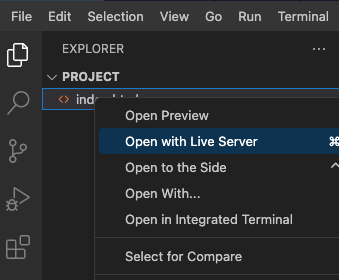
这将在 Web 8080 选项卡中打开项目。
点击单元格进行移动,点击重置按钮开始新游戏。
总结
恭喜!你已经成功使用 HTML、CSS 和 JavaScript 创建了一个井字棋游戏。本项目涵盖了创建 HTML 文件、添加 CSS 样式、实现游戏逻辑以及处理用户交互。该游戏支持两名玩家轮流操作,能够检查胜负或平局、更新分数并高亮显示获胜单元格。现在你可以运行项目并享受玩井字棋的乐趣了!