



Introduction
In this lab, you will learn strings in C++. You will learn how to define and initialize strings, and how to use string functions.
Content Preview
C++ supports two types of strings:
- A string is a
chararray, terminated with aNULLcharacter'\0'(Hex0). It is also called Character-String or C-style string. - the new
stringclass introduced in C++98.
The "high-level" string class is recommended, because it is much easier to use and understood. However, many legacy programs used C-strings; many programmers also use "low-level" C-strings for full control and efficiency; furthermore, in some situation such as command-line arguments, only C-strings are supported. Hence, you may have to understand both sets of strings.
- String declaration and initialization
- String input/output
- String operation
String Declaration and Initialization
To use the string class, include the <string> header and "using namespace std".
You can declare and initialize a string with a string literal, initialize to an empty string, or initialize with another string object. For example,
#include <string>
using namespace std;

string str1("Hello");  // Initialize with a string literal (Implicit initialization)
string str2 = "world"; // Initialize with a string literal (Explicit initialization via assignment operator)
string str3;           // Initialize to an empty string
string str4(str1);     // Initialize by copying from an existing string object
String Input/Output
For example
/* Testing string class input and output */
#include <iostream>
#include <string>     // Need this header to use string class
#include <limits>
using namespace std;  // Also needed for <string>

int main() {
   string message("Hello");
   cout << message << endl;

   // Input a word (delimited by space) into a string
   cout << "Enter a message (no space): ";
   cin >> message;
   cout << message << endl;

   cin.ignore(numeric_limits<streamsize>::max(), '\n');
   // flush cin up to newline (need <limits> header)

   // Input a line into a string
   cout << "Enter a message (with spaces): ";
   getline(cin, message);  // Read input from cin into message
   cout << message << endl;
   return 0;
}
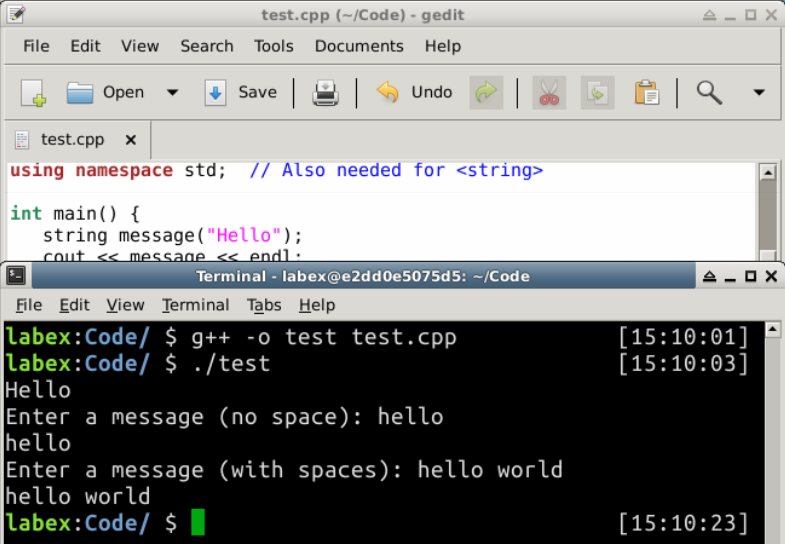
Output:
Hello
Enter a message (no space): hello
hello
Enter a message (with spaces): hello world
hello world
NOTES:
- We need to "
#include <string>" to use thestringclass, and "using namespace std" asstringis defined understdnamespace. - "
cin >> aStr" reads a word (delimited by space) fromcin(keyboard), and assigns tostringvariableaStr. getline(cin, aStr)reads the entire line (up to'\n') fromcin, and assigns toaStr. The'\n'character is discarded.- To flush
cin, you could useignore(numeric_limits<streamsize>::max(), '\n')function to discard all the characters up to'\n'.numeric_limitsis in the<limits>header.
String Operations
Checking the length of a string:
string str("Hello, world");
// both of them return the length of the string
cout << str.length() << endl;  // 12
cout << str.size()   << endl;  // 12
Check for empty string:
string str1("Hello, world");
string str2;                   // Empty string
// Check if the string is empty.
cout << str1.empty() << endl;  // 0 (false)
cout << str2.empty() << endl;  // 1 (true)
Copying from another string: Simply use the assignment "=" operator.
string str1("Hello, world"), str2;
str2 = str1;
cout << str2 << endl;   // Hello, world
Concatenated with another string: Use the plus "+" operator, or compound plus "+=".
string str1("Hello,");
string str2(" world");
cout << str1 + str2 << endl;  // "Hello, world"
cout << str1 << endl;         // "Hello,"
cout << str2 << endl;         // " world"
str1 += str2;
cout << str1 << endl;  // "Hello, world"
cout << str2 << endl;  // " world"
string str3 = str1 + str2;
cout << str3 << endl;  // "Hello, world world"
str3 += "again";
cout << str3 << endl;  // "Hello, world worldagain"
Read/Write individual character of a string:
string str("Hello, world");
// Return the char at index, index begin at 0. Perform index bound check.
cout << str.at(0) << endl;  // 'H'
cout << str[1] << endl;     // 'e'
cout << str.at(str.length() - 1) << endl;  // 'd'

str.at(1) = 'a';  // Write to index 1
cout << str << endl;  // "Hallo, world"

str[0] = 'h';
cout << str << endl;  // "hallo, world"
Extracting sub-string:
string str("Hello, world");
// Return the sub-string starting at beginIndex, of size
cout << str.substr(2, 6) << endl;  // "llo, w"
Comparing with another string:
string str1("Hello"), str2("Hallo"), str3("hello"), str4("Hello");
cout << str1.compare(str2) << endl;   // 1   'e' > 'a'
cout << str1.compare(str3) << endl;   // -1  'h' < 'H'
cout << str1.compare(str4) << endl;   // 0

// You can also use the operator == or !=
if (str1 == str2) cout << "Same" << endl;
if (str3 != str4) cout << "Different" << endl;
cout << boolalpha;  // print bool as true/false
cout << (str1 != str2) << endl;
cout << (str1 == str4) << endl;
Search/Replacing characters: You can use the functions available in the
#include <algorithm>For example,
#include <algorithm>
......
string str("Hello, world");
replace(str.begin(), str.end(), 'l', '_');
cout << str << endl;    // He__o, wor_d
Example
/* Example on C++ string function */
#include <iostream>
#include <string>    // use string class
using namespace std;

int main() {
   string msg = "hello, world!";
   cout << msg << endl;
   cout << msg.length() << endl;  // length of string
   cout << msg.at(1) << endl;     // char at index 1
   cout << msg[1] << endl;        // same as above
   cout << msg.empty() << endl;   // test for empty string
   cout << msg.substr(3, 3) << endl; // sub-string begins at
                                     // pos 3 of size 3
   cout << msg.replace(3, 3, "why") << endl; // replace sub-string
   cout << msg.append("end") << endl;        // append behind
   cout << msg + "end" << endl;              // same as above
   cout << msg.insert(3, "insert") << endl;  // insert after pos 3

   string msg1;
   msg1 = msg;   // copy
   cout << msg1 << endl;

   cout << "Enter a line: ";
   getline(cin, msg);   // read a line of input
   cout << msg << endl;
}
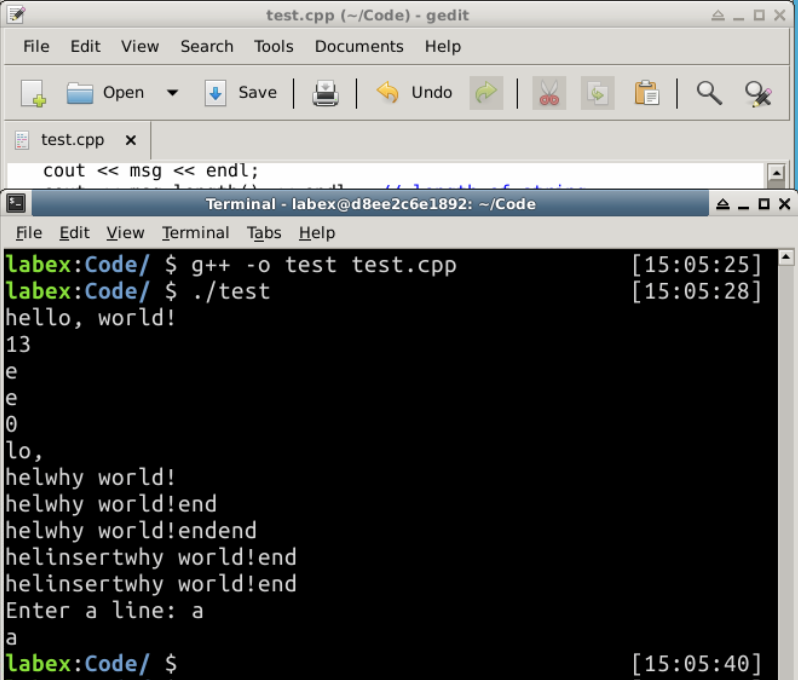
Output:
hello, world!
13
e
e
0
lo,
helwhy world!
helwhy world!end
helwhy world!endend
helinsertwhy world!end
helinsertwhy world!end
Enter a line: a
a
Summary
String is another important data type other than numbers. In this section, we talked about the use of strings, C++ provides many useful methods to deal with strings, learn to use them with ease.


