A browser or another client asks a web server for something by sending an HTTP request. The server returns an HTTP response. Reading the two messages tells you what was requested and what the server returned.
Web Security · Lesson 1
HTTP Requests and Responses
Learn to read the method, path, status, and content type in an HTTP exchange.
Reading the Request
Here is a short HTTP/1.1 request. GET is the method, which describes the action the client asks for. /health is the path. The Host header identifies which website the client addresses.
GET /health HTTP/1.1
Host: site.example
A header is a named value that carries information about the message. The method and path appear on the request's first line.
What does this client ask the server to retrieve?
Reading a Response
In an empty practice folder, create a page and start a Python HTTP server on loopback. The redirection writes the page. Leave this terminal running until the request finishes, then stop the server with Ctrl+C.
$ mkdir web-demo
$ printf '%s\n' ready > web-demo/health.txt
$ python3 -m http.server 8094 --bind 127.0.0.1 --directory web-demo
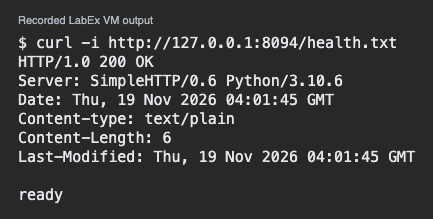
From a second terminal on the same machine, run curl -i. The option includes response headers before the response content.
$ curl -i http://127.0.0.1:8094/health.txt
A response begins with a status code. A 200 indicates success for this request. A blank line separates the headers from the body. Content-Type tells the client how to interpret the body, for example as plain text.
Which part helps the client decide how to display the content?
Comparing Two Results
A 404 response reports that the server did not find or disclose the requested resource. A page can return 200 on one path and 404 on another. Use the exact method and path when comparing outcomes.
A request to /health gets 200. What can you conclude about /welcome?
To practice checking response headers and connectivity, try How to test server connectivity with curl in Linux.
Lesson complete
You finished HTTP Requests and Responses
You can now read the main parts of a simple HTTP exchange.
Find the method, path, and host in a request.
Read the status and content type in a response.
Describe the result for the exact request that was made.
Keep your learning progress
Create a free account to save this lesson and continue learning on any device.
Create a free account